

.svg)
.svg)
.svg)
.svg)



.svg)




.svg)
.svg)

As we approach the end of the year, budgets are tightening, competitive edges are becoming more rounded, and AI is reshaping how people experience products.
However, if there’s one thing that remains unchanged, it’s that users still expect instant value without committing much early on in their journey.
That’s why Product-Led Growth (PLG) is regaining momentum in 2026.
Not as a buzzword, but as a deliberate, systemized growth motion that connects product experience to revenue more tightly than ever before.
In this article, we’ll…
- Recap what’s been happening in the PLG world over the last few years
- Discuss how the concept has evolved since it was first coined in 2016
- Explore fresh PLG examples, activation tactics, onboarding patterns, and strategies shaping 2026
TL;DR
- PLG is more relevant than ever. Users expect instant value, frictionless access, and self-serve experiences.
- But the PLG you might remember from a few years ago has evolved. AI, automation, and shifting buyer behaviors are reshaping everything from discovery and onboarding to in-app guidance and even sales touchpoints.
- Onboarding process remains at the heart of PLG, with companies increasingly offering optional, flexible, and contextual flows, personalized checklists, and interactive tutorials that accelerate time-to-value.
- Gamification, from streaks and progress bars to leaderboards, continues to drive habit formation and engagement.
- Freemium plans, free trials, and frictionless signup still matter, but they work best when paired with activation-focused onboarding, role-based personalization, and guidance embedded in the product.
- One key thing to remember about guidance and gamification is that they should never feel forced. Modern onboarding materials are introduced proactively but remain optional. Unlike the lengthy 10-step guides common a few years ago, today’s tutorials are short, focused, and actionable.
The state of PLG in SaaS: Trends and data for 2026
Three macro shifts shape the PLG landscape in 2026:
- Users try more tools but commit to fewer
- Sales cycles are compressed, even in enterprise
- AI is changing everything from product discovery to product education.
Let’s unpack these a little bit 📦
Changing market expectations and buyer behavior
Buyer behavior in 2026 looks radically different from even three years ago. SaaS users no longer tolerate long onboarding processes, complex documentation, or multi-day setup periods. They expect a product to start delivering value within minutes of first touch.
We’re not even talking about “low-friction” signup anymore.
The expectation has shifted toward instant, direct access: try first, account later; value now, commitment later.
This is partly because users have grown accustomed to consumer-level immediacy. Modern buyers open an app or website and expect to be doing real work instantly, without waiting for a demo, a verification email, or a complicated setup wizard.
If your product can’t be explored right away, there’s a good chance the user will abandon it before they ever experience the value you worked so hard to build.
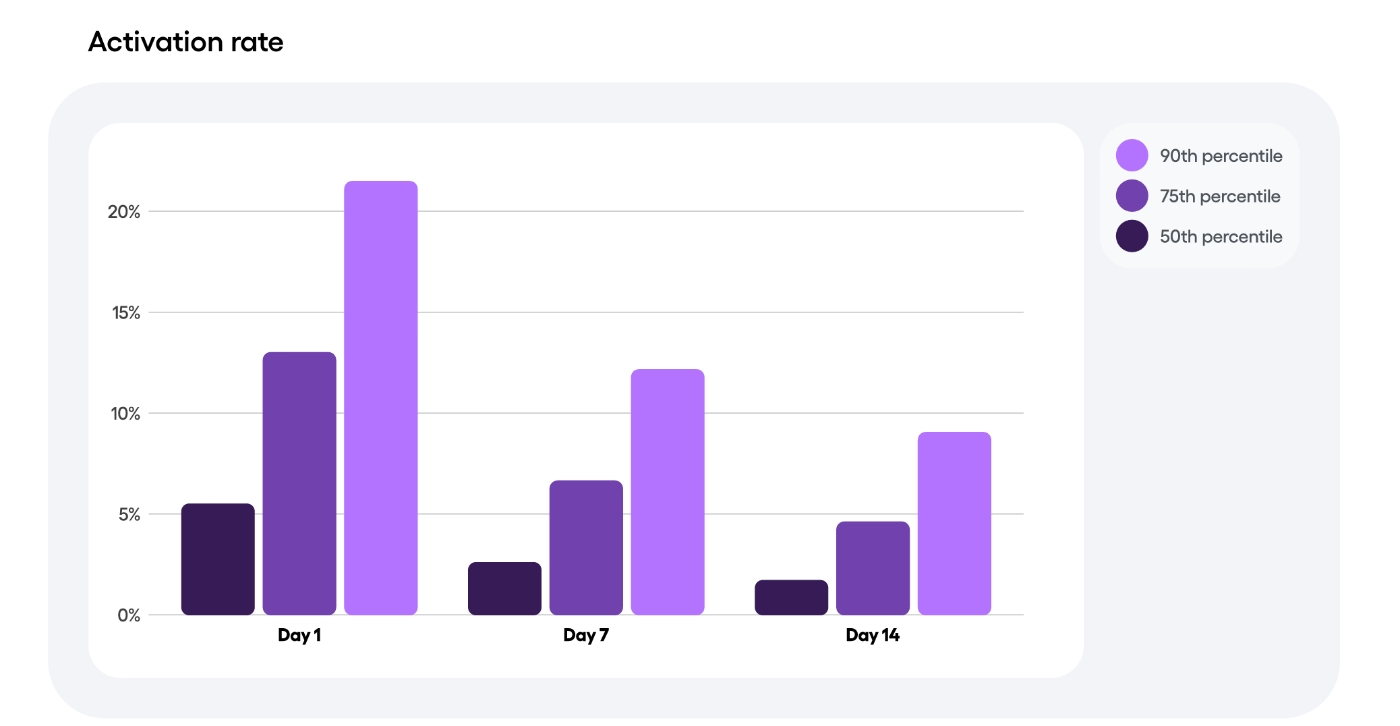
⚡ In fact, according to Amplitude’s 2025 Product Benchmark Report, for half of all products, more than 98% of new users are inactive two weeks after their first action.
This shift is also amplified by the way users now discover products.
They’re entering tools through nontraditional entry points like a TikTok clip demonstrating a workflow, or an AI search engine recommending an app based on a query.
But we’ll talk more about the AI aspect of things in just a minute.
PLG + sales = Product-led sales (PLS)
We know we’ve just said that users expect instant access to products with no complex setup or onboarding hurdles. And that expectation is absolutely real.
But it isn’t universal.
For mid-market and enterprise SaaS products, especially B2B tools solving inherently complex problems, removing all friction isn’t just unrealistic, it can actually be risky, too.
Some products require data migrations, multi-user setups, role-based permissions, security configurations, or integration-heavy workflows before meaningful value can be unlocked.
Product-led Sales (PLS) helps you design a path where complexity is supported with the right level of human guidance for exactly these cases.
In a PLS model, the sales team becomes an enabler, using in-product telemetry to tailor conversations, reduce risk, and guide complex customers to successful outcomes.
Users can still explore the product and experience core value, but deeper activation is supported by sales teams who work off real product usage insights. Instead of relying on demos, guesswork, or cold outreach, sales reps engage when the product signals genuine intent through feature adoption, integration installs, team invitations, etc.
⚠️ And it’s important to clarify something that often gets misunderstood: even in strongly PLG-driven companies, sales involvement still happens.
When a high-value account needs personalized configuration, custom data setups, hands-on onboarding, or in-person architecture planning, the most product-led companies in the world are still bringing humans into the process.
In 2026, we no longer equate PLG with no sales team!
If you’re interested in PLS and would like to learn more about how big companies like Amplitude, Twilio, and Rapid utilize PLS strategies along with their PLG strategies, check out Minami Rojas’s interview with Elena Verna and Laura Schaffer 👇🏻
PLG in the AI era
Many users are asking their questions directly to AI agents instead of “Googling” it.
These AI agents then surface curated answers, summarize product comparisons, and provide direct links to try the recommended tools. Even when the result leads to a blog post, the user arrives there through the AI, not through traditional search.
This shift is so significant that many SaaS businesses are optimizing their content for both AI consumption and search, as well as traditional SEO, to improve brand/product discovery.
We’re also seeing a lot of AI-powered features in the products, as well as AI-powered in-app guidance, support, and onboarding.
AI-driven in-app assistants can now answer questions conversationally, troubleshoot errors, make personalized recommendations, and even perform steps on behalf of the user.
And in user onboarding, AI automates material creation.
Some AI tools, or onboarding tools with embedded AI capabilities, let’s say, can generate tailored step-by-step guidance based on the user’s role, company size, goals, or previous actions.
- They write the onboarding copy
- They create the steps and highlight the important parts of a workflow
- They also offer optimization recommendations based on engagement data
In an episode of Marketing Against the Grain, hosts Kipp Bodnar and Kieran Flanagan talk with Chris Miller about how HubSpot is weaving AI deeply into its PLG ecosystem.
Miller explains how the company uses AI for everything from product design research to adaptive onboarding flows, in-app support automation, and even personalized sales chatbots that respond to real usage signals.
Here’s the full interview:
Where we left off: Insights from our previous PLG research
In our earlier PLG-related articles, including our breakdowns of top PLG examples and product-led onboarding frameworks, as well as many other industry-specific articles, we talked about how PLG and its core beliefs (customer-centricism and JTBD, for example) manifest themselves in real-life SaaS products.
We looked at how companies personalize their communication and guidance (be it email sequences or in-app tooltips) for different user personas and why it is important to do so.
We looked at how you can personalize your in-app guidance for different user goals, separately, even.
We talked about the PLG flywheel and compared it to the PLG funnel.
And about free trial strategies for PLG companies and strategies for free trial emails.
So, we’ve been on this case for quite some time 😌
Since our earlier research, we’ve observed several notable shifts in how PLG companies operate (hence, this article).
Let’s take a look at how things were back then and how they have come to today.
Evolution of personalization
The days when “personalization” meant nothing more than addressing a user by their first name are long gone, and honestly, we hope they stay there.
In 2026, personalization is a foundational pillar of PLG, embedded directly into onboarding, in-app guidance, communication workflows, and even sales involvement.
Modern personalization begins the moment the user signs up, or even earlier.
Onboarding surveys are becoming the new norm, and far more intentional than the old “What’s your company size?” dropdowns. Companies are using them to collect critical context, such as:
- The user’s primary use case
- Their level of technical expertise
- The tools they’re switching from
- The workflows they plan to accomplish
This information feeds into two major areas: communication (emails, prompts, lifecycle messaging) and in-product guidance (checklists, recommendations, onboarding flows).
📌 ClickUp’s onboarding survey is a great example.
They first ask about your general use case, then more specific use cases, the tools you already use, and which ClickUp features interest you.
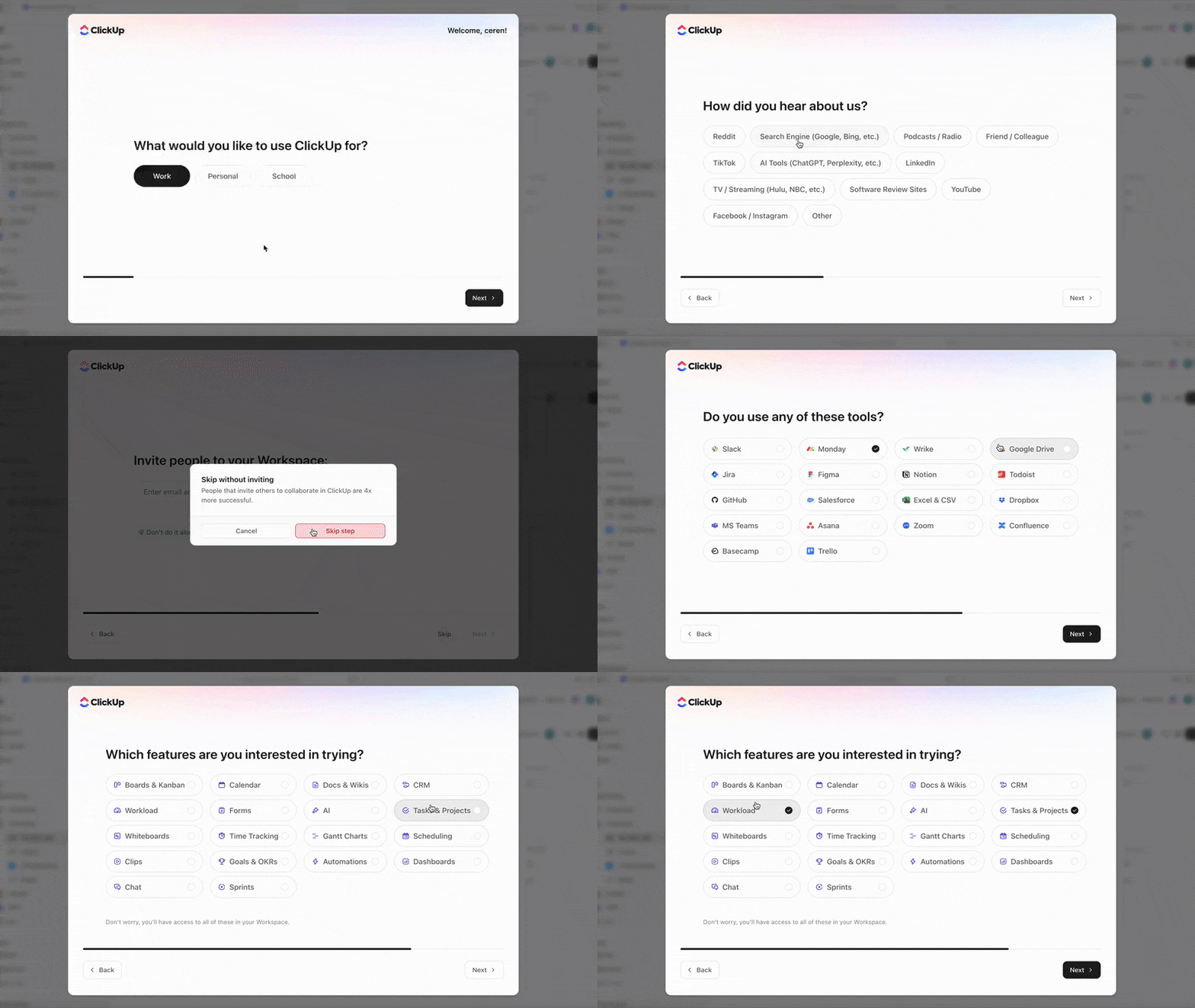
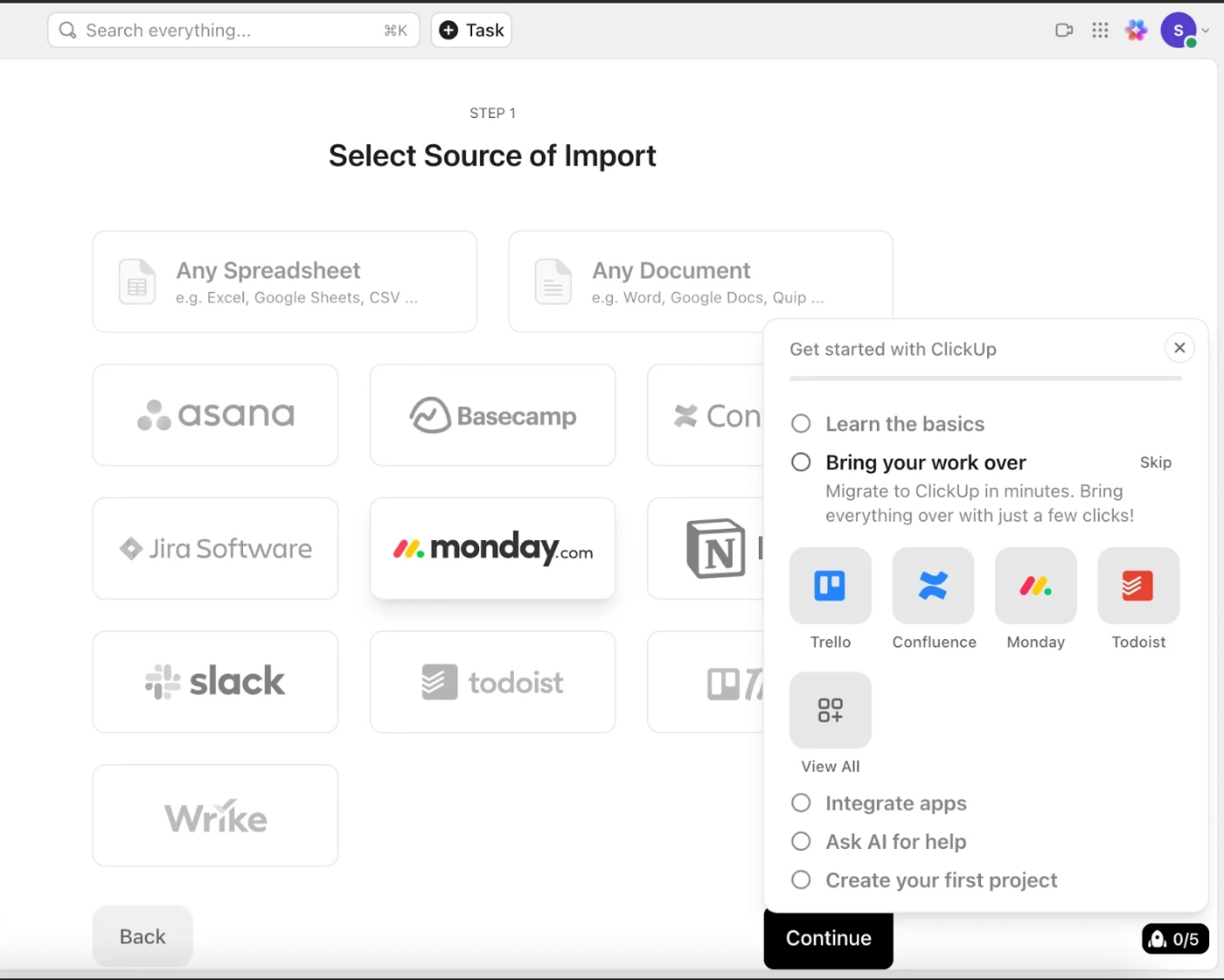
Based on your answers, they personalize both their communication and onboarding, starting with the tasks on your onboarding checklist. For instance, if you indicate that you use a specific tool, they provide guidance on how to integrate that tool with ClickUp or migrate your data from it.
⚠️ One misconception we see often is the idea that dynamic personalization (adapting experiences based on real-time behavior) is the “more advanced” version of personalization. And therefore, companies should aim to adopt it simply because it feels more modern.
That’s not how it works.
Role- or segment-based personalization is still highly effective, and in many cases, more predictable, manageable, and cost-efficient.
But that doesn’t undermine the advantages and possibilities of dynamic personalization.
Dynamic personalization is becoming increasingly popular, too, especially with the increasing integration of AI capabilities in SaaS tools for next-best action recommendations and automation capabilities.
Mark Abraham, co-author of Personalized: Customer Strategy in the Age of AI, discusses “the personalization index” and how personalization and AI technologies can work hand in hand in his TED speech:
From lengthy product tours to flexible and optional onboarding flows
Just a few years ago, when in-app onboarding was still maturing for many SaaS businesses, onboarding flows often took a long time, were rigid, and, let’s be honest, a bit intrusive.
Users were frequently pushed through multi-step tours, mandatory tooltips, and dense checklists before they could even touch the product. At the time, this approach felt necessary because onboarding was treated as a one-chance opportunity: “If we don’t show everything now, they’ll never find it.”
Thankfully, as an industry, we’re moving past that.
Onboarding is becoming shorter, lighter, and more respectful of user autonomy.
Instead of forcing users through a predetermined sequence, companies now design onboarding around choice.
Most modern SaaS products are adopting:
- Skippable steps that let users bypass certain tasks in a walkthrough
- Optional tours surfaced through welcome modals and checklists
- Mini onboarding loops instead of lengthy, linear tutorials
- Contextual help that appears only when the user reaches it
Even in cases where an initial tour starts automatically, it rarely exceeds 3–4 steps. The focus nowadays is on accelerating time-to-value, not forcing education.
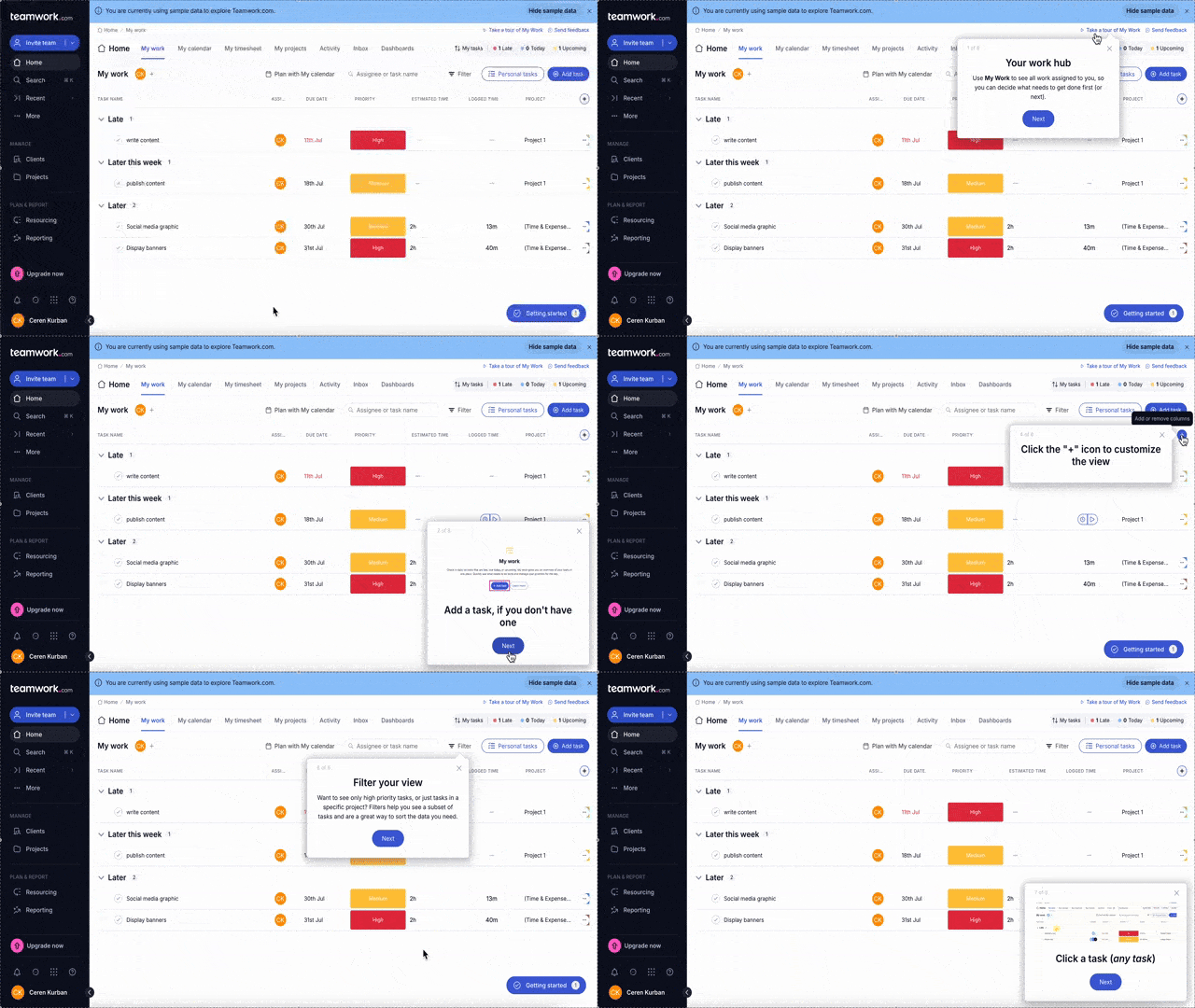
📌 A great example of flexible in-app onboarding is Teamwork’s optional feature walkthroughs.
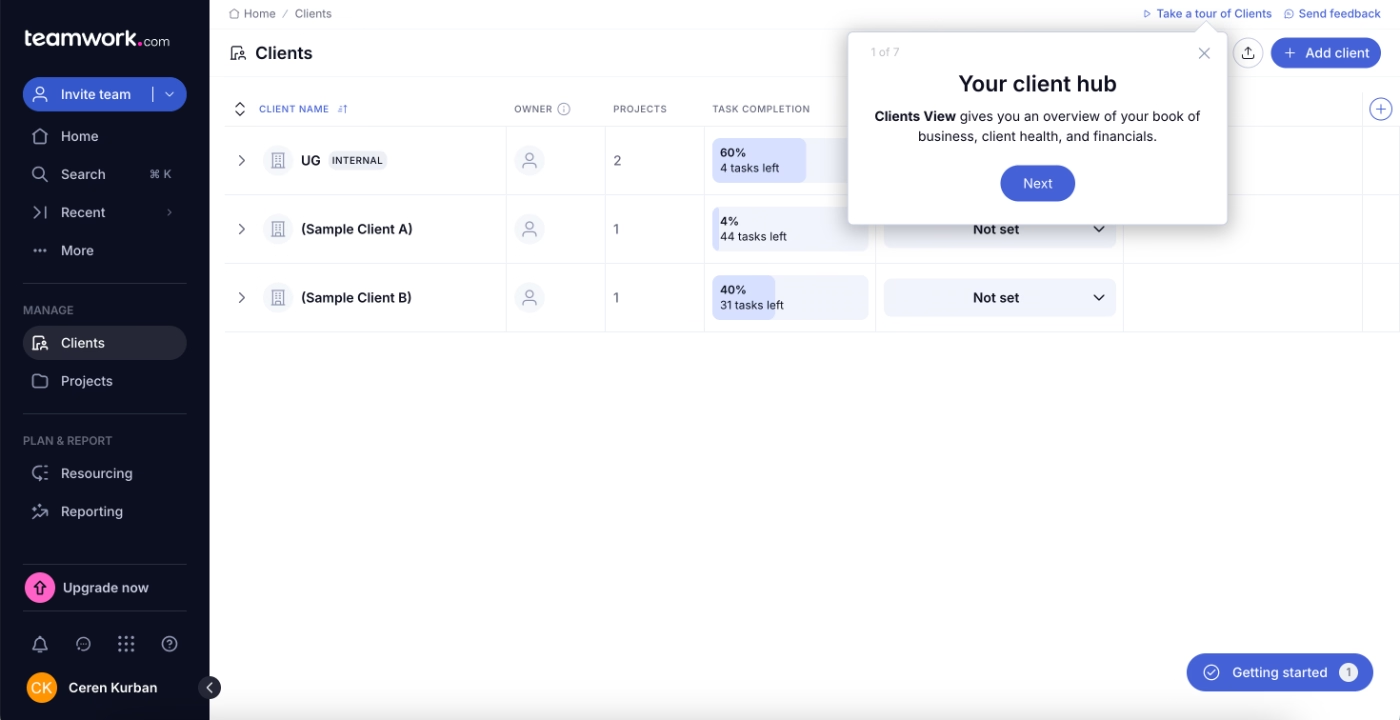
The walkthrough isn’t automatically triggered when the user first lands on the platform or interacts with the feature. Instead, it’s introduced with a tooltip, and the rest is left entirely up to the user.
They can choose to take the tour immediately when the tooltip appears, or they can access it anytime later by clicking the “Take a tour of Clients” button in the top bar.
Each feature page offers its own optional walkthrough.
Here’s what these tours look like:
👉🏻 In an episode of the UX Podcast, Krystal Higgins explains why forcing users through long, mandatory onboarding flows amounts to “front-loading”, overloading people with guidance before they actually need it.
She highlights the importance of keeping onboarding optional, contextual, and distributed over time so users can learn naturally as they explore.
Definitely check it out if you’re interested in optimizing your onboarding flow!
Habit-forming through gamification
When Nir Eyal published Hooked back in 2013, he essentially gave product teams a blueprint for building habit-forming experiences:
Trigger → Action → Reward → Investment.
More than a decade later, the principles he outlined are not only still relevant but also foundational to modern PLG strategy.
In product-led growth, habit formation is a growth lever.
If users don’t form the habit of using your product, they don’t activate. If they don’t activate, they don’t convert. And if they don’t continually see value, they churn quickly and often silently.
PLG companies use gamification techniques to build habits and hooks.
For example:
- To encourage regular product use through streaks, progress bars, and usage milestones.
- To motivate onboarding and education completion with challenges, scores, and celebratory animations.
- To boost community engagement using leaderboards, badges, and contributor levels.
📌 A real-life example that showcases how gamification can be incorporated into SaaS products (other than Asana’s flying unicorn 🦄) is Toucan.
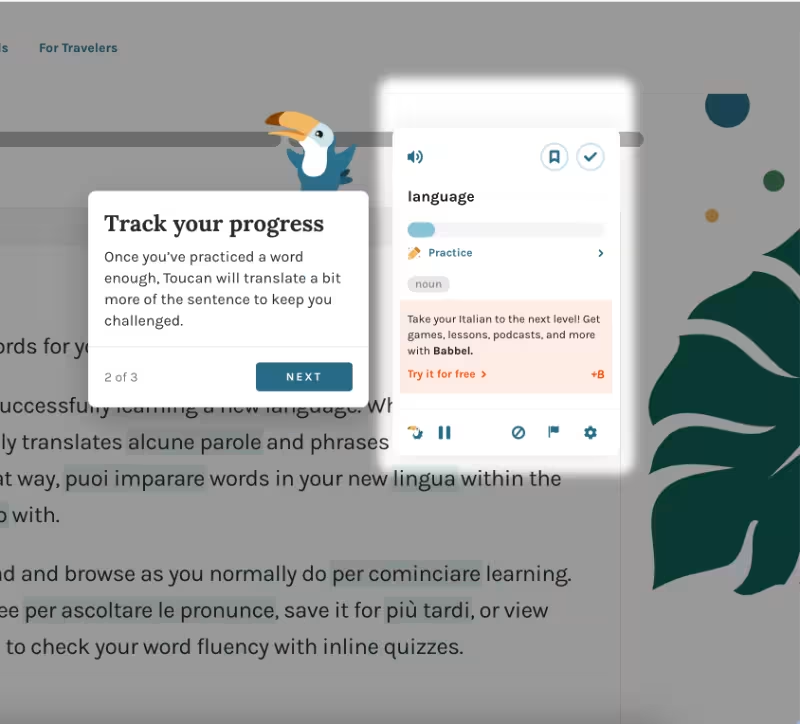
Toucan leverages gamification both to encourage regular product use and to motivate onboarding completion. During onboarding, users experience classic gamification elements such as celebratory animations, progress bars, and scores.
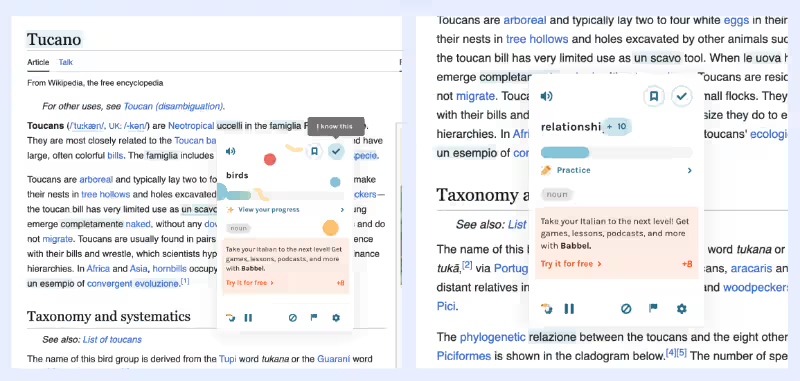
For ongoing product use, Toucan gradually increases the challenge as users engage more with the app.
The more you use it (saving words, passing quizzes, and practicing), the more the language you’re learning is incorporated into the content you encounter online. This keeps the experience aligned with your motivation and learning level, making engagement both rewarding and effective.
New and noteworthy PLG company examples
Gamma
Gamma is an AI-powered presentation and document creation platform.
One of Gamma’s core growth strategies is its freemium model. The free plan includes 400 credits, and when users run out, they can earn additional credits simply by inviting friends. This turns the credit system into a built-in viral loop, expanding reach while rewarding user engagement.
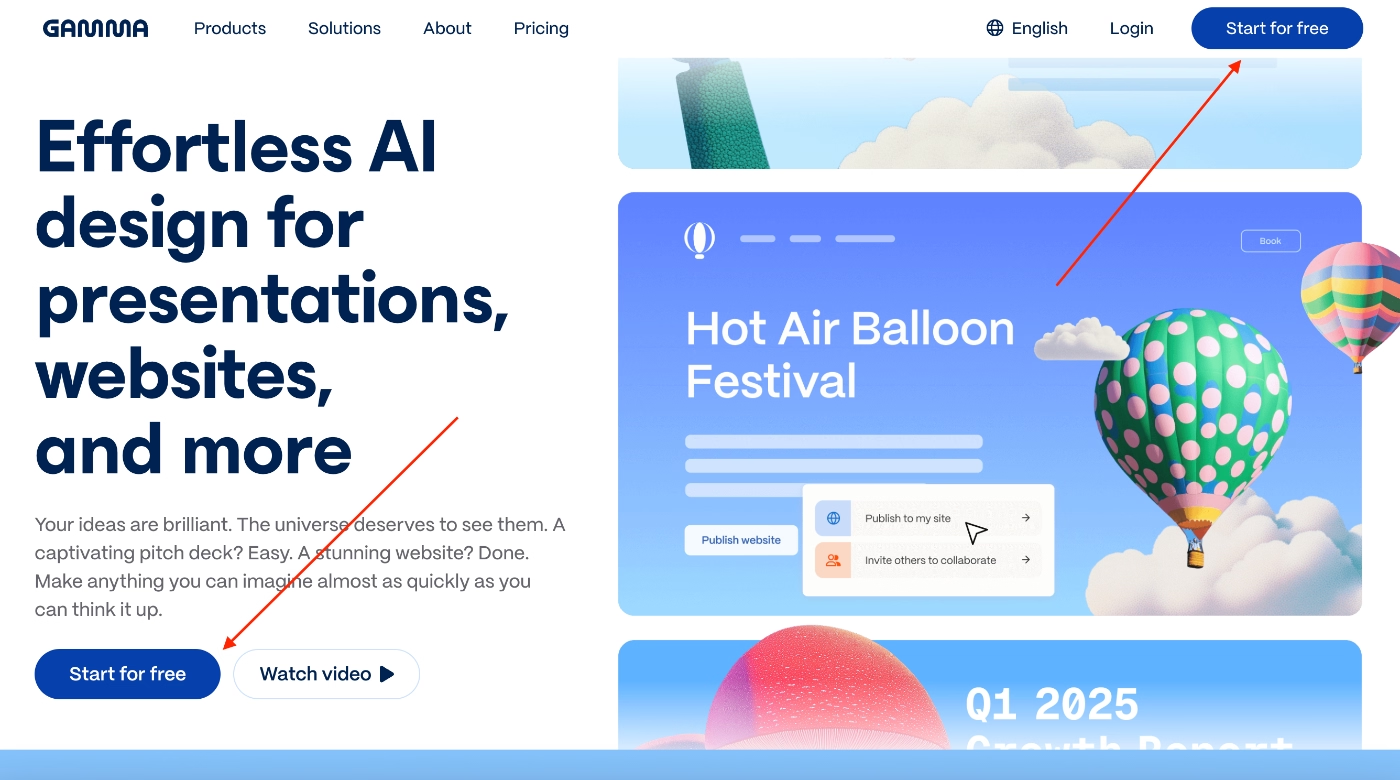
Gamma also prominently promotes its free plan across its website and encourages new users to get started instantly without friction.
It’s a clear reminder that freemium and free trials remain essential pillars of PLG in 2026, especially for tools that depend on quick value realization and high shareability.
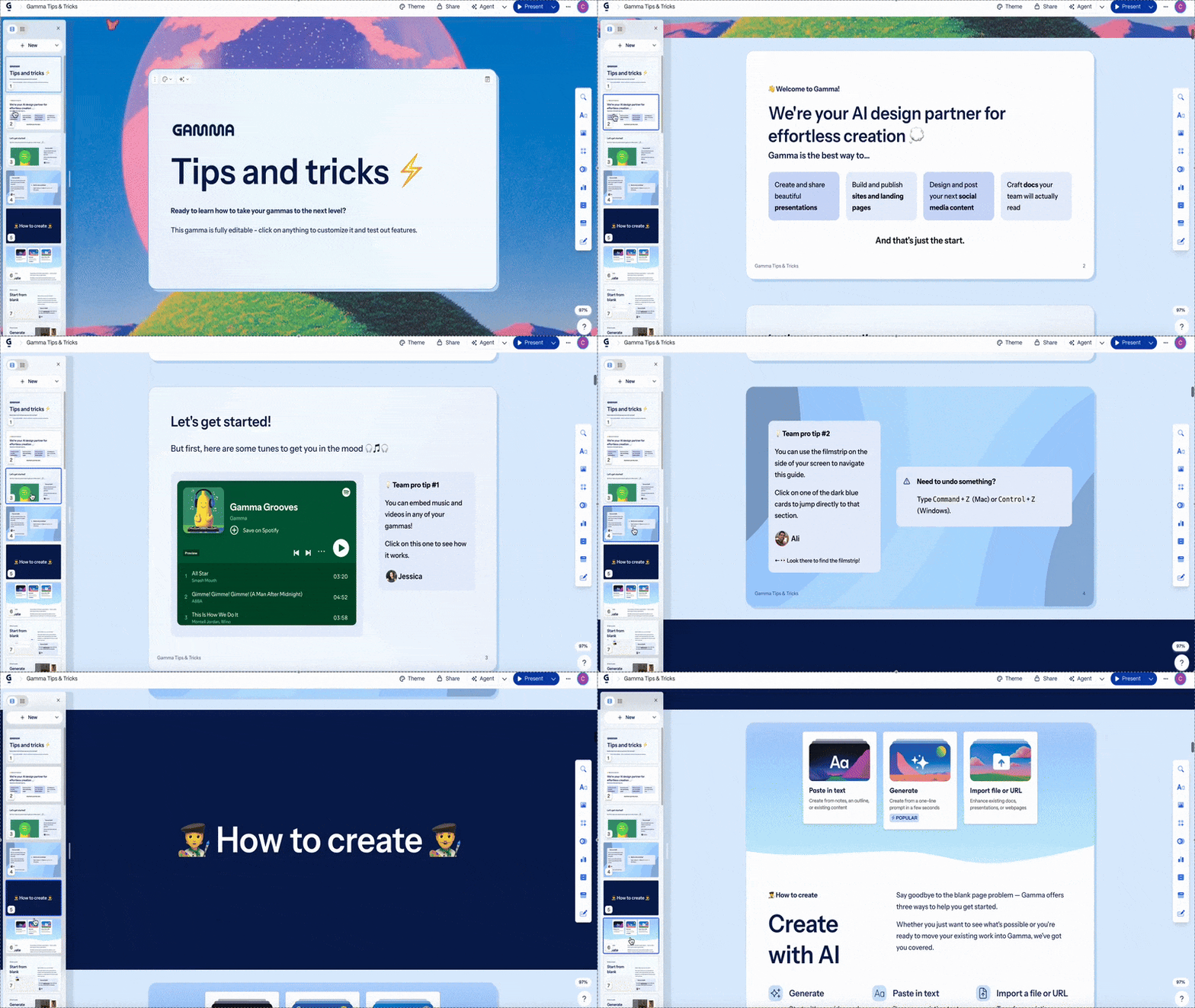
Beyond acquisition, Gamma places strong emphasis on in-app guidance and onboarding. Inside the product, users are welcomed with a comprehensive “Getting Started” presentation, which is essentially a built-in onboarding booklet.
It explains how to use Gamma’s features and also shares best practices and pro tips.
So it is valuable for both first-time users and experienced creators who want to level up their workflow.
Here’s how that presentation/booklet looks:
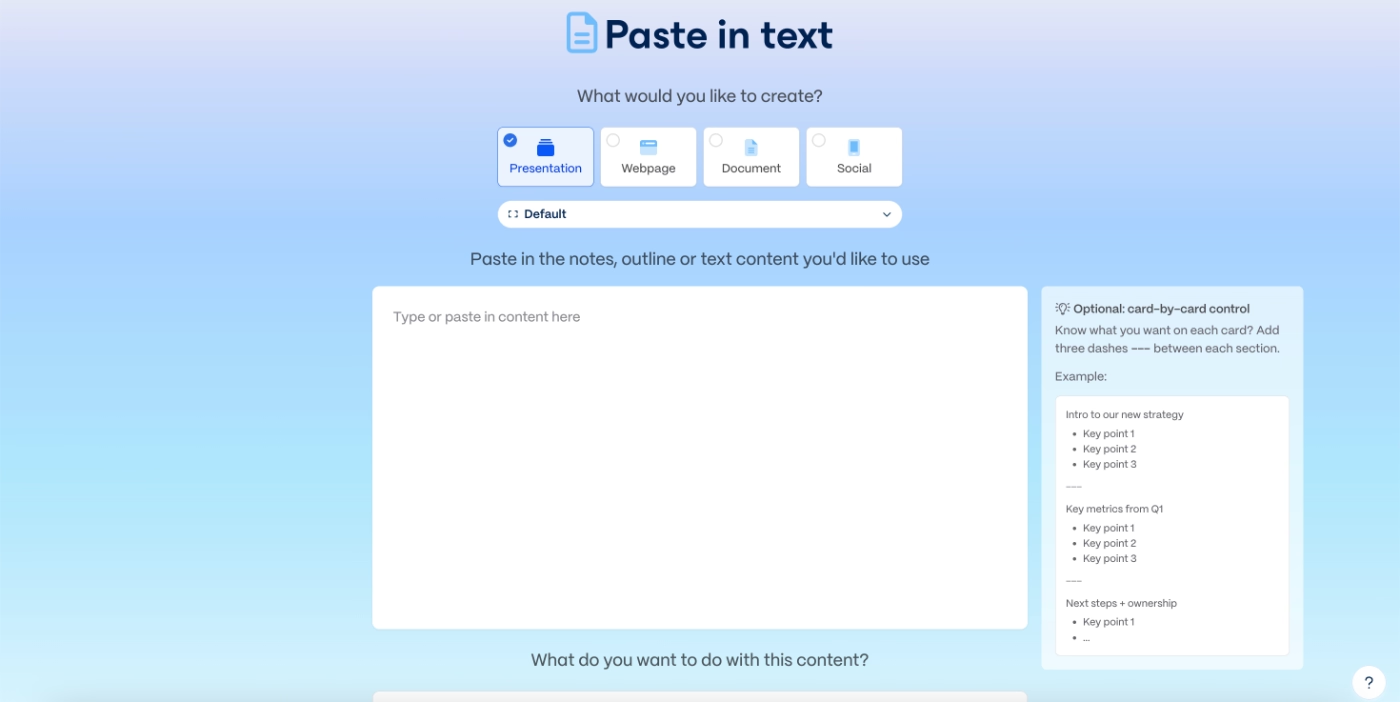
Gamma also embeds contextual guidance directly within feature pages using static tip boxes. These small moments of in-product education encourage best practices without interrupting the flow.
Here’s an example offering advice on how to structure and organize presentation cards:
What are Gamma’s PLG strategies?
🚀 Freemium plan and instant access to the product with a frictionless signup flow
🚀 Built-in virality with additional credits that can be earned by inviting others
🚀 In-app guidance and onboarding
HeyGen
HeyGen is an AI-powered video creation platform.
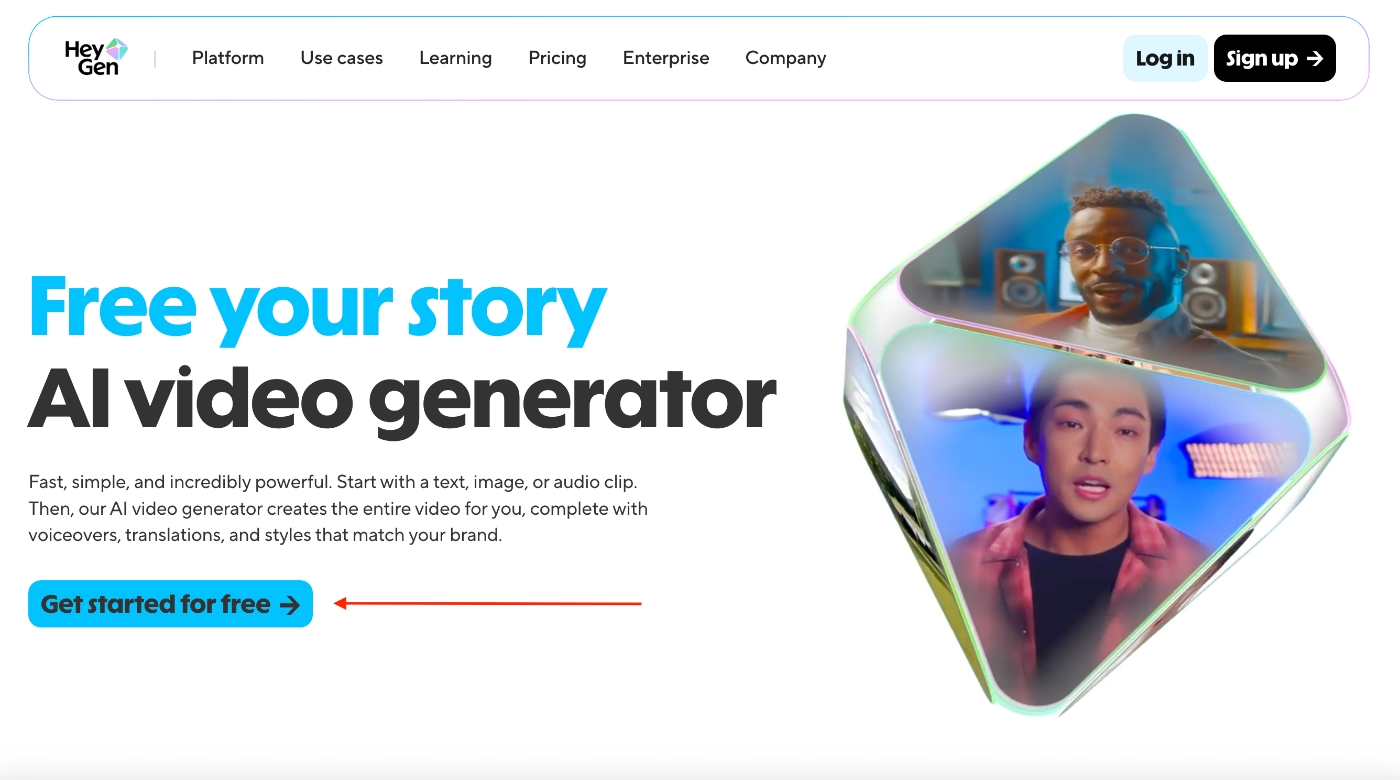
It operates on a freemium model, and the product makes that very clear. Throughout the website, multiple primary CTAs highlight the free plan and encourage users to jump in and start creating videos right away.
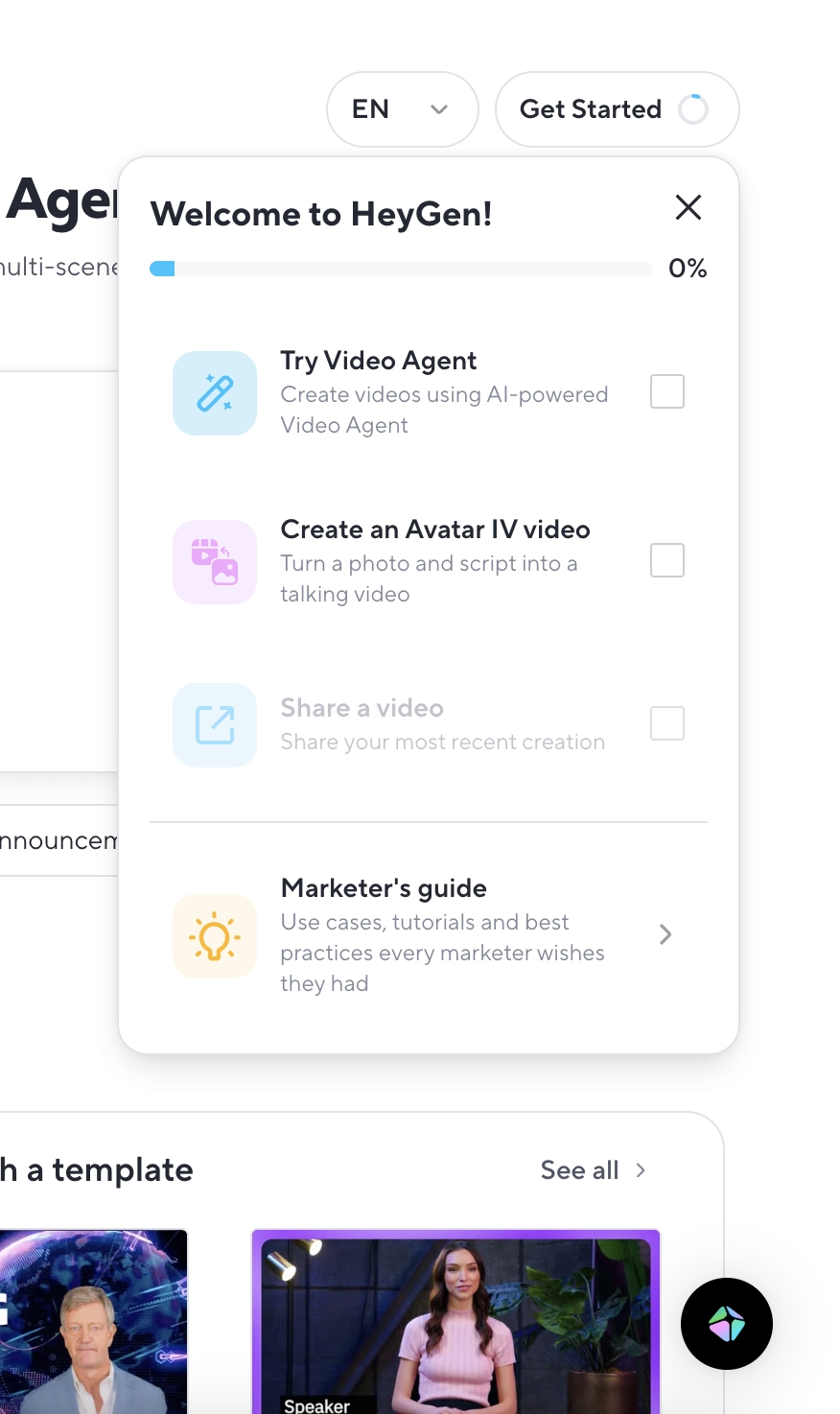
Once you sign up, you’re greeted with an onboarding checklist that guides you through the three essential first actions:
- Try Video Agent
- Create an avatar video
- Share a video
Importantly, the final task remains locked until you complete the creation step, which helps keep the onboarding sequence intuitive and goal-oriented.
Here’s what the checklist looks like:
Each task triggers a short, focused video tutorial that walks you through the entire workflow from writing a prompt to final edits.
These tutorials open in modal pop-ups, and each includes a CTA button that takes you directly to the relevant feature page. So even if you skip the video and prefer to explore hands-on, you can still use the modal to navigate with zero friction.
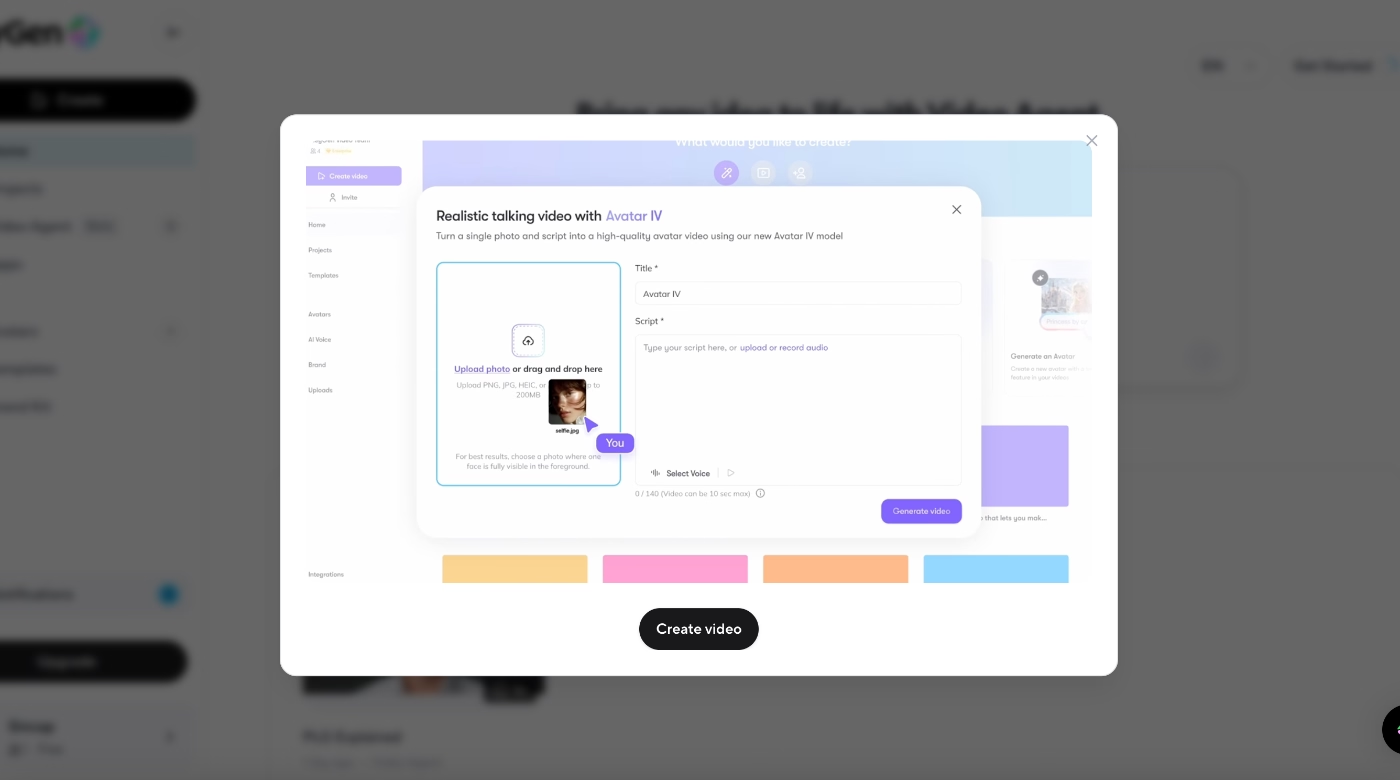
Also, at the bottom of the checklist, HeyGen includes one more resource, not a task, but a personalized resource recommendation.
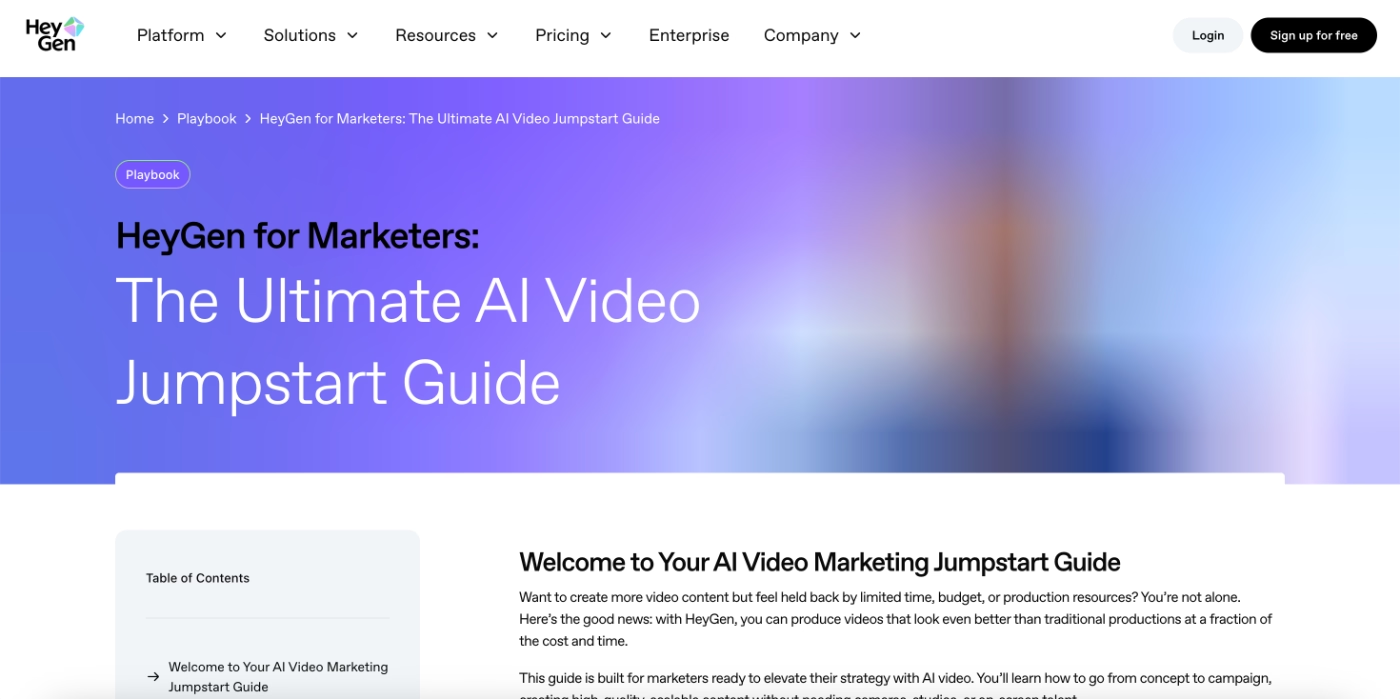
During signup, the platform runs a brief onboarding survey to assess your role and use case. Based on your answers, HeyGen changes this final checklist item.
For example, if you identify as a marketer, you’ll be shown a specialized best-practices guide tailored for marketing workflows.
What are HeyGen’s PLG strategies?
🚀 Freemium plan + instant access through a fast signup flow
🚀 Personalized onboarding and communication powered by a role/use-case survey
🚀 A value-oriented onboarding checklist that guides users to meaningful outcomes
🚀 Short, embedded video tutorials that teach core workflows without leaving the app
Wispr Flow
Wispr Flow is a productivity and AI-writing assistant designed for Mac.
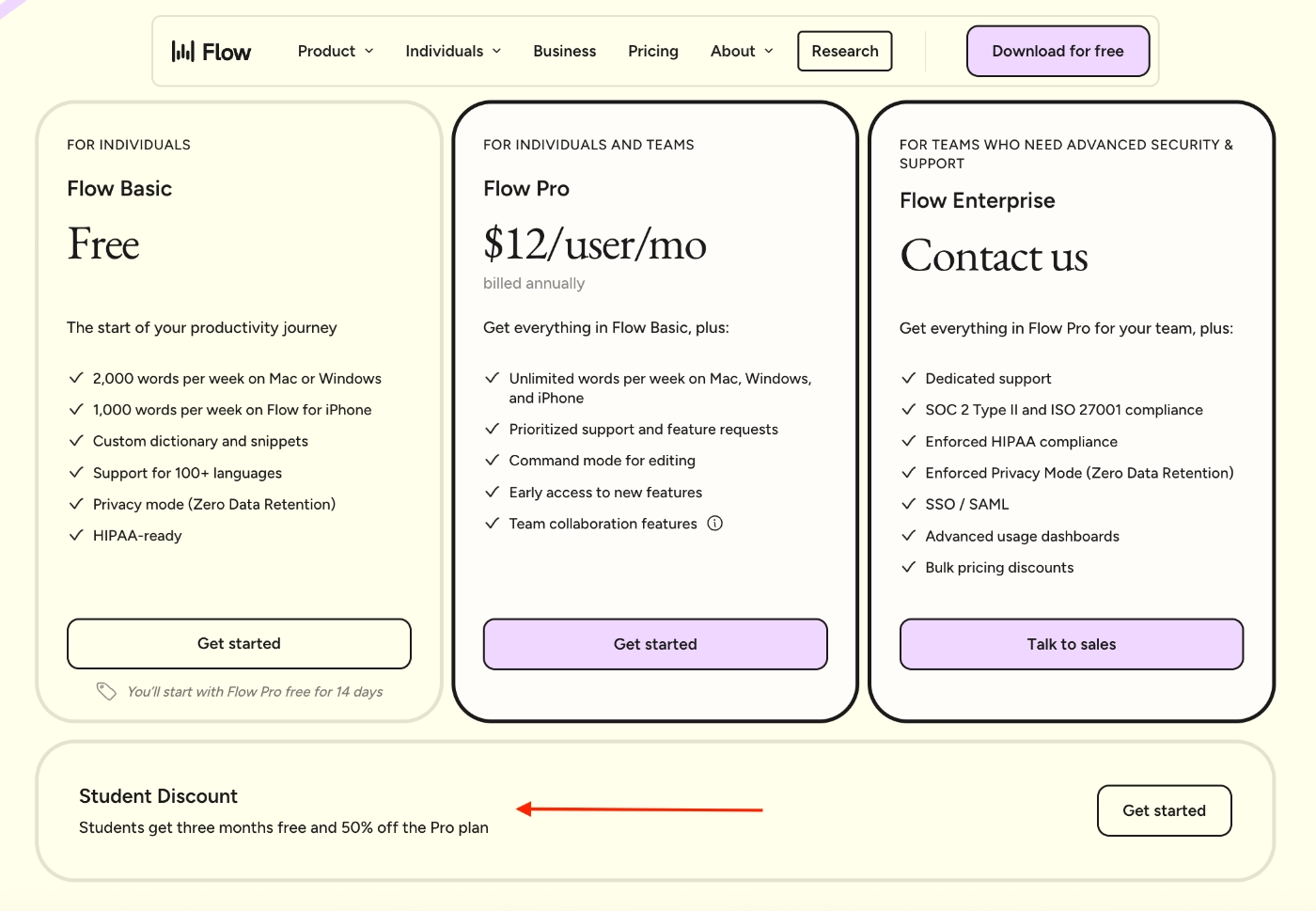
Wispr Flow operates on a freemium model and also offers a 3-month, 50% student discount for the pro plan, making it more accessible for learners and early-career users.
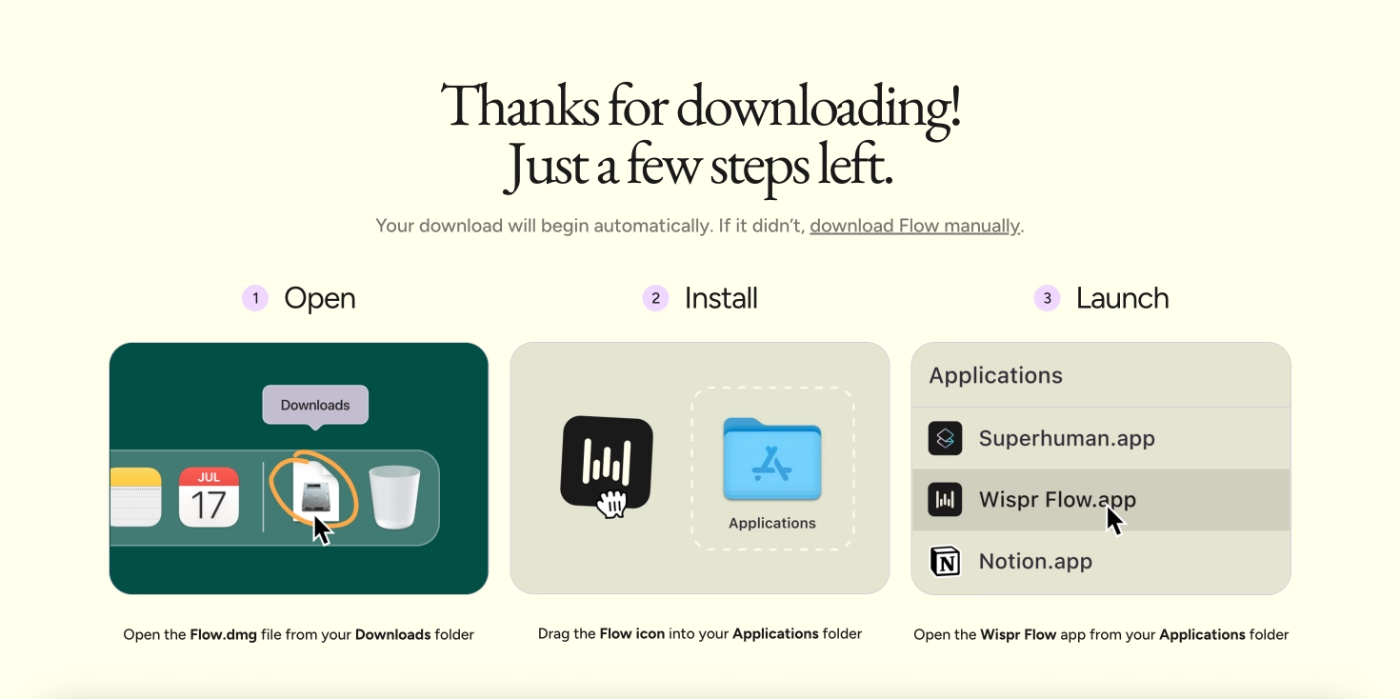
Wispr Flow is heavily focused on guidance and reducing the learning curve so users can adopt the app quickly and confidently. That guidance begins right at installation. When you first download the app, Wispr walks you through the setup process step by step on your MacBook.
After installation, you move into an onboarding flow that Wispr treats almost like a trial run. Here, you explore different shortcuts and see how the app works across email, social platforms, and document tools within a gamified, sandbox-style environment.
During this stage, you’re not yet using Wispr inside your own apps; instead, you’re experimenting safely in a controlled pre-onboarding experience.
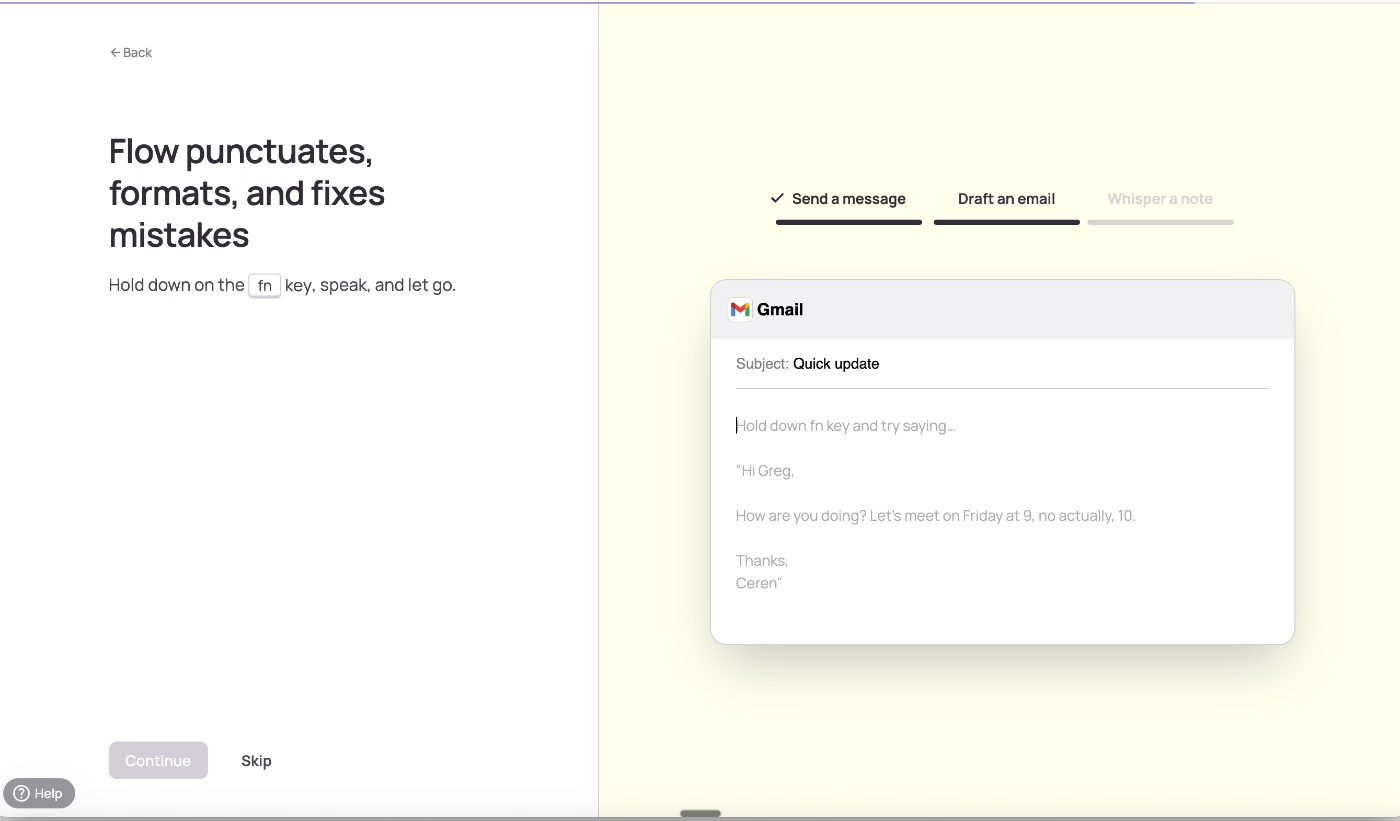
Once you complete the trial screens and enter the actual tool, Wispr still doesn’t leave you unguided. Instead, it asks which feature you’d like to try first, offering a list of interactive tutorials to help you ease into real-world use cases of the app.
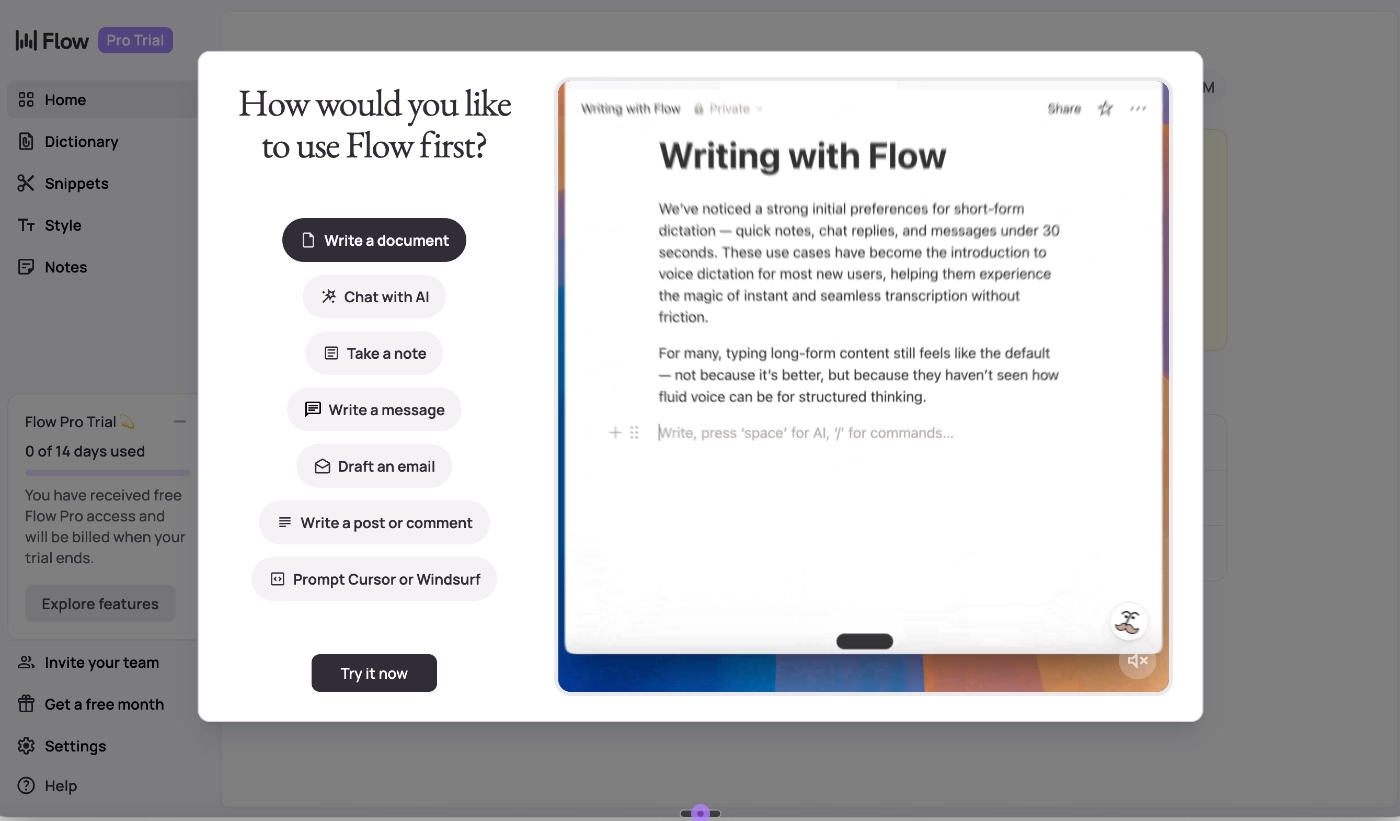
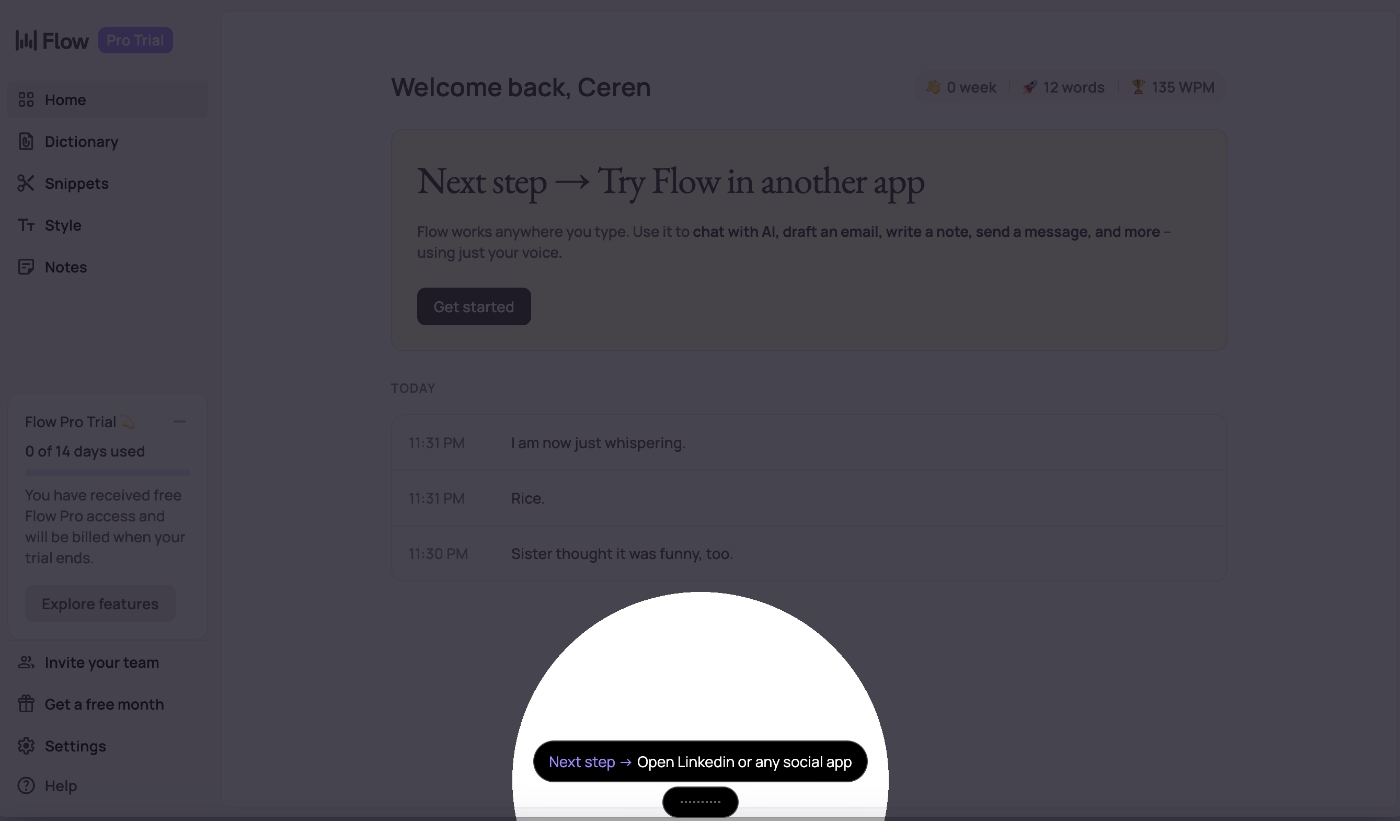
For example, if you choose to explore how Wispr helps with writing a post or comment, the guide first prompts you to open a social media app on your Mac.
From there, it walks you through the steps interactively.
What are Wispr Flow’s PLG strategies?
🚀 Freemium plan + generous student discount
🚀 Guided setup and installation that eliminates early friction
🚀 Sandbox-style, gamified feature trials before touching real apps
🚀 Interactive, real-world tutorials for first-time feature activation
GitKraken
GitKraken is a popular Git client designed to make version control easier and more visual.
GitKraken runs on a freemium model, and the website prominently features CTAs encouraging users to download the free desktop app right away. After installation, GitKraken triggers a quick, one-question onboarding survey that asks about your comfort level with Git.
Based on your answer, essentially, your technical experience, the app personalizes your onboarding flow accordingly.
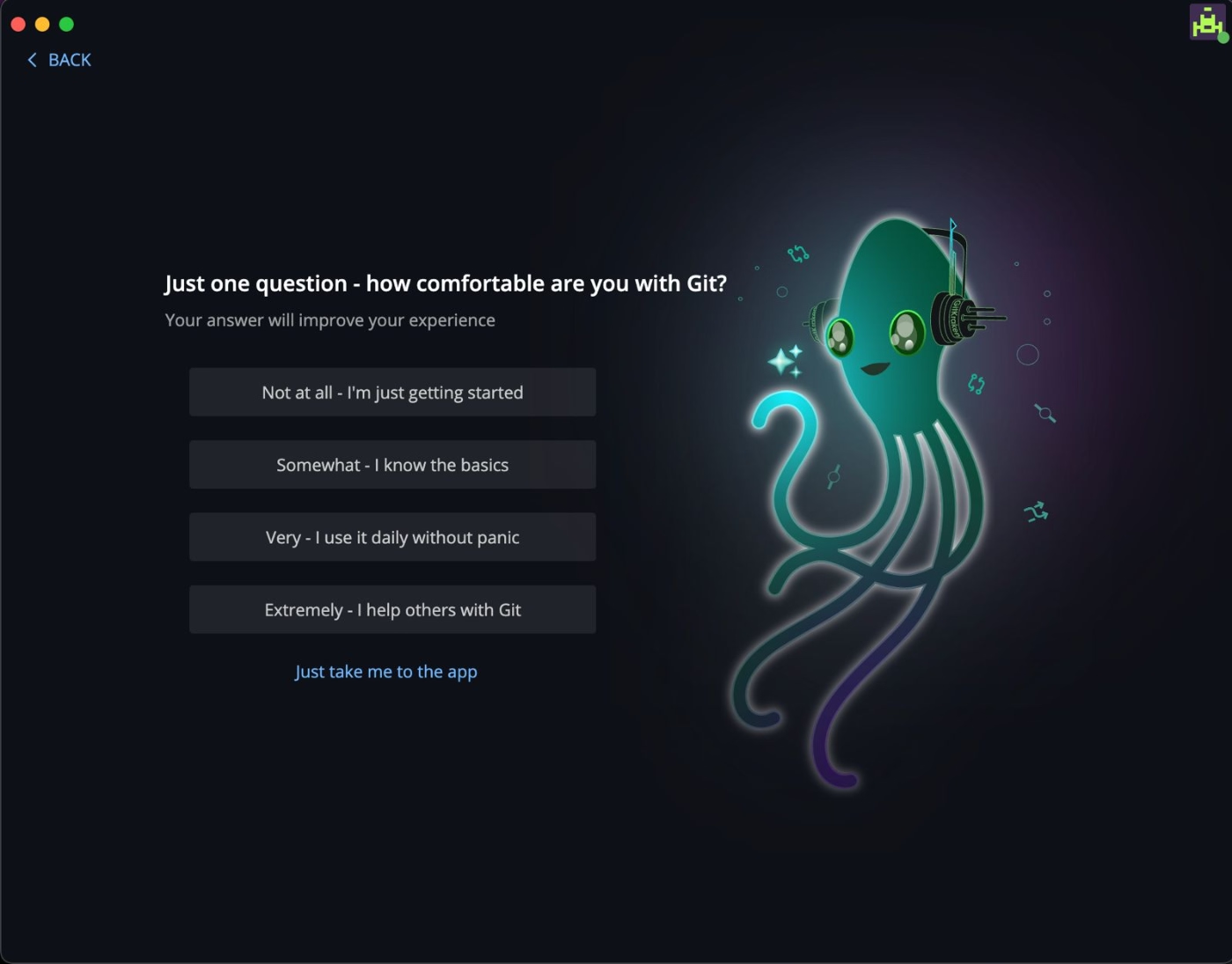
You can also skip onboarding entirely and jump straight into the app.
But if you choose to continue, and you indicate that you’re new to Git, GitKraken provides a detailed, structured in-app tutorial that walks you through both Git fundamentals and how to use GitKraken’s tools.
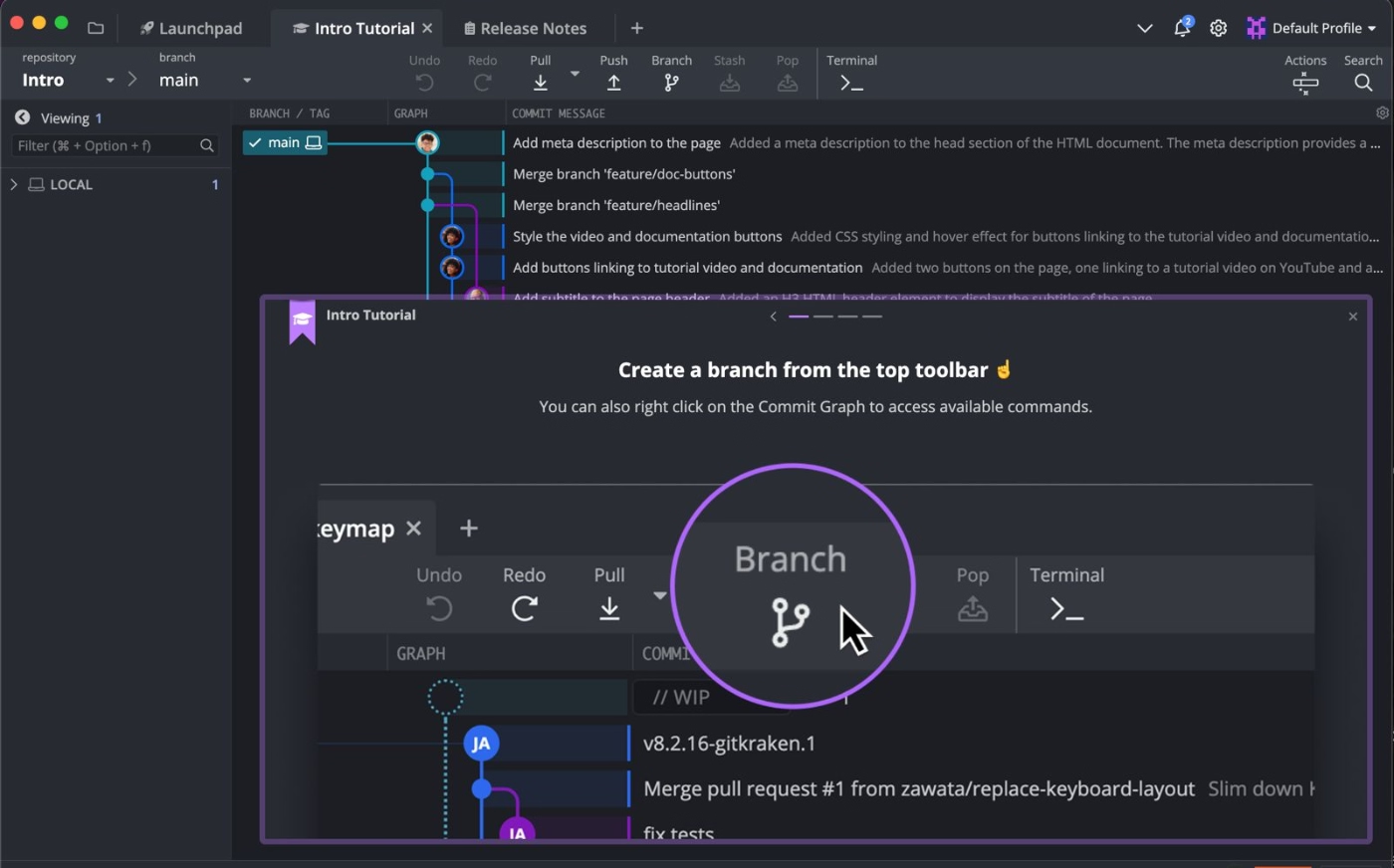
What are GitKraken’s PLG strategies?
🚀 Freemium plan with instant access through a frictionless download flow
🚀 Skill-based onboarding for beginners vs. advanced Git users
Mendeley
Mendeley is a reference and citation management tool used by students, researchers, and academics.
Just like many PLG-first products, Mendeley heavily highlights its free plan, in fact, you almost have to search to find the paid plans. The homepage lets you create a free account with nothing more than an email address, keeping sign-up fast and frictionless.
You can also download the desktop app straight from the prominent CTAs on the home page.
When you sign up and open the app, Mendeley offers a well-structured in-app onboarding flow.
You’re greeted with a slideout welcome modal that invites you to take a product tour, but the tour is optional, so you can decline it and explore the app freely if you prefer.
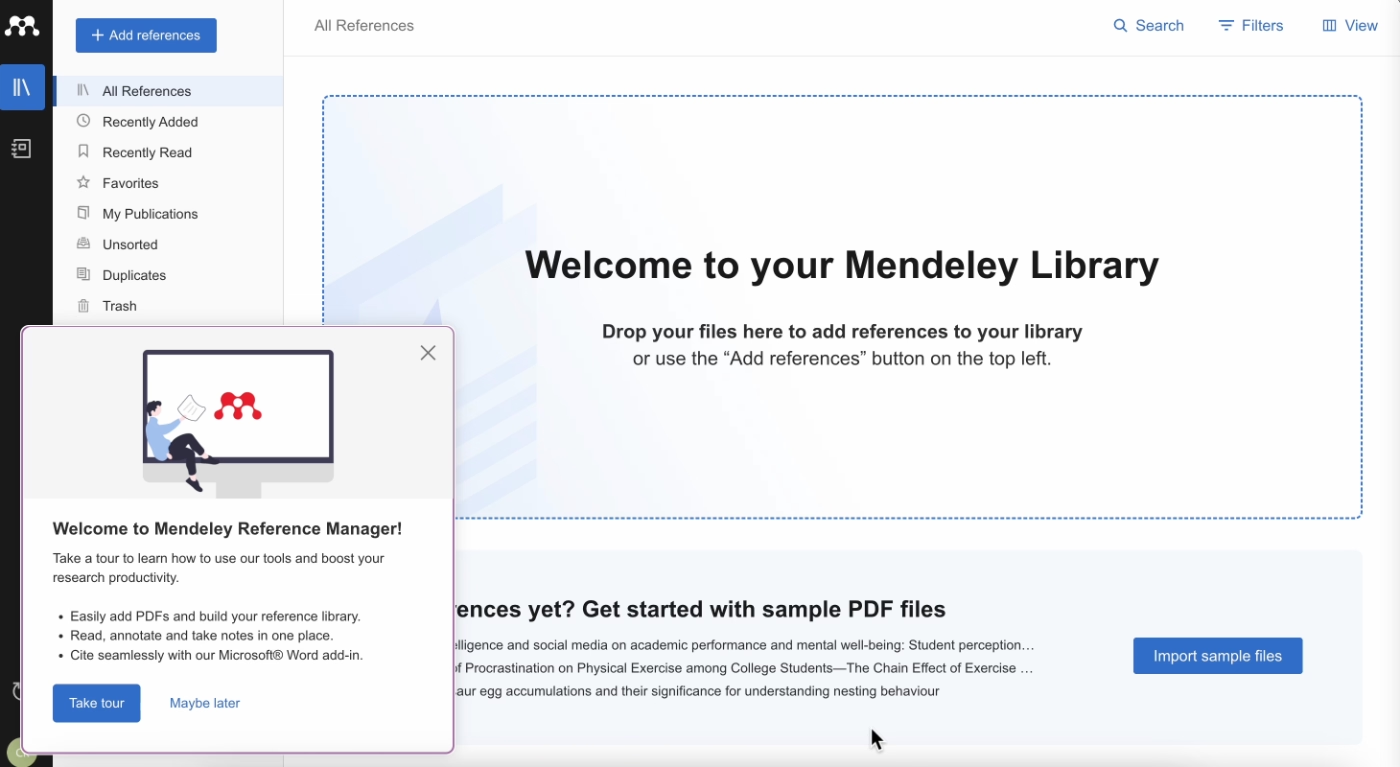
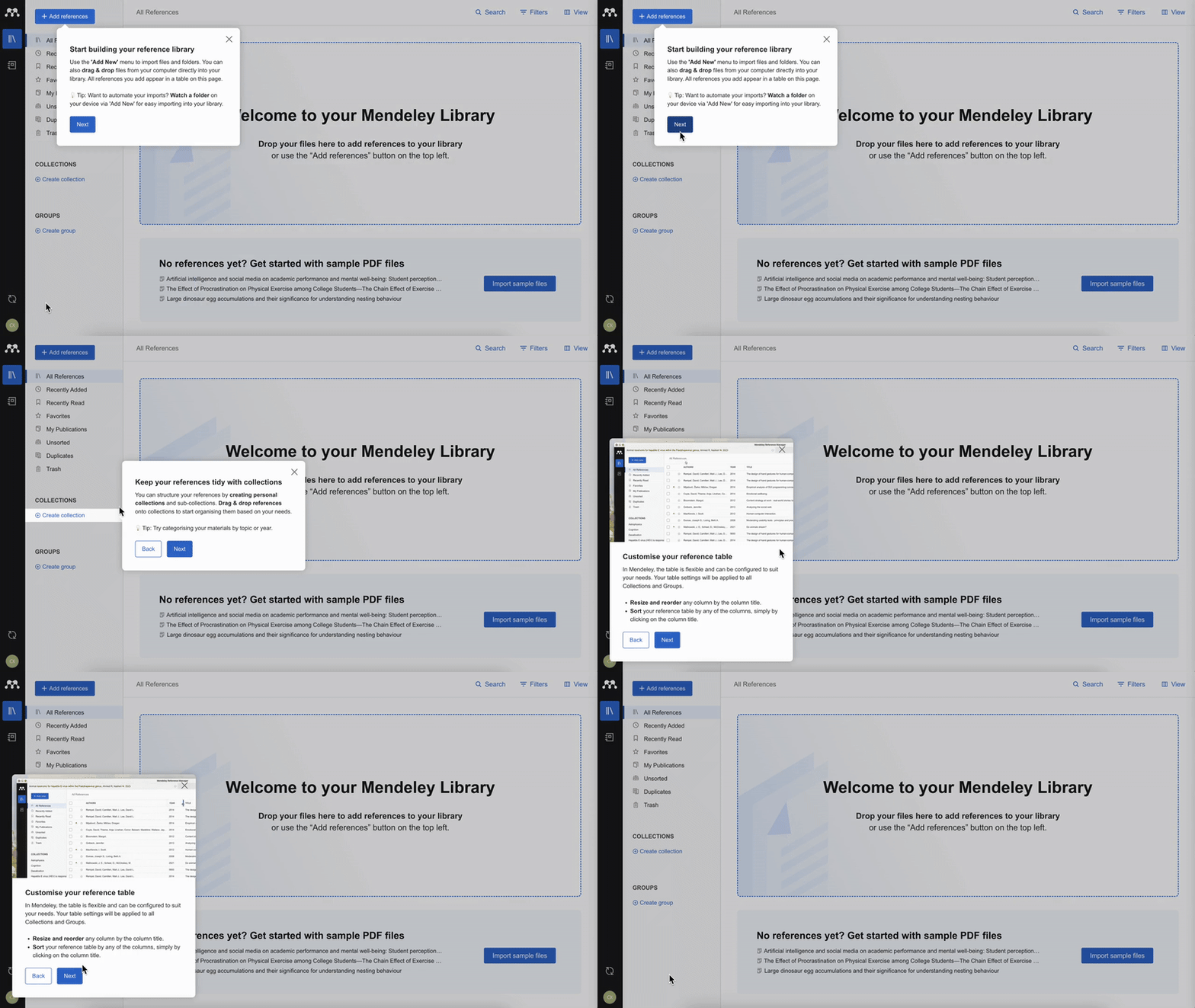
If you take the tour, the first half introduces the basics: where core features live in the UI, what they do, how to use them, plus shortcuts and pro tips for managing references and organizing documents.
Midway through, Mendeley asks whether you want to continue and learn the more advanced workflows, such as notebooks, manuscript editing, and annotations.
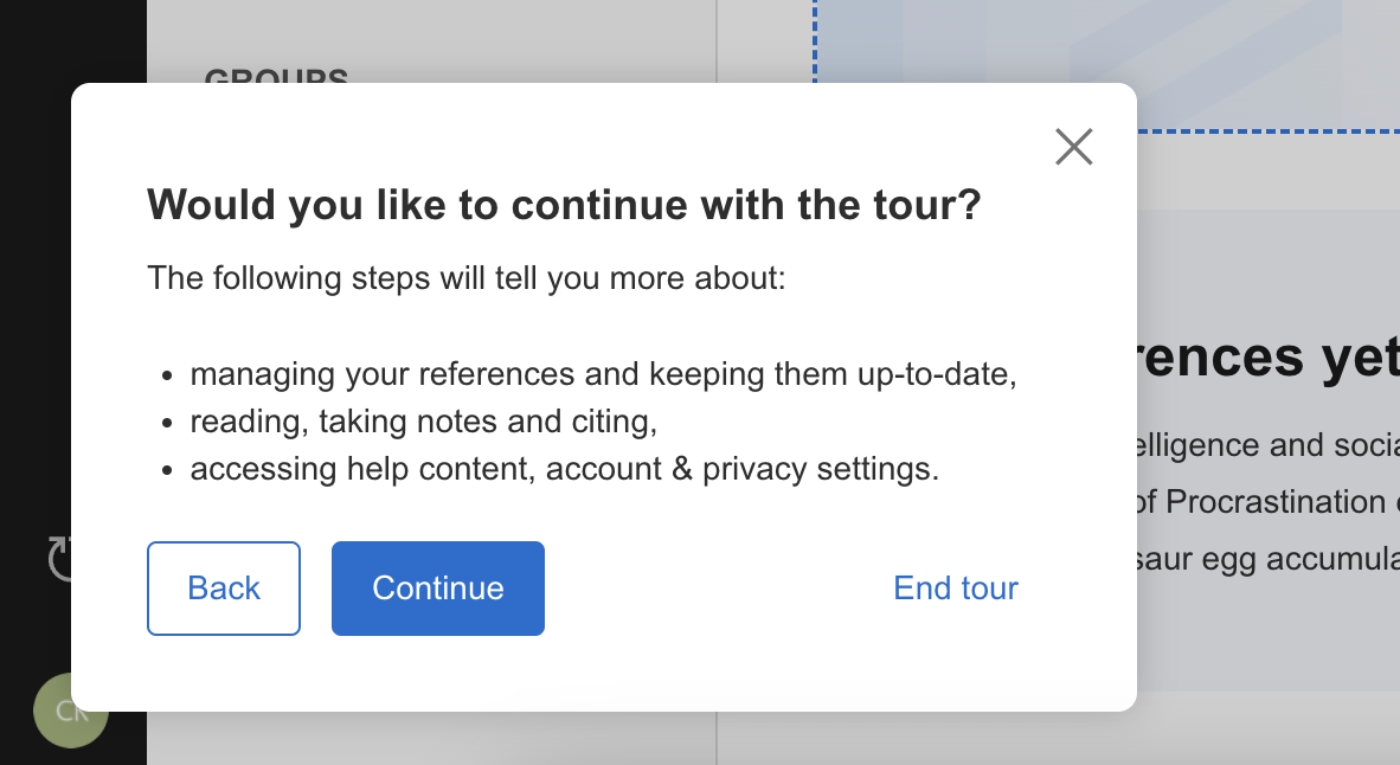
If you choose to proceed, the second half covers advanced features, use cases, and best-practice recommendations.
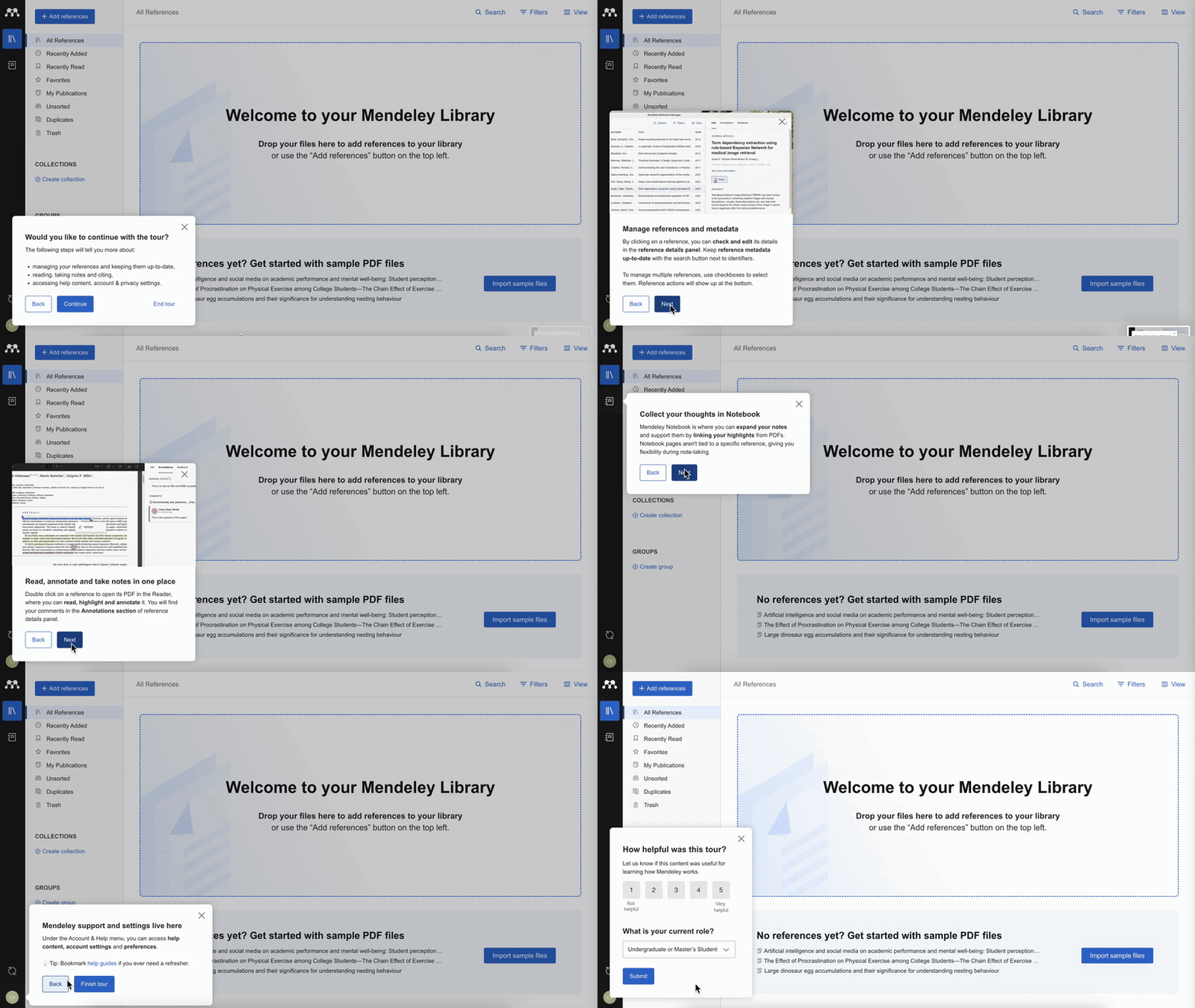
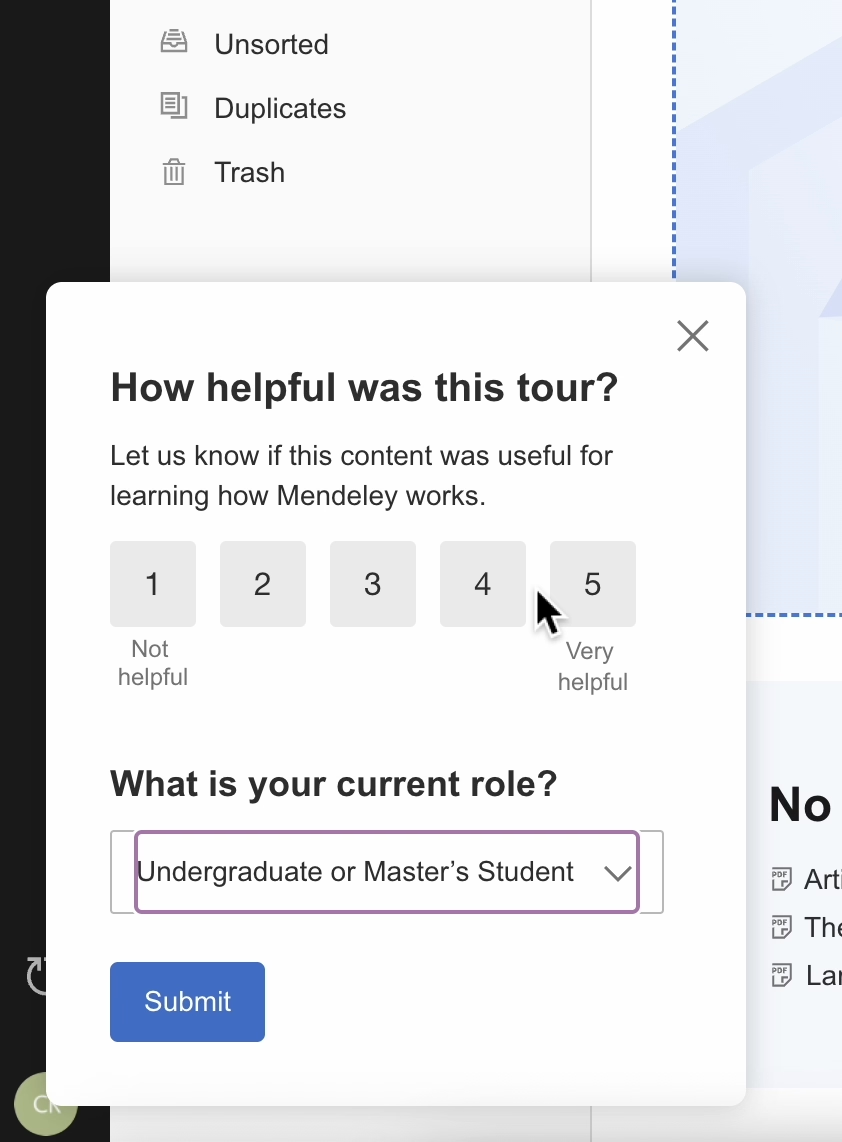
At the end of the tour, Mendeley asks for feedback with a short two-question survey: one about the usefulness of the tour and one about your role (MA student, PhD student, librarian, professor, etc.).
What are Mendeley’s PLG strategies?
🚀 Free plan + fast, frictionless signup
🚀 Optional onboarding that respects users who don’t want guidance
🚀 Structured product tour split into basics → advanced
🚀 Pro tips and best-practice suggestions woven into the tour (not just navigation)
🚀Short feedback form to reinforce user-centric improvements
Top Hat
Top Hat is an all-in-one teaching platform for lectures, assessments, homework, and student engagement.
It used to have a freemium plan, but later shifted its pricing model and removed the free tier. They still offer a free trial, though unlike most PLG companies we’ve covered, it’s not heavily promoted or placed front-and-center.
But freemium alone doesn’t make or break a PLG model. Top Hat is still very PLG-driven.
So how does Top Hat showcase value if it doesn’t rely on freemium and barely spotlights its free trial?
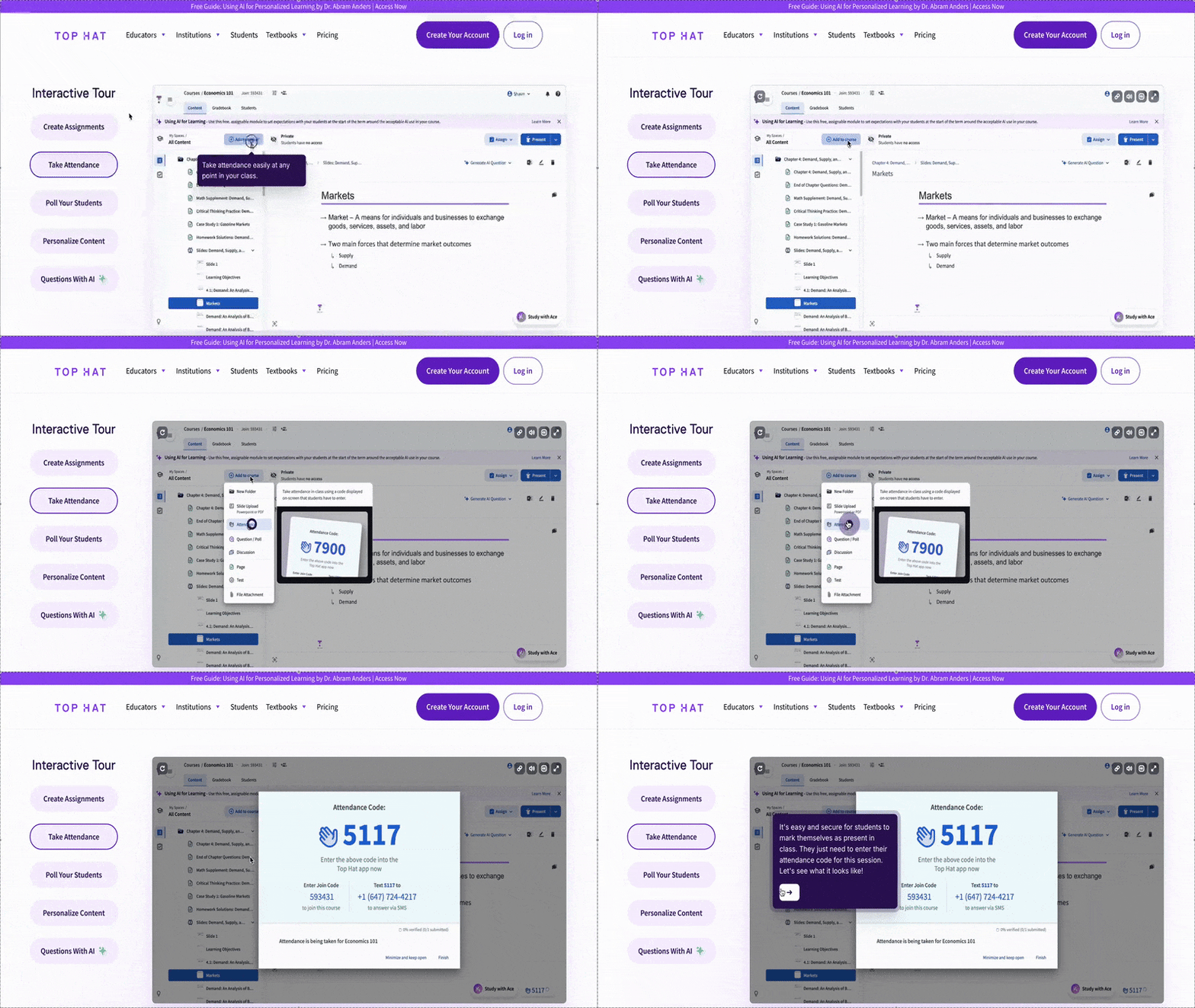
Through pre-recorded, semi-interactive demos.
Top Hat’s core workflows can be complex. Many require meaningful setup, like adding a course, uploading materials, and syncing a student list. Without real data in the system, users can’t easily experience the value of the product.
And this upfront commitment was something many users weren’t willing to make.
To solve this, Top Hat created guided, clickable demo experiences that walk prospects through key features, real classroom scenarios, and example data without requiring sign-up, setup, or student imports.
Here’s an example:
What are Top Hat’s PLG strategies?
🚀 Free trial (though not centrally highlighted on the website)
🚀 Pre-recorded use case and feature demos with tooltips and automated steps
Why user onboarding is still the heart of PLG
No matter how much the market evolves, how sophisticated AI becomes, or how many new acquisition channels pop up, one truth hasn’t changed:
👉🏻 If users don’t understand the product fast enough, they don’t activate. And if they don’t activate, nothing else in the PLG motion works.
The first few minutes of your product experience set the tone for the rest of the experience, at least that’s when users form their initial (and sometimes final) opinion about the product.
Is your product worth further exploring or not? That is an important decision for new users and potential paying customers.
Good onboarding is what nudges that split-second decision toward a “yes.”
A friendly welcome modal, a personalized onboarding checklist, a few optional tutorials, or even a functional in-app resource center give a sense of relief and reassurance to the user.
Even if they feel that the tool might be complicated for them (either because they lack prior familiarity with a similar tool or the tool itself is genuinely complex), onboarding materials alleviate that frustration for first-time users.
So, even if how SaaS companies translate core PLG values into their business strategies may have changed with evolving market trends and user behavior, onboarding remains one of the most prominent PLG strategies.
Let’s get into more detail and talk about how each onboarding material/tool is still valuable today, in the age of AI and high competition 👇🏻
Onboarding checklists support quick product discovery
From the beginning of the article, we’ve been emphasizing that users nowadays do not spend a lot of time discovering the potential capabilities of a single product, even though they spend more time in total checking out different tools for the same use case.
Because there are a lot of alternatives in the market, and because it’s so easy to sign up for a free trial or a freemium account (and it should be, don’t get us wrong!!).
However, if what your product offers to users is not very visible, both in terms of actual tangible features and long-term usage value, then users will go and check out another tool.
Onboarding checklists help you highlight your product’s core features and use cases.
So, when a new user signs up for the app, they immediately see what tools and capabilities come with it.
Welcome! These are our main offerings!
And if you personalize your onboarding checklists based on user personas and customer segments, highlighting different features or capabilities for users with different use cases, the value discovery process becomes even easier for the user.
Even if you don’t change the actual items on the checklist (your core features, essentially), you can still adjust the language to emphasize the specific use cases and benefits that matter to different roles or industries.
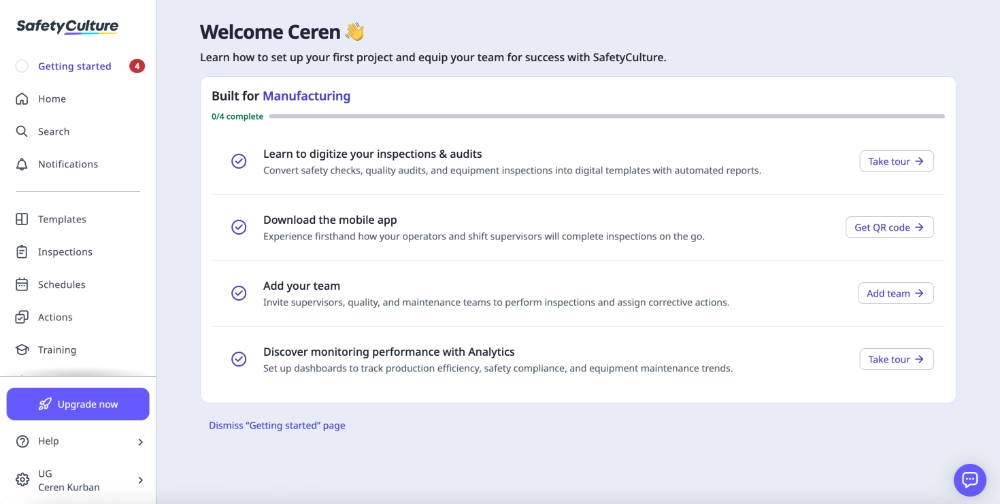
📌 That’s exactly what SafetyCulture does with its onboarding checklist.
They don’t necessarily change which features are highlighted, but they do frame those features in ways that speak directly to users in different industries.
Here’s what the checklist looks like for users in the manufacturing sector, for example:
Interactive tutorials eliminate user frustration (and impatience)
Just as users don’t want to spend a lot of time discovering features and capabilities, they also do not want to spend so much time learning how those functions work.
Interactive walkthroughs and tutorials explain workflows in a user-friendly and manageable way. Even the least technical users, or users with no prior experience with a similar product, can easily follow the tutorials without feeling overwhelmed.
In-app guides are also easier on users’ attention and patience because they tend to be short, direct, action-oriented, and, most importantly, contextual.
So instead of reading a five-page help article on a separate screen and then figuring out how to apply that information, users can simply follow a brief, in-product, five-step guide to complete the same workflow.
It’s far less mentally taxing.
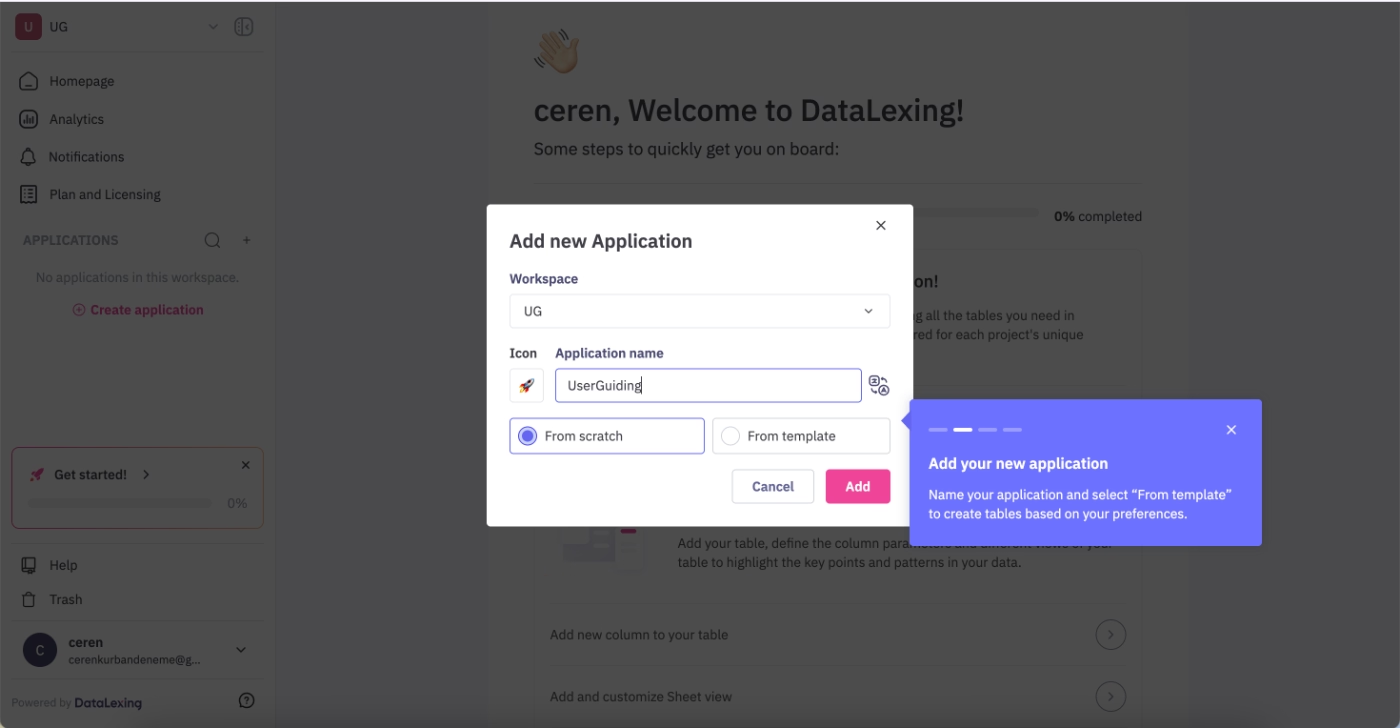
📌 DataLexing’s tour for adding a new app is a great example.
It’s only four steps long, and it’s fully interactive, so the guide waits for you as you complete each action. By the time you finish the tutorial, you’ve already created your app.
Hotspots and tooltips draw user attention to what’s important
Another major shift in today’s user experience landscape is the reality of shrinking attention spans.
Call it the impact of constant social media stimulation, call it cognitive overload, call it general fatigue. Whatever the reason, users simply don’t notice as much as they used to.
Even genuinely useful features can slip right past them.
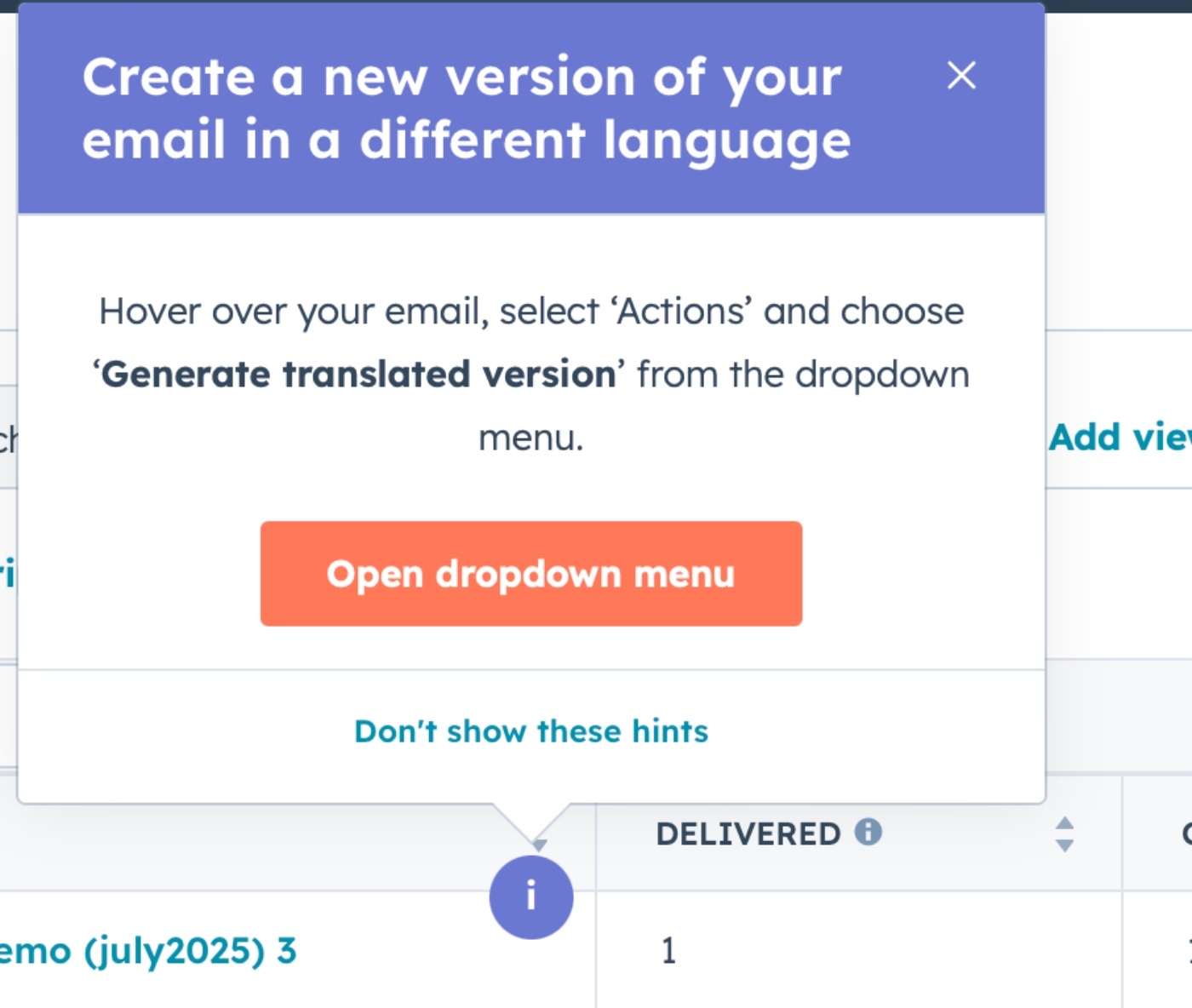
That’s where hotspots and tooltips come in. They act like small, focused attention magnets, guiding users toward the buttons, features, or announcements that actually matter.
They essentially say, “Hey, look here, this is important, and it will help you.”
📌 HubSpot, for example, uses hotspots (hints, as they call them) to announce feature improvements and new features:
PLG metrics and KPIs to watch in 2026
You’re probably keeping an eye on NRR, free-to-paid conversion, retention, churn, and customer lifetime value (CLTV).
We’ve all been talking about these in SaaS circles forever.
But there are a few PLG metrics that might be flying under your radar, and keeping track of them can give you a much clearer picture of how your product is actually driving growth and adoption in 2026.
📋 So, here’s the list:
- Activation rate: Percentage of users completing key actions that deliver initial value.
- Time-to-value (TTV): How quickly a user reaches their final “aha” moment.
- In-app engagement: Measures usage patterns like logins, sessions, or feature interactions.
- Support/help request volume: Can indicate friction points in the product or onboarding.
- Expansion revenue from self-serve: Revenue growth from upsells, add-ons, or higher-tier features without sales intervention.
- Referral/virality metrics: Users acquired through product-driven sharing or invites.
Strategic recommendations for SaaS teams adopting PLG in 2026
If you want to stay in the PLG game, you need to do more than freemiums.
Start by asking yourself if your product can deliver meaningful value without constant/frequent hand-holding. If it can, PLG is a natural fit. If not, consider a hybrid approach, like Product-Led Sales, where self-serve meets guided support for more complex use cases.
Next, make sure your teams are aligned.
- The product team should focus on contextual onboarding and clear activation loops.
- The marketing team should showcase value immediately and optimize discovery.
- The customer success team should be proactive, using product insights to guide users.
- The sales team should step in only when in-product signals show real intent.
PLG has always been a team game, and it always will be.
And watch out for the usual pitfalls.
❌ Do not overwhelm users with long onboarding or signup flows.
❌ Do not ignore personalization.
❌ Do not rely solely on freemiums without ensuring activation.
❌ And finally, do not underestimate the power of user feedback and input.
Frequently Asked Questions
What are the best PLG SaaS examples with strong activation and conversion metrics?
Some of the best PLG SaaS examples today combine freemium access with strong in-product guidance. Gamma, HeyGen, Wispr Flow, GitKraken, and Mendeley all showcase frictionless signup, personalized onboarding, and interactive tutorials. These approaches help users reach meaningful outcomes quickly, increasing activation and conversion. Their flows are short, contextual, and often gamified, which keeps engagement high.
How does PLG work in SaaS products with freemium models?
Freemium SaaS products allow users to experience the core value without an upfront payment. They work best when paired with activation-focused onboarding, optional tutorials, and personalized guidance. Users can explore at their own pace while being nudged toward meaningful actions. Freemium models can also include built-in virality loops, like Gamma’s additional credits for referrals. You should keep the friction low and emphasize real outcomes, so the product itself drives adoption and motivates upgrades naturally.
How do PLG vs SLG strategies compare for early-stage SaaS?
PLG focuses on letting the product demonstrate value directly to users, while SLG (sales-led growth) relies on human-driven outreach and demos. Early-stage SaaS can benefit from PLG by enabling self-serve discovery, quick value realization, and fast feedback loops. You can still combine PLG with sales involvement for complex workflows or high-value accounts, using Product-Led Sales to guide users when automated onboarding or in-app tutorials aren’t enough. This hybrid approach balances frictionless access with necessary human support.
Which PLG SaaS onboarding examples reduce time-to-value?
Products like HeyGen, Wispr Flow, and Mendeley reduce time-to-value with short, contextual onboarding flows and interactive tutorials. They introduce features gradually and keep learning optional, so users don’t feel forced. Personalized checklists and role-specific guidance help users focus on what’s relevant to their goals. This approach accelerates activation without overwhelming new users.
How does AI reshape PLG in SaaS companies?
AI is transforming PLG by powering personalized onboarding, in-app guidance, and content discovery. Tools can now generate tailored step-by-step tutorials, adapt flows to user roles, and optimize engagement based on real-time behavior. AI also supports discovery, with users finding products through conversational agents rather than traditional search. In-app assistants can troubleshoot, recommend features, and automate repetitive tasks.
What are the key PLG metrics SaaS teams should track in 2026?
Teams should focus on activation rate, time-to-value, and in-app engagement to measure initial product adoption. Support request volume can indicate friction points, while expansion revenue from self-serve shows growth without heavy sales involvement. Referral and virality metrics help track product-driven acquisition. Monitoring free-to-paid conversions and retention ensures the product’s value translates into revenue. You should look at these metrics collectively to understand how well the product itself is driving adoption, engagement, and expansion.
What are the common PLG mistakes SaaS companies make during scale-up?
Common mistakes include overwhelming users with long onboarding flows, neglecting personalization, and relying solely on freemium access without ensuring activation. Some teams ignore product feedback, leading to missed opportunities for improvement. Others overcomplicate guidance or force users through rigid tutorials, which can increase churn. You should maintain optional, contextual onboarding and gamified engagement, while aligning marketing, product, and customer success teams to support growth organically rather than just pushing more features or signups
Which pricing strategies support PLG growth in SaaS?
Freemium plans and free trials remain essential, especially when paired with fast, frictionless signup. Role-based or usage-based tiers can help highlight value for different user/ customer segments. Built-in viral loops, like extra credits for referrals or rewards for sharing, encourage adoption and engagement. Pricing should make it easy for users to experience value quickly, while optional upgrades or premium tiers align with activated users.

.png&w=3840&q=75)