.svg)
.svg)
.svg)
.svg)



.svg)


.svg)
.svg)


For the past few weeks, or maybe even a month, everyone even remotely AI-curious has been talking about the same product: OpenClaw (formerly Moltbot, and before that, Clowdbot).
The tiny red lobster has managed to make a handful of loyal fans, and even more critics since it first surfaced in November 2025.
Some people jumped in, eagerly experimenting and encouraging others to do the same. Others hit pause. As security and privacy concerns started surfacing, AI researchers, security specialists, and industry leaders began raising red flags about the potential risks tied to the platform in its current state.
And now, Peter Steinberger, the creator of OpenClaw, is joining OpenAI, as Sam Altman has very recently announced.
So what now?
Does this mean OpenClaw should be avoided altogether? Or is there a responsible way to experiment with the technology without putting yourself (or your product and company) at risk?
If you’re a tech enthusiast, a curious builder, or an early adopter, here’s our honest take on OpenClaw 🕵🏻♀️🕵🏻♀️
Tl;DR
- OpenClaw is an AI agent platform designed to bridge the gap between AI reasoning and real-world action. Unlike traditional LLMs that mainly generate text, OpenClaw can understand a task, plan the steps, and execute actions across multiple tools and platforms.
- It’s a very technical tool that requires careful setup, strong security practices, and ongoing attention to permissions and access.
- There are many concerns related to the agent’s power, third-party Skills, and potential system-level or data access.
- Non-technical users should avoid it for now, as safe usage demands technical expertise and isolated environments.
- However, there are safe use cases for experimentation: coordinating tools, summarizing content, researching competitors, or creating educational materials.
- Safe experimentation also requires isolated environments, dedicated accounts, limited tool permissions, and careful review of Skills.
- OpenClaw is exciting and full of potential, but for now, treat it as a sandbox for exploration, not a production-ready solution.
What is OpenClaw?
OpenClaw is a relatively new AI agent platform that is, at its core, designed to be a sort of central hub for AI agents and workflows, letting users connect, configure, and deploy multiple AI tools in one place.
You can also think of it as a command center or a gateway.
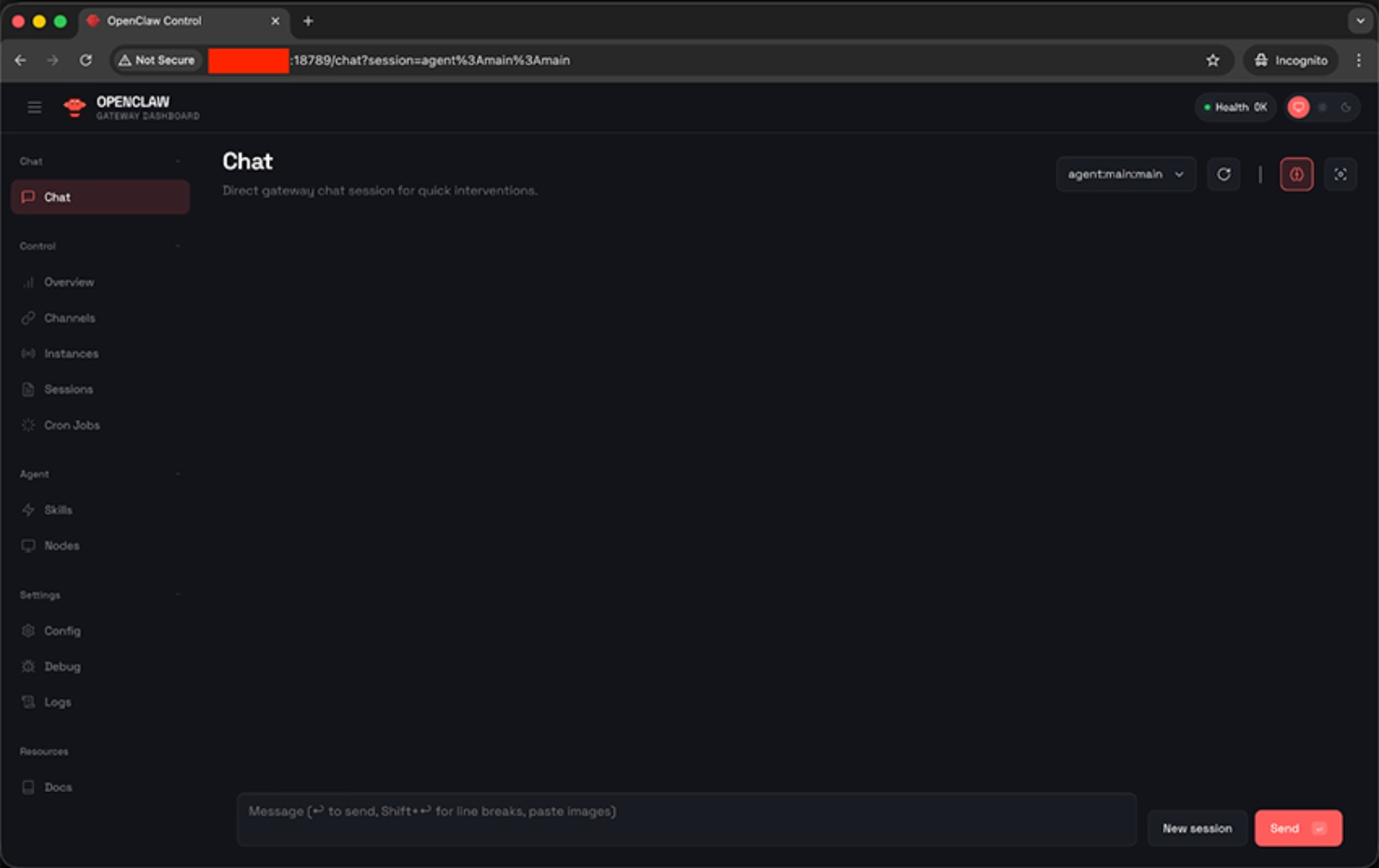
The OpenClaw agent works through LLMs and APIs, and completes tasks like sending emails, doing research, completing purchases, or making reservations on your behalf.
So, it attempts to bridge what many call the “expectation gap” of tools like ChatGPT or Gemini. Traditional LLM interfaces are powerful at generating text and reasoning through problems, but they largely stop at communication. They tell you what to do. OpenClaw aims to actually do it.
But, how?
Well, in simple terms, OpenClaw works by combining reasoning (LLMs) with action (Tools), guided by structured know-how (Skills).
Here’s the main framework:
- The LLM is the brain. It understands your request, breaks it into steps, and decides what needs to happen.
- Tools are the core capabilities. They let OpenClaw actually do things like read files, search the web, run commands, etc.
- Finally, skills are like playbooks. They teach OpenClaw how to use those Tools within specific ecosystems, such as Google Workspace, GitHub, Slack, or your notes app.
So when you say, “Analyze our competitor’s pricing and send me a summary,” the LLM plans it, the Tools execute it, and the relevant Skills provide the context for how to interact with the right platforms.
There are 25 official Tools and 53 official Skills developed and maintained by the OpenClaw team. These form the core architecture of the platform.
💡 If you’d like a deeper technical breakdown of how the official Tools and Skills are structured and layered, WehnHao Yu’s article offers a detailed walkthrough of the architecture.
Here’s how Yu categorizes the official tools and skills as core, advanced, and knowledge-level:

Because OpenClaw is open-source, the ecosystem doesn’t stop with the official skills, though.
Community developers can create and publish their own Skills in the public registry.
As a result, the number of available integrations has grown far beyond the official 53, with more than 5,700 community-built Skills currently listed, and new ones appearing regularly.
Here are some of the popular skills and use cases 👇🏻
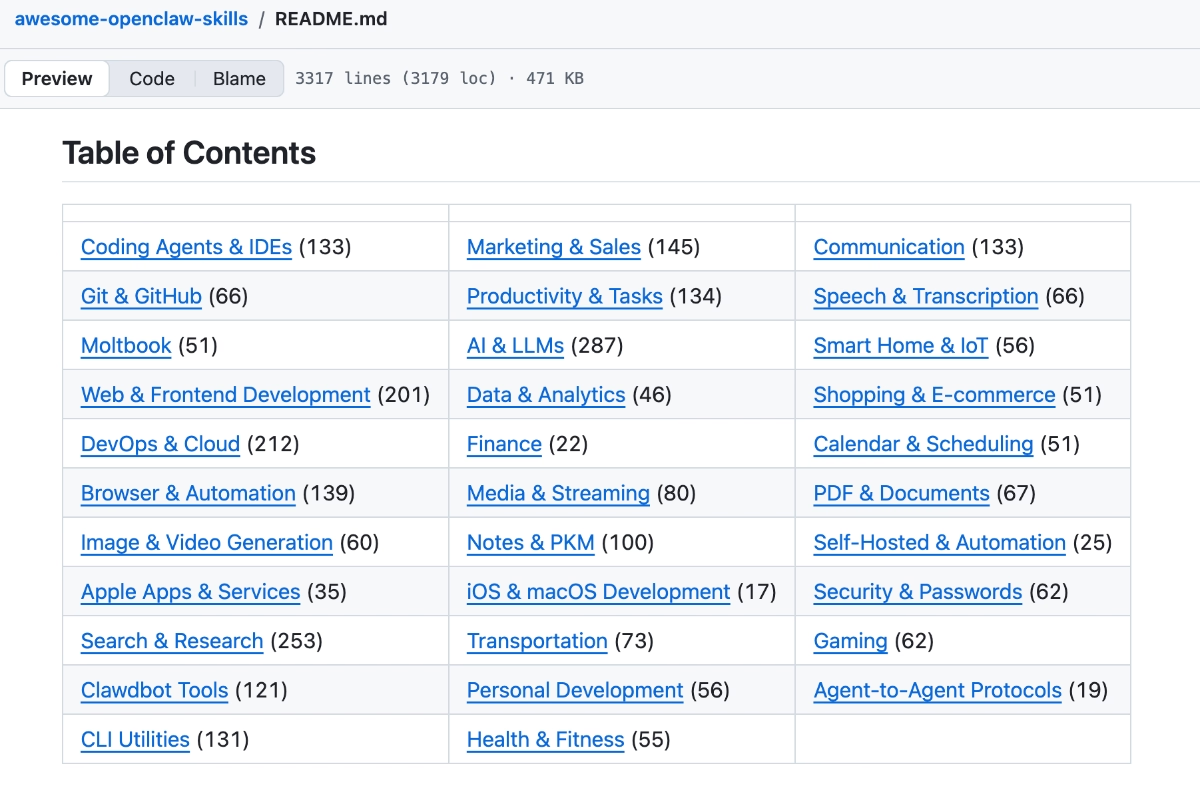
This open contribution model allows OpenClaw to expand quickly into niche tools, specialized workflows, and emerging platforms that the core team may not prioritize.
At the same time, it means the quality, security, and maintenance standards of third-party Skills can vary significantly…
While the OpenClaw works to review submissions and flag Skills that appear unsafe or potentially harmful, they cannot guarantee the security of every entry in the registry.
But we’ll talk about the security aspect of the app in a minute.
Who is OpenClaw for?
Let us be very direct: OpenClaw is NOT suitable for non-technical users (yet).
While the interface may look approachable, or the idea of communicating with your AI agent through WhatsApp or Telegram might sound pretty non-technical-friendly, the underlying system of OpenClaw requires a level of technical understanding to use safely and effectively.
Managing permissions, understanding sandboxing, handling API keys, or deploying the system on a virtual machine or cloud server are not beginner-level tasks.
If terms like access control, shell execution, environment variables, sandboxing, or virtual cloud instances feel unfamiliar, OpenClaw may not be the right hands-on experiment for you right now.
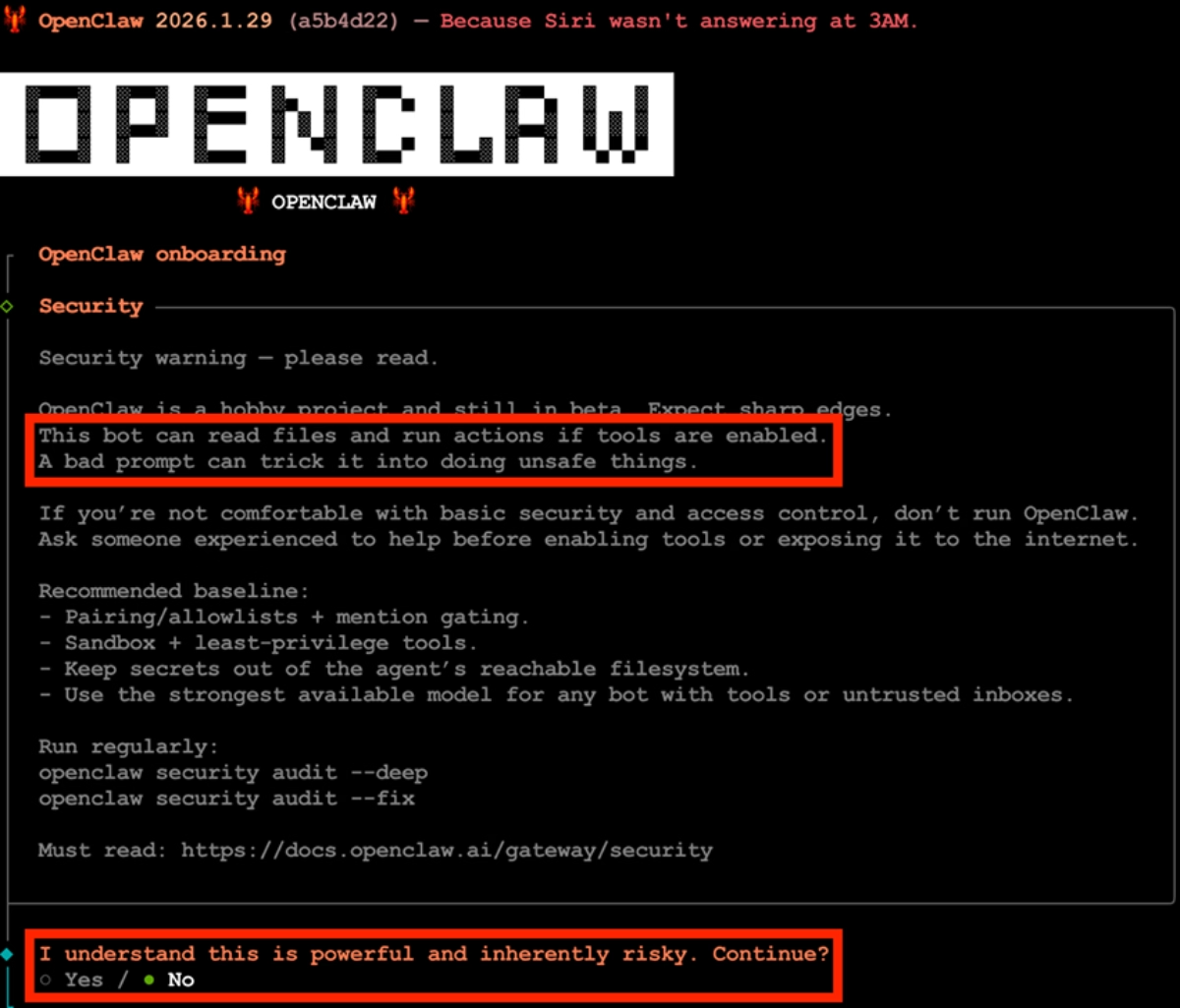
OpenClaw itself warns non-technical users off during its onboarding process, actually.
This bot can read files and run actions if tools are enabled. A bad prompt can trick it into doing unsafe things. If you’re not comfortable with basic security and access control, don’t run OpenClaw.”
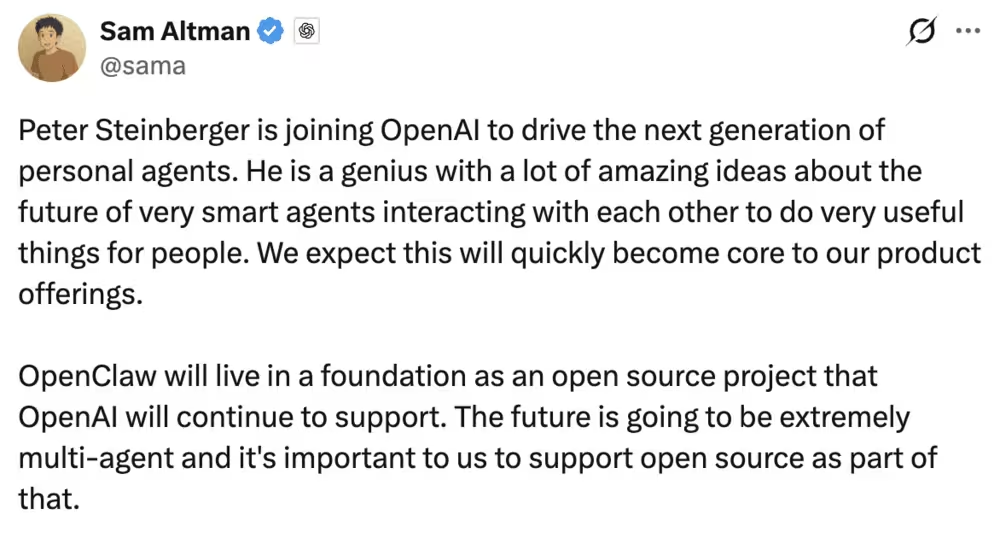
🚨 Sam Altman, CEO of OpenAI, recently announced that Peter Steinberger, the creator of OpenClaw, is joining the OpenAI team. That definitely caught the OpenClaw community off guard, especially considering the platform originally launched on Anthropic’s Claude.
According to Altman, OpenClaw will remain open-source, but OpenAI will support its continued development.
So… what does that actually mean?
Will OpenClaw become safer and more stable much sooner? Could OpenAI’s backing make it more accessible to non-technical users? Or might a larger organization introduce slower processes and more structured roadmaps that change its current pace?
Right now, we don’t have clear answers.
It’s a significant shift, and it could reshape OpenClaw’s direction entirely. Whether that leads to stronger security and usability, or a different kind of evolution altogether, is something we’ll have to watch closely.
Is OpenClaw safe? Or, under which circumstances is it safe?
The honest answer is: it depends…
It depends on how you configure and use it.
OpenClaw itself is not inherently “unsafe.” But it is powerful, and power, especially at the system level, expands risk.
Security researchers and AI specialists have raised several concerns since the platform gained traction. Here are the most common concerns:
- System-level access. Tools like command execution, file modification, and browser automation can potentially alter or damage a machine if misused.
- Prompt injection attacks. If OpenClaw browses the web or reads external content, it may encounter malicious instructions embedded in webpages that attempt to manipulate its behavior.
- Third-party Skills. With thousands of community-built Skills available, not all are audited or securely maintained.
- Over-permissioning. Users sometimes enable more Tools than necessary, unintentionally expanding the attack surface.
- Autonomous messaging. If configured to send messages externally, errors in context or tone could create reputational risks.
Moreover, these security concerns aren’t purely theoretical.
Researchers reported that more than 15,000 OpenClaw control panels were exposed to the public internet with full system-level access 👇🏻
⚠️ Importantly, if you’re using OpenClaw for business purposes and share sensitive information or customer data (to automate your marketing and sales communications, for example), you need to pause and carefully evaluate the compliance implications.
At the time of writing, OpenClaw is not positioned as an enterprise-grade, compliance-certified platform. It does not publicly advertise SOC 2 certification, ISO 27001 compliance, HIPAA readiness, or other formal security attestations that many regulated companies require from their vendors.
If your organization operates under strict data protection standards, OpenClaw may not meet your compliance requirements.
But there are basic precautions you can take to reduce risk and still experiment with OpenClaw responsibly, assuming you have the technical expertise to manage it properly.
Here are some of the top safeguard measures AI researchers and security specialists commonly recommend:
- Do not run OpenClaw on your primary laptop; use a separate machine to avoid exposing sensitive files and saved credentials.
- Deploy it in a virtual machine or isolated cloud environment to contain potential damage if something goes wrong.
- Keep the control panel off the public internet unless properly secured with strong authentication and firewall restrictions.
- Require manual approval for high-risk actions, such as command execution, to prevent unintended system-level changes.
- Enable only the Tools you actually need to minimize your attack surface.
- Avoid connecting critical production accounts and/or important personal accounts such as financial systems, password managers, or live customer data.
- Use dedicated and spending-capped API keys.
- Use a clean and new email address, calendar, and Telegram account.
- Review third-party Skills carefully before installing them and treat them like any other unverified open-source dependency.
Do you really need a Mac Mini to run OpenClaw?
No. Absolutely not. The Mac Mini craze is something totally unexpected (and slightly exaggerated, we must say).
The reason the Mac Mini entered the conversation is practical, not mandatory. Because OpenClaw can run with local models (for example through Ollama), some users prefer a small, always-on device dedicated to running private AI workloads.
✅ A Mac Mini is:
- Relatively affordable
- Energy efficient
- Powerful enough (especially Apple Silicon models) to handle mid-sized local LLMs
But that doesn’t mean it’s required.
In fact, OpenClaw itself only requires 32 megabytes of memory.
So, you can technically use any old laptop, desktop PC, or even a Raspberry Pi.
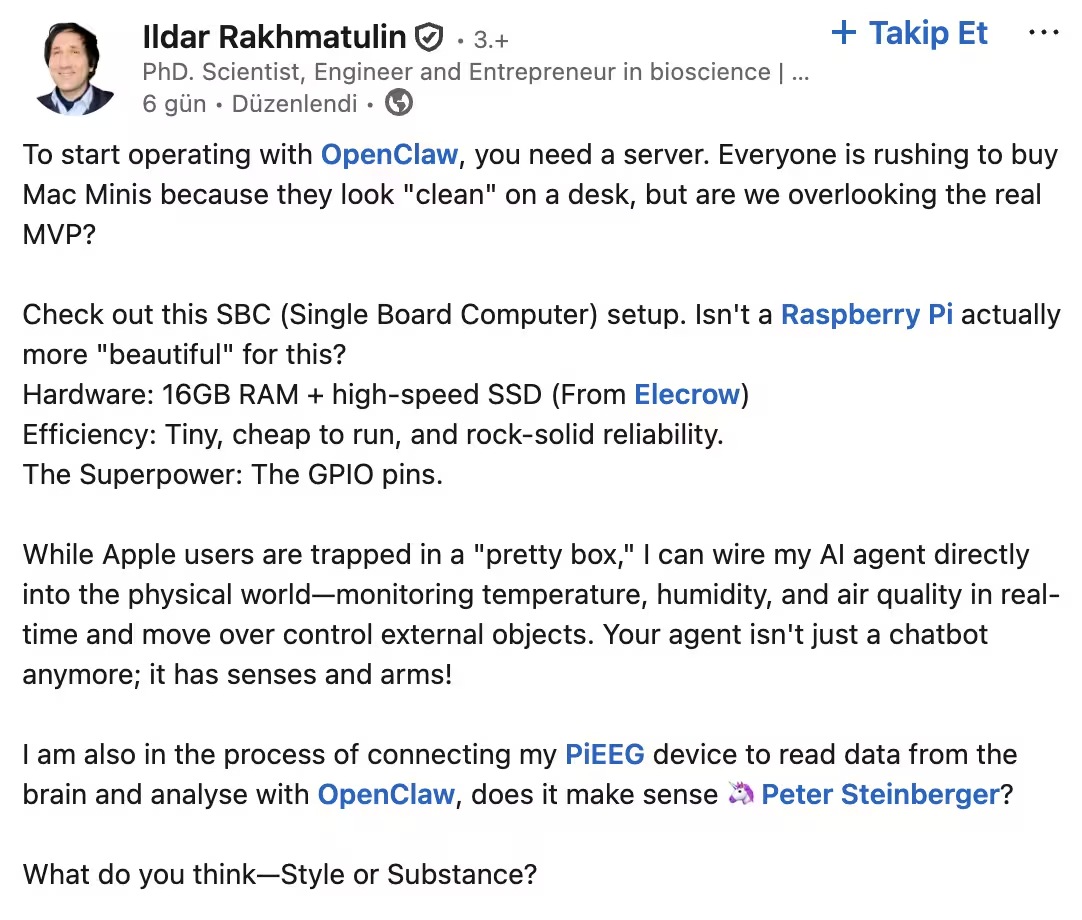
Or, if you want to keep things virtual, you can also run OpenClaw on a cloud virtual machine or a remote server, too. In fact, for many technically experienced users and product teams, this is often the more structured approach.
How can product teams adopt OpenClaw safely and effectively?
The security debate around OpenClaw is important, and in many ways, necessary. But acknowledging the risks doesn’t automatically mean the platform should be dismissed altogether.
OpenClaw offers interesting possibilities like automating research, orchestrating AI tools, generating educational materials, analyzing competitors, and more.
The key is controlled experimentation.
In this section, we’ll focus specifically on how product managers and product teams can explore OpenClaw in contained, low-risk ways.
Here are 4 ways you can experiment with OpenClaw: 👇🏻
Communicate and create with other (AI) tools more effectively
One of OpenClaw’s most practical advantages for product teams is that it can function as a coordination layer across multiple (AI) tools and software. Instead of treating software systems as separate destinations, OpenClaw lets you manage them within a single workflow environment.
OpenClaw agents are not limited to one-off prompts. Once configured with the right tools, skills, and permissions, they can operate:
- Continuously (24/7 monitoring or processing)
- On specific schedules (e.g., daily summaries, weekly reports)
- Triggered by events (new data, new tickets, new feature releases)
That means you don’t have to manually prompt the system every time something happens.
Another advantage is persistent memory.
Because OpenClaw can retain preferences, tone, product context, and prior decisions across sessions, it becomes increasingly tailored over time.
When generating reports, visuals, summaries, or stakeholder updates, you don’t need to restate formatting rules, brand tone, or strategic goals in every prompt. The system gradually adapts to how your team works.
❌ What is important here is that you do not…
- Connect it directly to production databases.
- Give it write permissions to live customer environments.
- Sync it with internal communication tools without scoped access controls.
Summarize lengthy articles, newsletters, and videos
As a product manager, you’re often expected to stay on top of industry shifts, competitor updates, AI releases, regulatory changes, and user sentiment.
The volume of information can be overwhelming.
However, OpenClaw can automate large parts of this research intake.
Using web access and scraping skills/ tools, an agent can:
- Pull full-length blog posts, research reports, or newsletters
- Extract key insights, statistics, and positioning changes
- Compare multiple sources into a single structured summary
- Highlight what is strategically relevant to your product
You can also use transcription skills/ tools to convert long videos (conference talks, competitor demos, launch announcements) into text, then generate:
- Concise executive summaries
- Bullet-point takeaways
- Actionable insights for roadmap discussions
And because OpenClaw stores memory independently from the model, it can also remember which competitors you track, which keywords matter, and what format your internal reports follow.
❌ For this use case, make sure not to share internal product roadmaps, customer data and user conversations, financial reports, unreleased metrics, confidential strategy documents, or private Slack, email, or CRM exports.
Conduct competitor research and analysis
Building on what we’ve discussed around web research and summarization skills, OpenClaw can also help you turn raw information into structured competitive insight.
Instead of simply collecting articles, changelogs, or pricing pages, the agent can compare sources side by side, extract strategic signals, and organize information. For example, it can identify recurring themes in competitor messaging, detect when new feature categories emerge, or track how pricing tiers evolve over time.
Here’s how Kyle Balmer, from AI with Kyle, explains OpenClaw’s deep research capabilities (and compares to LLMs’ research capabilities):
Because it operates as a workflow system rather than a single prompt, OpenClaw can continuously monitor predefined competitors and update internal summaries on a set schedule. Over weeks or months, this can allow your team to see patterns and trends.
It can also cluster public feedback into categories such as usability complaints, missing integrations, performance issues, or feature praise, making it easier for you to spot opportunity gaps.
Or, you can use it to stay on top of industry news and curate relevant content ideas.
Here’s how a design engineer uses OpenClaw safely to conduct research and draft social media posts:
Create educational materials and ebooks from your help articles
You and your product team probably already have a gold mine of structured knowledge in your help centers and documentation. One way to use OpenClaw is to transform existing material into new, high-value educational and marketing assets.
Instead of rewriting content manually, you can configure an agent to ingest selected help articles, group them by theme, and restructure them into more comprehensive formats, such as an onboarding ebook, a feature-specific playbook, or an advanced user guide.
It can also adapt the format depending on your needs. The same documentation can be converted into:
- A slide deck for sales or customer success teams
- A blog post series explaining core workflows
- A structured FAQ document
- A comparison table highlighting feature tiers
- A script outline for tutorial or explainer videos
If paired with visual-generation skills/ tools, it can even help create simple diagrams, tables, or infographics derived directly from your documentation
For example, Matthew Berman demonstrates how he connects OpenClaw to external AI media tools like NanoBanana and Veo to generate video and visual content:
❌ While using OpenClaw for this use case, avoid sharing:
- Unreleased features or roadmap details
- Internal-only troubleshooting procedures
- Security architecture explanations
- Customer-specific case data
- API keys, credentials, or configuration details
- Private analytics or usage metrics embedded in documentation drafts
If your help center includes both public and internal articles, make sure the agent only has access to the public-facing content or that sensitive sections are redacted before processing.
Wrapping up: Should you use OpenClaw as a product manager?
Okay, yes, OpenClaw is powerful, fascinating, and undeniably an important development in the AI world. Many call it a sneak peek into the future, and they aren’t wrong. It shows what AI agents might become.
But we all need a reality check.
OpenClaw is not ready for full adoption, especially not by businesses, product teams, or for mission-critical workflows. The platform is still experimental, technically demanding, and carries real security and compliance risks if mishandled.
You can explore it, experiment safely, and learn a lot, but don’t hand it the keys to your production systems or sensitive data just yet.
The technical expertise required to set it up safely so that intruders can’t access your workspace, API keys, or sensitive data is substantial. Don’t be fooled by those “30-minute no-code setup” YouTube videos. 👀
Those videos also recommend linking your personal email, calendar, or payment information to get the best results out of OpenClaw, which, at this point, we don’t need to remind you, are actions you shouldn’t take...
Safe usage is not simple.
There’s also the cost factor.
Running advanced models, high-memory workloads, and continuous automations isn’t free. You’ll need to invest in infrastructure and subscriptions if you want serious, reliable performance.
And finally, the usability question: Do you really need OpenClaw, or could your team achieve much of the same via existing LLMs and APIs? At the level where OpenClaw is actually safe and responsible to use, you may find it doesn’t add as much value as the hype suggests.
So, our honest advice would be to experiment if you’re technically capable and can commit to safe practices, but approach with caution and keep expectations grounded. Right now, OpenClaw is a sandbox for the curious, not a production-ready AI assistant.
OpenAI’s involvement could possibly turn OpenClaw into a more secure and usable platform with stronger security and a lower learning curve. Backing from a company like OpenAI could mean better guardrails, clearer onboarding, and faster hardening.
But for now, that’s still potential.

.png)