.svg)
.svg)
.svg)
.svg)



.svg)




.svg)
.svg)


Even a decade ago, digital education meant using PowerPoint presentations and teaching kids how to format Word documents.
Okay, maybe a little longer than that.
But it’s true that new technologies and digital tools have been entering every area of our lives much faster than before.
New tools, platforms, and systems appear faster than most schools can adapt, and the call for digital transformation now echoes behind every classroom door.
And if you (even sometimes) feel like you’re playing catch-up, struggling to keep pace with the latest edtech trends, we've got you, because in this article, we’ll cover:
- What digital transformation in education really means
- The main use cases and technologies driving it
- The benefits for students, teachers, and administrators
- The biggest challenges schools face during transformation
- And the key trends shaping the future of digital education
Plus, we’ll talk about some real-life examples of successful digital transformation in education, as well.
TL;DR
- Digital transformation (DT) in education means using technology to redesign how learning is delivered, managed, and experienced for students, teachers, and administrators.
- Key areas in which we see DT happen the most include:
- Administrative & operational workflows (student information systems, library/resource management, digital registration, HR/payroll, etc.)
- Teaching & course planning (LMS platforms, adaptive learning, AI tools, predictive and learning analytics, virtual labs, AR/VR technologies, etc.)
- Student engagement (Portals, mobile apps, chatbots, and parent engagement tools, etc.)
- Adopting digital tools ensures:
- Students enjoy personalized, engaging learning.
- Teachers have more time for teaching and engaging with students, because according to research, teachers spend half of their time on non-teaching tasks (like admin requirements that can be automated).
- Administrators save time, cut costs, and work more efficiently.
- But digital transformation is not an easy task or project. Unfortunately, there are several bottlenecks educators need to navigate through, such as:
- Limited access to devices and connectivity
- Outdated systems that don’t integrate well
- Tight budgets
- Gaps in digital skills among staff and students
- Some of these tech adoption barriers are much easier to overcome, while others depend on several factors/actors and require more effort.
- For example, digital adoption tools like UserGuiding can help bridge the skill gaps that prevent non-tech-savvy users from adopting new technologies by offering contextual guidance that eliminates learning curves!
What is digital transformation in education?
Digital transformation (DT) in education is the systematic use of technology to redesign how learning is delivered, managed, and experienced. It connects people, data, and processes to create environments where students, teachers, and administrators can learn, teach, and operate more effectively.
Digital transformation usually begins with digital innovation, say the introduction of new tools or ideas, such as an online learning platform.
Innovation turns into transformation only when these changes multiply and start reshaping the entire education ecosystem.
But of course, all of these don’t unfold without planning.
Every initiative sits within broader social, economic, and policy shifts, and not all succeed.
⚡ McKinsey’s research shows that fewer than 30% of digital transformation efforts deliver their intended outcomes, largely due to gaps in planning, culture, and execution.
So, to improve the adoption of digital technologies in education and increase the likelihood that transformation initiatives succeed, deliberate policies and frameworks are essential.
The OECD Strength through Diversity Project identifies 5 critical policy areas that shape how schools and systems use digital technology effectively:
• Governance
• Resourcing
• Developing capacity
• School-level interventions
• Monitoring and evaluating

If these policy areas and individual policy examples don’t make much sense to you and you cannot quite grasp how they translate into reality, don’t worry.
We’ll simplify things and handle the topic in a slightly different way.
So bear with us, and let’s talk about…
The use cases of digital transformation in education
There are many aspects and workflows in education that can be digitized or automated.
To make sense of this wide landscape, it helps to look at digital transformation through the lens of the people it affects most: administrators, teachers, and students.
- For administrators, digital transformation streamlines complex workflows.
Enrollment, payroll, procurement, and reporting become faster, more transparent, and less dependent on manual work. Data flows more freely between systems, which helps schools make informed, evidence-based decisions.
- For teachers, it changes how learning is designed and delivered. From learning management systems to adaptive learning tools and virtual labs, educators gain flexibility in how they teach and assess students.
Digital tools also free up time from administrative work and allow teachers to focus more on pedagogy and student connection.
- And for students, digital transformation brings personalization, accessibility, and engagement.
Learning can happen anytime and anywhere, lessons can adapt to individual needs, and interactive technologies make knowledge feel more tangible and relevant.
⚠️ Teaching practices, class structures, and learning needs differ radically between K-12 and higher education.
However, the areas where digital transformation occurs do not.
Of course, the tools, platforms, and software used may differ, but their main purpose and use cases can still be examined under the same DT categories.
And that’s exactly what we’re going to do throughout this article.
Operational & administrative use cases for school administration
Digital enrollment and registration
Enrollment is one of the first points of contact for students and families. Digital systems allow applications, document submission, and confirmations to happen online.
They also reduce paperwork and delays in student onboarding.
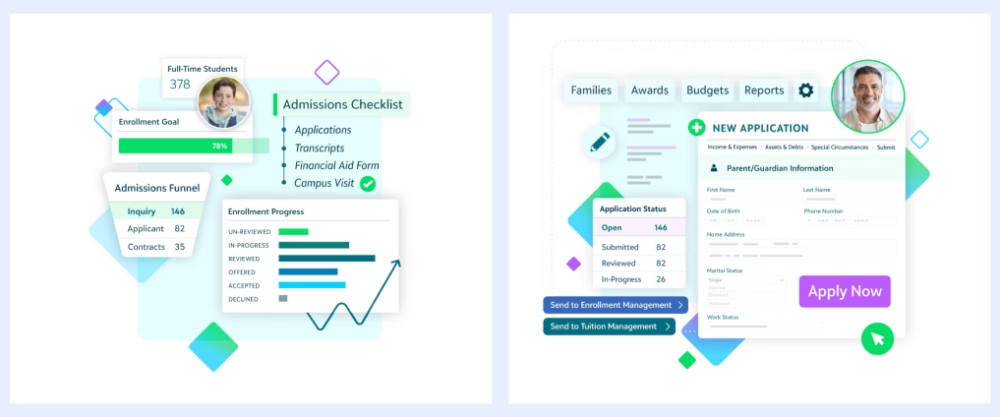
Using all-in-one student enrollment management platforms and systems, such as Ellucian Banner, Blackbaud, and Finalsite, also ensures standardization in the enrollment process through automation.
Here’s what digital enrollment platforms look like:
⚠️ Digitizing the registration process without fully integrating its different steps or centralizing the forms and information collected along the way can actually slow things down even more than traditional manual registration.
One Reddit user who works in education shares their experience with an institution that (technically) had a digital registration system, but was drowning in digital paperwork:
A while back, I was helping a local educational institute with their new student intake, and even though it was all digital, it was pure chaos. I'm talking about a mess of online forms, manual data entry into spreadsheets, and a constant back-and-forth that took, on average, three weeks to get a single student fully registered and invoiced. The admin team was drowning in digital paperwork. A student would fill out an online registration form. Admin staff would then have to manually copy-paste that data into a master student spreadsheet. Finance would then look at that spreadsheet and manually create a recurring invoice for the term fees in their payment system (like Stripe). Someone else would then have to manually add the student to the correct class communication list. It was a slow, painful process that created a clunky first impression.”
Student information and records systems
Student records form the backbone of school administration.
Grades, attendance, disciplinary notes, and even health data often live in separate silos, which makes it hard to get a full picture of a student’s journey.
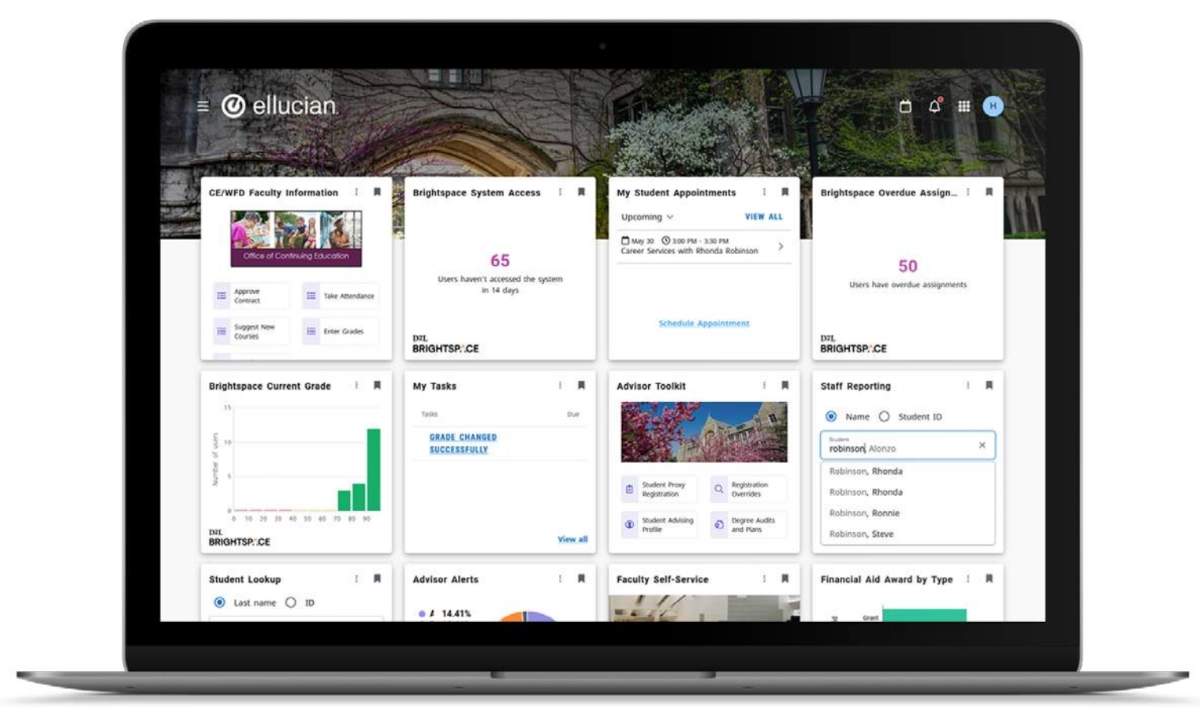
Centralized student information systems (SIS) bring all that data together.
They allow administrators and teachers to access accurate, up-to-date information instantly, generate reports, and make data-driven decisions. When integrated with other systems, such as learning management systems (LMS) or finance tools, they also reduce duplication and data entry errors.
Here’s an example SIS:
💡 Pro Tip: Many digital enrollment and registration systems also function as student information systems (or vice versa, depending on which platform you discover first). Blackbaud and Ellucian, for example, support both student information management and enrollment processes.
Finalsite, on the other hand, doesn’t include features for student information management.
So, if you’re looking for a platform to digitize your processes, it’s worth comparing your options based on how many digital transformation areas they cover and how well their tools integrate with each other.
HR, payroll, and faculty management
Managing faculty and staff involves dozens of ongoing tasks like recruitment, contracts, payroll, scheduling, and performance tracking, to name a few.
Digital HR and payroll platforms streamline all these processes in one place and reduce administrative workload and compliance risks.
If you opt for a payroll and finance management system built for education, your bursary can handle even more through automation and integration.
For instance, platforms like iFinance by iSAMS include a collaborative general ledger that enables real-time financial reporting and a fully paperless approval workflow. Budget holders can see live updates, approve purchase orders, and drill down to transaction details without leaving the dashboard.
These systems also bring flexible billing to life.
Your bursary can generate and update invoices for students, applicants, or alumni, and automatically synchronize all data with ledgers without needing repeated manual entries or monthly journal calculations.

Faculty management software, on the other hand, is very similar to student information management systems. They allow you to automate different steps of the faculty lifecycle, from onboarding and recruitment to workload management and performance tracking.
You can use them to:
- Track applicants, search resumes, and shortlist candidates
- Onboard new faculty members
- Monitor faculty performance (courses, published papers, research activity, etc.)
Most faculty management software also offers portals for the faculty, as well.
So, they can also track their (planned) research and courses, sabbaticals, or track their application status, if they’re not a member of the faculty yet but are applying for a new position.
Here’s an example faculty management software:

Procurement, vendor management, and logistics
Schools handle countless purchases from classroom supplies to lab equipment, often spread across multiple vendors and departments. Without digital systems, tracking orders, approvals, and invoices can turn into a full-time job.
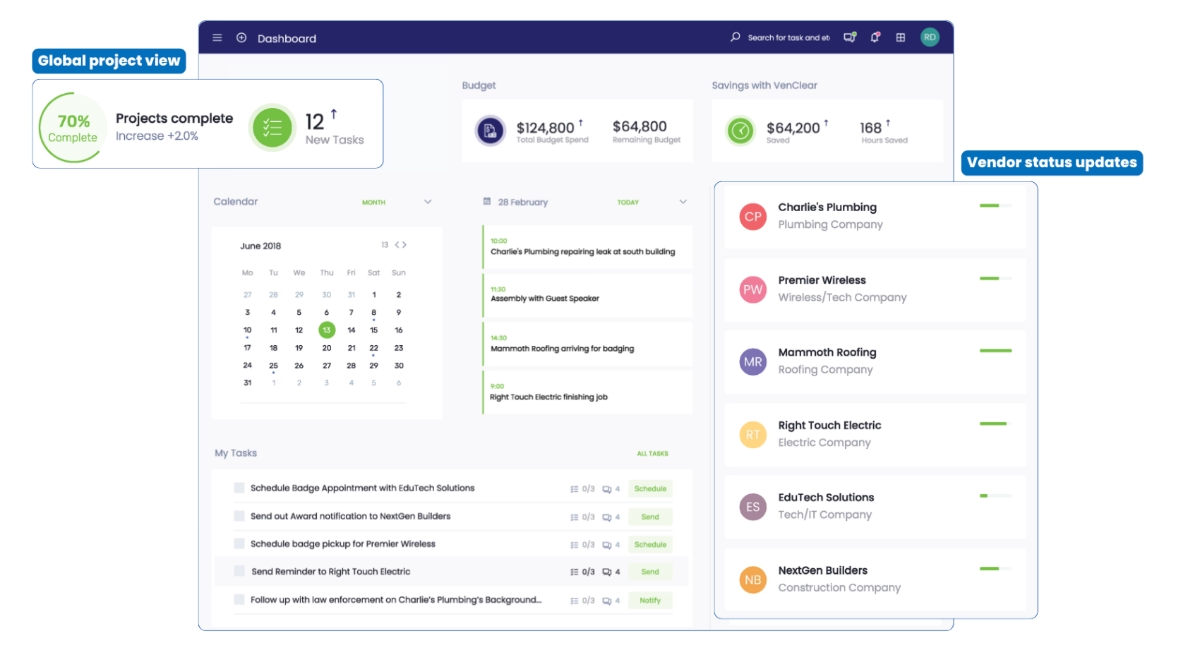
Digital procurement and vendor management platforms bring structure to that chaos, as they:
- Automate purchase approvals,
- Schedule your meetings/communication with vendors,
- Monitor spending limits and project progress with subtasks and steps,
- Centralize vendor records (service contracts, insurance certificates, etc.),
- And even allow you to chat directly with vendors.
So, fewer delays, fewer wrong purchases, and fewer miscommunications.
Here’s an example vendor management dashboard:
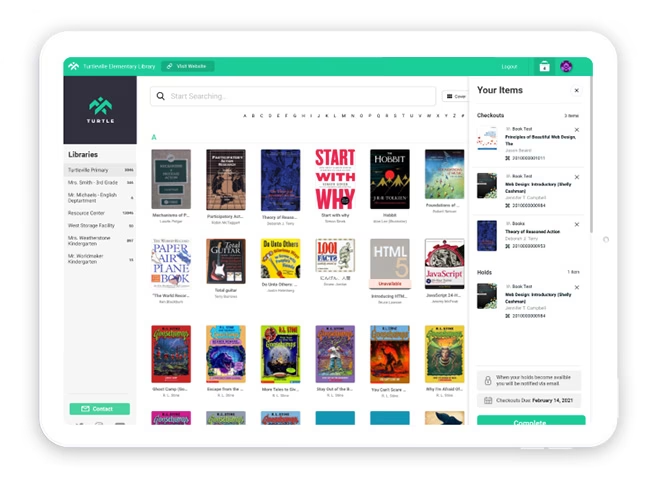
Library and resource management
Managing library assets used to mean stacks of books, sign-out sheets, and endless reshelving. Now, digital library systems make the process easier and more efficient.
Students and teachers can search, borrow, and access resources online, whether that’s a physical book, a video, or a research paper.
Institutional reporting & planning
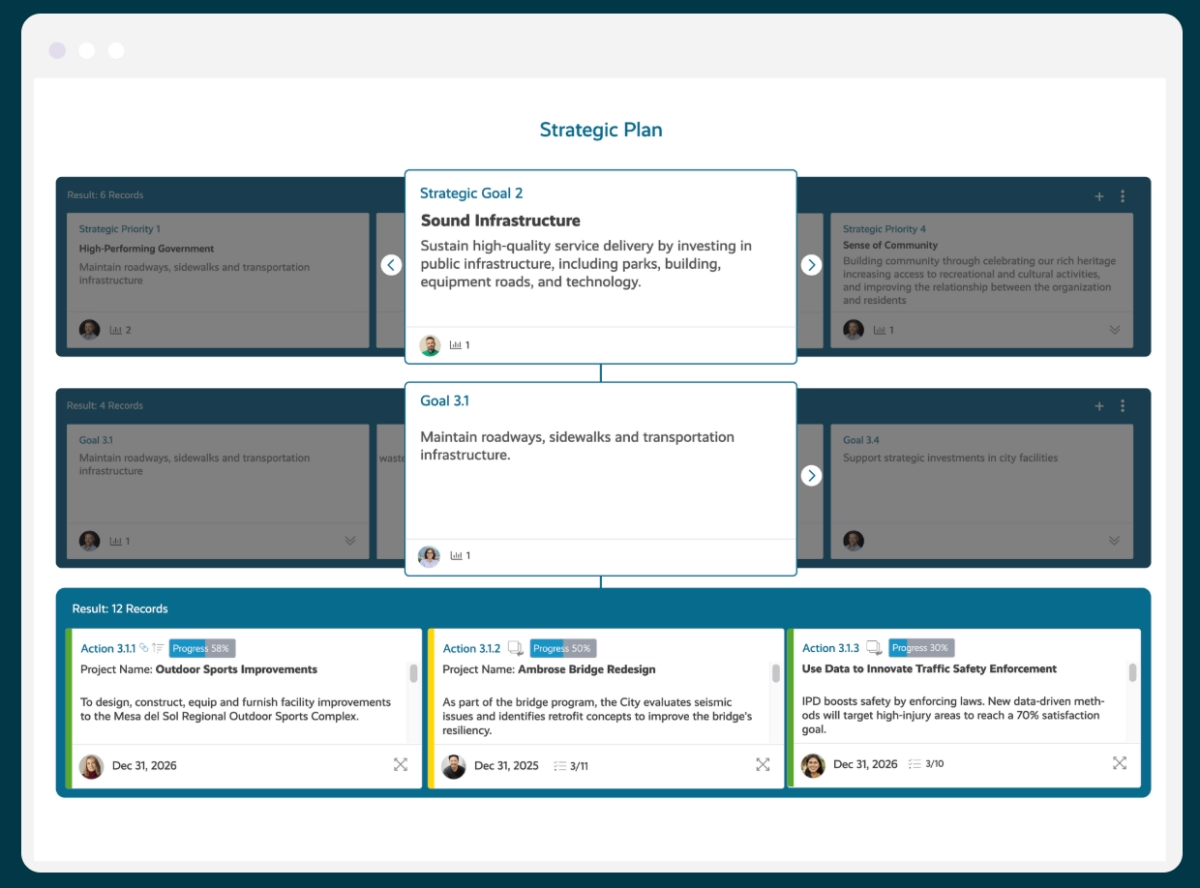
Modern institutional data management software allows schools to capture and analyze data across administrative, academic, and student affairs.
Many platforms even come with importable, pre-designed assessment plans that help you structure and document annual processes proactively. These plans also align with regional accreditation standards and display a real-time assessment cycle dashboard so progress can be tracked from one place.
Institutional planning software allows you to:
- Track your strategy through planning cycles
- Boost transparency with staff, boards, and the community
- Measure your performance against strategic goals
Teaching & course planning use cases for teachers
Learning management and course delivery technologies
Learning management systems (LMS) have become the digital backbone of modern classrooms. They let teachers plan, deliver, and track lessons all in one place.
With platforms like Canvas and Moodle, teachers can upload materials, design assignments, take class attendance, announce grades, and communicate with students without relying on emails or printed handouts.
Some also allow teachers to deliver their lessons online, as well.
Beyond convenience, these systems open the door to more interactive learning.
Students can track their progress with the reading materials, discuss with their classmates through forum posts, and/or complete short quizzes and tests right on a course’s page on the LMS.
Here’s an example Moodle page for teachers:

Personalized learning path technologies
Digital technologies allow teachers to tweak their teaching methods and learning materials based on student needs with diverse groups. And this is especially important for neurodivergent students and/or students with special needs.
Actually, a recent study found out that being able to control the learning pace by stopping, repeating, or reviewing lessons helps neurodivergent students feel less overwhelmed and absorb information more effectively. 👇🏻
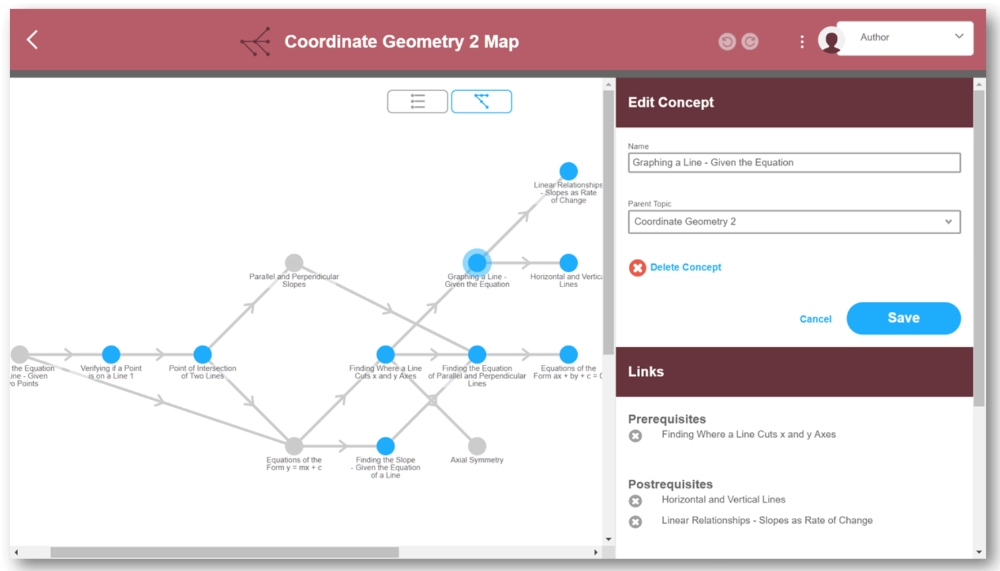
Personalized learning platforms (or adaptive learning platforms, in other words) use data and algorithms to adjust content, pacing, and feedback based on individual progress.
For example, if a student struggles with fractions, the system can automatically provide additional exercises or alternative explanations before moving on.
They make learning environments flexible and inclusive.
Here’s an example adaptive curriculum mapping tool:
In practice, UDL encourages teachers to offer multiple means of engagement (to motivate learners in different ways), multiple means of representation (to present information through text, visuals, audio, or interactive formats), and multiple means of action and expression (so students can demonstrate understanding in diverse ways, like writing, recording, or building).

Open educational resources
Open Educational Resources (OER) are freely available teaching, learning, and research materials like textbooks, lecture slides, videos, and quizzes that can be used, adapted, and redistributed without cost.
For teachers, OER means flexibility and creativity.
You can mix and match different resources to build your own lessons, customize examples for your students’ context, or even co-create materials with other educators worldwide.
Platforms like OER Commons, OpenStax, or MERLOT make it easy to find high-quality, peer-reviewed materials aligned with specific curricula.
OER also supports self-paced learning.
Teachers can share additional materials with students to revisit lectures, which can be especially useful for exam preparation or catching up on missed topics.

AI/ML tool for teachers
Just like in any other field or profession, we see an extensive increase in the use of AI technologies in education and teaching, too.
For starters, automated grading systems can now evaluate assignments and quizzes with pre-determined answer keys, or even open-ended questions, essays, and calculation-requiring problems in chemistry, math, or physics.
Tools like Gradescope or Turnitin’s AI grading modules help teachers save hours on marking.
And the teachers are still the ones deciding on the grading criteria and rubric; these tools only help with the standardization and automation a little bit, they do not grade based on any GenAI reasoning.

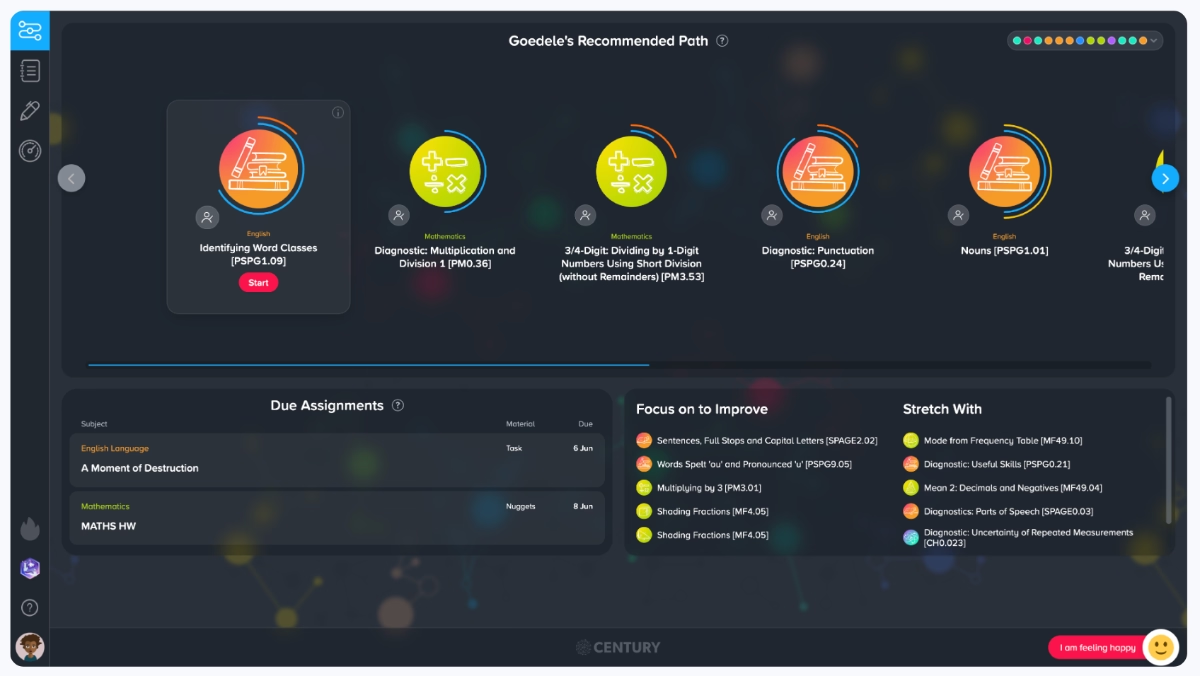
AI also supports personalized tutoring and content recommendations. Intelligent systems can analyze student performance data and suggest specific exercises, readings, or videos based on what each learner struggles with.
CENTURY Tech is one example of AI-powered personalized homework tools.
Here’s what an educator who has been using CENTURY says about their experience:
This additional level of personalisation is really good and it’s what has always set CENTURY apart. It’s so easy to see who is getting that extra stretch and how, as well as those that need that extra level of support.”
Another fast-growing area is AI-driven feedback.
Platforms like Writable give real-time insights into students’ writing and comprehension. Teachers can use this feedback to identify gaps early and adapt lesson plans accordingly.
Here’s what Amelia King, a digital transformation specialist in education, says about ethical and meaningful use of AI-powered feedback tools and how to strike a balance between personal, human feedback and technical, AI feedback:
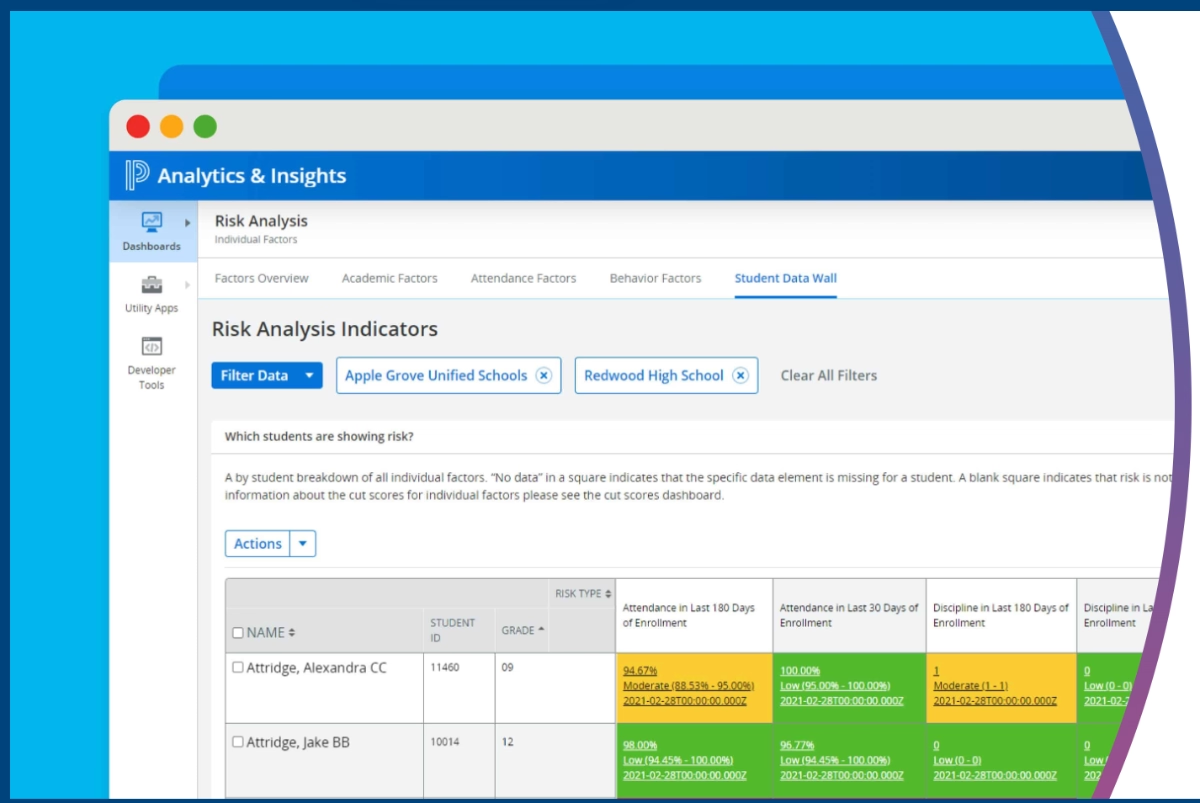
Predictive analytics (dropout risk, performance forecasting)
Predictive analytics helps educators make proactive, data-driven decisions instead of reactive ones.
By analyzing patterns in attendance, grades, engagement, and even LMS activity logs, schools can identify students who might be at risk of dropping out or falling behind, often before the first signs appear in the classroom.
For example, a university might use predictive models to flag students whose participation in online discussions has dropped or who consistently submit assignments late.
Academic advisors can then step in early with targeted support or tutoring.
These systems also help with performance forecasting.
Teachers and administrators can predict how students are likely to perform in future assessments based on historical data, and then adjust curriculum pacing, interventions, or class groupings accordingly.
Learning analytics (which content works, student behavior)
If predictive analytics tells you who needs help, learning analytics tells you what and why. It focuses on understanding how students interact with course materials:
- How much time do they spend on each lesson?
- Which quizzes do they fail most often?
- Which formats (videos, readings, simulations) drive better engagement?
These insights are invaluable for teachers and administrators alike.
For example, if analytics show that students consistently struggle with a particular module, teachers can revisit that section, perhaps the material is too dense, or the examples are unclear.
And at an institutional level, learning analytics can inform decisions about curriculum design, resource investment, and teaching methods.
Virtual labs, simulations, and AR/VR technologies
Virtual and augmented reality (VR/AR) technologies are redefining what “hands-on learning” means. Instead of reading about space exploration, students can experience it with these technologies now.
AR/VR technologies immerse learners in dynamic, interactive environments.
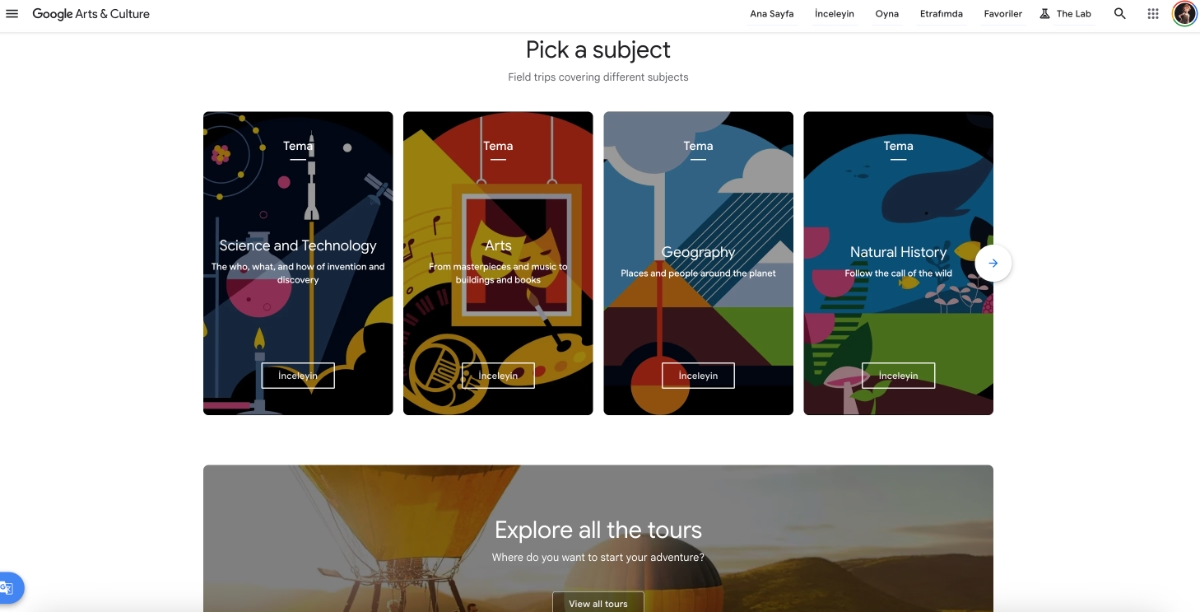
Take Google Arts & Culture (formerly known as Google Expedition), for instance, a platform that offers over 1,000 virtual and augmented reality tours, from art galleries and museums to underwater ecosystems and outer space.
But AR/VR isn’t limited to virtual field trips.
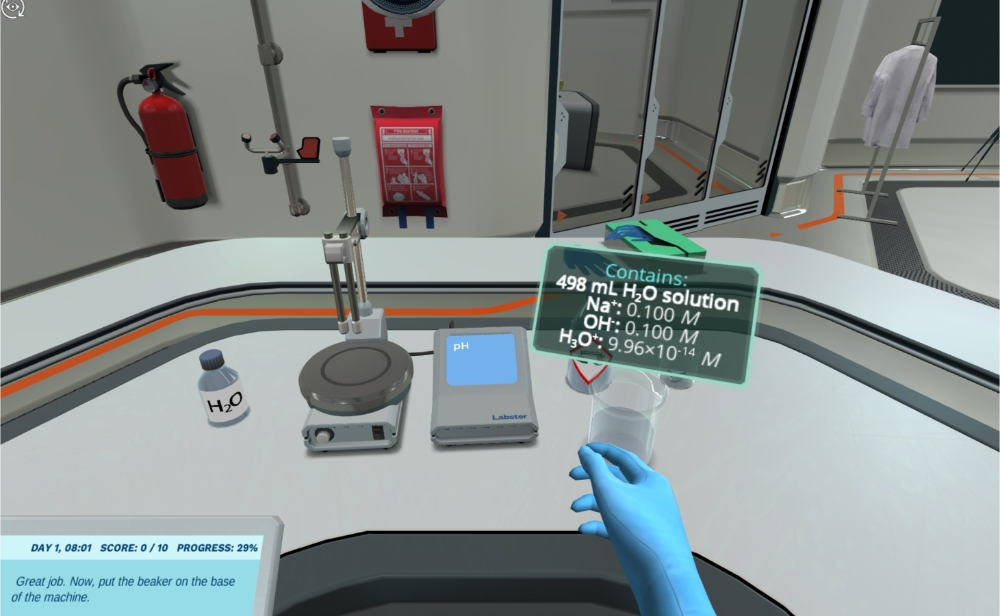
Virtual labs allow students to perform experiments safely and repeatedly, whether they’re mixing chemicals, dissecting a frog, or testing engineering designs.
Platforms like Labster simulate real-world environments and provide instant feedback, helping students grasp complex scientific concepts through practice rather than memorization.
These tools also enhance peer and group learning.
Imagine a biology class where students collaborate in a shared virtual lab or a history project that takes place in a 3D reconstruction of ancient Rome.
AR/VR technologies encourage active participation and experiential understanding, where learning happens by doing, exploring, and sharing insights together.
They even improve the permanence of information and practical skills.
👉🏻 According to Purdue Global, as they started using VR to simulate high-risk scenarios in their nursing programs, they saw 10-15% improvement in the national exam pass rates.
Classroom technologies
Smart boards, tablets, and connected devices have been in the classroom for quite some time now.
- Smart boards replace static whiteboards with digital canvases where teachers can draw, annotate, display videos, and run live quizzes. They make lessons more visual and dynamic.
- Tablets and personal devices allow learners to follow along with digital textbooks, collaborate on shared documents, or participate in instant polls and games.
Together, these tools create what’s often called a “smart classroom”.
💡Pro Tip: When we go beyond the smart boards and student tablets, and start to incorporate other technologies (like the AR/VR technologies we’ve just talked about), we get “immersive classrooms”.
And here’s how immersive classrooms impact student success:
Learning & engagement use cases for students
Student portals, mobile apps, and dashboards
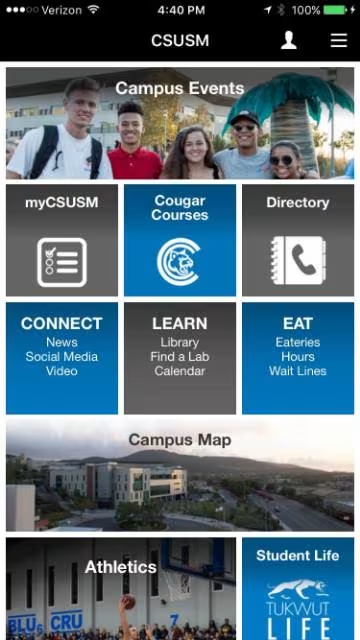
Student portals and mobile apps are the new digital hubs of campus life. They bring together essential functions like attendance tracking, exam enrollment, grade monitoring, and course updates in one place.
Instead of juggling multiple systems, students can log into a single platform to see their timetable, submit assignments, check grades, or even request transcripts.
These dashboards also make academic progress more visible.
Students can see where they stand in each course and what tasks remain, which helps them plan and stay organized.
Here’s an example mobile app from California State University, San Marcos (CSUSM):
Some universities even build dedicated portals for their alumni to support networking and job opportunities.
Technical University of Munich (TUM) is a good example of this:
Parent and legal guardian engagement tools
Parent engagement platforms provide real-time visibility into their child’s academic journey, from grades and attendance to upcoming assignments.
They’re especially useful for K-12 education.
Instead of waiting for quarterly report cards, parents can track day-to-day progress or receive automatic notifications about missed classes or approaching deadlines.
Tools like ClassDojo even include features for scheduling parent-teacher meetings and coordinating school visits.

Chatbots, virtual assistants, 24/7 support
Chatbots and virtual assistants are becoming the first point of contact for student questions, especially in higher education. Whether it’s about enrollment deadlines, campus navigation, or IT support, these tools reduce administrative bottlenecks.
And also allow students to access instant information and responses.
For example, Arizona State University partnered with Amazon to develop voice-activated AI assistants that help students with campus-related questions through Echo Dot devices.
Benefits of digital transformation in education
Digital transformation offers clear advantages for everyone in the education ecosystem.
➡️ For students, it ensures:
- Enhanced engagement and motivation
- Improved learning outcomes
- Greater access and inclusivity
The United Nations Convention on the Rights of the Child (UNCRC) emphasizes that every child has the right to high-quality education, and technology adoption helps schools move closer to this goal.
It ensures that students with diverse needs and learning types are not left on the sidelines of traditional classrooms but can engage meaningfully alongside their peers.
Plus, digital technologies are a big part of our daily lives outside of education, as well.
So, it’s only natural that traditional learning methods, homework, and class activities do not feel as engaging as they did before, not for the new generations.
Professor Adnan Dzelihodzic from University of Sarajevo explains the need for adoption of new digital technologies for better class engagement as well as learning efficiency:
➡️ For teachers, digital transformation offers chances of:
- Early intervention for at-risk students
- Curriculum and teaching optimization
- Culture of innovation and experimentation
Educators are often role models for their students. They introduce them to new ideas, tools, and ways of thinking, whether in K–12 or higher education.
When teachers actively use and experiment with digital technologies, they not only improve their own practice but also inspire students to be curious, adaptable, and open to innovation.
For many learners, classrooms are the only places where they can access advanced tools such as tablets, coding platforms, or even VR equipment.
In this sense, digital transformation in education doesn’t just modernize teaching, but also creates opportunities for students to experience and engage with technologies that might otherwise be out of reach.
➡️ For school administration, digital transformation means:
- Smarter resource allocation
- Scalable digital infrastructure
- Cost and time savings
- Resilience in times of disruption
The pandemic dramatically accelerated the digitization of education systems.
Yet, when COVID-19 first hit, many schools were unprepared.
Teachers lacked experience with online platforms, students struggled to adapt, and administrators faced unexpected challenges around infrastructure, budgeting, and implementation.
In fact, UNESCO’s study on Greek preschool teachers’ readiness to online teaching during COVID-19 highlights 2 key things:
- Many teachers felt underprepared and lacked the necessary skills and confidence to deliver effective online instruction.
- Support and guidance from local education authorities played a crucial role in facilitating the transition to remote teaching.
Through that period of experimentation and adaptation, the education community developed a new level of digital fluency.
Today, most students know how to access class materials or submit assignments online, and teachers are comfortable managing classes, announcements, and communication digitally.
As a result, digital tools and hybrid learning models have become part of the educational norm.
Building on this foundation with good infrastructure and the right technical know-how ensures that learning can continue seamlessly in the face of future disruptions, whatever form they take.
Examples of technology-driven education transformation
Twin Science offers in-app onboarding to help non-tech-savvy teachers bring AI-powered tools and innovative STEM learning into their classrooms
Twin Science is an education platform that offers various tools and AI-powered features for teachers to create interactive lesson plans, activities, and teaching materials for STEM skills development in younger students.
However, they were facing challenges in getting teachers to adopt the platform's different capabilities and clarifying their value propositions.
So they decided to create contextual and personalized in-app experiences with UserGuiding.
They’ve built:
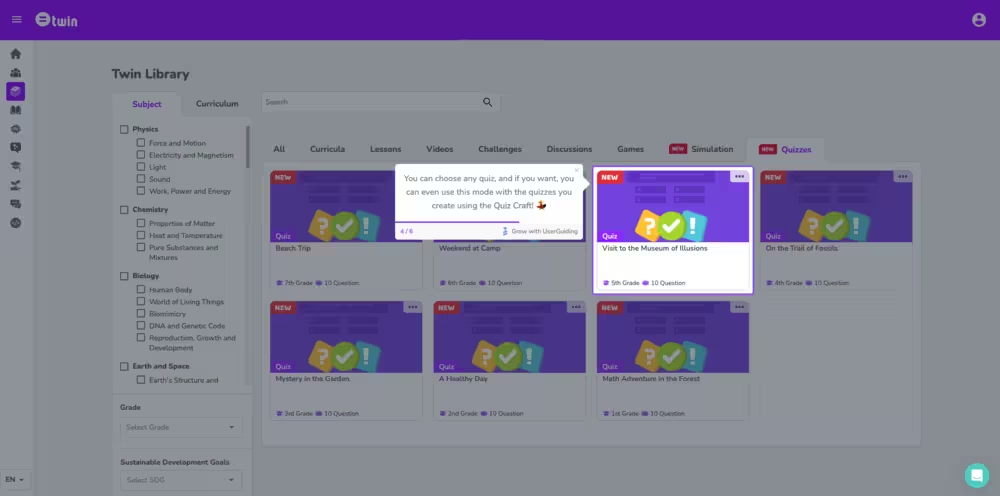
- Interactive tutorials that go over the key aspects of different tools,
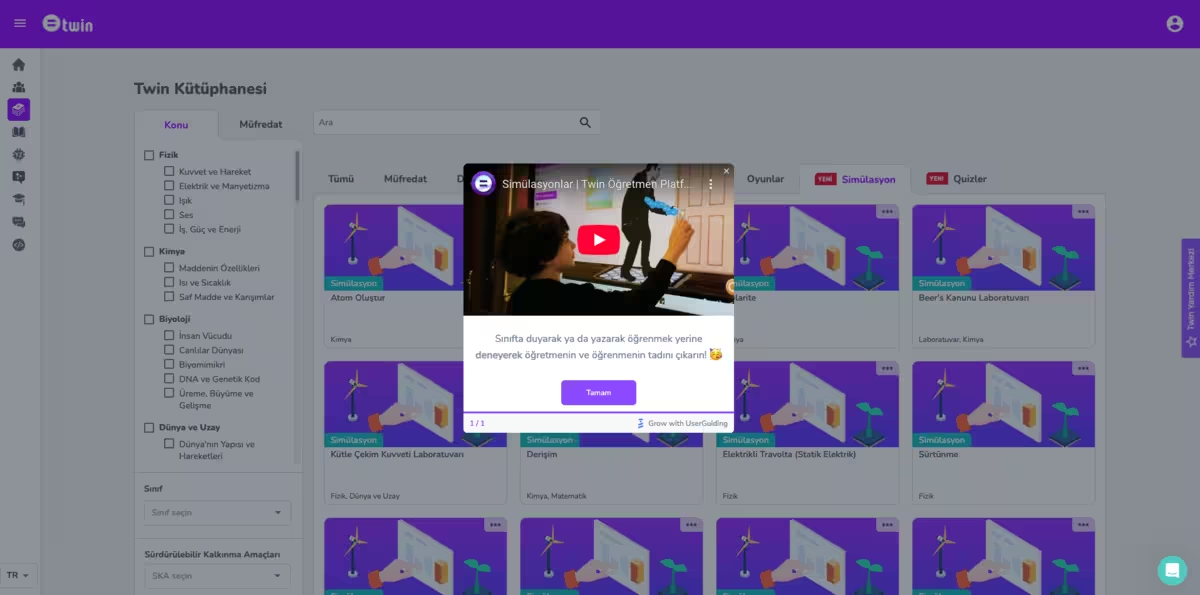
- Pop-up modals to welcome new teachers to the platform, and introduce them to relevant features, as well as modals to announce their new features to their existing users, and
- Standalone knowledge bases to create a self-serve support center by centralizing their use case articles, help materials, and FAQs.
And by creating all of these without writing a single line of code, without any dev time, without spending hours to learn how to use a so-called “no-code” tool, with UserGuiding, in other words, Twin Science saved $10,000 on employee costs.
Now, let’s look at what they did.
Here’s an example announcement modal for one of their new features:
And here’s an example tooltip from one of their interactive guides:
What makes this a good DT example?
✅ Decreases the learning curve and eliminates adoption barriers for non-technical teachers, which also brings equality to access to technology in classrooms, as students of non-tech-savvy teachers can now make use of innovative STEM exercises.
✅ Highlights value propositions and exemplifies use cases for skeptical users, which ensures higher activation and engagement with non-traditional teaching tools.
Brian.study offers self-serve support hubs so that teachers do not hit adoption barriers and give up on adaptive learning environments
Brian.study is an AI tutor that enables teachers to create adaptive and personalized learning paths for different students. Teachers can create engaging and gamified exercises and then get student engagement data and study reports.
But things were a little bit confusing for their users.
With all the cool capabilities, teachers were not able to use them independently.
When the support tickets came to a point where it was impossible for the support team to get back to them individually, they decided to adopt UserGuiding and create a self-surve support system.
To do that, they built:
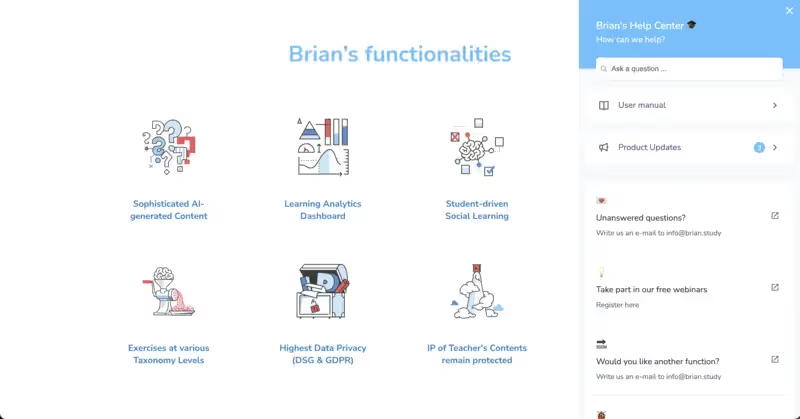
- In-app resource centers, and
- Standalone knowledge bases.
And these two self-serve support hubs combined saved them over $15,000 in support costs within six months of implementation.
Here’s a look at their in-app resource center:
And here’s their standalone knowledge base:

What makes this a good DT example?
✅ Allows teachers to access instant information and support without waiting for delays that might be caused by ticket overload and/or limited working hours.
✅ The in-app resource center brings valuable information and guidance into the app, allowing people to check for quick answers without leaving the app.
✅ The knowledge base makes use of localization and offers support in different languages (English, German, and French), which might be impossible/unsustainable to ensure with live support.
Open University of Catalonia (UOC) and The eLearning Innovation Center (eLinC)
The Open University of Catalonia (UOC), based in Barcelona, is one of the world’s leading fully online universities.
With a strong commitment to flexibility, accessibility, and innovation, UOC has become a model for higher education institutions looking to transition to digital-first learning environments.
To support this mission, the university established the eLearning Innovation Center (eLinC), a hub dedicated to transforming teaching and learning through research, experimentation, and the strategic use of technology.
The eLinC works hand in hand with faculty and staff to redesign courses, integrate new digital tools, explore learning analytics, and foster a culture of continuous improvement and innovation across the institution.
Among the projects the faculty leads, there are:
- Interactive online coding labs for hands-on programming practice.
- AI assistants that answer students’ course-related questions.
- Collaborative assessment tools that simplify and digitize master’s degree project evaluations.
- Competency self-assessment systems that help students reflect on and track their skills.
What makes this a good DT example?
✅ Improves accessibility, engagement, and personalization for both students and teachers.
✅ Reflects a culture of experimentation, where new ideas are tested, refined, and scaled to benefit the entire institution.
AI usage in EFL classrooms in Argentina
In Buenos Aires, a forward-thinking English language program has taken a bold step by weaving artificial intelligence into its teaching model.
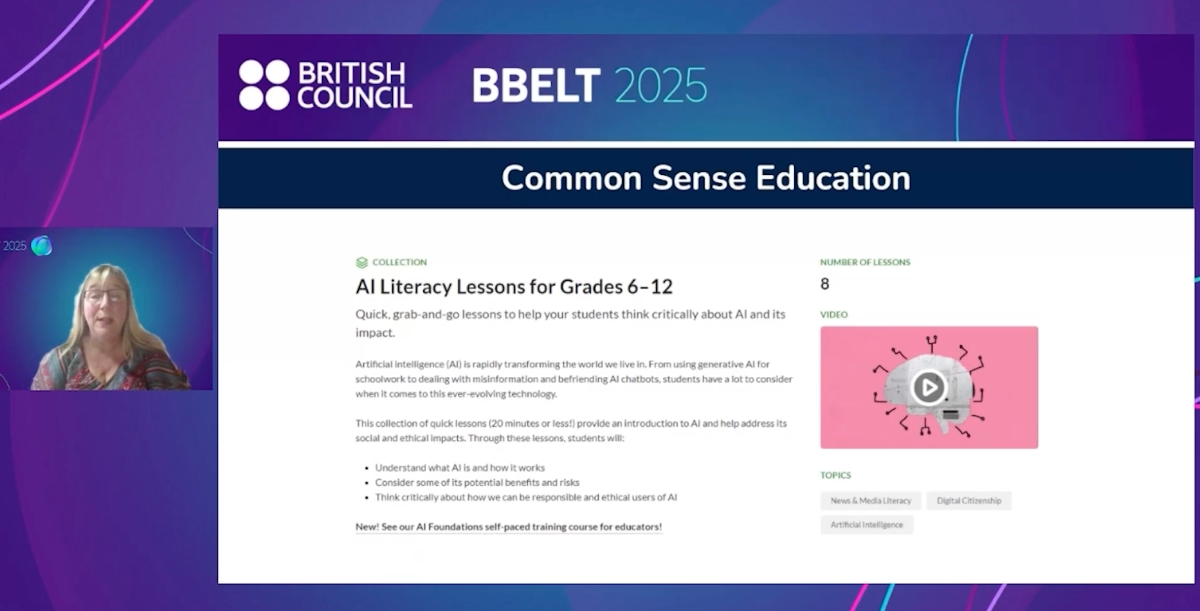
The school began by introducing AI literacy courses for both teachers and students to ensure everyone understood not just how AI works, but also its limitations, ethical implications, and best practices for learning.
Once that foundation was set, AI became an active learning partner in the classroom.
During English lessons, students first engage with regular course materials, and then move on to AI-powered chatbots and intelligent tutors specially designed to guide conversations, ask thought-provoking questions, and encourage reflection.
So, AI study partners, we might say.
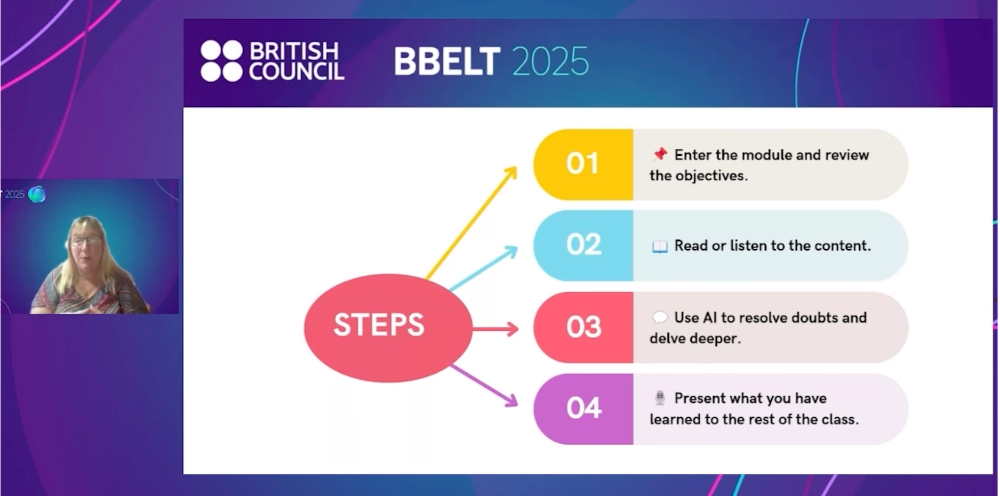
Teachers then build on this by organizing learning circles, class discussions, and presentations, where students share what they’ve learned and reflect on their experience with the AI.
You can watch the full video in which Jennifer Verschoor goes over the whole process and methodology of their AI implementation in more detail:
What makes this a good DT example?
✅ Demonstrates teacher-led innovation, where educators guide students in experimenting with emerging technologies rather than resisting them.
✅ Promotes active, reflective learning using AI as a partner to spark curiosity, dialogue, and deeper understanding.
Georgia State University (GSU) scales adaptive courseware through advanced data analytics
To drive transformation, GSU’s Center for Excellence in Teaching and Learning (CETL) collaborated with faculty course coordinators and instructional designers to evaluate, pilot, and scale adaptive learning technologies.
After reviewing 15 vendors, GSU selected adaptive courseware from Realizeit, Macmillan Learning, and McGraw Hill, embedding them into courses such as:
- Global Issues,
- Introduction to American Government,
- General Psychology, and
- Economics.
Faculty training was also central to the process.
Instructors learned not only how to use adaptive tools but also how to apply active learning pedagogy and data-driven intervention strategies to improve outcomes.
As a result, more than 18,000 students have enrolled in redesigned courses.
- Global Issues saw DFW rates drop nearly 20%,
- Intro to American Government improved from 26% to 17%, and
- Economics courses benefited from hybrid learning-lab formats that reduced failure rates gradually.
What makes this a good DT example?
✅ Scales use of adaptive courseware to personalize learning, improve student outcomes, and reduce failure rates by detecting/supporting at-risk students.
✅ Shows how close collaboration between faculty and edtech providers enhances tool adoption and overall learning outcomes.
National Science Foundation’s (NSF) QUBES project
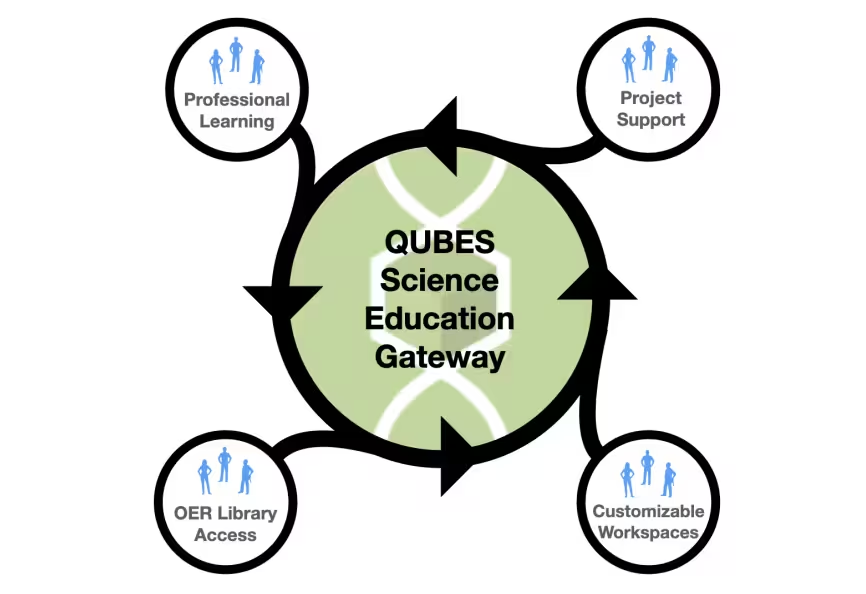
It provides faculty with cloud-based computational tools, a library of Open Educational Resources (OER), and collaborative workspaces, making it easier to implement evidence-based teaching practices across diverse institutions.
- The QUBES OER Library currently hosts over 2,100 resources that range from conference posters to classroom activities.
- The QUBES platform hosts over 450 online group workspaces containing 1,200 project areas.
- The Faculty Mentoring Network (FMN) brings together 10–15 geographically dispersed faculty who, over a semester, collaborate with a facilitator using a QUBES group space to share resources, communicate asynchronously, and publish their work.
What makes this a good DT example?
✅ Lowers barriers for resource sharing and evidence-based teaching adoption.
✅ Connects geographically dispersed educators to collaborate and innovate in teaching.
Schools in Spain used Smile and Learn, a digital learning platform, during the COVID-19 pandemic
When COVID-19 forced schools pretty much everywhere (at least in Europe) to close in March 2020, many schools in Spain quickly adopted Smile and Learn, an Ed-Tech platform for ages 3–12.
Before implementation, teachers and students received guidance and onboarding on how to use the platform effectively.
Schools then integrated over 5,000 activities across interactive “worlds” covering literacy, logic, science, arts, emotional intelligence, spatial skills, and collaborative multiplayer exercises.
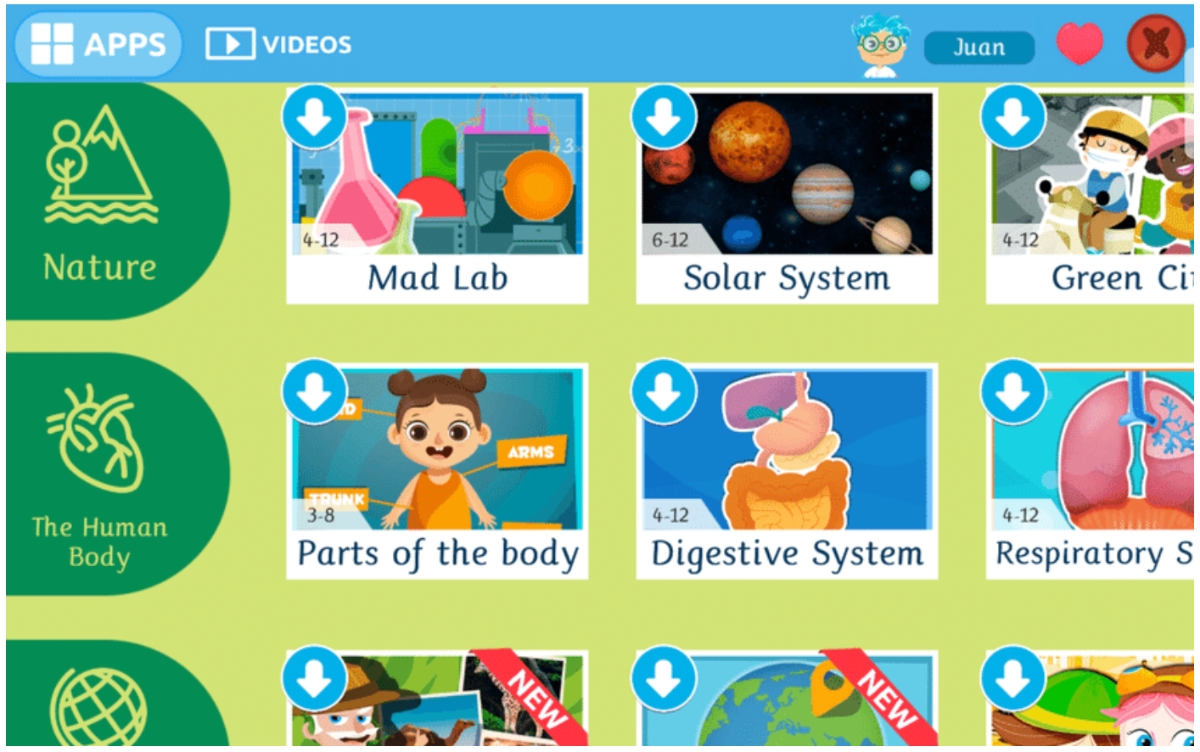
The platform’s AI-based recommender system also personalized learning by suggesting activities based on student progress.
Teachers reported that students engaged most with interactive games and multimedia content, while parents appreciated the platform’s structure and accessibility.
The platform's gamified elements (tokens, levels, customizable avatars, etc.) impacted the high engagement levels, as well.
What makes this a good DT example?
✅ Rapid deployment of digital tools enabled continuity of learning during a national (even worldwide) emergency.
✅ Integration of AI, gamification, and multimedia supported personalized, engaging, and equitable learning experiences for students and families alike.
Stanford Mobile Inquiry-based Learning Environment (SMILE)
The Stanford Mobile Inquiry-based Learning Environment (SMILE) is a mobile learning platform and pedagogical model designed to promote student-centered, inquiry-based learning.
Instead of passive lectures, SMILE encourages students to create, share, answer, and evaluate their own questions.
SMILE consists of 2 main components: a student mobile application for creating and solving questions, and a teacher management system to monitor activity, provide feedback, and manage classroom workflows.
Students submit questions (open-ended or multiple-choice), answer peer questions, and rate them based on creativity and depth.
Then they were grouped to generate challenging math questions, including multimedia elements like photos or drawings.
After creating questions, students solved peers’ submissions, rated their quality, and reflected on their process.
What makes this a good DT example?
✅ Uses mobile technology to enable active, student-centered learning.
✅ Fosters higher-order thinking skills such as analyzing, evaluating, and creating.
✅ Scalable to underserved regions, bridging gaps in teacher availability and resources.
The University of New South Wales in Sydney, Australia, uses Smart Sparrow, an adaptive learning technology, for examination
The Smart Sparrow Adaptive eLearning Platform is a web-based system that creates interactive, adaptive learning content, adjusting to each student’s performance.
At the University of New South Wales (UNSW), professors have been using the Smart Sparrow Adaptive eLearning Platform for several years to create interactive, adaptive learning experiences tailored to each student.
A strong example of this is Professor Gary Velan, who, since 2014, has used Smart Sparrow to replace traditional Phase 1 medicine practical exams with Virtual Microscopy Adaptive Tutorials (VMATs) in histology, embryology, and pathology.
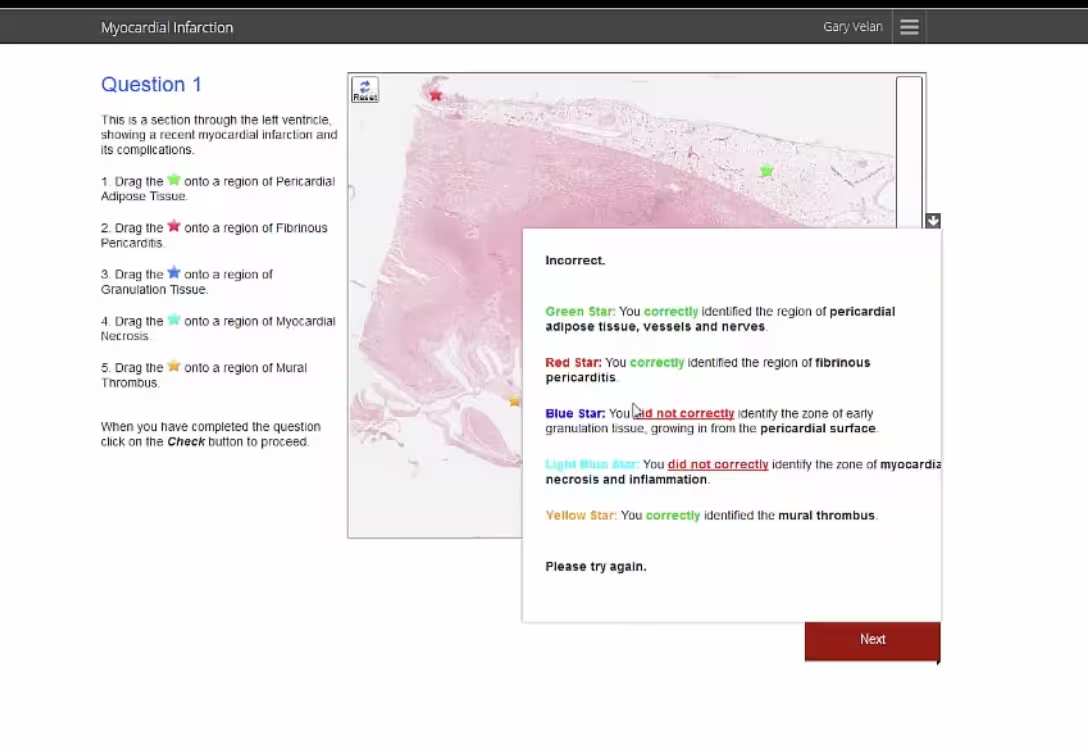
In these assessments, students access secure, individualized tutorials featuring drag-and-drop and dropdown questions on high-resolution images, completed within a 30-minute invigilated session.
The platform also automatically grades responses, saving faculty up to 30 hours per exam, and synchronizes scores directly with the Moodle gradebook.
Students can benefit from immediate feedback and interactive learning, while instructors gain rich analytics to monitor understanding and tailor instruction.
What makes this a good DT example?
✅ Combines interactivity, automated analytics, and scalable deployment to enhance learning outcomes.
✅ The university provides extensive onboarding materials, help articles, and best-practice guides to support new teachers in designing and deploying adaptive lessons effectively.
The University of Michigan’s Center for Digital Curricula and The Collabrify Roadmap System
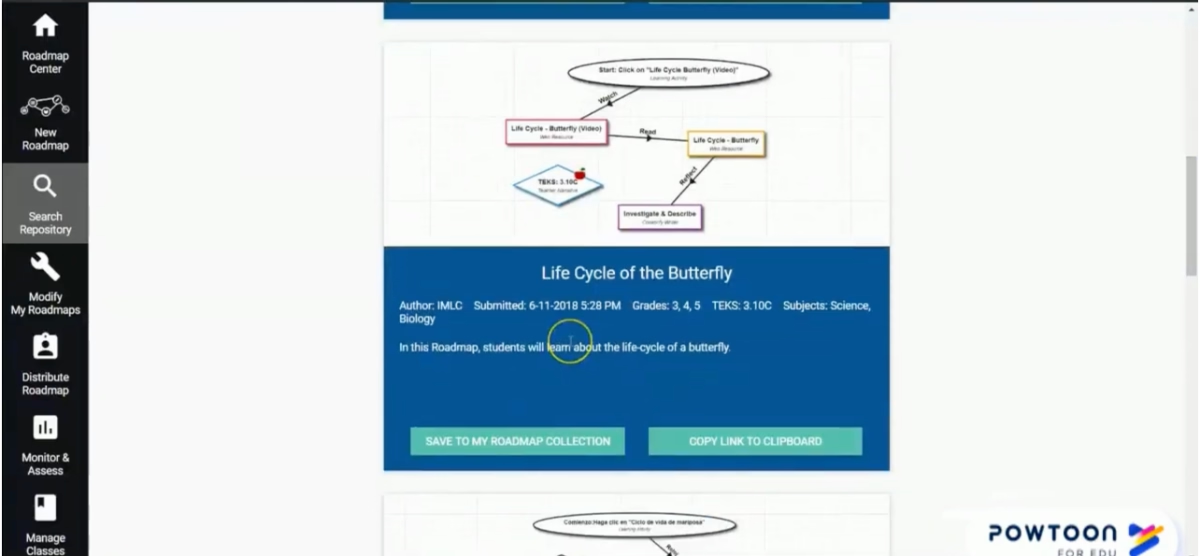
When COVID-19 closed schools in Michigan, the University of Michigan’s Center for Digital Curricula provided a solution: the Collabrify Roadmaps Platform, offering interactive, standards-aligned lessons in science, math, English, and social studies for K-12 students.
Integrated Twilio Voice allowed students to collaborate in real time from home without needing a phone, while teachers monitored activities, guided discussions, and supported small-group work.
The platform also provides resources for parents to assist with learning.
Hundreds of Roadmaps have been created during the pandemic, ensuring students stay engaged and connected, even in low-income or remote areas.
What makes this a good DT example?
✅ Combines curriculum, collaboration, and communication tools to enhance teaching and learning.
✅ Ensures continuity of learning and student engagement during school closures.
A cyber university in Seoul, South Korea, utilized AI-powered predictive analytics to detect students with high risks of dropping out
Hanyang Cyber University, an online university in Seoul, faced high dropout rates; 16.4% compared to 5.9% at traditional universities.
To tackle this, researchers developed predictive models using data from 16,970 students across four years, including demographics, academic records, and LMS engagement.
By combining advanced machine learning (LGBM) with a specific machine-learning algorithm that solves classification problems (logistic regression, to be specific), the models identified students at risk based on factors such as:
- Age,
- GPA,
- Major,
- Engagement with the LMS,
- Prior absences, and even occupation type.
Gender-specific trends were also revealed, allowing for tailored interventions.

This system enabled faculty to proactively reach out to at-risk students, provide guidance, and implement support strategies before students disengaged.
What makes this a good DT example?
✅ Integrates historical and real-time data to inform proactive, personalized interventions to support at-risk students.
Brazilian Ministry of Education’s Connected Education Internet Measurement System project
Despite 70% of Brazilian schools having Internet access, connectivity remains uneven, with 58% limited to speeds of just 2 Mbps and rural regions, particularly in the Amazon, still relying on radio or limited satellite connections.
With over 155,000 primary and secondary schools, most of them public, and more than 34 million students, ensuring high-quality connectivity and fostering digital skills is a massive challenge.
By July 2020, the system had been installed in over 22,000 public schools across 3,553 municipalities, capturing more than 8 million unique measurements since 2018.
This data provides policymakers and educators with a detailed understanding of connectivity inequalities across and within states.
By cross-referencing connectivity data with the National School Census, the system enables analysis of factors such as student-computer ratios, urban versus rural access, and school jurisdiction, while also pointing toward future opportunities to link connectivity quality with pedagogical outcomes.
What makes this a good DT example?
✅ Provideslarge-scale data to inform equitable digital infrastructure decisions.
✅ Supports targeted policies to improve connectivity and digital learning opportunities across diverse regions.
Ministry of National Education of Turkey’s Fatih Project
In 2007, only 29% of Turkish adults had completed upper secondary education, and the country has one of the highest proportions of young people under 15 in the OECD.
To improve educational outcomes and bridge the digital gap, the Turkish government launched the FATİH Project, aiming to integrate ICT into schools and provide equal opportunities for all students.
The project provided:
- Every school with high-speed broadband and VPN access.
- Every classroom with interactive whiteboards and wired/wireless Internet.
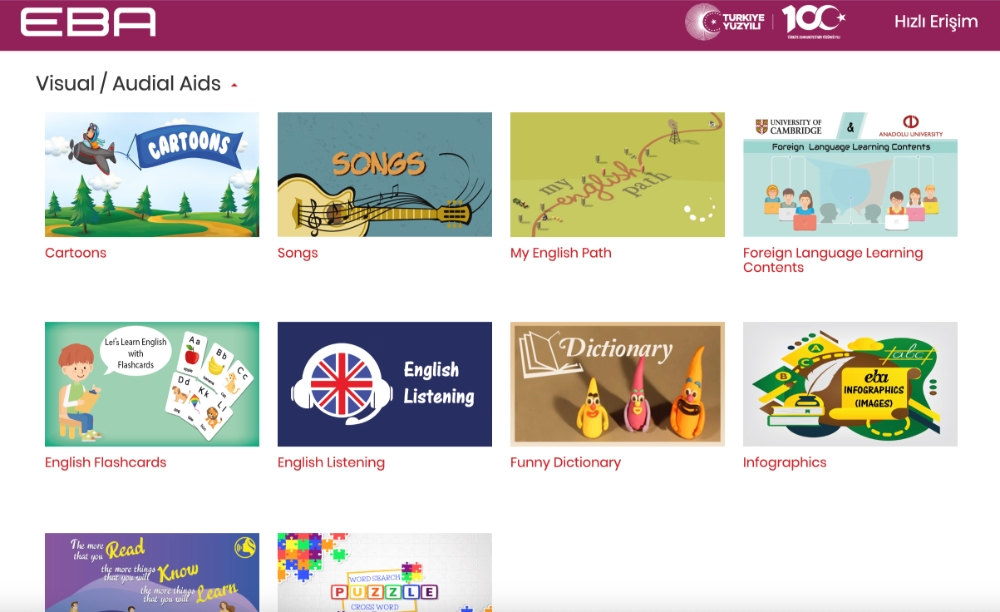
- Teachers with access to the Education Information Network (EBA), cloud accounts, and digital content management tools.
- Students with EBA accounts, digital identities, and access to interactive learning materials.
Here’s what the EBA platform looks like:
Phase 1 targeted high schools, Phase 2 vocational schools, and Phase 3 primary and pre-schools.
By 2015, over 700,000 tablets and 200,000 interactive whiteboards were distributed; by 2019, this increased to 1.4 million tablets and 430,000 interactive whiteboards.
Internet connectivity reached more than 13,500 schools across all phases.
Teachers received comprehensive training to use the ICT tools and integrate them into their teaching effectively.
What makes this a good DT example?
✅ Demonstrates large-scale digital transformation by equipping schools and classrooms with modern technology.
✅ Integrates teacher support and curated digital content to ensure effective adoption and learning outcomes.
Obstacles in digital transformation in education
While digital transformation promises many benefits, schools face a variety of challenges that can slow or even block progress.
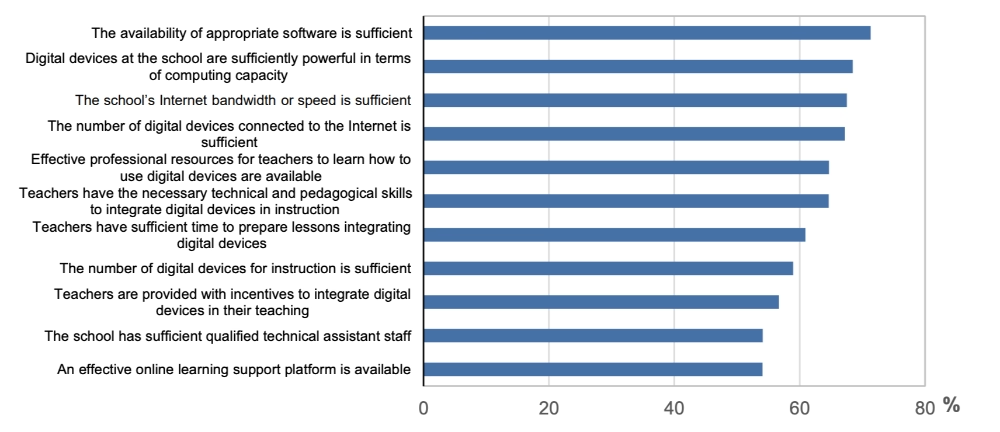
First and foremost, access to digital resources is uneven.
OECD surveys done with students across countries found out that there are big disparities in hardware, connectivity, and platform availability in schools.
But even in cases where access to digital resources isn’t an issue, other roadblocks await teachers, students, or administrators who want to adopt new technologies, such as:
- ➡️ Legacy systems and integration challenges: Many schools still rely on outdated IT infrastructure or software that isn’t compatible with modern educational tools.
This can create friction when trying to connect new learning management systems, student information systems, or digital assessment platforms.
- ➡️ Scalability, maintenance, and support burden (a.k.a. sustainability issues): Rolling out technology across multiple classrooms, schools, or even districts isn’t a one-time effort. Systems require regular updates, ongoing maintenance, and technical support.
Without proper planning, schools may face performance bottlenecks, system downtime, or even unsustainable maintenance costs.
And these all undermine the intended benefits of digital transformation.
Even the thought and risk of these problems can prevent many educational organizations from starting big DT projects, actually…
- ➡️ Data privacy, security, and compliance challenges: Schools manage sensitive data about students, teachers, and staff, from grades and health records to behavioral reports.
Protecting this data requires not only secure systems but also policies aligned with different local regulations and international standards.
Finding tools that abide by these standards or creating frameworks and workflows that are safe and secure can take time and thus slow down the digitization processes.
- ➡️ Budget limitations and unclear ROI: Implementing digital initiatives often comes with significant upfront costs, ongoing subscriptions, and infrastructure investments.
Decision-makers may hesitate when the expected benefits or returns are uncertain, particularly if past projects have failed or lacked measurable outcomes.
- ➡️ Resistance to change and cultural barriers: Even the most advanced technology is ineffective if the people using it aren’t ready.
Teachers, administrators, and students may resist new tools due to fear, skepticism, or simply being accustomed to traditional methods. Cultural attitudes toward change within schools play a critical role in whether digital initiatives succeed or stall.
But sometimes, these negative attitudes stem from easily solvable problems, like lack of technical know-how to actually use these digital tools.
Which brings us to the next and last roadblock👇🏻
- ➡️ Digital skill gaps in both students and educators: Having the right technology isn’t enough; teachers and students need the skills and confidence to use the tools effectively, too.
Lack of professional development, minimal in-app training/onboarding, or uneven digital literacy among students can result in underutilized platforms, errors, or frustration that slows down digital adoption.
Bridging this gap requires contextual, role-specific guidance.
Let’s explain what this means through an example of a learning management system.
- For teachers, this means learning how the LMS can enhance lesson planning, track student progress, or simplify admin tasks.
- For students, it means understanding how to navigate the platform, submit assignments, and engage with interactive content effectively.
And in general, it means creating different training materials and onboarding paths for different actors that will utilize the tool/software.
UserGuiding can help to overcome tech literacy gaps and pave the way for digital transformation in education!
Now, there are several methods and places one can offer guidance and technical support to non-technical users of a software product (be it teachers, students, parents, or administrators) in order to increase its adoption.
1️⃣ Through in-app onboarding and tutorials
2️⃣ Through self-serve support hubs (like help centers) and automated support chatbots
3️⃣ Through 1:1 training and constant handholding, which is the least optimal and sustainable way among all options
UserGuiding helps with the first two options.
UserGuiding is a no-code, all-in-one product adoption and onboarding platform that enables its users to create interactive in-app experiences and guidance material.
🚀With UserGuiding, you can create:
- Product tours, guides, and feature walkthroughs
- Onboarding checklists
- Tooltips and hotspots
- In-app surveys
- Resource centers
- AI assistants
- Standalone knowledge bases and product updates pages
For example, let’s say your school uses Moodle to create its own learning management platform. The school administration can create an interactive guide like this 👇🏻 to introduce that platform’s key capabilities to teachers:

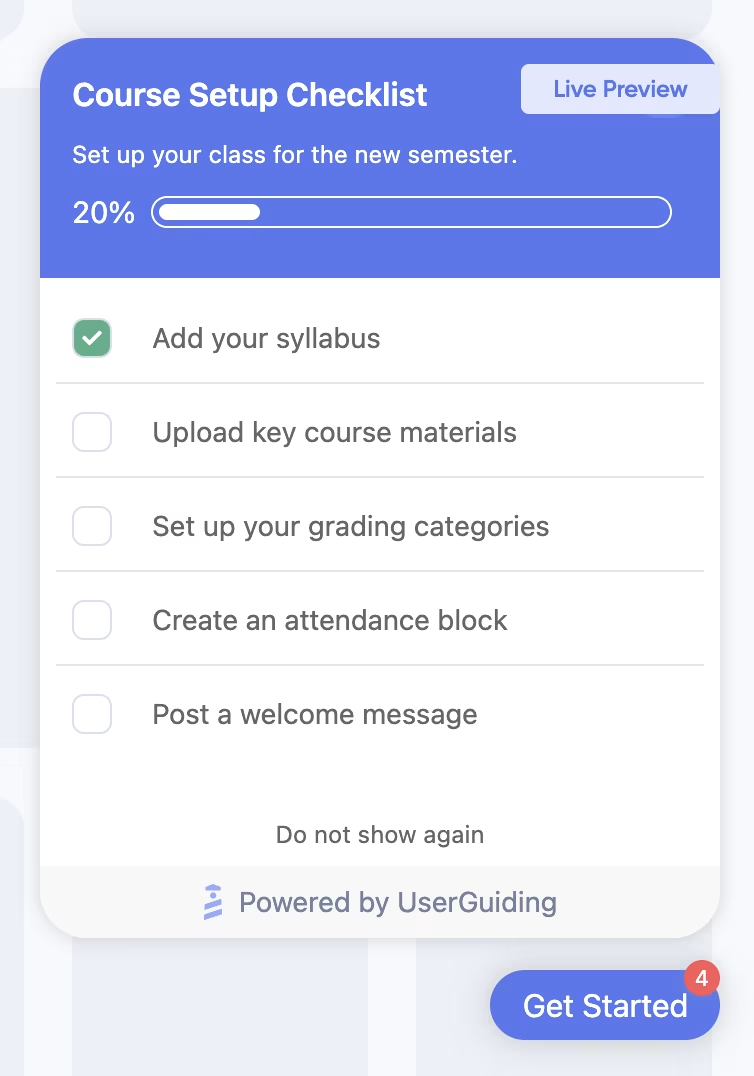
Or, create checklists like this 👇🏻 that go over different course setup tasks at the beginning of the semester (or when a new teacher joins the faculty) to ensure standardization:
Beyond interactive in-app tutorials and walkthroughs, you can also create and centralize your help materials in a standalone help center.
And it doesn’t have to focus only on your digital tools.
You can include documentation for registration steps, course selection procedures, or any other process that students, parents, or teachers might need guidance on.
Having a centralized knowledge base like this helps eliminate confusion and ensures everyone can access accurate, up-to-date information whenever they need it, instead of relying on word of mouth or outdated instructions.

You can then use your knowledge base materials to feed your AI assistant, which you can also create with UserGuiding, as we’ve said.
But if you want to use external links or PDF documents, you can do that too.
You can even use your interactive guides, which allows your AI assistant to recommend engaging with a tutorial when it’s relevant to the user’s question/request.

🎁 Start your free trial today and experience the power of in-app guidance (and UserGuiding, of course!!) in bridging technical skill gaps and overcoming steep learning curves.
Education digital transformation trends
Now that we’ve explored the tools and real-life applications of digital transformation in education, let’s zoom out a bit.
Before wrapping up, we want to look at broader trends and how DT is influencing inclusivity, accessibility, equity, and ethical practices in teaching and learning.
Interactive learning and gamification
Gamification and interactive learning are among the most visible transformations in today’s classrooms. Instead of passively consuming information, students engage with lessons through challenges, leaderboards, quizzes, and simulations that make learning more active and enjoyable.
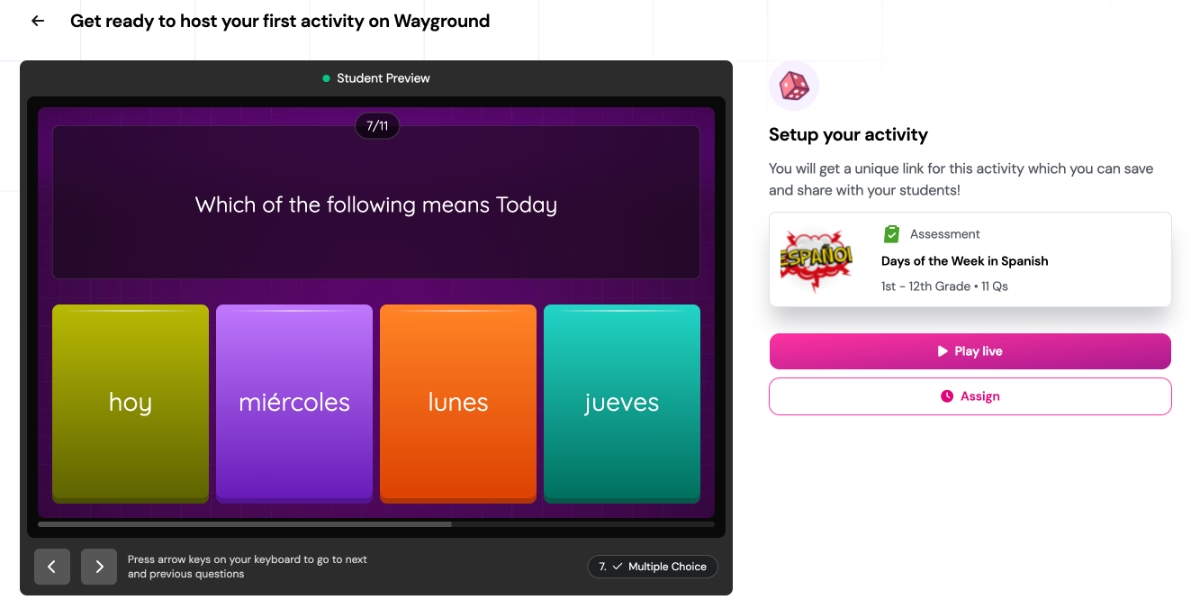
Tools like Kahoot! or Wayground (formerly Quizizz) turn traditional exercises into competitive and collaborative games, helping students retain knowledge better and stay motivated.
Use of online/distant learning platforms (especially during/after COVID-19)
While we’ve discussed how COVID-19 affected the teaching and learning experiences of students, we haven’t yet touched on how it democratized education.
Massive Open Online Courses (MOOCs) like Coursera, Udemy, and edX became global classrooms where millions of learners, from working professionals to retirees, enrolled to upskill, reskill, or simply learn out of curiosity.
Many universities also began offering open courses or remote degree programs, blurring the line between formal and informal education.
Assistive technologies in classrooms
Assistive technologies (AT) are transforming how schools support learners with diverse needs. Rather than creating separate systems, AT integrates inclusivity into everyday teaching.
These tools range from simple text-to-speech and screen readers to advanced wearables and adaptive interfaces. They help students overcome barriers in reading, writing, mobility, and communication while enhancing confidence and independence.
Research shows that AT can improve problem-solving, attention span, and motivation.
According to the OECD’s report, incorporating assistive technologies also has cost-effective benefits.
For example, digital exam papers can provide a more economical method of assessment for students with special educational needs compared to using readers or scribes.
Learning analytics
Learning analytics is a data-driven approach that helps educators understand how students learn and how teaching practices can be optimized.
By leveraging tools like data mining, machine learning, natural language processing, and visualization, schools can collect and analyze information not only about student performance but also about the context in which learning takes place.
Although most research has focused on higher education, learning analytics is increasingly being applied in secondary and K-12 settings, as well.
Beyond early warning systems we’ve talked about in the article before (like drop-out risks and graduation delays), learning analytics can also be used to…
✅ Increase student agency
✅ Personalize learning paths based on student interests and knowledge levels, and
✅ Support equity by identifying achievement gaps and tailoring support for disadvantaged students.
Ethical and responsible AI usage (both for educators and students)
AI has been part of our lives for quite some time now, and education is no exception.
Students and educators alike use AI every day, not just generative tools like ChatGPT, but also task automation, plagiarism checkers, smart search engine results, and other smart systems that support learning and administration.
At the same time, AI brings concerns and questions, especially in education.
Many teachers are hesitant to grade AI-generated work, and their caution is valid, too.
The technology is powerful, but its misuse can have real consequences.
However, AI is now a part of the educational landscape...
Preventing students from engaging with it entirely is neither realistic nor beneficial. Instead, educators can model how to use AI responsibly, ethically, and critically.
Just as teachers introduce new technologies in the classroom, they can also guide students on navigating AI tools.
Interestingly, many educators who were once skeptical are now experimenting with AI, finding ways to integrate it meaningfully into learning while maintaining high ethical standards.
By doing so, they shape a culture where students learn to think critically, innovate responsibly, and create with integrity.
In Conclusion…
Every day, new education technologies, tools, and platforms are introduced.
They add a new layer to how schools operate, how teachers and students connect, how lessons are delivered, and how inclusivity, accessibility, and equality are ensured through technological advances.
But behind every successful transformation, there are people who are willing to try, fail, and try again.
And it’s important to support those willing to move with the times and facilitate their jobs by offering them guidance and support whenever they need it.
UserGuiding ensures that.
Just saying. 👀

.png)