#Banners

High-Visibility Messages, Zero Disruption

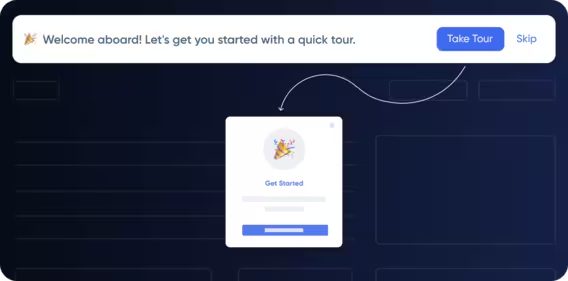
UserGuiding’s Banners give you a flexible, native way to share important messages, announcements , tips inside your web application.
SEE BANNERS IN ACTION

Your Message, Live in 5 Seconds

Banners give you a clean, unobtrusive way to deliver high-visibility messages inside your product, offering a fast, flexible alternative to intrusive pop-ups or one-off announcements.

72
%
Decrease in Support Calls
47
%
Increase in Feature Adoption
Create your first banner

Your Message, Live in 5 Seconds

Banners give you a clean, unobtrusive way to deliver high-visibility messages inside your product, offering a fast, flexible alternative to intrusive pop-ups or one-off announcements.

72
%
Decrease in Support Calls
47
%
Increase in Feature Adoption
Create your first banner

Banners That Blend Right In

Choose from push-down, floating, or sticky banner types and customize every detail such as layout, colors, placement, spacing, and behavior, so each banner aligns with your product’s design and the intent of your message.

70
%
Faster Time-to-Value
25
%
Increase in User Activation
Build your own banner now

Banners That Blend Right In

Choose from push-down, floating, or sticky banner types and customize every detail such as layout, colors, placement, spacing, and behavior, so each banner aligns with your product’s design and the intent of your message.

70
%
Faster Time-to-Value
25
%
Increase in User Activation
Build your own banner now

Turn Attention Into Action

Equip banners with powerful custom-action buttons that trigger guides, start surveys, redirect to URLs, or run custom JavaScript, turning every in-app announcement into a measurable, action-driving moment.

550
%
Increase in Trial Conversions
50
%
Increase in Session Durations
Book a demo with our onboarding experts

Turn Attention Into Action

Equip banners with powerful custom-action buttons that trigger guides, start surveys, redirect to URLs, or run custom JavaScript, turning every in-app announcement into a measurable, action-driving moment.

550
%
Increase in Trial Conversions
50
%
Increase in Session Durations
Book a demo with our onboarding experts

You are in good company

G2 Spring

Cagri Sarigoz
@Citizenshipper

“With UserGuiding, we were able to increase our activation rates by 25%.”

Read The Full Story

1,000+ Teams Scaling Successfully
with UserGuiding’s Best Value Platform

Join them — Take the first step toward growth;
start your free trial today with confidence.

How UserGuiding can help you more

Discover our features to get most out of Userguiding

Frequently Asked Questions

What is a Banner?

A Banner is a bar that appears at the top or bottom of your webpage or app. It is used to make announcements, share news, or drive actions without blocking the main content of the page, unlike pop-up modals.

Can I schedule Banners to appear at specific times?

Yes! You can schedule Banners to automatically start and stop displaying on specific dates. This is perfect for time-sensitive promotions, webinars, or temporary maintenance alerts.

Can I customize the design of the Banner?

Absolutely. You can fully customize the colors, fonts, positioning (top or bottom), and content (text, buttons, links) to ensure the Banner matches your brand's look and feel.

Will the Banner cover my navigation menu or top header?

No, and that is a key difference. Unlike many other tools that overlay banners on top of your site (hiding your header or buttons), UserGuiding Banners are designed to shift your entire page content down. This ensures your UI adjusts automatically so that your navigation and headers remain 100% visible and clickable, keeping your User Experience intact.