


.svg)
.svg)
.svg)
.svg)



.svg)




.svg)
.svg)


Want to learn what Product Fruits can do for you and your product? You’ve reached your destination!
Buckle up while we go through Product Fruits’ top features, its use cases, its pricing as well as some pros and cons.
Let’s go!
TL;DR
- Product Fruits is a no-code, AI-assisted digital adoption platform (DAP) designed to help SaaS teams onboard users, guide them through core features, and provide contextual in-app support without relying on developers.
- Other use cases of Product Fruits include:
- User onboarding with product walkthroughs, tooltips, and hints.
- In-app, self-service support.
- Monitoring user activation, journey progression, and feature adoption.
- Announcing new features, updates, and releases.
- Gathering and analyzing direct feedback.
- Localizing onboarding content across multiple languages using AI translation.
- Product Fruits' strong features include:
- Visual, adaptive Flows.
- Elvin AI copilot for drafting tour copy, recording click-through workflows, and deflecting user queries.
- Contextual tooltips, hints, and interactive onboarding checklists.
- Native micro-surveys, NPS, and an in-app feedback widget supporting video and screenshot capture.
- Responsive customer support.
- Some of Product Fruits' drawbacks are:
- A steeper learning curve for complex features and custom event rules.
- Limited deep design customization without writing custom CSS.
- Basic built-in analytics that lack deep behavioral funnel and cohort exploration.
- Strictly metered AI support usage.
- Scalability constraints.
- If the advantages of Product Fruits do not outweigh the drawbacks of the platform, or its offerings do not fully align with your needs and use cases, you might want to consider a different adoption platform, like UserGuiding.
- UserGuiding helps you create interactive user experiences and engage with your users through guides, tooltips, banners, standalone checklist widgets, NPS surveys, knowledge bases, and product update changelogs with feature request roadmaps.
- Start your free UserGuiding trial and see for yourself 🎁
What is Product Fruits?
Product Fruits is a no-code, AI-assisted product adoption platform designed to help you with onboarding your users, guiding them through core features and providing in-app support contextually.

It provides you with tools to build in-app onboarding flows, help widgets, onboarding checklists, and surveys directly inside your product, without having to rely on developers.
Their Elvin AI copilot stands out as it helps you in creating on brand and personalized flows for your differing use cases.
What is Product Fruits used for?
Most SaaS companies use Product Fruits for:
- Guiding users within the product with interactive walkthroughs, tooltips, and hints
- Offering 24/7 in-app self-service support
- Monitoring user activation, journey progression, and feature adoption
- Announcing new features, updates, and releases directly in-app
- Gathering user feedback with in-app surveys, NPS, and CSAT widgets
- Localizing product onboarding into multiple languages with AI translation
What are Product Fruits’ top use cases and features?
Product Fruits lists 7 use cases on its website: feature adoption, user onboarding, trial conversion, role-based journeys, product launches, ticket deflection, and lastly, NPS & surveys.
User Onboarding and In-App Guidance
Flows: Product Fruits’ flows are visual builders that create multi-step, adaptive onboarding journeys on a drag-and-drop canvas. With Flows you can adapt to how a user actually behaves inside your app.
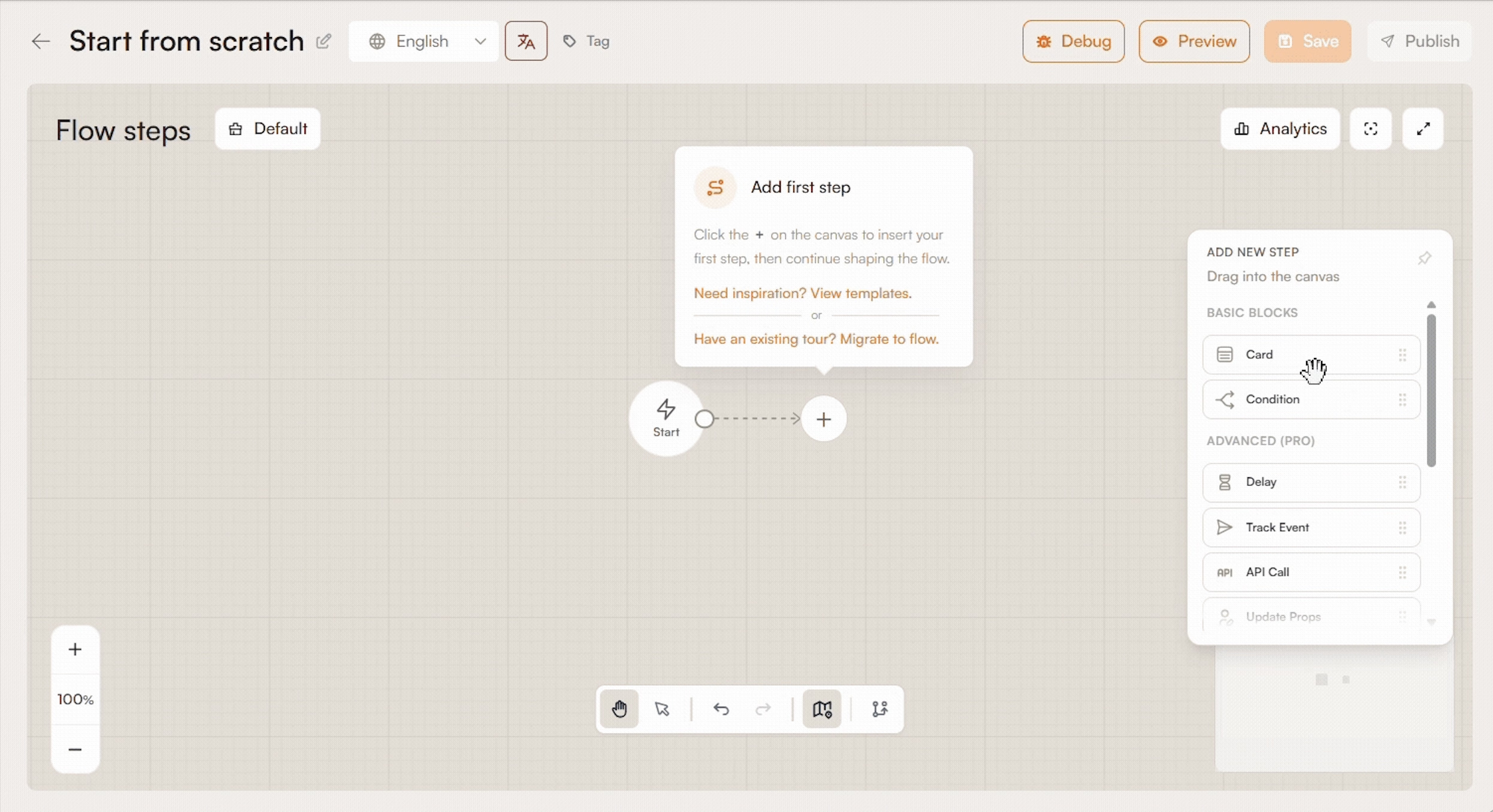
Tours and Guides: Product tours and guides provide interactive, step-by-step in-app walkthroughs to onboard users and highlight features without developer help. Built with a visual editor, these tours automatically adapt to desktop and mobile layouts, while the integrated Elvin AI assists in drafting copy and generating flows.

Tooltips and Hints: Product Fruits’ tooltips provide text-based guidance attached directly to UI elements. Hints are visual, pulsing indicators placed on specific interface areas to catch a user’s eye. When clicked, they can launch a short modal, trigger a full walkthrough, or expand a helpful tip.

Check real-life tooltip examples and use cases 👈🏻
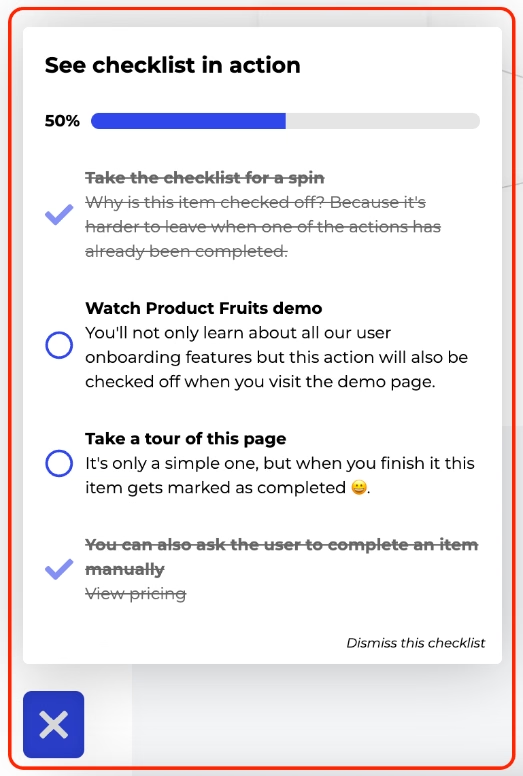
Onboarding checklists: Product Fruits’ onboarding checklists, which are available as both popup widgets and embedded elements, provide interactive task lists that guide users toward core setup milestones and activation.
‼️ With their AI agent, Elvin AI, Product Fruits allows you to automate tour generation. More specifically, Elvin AI is promised to help with:
- Tour & Copy Drafting: When supplied needed prompts, it automatically writes your step copy, drafts modal announcements, and suggests logical flow structures.
- Record with Elvin: When building Flows, creators can navigate through their product interface while Elvin observes the interactions, turning clicks and UI elements into complete flows.
- Continuous Updates: Elvin adapts guidance and automates maintenance.
Product Analytics and Reporting
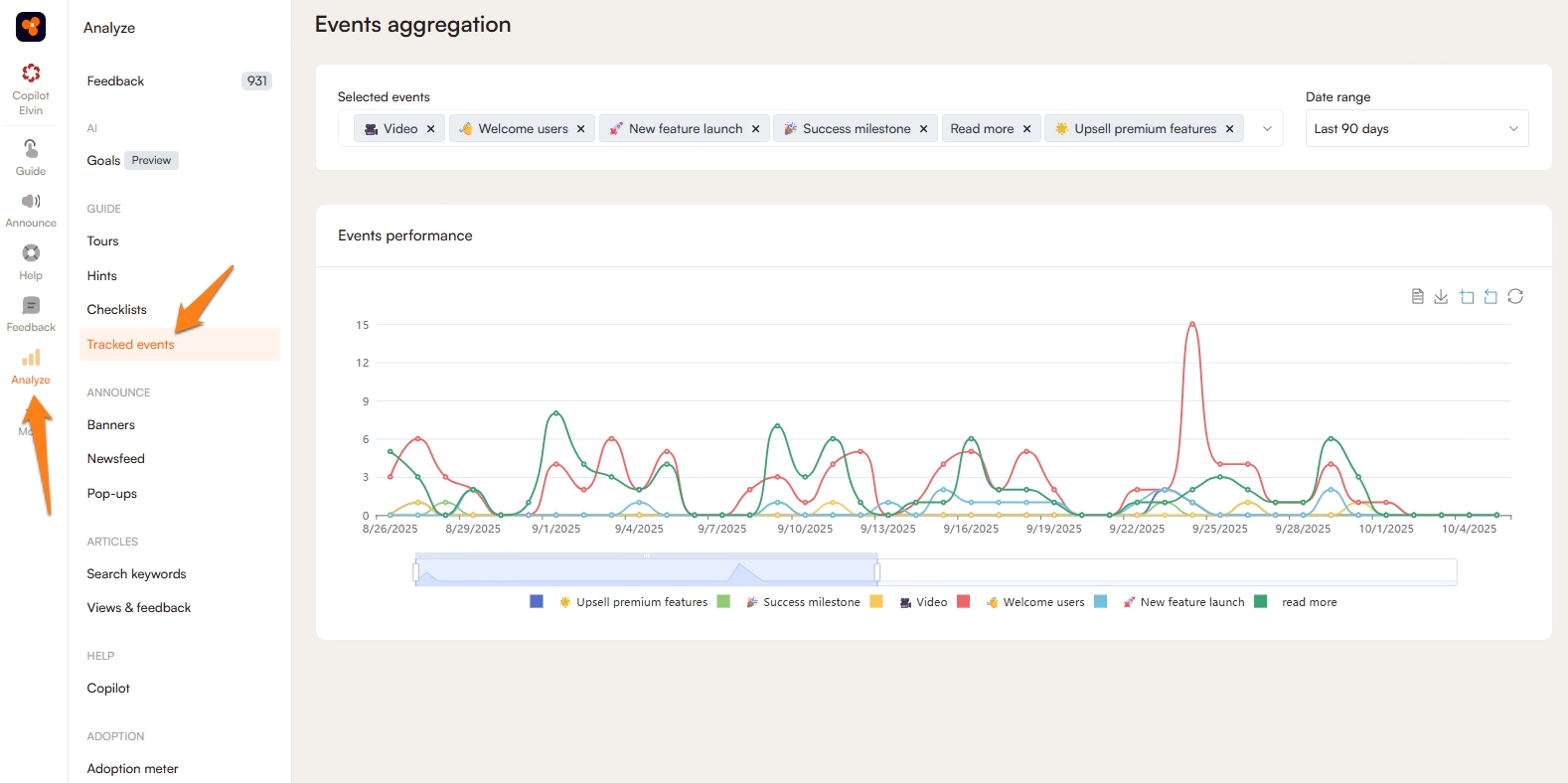
Custom Events: Product Fruits’ custom events feature allows you to track specific user actions. These tracked events act as conditions to launch walkthroughs, or qualify user segments.

Event tracking: Product Fruits’ event tracking captures user actions and milestone completions in real time to monitor product engagement and feature adoption.
User Research and Feedback
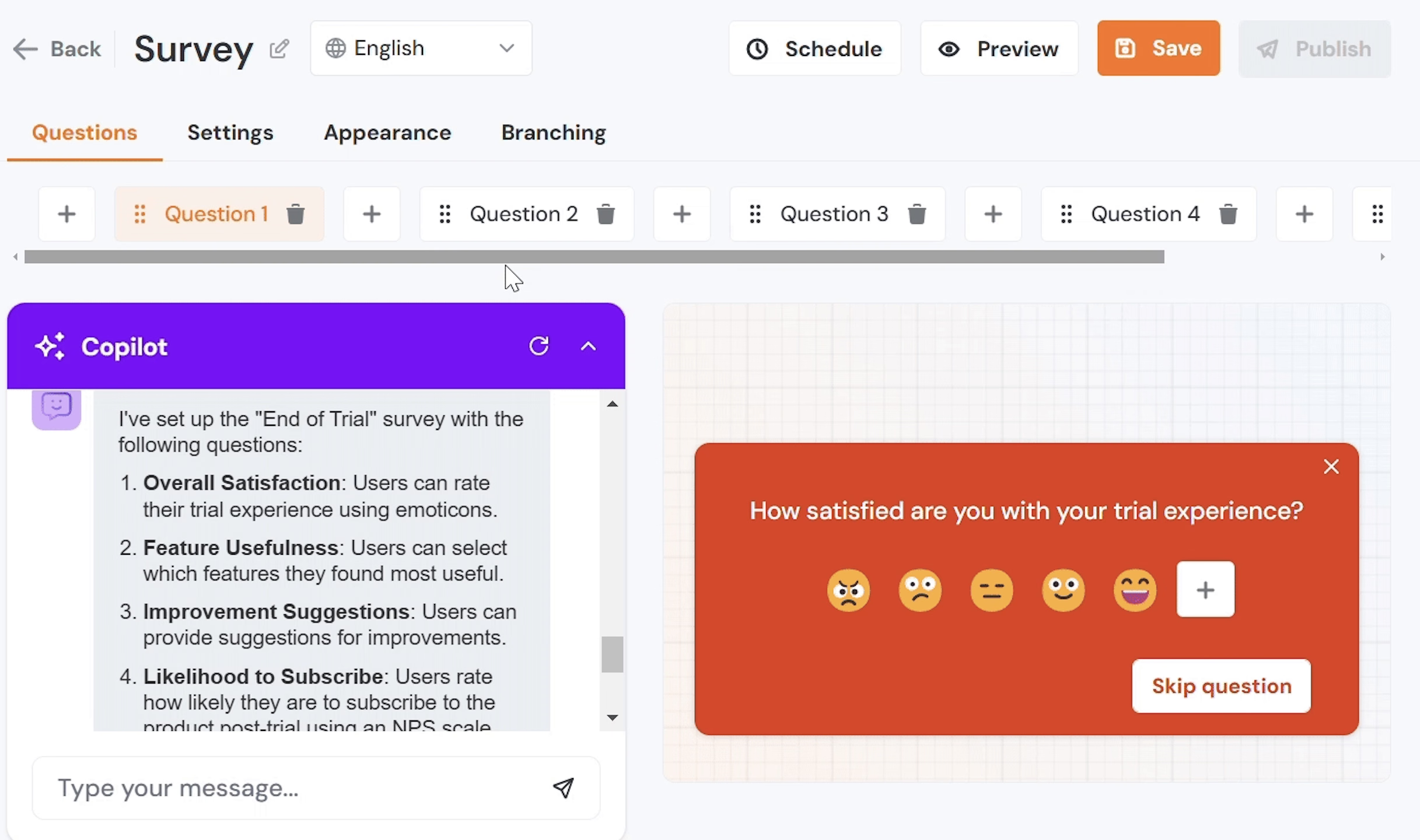
Surveys and NPS: Product Fruits’ in-app surveys capture real-time user feedback directly inside the product. Offering ready-to-use templates for Net Promoter Score (NPS), CSAT, CES, and custom questionnaires, surveys can be tied to specific user journeys and branching logic.
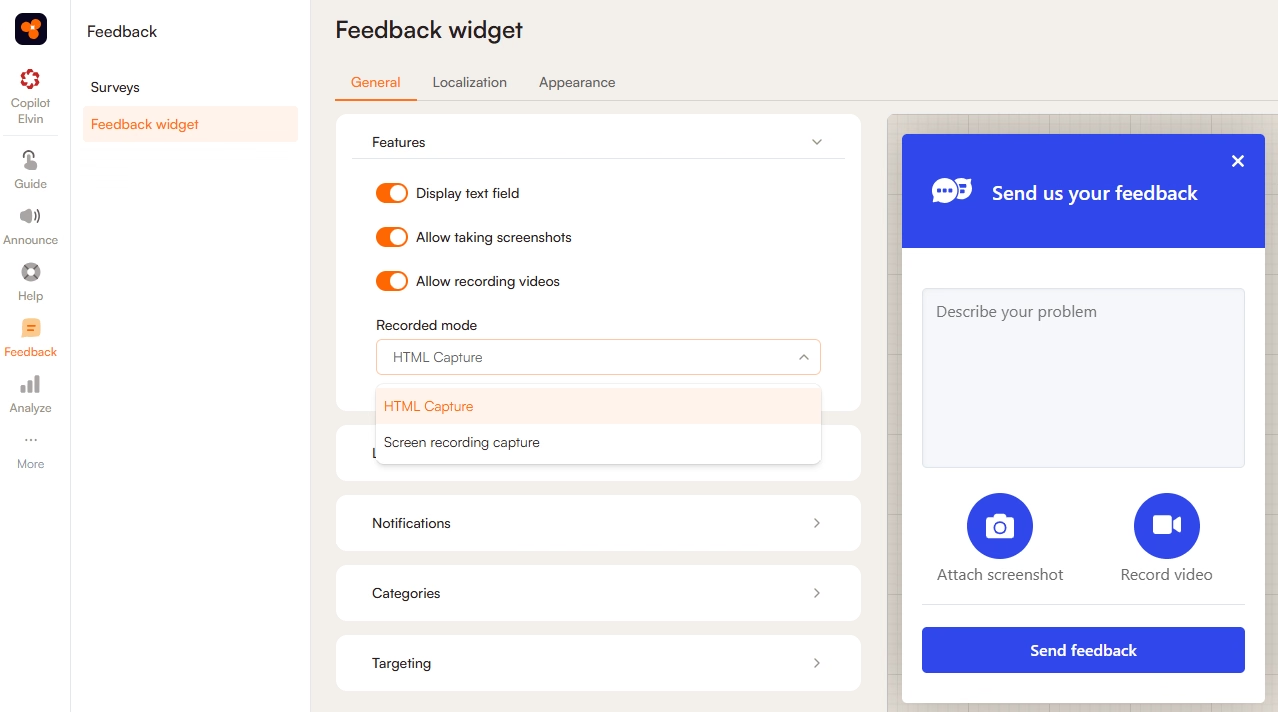
Feedback widgets: Product Fruits’ in-app feedback widget allows users to share thoughts or report bugs directly inside the application using video recordings or screenshots.
In-app Communication and Announcements
Modals and Pop-ups: Product Fruits’ modals and pop-ups deliver targeted in-app messaging for milestones, feature launches, or updates. Equipped with AI assistance for drafting and formatting, they can be styled with custom branding and optional CSS.

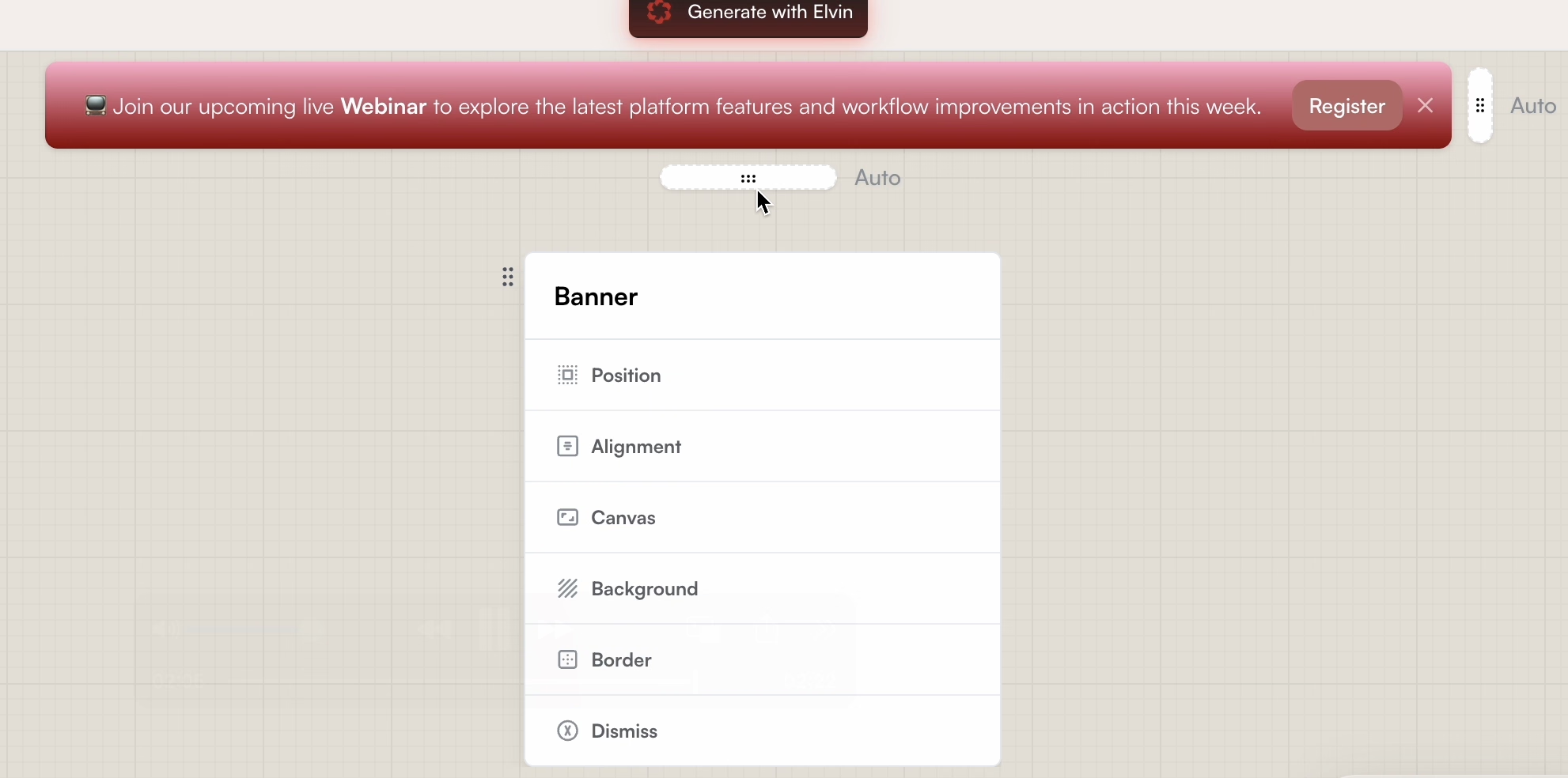
Banners: Product Fruits’ banners are used for non-intrusive notification bars anchored to the top or bottom of your interface. They are ideal for broadcasting high-visibility announcements, scheduled maintenance alerts, product releases, or promotional offers without obstructing underlying features.
Newsfeed: This is an announcement center to keep users informed about the latest news and changes about your product.
In-app Resource Center: Product Fruits’ built-in help center provides self-service support. Users can search knowledge base articles, launch guided tours, or get instant, AI-generated answers via Elvin Copilot.
Knowledge Base: Product Fruits includes a native, built-in knowledge base that lets teams create and organize contextual documentation directly within the onboarding platform. Rather than maintaining external help portals, articles live inside the in-app launcher and train the Elvin AI Copilot to answer queries automatically.
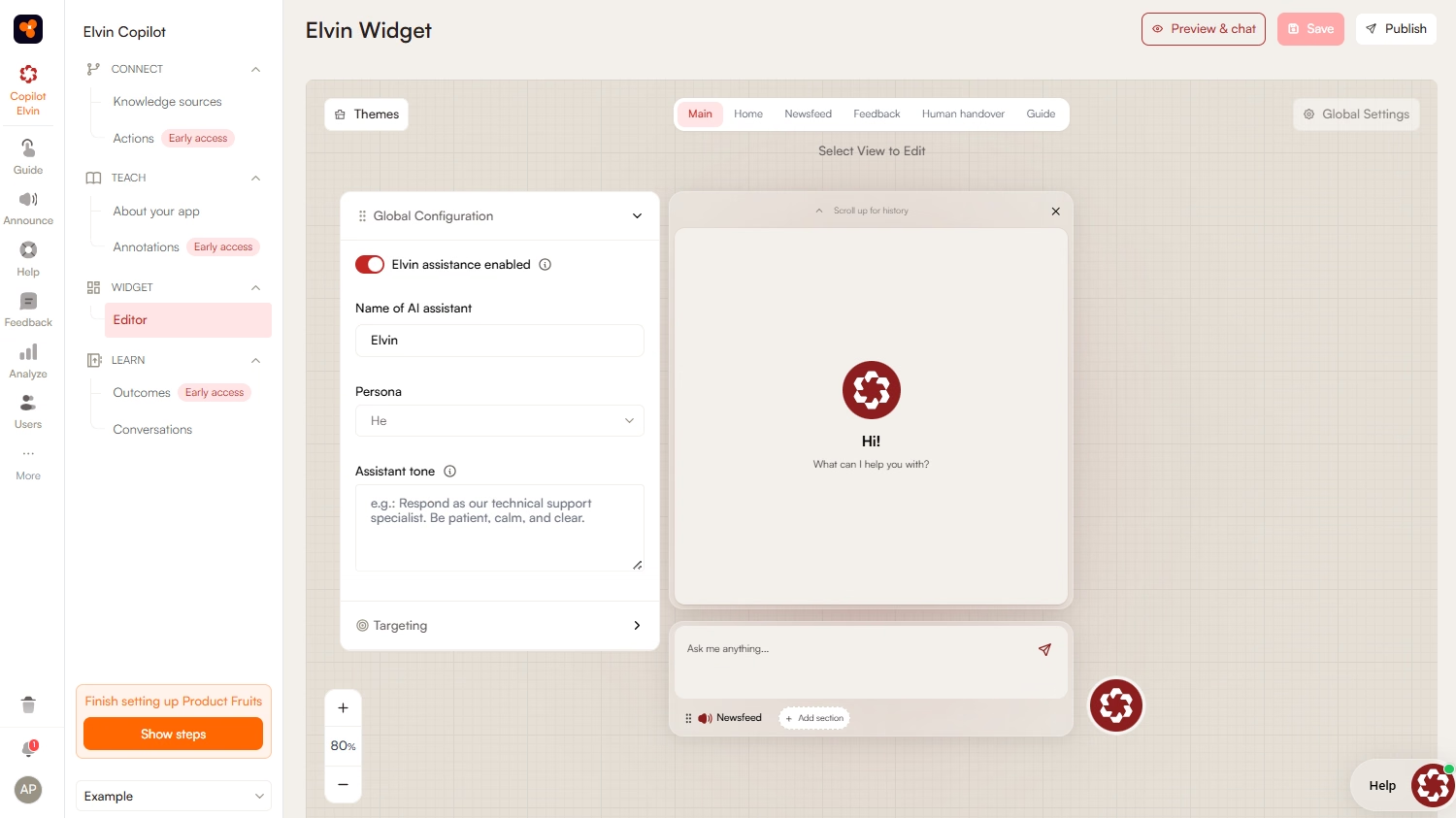
‼️ Their AI agent, Elvin AI, can act as a customer support service for the end users. Elvin Copilot connects directly to your native knowledge base and product documentation. When users encounter roadblocks, they can use Elvin as a chatbot and ask it their questions.
Segmentation and Localization: Product Fruits provides granular segmentation and automated localization to deliver personalized onboarding.
‼️ Similarly, with Elvin Copilot, you can translate walkthroughs, flows, or help center inquiries in real time.
How much does Product Fruits cost?
Product Fruits has a tiered pricing system. There are three separate plans: Starter, Pro, and Business. However, the pricing of these tiers depends on the number of monthly active users (MAUs) you have.
The following dollar amounts are for 1.500 MAUs:
- Starter: $111/month. This plan is ideal for small businesses that are just getting started with product adoption.
- Pro: $187/month. This plan is a great fit for those who need AI-powered automation to streamline their adoption process.
- Business: $374/month
‼️ Keep in mind that certain features such as localization, custom events, integrations and Elvin AI text conversations are limited or non-existent in the Starter plan.
While localization is limited for 1 language, you get only 20 free text conversations with Elvin AI. Additional 100 text conversations are charged $37 for all of the plans. This could cause the pricing to scale up depending on your usage.
Moreover, most of Elvin AI’s capabilities are not available for the Starter plan and are hidden behind higher paid plans.
Additionally, the Starter plan includes a public knowledge base, whereas a password-protected knowledge base (for internal use) is available only with the Pro and Business plans.
What are the pros of Product Fruits?
✅ Ease of Use: Product Fruits features an intuitive, drag-and-drop WYSIWYG editor designed for non-technical teams. Teams can easily build and adjust walkthroughs, announcements, and banners without writing CSS or code.
A user on G2 notes on the ease of use, stating:
Product Fruits gives us a very clean, intuitive UI/UX that makes it easy for non-technical teams to build in-app tours, hints, tooltips, checklists and more without cluttering our own interface.”
✅ Easy Setup: Implementation is lightweight and fast, requiring only a simple tag-manager snippet rather than complex SDK installations. Teams can install the platform without engineering dependencies, allowing non-technical staff to build, test, and publish fully functional onboarding flows and guides in mere hours or days rather than weeks.
The initial setup felt approachable, allowing us to create tours without developer help, which was reassuring and built confidence in using the tool.”
✅ Good Customer Support: Users note on receiving quick turnaround times, responsive assistance, and hands-on migration help from customer success managers.
...customer support is always available via chat, so whenever I encounter difficulties setting up something new, they are quick to assist and resolve the issue for me.”
✅ Strong Feedback Collection Features: The platform consolidates user research with native micro-surveys like NPS, CSAT, and CES. Coupled with an easily accessible in-app feedback widget, teams can capture bug reports and monitor sentiment directly inside the application, eliminating the need to pay for and manage separate third-party survey tools.
✅ AI Capabilities: Through Elvin AI, the platform automates tour creation by drafting copy, structuring cards, and observing user workflows. Its conversational Elvin Copilot pulls from documentation to deflect recurring support queries.
The AI significantly streamlines the guide creation process, saving time, and the support team responds quickly and thoroughly to any needs or questions.”
What are the cons of Product Fruits?
❌ Learning Curve: While basic tours launch quickly, more complex and intricate features such as setting up branching Flows and custom event tracking requires a steeper learning curve. Non-technical users unfamiliar with the product may feel overwhelmed by the options and behavioral rules, initially slowing down implementation.
One user on G2 elaborates on the learning curve for complex structures and states that it was a struggle “keeping up with all their new updates.”
❌ Difficult / Limited Customization: Although Product Fruits supports basic brand styling, creating deeply customized UI patterns or matching complex design systems often requires writing custom CSS. Without frontend development support, teams may struggle to tweak layouts or create highly bespoke in-app experiences that seamlessly reflect their application’s unique interface.
I find the advanced customization options a bit limited. While it's great that you don't need to code, it would be nice to have deeper design or behavior customization like animations, logic, or styling.”
❌ Inefficient Analytics: Product Fruits provides essential completion rates and drop-off tracking, but its built-in reporting lacks depth. It does not offer retroactive event mapping, comprehensive cohort analysis, or deep behavioral funnel insights. Teams focused on granular product data must connect external analytics platforms to gain meaningful engagement visibility.
...reporting and analytics could be more robust to provide deeper insights into user behavior and feature performance.”
❌ Metered / Tracked AI Support: While the Elvin AI Copilot handles frontline support, query resolutions are strictly metered on lower plans. Teams on Starter get only 20 monthly resolutions, with overages costing $0.69 each. Scaling support volumes can lead to unpredictable monthly add-on costs unless upgraded to custom enterprise agreements.
❌ Scalability: Product Fruits lacks native mobile SDKs, restricting guidance strictly to desktop and mobile web applications. As SaaS companies expand into multi-platform ecosystems, large organizations may also outgrow its integration library, basic user governance, and tier-gated feature sets, requiring migration to more robust, enterprise-grade adoption suites.
For smaller teams or startups, the pricing can feel slightly high, especially if you only need a few features.”
A better alternative to Product Fruits: UserGuiding
UserGuiding is a no-code, all-in-one product adoption platform. It allows you to create interactive in-app experiences for your users, communicate new feature releases and updates, gather insights through in-app surveys, and provide automated on-demand support.
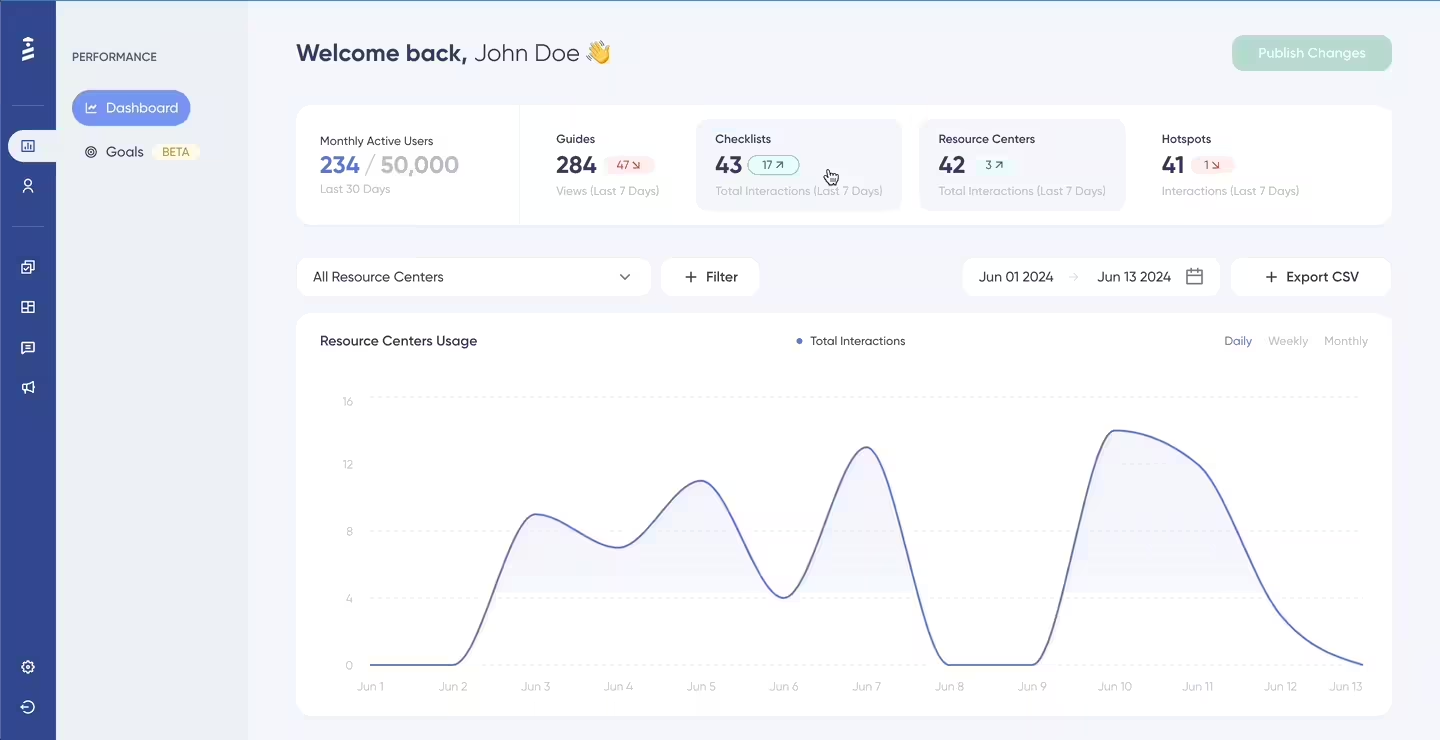
Having some similarities in its offerings to Product Fruits, UserGuiding’s features include:
- Product tours
- Tooltips and hotspots
- Banners
- Checklists
- Resource centers
- Surveys and NPS
- Knowledge bases
- Product updates
- AI assistants
- Analytics
- Session replay
- No-code event tracking
- MCP (Model Context Protocol)
- Custom alerts
- Feature request boards
- Public/Private product roadmaps
The main difference between Product Fruits and UserGuiding lies in their workflow complexity, design flexibility, and engagement ecosystem.
➡️ Product Fruits centers heavily on conversational support deflection and journey branching. While powerful, its Flow canvas and custom event rules introduce a steeper learning curve, deep styling requires custom CSS, and its AI support copilot comes with metered conversation caps and overage fees.
➡️ UserGuiding is built around an intuitive, zero-code user experience that balances in-app guidance with off-product communication. It delivers a shorter learning curve, standalone widgets that grab attention immediately, unmetered core onboarding tools, and built-in roadmap hubs to turn user feedback directly into product momentum.
Now, let’s take a closer look at some key features and compare them with Product Fruits’ offerings 🔎
- Announcement Modals: While Product Fruits supports modals and notification bars, deeply customizing their look to fit your app's branding often requires custom CSS. UserGuiding provides a flexible no-code builder for announcement modals, slideouts, pop-ups, and banners, enabling product teams to publish on-brand announcements without technical hurdles.
Here’s an example campaign banner you can create with UserGuiding:

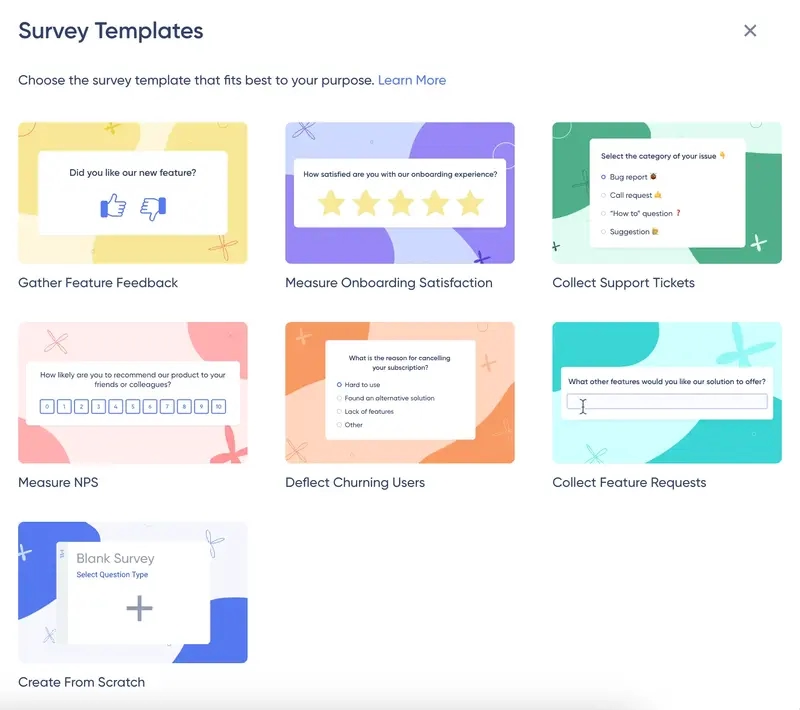
- In-app Surveys: Both tools offer micro-surveys like NPS and CSAT, but Product Fruits locks advanced survey capabilities behind higher-tier plans. UserGuiding provides ready-to-use survey templates such as onboarding satisfaction, churn deflection, and feature requests, allowing you to collect actionable feedback at every customer touchpoint.
- Product Tours, Tooltips, Hotspots: Both platforms allow teams to build real-time interactive walkthroughs without code. However, Product Fruits can feel overwhelming due to complex configuration menus and canvas logic. UserGuiding offers a cleaner, more intuitive WYSIWYG editor that lets non-technical creators deploy guides, hotspots, and input fields with zero friction.
Here are guide modals, tooltips, and input fields you can create with UserGuiding:
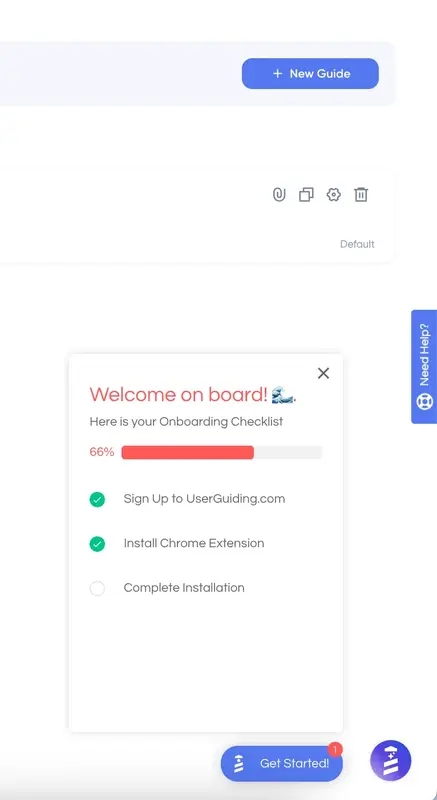
- Onboarding Checklists & Widgets: In Product Fruits, checklists are tied closely into the "life ring" help widget or embedded via custom placement. UserGuiding provides a dedicated, standalone onboarding checklist widget that appears distinctly on the screen, capturing user attention instantly and motivating completion without forcing users to hunt through a menu.
Also, UserGuiding keeps the onboarding checklist widget separate from the resource center, though you can still place the checklist within the resource center if preferred.
This approach allows UserGuiding to better capture the attention of new users through distinct visual cues and a separate widget, eliminating the need for users to search for them.
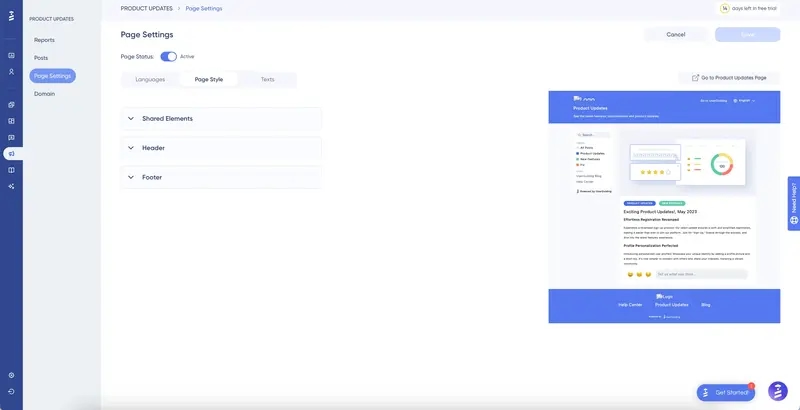
- Standalone, Off-Product Features: While Product Fruits includes a native help center and a centralized Knowledge Base, UserGuiding expands beyond in-app overlays with standalone Product Updates and changelog as well as feature request boards.
The Product Updates page also serves as a place to collect user feedback on your releases —customers can leave comments or emoji reactions, even anonymously.
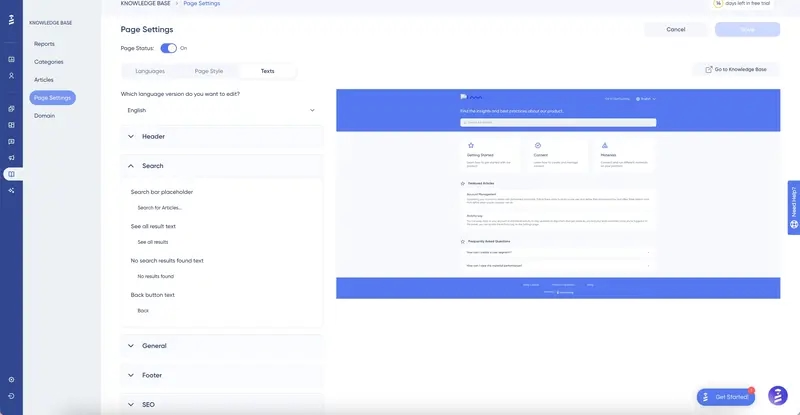
The Knowledge Base allows you to create a centralized hub, which you can also use for your resource center and AI assistant.
This setup helps reduce the number of support tickets/ support requests, saves time for both your team and customers, and eliminates the need for juggling multiple tools and integrations.
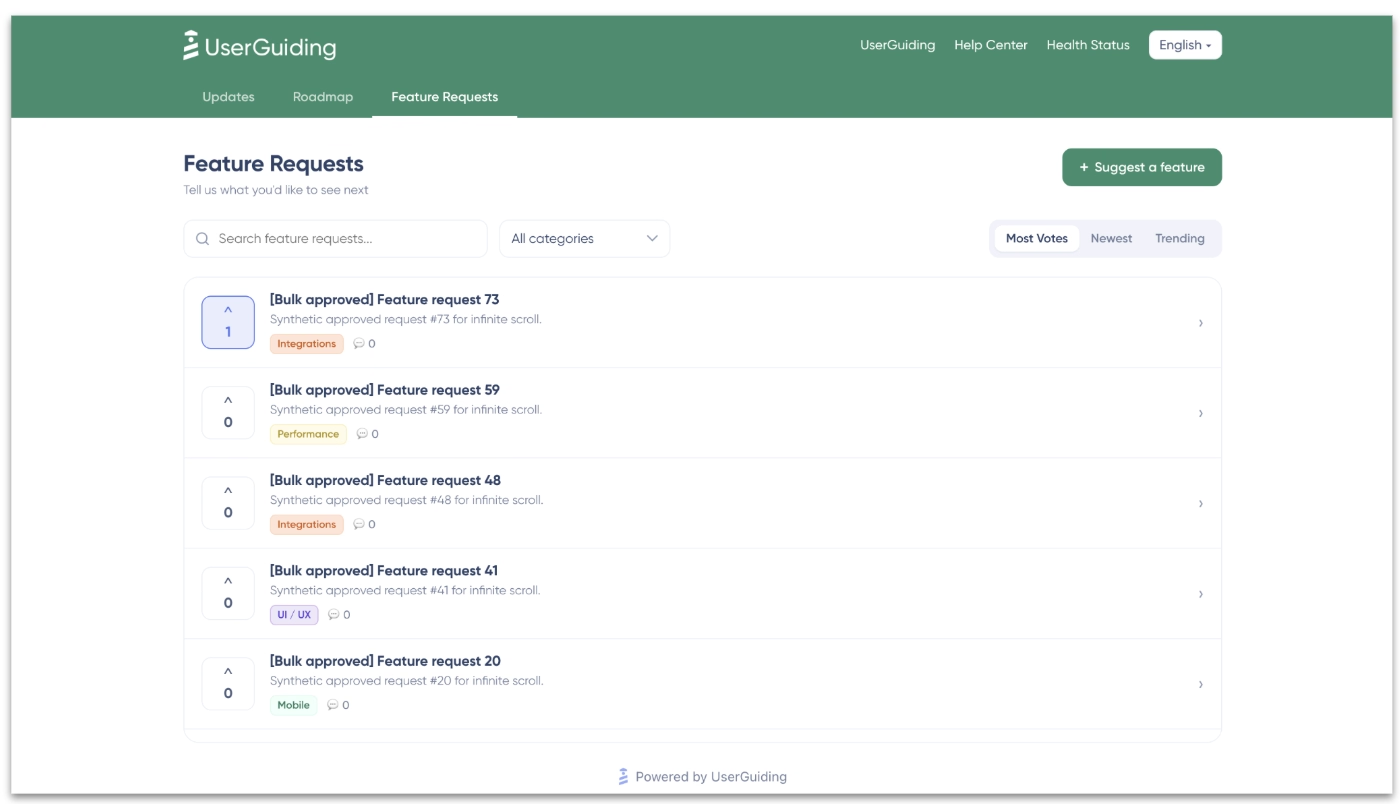
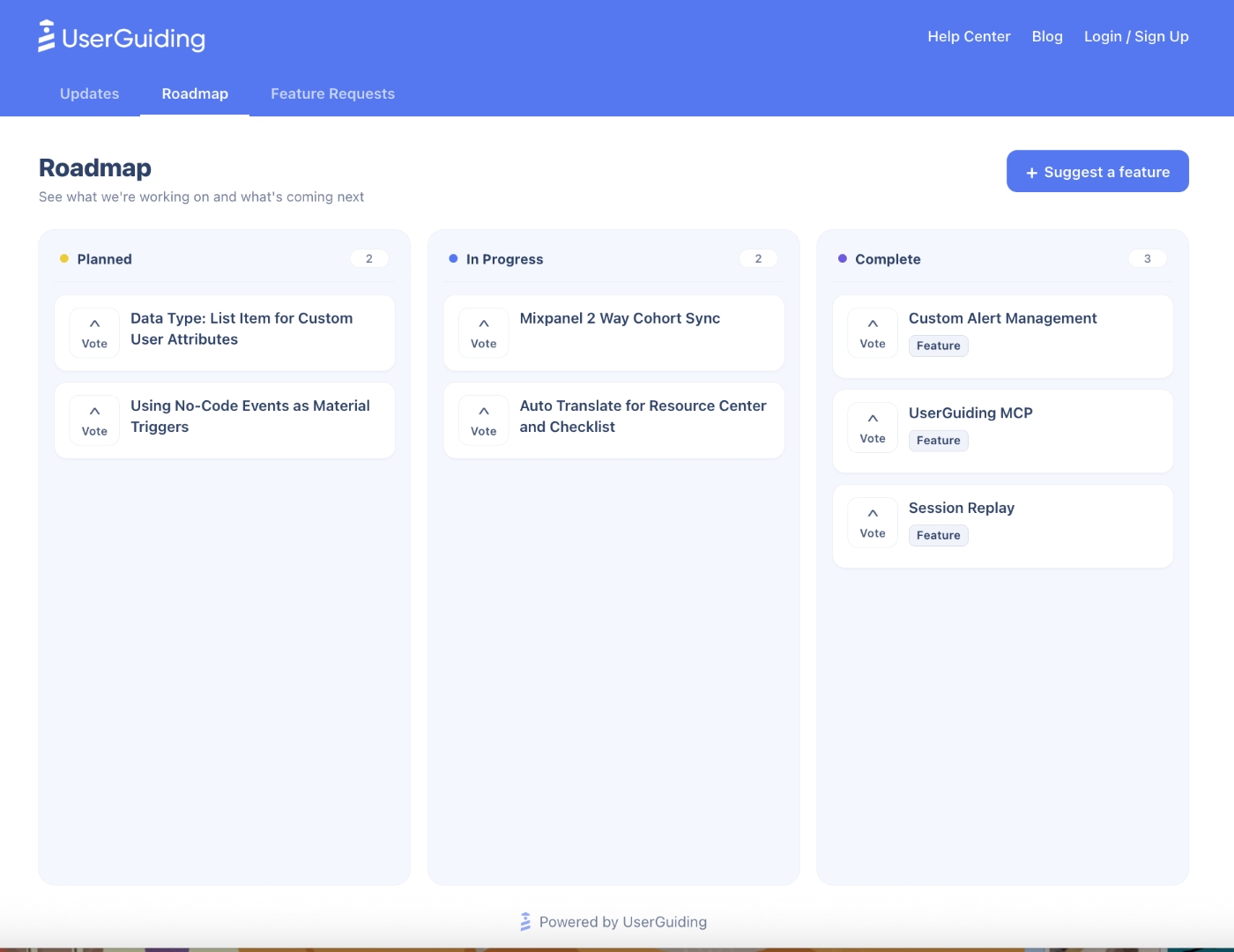
UserGuiding has recently released feature request boards and product changelogs that empower product teams in their product development processes. You can now gather new feature suggestions via public boards, which also allow upvoting, as well as updating your users and customers about the features and updates you’re currently working on and/or plan to work on in the future.
These are additions to the Product Updates page that add more depth in your two-way user communication.
Here’s what the feature request boards look like:
And here’s what the public changelogs look like:
You can also create private changelogs for internal planning.
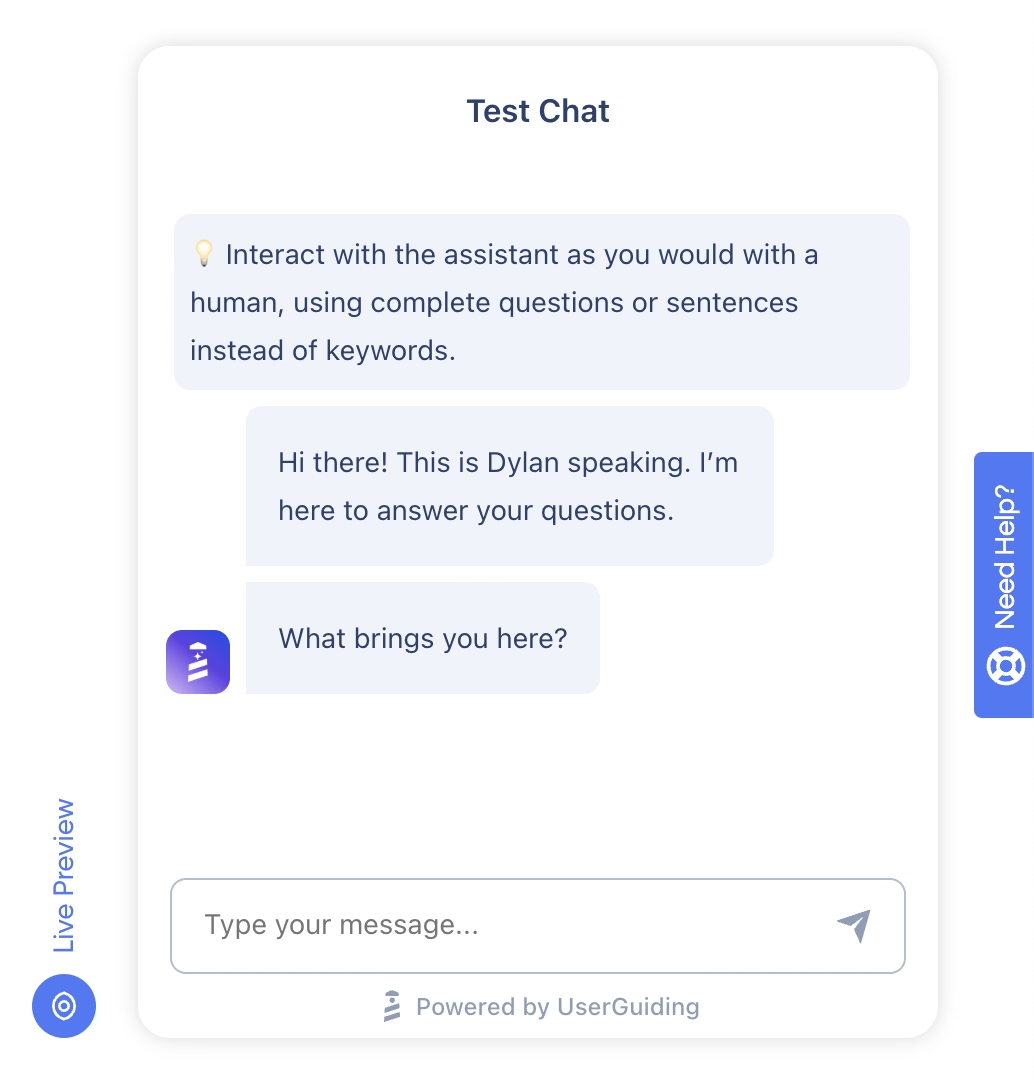
- AI Assistants: Both platforms provide an in-app AI copilot to deflect repetitive support tickets and assist users contextually. Similar to Elvin AI, UserGuiding's AI Assistant, Dylan can be trained through your knowledge base articles, as well as training on external URLs, uploaded PDFs, custom text snippets, and existing in-app guides..
When answering questions, it can trigger step-by-step interactive walkthroughs directly mid-conversation, includes transparent monthly resolution caps with 50 free credits, and configures smart fallbacks to your human support tools if a question falls outside its sources.
Here is what UserGuiding’s AI Assistant looks like in action:
How much does UserGuiding cost?
UserGuiding offers three pricing plans: Starter, Growth, and Enterprise. The pricing for these plans is based on your Monthly Active Users (MAU). This allows you to scale as you grow and save costs in the early stages.
- The Starter Plan starts at $249/month (billed annually) for up to 2,000 MAU.
- The Growth Plan starts at $499/mo (billed annually) for up to 2,000 MAU.
As you scale your MAU, these numbers scale as well.
The Starter Plan includes almost all of UserGuiding’s core features and capabilities, such as guides, surveys, checklists, resource centers, analytics, hotspots, knowledge base, and product updates —though with some limits on quantity.
The Growth and Enterprise Plans provide additional advanced services, enhanced account control features, and more customization and localization options. They also come with unlimited guides, hotspots, checklists, and resource centers.
AI features (Lighthouse included), are available across all plans.
In short...
As your introduction to the product adoption world, Product Fruits offers great features in the entry level, such as their Elvin Copilot, custom events, and feedback features.
It stands out with its ease of use and is praised for its customer support as well.
However, if you are looking for a more seamless, end-to-end user engagement and product growth platform, UserGuiding stands out as the stronger choice.
With an intuitive no-code builder, completely separated checklist widgets, standalone knowledge bases, and public/private feature request roadmaps, UserGuiding bridges the gap between in-app guidance and long-term product feedback.
🚀 Try UserGuiding with a 14-day free trial and see how it makes a difference for yourself!
👉 Check this article out to learn more about how Product Fruits compares to UserGuiding.
👉 Check this article out if you want to learn more about other Product Fruits alternatives.
Frequently Asked Questions
What is Product Fruits, and how does it support SaaS user onboarding?
Product Fruits is a no-code, AI-assisted digital adoption platform (DAP) that helps software teams guide users through key milestones without engineering resources. It supports SaaS onboarding by providing visual, multi-step Flows, interactive product tours, onboarding checklists, and pulsing hints directly inside the web interface. Through its visual canvas, teams map personalized paths tailored to specific user roles or actions. Paired with its built-in Elvin AI copilot to automate guide creation, Product Fruits accelerates initial setup, speeds up time-to-value, and drives product-led activation.
What are the use cases of Product Fruits for reducing churn in B2B SaaS platforms?
In B2B SaaS, churn frequently stems from poor feature discovery, setup friction, or delayed customer support. Product Fruits mitigates these risks by deploying targeted onboarding checklists to guide users toward activation milestones. When users struggle, the embedded Elvin Copilot and help center provide instant, 24/7 self-service answers to eliminate ticket backlogs. Teams can also trigger contextual micro-surveys (such as CSAT, CES, or cancellation feedback) and in-app feedback widgets to spot drop-offs, address user frustration early, and proactively re-engage at-risk accounts before they cancel.
What are the key features of Product Fruits for improving product adoption rates?
Product Fruits boosts adoption using interactive guidance, behavioral targeting, and timely user communication. Key features include Flows and Tours that walk users through complex functionality step by step, alongside non-intrusive Tooltips and Hints highlighting unadopted features in context. Onboarding Checklists gamify progress toward activation, while Modals and Banners announce releases and major updates. Under the hood, Custom Events and Event Tracking measure real-time interactions, allowing teams to trigger guides based on user behavior and ensure the right features get adopted quickly.
What industries benefit most from using Product Fruits onboarding software?
Product Fruits is best suited for web-based B2B and B2C SaaS platforms with continuous workflows or multi-tiered functionality. High-benefit industries include FinTech, HR tech, EdTech, healthcare software, ERP/CRM platforms, and e-commerce enablement tools. These sectors often feature data-heavy dashboards, recurring compliance updates, or complex setup procedures where users easily stall. Digital products expanding into international markets also gain immense value from Product Fruits’ rapid multilingual translation, enabling seamless customer onboarding across global teams without maintaining separate localized portals.
How does Product Fruits compare to Appcues or UserGuiding in feature set?
While Appcues offers native mobile SDKs and enterprise analytics at a higher starting price, Product Fruits remains web-only but includes a native knowledge base and an AI support copilot (Elvin AI). Compared to UserGuiding, Product Fruits leans toward conversational support deflection and canvas flows. In contrast, UserGuiding provides a cleaner no-code interface, standalone checklist widgets, a full knowledge base, and two-way product engagement tools, including but not limited to public roadmaps and feature request boards, without the steep learning curve.
.png)








