.svg)
.svg)
.svg)
.svg)



.svg)




.svg)
.svg)


Weeks of planning sprints, prioritizing backlogs, and finally shipping that new feature. But here’s the uncomfortable truth: 95% of new products and features fail to gain adoption.
In other words, only 5% of startups and their features survive each year, according to a MIT study. What gives?
For too many agile teams, hitting the “deploy” button is the end goal. They obsess over the technical release process: sprint ceremonies, story points, velocity tracking. Neglecting how they’ll communicate those releases to actual users becomes their fatal flaw, and they end up with features that get completely ignored because nobody knows they exist.
This guide covers the complete agile process, from initial planning through user communication and adoption. You’ll learn not only how to ship faster, but most importantly, how to ensure your releases actually reach and resonate with your users.
Let’s dive in.
TL;DR
✅ The agile release process breaks down your product roadmap into incremental, shippable outcomes through structured sprint cycles.
✅ Successful releases require both technical planning (backlog prioritization, velocity tracking) and user communication (changelogs, in-app announcements).
✅ 95% of products and features fail to gain adoption, leading to higher churn rates.
✅ Use story points and velocity metrics to plan realistic release timelines without overcommitting.
✅ UserGuiding’s Product Updates feature lets you create changelogs and announce releases in your app without writing code.
What is the agile release process?
Every release needs a plan. But sometimes, most carefully drafted plans fail to consider context and unexpected changes. And it’s one of the biggest reasons why projects and programs fail.
That’s the premise behind the agile release process. Instead of a singular, waterfall release approach, agile structure uses increments by breaking the scope into sprints (2–4 weeks) and delivering working functionality at the end of each iteration.
McKinsey reports 30% to 50% operational increase when companies go agile, but this rate of success demands hierarchy. And each level should feed into the next.
Here’s what the hierarchy looks like:
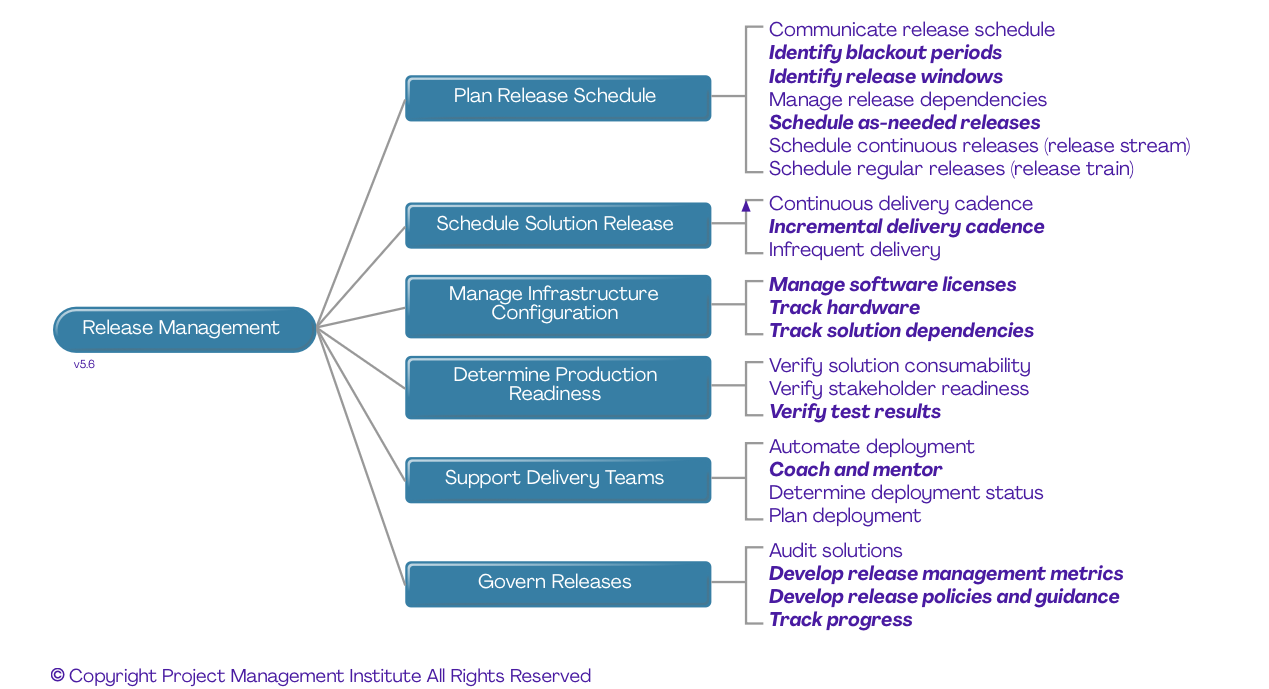
- Product vision: Knowing the “why” behind the release, which involves collaboration between the product owner, team members, stakeholders, and executives
- Product roadmap: Ranking the backlog requests and outlining release goals and dates
- Release plan: Picking one desired release and focusing on one sprint or iteration
- Sprint plan: Breaking the sprint or iteration down into detailed tasks, estimates, and determining the sprint goal
- Daily standups: Doing daily check-ins of what the team’s working on, getting all team members on the same page, and reviewing progress towards the goal
Notice how the increments start with the whole (product vision) and break the process down into smaller parts (daily standups).
Agile release plan vs. Product roadmap
Think about building a product like planning a road trip.
Before you start the engine, you decide where you’re going, why that destination matters, and what major stops you want to hit along the way. That’s your product roadmap.
Then, a week before you leave, you figure out what you’re packing, which route you’re taking first, and where you’ll stop for gas. That’s your agile release plan.
They’re connected, but they’re not the same thing.
A product roadmap is the big-picture view of your product’s future. It answers:
- Where is the product heading?
- What problems are we solving long-term?
- What outcomes matter for the business and customers?
Roadmaps are stakeholder-facing. Leadership, marketing, sales, and investors use them to understand priorities and direction. Because of that, they focus on themes, customer value, and long-term business goals.
An agile release plan, on the other hand, zooms in. It takes a slice of the roadmap and turns it into something the development team can actually ship. It answers:
- What are we delivering in the next release(s)?
- When can we realistically ship it?
- How does this fit within our team’s capacity?
Release plans are team-focused and deal with features, user stories, sprint sequencing, and short-term timelines (weeks or a few months).
While the roadmap talks in outcomes and themes, the release plan talks in increments and execution. So the flow looks like this:
Vision → Product Roadmap → Agile Release Plan → Sprints
Why is the agile release process important for SaaS teams?
SaaS products don’t often live on yearly cycles as users expect continuous improvements. An agile release process helps teams ship in smaller increments, learn from real customer feedback, and adjust fast.
That speed matters when competitors are always releasing, too. It’s the operational link between roadmap strategy and steady, reliable delivery.
The 6-step agile release process
1- Define the product vision and release goals
Start with the why behind this release: what problem it will solve and what outcome it should drive. Use frameworks like SMART goals or OKRs to turn that vision into clear targets.
Involve key stakeholders early so business and product priorities stay aligned. Remember that the best release goals are specific, measurable, achievable, and ambitious enough to move the needle, not vague feature wish lists.
2- Review and prioritize the product backlog
Before planning a release, the team needs a clean, current backlog. That means regular refinement: clarifying user stories, breaking down large items, and removing outdated work.
Then comes prioritization:
- Cost of Delay: Rank work by the impact of postponing it
- Priority Poker: Stakeholders collaboratively score items to reach consensus.
- 100 Dollar Test: Distribute a fixed “budget” across items to show relative value
- MoSCoW: Classify work as Must-have, Should-have, Could-have, or Won’t-have
The key is to prioritize outcomes and benefits, not just features. Otherwise, teams fall into the “feature factory” trap: shipping more without delivering more value.
Common prioritization mistakes
Teams often prioritize the loudest stakeholder instead of the highest-value work. And ignoring technical debt also backfires, slowing future releases.
Another trap is overlooking dependencies, which can derail timelines and create bottlenecks. Strong prioritization balances business value, system health, and delivery realities.
3- Estimate effort and determine velocity
Teams estimate work using story points (a relative measure of effort, complexity, and uncertainty) instead of hours. Once items are sized, you can calculate team velocity by taking the average story points completed over the last three sprints. This gives a realistic baseline for how much work the team can handle in an upcoming release.
Also factor in capacity: vacations, meetings, onboarding, or cross-team support all affect delivery. Most importantly, don’t overcommit. It’s better to plan conservatively and deliver consistently than to promise more than the team can sustainably ship.
How to assign story points
Start by picking a benchmark story and assign it a baseline value (often 3 points). Then estimate other items by comparing their effort, complexity, and uncertainty relative to that reference. Use the Fibonacci sequence (1, 2, 3, 5, 8, 13…) to reflect increasing uncertainty as work gets larger, instead of pretending effort scales linearly.
4- Plan and execute sprints
With priorities and capacity set, work moves into sprints. During sprint planning, the team selects backlog items and defines a clear sprint goal that ties work to outcomes, not just tasks. Daily standups keep everyone aligned, surface blockers early, and maintain momentum.
At the end of the sprint, a sprint review shares progress with stakeholders, while the retrospective focuses on improving how the team works. As a best practice, keep sprints short (around two weeks) to get feedback faster and adjust direction before small issues turn into big delays.
5- Deploy and release
Once a sprint is complete, it’s time to deploy and release. Teams can choose from strategies like big bang (all at once), incremental (staged rollout), or dark launches (hidden features released to a subset of users). Use feature flags to control who sees new functionality, and run beta tests to catch issues before a full release.
Top agile teams don’t wait weeks or months. They deliver multiple times per day, responding to user feedback and iterating quickly. A controlled, measured release keeps users happy, reduces risk, and ensures every new feature adds real value.
Release types
Releases come in different sizes.
Major releases deliver new features or redesigns that shift user experience. Minor releases make incremental improvements, like enhancements or optimizations.
Micro releases handle small changes, such as bug fixes or patches, keeping the product stable and reliable between larger updates.
6- Communicate releases to users
Here’s a critical step many teams overlook: telling users what’s new.
Even the best release can go unnoticed without proper communication. Use release notes and changelogs for transparency, and in-app announcements (like modals, banners, or tooltips) to highlight key changes.
Reach dormant or churned users with email campaigns, and amplify updates through social media to showcase improvements and engage your audience. Clear communication ensures users understand value, adopt new features, and stay connected to your product.
Why communication to users is non-negotiable
90% of users churn if they don’t understand a product’s value in the first week upon signing up.
In other words, unannounced features often go unused, no matter how powerful. Regular, transparent communication ensures users see the value, adopt new functionality, and builds trust in your product and brand.
Tools for announcing releases to users
Creating and sharing release updates can be surprisingly tricky. Many teams rely on the traditional approach: manual documentation, often written by developers, which can be time-consuming and hard for users to digest.

A modern approach uses dedicated tools that integrate directly with your product. For example, UserGuiding’s Product Updates feature lets you:
- Create a standalone product changelog
- Publish updates with labels and categories
- Promote updates in-app with Boosters without disrupting UX
- Collect emoji reactions and written feedback
Agile release planning best practices
Let’s look at six tested and proven strategies that will help you thrive with an agile release plan.
Never skip goal-setting
Clear goals guide every decision in the release process. Without them, prioritization becomes arbitrary, and teams risk shipping features that don’t move the product (or the business) forward.
Focus on delivering value instead of features
Avoid the “feature factory” mentality, where teams ship new features without considering impact. Instead, ask: “What user problem does this solve?”
Prioritize work that delivers real value and improves the user experience, rather than just adding more features for the sake of it.
Set flexible release dates
Avoid locking in specific release dates too early. Instead, use date ranges to provide a realistic window for delivery.
This flexibility reduces pressure on the team, minimizes the risk of corner-cutting, and allows adjustments based on capacity, unforeseen issues, or feedback.
A flexible schedule keeps quality high and teams focused on value, not just deadlines.
Keep sprints short and achievable
For most teams, two-week sprints hit the sweet spot.
Shorter sprints mean faster feedback, quicker learning, and more opportunities to iterate before small issues become big problems.
By keeping work achievable and realistic, teams can underpromise and overdeliver, building trust with stakeholders while maintaining sustainable momentum. Short, focused cycles ensure steady progress without burning out the team.
Define roles clearly
Clear roles keep agile releases on track:
- The Product Owner represents the customer and makes prioritization decisions.
- The Scrum Master facilitates the process and removes roadblocks.
- The Development Team executes the work.
Unlike traditional setups, Scrum has no project managers, so responsibility is shared across the team.
Collect and act on feedback
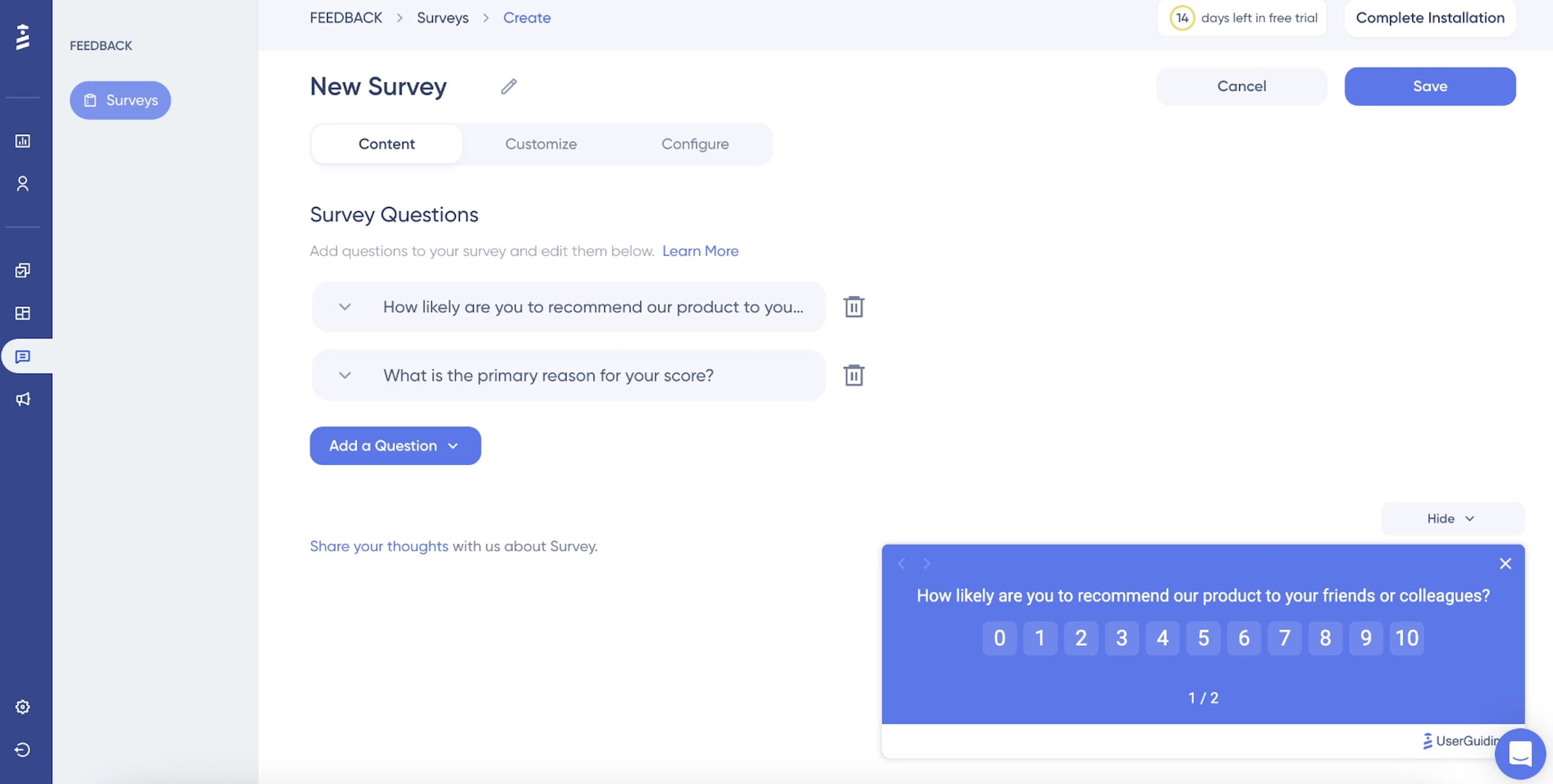
Gather feedback through in-app surveys like NPS or CSAT, and complement them with user interviews for deeper qualitative insights.
Track product usage data to see how features perform in the real world. The best practice is to use this feedback to guide the next sprint, ensuring continuous improvement.
Communicating your releases effectively
As we’ve discussed, most fail to communicate their releases effectively, which also makes the time and effort fall flat. To avoid the same unsuccessful fate, we can break down the process into two sections: why most release communication fails and tips to put your best foot forward with your communication.
Let’s discuss.
Why most release communication fails
Release communication often fails when developers ship features but marketing isn’t informed. Release notes are also frequently written for a technical audience, not users, making them hard to understand or engage with.
On top of that, new features rarely get in-app promotion, so users don’t notice them. The result? Low adoption, frustrated users, and wasted development effort, all because updates weren’t communicated effectively to the people who actually use the product.
Best practices for release notes
Effective release notes focus on the user, not the code. So you should write for your audience: Technical users may appreciate details, but most users respond to benefits. Use clear, jargon-free language to make updates easy to understand.
Incorporate visuals like GIFs or screenshots to show changes in action, helping users grasp new functionality quickly.
Keep updates concise but informative, highlighting how the release improves their experience. Well-crafted release notes drive adoption, reduce confusion, and reinforce that your product is evolving to meet real user needs.
Using in-app announcements
In-app announcements make sure users see and understand your updates without leaving the product.
For major releases, use modals to grab attention and clearly communicate key changes.
Banners work well for minor updates or ongoing notifications, staying visible without disrupting the user experience.
Tooltips are perfect for introducing new features in context, guiding users exactly where and when they need help.
Additionally, a resource center lets users explore updates at their own pace, providing self-service discovery and reference material. Combining these methods ensures your releases are noticed, understood, and adopted, increasing feature usage and reducing support requests.
Using changelogs
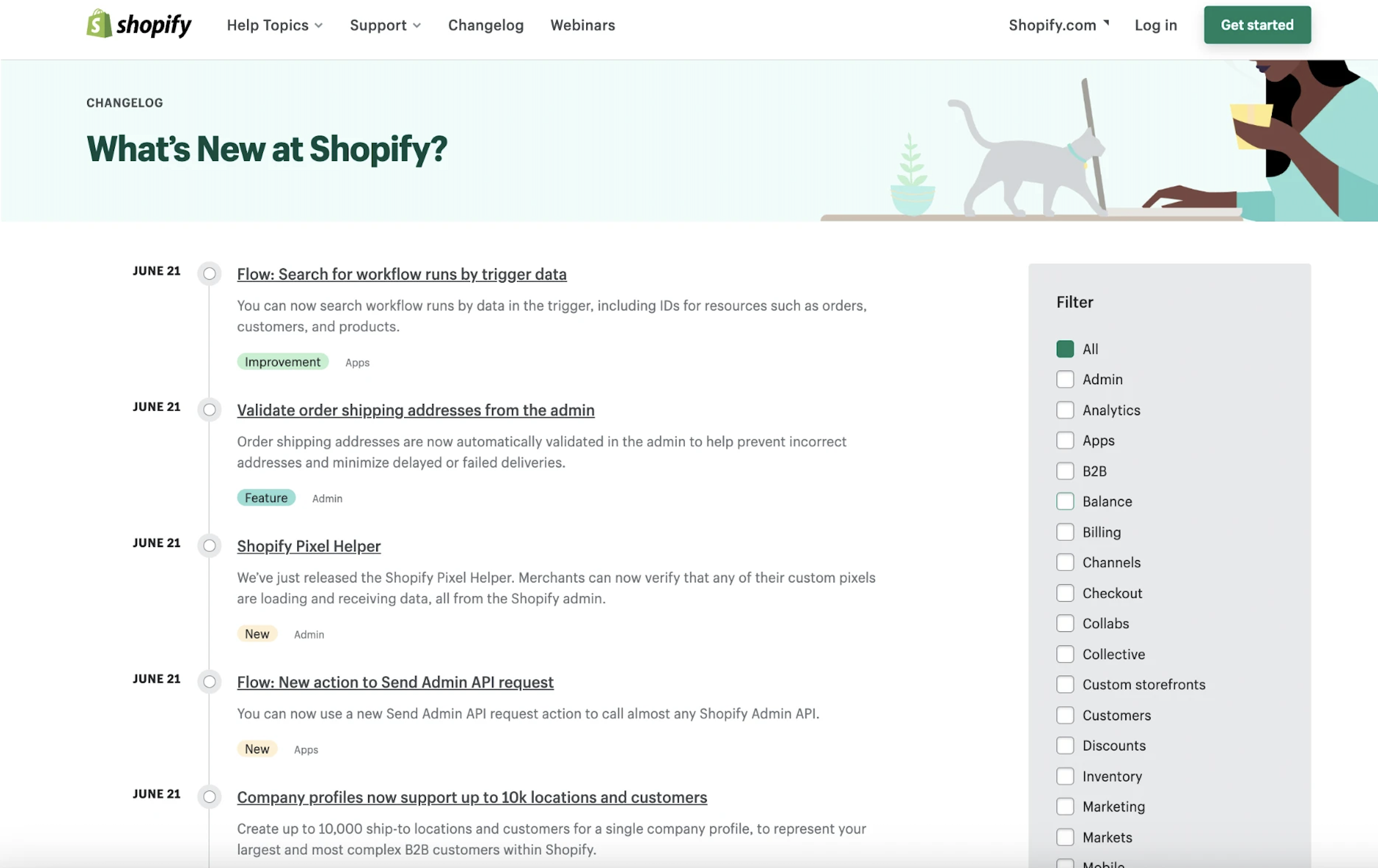
A changelog serves as a central hub for all product updates, giving users a single place to see what’s new, improved, or fixed.
By maintaining a transparent record of changes, you build trust, showing users that your team is actively improving the product and values keeping them informed.
Changelogs also create a searchable history, making it easy for users to reference past updates, track feature evolution, or troubleshoot issues.
When combined with in-app announcements and release notes, a well-maintained changelog ensures that users are aware of updates, understand their benefits, and can confidently adopt new features without confusion.
Announcing to inactive and churned users
Email is still the most effective way to reach inactive or churned users. Use it to highlight new features that directly address their previous pain points, showing how your product has evolved to meet their needs.
Tie these messages to re-engagement campaigns centered around releases and include concise explanations, visuals, and calls-to-action to make the benefits obvious. By combining thoughtful messaging with strategic timing, you can reignite interest, drive adoption of new functionality, and turn lapsed users back into active, engaged customers.
Introducing UserGuiding’s product updates
For teams looking for more efficient release communication, UserGuiding’s Product Updates feature offers a comprehensive solution. Here is what it can do for you:
✅ Create a branded changelog page in minutes
✅ Publish posts with custom labels (new feature, bug fix, improvement, etc.)
✅ Collect user feedback with emoji reactions and comments
✅ Use “Boosters” to promote updates inside your app
✅ Integrate with resource center for self-service discovery
Show users your latest updates in minutes for free
Measuring release success
Shipping a release is the start of learning what actually worked. Measuring release success shows whether you delivered real value or just pushed code. Here’s what you need to consider👇
Key metrics to track
To see whether a release delivered real value, monitor both product usage and team performance:
- Feature adoption rate: Percentage of users engaging with a new feature
- Time-to-adoption: How quickly users start using new functionality
- Release velocity: How frequently your team ships updates
- Lead time: Time it takes to move from idea to production
- CSAT/NPS: User sentiment after a release
- Support ticket volume: A decrease often signals clear communication and better UX
Using analytics to inform future releases
Analytics help you move from assumptions to evidence. Track which features drive the most engagement, retention, or conversion to understand where real value comes from.
At the same time, identify underperforming features that see low usage or drop-off. These are candidates for iteration, repositioning, or even sunsetting.
Usage data often reveals which features deserve more investment and which should be demoted, helping teams focus on what truly improves the product instead of maintaining functionality users don’t actually use.
When to sunset features
Consider sunsetting features with consistently low usage, especially when they require high maintenance effort.
If a feature no longer aligns with your product’s direction, it can distract from higher-impact work. The best practice is to communicate sunsetting clearly to affected users, explain the reason, and guide them toward alternatives to maintain trust and reduce frustration.
Common agile release challenges (and how to overcome them)
Agile releases sound smooth in theory until real-world constraints hit. Recognizing common challenges early helps teams adapt fast and keep delivery on track without sacrificing quality.
Scope creep
Scope creep happens when new requirements are added mid-sprint, disrupting focus and timelines. The fix is to protect the sprint scope: log new requests in the backlog and evaluate them in future planning cycles instead of derailing current commitments.
Unrealistic commitments
Unrealistic commitments happen when teams overestimate their capacity and take on more than they can deliver. Use historical velocity as a baseline and add a buffer for unknowns to create plans that are ambitious, but still achievable.
Poor cross-team communication
Misalignment happens when development, marketing, and support operate in silos. Include key stakeholders in release planning and maintain a shared release calendar so everyone knows what’s shipping, when, and how to prepare.
Low feature adoption
Low adoption occurs when users don’t discover new features. Combat this by investing in clear release communication through changelogs, in-app announcements, and targeted emails, ensuring users understand the value and know how to engage with updates.
The “we shipped it” fallacy
Shipping a feature doesn’t equal success. True success comes from user adoption and positive outcomes. Always track how users engage with new functionality, rather than assuming deployment alone delivers value.
Looking ahead — Building a complete release culture
A successful agile release process goes beyond sprint ceremonies. Combine technical excellence with clear user communication: start with goals, prioritize value, announce releases effectively, and iterate based on feedback.
Ready to close the gap between shipping features and user adoption?
Try UserGuiding’s Product Updates — create changelogs, announce releases in-app, and collect feedback without writing a single line of code.
Frequently Asked Questions
What is the difference between a release plan and a sprint plan?
Release planning and sprint planning operate at different levels of granularity in the agile hierarchy:
Release Plan:
- Covers multiple sprints (often a quarter or program increment)
- Focuses on which features/epics will be delivered
- Aligns with business goals and the product roadmap
- Provides stakeholder visibility into upcoming deliverables
Sprint Plan:
- Covers a single iteration (2-4 weeks)
- Details specific user stories and tasks
- Created by the development team based on velocity
- Flexible within the sprint but fixed once committed
The relationship is hierarchical. The release plan sets the direction, while sprint plans execute it incrementally. When release planning is done well, sprint planning becomes much easier because teams have clear goals and priorities.
How often should agile teams release?
Agile release frequency varies by organizational maturity and product type. But common cadences include:
- Sprint-aligned: Every 2-4 weeks (most common for SaaS)
- Continuous deployment: Daily or multiple times per day (mature DevOps teams)
- Feature-based: When significant functionality is complete (less predictable)
Factors Influencing Frequency:
- Technical infrastructure (CI/CD maturity)
- Testing automation coverage
- Team size and coordination complexity
- Customer expectations and industry norms
Best Practices:
- Release working functionality, not half-baked features
- Use feature flags for controlled rollouts
- Don't let release dates drive scope, adjust scope to meet realistic timelines
- Communicate consistently so users know what to expect
The goal is sustainable velocity and releasing frequently enough to deliver value quickly without sacrificing quality or burning out the team.

.png)