


.svg)
.svg)
.svg)
.svg)



.svg)




.svg)
.svg)


Struggling with new hire turnover, slow ramp-up, or disengaged employees? Your new employee training program could be the culprit.
Just like how customer training sets the tone for your relationship with your customers and makes or breaks their interest and engagement with your product, well… the same goes for your new employees, as well.
When a new customer doesn’t understand how to use your product, they churn.
And when a new hire doesn’t understand how things work in your company, even if they do not immediately resign, their workflow and responsibilities take a big hit.
And everyone would want to have/offer nice first experiences that make it to LinkedIn posts like this one here, right?
Gather around, in this article, we’re talking about everything related to new employee training:
- The best practices and trends
- The common mistakes to avoid
- The tools and tech to adopt
- And successful real-life examples to learn from
We even give a step-by-step roadmap!
So, let’s get started. 🏄🏻♀️🏄🏻♀️
TL;DR
- New employee training is the process of equipping new hires with the skills, knowledge, and confidence they need to succeed in their role and integrate into the company culture.
- There are several ways you can train your new hires, such as instructor-led sessions, peer mentoring, microlearning, hands-on exercises, gamification, and personalized asynchronous programs.
- Whichever method you choose depends on your employees’ roles, experience levels, learning preferences, and your company’s workflows and resources.
- This way or that way, employee training ensures faster ramp-up, higher engagement, stronger retention, and alignment with business goals.
- However, in order to get these benefits, there are several pitfalls you need to avoid:
- Rushing the onboarding process
- Overloading employees with information
- Using outdated tools or content
- Focusing on telling instead of showing
- Ignoring learner engagement and fatigue
- Skipping measurement and feedback
- Training misaligned with business goals
- And the best practices and trends you can follow include:
- Mix training methods: live sessions, microlearning, peer mentoring
- Personalize learning based on role, experience, and style
- Integrate company culture and values throughout training
- Use analytics to track outcomes and iterate
- Provide continuous learning opportunities beyond the first months
- Leverage tech, such as LMS, DAPs, and coaching platforms
- Encourage social and peer learning for collaboration and real-world context
What is “new employee training”?
New employee training is the process of helping your newest team members learn everything they need to succeed in the new work environment, as well as in their job position.
Think of it as setting them up to do the job and belong in the workplace.
From mastering daily tasks to understanding the culture, tools, and rhythm of your company, it entails several areas of training. However, we can categorize them into mainly 3 areas:
- Role-specific skills: the how-tos, systems, and workflows they’ll use every day.
- Company knowledge: who you are, who your customers are, how the business runs, and what success looks like.
- Cultural onboarding: the values, tone, and shared habits that make your team… your team.
⚠️ New employee training might resemble very much to Learning and Development (L&D).
And honestly, it’s easy to see why. Both are about helping people learn, grow, and perform better at work.
But there’s a key difference, timing and purpose.
New employee training happens at the beginning of the employee journey. It focuses on what a new hire needs right now.
Learning and Development (L&D), on the other hand, is an ongoing process.
👉🏻 Another important distinction we should talk about is the distinction between new employee training and employee onboarding.
Employee onboarding is the big picture process of integrating a new hire into your company. It starts from the moment they accept the offer and often continues through their first few months.
Think of it as the “welcome journey.”
Here’s what onboarding typically includes:
- Setting up accounts, tools, and access
- Meeting the team and learning communication norms
- Understanding company policies and workflows
- Getting a sense of culture, mission, and values
Today, onboarding is often digital-first, guided by tools, checklists, or product tours. It’s about helping new hires get oriented quickly and comfortably, especially in remote or hybrid settings.
New employee training, on the other hand, goes a level deeper.
It’s focused on building the specific skills and knowledge a new hire needs to do the tasks their role requires.
So, while onboarding introduces the environment, training strengthens performance.
Why it matters (a.k.a. benefits and costs of missing it)
Training new employees well is one of the smartest investments a company can make.
Let’s break that down a bit why 👇🏻
1. Faster ramp-up and productivity
When new hires know what to do and where to go for answers, they hit their stride sooner. And that means fewer mistakes, less downtime, and a smoother workflow for everyone.
⚡ 59% of employees think their performance is directly related to the training they receive.
2. Higher engagement and morale
Training signals care. It tells employees, “We’re invested in your success.” That sense of support boosts motivation and pride, which are two key drivers of long-term engagement.
3. Stronger retention
A well-trained employee is a confident one, and confident people stay.
⚡ 94% of employees say they’d stay longer at a company that invests in their learning and growth.
4. Better alignment with company goals
Training connects daily tasks with the bigger picture. When people understand why their work matters, they make smarter decisions that move the company forward.
⚡ Poorly trained and disengaged employees cost U.S. companies up to $550 billion a year.
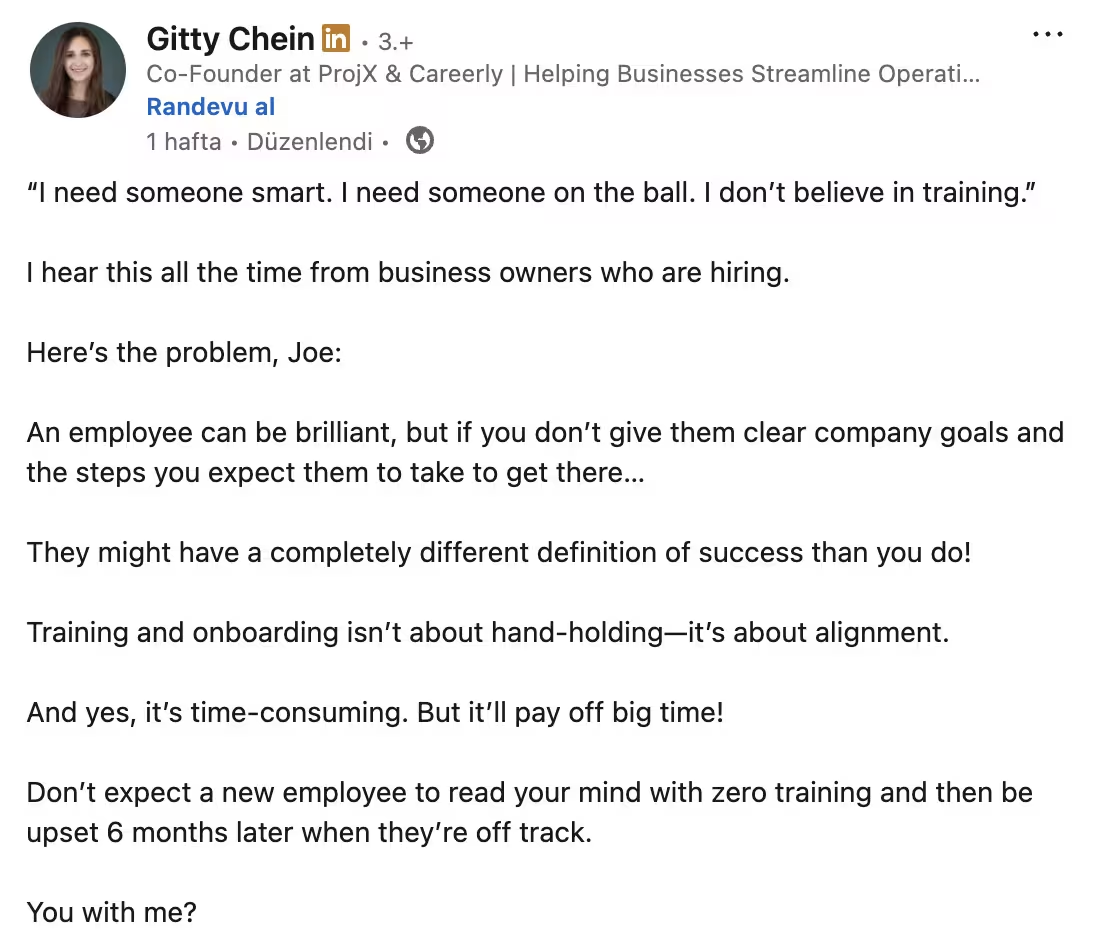
Current trends in new employee training
The way we train new employees has changed a lot in just a few years. Remote work, new technologies, and shifting expectations have completely reshaped how people learn on the job.
If you’re still picturing long, one-size-fits-all sessions in a conference room, it’s time for an upgrade.
Let’s look at what’s defining modern new hire training programs today 👇🏻
Remote and hybrid training
With distributed teams becoming the norm, training no longer happens in the same room, at the same time.
And that’s not a bad thing.
Companies are using video calls, online learning platforms, and digital walkthroughs to create flexible, engaging onboarding experiences.
✅ What’s great about this approach?
- People can learn at their own pace
- You can standardize the training process and materials across teams and time zones
- Remote tools make it easy to track progress and engagement
Microlearning
Microlearning breaks content into short, focused lessons (videos, quizzes, or quick tutorials) that fit neatly into a busy schedule.
It’s learning that feels more like a TikTok scroll than a textbook chapter.
Fast, relevant, and surprisingly sticky.
✅ Why does this work?
- Boosts retention and reduces cognitive overload
- Keeps learners engaged
- Fits naturally into the flow of work
Gamification and interactive learning
Gamified learning uses points, badges, challenges, or leaderboards to turn progress into a game-like experience.
We’re also seeing more simulations, scenario-based exercises, and live problem-solving sessions in employee training programs. These formats help people practice real-life situations safely and confidently.
✅ What does gamification ensure?
- Boosts engagement and motivation
- Improves knowledge retention through active participation
- Creates a safe space to practice real scenarios
Personalization and adaptive learning
One-size-fits-all training is officially out.
Modern tools can tailor content based on each employee’s role, skill level, and even learning style.
For example, a sales rep and a support specialist might take completely different learning paths, even within the same onboarding framework.
✅ What does personalization ensure?
- Reduces overwhelm with content that fits real needs
- Respects each employee’s role, pace, and background
Learning in the flow of work
One of the most important shifts is that learning no longer has to pull employees away from their work.
Tools like UserGuiding and other in-app guidance platforms now deliver training right inside the software employees use daily.
This approach helps people learn by doing, directly in context, and reduces those “wait, how did that work again?” moments.
✅ Why does this work?
- Makes learning seamless and part of daily routines
- Encourages instant application of new skills
- Strengthens confidence through hands-on practice
- Supports faster problem-solving on the job
💡 According to the 70-20-10 learning model, effective workplace learning happens through three sources: 70% of learning takes place on the job, 20% through social interactions with colleagues, and 10% from formal training courses.
Social and peer learning
Learning doesn’t always happen in formal sessions. In fact, some of the most valuable lessons come from interacting with the people around you.
Many companies now encourage peer mentoring, team-led discussions, and Slack- or chat-based knowledge sharing.
This approach is informal, quick, and highly effective.
New hires get answers in the moment, observe how experienced colleagues solve real problems, and start building relationships faster.
✅ Why is this a good approach to employee training?
- Fosters collaboration and strengthens teamwork
- Speeds up problem-solving with real-time guidance
- Builds a culture of continuous learning
Training methods and formats (a.k.a. what works)
Not all training methods are created equal. The trick is choosing the right format for the content, the audience, and the learning goals.
Here are the most effective approaches and when to use them:
Instructor-led training (ILT) and group learning
Group learning involves training multiple employees together, often through workshops, discussions, or collaborative exercises. It encourages interaction and collective problem-solving.
When to use:
- Introducing company-wide processes or company policies
- Fostering teamwork and collaboration
- Brainstorming solutions or practicing soft skills
Here are the best practices of ILT explained by Ramadan Elsayed:
Mentoring/Peer learning
This method pairs new hires with experienced employees to share knowledge, guidance, and real-world insights. Peer learning can also happen in small teams or discussion channels.
According to LinkedIn’s 2025 Workplace Learning Report, 55% of companies offer mentorship programs and 31% run peer learning groups.

When to use:
- Transferring institutional knowledge
- Encouraging relationship-building and collaboration
Personalized asynchronous learning
Self-paced, digital learning tailored to each employee’s role, experience level, and skill gaps. This could include online modules, video tutorials, or interactive exercises.
When to use:
- Teaching role-specific tools or procedures
- Supporting remote or hybrid employees
- Allowing learners to progress at their own pace
- Reducing cognitive overload with targeted content
⚡ According to statistics, 38% of workers expect training opportunities relevant to their jobs, 32% want them to be current, and 31% wish they had more control over the programs.
Hands-on learning
Employees practice tasks in real or simulated environments. This method emphasizes experiential learning and immediate application.
When to use:
- Onboarding to software, tools, or technical tasks
- Practicing client interactions or service scenarios
- Reinforcing skills learned in theory
- Preparing employees for high-stakes or repetitive tasks
Best practices for new employee training
#1: Talk to senior employees and gather insights
Before designing your training, speak with experienced team members.
They probably remember the challenges they faced when they were new and can highlight which methods or materials helped the most. This will ensure your program is realistic, practical, and grounded in actual experience.
#2: Plan ahead and know your audience
Before creating a training program for your new hires, you should consider their roles, skill levels, and potential familiarity with the tools you use in your company.
Then, you can plan the sequence of lessons, choose appropriate methods (hands-on, e-learning, group sessions), and ensure the pace is manageable.
What is important during the initial training process for a new employee is to ensure:
- You do not overload them with too much new information at once.
- Everything that needs to be covered is covered during this process.
- The employee doesn’t feel babied with basic information they already know.
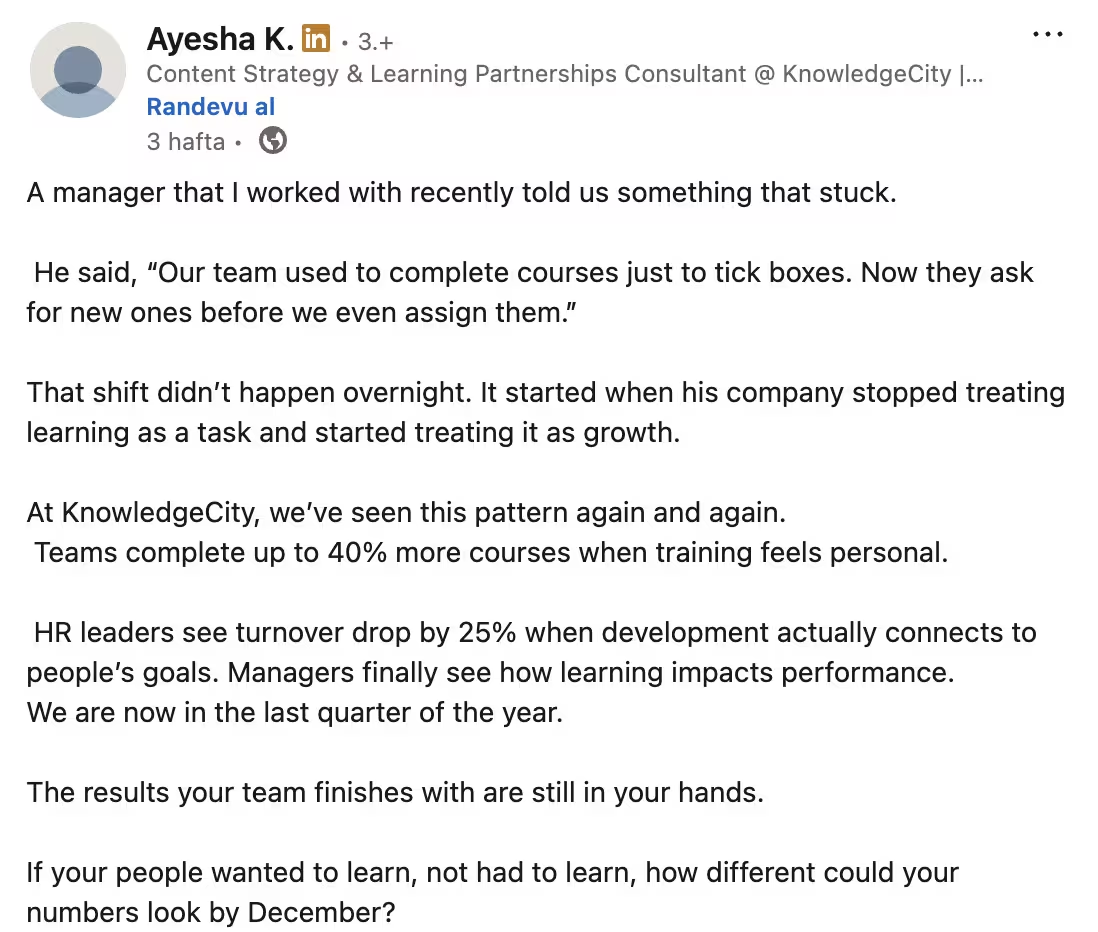
According to KnowledgeCity, teams complete up to 40% more courses when training feels personal, and HR leaders see turnover drop by 25% when development actually connects to people’s goals.
#3: Integrate company culture
New employee training is about how things work here, as much as it is about the tasks and the tools.
So, sharing your company’s mission, values, and behavioral expectations throughout the program is an important (and expected) part of the initial training.
This is important both for the new employees and you.
👉🏻 The employees know what behaviors, communication styles, and values are expected, and gain confidence in making decisions aligned with company standards.
👉🏻 You ensure consistent behavior and alignment across the team, and reduce miscommunication, errors, and culture-related conflicts.
⚡ Glassdoor’s surveys show that nearly 9 out of 10 employees who experience well-planned and executed training feel a strong sense of connection and cultural belonging at work.
#4: Align training goals with specific roles and business objectives
Training works best when it’s tailored to both the employee’s role and the company’s overall goals.
Every new hire comes with different day-to-day responsibilities, experience, and needs, so a one-size-fits-all approach often falls short. By aligning training with specific roles, you can create personalized learning paths that focus on the skills and knowledge employees will actually use in their day-to-day work.
One effective way to structure these goals is by using SMART goals, goals that are Specific, Measurable, Achievable, Relevant, and Time-bound.
SMART goals help clarify exactly what employees should learn, provide a way to track progress, and ensure that the training contributes directly to business outcomes.
❌ For example, instead of a vague goal like “learn the sales platform,”...
A SMART goal would be:
✅ “Complete the CRM onboarding module and demonstrate the ability to log and track at least 10 client interactions within the first two weeks.”
This approach makes learning feel purposeful and relevant.
Employees can see how their role connects to the company’s bigger picture, which boosts motivation, engagement, and confidence.
#5: Set up feedback loops
Feedback is the heartbeat of effective training. And we’re not talking about checking in once and moving on here. 👀
You should ask them:
- What’s working,
- What’s confusing, and
- What they still want/need to learn.
You should encourage open dialogue during and after training sessions so employees feel heard and supported.
When you start the conversation and show you’re open to feedback, it’ll also encourage new employees to contact you more consistently and openly when they have questions or encounter problems, as well.
Because more often than not, giving feedback to managers and senior employees without them asking first and/or leaving an open door for it, is hard. And it is even harder for new employees…
#6: Use analytics/ metrics to evaluate outcomes
You can’t improve what you don’t measure.
Collecting data on training outcomes gives you a clear picture of what’s working and what needs adjustment.
You can look at…
- Engagement rates,
- Knowledge retention,
- Time-to-proficiency, or performance improvements to see how well employees are absorbing and applying what they’ve learned.
#7: Plan for ongoing growth and development
Employee development doesn’t stop after the first 30, 60, or 90 days.
By establishing regular check-ins, offering advanced training modules, and providing stretch assignments, you give employees opportunities to keep learning, build new skills, and take on challenges that push them beyond their comfort zones.
Taking a long-term perspective benefits both employees and the company.
Employees feel supported, confident, and motivated to contribute, while managers can ensure that skills remain sharp, knowledge stays up to date, and engagement levels remain high.
So, you need to think about how you can link your new employee training programs with your other learning/ training programs.
Common mistakes and what not to do while training employees
Even the best-intentioned training programs can stumble if a few key details are overlooked.
Here are some common pitfalls that can quietly undermine your efforts:
❌ Turning training into a competition
A little friendly challenge can be motivating, but making training feel like a contest often backfires. When employees start comparing rather than collaborating, you risk discouraging quieter team members and creating unnecessary pressure.
⚡ Over 42% of employees believe that executives promote unhealthy competition, which often leads to reduced workplace collaboration and productivity.
❌ Telling instead of showing
It’s easy to fall into the “let me just explain it” trap, especially when you already know the process inside out. But here’s the thing: listening doesn’t always equal learning.
You can talk someone through a system for an hour, and they’ll still freeze the first time they actually open it.
People learn by doing, not by watching endless slides or hearing long-winded explanations.
So instead of telling them how to do something, show them.
Use live demos, walkthroughs, or guided “learn-by-doing” sessions where they can click, test, and make a few harmless mistakes.
It’s like teaching someone to ride a bike.
You can’t just describe how to balance; at some point, you’ve got to let them pedal...
❌ Using outdated tools or content
You know that moment when you’re watching a training video and the interface looks like it came straight out of 2009? Yeah, not great.
Outdated visuals, old data, or examples from “the way we used to do it” can instantly make your training feel irrelevant.
When the UI on the screen doesn’t match what new hires actually see, it’s confusing and frustrating. They pause, rewind, and start questioning whether they’re even in the right place.
It also quietly tells them the training program isn’t getting the attention it deserves.
So, keep your content fresh.
Update screenshots, refresh stats, and swap out that old internal video where someone’s clearly using Windows XP in the background.
Small updates show you care, and make the whole experience feel polished, accurate, and worth their time.
❌ Rushing the process
You can’t speed-run learning. Trying to cram everything into a two-day bootcamp might seem efficient, but it usually just leads to blank stares and mental overload.
Every new hire learns differently. Some people pick things up fast; others need time to process, test, and repeat.
When you rush it, they remember less and end up asking the same questions you thought you’d already covered.
Instead, space it out.
Let your employees absorb things gradually.
Think “steady onboarding,” not “training bootcamp.”
Plus, when you pile a ton of training material under a tight deadline, it stops being a learning experience and turns into a checklist to get through. People start skimming, mentors rush, and important details get brushed off with a casual “just ask me later if you get stuck”, instead of taking the time to make things clear from the start.
These happen in new employee trainings as well as L&D trainings and compliance trainings that happen along the way.
⚡ According to Corporate Compliance Insights, 34% of employees report skimming the training content.
❌ Overlooking learner engagement and fatigue
If your training sessions feel like an endless slideshow, chances are you’ve already lost your audience somewhere between Slides 23 and 47.
Even the most motivated new hire will start to zone out when engagement takes a backseat.
Instead, try to mix things up!
Combine interactive exercises, short videos, and discussions to keep things fresh. Encourage questions and feedback, and remember that attention spans are shorter than ever (thank you, social media).
And just as important, you need to watch for information fatigue.
Training overload is a real thing. You should give people breaks, vary formats, and make learning feel like a rhythm, not a marathon.
When employees are energized and curious, they retain information better and actually enjoy the training process.
To link this up with the “don’t rush the process” tip we’ve just given, if you have a month-long employee onboarding process, maybe prioritize certain tasks and skills. And if you still have too many things to cover, maybe think again and find ways to offer some of them when the need arises, with just-in-time training, for example.
❌ Ignoring business alignment
Here’s a sneaky one: you can have the most engaging, well-designed training in the world, but if it doesn’t connect to real business goals, it’s just… noise.
When training is misaligned, employees end up learning things that don’t move the needle.
They might enjoy it, sure, but it won’t help them perform better or support your company’s bigger objectives.
Always tie every module, every exercise, every example back to why it matters for the business. When people understand how their learning connects to success, both theirs and the company’s motivation skyrockets.
❌ Skipping measurement and feedback
Once the initial training wraps up, you should have a clear picture of whether it worked and where things might need fine-tuning.
Think of it like this: you wouldn’t launch a new product and never check how it performs, right? The same goes for your training.
You want to know:
- Did employees actually learn what they need to do their jobs well?
- Are there gaps that require more follow-up?
- How confident are they feeling in their new roles?
Start simple. If you’re working with a small team, skip the spreadsheets and go for direct conversations. Ask people what parts of the training helped most and what didn’t land.
You’ll be surprised how much useful feedback comes out of an honest, informal chat.
If you like numbers, add a few structured checkpoints. Maybe a short quiz, a confidence survey, or a performance snapshot a month or two after training ends.
And of course, the best measure of success is how people perform on the job.
Are they solving problems faster? Making fewer mistakes? Feeling more self-sufficient?
Those signs are worth a hundred survey responses.
If results aren’t what you expected, that’s valuable data. It might mean the pacing was off, the materials need an update, or the delivery method didn’t fit your team’s learning style.
The good news is that you can fix that.
Use what you learn to make the next round smoother, smarter, and more engaging.
How to measure success and track ROI
So you’ve designed a solid new employee training program, great! But how do you know if it’s actually working?
➡️ Start with the right metrics
There’s no single magic number that proves training success, but here are a few solid places to start:
- Time to proficiency: How long does it take for a new hire to become fully productive?
- Performance metrics: Are employees meeting the expected standards in their roles?
- Engagement levels: Do learners actively participate in training, or do they seem checked out?
- Retention rates: Are new hires sticking around longer after going through training?
- Error rates or rework: Has quality improved since the training program started?
➡️ Use both pre- and post-training assessments
A great way to gauge impact is by comparing what employees knew before and after training.
That can mean:
- quick skill assessments or self-evaluations,
- surveys about confidence or readiness, or
- performance-based exercises that simulate real work.
➡️ Visualize new employees’ progress
If you’ve got a learning management system (LMS) or any HR analytics tool, don’t let it sit there gathering digital dust. Those platforms can do more than store course completion; they can actually show you how your people are growing.
Create simple dashboards that track key metrics, such as progress, engagement, and retention, over time.
You’ll quickly spot patterns, such as where new hires are thriving, where they’re slowing down, and which parts of your training might need a little extra attention.
Step-by-step guide to train your new hires
📌 Step 1: Define your audience
Before you plan a single training session, take a step back and understand who you’re training.
Different roles, departments, and experience levels require different types of support.
Ask yourself:
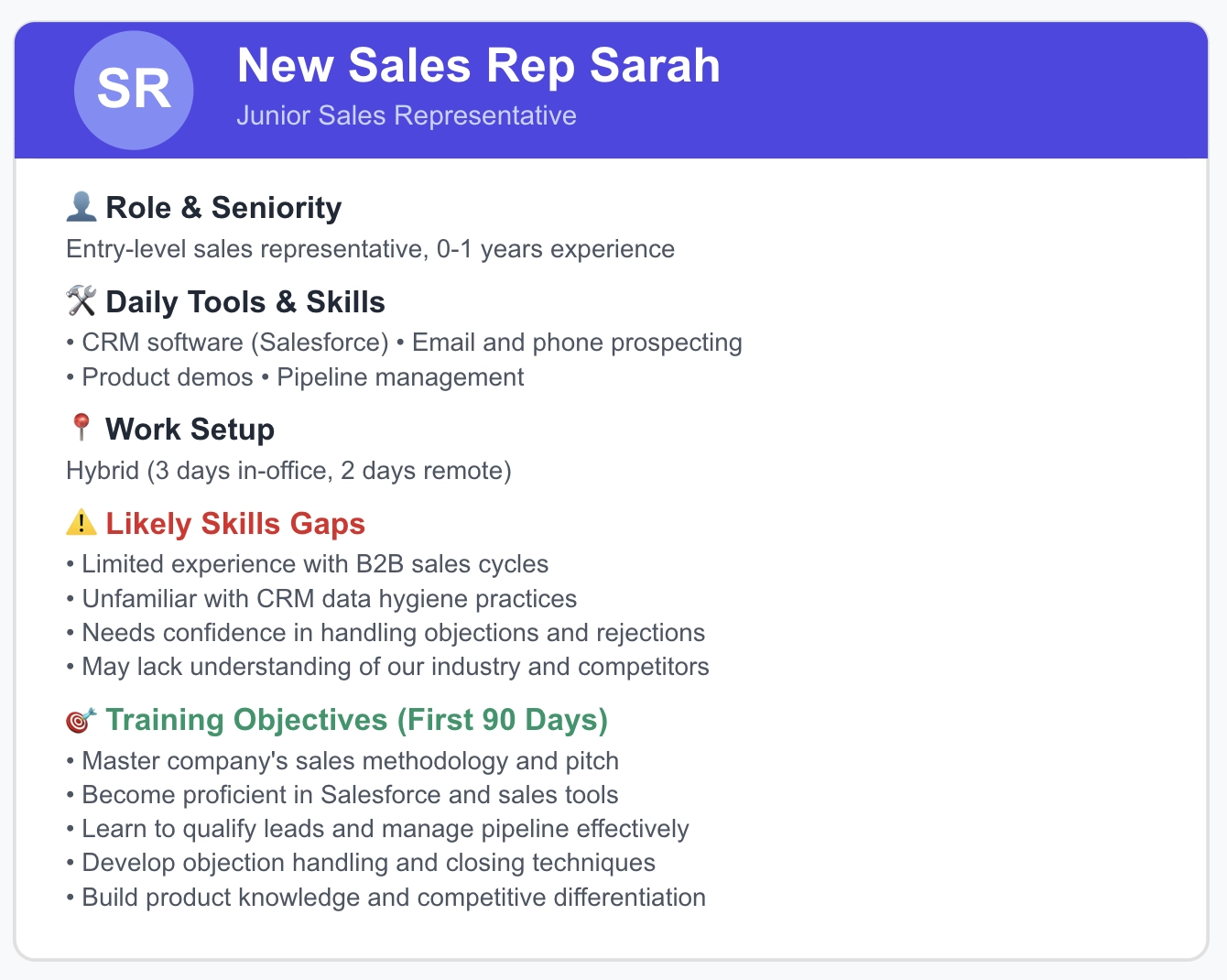
- What’s their role and seniority level?
- What skills or tools will they use daily?
- Are they remote, hybrid, or in-office?
💡 Pro Tip: Create short persona profiles, e.g., “New Sales Rep Sarah,” “Junior Developer Dan,” or “Customer Support Chloe.” This helps you visualize learning needs and tailor the tone, tools, and format accordingly.
📌 Step 2: Assess skill and knowledge gaps
Before you jump into building a training plan, take a moment to understand where your new hires are starting from. Everyone brings something different to the table.
Previous roles, skills, and comfort levels with technology can vary wildly, even within the same job title.
Think of this step as your “training baseline.”
It helps you avoid overexplaining what they already know and focus instead on what they actually need to learn to succeed in your environment.
Start by asking a few key questions:
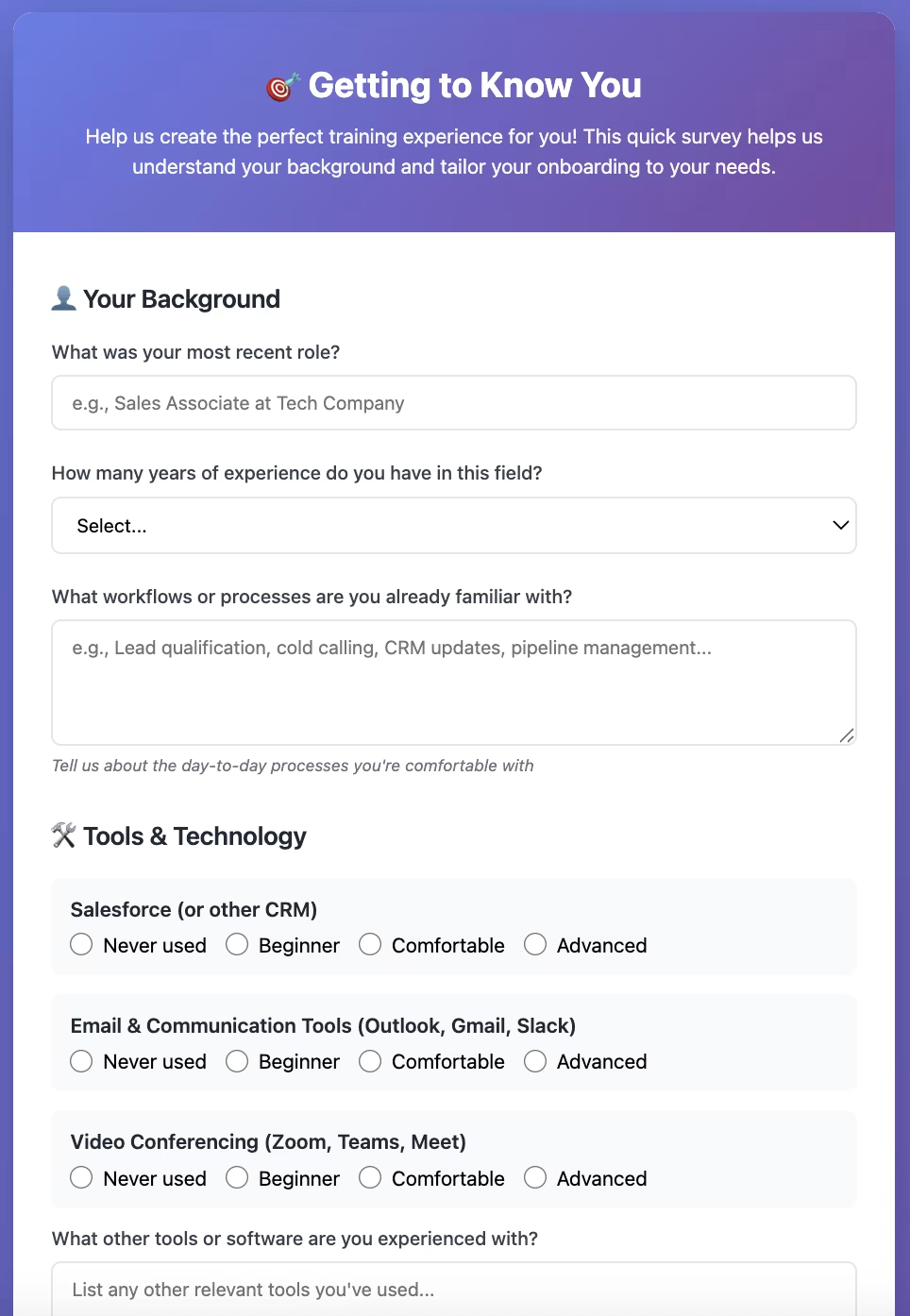
- What was their previous role?
- What tools are they already familiar with?
- What workflows are they used to?
- What kind of learning do they prefer?
💡 Pro Tip: Create a pre-training form or short “getting to know you” interview template for every new hire. Ask about their comfort level with specific tools, how they like to learn, and what they’re most excited (or nervous) about.
Don’t forget, the goal here isn’t to test them but to meet them where they are.
📌 Step 3: Choose training methods
There’s no single best way to train your new hires; it all depends on who you’re training, what they need to learn, and how your company operates. The key is to match the method to the moment.
We’ve already gone over the different training formats earlier, so we won’t list them again here. Instead, let’s focus on the strategy behind choosing how and when to use them.
Here’s the truth: you shouldn’t stick to just one method.
Think of your training program as a playlist rather than a single track. Mix and match formats that complement each other:
- Start with live sessions to build human connection and give new hires space to ask questions.
- Layer in self-paced or microlearning content for flexibility and reinforcement.
- Use DAPs to deliver “learn-by-doing” moments right inside your company software.
- Add peer mentoring or job shadowing to bring real-world experience into the mix.
Do you operate fully online? Do you work in a factory? Do you have several offices around the world that speak different languages?
All of these factors will also influence your training methods, of course.
So, do your best to mix things up, try a bit of everything that makes sense for your team, your tools, and your goals. But don’t feel pressured to cram in every possible method just for the sake of variety.
📌 Step 4: Design the curriculum
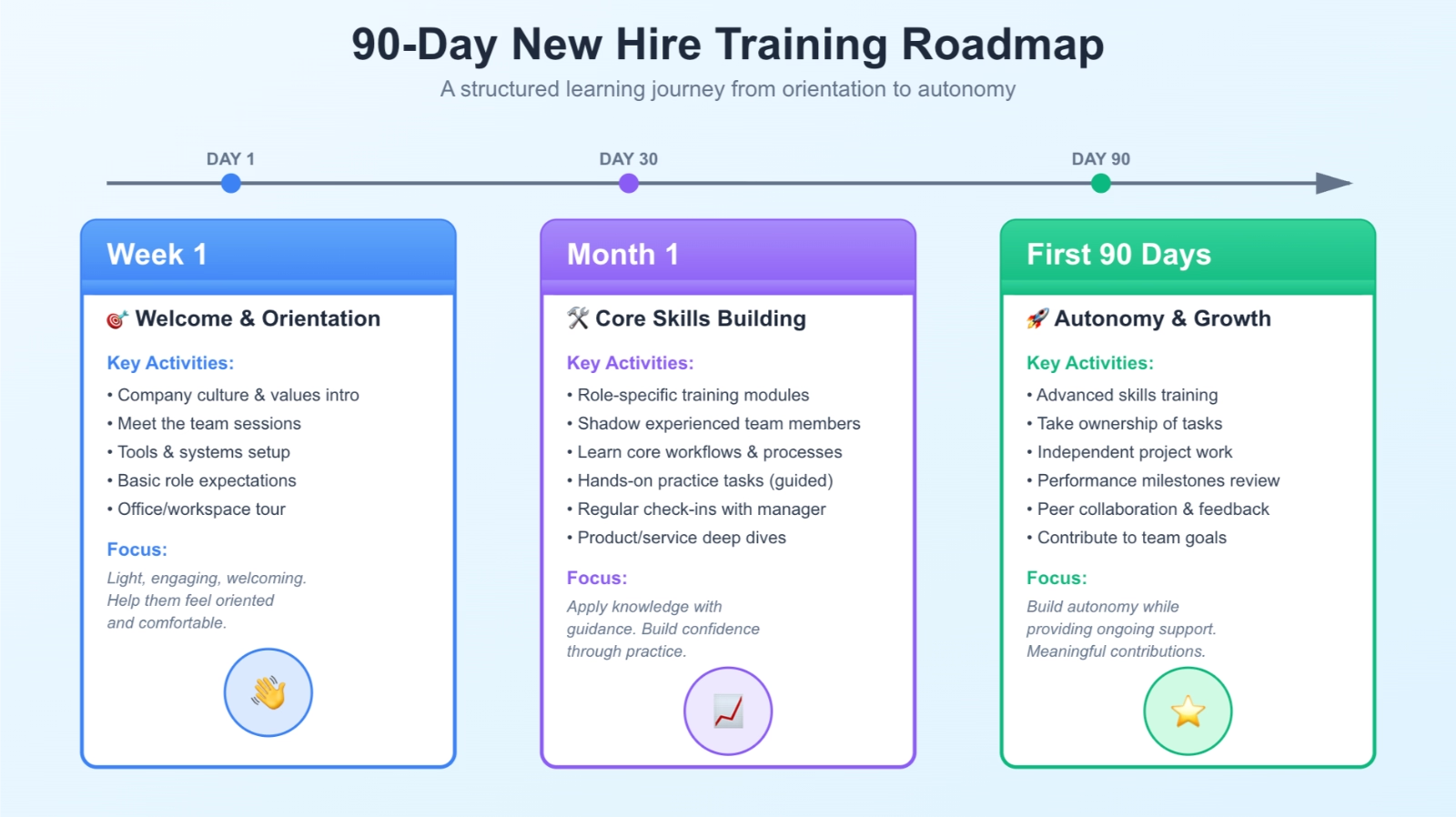
Now that you know who you’re training and how you’ll deliver it, it’s time to map out the learning journey. Think of it as creating a roadmap and start by structuring your curriculum into logical phases:
- First few weeks: Introductions, company overview, tools setup, and basic role expectations. Keep it light, engaging, and focused on helping new hires feel oriented and welcomed.
- Month 1: Core skills, workflows, and processes. Include shadowing opportunities, role-specific demos, and small hands-on tasks. This is where they start applying knowledge with guidance.
- First 90 Days: Advanced training, autonomy in responsibilities, and performance milestones. Encourage employees to take ownership and start contributing meaningfully while still providing support.
💡 Pro Tip: Create a shared onboarding calendar or digital checklist (Notion, Trello, Asana, whatever works). This helps new hires know exactly what’s next while giving managers visibility into their progress without constant check-ins.
📌 Step 5: Deliver the training
This is where your planning meets execution. A strong delivery strategy keeps employees engaged, motivated, and confident as they learn.
Key points to make training effective:
- Store resources in your LMS, shared drive, or company wiki so employees can revisit materials anytime.
- Adjust pacing or focus areas depending on how quickly employees grasp concepts.
- Encourage curiosity, celebrate small wins, and create a safe space for new hires to ask questions, even the “silly” ones.
📌 Step 6: Measure and iterate
Training doesn’t end when the slides do. Once the sessions are done, your real job begins: understanding what worked, what didn’t, and what to tweak next time.
Here’s what to keep an eye on:
- Time to proficiency: How long before new hires feel confident and start contributing independently?
- Retention and engagement: Are well-trained employees sticking around longer?
- Feedback and satisfaction: Do new hires feel supported, informed, and connected?
You can gather this data through surveys, one-on-one check-ins, performance reviews, or analytics from your LMS or DAP.
And when you get the information, please don’t let it sit in a spreadsheet…
Use those insights to update outdated materials, improve unclear lessons, and recognize what’s already working well.
Tools and technology to support new employee training
The right technology makes learning smoother, faster, and far more engaging for new hires. While the wrong technology leads to inconsistencies and training content scattered around different platforms and tools.
Here’s a breakdown of the most common tools that can elevate your training program (with a few examples to help you visualize what they look like in action).
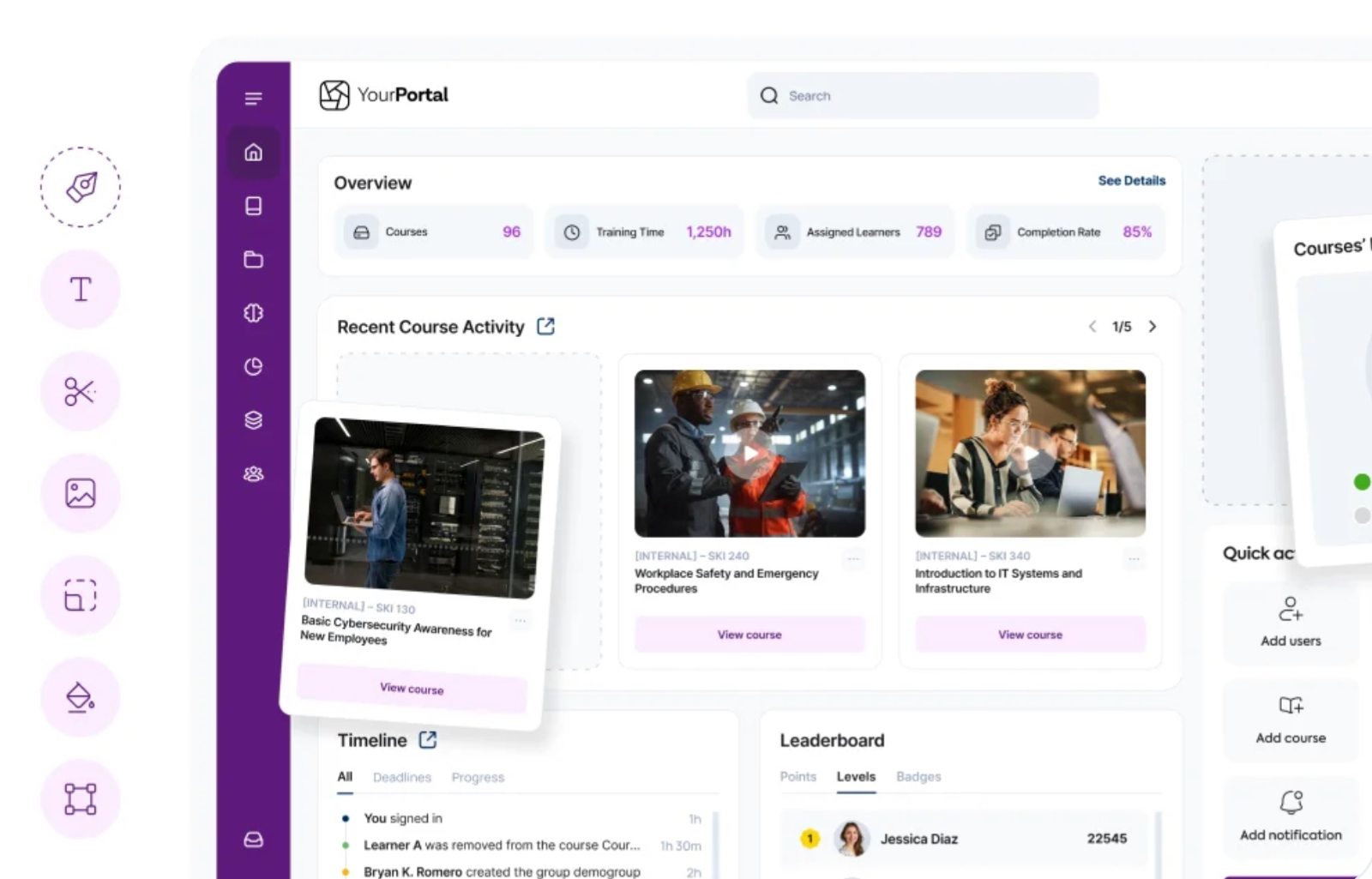
Learning Management Systems (LMS)
An LMS is where all your learning materials live. It lets you create, organize, deliver, and track training courses from one place. You can upload videos, assign modules, monitor completion rates, and generate reports without touching a spreadsheet.
Modern LMS platforms also support personalized learning paths, meaning a sales rep and a software engineer can go through totally different journeys, and both get what they need.
Popular examples include…
- TalentLMS: lightweight and perfect for growing teams.
- Docebo: AI-powered and great for enterprise learning.
- LearnUpon: ideal for companies with large employee bases.
Microlearning platforms and mobile apps
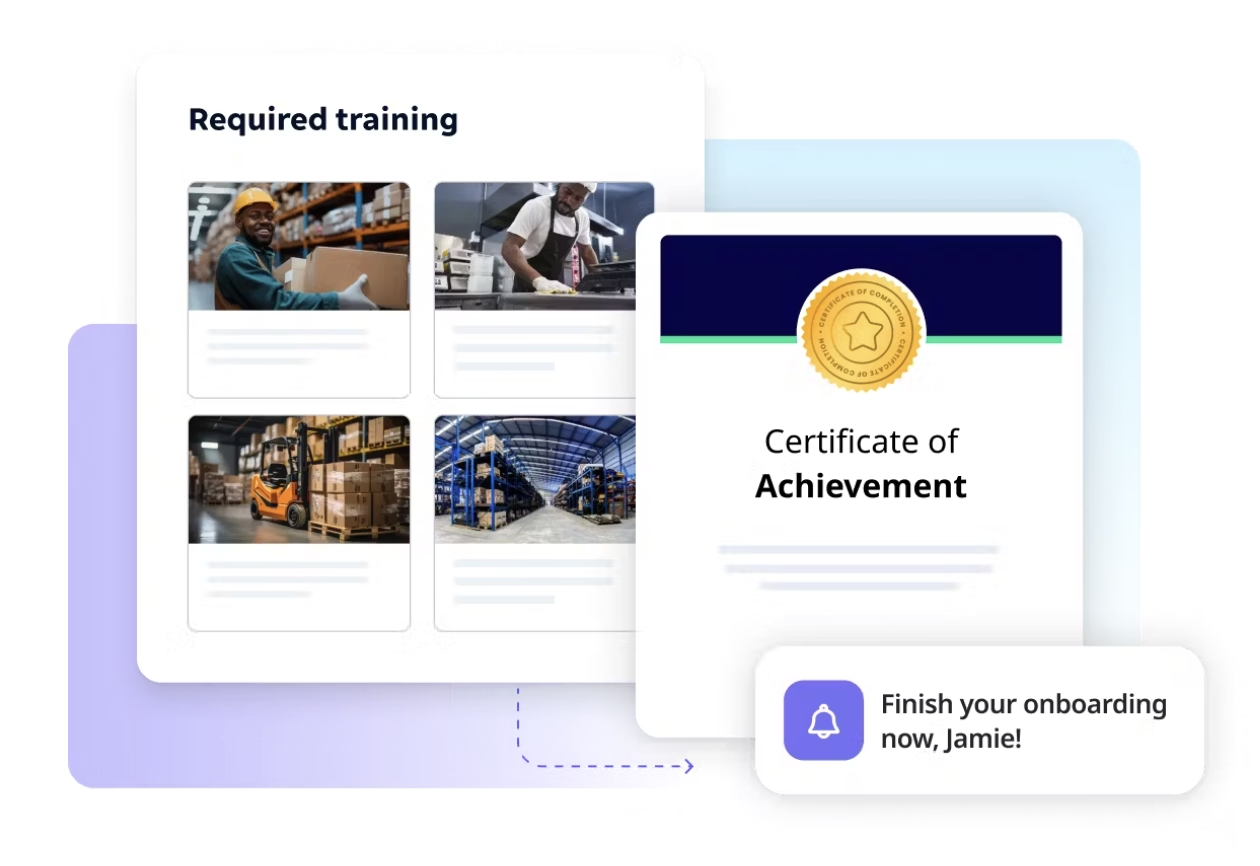
Microlearning platforms make it easy to create, deliver, and track short, focused learning experiences. Most of them come with built-in authoring tools, analytics dashboards, and mobile-first interfaces, so employees can learn wherever they are, and admins can easily monitor progress.
They’re also smart systems that adapt to how and when people learn best.
Many include AI-driven recommendations, gamification elements like badges or leaderboards, and integrations with your existing LMS or communication tools (Slack, Microsoft Teams, etc.).
Popular examples include…
- TalentCards: lets you turn training material into swipeable digital cards with quizzes, progress tracking, and leaderboards.
- Axonify: combines microlearning with AI personalization, reinforcement reminders, and performance analytics; great for large or frontline teams.
- SC Training (formerly known as EdApp): offers a full suite for creating mobile courses, adding interactive templates, gamification, and real-time analytics.
Coaching and mentoring systems
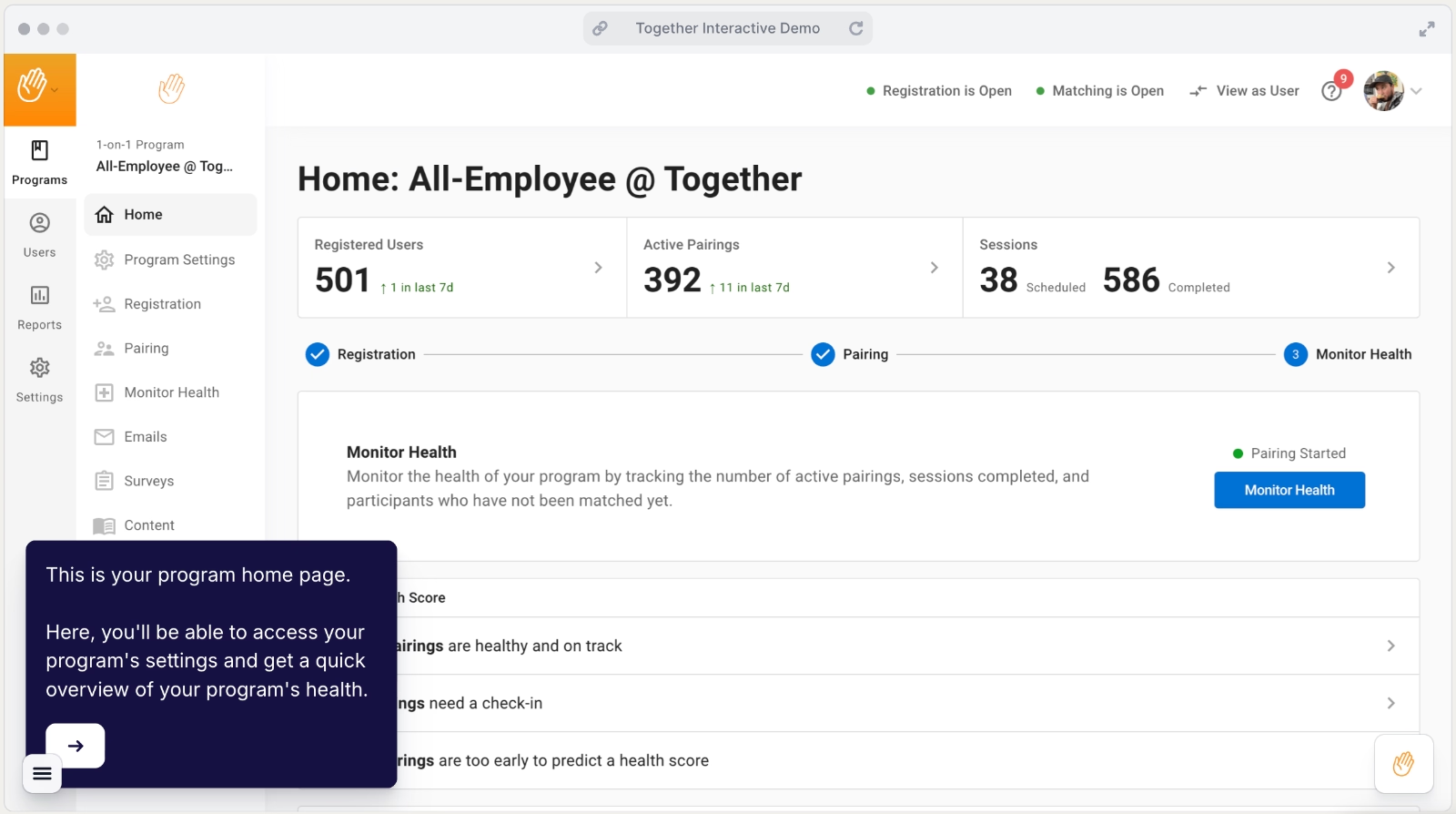
Coaching and mentoring platforms connect new hires with experienced team members who can guide them through real-world challenges, company culture, and role-specific know-how.
Many systems let you automate mentor matching, track meeting progress, and even collect feedback after each session.
Popular examples include…
- Together Platform: automates mentor-mentee pairing and progress tracking.
- MentorcliQ: great for enterprise mentoring programs.
- Torch.io: combines mentoring with leadership coaching.
Digital Adoption Platforms (DAPs)
Digital Adoption Platforms (DAPs) are like having a built-in coach that lives inside your software tools. Instead of pulling employees away from their work to watch a tutorial, a DAP helps them learn while they’re actually doing the task.
Here’s how it works: when someone logs into a tool like a CRM, project management app, or analytics platform, the DAP overlays step-by-step walkthroughs, tooltips, and interactive pop-ups directly on the screen.
It guides users through real workflows like setting up a client record, creating a report, or managing a campaign in real time.
In short, DAPs combine training and execution.
Popular examples include…
- UserGuiding: great for creating no-code, in-app walkthroughs, checklists, and tooltips to onboard both employees and customers.
- WalkMe: powerful for enterprises; uses AI-driven insights to automate guidance and analyze user behavior.
- Whatfix: offers advanced analytics and sandbox-style training environments.
Here’s an example interactive tutorial created with UserGuiding:

⚠️ To make an interactive onboarding overlay appear on top of your platform, most DAPs need to be embedded directly into your product’s codebase.
That means you (or your developer) must add a small container code snippet, like a tracking pixel, to your site so the DAP knows where to display tutorials, walkthroughs, and tooltips.
But what if you don’t have access to your product’s code?
That’s where UserGuiding Now (UG Now) comes in.

UG Now is a Chrome extension that lets you publish and view onboarding content without touching the codebase. It basically installs UserGuiding inside your browser, so you can see your in-app guides live on any web page, even if you can’t embed the container code.
This makes it perfect for:
- Internal onboarding or employee training on third-party tools
- Product demos or content previews
To use it, you simply install the UG Now Chrome extension, enter your Container ID from UserGuiding, define the domain or pages where it should appear, verify it, and voilà, your onboarding content is active.
(Note: UG Now doesn’t work on platforms that have strict Content Security Policies, so check that first.)
🎁 Start your free trial with UserGuiding and see its capabilities firsthand.
Real-world examples of new employee training
RAM automates new employee onboarding with UserGuiding
RAM, one of South Africa’s leading courier services, faced a major challenge: rolling out a full IT systems overhaul across its 40+ branches and 1,000-vehicle fleet.
With thousands of couriers and branch employees needing training (and future hires to consider), in-person onboarding wasn’t an option.
RAM sought a scalable, efficient solution to get employees up to speed quickly while maintaining business continuity.
Enter UserGuiding.
Using UserGuiding’s interactive walkthroughs and onboarding checklists, RAM created an automated training experience that felt as engaging as in-person sessions.

They even introduced “Sam from RAM”, a virtual guide who walks employees through the platform step by step, from basic UI elements to essential applications.
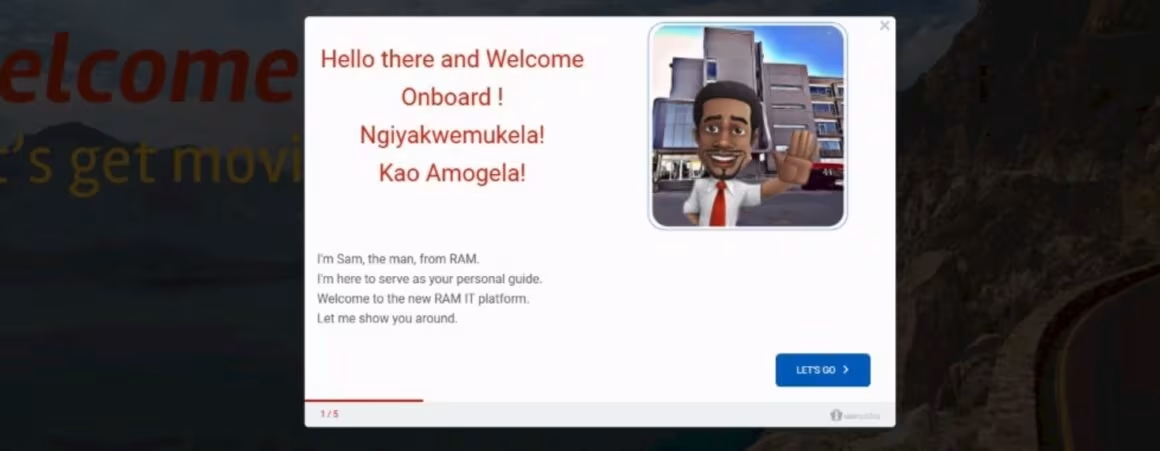
Progression is reinforced with checklists and certifications, ensuring employees gain confidence and mastery along the way.

What makes this a standout example?
✅ Combines automation and personalization to scale employee training.
✅ Maintains engagement through interactive, gamified walkthroughs.
✅ Reduces operational costs and accelerates change adoption across a dispersed workforce.
Cardinal Health offers mentorship programs to increase employee satisfaction
At Fortune 14 healthcare giant Cardinal Health, leadership wanted to see measurable results from their employee development initiatives. Their answer: intentional mentorship and sponsorship programs designed to strengthen engagement, retention, and diversity and inclusion metrics.
By pairing employees with meaningful mentors, Cardinal Health created a ripple effect across the organization.
Data shows that employees with two meaningful mentoring relationships are twice as likely to stay with the company. Beyond retention, mentors themselves experienced higher engagement, creating a self-reinforcing cycle of growth and collaboration.

Over three years, the program grew organically, participants shared their experiences, energy spread across teams, and more employees joined, turning mentorship into a flywheel of engagement and inclusion.
What makes this a standout example?
✅ Directly links mentorship to measurable increases in retention and engagement.
✅ Strengthens diversity and inclusion by fostering intentional relationships.
✅ Builds a scalable, self-reinforcing development culture that spreads organically.
Deliveroo standardizes new employee training with an LMS
Deliveroo, the UK-based food tech company connecting customers with thousands of restaurants and stores worldwide, faced a major challenge: training 500+ sales employees across multiple markets, each with different needs and workflows.
Their old approach, one-hour Google Meet sessions with little interaction, wasn’t cutting it. Training was inconsistent, hard to track, and lacked engagement.
The COVID-19 pandemic intensified the need for quick, accessible, and consistent training.
Then, they met TalentLMS.
Marcus Verri, Deliveroo’s Global Sales Training Manager, implemented the platform to deliver scalable, interactive, and on-demand training.
Using TalentLMS, employees could access microlearning modules, product courses, and role-specific resources anytime, fitting training naturally into their daily workflow. Off-the-shelf courses and TalentLibrary™ helped Marcus manage over 500 learners without producing all content from scratch.
Deliveroo’s Roo Commercial Academy became the centralized hub for all sales training. Employees now prepare for calls, review product info, and engage with content proactively.
What makes this a good example?
✅ Provides a single, consistent source of truth for globally distributed teams.
✅ Demonstrates measurable business impact, linking learning directly to KPIs (sign-up times for new restaurants decreased by 30%, and questions from sales reps about systems and processes dropped significantly).
Rosetta Stone optimizes its new employee training program with constant testing
Rosetta Stone, a pioneer in interactive language learning, needed a way to train new customer service employees efficiently while tracking learning effectiveness.
They turned to TalentLMS, creating customized eLearning courses with built-in testing to measure knowledge retention and refine content. With 90% of training delivered online, new hires could learn at their own pace while managers monitored progress and identified areas for improvement.
David Tucker, Customer Operations Trainer, says:
TalentLMS has allowed us to organize training while measuring effectiveness through testing.”
What makes this a standout example?
✅ Tracks knowledge retention through integrated testing to improve content.
✅ Provides a measurable, data-driven onboarding process that enhances employee readiness.
NuAxis Innovations turns new employee training into an engaging and fun experience
NuAxis Innovations, an IT consulting firm serving federal agencies, faced a challenge: onboarding new employees quickly and effectively while ensuring they felt welcomed, informed, and ready to contribute to the company’s mission.
Using a human-centered design approach, NuAxis formed a cross-functional team from HR, IT, and leadership to understand new hires’ experiences.
They conducted surveys and interviews, created personas and journey maps, and tested prototypes to refine the onboarding process.
This led to a comprehensive (and engaging) onboarding program that combines interactive training modules, easy-to-access FAQs, built-in feedback tools, and a welcome package complete with company swag.
What makes this a standout example?
✅ Uses human-centered design to tailor onboarding to employee needs.
✅ Includes extensive planning, prototyping, and testing to ensure the program works smoothly before full rollout.
Timberland scales and digitizes employee training with Retail Academy
Timberland, the iconic American outdoor lifestyle brand, faced a post-pandemic challenge: reconnecting dispersed retail teams across Europe while maintaining consistent customer experiences and onboarding new hires efficiently.
Traditional in-person and written training methods weren’t enough.
To solve this, Timberland partnered with MobieTrain to launch the Timberland Retail Academy, a centralized, digital learning platform.
The Academy delivers mobile-first, microlearning modules, peer-led training, and video content created by store managers in multiple languages.
Continuous feedback loops and training champions ensured the program remained relevant and engaging.
The results were striking:
- 1,206 registered users with 1,013 active users (84% activation rate)
- 774 modules completed in six months
- Over 90% adoption and engagement across stores

What makes this a standout example?
✅ Combines peer-led, video-first, and mobile microlearning for effective learning.
LaborMax Staffing adopts a progressive learning method for their new employees
LaborMax Staffing, a staffing company with over 100 branch locations, faced a familiar industry challenge: high turnover and inconsistent onboarding.
Before 2018, new hires were guided by paper checklists, leading to uneven training and frustrated employees.
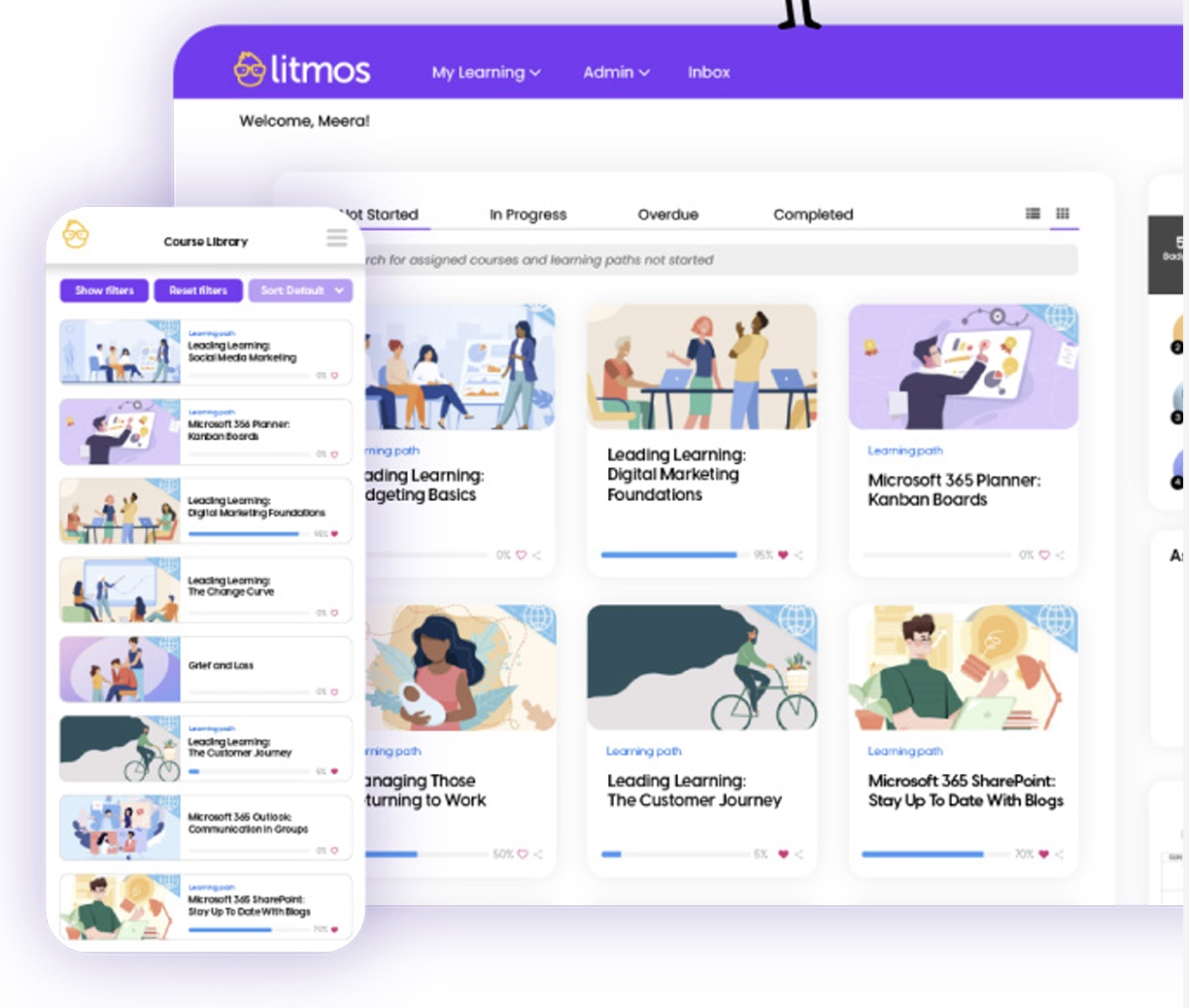
To tackle this, LaborMax implemented the progressive learning model through their Litmos LMS, creating LaborMax University (LMXU).
This approach guided employees through their first six months with a mix of structured courses, personalized learning meetings, video podcasts, and leadership development initiatives.
Key features included:
- Month 1: New Hire Learning Path using storytelling to frame employees as the “hero” of their journey.
- Months 2-3: One-on-one learning meetings to address individual needs and retention risks.
- Months 3+: Video podcasts with internal experts to reinforce concepts and show the bigger picture.
- Month 6+: Leadership development programs to cultivate skills applicable to all roles.
What makes this a standout example?
✅ Uses a progressive learning model to guide employees through their first months, cutting first-year turnover from 70% to 58%.
✅ Mixes personalized mentoring, microlearning, and multimedia, with 87% of onboarding courses completed in the first four weeks.
To wrap up…
Think your onboarding and training programs are actually hitting the mark?
Now’s a good time to double-check.
Use the checklist, experiment with new tools and tech, and mix up your training methods to make learning engaging and effective.
Even small changes can turn new hires into confident, high-performing team members.
⚡ Here’s the reality:
- Only 12% of employees feel their organization nails onboarding, and
- 52% say they still feel unprepared after it.
That adds up to disengaged employees, clunky workflows, and preventable turnover.
A thoughtful, well-planned onboarding program can change all that, for your team and your business.
Frequently Asked Questions
How do you structure a new employee onboarding program for remote teams?
You can structure a remote onboarding program by combining digital-first tools with clear learning paths. You can include video calls, online modules, and interactive walkthroughs to ensure employees understand systems, workflows, and company culture. You should also provide self-paced content alongside live sessions for flexibility, as remote teams might mean different time zones and work hours.
How does the new employee training plan template for 30-60-90 day ramp-up go?
The training curriculum is shaped by the company’s needs and the specific role. You can organize it into phases that gradually build knowledge, skills, and confidence, ensuring employees gain the right expertise at the right pace while aligning with business goals. In general, across industries, the first 30 days focus on structured training, covering core skills, company processes, and essential tools. The following 60 and 90 days shift more toward on-the-job learning, where employees apply what they’ve learned, gain hands-on experience, and refine their skills while receiving guidance and feedback.
What are the best LMS tools for new employee onboarding workflows?
You can use an LMS to centralize, track, and manage onboarding content. Popular tools include TalentLMS for growing teams, Docebo for enterprise-level AI-powered learning, and LearnUpon for large employee bases. These platforms let you create role-specific learning paths, monitor course completion, and deliver microlearning modules. You should also look for analytics and reporting capabilities to measure engagement, retention, and training effectiveness.
What does the new hire onboarding checklist for SaaS customer support roles include?
You need to cover account setup, access to tools, and system navigation first. You should also include training on customer workflows, ticketing platforms, and communication protocols. Cultural onboarding and team introductions are important to help new hires feel connected. You can layer in role-specific skills, best practices for client interactions, and compliance requirements. The checklist should be structured in a way that combines hands-on practice, digital learning, and peer support.
How do you measure time-to-productivity in new employee training programs?
You can measure time-to-productivity by tracking how long it takes for new hires to perform their core responsibilities independently. You should compare pre- and post-training performance metrics, such as task completion rates, error reduction, and quality benchmarks. You need to monitor engagement and confidence levels through surveys or assessments. By combining these data points, you can determine how quickly employees reach full productivity and adjust the training program accordingly.
What are the differences between new employee onboarding and orientation?
You should understand that onboarding is the broader process of integrating a new hire into the company over several months. Orientation is just the initial phase, focused on welcoming employees, providing policies, and a basic understanding of company culture. Onboarding extends beyond orientation, including role-specific training, mentoring, performance milestones, and ongoing skill development. You can see onboarding as a journey, whereas orientation is the starting point.
How do you personalize onboarding paths for different job roles?
You can personalize onboarding by tailoring learning paths to the specific responsibilities, skills, and experience levels of each role. For example, a sales representative and a support specialist can follow different courses, exercises, and resources that are most relevant to their daily tasks. You should also leverage tools like Digital Adoption Platforms (DAPs) such as UserGuiding, which deliver step-by-step, in-app guidance directly within the software employees use, helping them learn while doing and ensuring training fits their real-world workflows.
What are some of the compliance training requirements for new employees in regulated industries?
You should include industry-specific regulatory training as part of onboarding. This may cover data privacy, cybersecurity, safety procedures, and ethical standards. Employees need to understand company policies and legal obligations. You can use LMS modules, assessments, and periodic refreshers to ensure compliance knowledge is retained. Proper compliance training reduces organizational risk, strengthens accountability, and ensures that employees operate within legal and industry standards from day one.
How does the cost breakdown of new employee training programs for growing teams?
You can expect costs to include technology platforms, content creation, and facilitator or mentoring time. You should factor in LMS subscription fees, microlearning tools, and any digital adoption platforms used for in-app training. Additional costs may arise from course development, onboarding materials, and time spent by managers or HR staff supporting new hires. Investing in structured training can save money by reducing turnover, improving productivity, and minimizing errors in the long run.
What are the most effective microlearning strategies for faster new hire onboarding?
You should use short, focused lessons delivered in various formats such as videos, quizzes, and interactive tutorials. Microlearning should be relevant, just-in-time, and easily digestible to prevent cognitive overload. You can combine it with hands-on practice, peer learning, and role-specific guidance. Mobile and remote access help employees learn at their own pace.

.png)










