.svg)
.svg)
.svg)
.svg)



.svg)




.svg)
.svg)


In conversations, many people use product walkthroughs and product tours interchangeably even though they have different purposes and appear at different stages of the user journey.
An interactive product walkthrough is a self-service experience that guides users through specific tasks within the live UI. Product demos, on the other hand, are typically curated presentations or recordings designed to showcase value during the sales cycle.
So, when should you use product walkthroughs vs product demos?
The answer lies in where in the app you want to position users.
In this guide, we’ll talk about how product walkthroughs compare to product demos, use cases for both in 2026, and talk about how UserGuiding is one of the best tools on the market to get you started.
Before we dive in, keep in mind that this guide focuses on B2B SaaS customer adoption. Therefore, we won’t cover any employee onboarding or HR software.
TL;DR
- Product walkthroughs are self-serve experiences that guide users through specific tasks within the live UI.
- Product demos aim to convince prospective users to showcase the product’s value during the sales cycle.
- UserGuiding supports product-led growth and product adoption with interactive elements like hotpots and tooltips as well as interactive product walkthroughs that offer onboarding checklists and progress bars to help users experience value from day one.
The 2026 Comparison: Walkthroughs vs Demos at a Glance
Virtual onboarding fails 23 out of 100 times if it’s not interactive. Interactive product walkthroughs not only demonstrate value but also encourage users to build a habit of using the product from day one.
However, it’s important to keep the funnel stage you’re targeting to make the best choice. If you want to engage with users who know about your product but aren’t really familiar with it, a product demo might be your best bet.
On the other hand, once users are subscribed, you’ll need more than static tutorials to build that habit. A product walkthrough, therefore, is a better fit. It answers some of the questions users have within the product (without contacting a support rep) and makes them feel supported.
When to Deploy Interactive Product Walkthroughs
If there’s one thing product walkthroughs do best, it’s driving feature adoption by providing immediate value within the app. But walkthroughs don’t have a one-size-fits-all structure.
For example, a product with a multi-step setup will rely on onboarding checklists, while a product with a complex dashboard will break down its important sections and functions with hotspots.
Here are some of the interactive elements you can use:
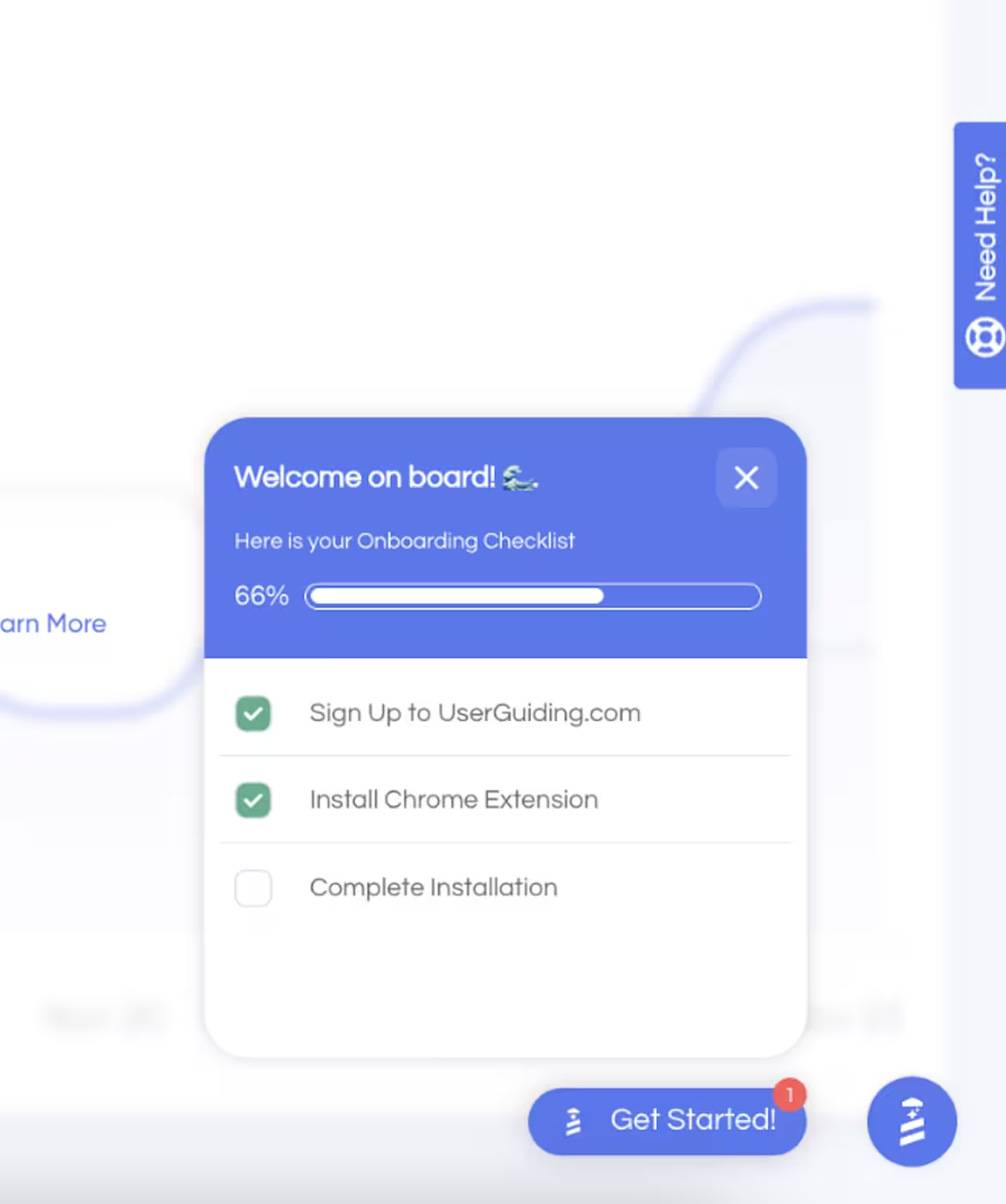
- Onboarding checklists: Onboarding checklists are a list of tasks that guide users from signup to activation, showing users where they are in the onboarding process with progress bars, contextual triggers, and navigation buttons.
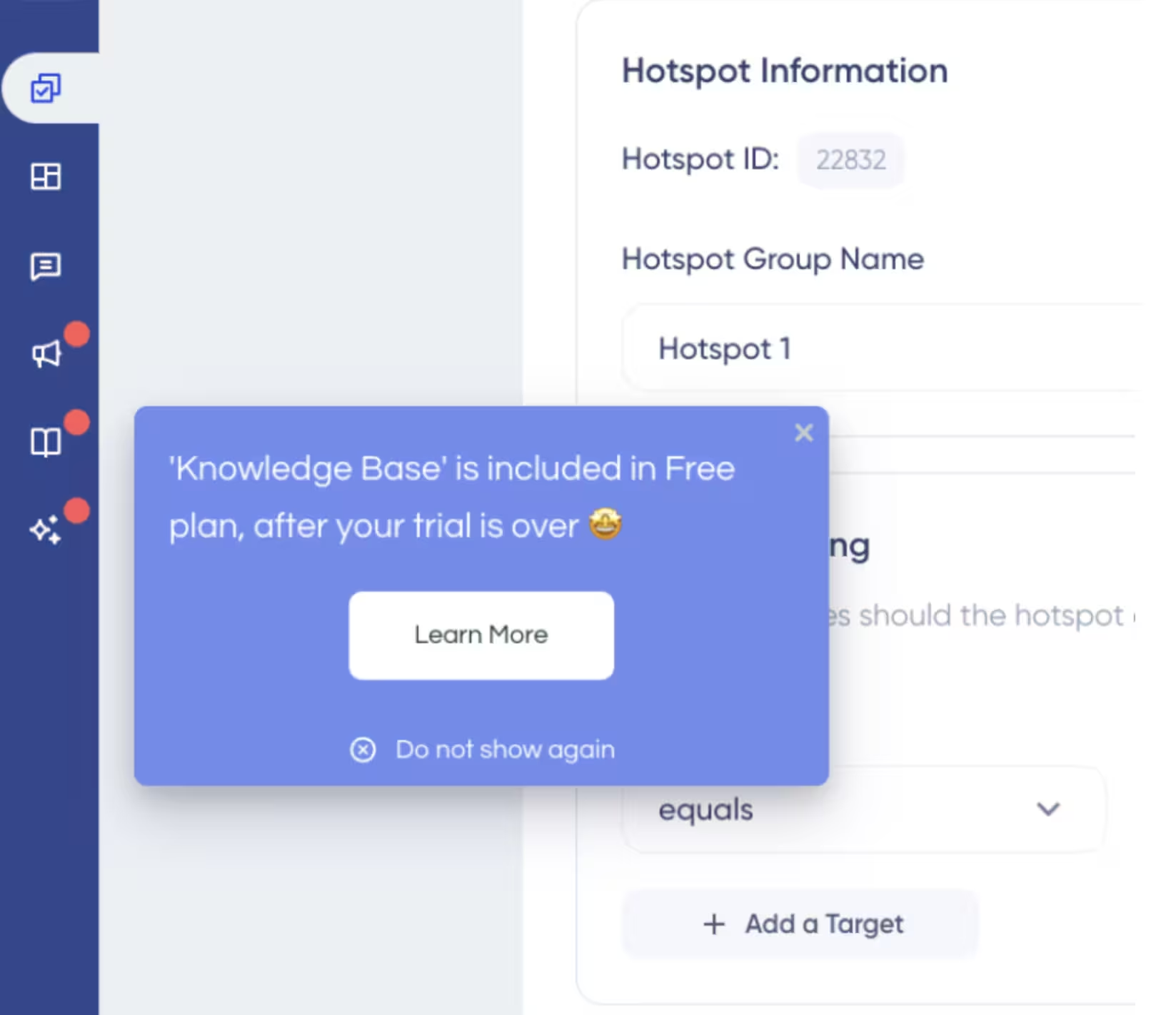
- Hotspots: Hotspots are static or pulsating elements that sit on top of any page element, triggered by a user’s engagement (usually by clicking or hovering over the element). They present information on demand so there’s no disruption to a user’s activity.
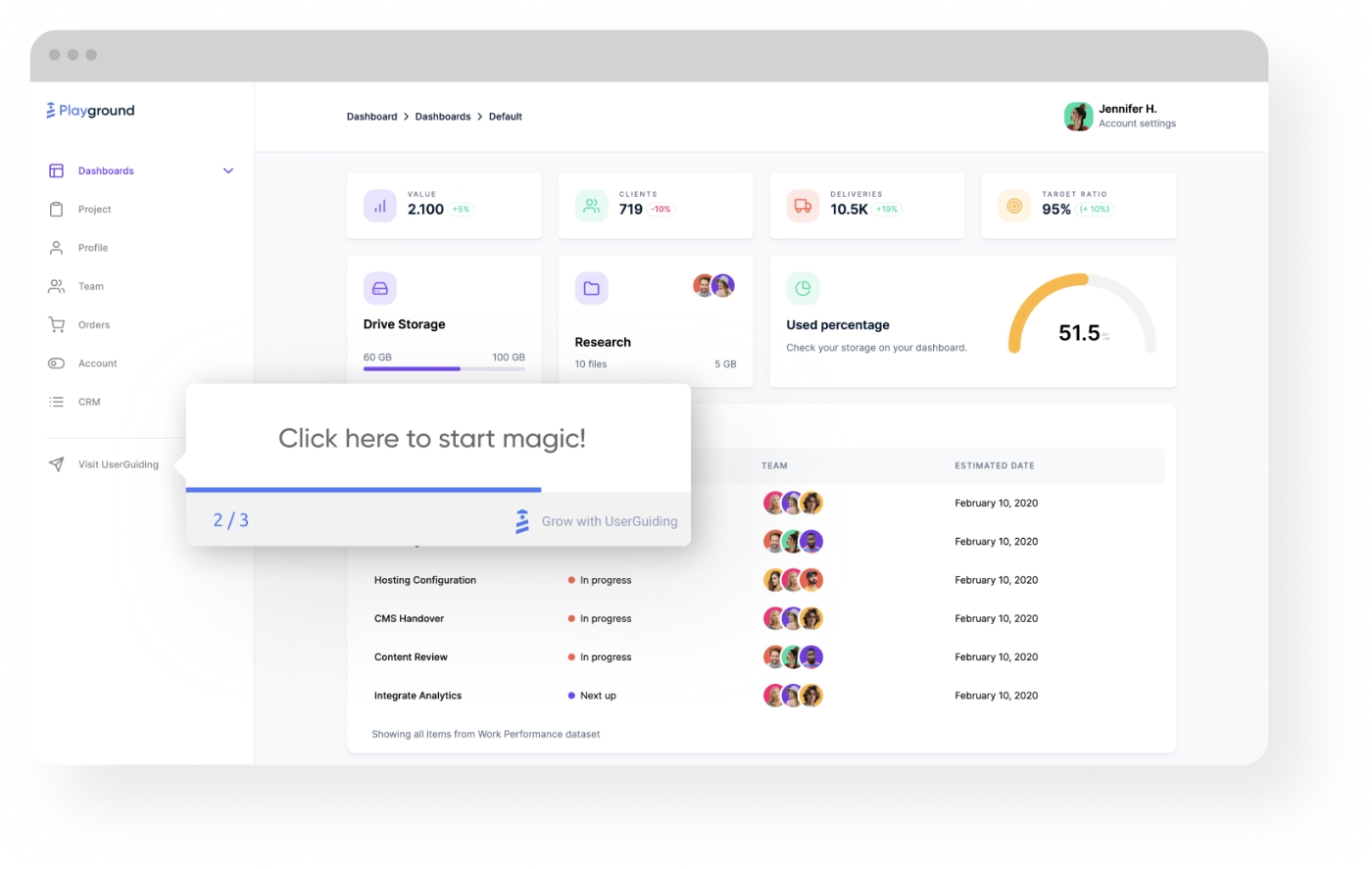
- Tooltips: Tooltips are elements displayed over a UI element to inform the user about different functionalities or ask them to take actions.
- In-app announcements: In-app announcements are non-disruptive pop-ups, banners, or tooltips that guide users through new software updates, features, or product milestones.
In 2026, most of these elements are no-code, or in other words, you can build them yourself in minutes rather than waiting for an engineering spirit to prioritize them. These elements also continue to evolve. AI-driven personalization made data-driven paths based on user behavior made interactivity a necessity or a minimum threshold.
Benefits for Customer Success Teams
A day in the life of a customer success manager is divided between client meetings, incoming and outgoing emails, and alignment with other departments. Where can onboarding sessions fit into this busy schedule? One-on-one sessions can be used for specifically targeted users, but customer success teams can’t hold those for every customer.
That’s why product walkthroughs replace hands-on sessions. They’re self-service experiences, meaning that customer success teams only intervene if a user gets stuck. Otherwise, users learn about and use the product on their own terms. Meanwhile, customer success teams focus on high-level strategy. It’s a win-win for everyone.
Besides, launching walkthroughs doesn't interrupt your team’s day. With the right tool, no-code product walkthroughs take less than a day to go live.
Driving Product-led Growth (PLG)
The benefits of product walkthroughs aren’t limited to customer success teams. They also support product-led growth (PLG) as well.
In product-led growth, the product itself leads acquisition, activation, retention, and expansion. PLG experiences let users experience value directly through the product by reducing friction and guiding them to their “Aha!” moment.
Because walkthroughs shorten the learning curve by instantly highlighting core features, users get an instant, hands-on experience to achieve their desired outcomes from day one.
The Strategic Role of Product Demos
A good interactive 3D product demo can improve understanding by 45%. A video tutorial, on the other hand, if not well done or fast-loading, can increase drop-offs by 300%.
That’s why ROI on product demos (both in terms of time and money) usually surpasses static videos. However, this is a very sales-centric approach, which wouldn’t translate the same way into how onboarding operates. While it’s important to consider them both, only one takes long-term relationships into account, and that’s onboarding.
The purpose of a demo is to showcase value and provide ROI to generate sales, whereas onboarding tools help teach and train a new user after the sale. Demos address specific prospect pain points, while user onboarding tools provide a structured path for actual product adoption.
Krystal Higgins explains the process even better. According to Higgins, user onboarding is “a journey of acclimation and taking many actions in a product that eventually gets someone from the state where they don’t really know what’s going on yet … to one where they’re very comfortable using it and kind of one of the core users of our service or product.”
Sales and marketing product demos show users the “what,” but onboarding reveals the “how.”
Here’s how different types of demos compare:
- Marketing demos: For awareness and lead generation. Self-serve interactive tours capture top-of-funnel leads on demand with clickable, embedded tours on landing pages. High-level video demos aim to create an “Aha!” moment for the audience with polished overviews for social media and webinars.
- Sales demos: For qualification and deal closing. The vision demos provide a 5-to-7-minute presentation on the product’s overarching value proposition asynchronously. Live discovery demos qualify the lead and map features to address specific challenges in real time with share screen environments. Technical deep-dives remove final friction and provide technical feasibility with cloned sandbox environments of your software.
Interactive Product Demos in Marketing
Self-guided, interactive product presentations remove the need to imagine how a workflow functions. From a marketing perspective, they do the heavy lifting by capturing buyer intent based on engagement and reduce friction by allowing the prospective customer experience the user interface at their own pace, figuring out if it fits their needs, without the sales tax where the wait time for a sales call or overly salesy push from a team member.
Here’s how demos on landing pages capture intent:
- Micro-conversions and path selection: Demos force users to click through specific use cases or personas, such as UserGuiding’s welcome screen for tech-savvy and non-tech-savvy users, which instantly tags the lead’s core interest.
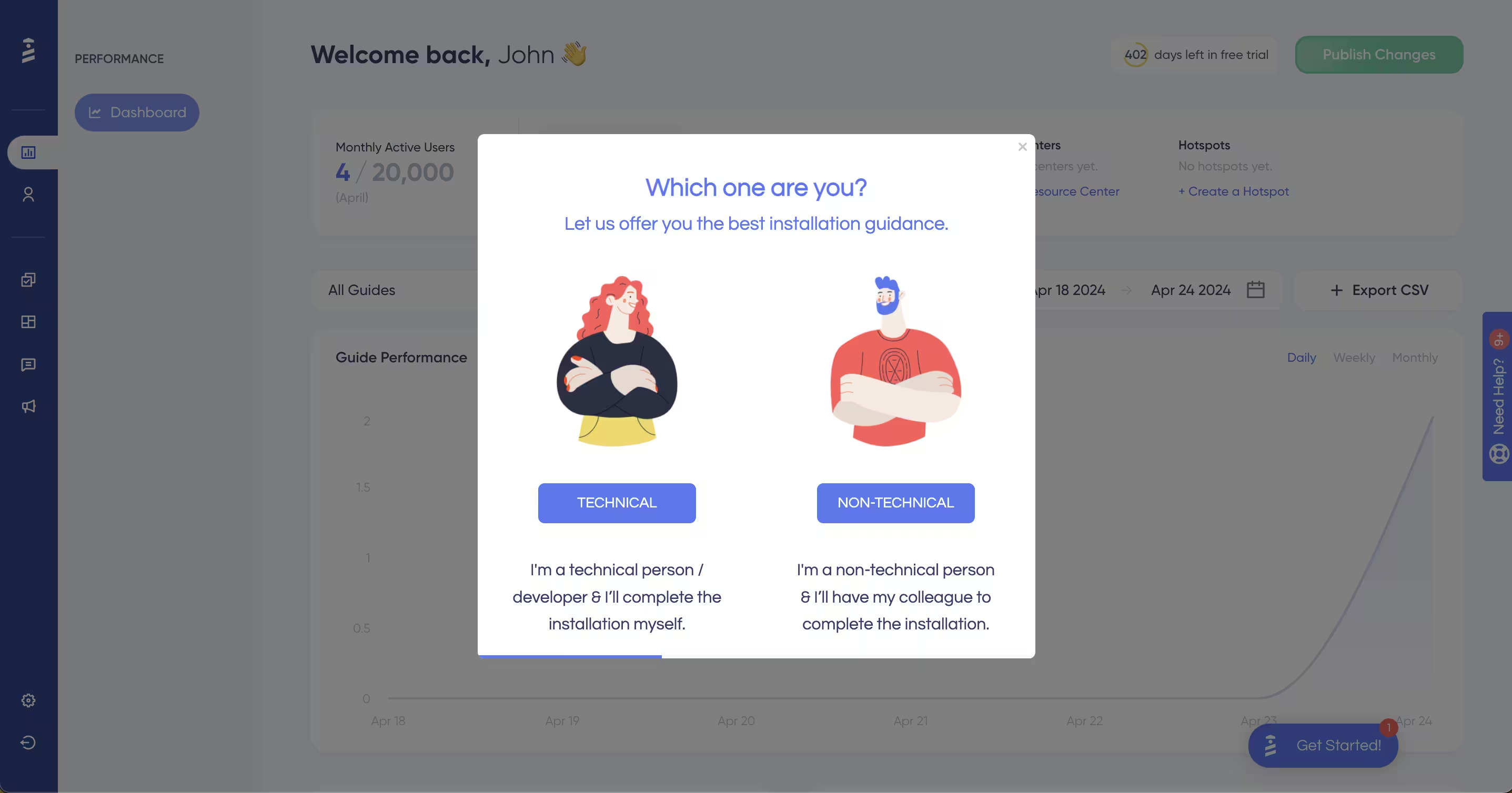
- Feature prioritization: As users interact with the interface, analytics track their movement — how long they linger, which features they click on, and where they drop off. This gives sales and marketing teams to know what the prospect cares about before they even schedule a discovery call.
Live Demos for High-Touch Sales
Human-led live demos translate a prospect’s operational challenges into the software’s capabilities. Rather than just showing features, these demos are tailored to dig deeper into the root causes of workflow gaps and configure the software’s dummy data to reflect the prospect’s specific industry, so the solution is highly achievable.
Here’s what live demos aim for:
- Navigating stakeholders: Many B2B deals often involve stakeholder committees. A human presenter acts as a strategic guide who tailors the narrative so every attendee sees exactly how the platform benefits their specific role and the organization as a whole.
- Deep discovery: Human-led demos allow for adjustments on the spot, so the product can reflect how it will serve the prospect with data.
- Managing objections: Contracts usually come with high annual contract values (ACVs) and require significant organizational change to fit the product. Human-led demos give space for conversation to address objections whether it’s about product onboarding or data migration.
How UserGuiding Supports Your Adoption Strategy
If users can get the same walkthroughs or demos from two tools, they’ll choose the one that will create them faster. And that usually involves a no-code environment. With UserGuiding, you get both: speed and no-code, interactive product walkthroughs.
You can build them in minutes without going back and forth with a developer.
Take Cyncly, a global software provider for the spaces-for-living industry, for example.
Before UserGuiding, the company struggled with translating the complexity of the business into a digestible onboarding flow. The team had the positioning down right but different departments involved and unique user segments made it harder to help each stakeholder use 100% of the product.
Besides, the user onboarding was mostly manual before — with a phone call and screen-sharing approach. Any changes made to the product involved development team heavily, which made half of the onboarding efforts inefficient but especially video guides.
Until UserGuiding entered the picture.
First, Cyncly fixed the onboarding flow with well-defined user segments and introduced checklists for each segment to train them on the product. Then, the next step was interactive guides to show how Cyncly actually worked for their users’ goals. With UserGuiding’s superior self-service and tooltips, Cyncly quickly changed its strategy and collected the rewards too.
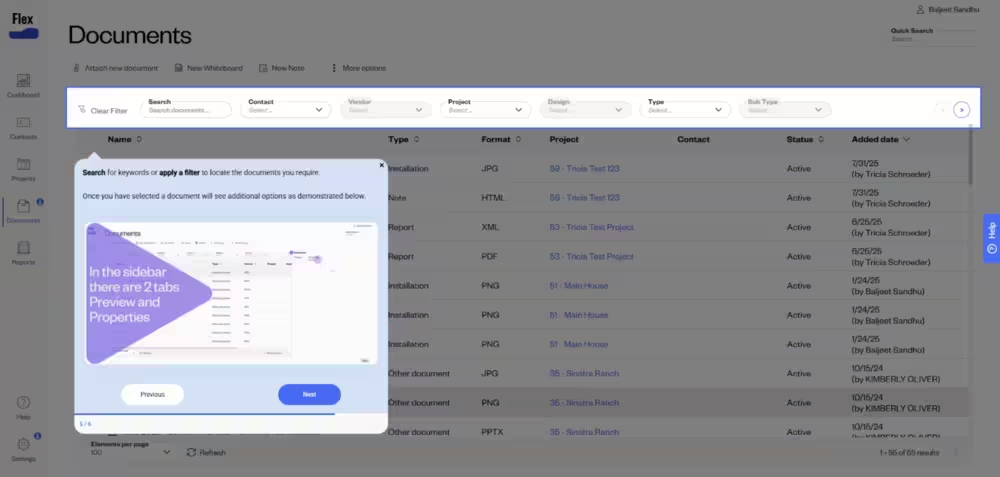
Balljeet Sandhu, Documentation Specialist at Cyncly, shares how UserGuiding changed their approach to onboarding and new feature deployment:
The product managers actually like the fact that we can react and change things as quickly as we can without it having to be put into a backlog or into a sprint and things like that. It has been really well received in that sense.”
The success was immediate. Cyncly eliminated 45 to 60-minute onboarding calls and increased its core onboarding flow completion rate to 70%.
Want to experience similar (or better) results? See UserGuiding in action yourself. Try it today. Zero coding required.
Frequently Asked Questions
What is the difference between a product tour and a demo?
A product tour is a self-guided walkthrough that highlights how a product works, usually through interactive steps, tooltips, or onboarding flows. Product tours are designed for scalable education and allow users to explore features at their own pace.
A product demo is a presentation of a product’s capabilities, often led by a salesperson, customer success manager, or prerecorded video. Product demos are typically personalized to a prospect’s goals and are used during the evaluation or sales process.
In short:
- Product tour: Self-serve, interactive, scalable
- Product demo: Guided, personalized, sales-focused
Companies often use both together to move prospects from awareness to purchase.
What is an interactive product demo?
An interactive product demo is a hands-on experience that lets prospects explore a software product without needing a live sales call or full account setup. Instead of watching a static video, users can click through workflows, test features, and experience the interface in a guided environment.
Interactive product demos are commonly used in SaaS marketing and product-led growth strategies because they:
- Reduce friction in the buying journey
- Allow prospects to evaluate products independently
- Increase engagement compared to traditional demos
- Help qualify leads before speaking with sales
- Scale across websites, email campaigns, and onboarding flows
Interactive demos can be fully self-guided, partially guided, or personalized based on user role or industry.
What are the two types of demos?
The two primary types of product demos are:
- Live demos
A presenter walks prospects through the product in real time, usually during a sales call or webinar. Live demos allow for customization, Q&A, and tailored explanations. - Interactive or self-guided demos
Prospects explore the product on their own through clickable walkthroughs, guided simulations, or sandbox environments. These demos are available on demand and can scale without requiring sales involvement.
Many modern SaaS companies use a combination of live and self-guided demos to support different stages of the customer journey.
When should you use a product walkthrough instead of a live product demo?
A product walkthrough is often a better choice than a live product demo when prospects want to evaluate a product quickly and independently. Walkthroughs work especially well for top-of-funnel education, product-led growth strategies, and high-volume inbound traffic.
You should use a product walkthrough instead of a live demo when:
- Buyers prefer self-service research
- Your sales team cannot support every inbound lead
- You want to shorten the evaluation process
- Users need immediate access to the product experience
- You are showcasing a simple or intuitive workflow
- You want consistent messaging across all prospects
Live demos remain valuable for enterprise sales, complex use cases, and highly customized discussions, while product walkthroughs help scale discovery and engagement efficiently.

.png)