

.svg)
.svg)
.svg)
.svg)



.svg)




.svg)
.svg)

Chances are, if you’re over 10K Monthly Active Users (MAU), you’ve likely already moved past manual onboarding. You have in-app guides, maybe checklists, maybe even some simple segmentation in place.
Maybe you’re using a basic onboarding tool, or you’re working closely with your developers to create these in-app materials in house.
Honestly, both could have been working okay up until 10K MAU, too.
But if you’re here, that likely means you’ve reached the point where they’ve started to create problems, like not offering the level of complexity you need or slowing down your development team more than they can handle…
In this guide, we’ll break down why your current onboarding setup stops working at scale, and what you need to build instead to grow from 10K to 100K+ MAU without losing control.
Let’s get started.
TL;DR
- At ~10K MAU, basic onboarding automation starts to fall short. One-size-fits-all flows, limited segmentation, and manual processes can’t keep up with growing user diversity.
- Scaling onboarding at this stage requires:
- Hyper-granular segmentation based on role, behavior, industry, and more
- Reduced dependency on engineering through no-code tools
- Bi-directional data flow between onboarding, CRM, and analytics tools
- Multi-project management to handle different products, platforms, and teams
- Automated localization to support global users at scale
- Advanced analytics also become critical. Step-by-step drop-off tracking, A/B testing, and user-level data help you continuously optimize onboarding performance.
- UserGuiding bring all of these capabilities into a single system! Start your free trial and check out the platform’s capabilities on your own.
Onboarding Scaling Needs by MAU Stage
| ~50 MAU | ~100 MAU | ~10K MAU | 100K+ MAU | |
|---|---|---|---|---|
| Onboarding Approach | High-touch, founder-led, manual onboarding | Mostly manual onboarding with early automation (basic checklists, simple in-app guides) | Fully personalized, automated, in-app onboarding journeys | Fully personalized, automated, in-app onboarding journeys |
| Segmentation Depth | Minimal or none | Very light segmentation (basic use-case split) | Role-based (Admin vs User) | Hyper-granular (role, industry, behavior, account tier) |
| Analytics Maturity | Basic (activation, signups) | Tracking activation and early engagement metrics; limited visibility into drop-offs | Funnel + segment-based engagement tracking (basic event tracking/ session replays) | Advanced behavioral + predictive analytics |
| Data Integration | None/ Basic analytics | Basic analytics + limited CRM | CRM + product analytics sync (e.g., Salesforce CRM, HubSpot) | Real-time, bi-directional sync across entire stack (even Webhooks for important actions.) |
| Automated Localization | Not needed/ Manual localization could suffice | Considered for key markets | Considered for key markets | Fully automated, multi-language support |
| Compliance & Data Governance | Basic data handling and security policies | GDPR, SOC 2, and industry-specific compliance where relevant | GDPR, SOC 2, and industry-specific compliance where relevant. Starting to need regional data handling (e.g., EU vs US), as well | Role-based access and permissioning (RBAC), read-only data access controls, as well as full audit logs and system-wide accountability |
| Support Model | Founder/CS-led, manual support | Hybrid (self-service + human) | Hybrid (self-service + human) | AI-first support with human escalation |
| Biggest Bottleneck | Lack of scalability | Choosing the right onboarding tool and struggling to implement it effectively without adding complexity | One-size-fits-all onboarding failing | System complexity + coordination across teams |
| Upgrade Needed | Introduce lightweight automation (basic checklists, triggered emails, simple in-app guides) to reduce manual onboarding load and start building repeatable flows | Build visibility into onboarding performance. Track engagement, identify drop-offs, and iterate based on real user behavior | Transition to segmented onboarding with role-based experiences, integrated CRM data, and structured experimentation (A/B testing) | Implement fully scalable systems (AI-driven onboarding, real-time data orchestration, automated localization, multi-instance governance, etc.) |
| What to Look for in an Onboarding Tool | Free tier or low cost. Simple setup. | Easy implementation. Affordable and flexible pricing (monthly plans). No-code builder. Ability to iterate quickly without engineering. | Low maintenance. Advanced segmentation and analytics. Comprehensive toolkit. | Enterprise-level support. Advanced integrations. Security, compliance, and multi-instance management. |
Why Your Current In-App Onboarding Breaks at 10K MAU
After onboarding your first 20 to 50 users manually, moving to automated in-app onboarding usually feels like a big step forward. You might adopt a simple, affordable (or even free) onboarding tool, or build basic guides and checklists in-house with your dev team.
At that point, it can feel like you’ve “solved” onboarding.
But in reality, you’ve only entered the first stage of onboarding automation.
These early solutions, whether homegrown or tool-based, are designed for simplicity. They help you standardize the experience and reduce manual effort. However, as you grow toward 10K, 20K, or 30K monthly active users, you’ll start to notice that this initial layer of automation doesn’t scale up until you become an enterprise-level company.
It’s not that your onboarding suddenly becomes outdated.
It just was never designed to handle this level of user diversity in the first place, that’s all…
At smaller scale, your users tend to look similar. They have comparable goals, similar levels of technical understanding, and often overlap in how they use your product. A single onboarding flow can cover most of their needs.
📌 As you grow, you start bringing in users from different:
- industries
- roles and responsibilities
- levels of technical literacy
- team structures and workflows
Even if your core use cases seem the same, the way different users approach those use cases can vary significantly. And unless you’re actively validating this through user research or onboarding surveys, it’s easy to underestimate just how wide that gap has become.
Your user base is evolving.
Your onboarding flows need to evolve at the same pace, too.
➡️ What solves this problem?
You can start by introducing basic segmentation first. Role-based onboarding is usually the easiest entry point. Even a simple split (like Admin vs User) can significantly reduce noise and make onboarding feel more relevant.
From there, you can gradually layer in more context. This could be based on:
- specific use case,
- industry,
- team,
- existing toolkit,
- tech-savviness,
- previous familiarity with a similar tool (or migration from another tool), or
- how the user behaves inside the product.
Here are other problems you start to face as you scale over 10K MAU 👇🏻
The Tech Dependency Debt
The second issue is less visible than the “one-size-fits-all” (or one-size-fits-none, really) problem, especially if you’re not in the development team 👀
As you grow your user base, your onboarding systems become slow to evolve.
Early on, it’s normal for onboarding changes to involve engineering. You might need a developer to trigger an event, modify a flow, or deploy a new experience.
At a small scale, this can be manageable, but at 10K MAU, it starts to become a real issue.
More user segments, more edge cases, more experiments to run, more personalization (hopefully), more materials… We’re not just talking about speed or page load optimization. We trust your developers, pretty sure they can plan around those. But we’re talking about asking more and more and more from your developers.
More things, less time.
If every change requires a Jira ticket, prioritization, and a sprint cycle, your iteration speed drops dramatically. Instead of improving onboarding weekly (or daily), you’re making changes every few weeks, if that.
This creates what I’d call tech dependency debt.
At this point, you’re structurally unable to respond to user behavior in a timely way.
➡️ What solves this problem?
You need to move toward a no-code or low-code onboarding setup, where Product and Customer Success teams can:
- create and edit flows,
- launch experiments, and
- adjust targeting and segmentation without needing engineering support every time.
This doesn’t mean engineering disappears from the process. It means they focus on instrumentation (events, data quality), and core product improvements.
And your growth teams handle the onboarding lifecycle itself independently.
Data Silos and Disconnected Workflows
The third issue shows up when you try to connect onboarding with the rest of your go-to-market efforts.
At a smaller scale, your onboarding tool tracks its own metrics like completion rates, a bit of engagement, and that’s usually enough to get a general sense of how things are going.
As you grow, though, your expectations from onboarding data change.
You want to understand how different users behave, where they struggle, and how onboarding connects to activation, retention, or revenue. You start building dashboards, sharing insights with stakeholders, and using onboarding data to inform your roadmap and feature development processes.
At the same time, you want to personalize onboarding. But the data you need (user roles, account types, lifecycle stages, user roles, etc.) lives in your CRM, in tools like Salesforce CRM or HubSpot. So you connect the two, you bring CRM data into your onboarding tool.
But then the data flows into onboarding and it often doesn’t flow back out. The insights you gain during onboarding like who dropped off and who activated, stay locked inside the onboarding tool.
Meanwhile, each team continues working in its own system. Product looks at onboarding behavior. Sales looks at CRM data. Customer Success tracks health scores somewhere else. Everyone is learning something about the same users, but those insights don’t naturally come together.
In theory, alignment happens through meetings, reports, or internal communication. But. Well. Yeah. We know how important things still get missed or overlooked.
What you end up with is fragmented information spread across different tools.
➡️ What solves this problem?
The key shift is moving toward bi-directional data flow.
From a practical perspective, it means:
- Syncing core user attributes (like role, plan, or account tier) across systems
- Ensuring consistent user identification everywhere
- Setting up events/automations/Webhooks that can trigger actions outside the onboarding tool and allow relevant teams to be informed about key interactions
Strategies for Scaling Onboarding from 10k to 100k+ MAU
1. Hyper-Granular Segmentation
At 10K+ MAU, even users who share the same role can have very different goals, expectations, and ways of using your product. Before reaching this scale, you might have handled this gap manually, giving extra attention to outlier accounts or high-value teams, while relying on a simple “Admin vs User” onboarding structure for everyone else.
But with a growing MAU, this special treatment for some accounts will be hard to keep up with.
So, you’re left with two options: either force these users into generic onboarding flows, which reduces relevance, or rethink how you segment users altogether.
Instead of relying on a single dimension, like role, we recommend starting to define segments using multiple layers of context. We’re talking about:
- Industry (SaaS, Fintech, Healthcare, Government)
- Account type or tier (SMB, Mid-market, Enterprise)
- Region (which can affect compliance, language, or workflows)
- Use case or job-to-be-done (what the user is actually trying to achieve)
- Product behavior (new vs returning users, activated vs struggling users)
- Existing toolkit (what tools they already use and how you fit into their stack)
- Migration source (whether they’re coming from a competitor or spreadsheets, etc.)
The goal is not to create a completely separate onboarding flow for every segment. That would quickly become unmanageable. Instead, you design onboarding as a set of modular experiences that can be shown or hidden based on who the user is.
With an onboarding solution that has solid segmentation and personalization capabilities, implementing this is much more manageable than it sounds.
This way, you don’t need to rebuild flows from scratch for every segment. You define rules, conditions, and triggers that control which elements appear for which users. Over time, this becomes a structured system rather than a disorganized collection of one-off flows.
👉🏻 Here’s our step-by-step guide to personalized product experiences.
For those coming from a more technical background, or in need of a more data-heavy model for customer segmentation, here’s an interesting read from Towards Data Science:
2. Automating Support with AI Assistants
As your user base grows, support demand increases alongside it. A large portion of incoming questions will be repetitive, coming from users asking how to complete the same actions or find the same features.
Handling this entirely through human support does not scale efficiently.
A more sustainable approach is to build a self-service layer, preferably one that works for different learning methods and preferences.
- AI assistants inside the app
- An organized knowledge base (with both help articles and video tutorials)
- An in-app resource center for quick answers and interactive materials
⚡ According to Salesforce surveys, 69% of consumers prefer to use AI-powered self-service tools for quick issue resolution.
⚡ And a recent Gartner study predicts that agentic AI will autonomously resolve 80% of common customer service issues without human intervention by 2029.
👉🏻 Here’s our guide to automating customer support.
However, while integrating AI into your customer support system, be aware of the preferences against chatbots, as well as the limitations of the chatbot, and always keep your support team accessible for your customers that prefer (or need to) reach out to them.
Or else, you might cause very negative customer experiences like this one:
3. Implementing Multi-Project Governance
As onboarding becomes more complex, managing how changes are made becomes just as important as what changes you make.
For example, you may now be dealing with:
- multiple onboarding projects for different use cases or teams,
- different languages and localized versions of the same flows,
- content that is active, outdated, or temporarily paused,
- multiple products, platforms, or environments (web app, mobile app, different products).
With proper governance in place, you can handle this complexity without losing control. Instead of managing everything as a single pool of onboarding content, you organize your setup into clearly defined projects (or folders, depending on how the onboarding tool you use names the multi-project governance capability). Each project can represent a specific product area, platform, or region.
You should also be able to activate and deactivate flows easily, and archive outdated content to keep your onboarding environment clean and up to date.
Localization is another layer that needs structure.
As you support more languages, you need a way to manage different versions of the same onboarding flows without losing consistency. This means being able to:
- track which languages are active,
- update content across languages without breaking flows, and
- ensure users always see the correct localized version.
4. Global Scalability via Automated Localization
⚡ Approximately 40% to 60% of the revenue SaaS companies generate comes from international markets.
⚡ And according to Unbabel’s multilingual CX research, 57% of consumers consider it a bias when brands don’t offer end-to-end multilingual experiences to their customers.
⚡ Another customer survey finds that nearly 80 percent of respondents prefer to purchase products with information in their native language.
What do all these statistics tell us?
Well, it tells that your users are global by default, and they expect your product to reflect that.
Localization is no longer just about translating your landing page or a few of your getting-started articles. Users expect the entire experience, from onboarding to support to ongoing product usage, to feel natural in their language and context.
Every flow, tooltip, checklist, or resource center you build now needs to exist in multiple languages. Every update in your product updates page or knowledge base needs to be reflected across those versions.
This level of localization is only possible (or manageable and sustainable, let’s say) via automated localization.
✅ If your onboarding tool offers automated localization, this will allow you to:
- Translate onboarding content across multiple languages instantly
- Keep all language versions in sync whenever you update a flow, tooltip, or checklist
- Manage translations from a single place instead of editing each version separately
- Reduce delays in launching updates globally, so all users get the same experience at the same time
- Maintain consistency across languages, avoiding mismatched or outdated content
- Scale to new regions quickly without needing dedicated localization resources for each one
Measuring What Matters through Advanced and Detailed Analytics
When you start implementing everything we’ve covered so far (segmentation, localization, multiple onboarding projects), you’ll quickly realize that basic dashboards or spreadsheet-based tracking are no longer enough to monitor what’s happening.
Your onboarding is now a system with multiple variations, different user paths, and constantly changing experiences. To manage this effectively, you need a more detailed way of understanding user behavior.
👉🏻 One of the most important capabilities here is step-by-step drop-off analysis. Monitoring this will allow you to:
- Identify exactly where users leave a flow instead of guessing
- Pinpoint friction points within specific steps (not entire flows)
- Compare behavior across segments (e.g., enterprise vs SMB users)
- Understand which steps are unnecessary or too complex
👉🏻 Alongside this, A/B testing becomes essential. With A/B testing, you can:
- Test different onboarding formats (e.g., checklists vs hotspots)
- Experiment with messaging and flow structure
- Measure which variation drives higher activation or completion
👉🏻 Another key requirement is consistent user identification. Unique user IDs allow you to:
- Track users accurately across different tools and platforms
- Prevent duplicate users and inflated metrics
- Ensure user attributes (role, plan, segment) are applied correctly
- Sync onboarding data with CRM and analytics systems reliably
UserGuiding is the #1 solution for high-volume onboarding scaling!
UserGuiding is a no-code, all-in-one product adoption platform with extensive onboarding, in-app communication, automated support, and customer feedback capabilities, as well as strong analytics.
✅ UserGuiding enables you to alleviate manual workload, reduce support tickets, improve feature adoption, and address product complexity.
With UserGuiding, you get everything you need to automate and scale your onboarding flows:
- Product tours
- Onboarding checklists
- Hotspots and tooltips
- Announcement modals (banners, slideouts, pop-ups, etc.)
- NPS and custom in-app surveys
- AI assistant
- Resource center (in-app)
- Knowledge base (standalone)
- Product updates (standalone)
- Segmentation
- Analytics
- Session Replays
- UserGuiding MCP Server
- No-code Event Tracking
- Multiple Project Management
Here’s why UserGuiding is perfect for scaling your onboarding 👇🏻
Frictionless Setup and Implementation
Past 10K MAU (with the level of segmentation and project load it brings), even very small changes to your onboarding flows and materials can become expensive if they require engineering involvement.
Many enterprise tools still depend heavily on developers for event tracking, flow updates, or even small adjustments to design. This slows down iteration and creates bottlenecks between Product, Growth, and Engineering teams.
With UserGuiding’s intuitive and non-technical-user-friendly interface, Product and Customer Success teams can:
- build and update onboarding flows without writing code
- track user behavior with no-code event tracking
- launch experiments and iterate without waiting for dev cycles
This significantly reduces dependency on engineering and allows teams to move faster.
And it’s not just us claiming this simplicity and ease of use/maintenance, it’s actually UserGuiding users saying that.
For example, one UserGuiding customer on G2 says that:
I like the ease of creating and adjusting guides within UserGuiding without relying on the development team. I can test quickly and achieve good results. I also appreciate the reliability of the tool. Additionally, the initial setup was really simple and fast, which allowed me to start creating the first guides and put the tool to use in no time.”
Many UserGuiding customers also highlight how easy the setup and initial implementation are, often mentioning that they were able to get everything up and running in as little as 15 minutes, and feel comfortable using the platform within an hour.
👉🏻 Read more about what UserGuiding users say about the platform and their experience.
Cost-effective and Fair Pricing
As MAU grows, pricing becomes a major factor when choosing onboarding tools.
Many platforms introduce sharp price increases as you scale, often requiring long-term contracts or forcing upgrades just to access essential features. This makes costs unpredictable and difficult to justify, especially when you get close to 30K, 50K, 100K MAU.
UserGuiding offers a more predictable and transparent model.
- Pricing scales gradually with MAU
- Core features are available across plans
- No forced upgrades just to unlock critical functionality
- Monthly billing options provide flexibility
Now, to scale beyond 10K MAU, contact the UserGuiding sales team for a tailored quote.
That said, UserGuiding is still transparent about how pricing scales as you grow, and it doesn’t hide its entry-level structure or growth curve. To give you a clear idea of how it progresses:
- Starter plan starts at $249/month (billed yearly) for up to 2,000 MAU
- Growth plan starts at $499/month (billed yearly) for up to 2,000 MAU
Enterprise-Grade Security and Compliance
If you’re looking for ways to scale your onboarding past 10K MAU, chances are you’re often working with larger organizations, stricter data policies, region-specific regulations, or maybe even industry-specific ones like HIPAA.
UserGuiding addresses this with enterprise-grade standards.
- SOC 2 compliance ensures strong security controls and data protection standards
- GDPR compliance supports strict data privacy rules for EU and global users
- EU-based hosting supports data residency and regional compliance needs
- HIPAA readiness enables use cases in healthcare and healthtech industries
UserGuiding MCP
UserGuiding’s MCP (Model Context Protocol) server introduces a more flexible way to work with onboarding data through AI tools.
Instead of manually navigating dashboards, you can:
- query onboarding data using natural language
- analyze user behavior and onboarding progress
- identify segments or issues without exporting data
It also allows AI tools to take action within your onboarding system. For example:
- updating user attributes
- tracking events
- managing knowledge base content
- identifying users who need intervention
While several onboarding solutions offer AI and automation capabilities within their platforms, many of these capabilities are still fragmented, and in practice, teams often need to spend a significant amount of time inside the tool to configure them.
So, UserGuiding’s MCP stands out as a more unified approach.
In a market where more SaaS companies are adopting agentic AI into their workflows at different levels, MCP becomes a practical bridge between onboarding data and the tools teams already use. Instead of creating another isolated system, it integrates into existing workflows and makes onboarding data usable in a more flexible, AI-driven way.
Automated Localization
UserGuiding offers built-in AI-powered auto-translation across all major onboarding materials. With UserGuiding’s localization capabilities, you can:
- translate Guides and Hotspots instantly with one click
- translate Knowledge Base articles and Product Updates without manual work
- support 50+ languages without rebuilding or duplicating content

[UserGuiding’s auto translation for the product updates page.]
Multiple-project Management
UserGuiding’s Multiple Projects Management allows you to organize onboarding, in-app experiences, and self-serve support into separate workspaces without mixing data, content, or analytics.
This is especially useful if multiple teams need to work in parallel for onboarding and customer support, which tends to be the case for scaling teams.
With Multiple Projects Management, you can:
- create separate projects for different products, apps, or platforms
- keep users, analytics, and onboarding performance fully isolated per project
- manage Knowledge Bases, AI Assistants, and integrations independently per project
- switch between projects instantly from a single dashboard
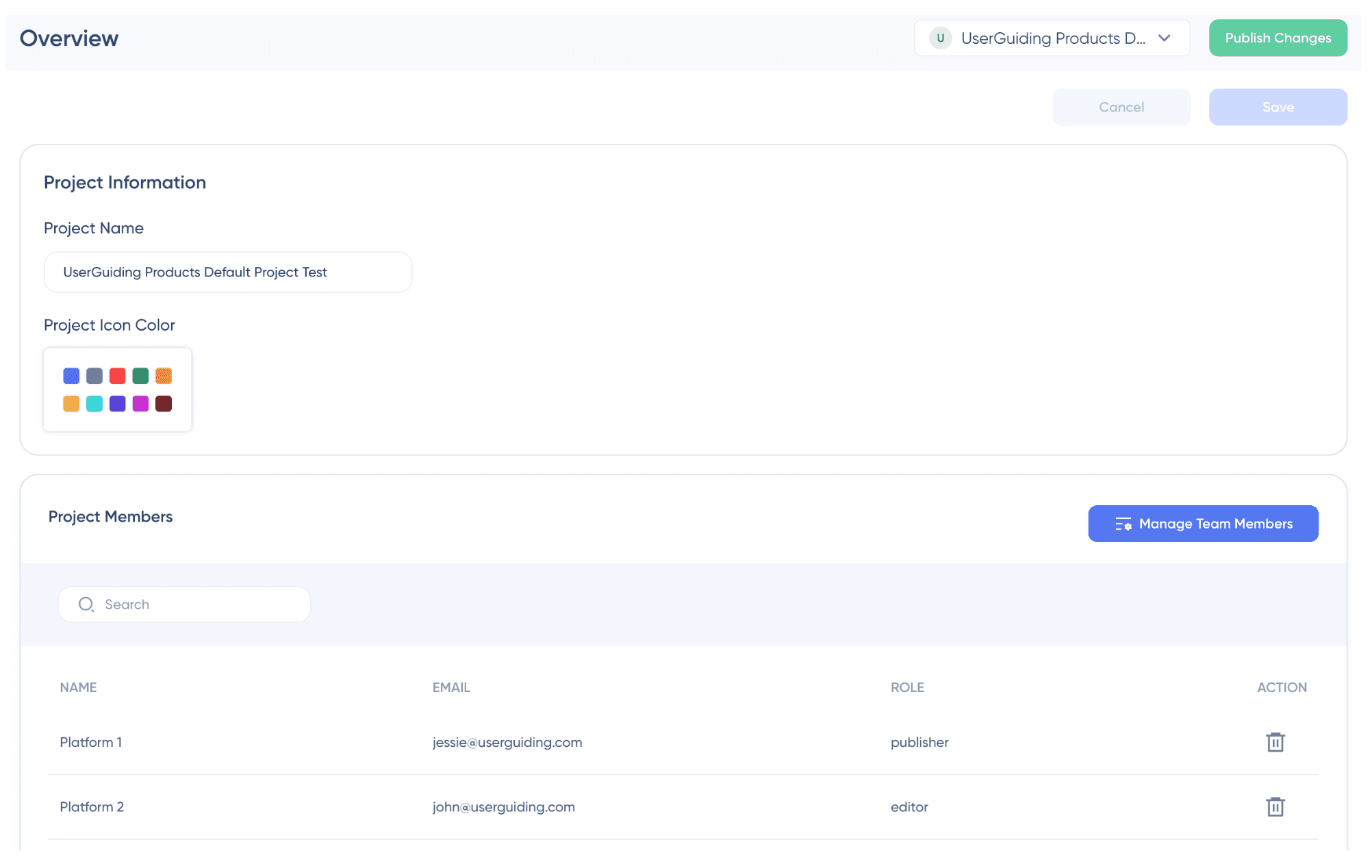
[UserGuiding Projects page.]
Advanced Analytics and Engagement Monitoring
UserGuiding provides visibility into how users interact with onboarding elements, helping you understand what works and what doesn’t. With its analytics capabilities, you can:
- track engagement across different onboarding materials
- analyze step-by-step drop-offs in flows
- compare performance across user segments
- monitor feature adoption and onboarding impact
With features like no-code event tracking and session replays, you can go deeper and…
- See how users actually interact with your product
- Identify friction points visually
- Validate hypotheses before making changes
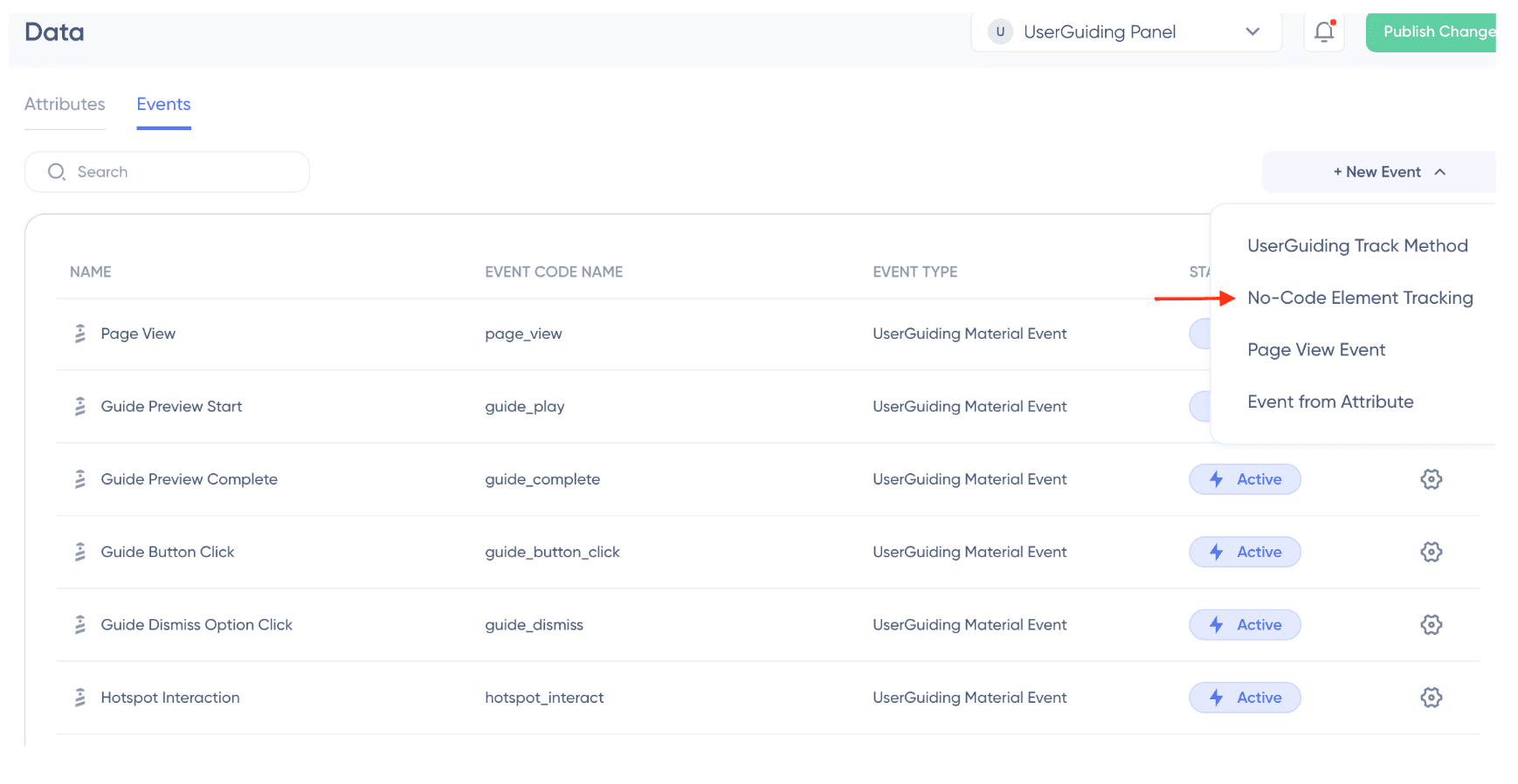
[UserGuiding’s no-code event tracking.]
To Wrap Up…
Once you pass 10K MAU, the challenge is no longer just “automating onboarding.” It’s making sure that automation actually works for a diverse and growing user base.
That means:
- moving beyond one-size-fits-all flows
- reducing dependency on engineering
- connecting onboarding with the rest of your tech stack
- and building systems that can scale globally
To keep onboarding effective, you need structure, visibility, and flexibility. You need to understand how different users behave, respond quickly to that behavior, and continuously improve the experience.
And for that, having the right tool makes a real difference.
With a platform like UserGuiding, you can manage this complexity without slowing down your team, and scale onboarding in a way that actually supports your growth instead of holding it back.
🎁 Start a free trial with UserGuiding.
👉🏻 And if you’re curious about other options, here’s a comparison of top onboarding tools, first by ease of implementation, and then by pricing.
Frequently Asked Questions
How to manage onboarding across multiple products or sub-domains?
Managing onboarding across multiple products or sub-domains requires a structured approach where each product has its own dedicated workspace. This allows you to separate onboarding flows, analytics, and user data while still managing everything from a central system. With this setup, you can tailor experiences to each product’s use case without mixing content or insights. For all of this, you need onboarding tools with multiple project management capabilities, which not all platforms offer. For example, UserGuiding enables you to manage multiple projects under one account, so each product can have its own onboarding logic while teams collaborate centrally.
Can we trigger in-app onboarding flows based on data living in our CRM?
Yes, and this becomes essential as you scale. By integrating your onboarding tool with your CRM, you can use attributes like user role, plan, lifecycle stage, or account type to trigger specific onboarding experiences. This allows you to deliver more relevant, personalized flows instead of generic ones.
How to conduct A/B testing on onboarding flows?
A/B testing onboarding flows involves creating variations of a specific experience and measuring which one performs better against a defined goal, such as activation or feature adoption. Instead of changing entire flows, you can test individual elements like messaging, UI patterns, or step sequences. You should also run experiments within specific segments (such as role, plan, or industry). This helps you understand what works for different user groups. The key is to run controlled experiments and analyze results based on user behavior.
What is the role of "Webhooks" in an advanced onboarding strategy?
Webhooks connect your onboarding system with the rest of your tech stack. They allow real-time data exchange by sending event-based triggers between tools. For example, when a user completes onboarding or drops off at a key step, a webhook can notify your CRM, marketing automation platform, or support system instantly. This enables automated follow-ups, personalized outreach, and better coordination across teams, making onboarding part of a larger.
How to justify the ROI of an onboarding tool to the CFO?
To justify ROI, you need clear visibility into impact, which depends heavily on strong analytics and reporting capabilities. A good onboarding tool should provide dashboards that show how flows perform, where users drop off, and how onboarding affects activation and feature adoption. These insights make it easier to connect onboarding efforts to business outcomes like retention and revenue. When you can clearly visualize improvements and trends, it becomes much easier to communicate value to C-level stakeholders and justify the investment. You can also highlight operational efficiency, as less engineering and manual effort is required to manage onboarding with an easy-to-use, no-code onboarding tool.

.png&w=3840&q=75)