NEW WEBINAR! Year-End Q&A: Everything UserGuiding Users Need to Know (12/11)
Register now! →Cyncly
How Cyncly achieved a 70% guide completion rate and eliminated the need for manual support calls
Summary
Cyncly faced an unsustainable onboarding process reliant on manual, 45 to 60-minute support calls and costly developer resources for updating hard-coded in-app training.
The documentation team deployed a no-code strategy using segmentation and a gamified checklist, enabling them to own and instantly update all in-app guidance.
The team achieved an over 70% guide completion rate on core flows, leading to the full elimination of the time-consuming manual onboarding calls.
This shift established a scalable, self-service model, freeing up the support team for complex issues and allowing product managers to launch feature updates immediately without reliance on engineering sprints.
Cyncly, a software company dedicated to the spaces for living industry, navigates complexity with ease. Their powerful, cloud-enabled Flex platform seamlessly manages the entire customer lifecycle, from initial lead generation to the final invoice.
Onboarding new customers to such a comprehensive system required highly personalized attention, but the old methods were proving unsustainable.
After just one year of using UserGuiding, Cyncly's documentation team has built a robust self-service model, achieving over 70% completion on their core onboarding flows.
They eliminated time-consuming manual support calls, freed up developer time, and established a scalable foundation for future product growth.
Onboarding an entire business in a single tool is a challenge:
The Flex platform was incredibly powerful, managing every step of a customer's journey. However, that power came with a unique challenge: complexity.
The software needed to serve multiple departments in a business (design, sales, purchasing, and accounting), and onboarding had to cater to completely different user roles simultaneously.
Before implementing in-app guidance, the onboarding process was heavily reliant on manual effort.

The onboarding phone calls were being scheduled, and they were quite time-consuming as well. They could take 45 minutes, up to an hour sometimes if they were experiencing some issues.”

Baljeet Sandhu
Documentation Specialist
This manual, phone-and-screen-sharing approach was inefficient, non-scalable, and often inconvenient for their small and medium-sized business customers.
This was caused in part by the technical debt associated with updating content.
Relying on developers for simple updates created a costly bottleneck because previous, hard-coded training required engineering resources every time the product changed.
Furthermore, maintaining external documentation like video guides was impossible, as a single feature update would instantly render the entire video useless.
The team needed a solution that was non-technical and fast to implement.
In search for an easy-to-use tool
Cyncly attempted several solutions, including pre-recorded videos and passive click-through e-learning modules.
However, none of these options were truly effective because they lacked two key features: real-time in-app interaction and the ability to update content instantly.

As soon as the developer goes and changes one little feature, all of your videos become out of date, and they are really time-consuming to recreate. We were feeling the pressure of having to go and update all of that again, and it wasn't very efficient in our time.”

Daniel Hoult
Director of Documentation
The team lead realized the potential for a no-code, in-app solution after seeing a product walkthrough on another application.
With Flex operating entirely in the cloud, an overlay tool could address the visibility and scalability issues instantly.
The team sought a tool that would allow them to:
- Segment users based on their specific role (Admin versus Designer).
- Centralize existing documentation and knowledge base articles.
- Allow the documentation team to own the onboarding process end-to-end, without developer support.
UserGuiding sweeps in with the power of segmentation and checklist features
To tackle their diverse user base, Cyncly focused on role-specific guidance.

It was quite important that we could segment the users and split them in that way because what they can see is determined by their access. So if you're an admin user, you see the settings, if you're not an admin user, you don't see them."

Baljeet Sandhu
Documentation Specialist
The team utilized UserGuiding's segmentation feature, dividing users into distinct roles, such as admin (responsible for company-wide setup) and designer (focused on creating contacts, projects, and designs).
This ensured every user saw only the steps relevant to their specific job.
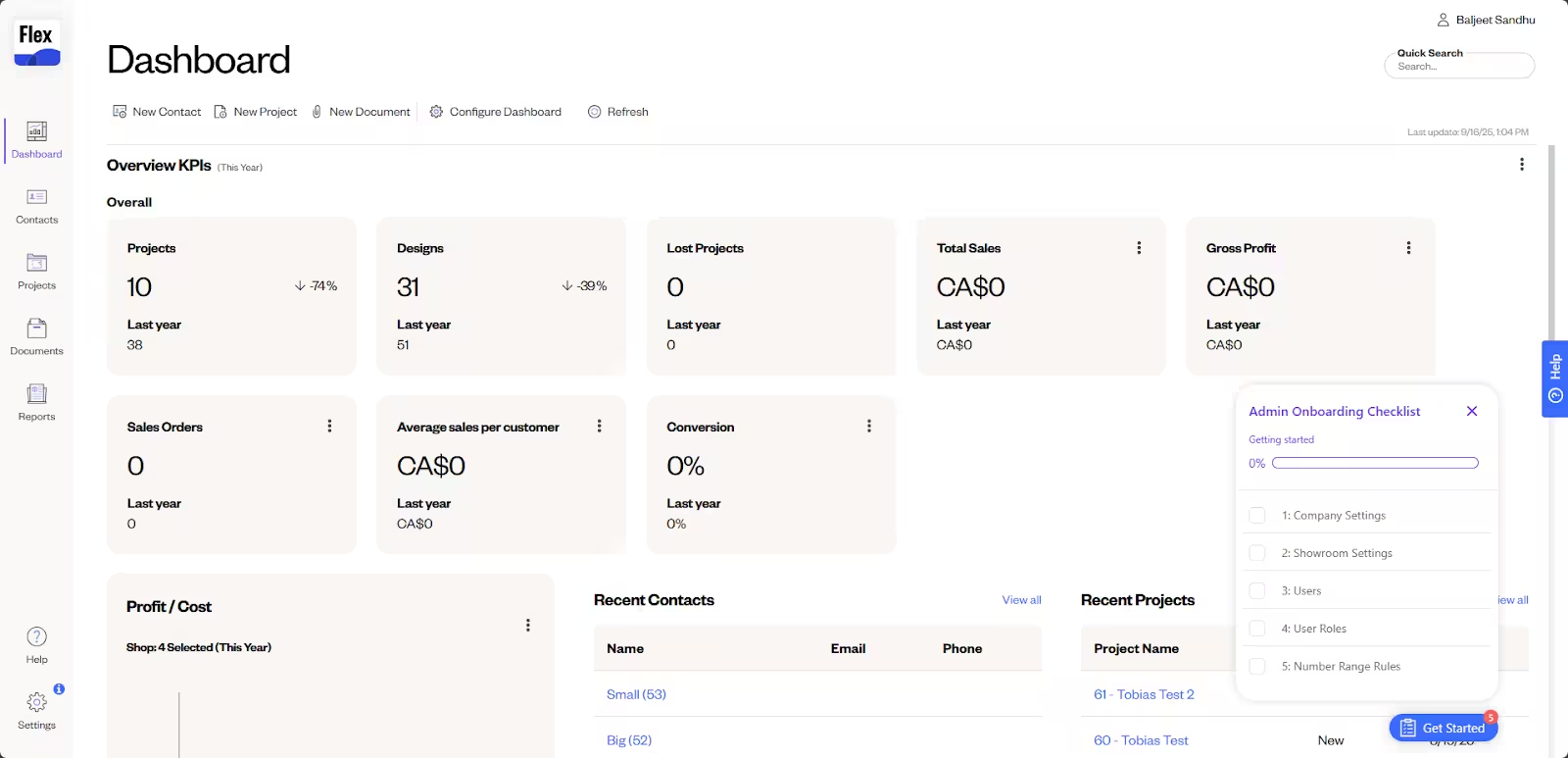
Once a user understands the basics, Cyncly provides interactive training.
Users receive help exactly when needed, whether they're searching documents or setting up sales rules. This emphasis on clarity is visible in the actual walkthrough steps.
Instead of relying on static screenshots, the guides actively point to specific elements on the page, like this example showing a user exactly where to search and apply filters within the Documents section.
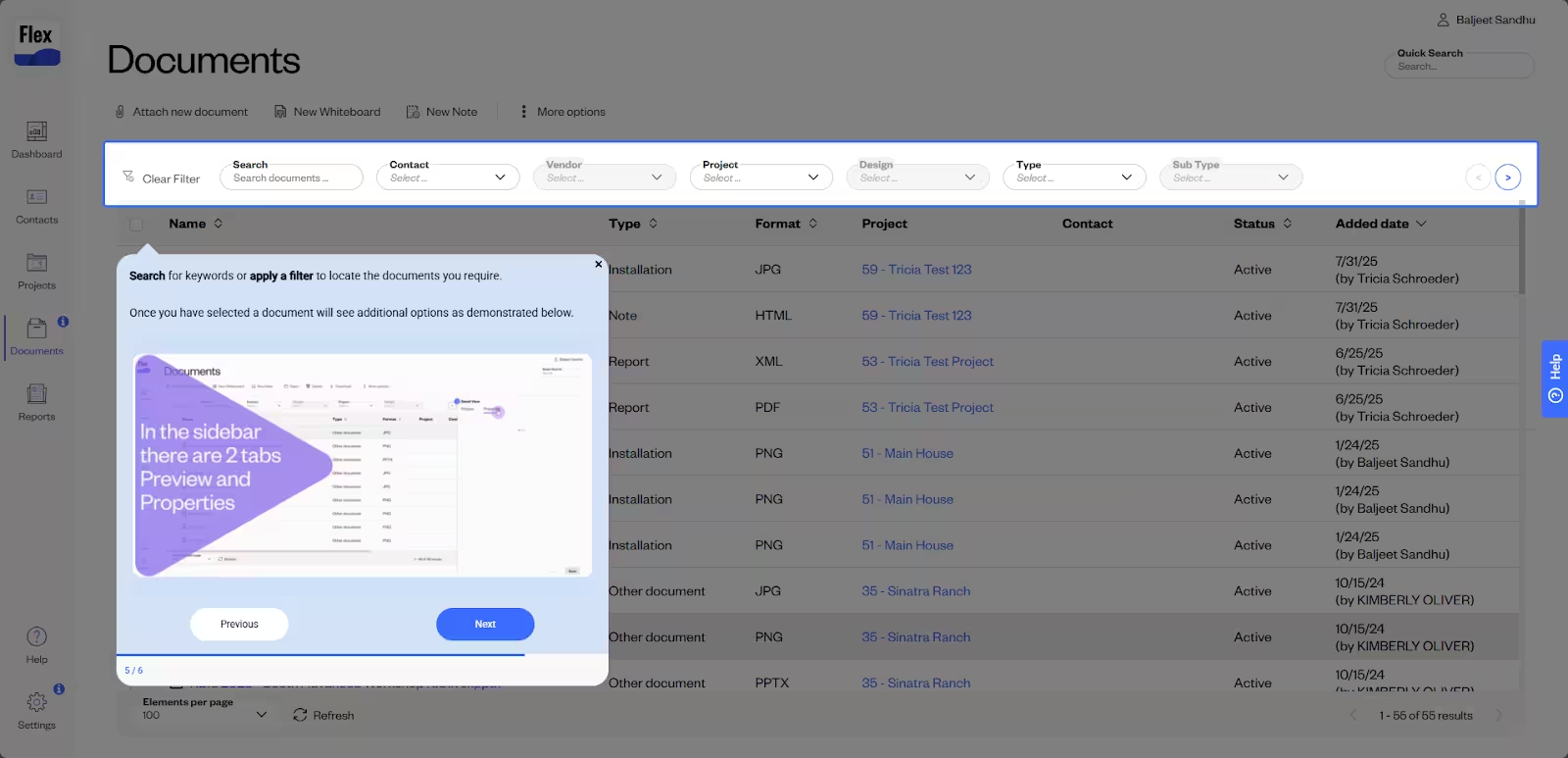
This interactive method aligns with Cyncly's "See and Do" learning approach.
Users can review steps in a GIF or slide before starting a full guide, which helps them prepare and increases their comfort and guide completion.
To tie all these elements together, Cycnly implemented a resource center that directs the users to the relevant support articles, in case they want to learn more.
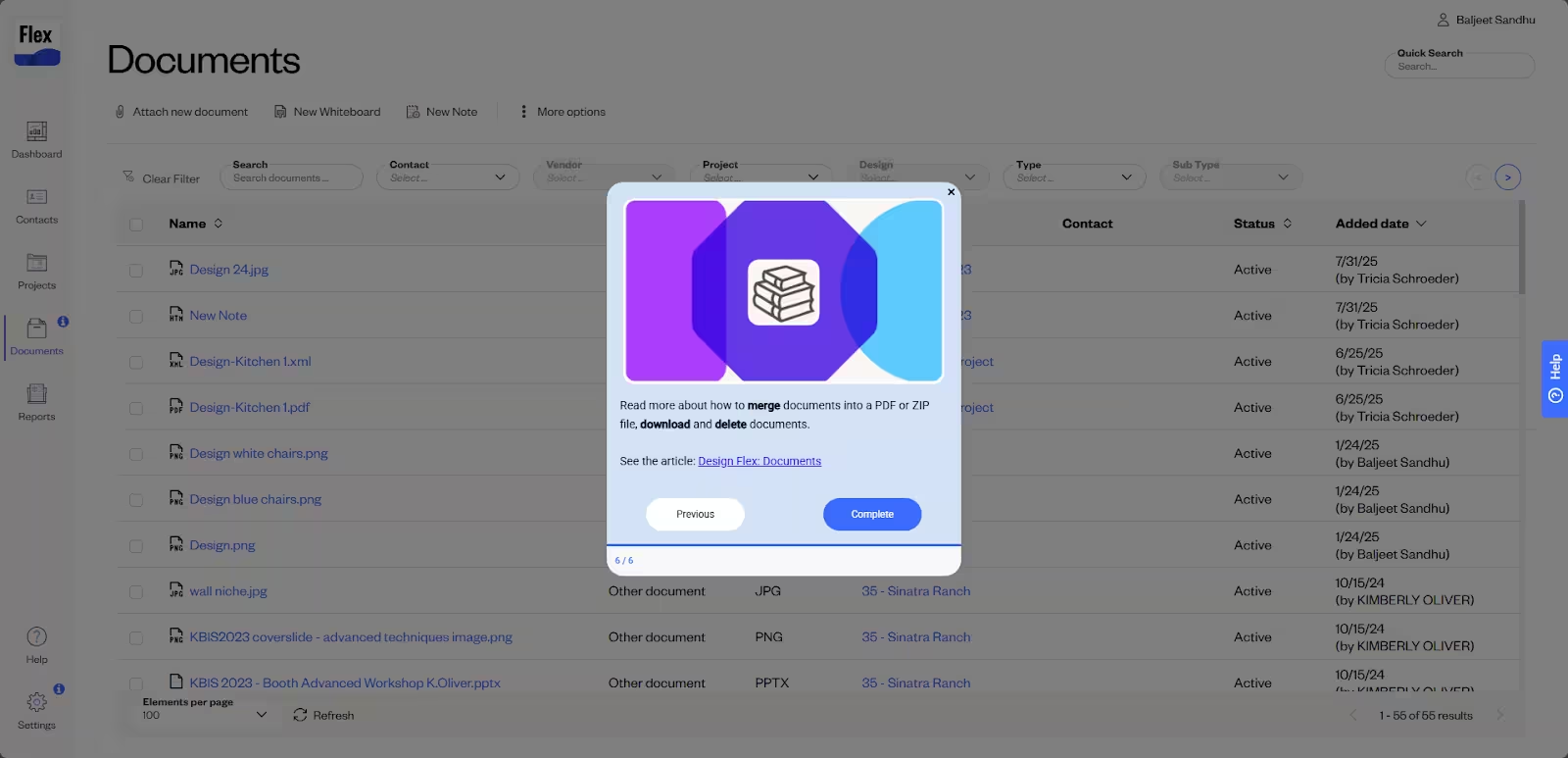
The centralized "Help" tab acts as the sole entry point for all support documentation, directly integrating Cyncly’s existing Zendesk knowledge base search into the Flex platform sidebar.
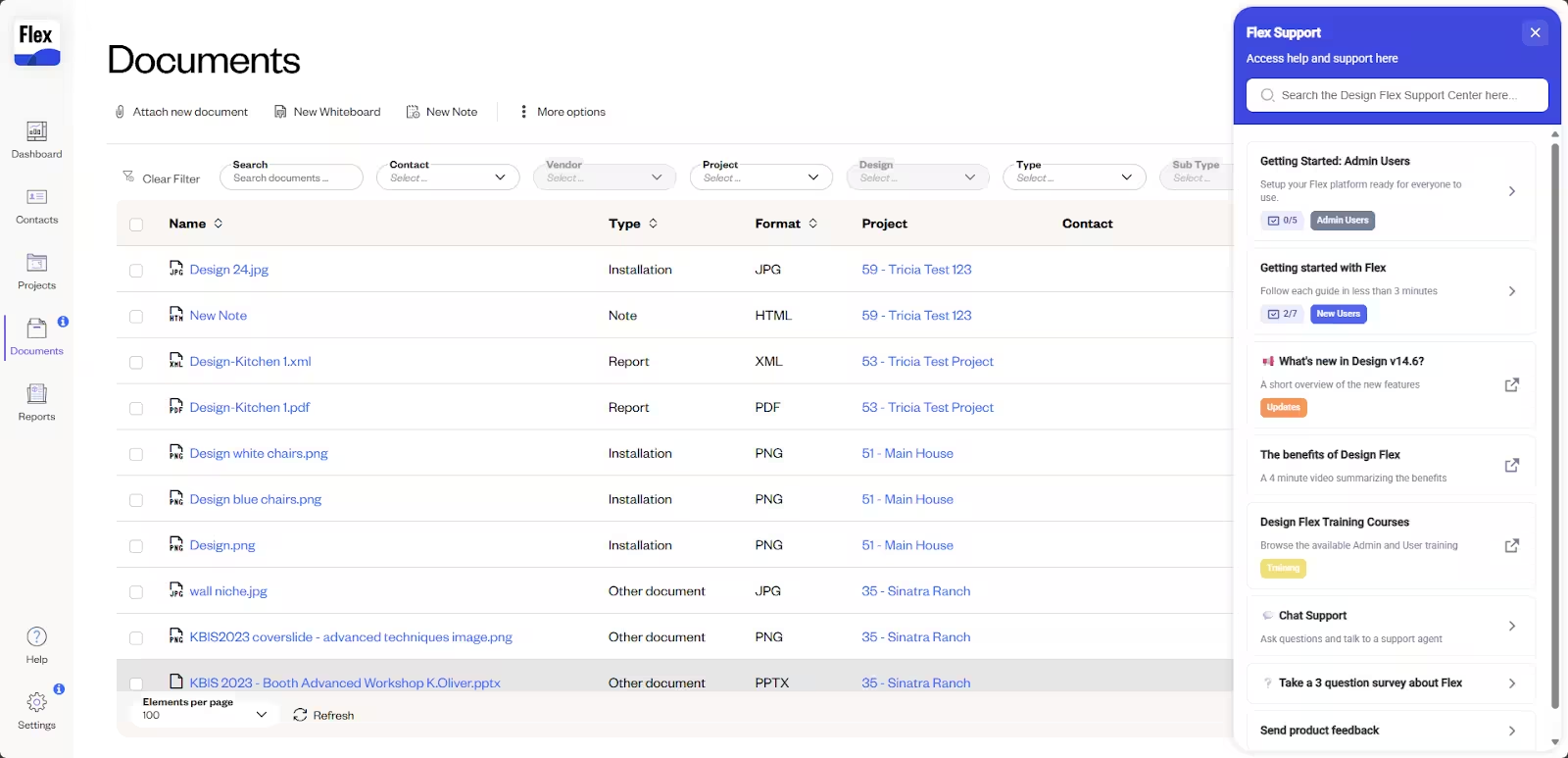
This comprehensive self-service hub saves the documentation team from duplicating content and ensures a consistent, organized experience where every resource is just one click away.
In short… The result was incredible
In the first year of implementation, Cyncly shifted its entire approach to user education, moving from a costly support model to an efficient, self-service experience.
They successfully transformed their onboarding process from a resource drain into a reliable, automated, and high-performing adoption engine.
Cyncly maintains over 70% guide completion rate across their core, multi-step onboarding flows, proving the effectiveness of their concise, segmented approach.
Crucially, they achieved zero developer dependency, meaning the documentation team can now create, test, and update all in-app content instantly.
The domino effect created enhanced metrics across the business:
- Elimination of manual calls: The team eliminated the need to book time-consuming 45 to 60-minute manual onboarding calls, freeing up the Support team to focus on complex technical issues.
- Rapid time-to-market: The product team can now use UserGuiding’s no-code editor to react to product changes and launch new feature guides immediately, accelerating adoption.
- Scalable documentation: A small team of just two people can now efficiently manage documentation across multiple product applications and user segments, ensuring the process scales as Cyncly grows.
This success was recognized internally:

The product managers actually like the fact that we can react and change to things as quickly as we can without it having to be put into a backlog or into a sprint and things like that. It has been really well received in that sense.”

Balljeet Sandhu
Documentation Specialist
By implementing a segmented, no-code in-app guidance strategy, Cyncly now guides every user to their specific "Aha" moment quickly and efficiently.
If your team is struggling with developer bottlenecks, low guide completion rates, or high-touch manual onboarding, discover how UserGuiding can help you scale your user adoption today. 👈


For a user trying to utilize 100% of the product [Flex] for the entire customer workflow and customer journey, the complexity would be an 8 out of 10 to achieve that full implementation."