


.svg)
.svg)
.svg)
.svg)



.svg)




.svg)
.svg)


With the rapid digitization, people are expected to adopt new technology (or at least a new tool) faster than ever before.
Every other week, there’s a new AI model and several apps that come with it. Even the tools people already know evolve so quickly that understanding what’s changed (and how it’s different from the last version) takes extra effort.
Tech-savviness used to be manageable when big changes happened every decade or so.
Now? Now it’s different.
⚡ According to Asurion’s 2024 Tech Lifestyle Report, nearly two-thirds of consumers (66%) don’t consider themselves tech savvy. Even Gen Z, the so-called “tech generation”, say they feel stressed and anxious about new technologies.
This is the gap that onboarding solutions help to bridge.
They reduce the anxiety and hesitation that people often feel toward new software, and they make tools genuinely easier to use.
It makes software accessible.
To everyone. Across backgrounds, generations, and levels of technical expertise.
In this article, we’ll cover:
- The common challenges non-technical users face when adopting new software and SaaS tools.
- How onboarding solutions address these challenges through practical strategies.
- What to prioritize when designing onboarding flows that truly support less tech-savvy users.
We’ve got a lot to unpack, so let’s get started.
TL;DR
- Before jumping into the importance of onboarding (especially for non-tech-savvy users), let’s clarify what onboarding is and what it stands for, so we can understand its value more clearly.
- Onboarding is the process of familiarizing a user with your product and offering them easy-to-follow paths and tips to successfully achieve what your app promises to them: to help them, to empower them, to bring them to success.
- So, when you think that way, you might have (potential) users/customers/clients that are interested in your product/services and promises, but are not equipped with the knowledge to use it.
- Or, there might be other adoption barriers at play that are common with non-tech-savvy users, such as:
- Fear of failure and/or biases.
- Software fatigue caused by recent tool migrations and changes (or simply an already crowded toolkit).
- Concerns over data privacy and security.
- Lack of personalized outreach that proves the value of the product to the user and thus a disbelief in the overall promise/ value proposition.
- With contextual and tailored in-app onboarding, you can overcome these challenges, reassure skeptical users, and also empower non-technical users.
- Interactive guides, checklists, tooltips, hotspots, in-app resource centers, AI assistants, feedback forms and surveys… There are a lot of different onboarding solutions that are very useful for different situations.
What is the challenge for less tech-savvy users?
Have you ever wondered why some people are great at adopting new tools and software, while others struggle to keep up?
Why are some users immensely tech-savvy, while others are not?
Well, there are several adoption barriers that hold some users back more than others.
Like…
Overwhelming complexity of modern SaaS platforms
The most visible adoption barrier, and often the first that comes to mind, is the sheer complexity of modern software platforms.
Especially enterprise tools, compared to consumer apps.
Enterprise tools today are often packed with features, dashboards, menus, and integrations.
While these capabilities are powerful, they can also feel like a maze for someone who isn’t familiar with software in general, or with that platform in particular.
Enterprise platforms, unlike consumer apps, also usually cannot be discarded easily.
Once a team or manager selects a tool, employees are expected to use it, and the ability to switch to another platform is often restricted, particularly after migrations or long-term contracts are in place.
This cognitive load and pressure, combined with the inherent complexity of a tool, can leave users paralyzed at the sight of something new, often causing them to overestimate how complicated it actually is.
Fear of failure due to steep learning curves
Talking about cognitive load…
Besides the mental pressure of keeping up with colleagues and peers in adopting new technology, there’s also the fear of “breaking” something, which is common among less technical users.
When faced with unfamiliar interfaces, multiple features, and hidden options, less tech-savvy users often worry about making mistakes or causing problems in the tool.
This fear of failure is closely tied to steep learning curves.
Logically, the more complex the workflow, the more opportunities there are for something to go wrong.
When a workflow includes several steps and interactions to complete, users can feel overwhelmed by the number of steps or decisions required to complete basic tasks.
In other words, a steep learning curve can create an emotional barrier and reduce user confidence.
Software fatigue
Even when users get past the initial fear of failure, there’s another barrier waiting: fatigue.
Modern workplaces rely on a growing stack of apps, and the overload is real.
⚡ Studies show that 81% of new employees use at least six platforms, while one-third use 11 or more. That’s a lot of context-switching, logins, and mental juggling before any real work even begins.
It’s no surprise, then, that 81% of new hires also report feeling overwhelmed with information during their onboarding process.
Instead of feeling empowered, they feel scattered and exhausted.
This fatigue often translates into…
- Early disengagement,
- Low productivity,
- And in many cases, churn.
For non-technical users especially, who already feel at the edge of their comfort zone, this overload can quickly push them away from a product altogether.
Generational bias and lack of personalized outreach for older user segments
It’s a common stereotype that older generations struggle with technology.
But the reality is more nuanced.
⚡ For example, 70% of Boomers say they aren’t intimidated by new technology, and more than 30% actively enjoy sharing new apps and tools with friends and family.
Far from being “anti-tech,” this group often serves as powerful advocates.
The real challenge is that they’re rarely addressed with personalized experiences.
In the words of Nic Chidiac, Chief Strategy Officer of Brand and Experience at Razorfish, the firm that conducted the consumer survey with Boomers:
Boomers are not a monolithic segment; they are a multitude of micro-segments, and they expect personalization. When you think about the fact that Boomers hold nearly 50% of total U.S. assets and account for more than 20% of spending, there’s a massive opportunity for brands and marketers to engage with them more deeply.”
And it’s not just Boomers.
Gen X in workplaces, often stereotyped as resistant to change, are actually pragmatic adopters.
They’ve lived through the transition from analog to digital and know the value of useful technology, yet they still face steeper learning curves compared to digital-native Millennials and Gen Z.
However, their resilience, adaptability, and professional expertise allow them to perceive the potential benefits of new technologies, like AI tools.
What they need is stronger support in the adoption process and a clear understanding of the value a new tool provides.
Which brings us back to the need for a clear, personalized value proposition.
Concerns over data privacy and security
For many less tech-savvy users, the first barrier they face (even before usability issues) is trust.
⚡ According to research, one-third of older Americans cite data privacy as the biggest concern that keeps them from adopting new technologies.
And this concern isn’t limited to seniors.
Across all demographics, people are becoming more cautious about how their data is collected, stored, and used.
And it’s not just individuals; businesses are just as concerned.
If you’re offering software solutions to other companies, privacy questions come up even more often, especially in the wake of the AI boom. With sensitive data being shared, processed, and sometimes fed into machine learning systems, the stakes feel higher than ever.
Transparency, clear explanations, and reassurance about safety are essential to building the trust needed for adoption. You should address these fears clearly across your website, demos, and onboarding.
What happens when these barriers are not lowered for non-technical users?
❌ Negative brand perception. A frustrating experience doesn’t just stop individual users from engaging; it shapes how they talk about your brand.
❌ Increased reliance on customer support. Without clear guidance, non-technical users turn to support for every small question. This puts extra strain on your CS teams and increases resolution times, instead of empowering users to be self-sufficient.
❌ Poor product adoption. This is the most predictable outcome. Without proper guidance and support (both to ease practical hurdles and to address mental or emotional frictions like fears and biases) you can’t expect users to fully adopt your solution.
What do user onboarding solutions provide?
Elena Verna, one of the most respected voices in product-led growth (PLG), recently shared a meme about product tours that went viral on LinkedIn. 👇🏻
In the comments, Verna calls product tours and walkthroughs “band-aids to bad UX/UI”.
And if you’ve ever clicked through a clunky, one-size-fits-all product tour, you probably know exactly what she means.
But here’s the thing: SaaS isn’t that black and white.
The mindset of “let users figure it out, and if they don’t come back, it’s their loss” can be harmful, especially for less tech-savvy users.
In reality, very few products are intuitive enough for everyone to grasp immediately. And when users feel lost, confused, or overwhelmed, they don’t usually stick around to give the product another chance.
They churn.
⚡ In fact, studies say that 90% of users churn if they don't understand a product’s value within the first week.
On the other hand, the idea that you can simplify UX/UI to the point where every single person instantly understands it isn’t realistic either.
Tesler’s Law, also known as the Law of Conservation of Complexity, reminds us that every system has an inherent level of complexity that cannot be eliminated.
You can minimize it, mask it, or shift it, but you can’t make it disappear.
That’s why onboarding plays such a critical role.
It doesn’t excuse bad design, but it acknowledges that even great design still carries unavoidable complexity, and users need guidance to navigate it confidently.
Now that we’ve established why in-app guidance matters (with product tours being just one example), let’s look at how onboarding solutions equip you to help your users feel confident instead of abandoned. 🔧 👷🏻
Interactive guides & walkthroughs to offer step-by-step instructions
One of the biggest hurdles for non-technical users is not knowing where to start.
Interactive guides and walkthroughs take away that uncertainty by showing users exactly what to do, inside the product, step by step.
Instead of dropping users into a complex dashboard and hoping they “figure it out,” interactive guides replicate the kind of hand-holding you’d get from a live demo or a sales rep.
As Catie Ivey, CRO of Walnut, explained in a podcast interview with Mason Cosby:
Think about a product tour that you see on someone's website or a demo center that you might go interact with on your own, or the experience of sitting down with a sales rep and actually demoing parts of the product and having that salesperson walk you through it. The technology itself just makes it much simpler… it makes it really simple to be able to string together a version of your product and tell a really powerful story.”
Here’s an example interactive walkthrough from Remote:
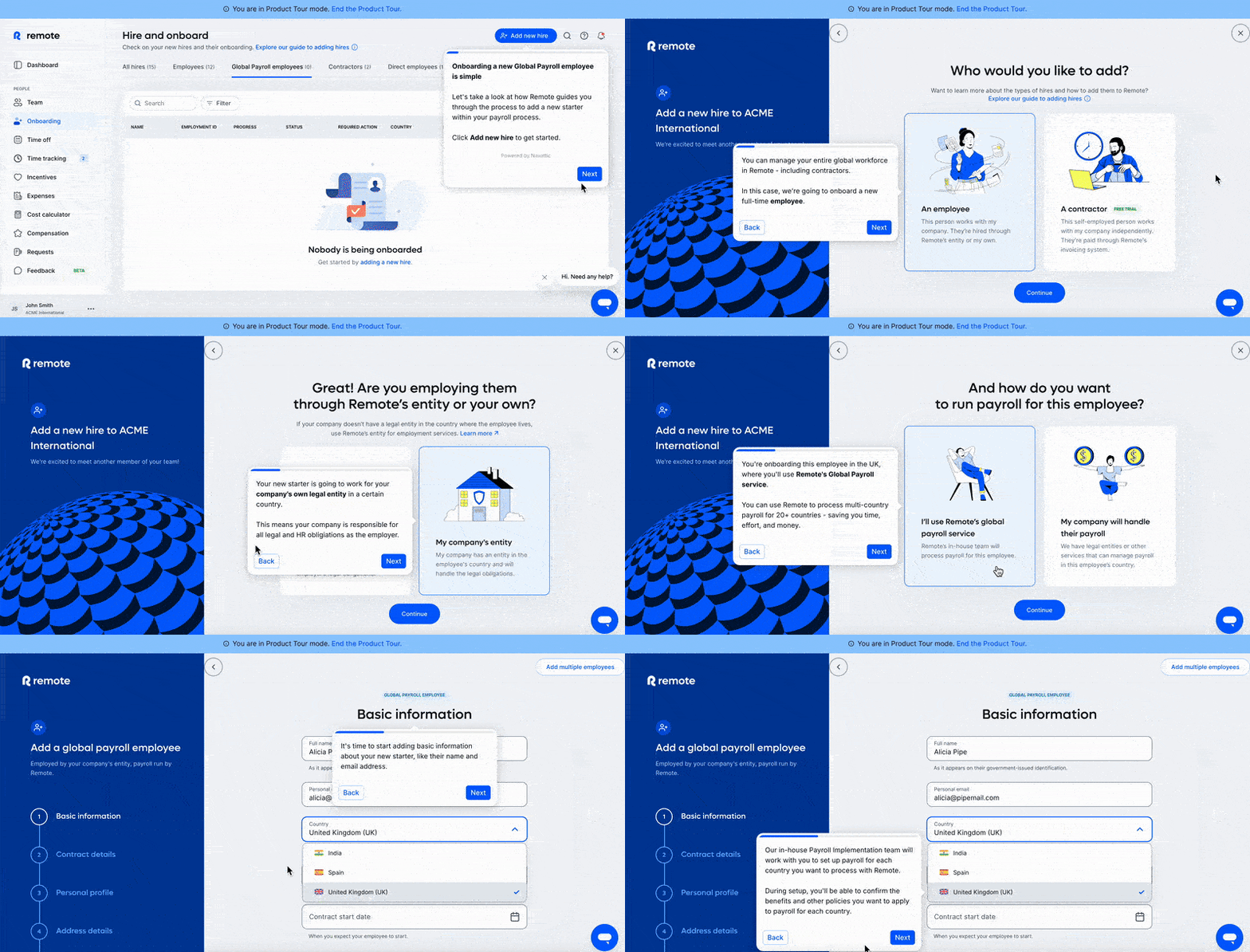
✅ Remote storifies the process for new users and explains each step of the workflow in detail. To save time for those in a hurry, they also highlight key actions and instructions in bold, so users can easily skim through the steps if they prefer.
✅ The walkthrough helps users focus on specific tasks/buttons/input fields at a time, instead of looking at everything on the UI at the same time and feeling lost or intimidated. One tooltip, one click at a time.
✅ By offering in-app guidance for one of the platform’s key features or workflows, Remote eliminates early friction and confusion for non-technical users.
✅ The tour is also optional, so users familiar with HR platforms aren’t forced through the training, while those who haven’t used a similar tool before can appreciate the guidance.
Checklists & progress trackers to keep users oriented and motivated
Checklists provide a clear path through the onboarding journey, letting users see where they are, what they’ve completed, and what’s left to do.
For less tech-savvy users, this visibility reduces anxiety.
Instead of wondering “Did I miss something?” or “Am I doing this right?”, they can focus on completing one step at a time. Each completed step delivers a small sense of achievement and helps users maintain motivation and confidence.
Checklists and progress trackers help address a key onboarding challenge: users getting confused by disorganized materials.
Many users struggle to understand how onboarding guides or videos help them achieve success or realize a product's value.
They often don’t know which resources are relevant to them, and when faced with a crowded “Getting Started” section or too many help materials, they may avoid interacting with any of them.
⚡ Statistics show that 75% of users abandon a product within the first week if onboarding is confusing.
Checklists solve this problem by highlighting what’s most relevant and valuable now.
As Wes Bush (a.k.a. The PLG Guy) calls, checklists are product bumpers that bump users back in the right direction when they lose their way.
Here’s an example checklist from Apollo:
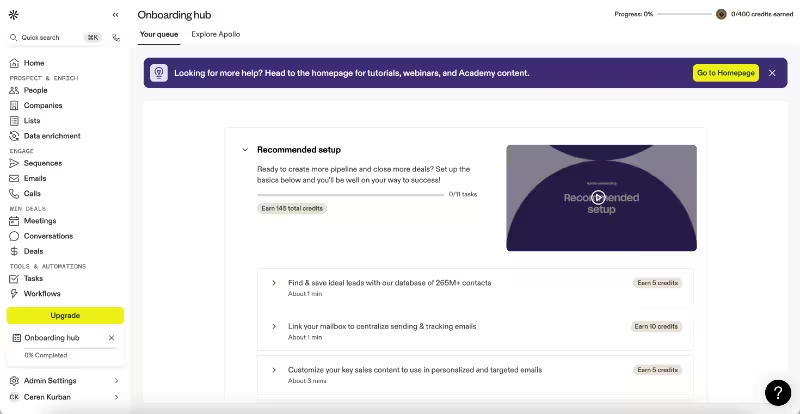
✅ Apollo offers a recommended setup path so users can experience the full potential of the platform without friction. The setup begins with the basics and gradually introduces other helpful features, starting with easier functionalities and progressing to more advanced ones.
✅ Each task on the checklist also includes a short explanation along with its value proposition, so users understand why the step is important. This clarity increases the likelihood of onboarding completion and user engagement.
✅ The checklist breaks the user onboarding process into manageable tasks, each with an estimated completion time, easing potential frustration caused by the tool’s complexity and learning curve.
✅ The progress bar and credits earned for each task gamify the onboarding and in-app training experience, helping users focus on learning rather than feeling burdened by technical details.
✅ More technical users who prefer to skip in-app onboarding can dismiss the onboarding hub easily and don’t need to follow the recommended setup steps. Even for them, however, the checklist provides a concise summary of the platform’s value and possibilities.
Tooltips & hotspots to explain features contextually
Tooltips and hotspots provide contextual guidance exactly where it’s needed, without cluttering the interface or overwhelming the user.
As Ed Dawson explains in an episode of SEO is not That Hard, tooltips are great at enhancing the usability of a website or a product.
Dawson exemplifies this in the podcast with a personal anecdote, as well.
He says that when they conducted a usability test, it revealed that while most users appreciated the abundance of data in their content optimization tool, they often didn’t understand what each column or metric meant.
For example, terms like “similarity,” “page position,” or “best query position” were confusing without additional explanation.
And when they added tooltips directly next to these elements, users could access quick definitions and guidance on demand. This allowed users to:
- Understand complex terms without leaving the page
- Gain confidence in navigating the interface
- Reduce mistakes or uncertainty during tasks
Here’s an example tooltip from Google Meet:
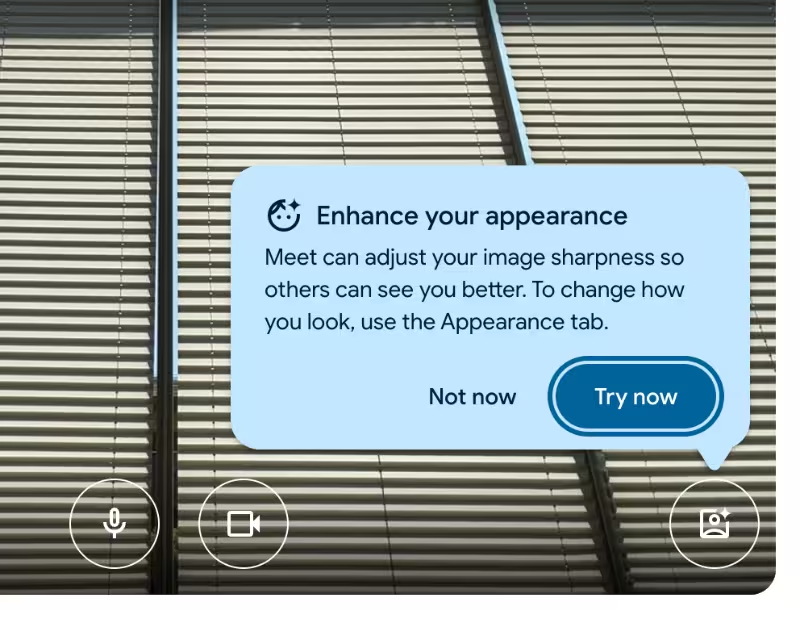
✅ Google Meet triggers this tooltip to introduce its image-enhancing tools contextually when a user’s video quality isn’t optimal, for example, due to reverse lighting. This way, users receive the information at the right moment, making them less likely to be annoyed by the pop-up and more likely to try the feature.
✅ The introductory tooltip encourages users to engage with the buttons on the UI, or at the very least, clarifies what those buttons do. This is a huge relief for users who might be worried about “breaking” something just before an important meeting. (Click this button, it won’t suddenly give you a cat face mask, promise.)
✅ Meet uses these contextual tooltips both before and during meetings, covering not just image quality but also voice quality and background noise. When a tooltip like this pops up, whether it’s about noise reduction or video enhancement, it doubles as a gentle reminder for the user to check their environment for a smoother call experience. Very user-friendly, we’d say.
Similarly, hotspots are great at drawing attention to specific elements on the UI.
They often appear as shiny, pulsating beacons or static markers that signal, “Hey, look here, this matters.” 🔵
Hotspots can go beyond simple highlights, too.
Some embed short videos to explain a feature in action, while others prompt users to take the next step, like starting a product tour to explore a new capability.
Here’s an example hotspot from Zakeke:

While tooltips are usually action-oriented (nudging users to click, input, or engage), hotspots can serve as gentle announcements and reminders.
That’s why they’re often used for feature activation and discovery.
In-app resource centers to provide instant help without searching external docs
When users get stuck, the last thing they want is to open ten browser tabs, sift through a knowledge base, or wait for a support ticket to be answered. That kind of friction not only slows them down, it also amplifies their frustration and anxiety.
For less tech-savvy users, this matters even more.
If they hit a roadblock and don’t immediately find an answer, chances are they’ll just abandon the tool altogether.
In-app resource centers solve this by bringing help directly into the product.
Instead of searching externally, users can access support without leaving the app.
📌 A good in-app resource center combines multiple forms of support, such as:
- Help articles or FAQs for instant clarity on common issues.
- Videos or interactive guides to show, not just tell, how to use a feature.
- Search bars that let users type in their question without digging through categories.
- Live chat or ticketing options for when human help is unavoidable.
- External links to your support and educational channels (YouTube channels, knowledge bases, blogs, product academies, etc.)
Here’s an example in-app resource center from Zendesk:
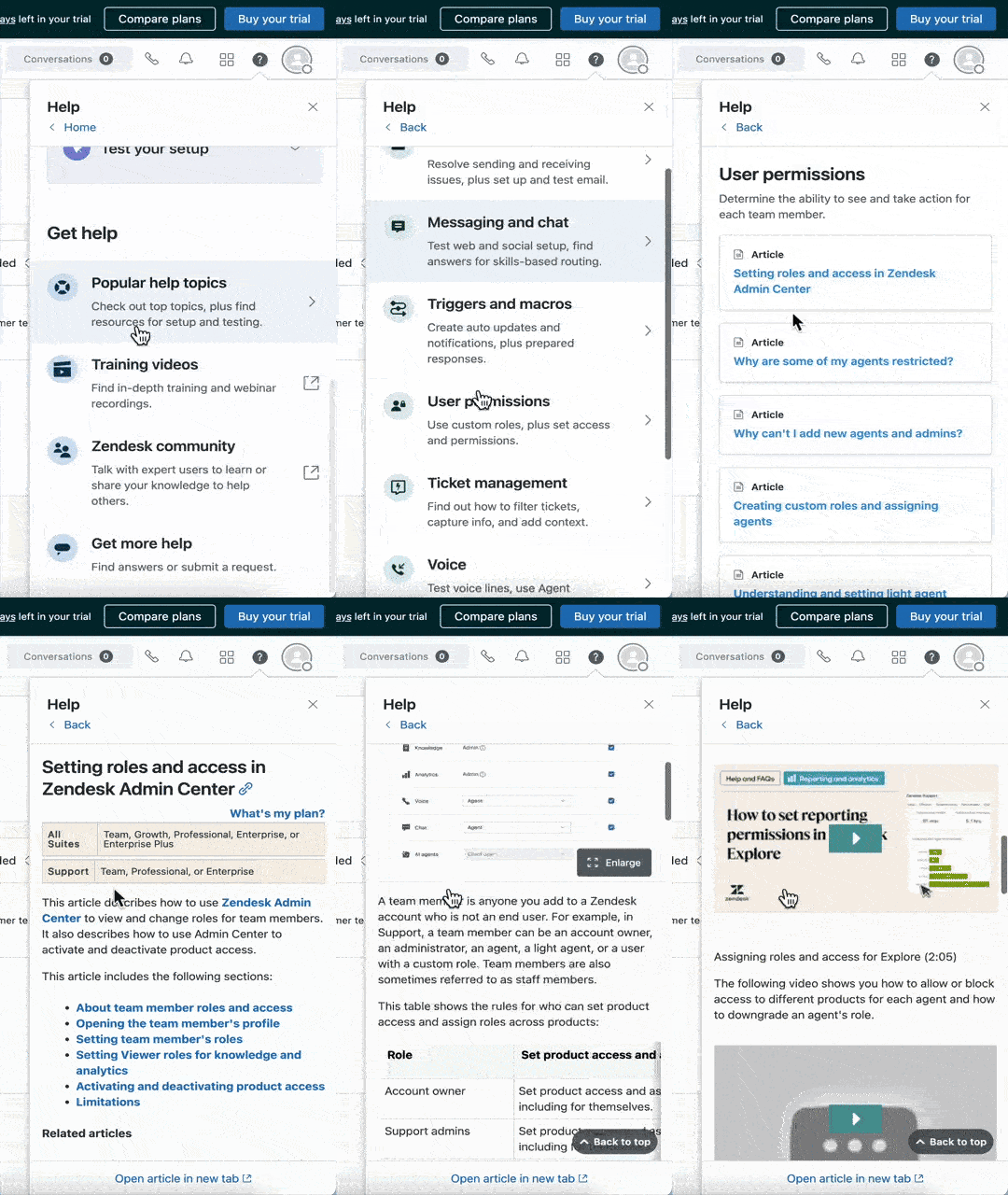
✅ Onboarding and setup tasks are organized into a checklist. The checklist is accessible through the resource center and triggers either interactive tutorials or written guides that walk users through the required process step by step, often with images included.
✅ Alongside the onboarding checklist, help center articles are also available directly in the resource center. You can read the articles just as you would in the full help center, and even play videos within the widget itself.
✅ The resource center also provides external links to the help center, video tutorial hub, webinar recordings, and the Zendesk community. In short, anything a new user might need is either directly available inside the RC or just one click away through a forwarding link.
Surveys & feedback widgets to capture confusion points
Even with the best walkthroughs, tooltips, and resource centers, you can’t predict every friction point. Non-technical users, especially, may struggle in ways you didn’t anticipate.
Sometimes, it's because of wording, sometimes because of workflow design, or even because of misplaced expectations.
Surveys and feedback widgets built directly into your product give users a quick, low-effort way to share what’s confusing, frustrating, or unclear without leaving the app.
These can take a few different forms depending on what you want to learn:
- Contextual micro-surveys that pop up after a specific interaction, like finishing a user onboarding flow or trying out a feature for the first time.
- Always-available feedback forms inside your resource center, so users can share thoughts on their overall experience, report bugs, or flag confusion at any point.
Here’s an example in-app survey from Sprig:
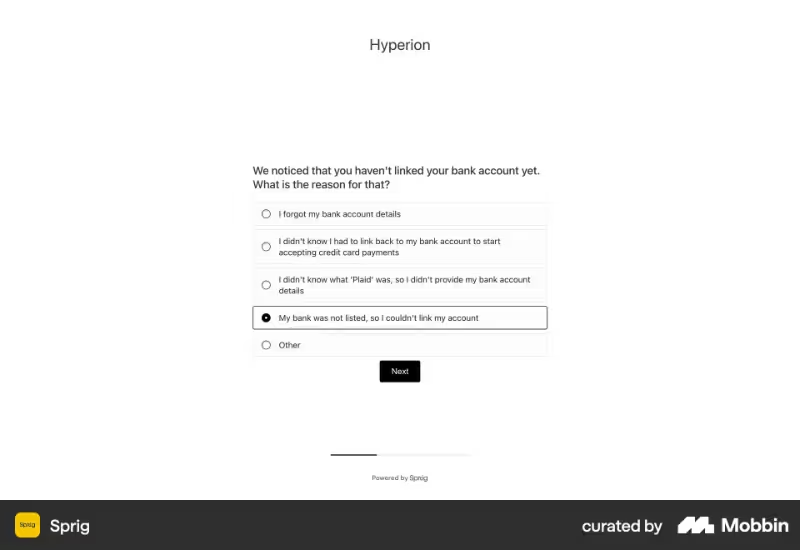
✅ Sprig triggers surveys and collects feedback contextually based on user interactions (or non-interactions, in this case). This keeps the questions relevant and avoids awkward prompts like “Do you like us?” on a random Monday morning.
✅ The survey mixes multiple-choice, open-ended, and star rating questions. It’s a bit longer than average, but since most questions are quick to answer and there’s a progress bar, it still feels manageable for users.
✅ The multiple-choice options are tailored and reflect real user frictions. This reassures users, especially non-tech-savvy ones, that the company understands their struggles and that they’re not the problem.
✅ The survey also gives Sprig a chance to guide users in real time. For example, if someone says they didn’t connect their account because they didn’t know what “Plaid” was, Sprig could trigger a walkthrough to explain it.
✅ Answers also inform preventative measures. If the same confusion keeps surfacing, Sprig can add contextual help, like tooltips or guides, to clear things up.
Here’s what Vitaly Friedman, a UX leader and coach, says about best practices for in-app surveys:
Why are they “must-haves”? (key benefits)
The onboarding process influences your customers and team members.
Because someone needs to create, test, and update these flows, right?
Plus, if your onboarding leaves certain things hanging in the air or causes misunderstandings and confusion, your support team will also deal with those issues.
So, it’s important to offer optimized onboarding and prevent common and small issues as much as possible.
Both for your customers’ satisfaction and your team’s efficiency.
⚡ Statistics show that companies that invest in onboarding strategies report 60% less time spent on manual onboarding tasks by customer success teams.
Let’s go over the other benefits of automated in-app onboarding solutions 👇🏻
Reduce cognitive load
Most SaaS products today have dozens of features, each with its own settings and workflows. But if you rely only on static documentation without offering a specific learning path tailored to users’ use cases, roles, or plans, you’re putting an immense workload on the user’s shoulders.
- Finding the right help article for each feature,
- Reading through five different guides just to figure out which one applies,
- Going back into the product to test it out,
- Not quite getting it, then digging through Reddit threads for “pro tips”...
All of this is doable, of course, but it comes with a lot of mental load.
And for non-technical users, that much research and trial-and-error often leads to disengagement and frustration.
Now compare that to in-app guidance.
When help shows up in the product, right where and when users need it, all that heavy lifting disappears. Suddenly, the information feels natural instead of like extra homework.
Well, if a tour pops up exactly when I’m trying a new feature, why not take it?
With in-app onboarding solutions like timely tooltips and walkthroughs…
- ❌ Users skip the stress and the search.
- ✅ You deliver a curated, friendly learning flow that feels approachable.
💡 Pro Tip: Onboarding solutions let you reduce the cognitive load of complex UIs/UXs without oversimplifying to the point where power users feel limited or valuable advanced features get lost.
UX design specialists often warn that simplifying interfaces too much can frustrate experienced users.
With overlay guidance that the tooltips, walkthroughs, and hotspots provide, you can keep advanced, technical users satisfied while helping beginner, non-technical users feel supported.
Build confidence
Confidence is underrated in tech adoption.
When someone feels out of their depth, their instinct is to retreat.
But with clear, contextual guidance, you can flip that feeling around. Instead of worrying they’ll “break” something, users learn through safe, guided exploration.
When your product actively reassures people, “click here, this is safe,” or “here’s what happens next”, they begin to feel in control.
That trust translates into curiosity, and curiosity leads to deeper adoption.
As Mayara Almeida, the product designer and UX strategist, says:
“Every user arrives with a paradox: they want clear direction while simultaneously craving autonomy to explore on their terms. We all want to feel capable of exploring while knowing there's a clear path forward when we need it.”
And in-app guides, even when you do not trigger them immediately, offer exactly that confidence and sense of security as long as they stay available and accessible through in-app resource centers and checklists.
There’s a clear path that will guide you if you need it.
Accelerate time-to-value
Every user is silently asking: “How soon will this tool actually help me?”
If the answer isn’t “right away,” you risk losing them.
Guided onboarding accelerates time-to-value (TTV) by steering users directly toward the moments that showcase your product’s benefits.
Instead of wasting hours figuring things out on their own, they can complete their first meaningful workflow and see results if you highlight the right onboarding tasks on your checklist and guide them through with in-app tutorials.
That early win then builds momentum.
Even users with limited tech skills feel: “Okay, I can do this, and it’s already useful.”
Cut support costs
As we’ve discussed in the beginning, too, poor onboarding causes more friction and questions in the users’ minds than it helps them.
That causes users to go to your support team and submit tickets for minor issues.
- “Where do I find this setting?”
- “How do I create my first project?”
- “Why isn’t this feature working?”
And that causes your support team to spend their valuable time resolving issues that could have been avoided to begin with, instead of focusing on high-priority and more complex issues…
We don’t need to say that means inefficient resource allocation, right?
The onboarding solutions we introduced (like in-app guides, resource centers, and surveys) reduce the noise of repetitive support tickets submitted by non-technical users.
- ✅ Proactive guidance prevents “How do I…?” questions before they arise.
- ✅ Timely triggered in-app surveys allow support teams to detect common friction points, create FAQs and articles targeting them, and highlight the answers within the resource center.
- ✅ When self-serve support is available in the app (through guides, articles, videos, and FAQs) and doesn’t require a lot of effort to access information, users are less likely to reach out to support.
💡 Pro Tip: You can also use AI support agents and chatbots to provide automated self-serve support that feels more like a natural conversation than digging through help articles.
You can train your agent using your knowledge base materials and documentation, and even connect it with your interactive guides so it can offer them to users when they’re relevant.
Robb Clarke exemplifies how much efficiency they gained through AI-powered support chatbots and other automated support solutions (like guides and articles) and solved 98.4% of their "critical support issues" without immediate human involvement 👇🏻
Increase retention & satisfaction
Retention is heavily influenced by initial user perception.
If onboarding feels like a confusing maze, users assume the rest of the product will be just as difficult, and many won’t give it a second chance.
But if the onboarding feels clear, smooth, and encouraging, users associate your brand with simplicity and care.
⚡ In fact, 67% of users say a poor website experience negatively impacts their perception of a brand.
The same goes for user onboarding experiences.
Effective onboarding leaves people thinking, “This company understands me. They’ve made this easy for me.”
And when people feel understood, they stick around.
Here’s a quick checklist for creating a great user onboarding experience, one that prevents confusion and reduces churn, shared by Stanislav Mykhalchuk, an experienced customer success manager.
Successful case studies and different industry examples that can inspire you
Many industries offer software and apps, but not all end users have technical expertise.
After all, developers and tech-focused professionals aren’t the only people interacting with digital tools and software.
Let’s explore several industries that provide technological solutions to everyday users and examine the challenges non-technical users face when adopting these tools. 🔎
⚠️ P.S. We’re not claiming that all end-users of these industries and technologies are non-tech-savvy users. We simply draw attention to users who might not necessarily have technical expertise in the software they get to/want to use in their workflows/daily lives.
FinTech & financial advisory
Like one Reddit user within the industry shares their observations:
This is a super common issue [users churning during/before onboarding]… especially in regulated industries where KYC isn’t optional. What often gets missed is how much of that drop-off comes from how the flow is explained and supported in real time. If users hit a friction point and there’s no human or semi-automated help available, they bail.
Some companies are experimenting with lightweight AI assistants (voice or chat) that guide users through tricky steps, answer questions, or follow up when someone drops off. Not a magic fix, but can reduce customer acquisition costs (CAC) waste when done well.”
Retail & POS software
Frictions during the setup of retail and POS software can create bigger problems down the line.
If menus or inventories aren’t synced properly, or key automations aren’t configured from the start, customer-facing employees can struggle, especially during rush hours.
Figuring out workflows and automations on your own can take a lot of time, particularly for those who haven’t done it before.
For example, a Reddit user who owns a bar shares their experience with a restaurant management and POS system, describing how long it took them to learn how to use it.
I've used it for 3 years in the full-service bar I own. It wasn't great at first, but I figured out how it works and reprogrammed the entire menu. It's been pretty solid for the bulk of the time. No issues with online orders.
It has its quirks, but once you're used to them, it's not bad. We originally had it wired up incorrectly; it worked kinda, but had all sorts of issues…”
Design & marketing agencies
For design and marketing agencies, onboarding needs arise in two main areas.
First, the agencies and their teams may require extra guidance, since not every employee is tech-savvy. Second, their clients, who receive services or collaborate on projects through software tools, may also be unfamiliar with the platforms the agency uses.
Some agencies report that onboarding a new client for a project takes up to 4 hours each time.
New client closed, time to onboard, cool. Except now I have to spend 4 hrs on setting up their project, custom views, permissions, custom fields etc. By the time I'm done with this setup, I always wonder if I could've just managed it in a spreadsheet. And if I'm still not pissed, I remember that I am trying to do this in ClickUp. Too slow? Tried moving to Asana, well now I miss ClickUp's customizability. I move back and now I miss Asana's task management.
We have brought up making our own custom tool to fit us so that client onboarding can be automated at least to some extent. But that would take a ton of dev time...”
EdTech
There are different product types within the EdTech industry; there are school management software, class management software, self-learning platforms…
Most of these tools serve large and diverse user bases with very different technical backgrounds and levels of expertise. This makes personalized, goal-oriented onboarding essential. Even within the same user group (like teachers), individuals may be interested in entirely different capabilities.
Without proper guidance, many of these valuable features remain hidden and unused.
Teachers are not AI specialists. We don't know what kinds of tasks can be automated successfully. Except we've been asked and interviewed hundreds and thousands of times. And it's always the same question, "How can AI solve all your problems?", but no one actually knows what is a reasonable expectation for a computer system. Or even how to meaningfully describe the problems we face in a software-solvable environment.”
Twin Science and Activesoft are 2 EdTech companies that solved the problem of their non-technical users not knowing how to get the most out of their product by adopting UserGuiding’s onboarding solutions.
Here’s how 👇🏻
To eliminate the initial frustration of their non-tech-savvy teacher users and help them overcome technology fears and biases with gentle guidance, Twin Science decided to offer interactive in-app onboarding.
They welcomed users with a modal and a short, 3-step product tour that introduced the platform's key features.
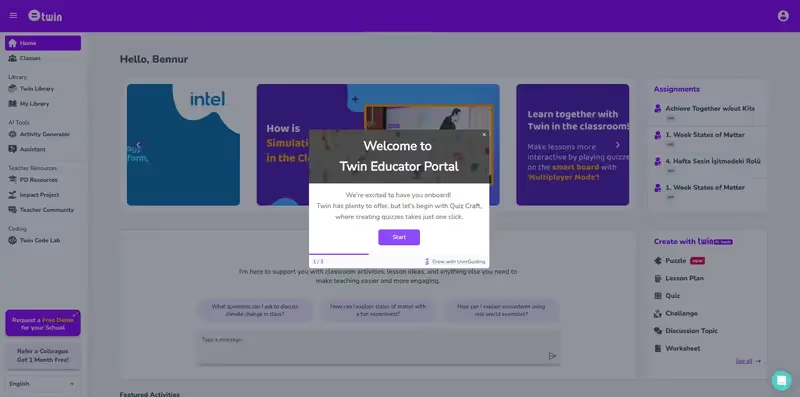
They also built step-by-step interactive walkthroughs for features that seemed relatively complex or were not widely adopted by non-technical users, and set up a standalone knowledge base for teachers with more specific questions.
By doing all of this with UserGuiding instead of dedicating their developer teams and spending months on projects, they saved more than $10,000 in employee costs, with even greater savings expected as they release new features or update materials.
Read Twin Science’s success story to see what they’ve accomplished in more detail.
In Activesoft’s case, the problem was that their in-depth onboarding videos for each feature complicated the learning process and lengthened the onboarding experience for users.
They also couldn’t ensure two-way communication with their users, which made it difficult to gather feedback after updates and feature releases.
With UserGuiding, they solved both issues.
They streamlined and optimized onboarding with interactive, contextual guides and conducted extensive user research through in-app surveys.
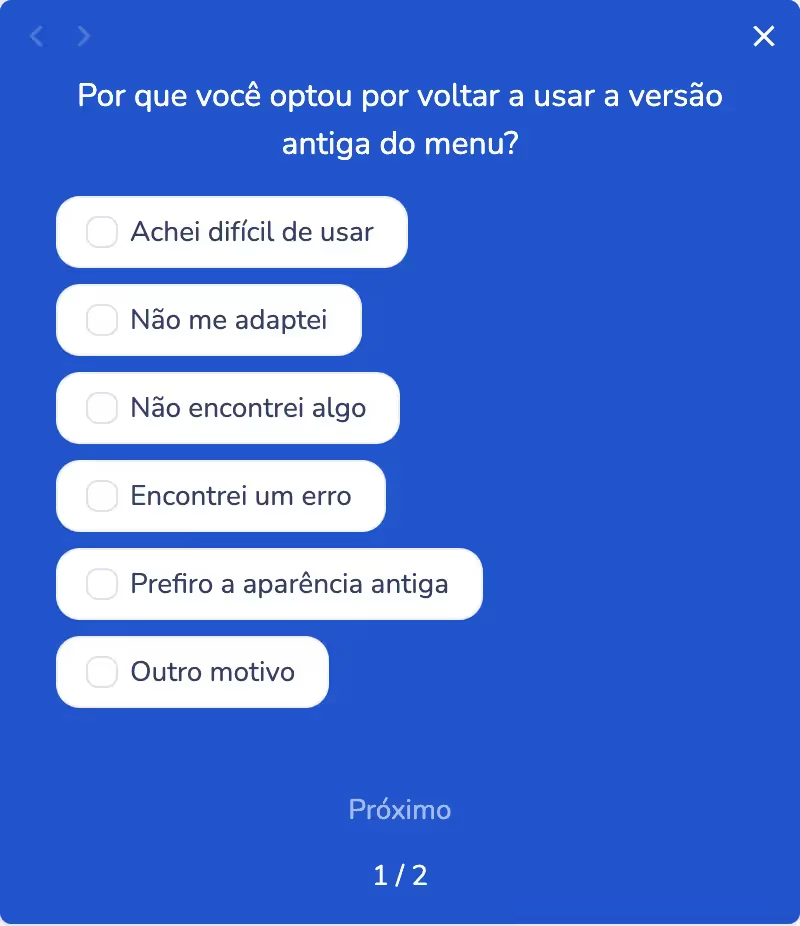
In little over a year, Activesoft collected more than 8,500 responses through UserGuiding’s in-app surveys and caught on to the user experience through actual data.
Read Activesoft’s success story to see what they’ve accomplished in more detail.
👉🏻 Check out how EdTech companies onboard their users.
HealthTech
Here’s what a Reddit user working in clinical research says about the endless and ineffective onboarding processes CRAs and CRCs go through when they start working on a new project:
I recently started with ICON in their bridge program as an in-house CRA and I'm worried I'm not retaining enough from the 150+ online training modules I've been assigned.
I was on a small team and now I have to learn about LMs, GLMASs, FLs, CQCs, PMs, ETC and that's not even including all of the form and system abbreviations!
I know all the information isn't gonna stick right off the bat and most things I will learn through experience but how much SHOULD I be remembering? I'm really not crazy about the idea of taking notes as I go through because of the sheer volume of information but it might come down to that.”
👉🏻 Check out onboarding trends and practices in healthcare.
Logistics & supply chain
While many logistics and brokerage companies still rely on Excel and are uncertain about the benefits of dedicated software, a user-friendly interface paired with effective onboarding can make a big difference in winning over potential users.
One logistics company owner even cited onboarding and training among the primary reasons they chose the tool they ultimately adopted:
Free onboarding + training, mobile app, tracking, unlimited users, I can control both sides of my business and it's super user friendly.”
LogComex is a supply-chain management software company that successfully simplified their UX/UI for non-technical users using UserGuiding’s no-code onboarding solutions.
They were struggling not only to promote new features but also to provide guidance to their customers and answer their questions.
With UserGuiding, they were able to create guides, checklists, and in-app resource centers, delivering the help their users needed without investing significant time or development resources.
In fact, they decreased the development time of in-app UX/UI elements by 95%.
Read LogComex’s success story to see what they’ve accomplished in more detail.
PropTech & real estate
Property management tools are becoming increasingly popular in the industry, replacing less efficient and less standardized traditional methods, such as physical bookkeeping or Excel sheets.
However, many industry professionals are frustrated by the minimal onboarding they receive when starting with a new property management company.
The companies often do not provide onboarding, and even the software they use lacks a structured onboarding process to ease their transition.
For example, one property manager on Reddit asks for help:
First time PM here at an entirely new property management company, & I feel like I’m drowning. I feel like there’s no real structure to my training or onboarding…”
Ajar, a real estate management platform for property managers, owners, and tenants, initially offered 1:1 onboarding for new customers to prevent complaints and ensure a positive experience.
However, as their customer base grew, they realized this approach wouldn’t scale.
To address this, they automated their onboarding with UserGuiding.
They created interactive guides and checklists to standardize the quality of onboarding for all customers and even provided onboarding in multiple languages, including English and Arabic, through localization.

Read Ajar’s success story to see what they’ve accomplished in more detail.
HRTech & employee onboarding
With HRTech and employee onboarding, challenges often arise due to differences between departments and non-standardized processes, or sometimes overly standardized processes that make onboarding irrelevant to a new hire’s role.
HR and onboarding teams may find it difficult to personalize onboarding for each department while managing progress efficiently.
At the same time, non-technical employees can struggle to navigate learning materials, complete onboarding tasks, and access necessary documentation.
One manager on Reddit shared their frustration that onboarding materials are often insufficient, and assigning a senior team member to properly onboard a new hire can upset the team dynamic and even disrupt overall work efficiency:
There's never enough training material available and HR only teaches the DEI and company policies. We're always very busy. Training is super important and most of my staff is willing to teach but the internal customers like project management get upset when I divert an expert to train someone for a week or two even though that will benefit said PM greatly in the near future.”
But aside from the onboarding needs of different departments, HR departments themselves also need proper onboarding.
For example, Kariyer.net, one of the largest employment platforms in Turkey, is used by a variety of HR specialists and roles, such as admins and managers.
Their tasks on the platform differ, which means they rely on different core features and require tailored onboarding tutorials and tips when they first start using the platform.
To personalize the experience for each user and ensure everyone receives relevant guidance, Kariyer.net adopted UserGuiding. With the segmentation feature, they began offering customized guides and tooltips to different user personas.

Read Kariyer.net’s success story to see what they’ve accomplished in more detail.
Warehouse management systems
Like SafetyCulture, the workplace operations platform explains:
The hardest part of inventory management is that it’s a mix of people, systems, and data. If staff aren’t logging movements or following processes, even the best WMS won’t save you, and when reporting isn’t centralized you spend more time compiling data than actually analyzing it.
Automation can help, but only if the fundamentals like accurate counts and consistent processes are already in place.”
With in-app guidance, you can reduce the common mistakes that happen during these processes, like skipping fields or filling out forms incorrectly. Tooltips can point out required fields, walkthroughs can show how to record movements properly, and reminders can keep reporting consistent.
Instead of broken data, you get accurate logs, and the system finally delivers the value it promises.
LegalTech
Lawyers, litigators, and legal practitioners are among the ones that are trying to adopt new tools and software as they develop to automate some of their repetitive tasks and optimize their workflows.
However, they’re also facing big learning curves, like this Reddit user says:
I’ve been testing a bunch of legal tech tools lately; AI-powered search, intake automation, drafting helpers, the works. Some are cool in theory but kinda fall apart in real workflows. Others actually save time, but come with steep learning curves or pricing.”
Or, they’re not totally sure how new technologies can help them, like another Reddit user says:
Basic things are still not handled by AI, of course the privacy and trust factor is first, but also many firms don’t even know where to begin…”
TimeSolv, a legal time tracking and billing software, for example, adopted UserGuiding to create in-app messages and guides to help their non-technical customers navigate more advanced workflows and functions.
“There are some complicated layers to our product and some terminology that might need explanations,” they said, and they took action to solve this problem.
Here’s an example walkthrough they created with UserGuiding:
Read TimeSolv’s success story to see what they’ve accomplished in more detail.
Accounting software
Several bookkeepers online explain their onboarding processes with new clients, often mentioning how setup takes a lot of time and even requires several in-person meetings because clients struggle with access and integration.
Like this accountant on Reddit here:
Our usual onboarding involves an in-person meeting that's more of an introduction meeting (only 30 mins). From there, we send an email from our client portal requesting QB Online access, all relevant log ins, etc.
This request is such a pain point for us because the client has trouble getting all the sign-ins ready for us and sometimes the connections in QBs break or need to be set up because they or the prior bookkeeper never set up an account. It takes me forever to get things set up for a new client.”
Choosing the right user onboarding solution…
We’ve covered a lot of onboarding solutions and how each one can add value. But the truth is, not every platform delivers all of these benefits.
Or at least not without some trade-offs.
Especially if you don’t want to end up spending tens of thousands of dollars on a tool that falls short of your needs, or having to dedicate a team member just to learn how to use it…
📌 When evaluating onboarding platforms, it helps to keep an eye on:
- Scalability across devices and apps: Will it work seamlessly on desktops, tablets, and mobile?
- Personalization and customization: Can you tailor experiences for different user segments, roles, or skill levels? And can you match your brand look and overall UI?
- Analytics and insights: Can you track where users struggle and optimize guidance accordingly?
- Learning curve and usability: Is it truly no-code, so your team can create guides without a developer?
- Feature coverage and ROI: Does it justify its cost with the capabilities it offers?
And we know just the platform you need. 👀
Meet UserGuiding!
UserGuiding is a no-code, all-in-one product adoption and user onboarding platform offering features and capabilities that improve your in-app experiences.
🚀 With UserGuiding, you can create…
- Interactive guides and walkthroughs
- Onboarding checklists
- Tooltips, hotspots, and other pop-up modals
- In-app resource centers
- Standalone knowledge bases and product updates pages
- In-app surveys
- AI assistants
For example, for your non-tech-savvy users, you can create a dashboard tour that looks like this:
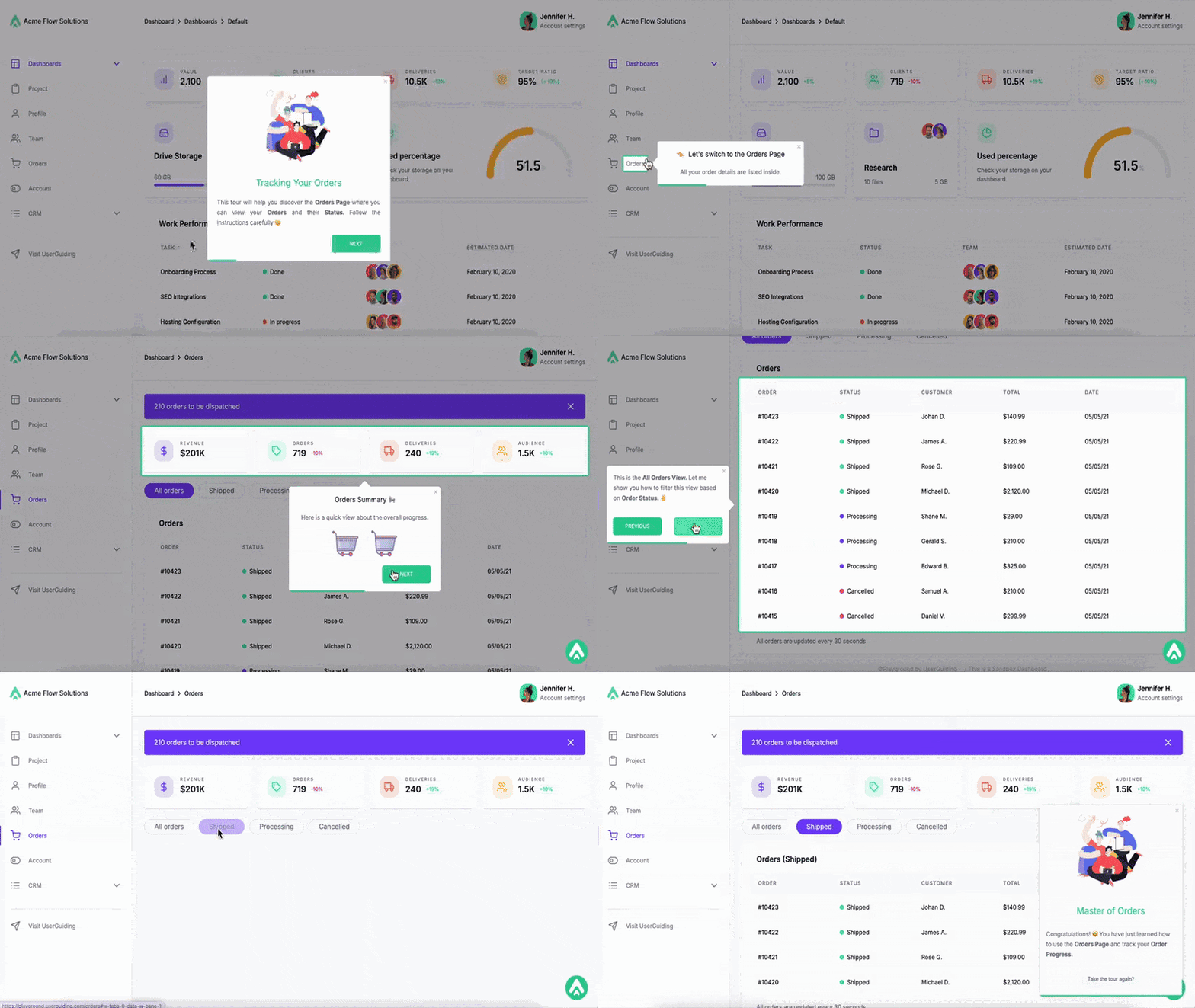
Then, add it to an onboarding checklist like this, so users see it when they first sign up but are not forced to take the tour immediately upon entering the platform:
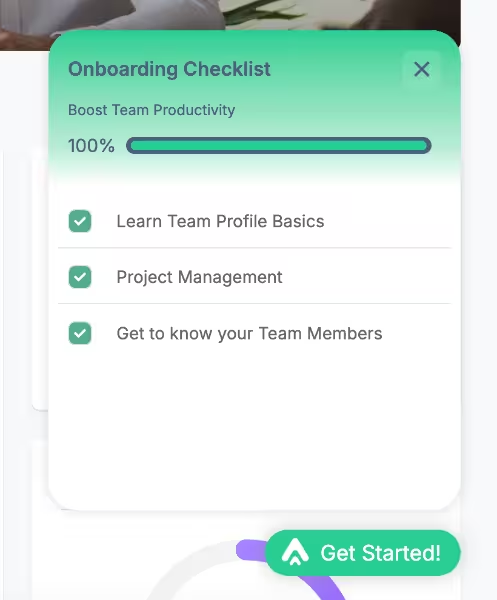
A checklist like this can help highlight your important features and value proposition, and you can even personalize it for different user segments and personas, keeping the checklist focused and achievable.
For guides you want to offer but not highlight on the initial onboarding checklist (because let’s face it, not all product features need to be tried in the very first session), you can place them in a separate checklist within your resource center.
This way, your guides stay organized without overwhelming users or making onboarding feel like a series of lessons.
Like this checklist here:

Liked what you’ve seen so far?
🎁 Start your free trial today and see how easy it is to create engaging onboarding flows!
Practical tips for writing/designing onboarding for non-technical users
Designing onboarding for non-technical users requires a different mindset than building it for power users.
👉🏻 When you build guides and in-app messages for (potential) power users, you focus on advanced capabilities and pro usage tips. Maybe shortcuts and automations.
👉🏻 With non-technical users, your onboarding goal is to remove potential friction and build confidence.
Here are a few practical tips to keep in mind when creating your onboarding flows:
Tip #1: Use plain language, avoid jargon.
Drop the technical terms and product lingo.
Your non-technical users probably do not use the exact wording you use. So, if you want to be truly helpful with your onboarding and eliminate confusion instead of causing it, pay attention to how they speak.
Tip #2: Show instead of tell (visuals, videos, tooltips).
Reading walls of text can feel overwhelming because it requires a kind of mental translation from written instructions into real-life actions.
For non-technical users, the tasks often grow bigger and more intimidating in their minds, and even the simplest step-by-step instructions start to feel complicated and nuanced.
Visual aids like screenshots, short videos, GIFs, and contextual tooltips are much easier to process.
The jump from visuals, or better yet, interactive elements/ experiences, to real-life workflows is far smoother.
Tip #3: Don’t overload; progressive disclosure is key.
No user needs to be introduced to every single feature on day one.
Especially not non-technical users.
You need to break the onboarding into small steps and reveal advanced options only after users get comfortable with the basics.
You shouldn’t talk about your advanced filtering capabilities or CSS-level customization when your non-technical user hasn’t even tried to create a dashboard, yet.
Tip #4: Test guides with less tech-savvy users and get their feedback.
When you’re too close to the product, everything feels more intuitive and obvious than it really is.
Unfortunately, that’s rarely the case for beginners.
What seems “crystal clear” to your product team can feel confusing, overwhelming, or even intimidating to a non-technical user.
That’s why it’s so important to test your onboarding flows with people who don’t live and breathe your product every day.
You might discover:
- Steps that feel “hidden” or hard to notice.
- Tooltips or instructions that use technical terms users don’t understand.
- Tasks that feel bigger or more complicated than intended.
- Moments where users hesitate, backtrack, or abandon the guide.
So, moral of the story: always run A/B tests and collect user feedback.
Tip #5: Provide multiple support channels (chat, knowledge base, in-app help).
Everyone learns differently.
Some prefer chatting, others prefer reading, or learning things by actually doing it.
Offering in-app guides, resource centers, chat support, and access to a knowledge base ensures that non-technical users can get help in the way that suits them best.
And if you have the right onboarding tool, it’s so easy to offer options.
To wrap up…
At the end of the day, great products are built for a variety of people.
And that “variety” includes the less tech-savvy users who might not always shout the loudest but who make up a huge portion of your customer base.
Your onboarding needs to feel supportive and approachable to showcase your equal respect and care about their experiences as you do your tech-savvy users.
What might be surprising is that what makes life easier for non-technical users almost always smooths the experience for advanced users as well.
So, take a look at your current onboarding.
- Does it empower users, or intimidate them?
- Does it guide them, or leave them guessing?
If it’s leaning toward the second column, it might be time to invest in a no-code onboarding tool that can scale, personalize, and truly meet your users where they are.
To happy customers 🥂
To tech inclusivity and accessibility 🥂
Frequently Asked Questions
Why are onboarding solutions essential for less tech-savvy people in SaaS platforms?
You might have users who are curious about your solution and interested in its promise, yet their prior familiarity with similar tools or their concerns around technology could slow down adoption. Onboarding solutions allow you to remove that barrier. By guiding users at their own pace and offering support that matches their level of expertise, you ease their minds and help them feel comfortable. This way, they can focus on the value your product delivers rather than the stress of figuring it out.
What are the new user onboarding strategies that simplify adoption for non-technical audiences?
You can benefit from UX tools and modals like interactive walkthroughs, contextual tooltips, and progress checklists. These tools provide clear direction and allow your users to focus on one task at a time without feeling overloaded. Visual explanations, simple language, and gradual feature introductions also ensure that users become familiar with the platform at a comfortable pace.
How do onboarding solutions reduce churn among less tech-savvy users?
Users are less likely to leave a platform when it feels intuitive and supportive from the start. Onboarding solutions highlight the essential workflows that show immediate value and guide them through them with minimal friction. When users feel reassured and capable, their confidence grows, and feature engagement increases. This early success creates a positive perception of the product, which increases satisfaction and significantly reduces the chance of users abandoning the tool.
What are the best user onboarding tools for beginners and non-technical customers?
You should look for onboarding tools that provide no-code, customizable guidance so you can create walkthroughs, checklists, and tooltips without developer support. A solution like UserGuiding allows you to build in-app resource centers, interactive tutorials, feedback surveys, and more within minutes. With these capabilities, you can offer accessible guidance for beginners and non-technical users.
How do you design user onboarding that builds trust with non-technical users?
You can build trust by keeping explanations transparent, simple, and supportive. When users feel unsure about privacy, safety, or their ability to complete tasks, reassurance becomes essential. By offering contextual help, clear value explanations, and accessible resources within the product, you allow people to feel safe while exploring. This approach shows respect for their concerns, creates confidence in the product, and helps them see the tool as reliable and approachable.
What are the onboarding solutions that minimize cognitive load for less tech-savvy customers?
You can reduce the effort required to understand complex software by using onboarding solutions that deliver help directly inside the product. Walkthroughs, tooltips, and checklists guide you toward the right actions without requiring long searches through documentation. This minimizes mental strain and allows you to focus on learning naturally. With curated in-app guidance, you spend less energy trying to figure out where to begin and more energy achieving real results.
How do onboarding tools tailored for non-technical versus technical users compare?
You may notice that non-technical users need clarity, reassurance, and gradual learning paths, while technical users value autonomy and efficiency. Onboarding solutions can adapt to both needs. For beginners, walkthroughs and checklists provide a safe path to success. For advanced users, dismissible guidance and optional resources ensure flexibility. You can also create guides or contextual tooltips for your more advanced capabilities and offer pro usage tips to your technical users. This way, you can design onboarding that feels supportive without restricting more experienced users, creating an inclusive experience for both groups.
What are the key KPIs to track onboarding success for less tech-savvy people?
You can measure success by monitoring metrics that reflect engagement and adoption. Time-to-value shows how quickly you complete meaningful tasks. Feature adoption rates reveal whether you are discovering the product’s core capabilities. Engagement with walkthroughs or checklists indicates how much guidance you actually use. Support ticket reduction highlights the effectiveness of self-serve resources.
Why is user onboarding critical for accessibility and inclusivity in digital products?
You should view onboarding as more than just a feature tutorial. It is a way to make digital products genuinely inclusive. By offering clear, supportive, and adaptable guidance, you allow users of all ages, backgrounds, and skill levels to participate equally. Onboarding ensures that technology does not feel exclusive to experts or technical roles.

.png)










