NEW WEBINAR! Year-End Q&A: Everything UserGuiding Users Need to Know (12/11)
Register now! →Kariyer.net
How Kariyer.net improved the activation and engagement rates with UserGuiding’s segmentation feature
Summary
Kariyer.net needed to onboard distinct user groups—employers with different user roles—without overloading their development team with constant customization work.
By using UserGuiding’s segmentation, checklists, and tooltips, the product team created personalized, no-code onboarding experiences tailored to each user role.
Admins and managers were guided through actions like posting jobs and exploring resume pools—each through clear, segmented flows.
Then, Kariyer.net saw a noticeable boost in activation and engagement rates, all while reducing development dependency and speeding up onboarding iterations.
Kariyer.net is Turkey’s leading career platform, helping thousands of businesses and candidates connect every day.
With multiple user roles for employers, and various platforms to introduce, the product team needed a scalable way to tailor in-app experiences without burdening their developers.
From displaying a list of to-dos for different user segments through checklists to highlighting page-specific actions with tooltips, Kariyer.net needed to personalize onboarding for a diverse user base so that users don’t get lost while discovering the platform on their own.
Along with checking all these items on the list, they also saw an increase in the activation and engagement rates, making the whole process a great win-win!
Let’s take it from the start and see how they did so 👇
It’s challenging to personalize onboarding for a diverse user base without taking up too much of developers' time…
Kariyer.net has different user roles for employers, such as admins and managers.
While the latter posts job opportunities, the former goes through them, but they share one thing in their flows: the need for guidance.
In the platform, both user groups were directed to the homepage after registration, waiting to follow a path based on their role once they signed up.
Kariyer.net wanted to provide users with the first action items they should take; otherwise, they would be left discovering the platform on their own, which would lower the activation rates significantly.
The biggest challenge for them during this process was that:
- The product team needed to create a detailed plan.
- Then, they needed to let the development team in on it.
- The latter needed to find an available slot in their workflow to start working on it.
Kariyer.net realized that creating personalized onboarding flows with internal resources would be quite the opposite of what they needed: costly and time-consuming.
Taking the shorter road…
Seeing how hard it would be to go in-house for this project, Kariyer.net started looking for a flexible, no-code, and easy-to-use solution.
Upon trying out UserGuiding, they were able to create in-app experiences that align with specific user roles and behaviors in hours instead of investing the time of two teams into a long-haul in-house project.
Here comes the change!
For starters, Kariyer.net utilized the segmentation feature of UserGuiding to divide their users into different segments.
In order to direct these user segments toward their unique goals, they benefited from checklists that involved items that would display the product value after signing up.
For example, the checklist for a manager involved items like:
- Create your first job posting.
- Find candidates.
- Edit your company page.

Employers with different user roles come to us with completely different goals, yet we used to drop them on the same homepage. It left too many users unsure of their next step."

Merve Bakar
UX Researcher
Apart from checklists, Kariyer.net also uses UserGuiding to welcome users through modals; for example, they welcome the employers and briefly mention the product offering, accelerating the hiring process through the resume pool.
After welcoming users, Kariyer.net starts introducing the user interface and sections to new users.
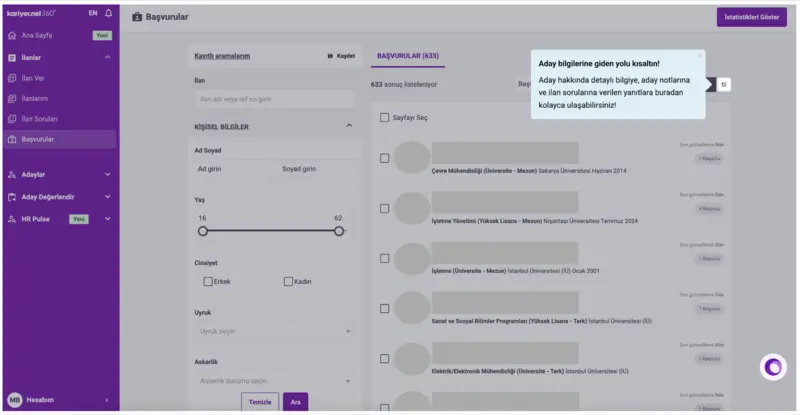
For instance, the tooltip below highlights how to access the Candidate Information section, where employers can view detailed candidate profiles, review submitted answers to job-specific questions, and view internal notes.
This tooltip example, on the other hand, focuses on a key navigation item in the left sidebar: Research Reports.
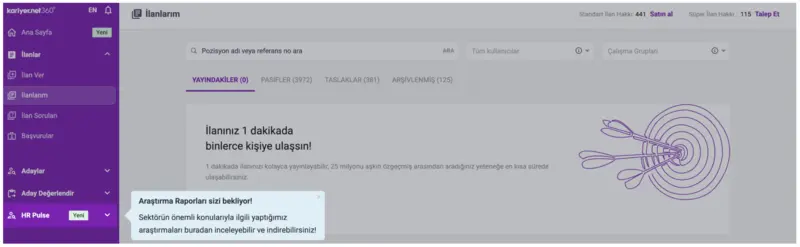
The tooltip conveys that employers can explore and download in-depth industry reports covering the most critical and current topics in their sector within this valuable resource hub.

With UserGuiding’s segmentation and tooltips, we turned confusion into clarity. Each user now sees actions tailored to their intent and behavior."

Merve Bakar
UX Researcher
With these tooltips, Kariyer.net led employers into relevant sections for them to quickly reach their goals.
Thanks to UserGuiding’s segmentation, checklists, and tooltips, Kariyer.net is able to:
- segment users into user roles to offer a targeted approach to onboarding,
- guide these users into important actionables through checklists,
- and provide them with personalized onboarding sequences.

Users feel more ‘guided,’ less overwhelmed. And our behavioral metrics—engagement and time-to-first-key-action—back that up."

Merve Bakar
UX Researcher
In short…
Kariyer.net was to go in-house for creating targeted onboarding elements, but noticed that it would take a lot of time and effort for both product team and developers—even finding a vacant spot in developers’ workflow for the next two months was next to impossible.
UserGuiding helped Kariyer.net accelerate this process significantly through segmenting their user base in seconds, offering tons of onboarding elements for a diverse onboarding experience, and allowing their product team to build in-app experiences for specific user roles.
Now, Kariyer.net offers custom journeys for different user roles based on varying user needs using UserGuiding.
As a result of segment-driven onboarding, Kariyer.net was able to earn two quick wins: increasing the productivity and momentum of teams and improving the activation and engagement of users.
If you wish to experience the same outcomes as Kariyer.net, give UserGuiding a try 👈


Our biggest obstacle was scalability. We couldn’t keep involving developers every time we wanted to tweak the onboarding experience for different user roles."