


.svg)
.svg)
.svg)
.svg)



.svg)




.svg)
.svg)


The healthcare industry is undergoing rapid digital transformation, driven by rising patient expectations, workforce shortages, and the need for more efficient care delivery.
According to Deloitte’s report on digital health trends, healthcare leaders are prioritizing automation and integrated technology across the entire patient journey.
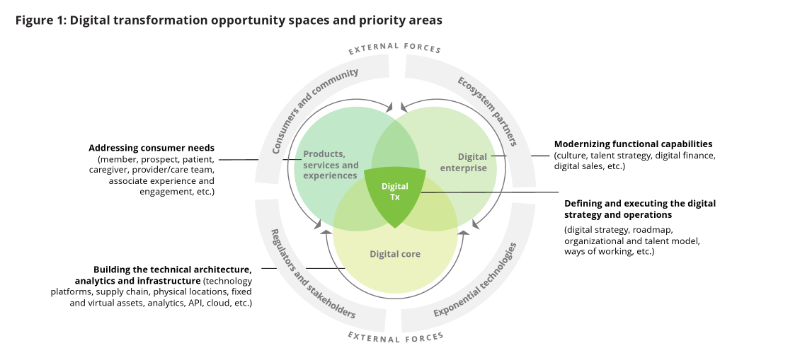
And it’s paying off.
Another research shows that organizations that embrace patient journey automation see up to 4.2x higher ROI.
One area where this shift is especially impactful is onboarding.
Whether it's a new patient navigating pre-op instructions or a clinician stepping into a complex hospital system, digitized onboarding is becoming essential for improving both experience and efficiency.
And in this article, we cover:
- The biggest challenges in healthcare onboarding
- Proven best practices and real-world examples
- Tools and platforms used by leading healthcare organizations
- How to personalize, automate, and improve onboarding for both patients and employees
¡Vamos!
TL;DR
- Healthcare onboarding is the process of guiding both patients and employees through the necessary steps to become active, informed participants in a healthcare organization or service.
- Patient onboarding includes medical history intake, consent forms, digital access setup, and care navigation tailored to their health needs.
- Employee onboarding includes credential verification, role-based training, compliance tasks, EHR access, and check-ins over the first 30/60/90 days.
- Best practices of healthcare onboarding include…
- personalized onboarding paths,
- automated admin workflows,
- dynamic checklists,
- embedded feedback loops, and
- AI-powered support.
- But because the healthcare industry is a very complex one, coming with a lot of regulations, high-stakes actions, and people interactions from different backgrounds, it brings several challenges.
- The most faced challenges include high turnover, legacy tech stacks, administrative burden, low patient digital literacy, compliance demands, and lack of personalization.
- In order to simplify and digitize your onboarding, you can utilize HR and onboarding tools like UserGuiding, Workday, or BambooHR, and LMSs like Relias or MedTrainer.
- Check out the article to see best practices in action with real-life examples!
What is healthcare onboarding?
Healthcare onboarding is the structured process of welcoming and preparing individuals (whether they are patients or employees) for their role in a care environment.
It sets the tone for their experience, builds trust, and ensures that everyone understands expectations, responsibilities, and safety protocols from the start.
There are two primary sides to healthcare onboarding:
- Patient onboarding involves guiding a new patient into the care experience. It includes collecting medical history, obtaining consent, verifying insurance, and preparing them for their first appointment.
More than forms and check-ins, this process shapes how a patient feels about your care from the very beginning.
- Employee onboarding introduces new clinical and non-clinical staff to your systems, workflows, policies, and culture. This includes everything from HIPAA training and EMR access to meeting their team and understanding safety procedures.
In a healthcare setting, many people contribute to the overall care experience.
So, in the traditional sense, healthcare employee onboarding doesn’t just apply to doctors and nurses; it also includes receptionists, security personnel, cleaning staff, and anyone else working within the organization.
Besides the distinction between patient and employee onboarding, there’s also a difference based on the healthcare setting and how onboarding is delivered.
The strategies used in traditional environments like hospitals and clinics differ significantly from those used in digital settings, such as mobile health apps (mHealth), practice management platforms, EHR systems, or telehealth software.
To make things easier to follow, let’s break things down.
Here’s a comparison chart:

So, as you can see from the chart, too, healthcare onboarding is more than patient registration paperwork or new hire IT setup.
With a decent and well-structured onboarding flow, you can…
- ✅ Build trust and ease patient anxiety from the start
- ✅ Boost patient engagement and follow-up with automated digital support
- ✅ Help employees clearly understand safety and compliance procedures
- ✅ Speed up new staff productivity with guided onboarding
- ✅ Save time through automation, letting staff focus on patient care
- ✅ Reduce employee burnout by setting clear expectations and providing support
- ✅ Create a smoother, connected experience for patients and staff
The patient onboarding process (steps & examples)
Patient Onboarding in Traditional Healthcare Settings (Hospitals & Clinics)
As we mentioned earlier, patient onboarding is more than just registration, though registration is often part of the process.
Registration typically refers to the collection of basic information like demographics, insurance details, and consent forms. It’s mostly administrative and often happens just before a visit.
On the other hand, onboarding covers the entire experience of preparing a patient to engage with your healthcare services.
This includes educating them about what to expect, gathering medical history, addressing privacy concerns, etc.
An example of patient onboarding in a traditional healthcare setting might look like this:
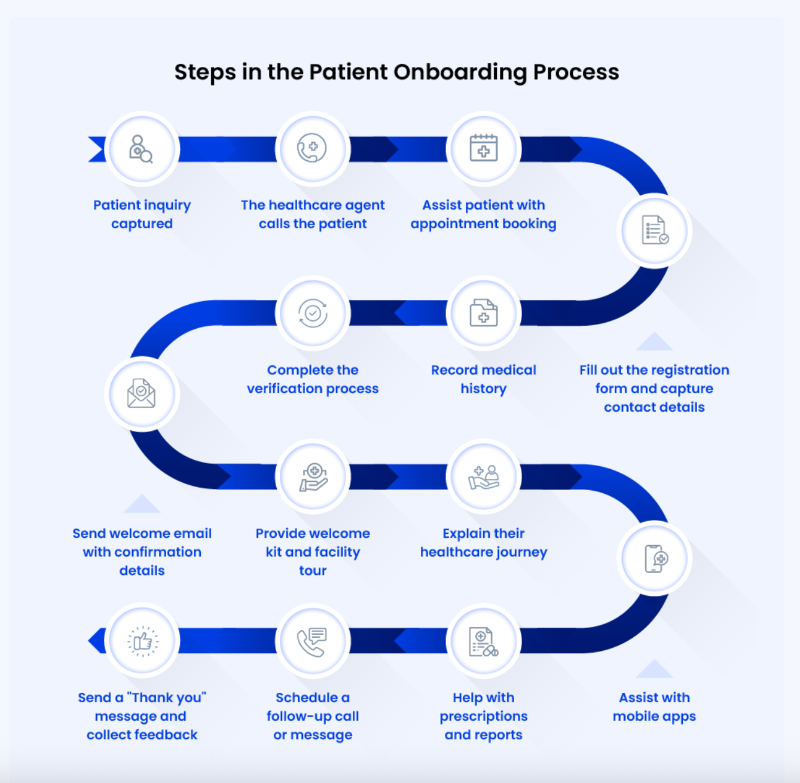
Here’s an overview of the main steps involved in patient onboarding 👇🏻
Step 1: Registration & Verification
This step involves collecting patient information like demographics, insurance details, and medical history. Coverage and identity are verified either at the front desk or through a patient portal.
💡 Interestingly, recent surveys show that 70% of patients prefer to book appointments online, and healthcare providers offering online scheduling tend to attract 76% more millennials.
However, many healthcare organizations still don’t provide easy digital options.
Step 2: Consent & Compliance
At this step, patients receive HIPAA and consent forms, which may be paper-based or digital. It’s important that these documents use clear, plain language to help all patients, including elderly or ESL individuals, understand what they’re consenting to.
Since the forms themselves can be complex, extra support often comes from brochures, pamphlets, or guidance from medical staff to help clarify any questions.
Providing multi-lingual support through translated documents or access to interpreters at this step is also essential to ensure all patients fully understand the information and feel comfortable during the consent process.
💡 A U.S. study found that only 42% of physicians speak a language other than English fluently, which can lead to communication challenges and issues during the consent and compliance process.
This isn’t unique to the U.S., though.
In some other countries, up to 40% of patients also depend on interpreters during healthcare visits.
Step 3: Orientation & First Visit
Brochures and pamphlets are helpful for explaining procedures, such as the check-in process. When check-in is virtual, providing additional information about how it works becomes especially important.
Emails also play a key role, often used to share orientation details, check-in instructions, and confirmation messages.
Here’s an example pamphlet to assist informed consent for wisdom teeth operations:

Step 4: Post-Visit Follow-Up
After the visit, patients typically receive test results, prescriptions, and satisfaction surveys via secure portals or email. This follow-up helps maintain communication and engagement beyond the appointment.
Post-visit follow-up can also involve sending information kits, such as pamphlets, leaflets, or email sequences, that provide guidance on aftercare, lifestyle changes, or managing new treatments. These resources keep patients supported and informed after their appointment.
Patient Onboarding in Mobile Health Apps (mHealth)
💡 According to Accenture’s Healthcare Consumer Survey in KSA, 84% of patients find technology important in managing their health. In the same survey, it was found that diet/nutrition apps are the most common apps among the health apps, followed by fitness apps, and health/condition trackers.
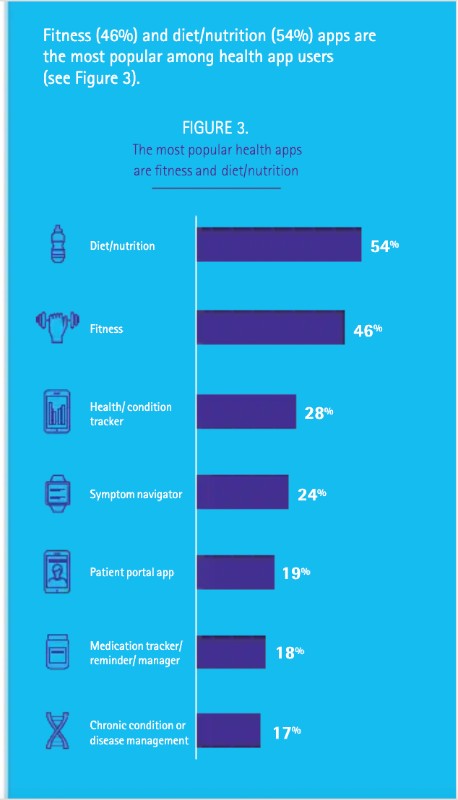
And onboarding looks a little different in these apps, compared to in-person onboarding offered in clinics and hospitals, as you can imagine.
Here are the key steps of mobile health app onboarding 👇🏻
Step 1: Account Creation & User Identity
The onboarding journey starts with creating an account, which is the user's first real interaction with the app. This step usually includes logging in via email, phone number, or third-party platforms like Google or Apple ID.
Some apps also offer biometric login options, such as Face ID or Touch ID, for added convenience during future sessions.
Step 2: Permissions & Privacy Consent
Since most mobile health apps handle sensitive data, this step focuses on getting the proper permissions and legal consents in a user-friendly way. Users may be asked to allow access to health data, notifications, device sensors (like motion or location), or integrations with tools like Apple Health.
Privacy policies and consent forms must follow standards like HIPAA or GDPR.
But legal compliance alone isn’t enough.
Many users abandon apps when presented with dense, technical language, so it’s important to use digestible summaries and visual toggles to help users understand what they’re agreeing to.
You can also explain why you’re collecting this data and how it’ll improve the experience of the user/ the quality of the service the patient will get.
Here’s how BetterHelp emphasizes the importance of a patient’s previous healthcare records, placing it right beneath the question, “Have you ever been in therapy before?”
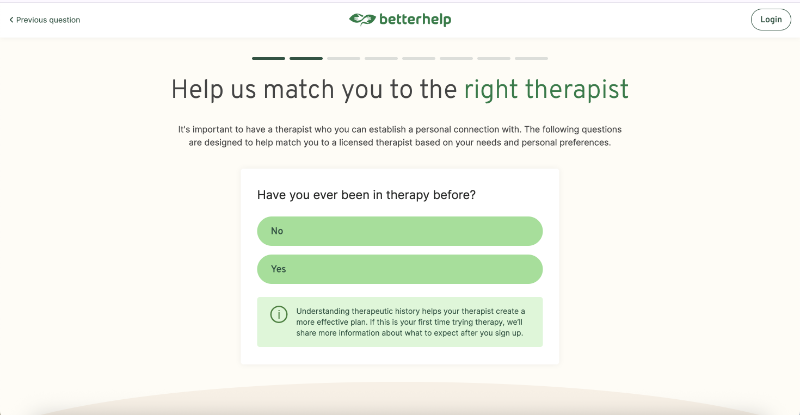
You can also create easily accessible data security hubs where users can review and manage their app data and permissions.
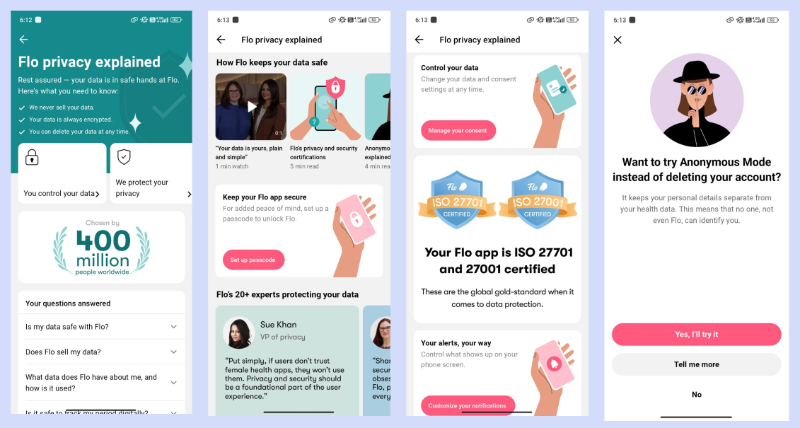
Flo, for example, informs users about what data is collected, how and where it’s stored, and who has access to it directly within the app. Users can take actions like adjusting permissions, deleting their data at any time, or going into anonymous mode.
To build trust and transparency, Flo also includes videos and quotes from their data security and compliance team.
Step 3: User Goal Setting & Personalization
After setting up the basics, users are often asked to share their primary health goals.
This could include managing stress, improving sleep, tracking medications, monitoring weight, or consulting with a therapist. Based on this input, the app can shape a dynamic onboarding path that highlights the most relevant tools and content.
For platforms like Betterhelp and Talkspace, where patients are matched with doctors or licensed practitioners, this step often serves as a preliminary survey. The information gathered helps professionals tailor a care plan that fits the patient’s specific needs.
In some cases, it’s also used to match patients with providers who specialize in the most relevant areas.
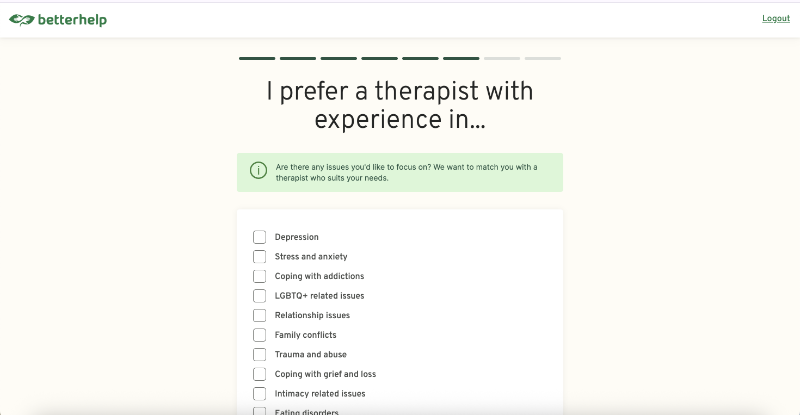
BetterHelp asks patients if they have a preference for a therapist with expertise in specific areas, for example:
For mHealth apps like Calm, Headspace, and Flo, where users track goals related to sleep, mental health, pregnancy, or weight, you can personalize recommendations, content, and even elements of the user interface based on individual needs.
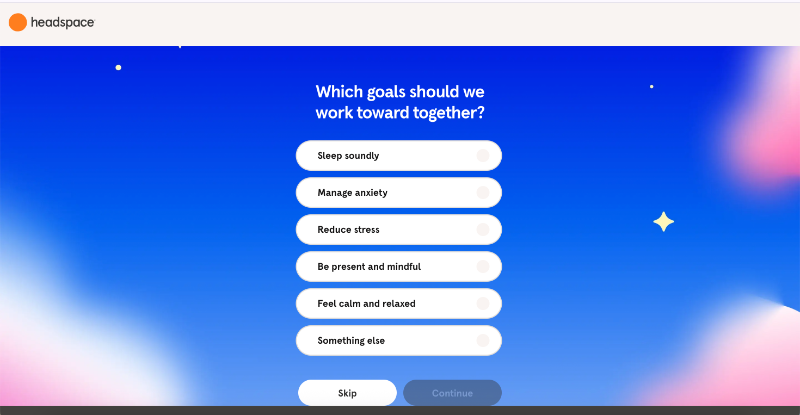
Here’s how Headspace asks new users about their goals to personalize both the onboarding experience and the in-app recommendations:
⚠️ Onboarding surveys in health platforms and apps tend to be significantly longer than those in industries like e-commerce or task management SaaS.
While the average onboarding survey across all industries includes 4–5 questions (with 73% of SaaS companies using short surveys of 1–5 questions and 27% using 6 or more), the healthcare industry often exceeds this.
Surveys can contain as many as 40–50 questions and take over 15 minutes to complete, especially in mental health apps.
Step 4: Feature Walkthrough & Tutorials
Once goals are set, users are introduced to the app’s core features.
These walkthroughs are often short, visual, and interactive. Swipe-through slides, tooltips that pop up over buttons, or short animations that show how to use a feature are among popular choices. Some apps also guide users by adding helpful text or tips to empty sections of the interface.
The purpose of this step is to eliminate confusion and help users feel confident about navigating the app.
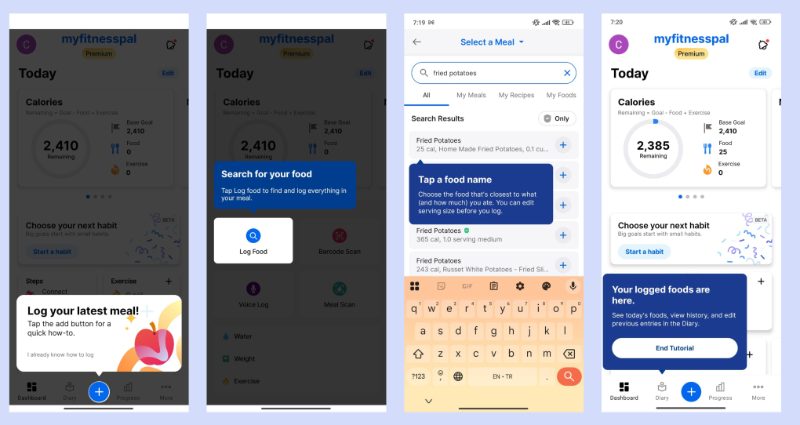
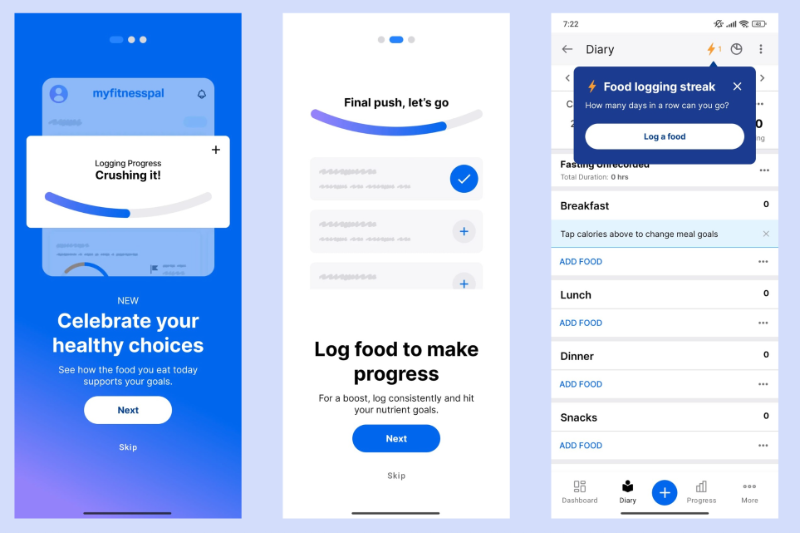
MyFitnessPal, for example, guides new users through an interactive walkthrough that demonstrates how to log meals. The walkthrough pauses until each required action is completed, so by the end, users have already logged their first meal.
You can also make use of progress indicators like progress bars, walkthrough step numbers, onboarding checklists, or task completion badges to gamify the experience and make it a little bit more interesting for the user.
Myfitnesspal also congratulates users when they set a new goal (like drinking more water), meet their goals, or log meals consistently. This way, they keep both user motivation and engagement high until the app becomes a part of the user’s routine.
Step 5: Data Input & Syncing
This is the point where the app begins to collect actual health-related data from the user. It might involve syncing with wearable devices like Fitbits or Apple Watches, or it might require the user to input their health history manually, such as medications, allergies, or past diagnoses.
Some apps include this step within the onboarding survey if the information is essential for the user experience and can’t be postponed. If it’s important but not critical, you can add it as a task in the onboarding checklist.
This way, users aren’t forced to sync devices or provide health data before they even start using the app, but they still receive gentle reminders to complete the task.
Plus, the more seamlessly this step is handled, the better.
Offering auto-fill options or pulling from connected accounts can significantly reduce user effort.
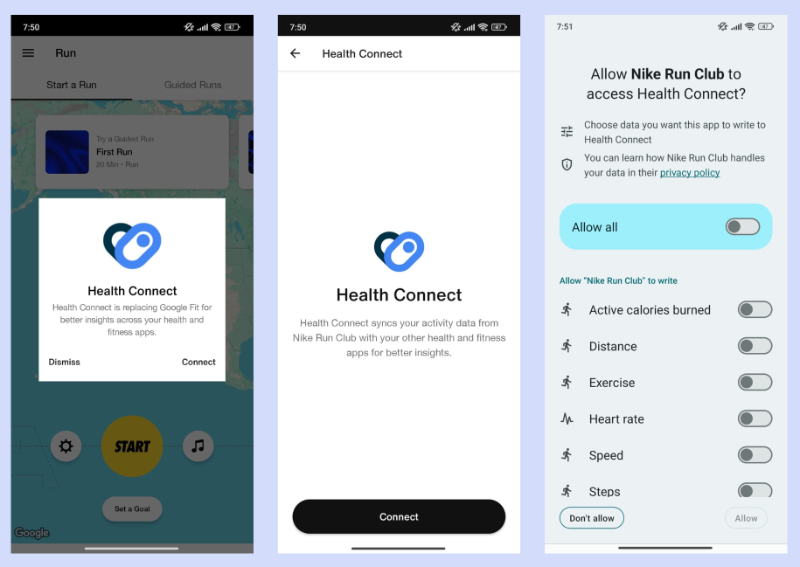
Nike Run Club prompts Android users to link their Health Connect (Google’s replacement for Google Fit) and Apple users to connect with Apple Health as soon as they land on the home screen for the first time.
Step 6: First Engagement/Session
Now that setup is complete, the goal is to help the user take their first meaningful action. That could be logging a mood entry, joining a video therapy session, or tracking their water intake for the day.
The key here is immediacy and encouragement.
To support users during their first session, AI chatbots can be a valuable addition, especially in more complex health apps with layered features or algorithms. Chatbots allow users to ask questions and get real-time guidance tailored to their needs.
While walkthroughs are helpful, they can sometimes feel rigid or limited.
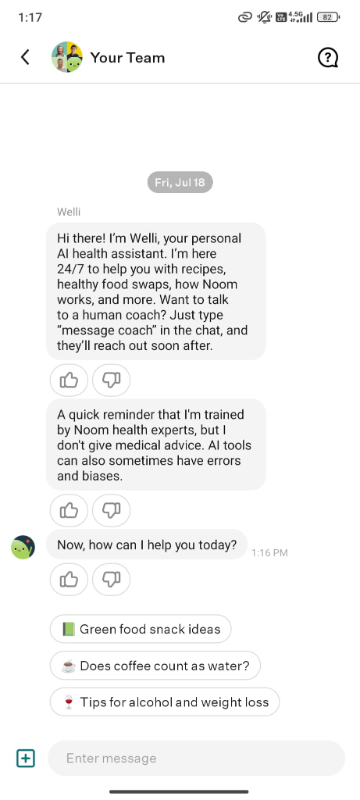
Noom, for example, sends an automated welcome message from its AI chatbot to encourage new users to engage right away. The message also explains that the chatbot is guided and trained by healthcare professionals, and highlights how it can help users get the most value from the app.
Step 7: Follow-Up Nudges & Habit Formation
Once the user has begun engaging with the app, it’s important to keep the momentum going. Apps use push notifications, emails, or SMS reminders to encourage ongoing behavior like completing a check-in, drinking water, or scheduling a follow-up session.
These nudges are more effective when they’re personalized based on the user’s behavior and goals.
Many successful health apps also use habit-forming strategies like achievement badges, streak tracking, and personalized tips.
Here’s how Lifesum turns dietary and exercise logs into a weekly life score and gamifies the meal, water, and exercise logging experience into a personal challenge:

The app also tracks daily logs and displays a separate dashboard for streaks.
Step 8: Feedback & Iteration
After a few sessions, the onboarding process closes with feedback collection. This helps you understand what worked, what didn’t, and where users may have dropped off.
Apps often collect this through NPS surveys, short in-app questions, or open-text forms. Triggering these prompts at the right time, such as after completing a week of use or reaching a milestone, improves the quality of feedback.
You can also use this input to refine the onboarding process continuously.
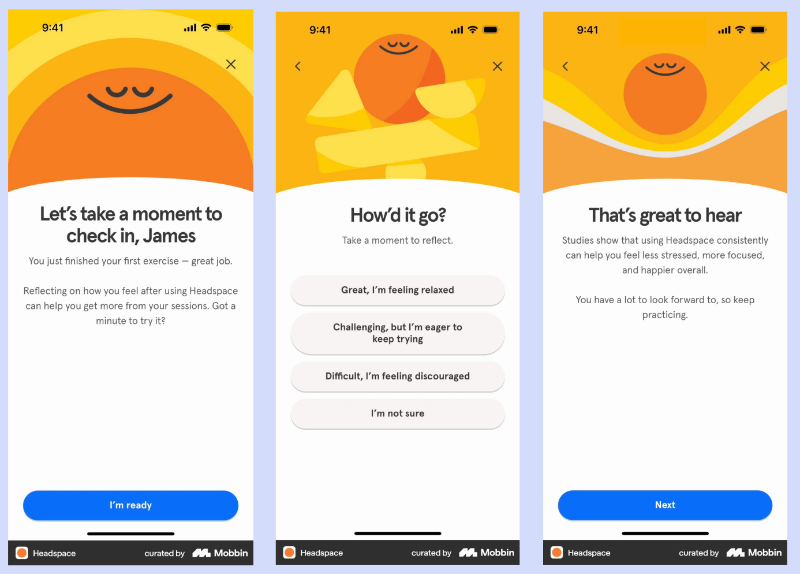
Headspace asks users about their experience after completing a session for the first time. This not only encourages engagement and gathers feedback, but also creates a moment for users to reflect on their feelings and experience.
Examples of good patient onboarding
Talkspace’s Patient Onboarding with Great Use of Empty State
Talkspace utilizes the empty space on the UI to guide the patient and explain what awaits them. They also use this space to remind users of the platform’s capabilities.
For example, on the home page, under each section, there are prompts that either inform the patient about the process or gently nudge them to use the app’s features, like answering pre-session questions to prepare for a session.
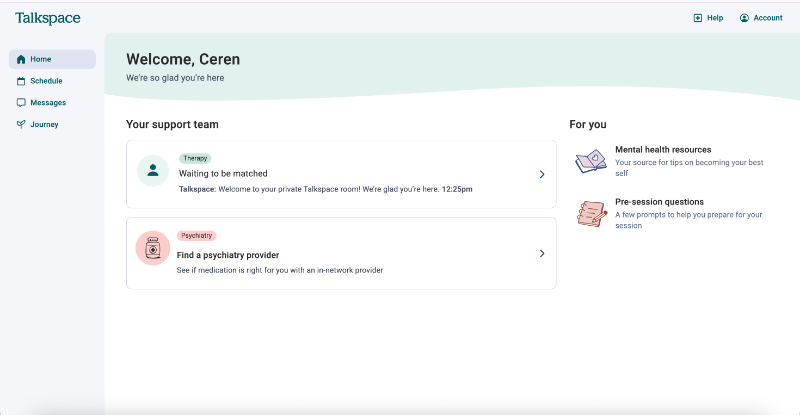
Same goes for every page on the platform.
For example, on the Journey page, you normally see your symptoms, and set and track your short-term/long-term goals. This page is organized after your session and in collaboration with your therapist, though.
So for a new patient, there’s not much to see or do here yet.
However, to prepare the patient for what’s ahead, Talkspace uses the empty space here to provide helpful information as well.

Another good onboarding practice Talkspace adopts is dividing the patient survey into two separate parts, one for setting up the account and collecting general information, and another for more specific, in-depth health and medical history.
They also keep the surveys as flexible as possible by making questions about medical history and prescriptions optional and skippable.
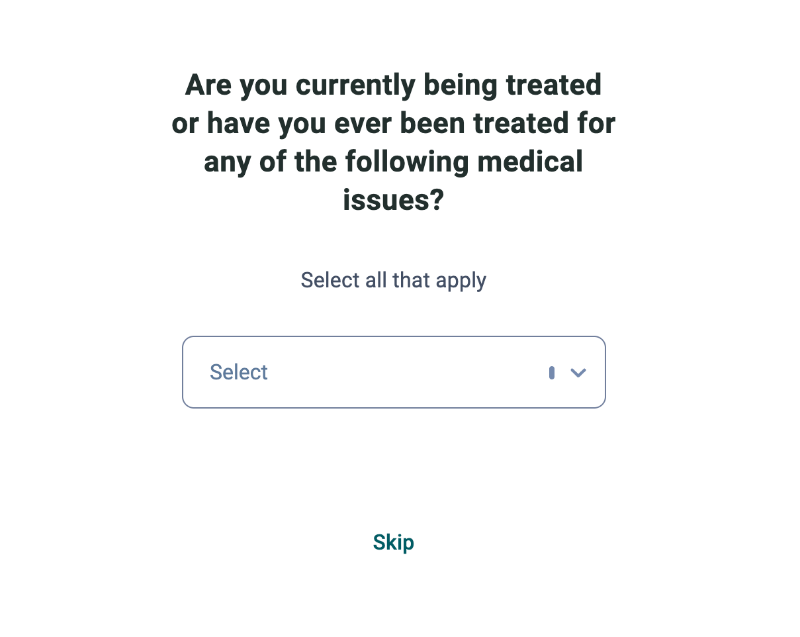
What’s good about this patient onboarding?
✅ Flexible patient surveys eliminate the delayed value realization and allow the patient to check out the app before committing to it with full patient history
✅ Great use of empty space for onboarding and guiding the patient
✅ Explaning the processes beforehand on the UI to prepare the patient (taking an assessment survey every 3 weeks to track symptoms, for example)
Betterhelp’s Patient Onboarding with Contextual Tooltips and Modals
We’ve already shown a few screenshots from Betterhelp’s onboarding survey; however, there’s more to their patient onboarding than their very detailed survey.
When you complete the survey, you’re directed to choose a subscription plan. However, there’s no free trial at this point. So, if you change your mind and do not want to commit to a paid subscription, BetterHelp triggers a modal asking you your reason to leave:
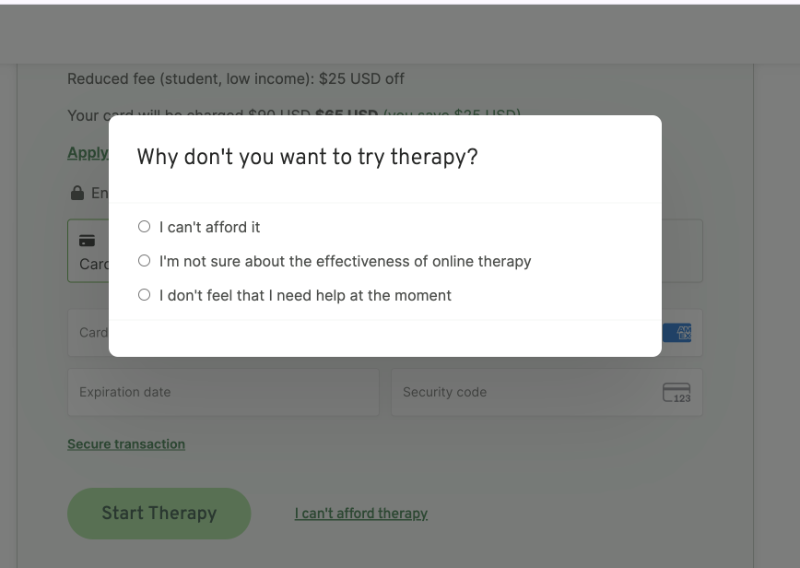
At this point, depending on your answer(s), the next modal changes.
So, if you choose I’m not sure about the effectiveness of online therapy, the next modal provides you with studies done about the topic and social proof from BetterHelp’s existing patients.
If you choose I can't afford it, then BetterHelp encourages you to check your eligibility for financial aid, for example, for students.
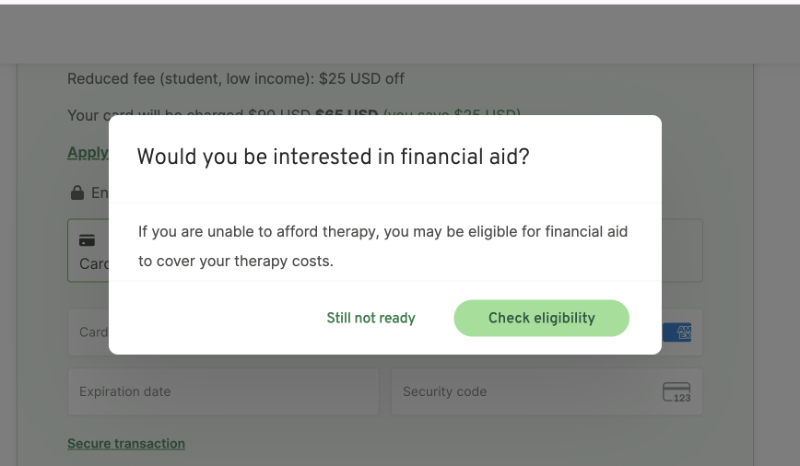
At this point, even if you want to sign up to the platform but cannot because of financial restrictions, you’re not offered a free trial; only financial aid.
However, if you choose I don’t feel that I need help right now in the first modal, then you’re offered a 7-day free trial of the platform.
So, as you can see, BetterHelp offers different encouragements and motivations to different patients at different stages of their journey or with different needs.
- Financial concerns? → Here’s a discount.
- Not sure about the value of the service? → Here’s an academic study.
- Don’t believe you’re the intended audience? → Try the service out for free.
Besides these sign-up modals, BetterHelp also utilizes welcome modals and tooltips around the UI to welcome the new patient, explain how the process works, and offer guidance to utilize the service and platform’s offerings to the fullest.
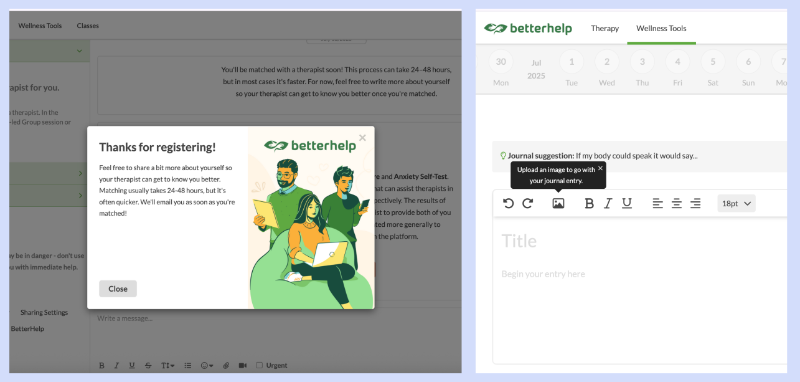
What’s good about this patient onboarding?
✅ Detailed onboarding survey to match the patient with the most suitable practitioner
✅ Segmented and personalized re-motivation modals and offerings
✅ Following process and procedure is explained right away with a welcome modal
✅ Contextual tooltips around the UI to guide patients who might be unfamiliar with similar platforms and services
Noom’s Patient Onboarding across Web and Mobile
Noom splits the onboarding process between its website and mobile app to ensure users don’t feel lost in the world of diet and exercise tracking without guidance...
On the website, users complete a detailed onboarding survey designed to learn about their habits, behavioral patterns, goals, and expectations.
Since the survey takes around 15–20 minutes to complete, Noom breaks it up with motivational quotes, scientific insights, and success statistics to keep users engaged and motivated.
Here’s an example:
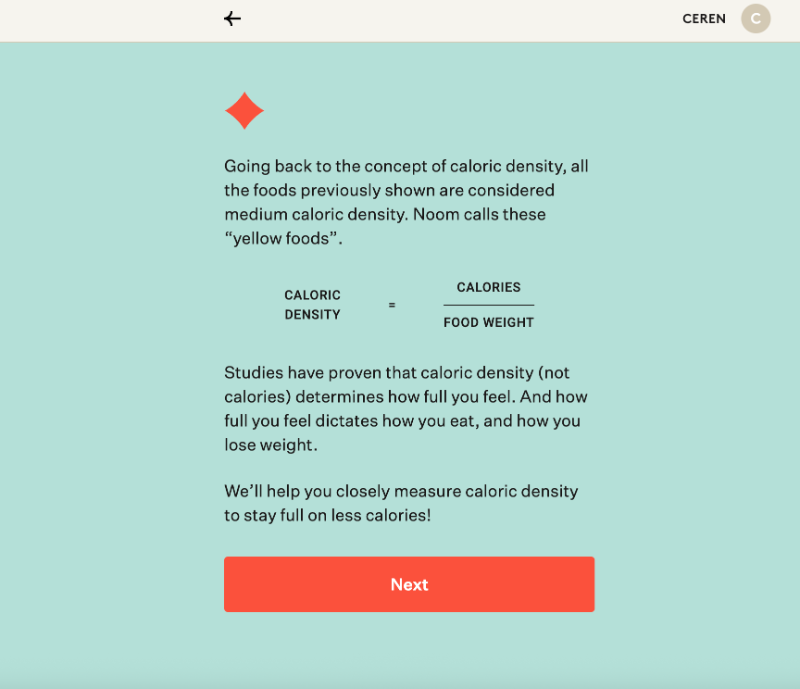
If you complete the survey and create your account, you're then directed to install the app and continue the onboarding process there.
The in-app onboarding uses gamification to keep users engaged. A set of carousel screens welcomes you to the app, walks you through its value proposition and explains what the app can do for you.

Then, within the app, the gamification continues with a daily checklist of recommended actions. On the first day, it focuses on learning the app and its interface; on the following days, the checklist tracks lesson progress based on the user's learning goals.
The lesson plans are also visualized through a journey map, making them easier (and more fun) to follow.
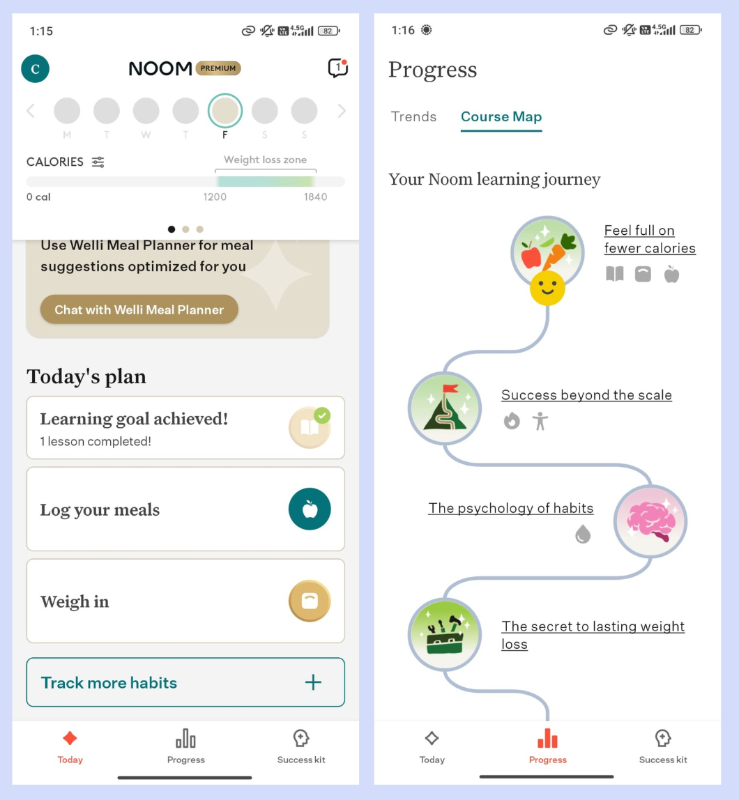
What’s good about this patient onboarding?
✅ Onboarding survey has breaks that allow the patient to breathe and also boost their motivation to continue answering questions
✅ Onboarding doesn’t end with the patient survey but continues with in-app guidance, too
✅ Value proposition is highlighted through the mobile onboarding carousels
✅ In-app experience is gamified for higher engagement
Employee onboarding in healthcare (steps & examples)
Just like how patient onboarding doesn’t end with patient surveys and registration, employee onboarding doesn’t end with setting up an email address or handing over an ID badge.
Whether clinical or non-clinical, a structured onboarding process plays a critical role in ensuring compliance, patient safety, and staff retention.
As Jarvis T. Gray explains in his Excellence in Healthcare podcast, onboarding is the foundation of any strong compliance program, regardless of your organization's mission or specific focus. From seamless data sharing to clear role expectations, good onboarding helps align new hires with both regulatory standards and your broader culture of care.
Here are the key steps of employee onboarding in healthcare settings 👇🏻
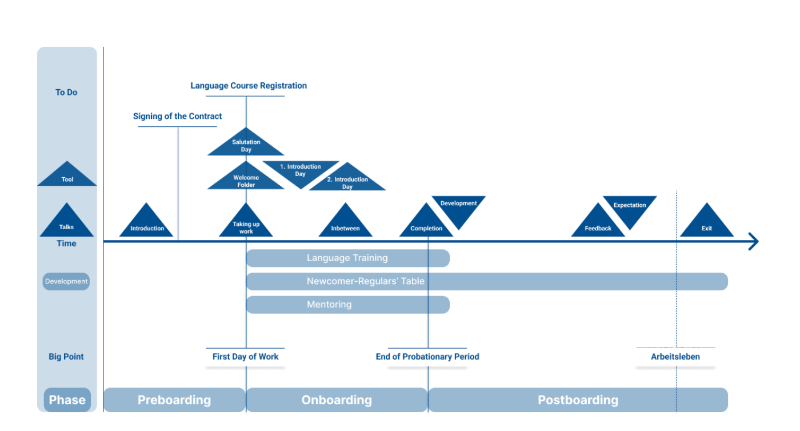
Step #1: Preboarding
Before a new hire even walks through the door, the onboarding process should already be in motion. Preboarding focuses on administrative preparation and early engagement. This includes collecting essential credentials such as medical licenses, background checks, and required certifications to ensure compliance from day one.
It's also a chance to welcome the new hire with key logistical information, like parking instructions, dress code, and organizational hierarchy, to reduce first-day confusion.
You can also use this time to introduce the organization's mission, values, and culture.
Here’s an example preboarding email template:
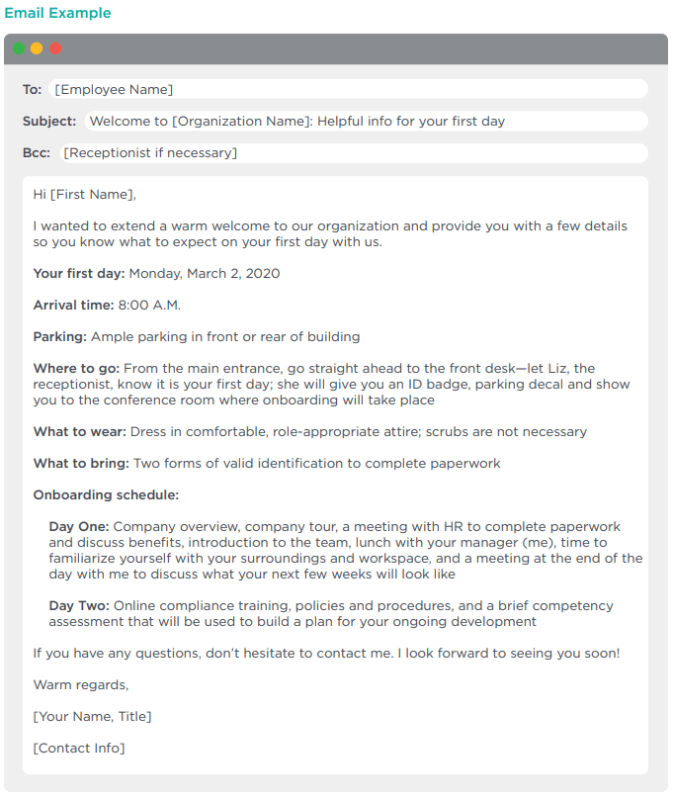
Step #2: Employee orientation and compliance training
Once onboard, employees must complete mandatory orientation and compliance training covering HIPAA regulations, infection control protocols, workplace safety, and diversity, equity, and inclusion (DEI) policies.
These sessions typically combine digital eLearning modules with in-person instruction, and they require documentation and e-signatures to fulfill legal requirements.
At this step, you can also introduce your continuous learning resources, if you have any.
Here’s an example orientation schedule:

Step #3: Role-specific onboarding
As we’ve said before, employee onboarding in healthcare covers all employees, ranging from medical to non-medical staff. So, you need different onboarding plans and procedures for different teams, departments, and roles.
✔️ Role-specific onboarding ensures…
- Clinical staff receive hands-on training with medical equipment,
- Observe experienced peers through shadowing, and
- Learn patient communication best practices.
For non-clinical employees like front desk personnel, schedulers, or billing coordinators, this step includes system training (e.g., EHR, scheduling tools) and customer service protocols.
Here’s a Reddit post from a medical assistant (MA) detailing their role-specific onboarding experience:
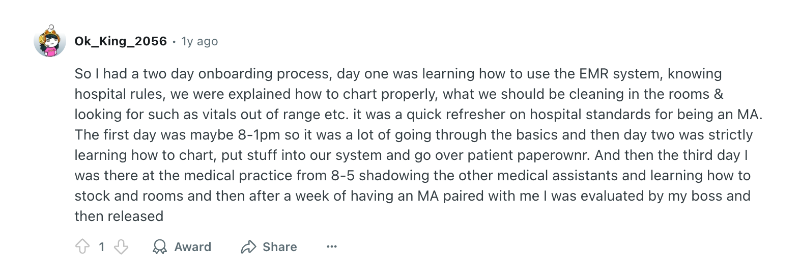
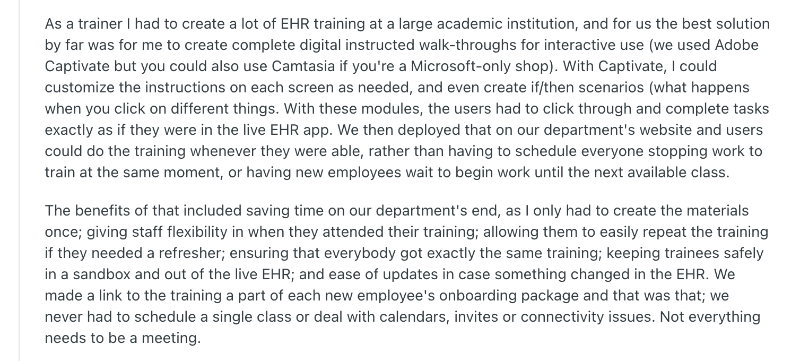
Step #4: Tech & system access setup
In healthcare, having the right tools and timely access to them is crucial.
From day one, staff need to interact with complex systems like electronic health records (EHRs), internal/external communication platforms, and scheduling tools to perform even the most basic tasks efficiently.
💡 According to Accenture’s Healthcare Industry Report, 70% of healthcare workers’ tasks in the U.S. could be redesigned by technology augmentation or automation. This makes it even more critical to ensure that new hires are equipped with the right tech setup from the start.
You can also automate tech onboarding with interactive guides and in-app tutorials. Here’s a Reddit user explaining how they use walkthroughs to onboard new employees in EHRs:
Step #5: Culture and connection
In traditional healthcare settings, onboarding also includes team connections. Introducing new hires to their team, giving them a tour of the facility, and pointing them to wellness resources can help them feel grounded.
You can also create a support system by assigning mentors during the first 30-60 days.
💡 32% of new hires who leave within the first three months cite cultural misalignment. To avoid this, healthcare organizations should add more human touch to their onboarding plans and encourage connections through buddy systems.
Step #6: First 30/60/90 day check-ins
Many healthcare organizations structure their onboarding checklists across the first 30, 60, and 90 days, and outline key components and required actions, including feedback sessions.
This approach helps standardize the process and ensures that every employee completes the necessary onboarding milestones.
Here’s what you should focus on in the first 30/60/90 days of employee onboarding:
- First 30 Days – Orientation & Adaptation: Focus on introductions, training, compliance, and clarifying role expectations. Frequent check-ins help address early questions or concerns.
- Days 31–60 – Integration & Contribution: The employee starts applying their training and taking on tasks independently. Midway reviews help identify gaps and reinforce team connection.
- Days 61–90 – Performance & Development: Review performance, give feedback, and align on long-term goals. Tools like onboarding surveys or self-assessments support ongoing improvement.
Here’s an example healthcare employee onboarding checklist from University of Kentucky:

While the 30/60/90-day framework is widely used, it’s just a guideline, not a rule.
You can opt for more detailed time frames, like the University of Kentucky does, or use the 30/60/90 structure as a high-level outline and build separate sub-checklists for the first day and week to ensure a smoother start.
Examples of good employee onboarding in healthcare software
💡 Studies show that 80% of under-trained new hires plan to quit, while 70% of well-trained employees plan to stay. In fact, one case study reported a 91% first-year retention rate thanks to structured onboarding.
Here are real-world examples that show what good software onboarding for medical employees looks like in action:
Healthie’s Practitioner Onboarding with Interactive Walkthroughs
Healthie is a practice management and telehealth platform designed for wellness and healthcare providers. It offers scheduling, EHR, billing, and client engagement tools.
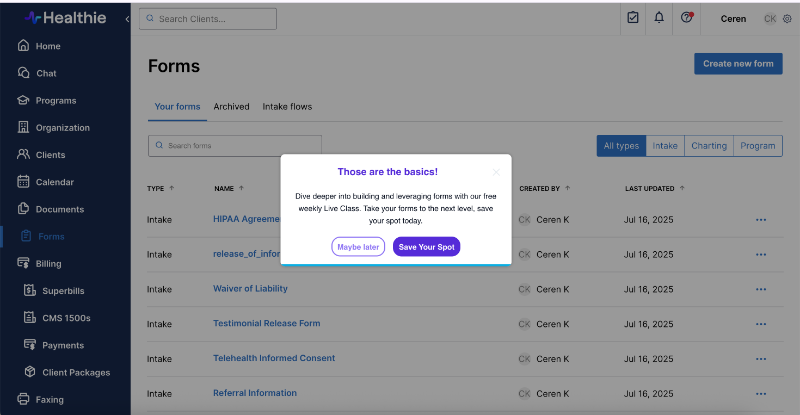
When a practitioner/new employee enrolls in the platform, Healthie encourages them to take an interactive walkthrough that introduces the tool’s features and capabilities, and explains how to use them.

The tour incorporates explanatory videos into steps that require more instructions and explanations. For less complicated steps and features, there are only written instructions.
Here’s an example step:
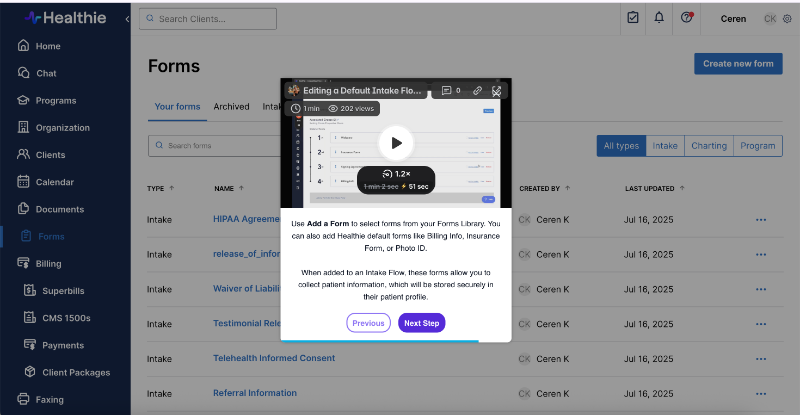
Once the walkthrough is complete, Healthie encourages you with a popup modal to sign up for a live onboarding and product demo.
This approach allows them to automate basic training while reserving in-person sessions for more advanced features and capabilities.
What’s good about this healthcare employee onboarding?
✅ Opt-in in-app training with automated walkthroughs
✅ Incorporates video explanations for more complex tasks
✅ Mixes automated in-app training with live online training
Zanda’s Practitioner Onboarding with a Quick and Flexible Setup Wizard
Zanda is a cloud-based practice management and EHR platform. It offers features such as client records and clinical notes (including intake forms and e-signatures), integrated secure telehealth, appointment scheduling and reminders (via SMS/email), etc.
Zanda welcomes new practitioners or employees with a popup modal that immediately invites them to set up their account by entering key details about their practice, such as business information, services offered, and availability.
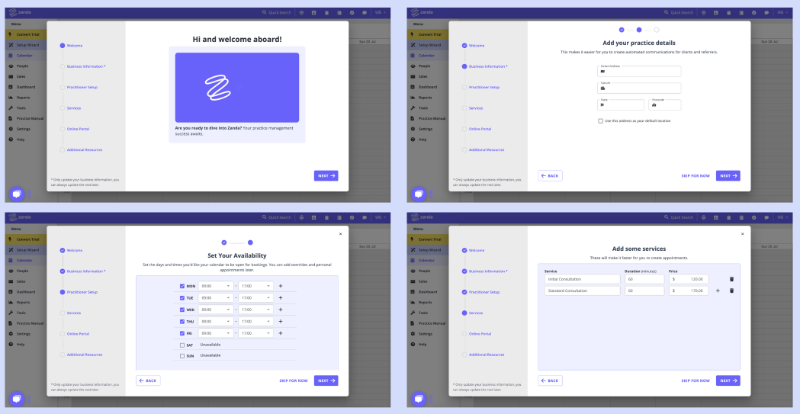
However, most of these steps are still optional, and you can choose to proceed without completing them.
Once you complete the setup (or skip enough steps), the platform introduces you to the resources and training materials you might need during your onboarding.
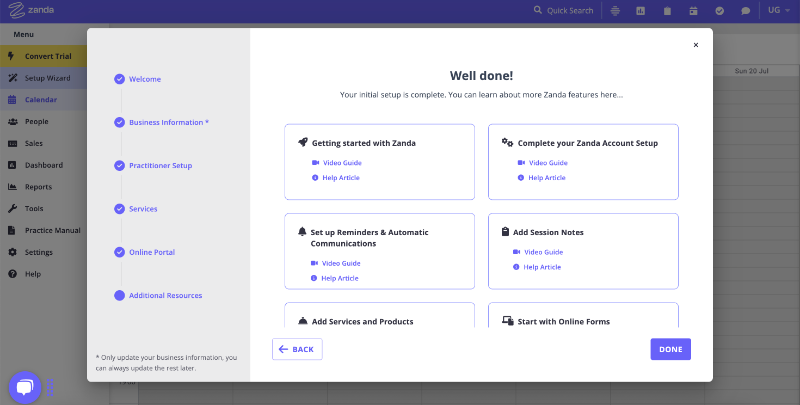
Each feature/capability has video guide as well as a written help article, so, depending on your preference, you can choose either one.
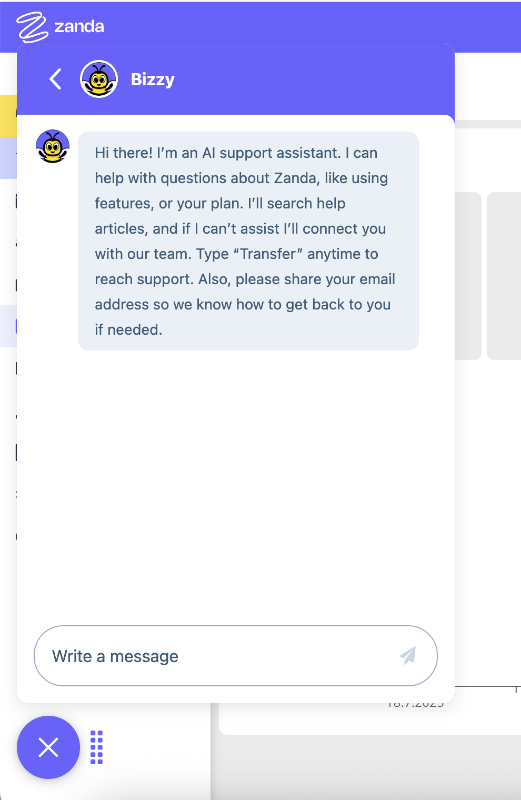
Zanda also offers an AI assistant that helps you troubleshoot issues during onboarding or quickly get tips and answers without having to read lengthy articles or watch videos.
What’s good about this healthcare employee onboarding?
✅ Quick setup with skippable steps
✅ Highligted onboarding materials and resources (both video and articles)
✅ Automated in-app support with an AI assistant
✅ Empty space and templates offer pro tips and guidance
Carepatron’s Practitioner Onboarding with Goal-oriented Checklist
Carepatron is an all-in-one practice management tool for healthcare professionals, offering features like appointment scheduling, note-taking, billing, and telehealth.
Carepatron starts the onboarding process with a quick survey, as well.
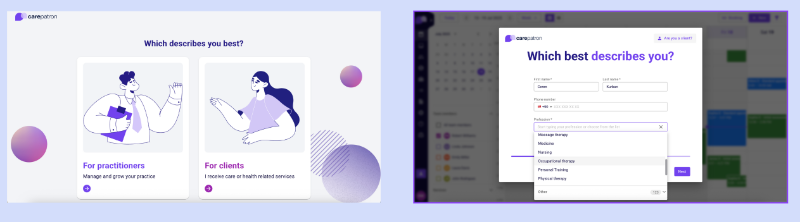
The survey is to set the platform up for you, and includes questions about your practice, only (when you answer the first question as “for practitioners”, of course).
As you might have already noticed, the onboarding surveys for EHRs and telehealth software are much shorter for employees and practitioners compared to those used in mobile health apps and patient onboarding.
Anyway, back to Carepatron.
After the quick setup process, an onboarding checklist welcomes you to the platform.
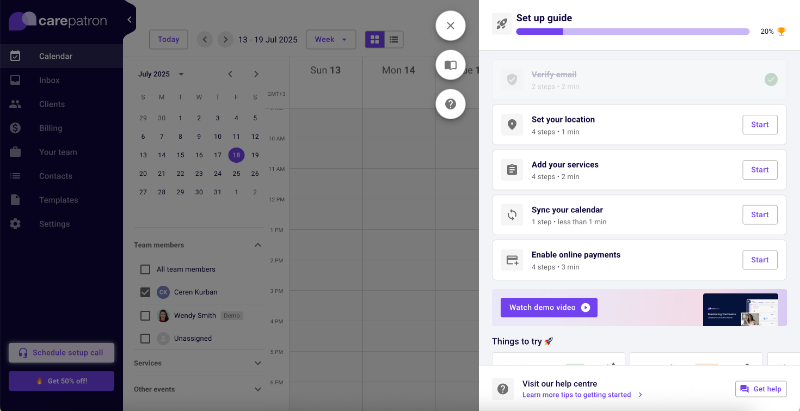
Each task on the checklist is to ensure that the new practitioner/employee knows how to use the platform and set it up correctly to get the best value out of it.
So, in addition to the tasks (which trigger interactive tutorials), there’s a demo video, a list of recommended actions and features to try out, and a link to the help center.
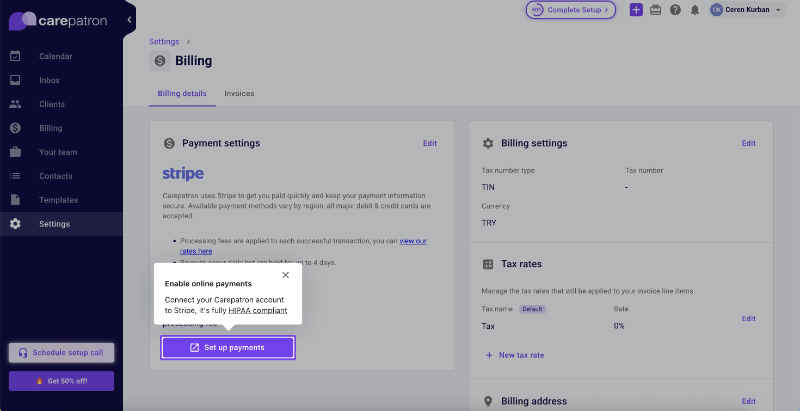
Here’s what the triggered tutorials look like:
What’s good about this healthcare employee onboarding?
✅ Quick setup and immediate access to the app without additional email verification
✅ Value-driven onboarding checklist (+ recommended actions)
✅ Short tutorials/tooltips triggered from the checklist
Onboarding best practices and frameworks that work in the healthcare industry
💡 Healthcare onboarding software empowers HR and compliance teams by saving an average of 4 hours per new hire, adding up to about 21.5 weeks of time saved each year.
Here are some best practices to help you digitize and automate onboarding processes for both your medical staff and patients:
Use of interactive onboarding portals
Interactive onboarding portals are especially valuable in healthcare, where the systems in use like electronic health records (EHRs), telehealth platforms, and compliance tools can be unfamiliar and complex.
A static document or email won’t cut it when you’re onboarding someone into a high-stakes, fast-moving environment.
Instead, onboarding portals should guide users through the platform interface in real time.
For example, when a new nurse joins your system, they could be taken through how to check a patient’s chart in your EHR, enter vitals, and log notes, all within a guided experience layered over the interface.
Similarly, a patient onboarding into your care app can be shown how to navigate lab results, refill prescriptions, or schedule follow-ups.
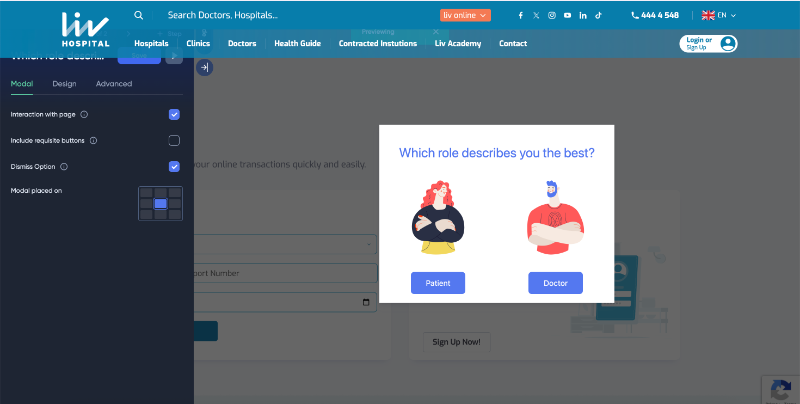
👉🏻 With a no-code tool like UserGuiding, these flows can be built and adapted quickly, based on the user’s role or platform behavior. You could easily design a walkthrough that’s shown only to oncology patients, or a tutorial for medical assistants learning to use the scheduling dashboard.
Here’s an example modal to trigger different onboarding flows:
Personalized onboarding journeys for patients and roles
Talking about designing different walkthroughs… One-size-fits-all onboarding doesn’t work in healthcare. Not for your patients, not for your employees.
A billing specialist, a physical therapist, and a patient managing diabetes all need very different information and guidance to feel confident and supported.
Let’s say a patient has just completed their intake survey and listed their goal as “improving sleep quality.” Based on that, you can trigger a tailored onboarding journey that introduces sleep-tracking features, personalized routines, content around sleep hygiene, and progress monitoring tools.
Another patient, however, lists “daily meditation and stress reduction” as their goal.
For them, you can design a separate onboarding flow that highlights guided meditation sessions, breathing exercises, and habit-building features like streaks or reminders.
This way, each experience is aligned with the patient’s priorities.
Automation of repetitive admin tasks
Healthcare professionals lose valuable time to routine paperwork and onboarding steps that could easily be automated. This includes everything from submitting credentials to answering common questions about scheduling policies or platform usage.
For example, your onboarding process might involve collecting documents like state licensure, NPI numbers, immunization records, or CPR/BLS certifications for clinical staff.
Automating this collection with form-fill prompts, dynamic checklists, and e-signature integrations helps reduce delays and ensures compliance.
On the patient side, you can automate appointment prep, such as sending pre-visit instructions, fasting guidelines, or reminders to upload recent lab results or imaging.
Many organizations also embed AI chat assistants within the onboarding interface, especially for patient portals, to handle common questions like “How do I book an appointment?” or “Where can I find my visit summary?”.
This saves both your clinical team and your support staff hours of manual intervention.
More advanced triage chatbots use natural language processing to assess symptoms and guide patients to the appropriate level of care.
💡 According to research, these systems can reduce non-urgent emergency department visits by up to 30% and significantly improve patient satisfaction with the care navigation process.
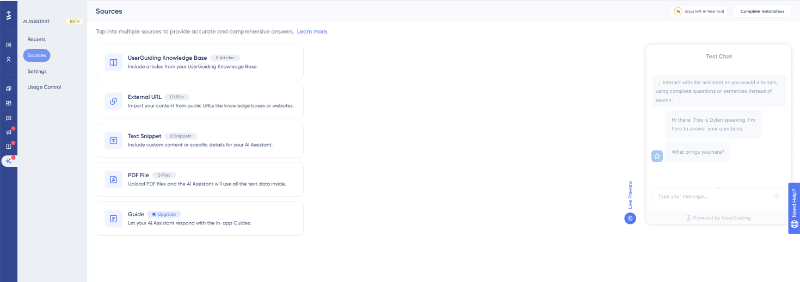
👉🏻 With UserGuiding, you can also create an AI assistant and train it using your own internal materials, like help center articles, onboarding checklists, consent form guides, and FAQs. This ensures the assistant provides accurate, organization-specific answers rather than generic ones.
Checklists, nudges, and reminders for both patients and staff
Onboarding is rarely a one-step event.
It unfolds over time, and your audience (whether employees or patients) need help staying on track.
For instance, when a patient signs up for your platform, they may need to:
- 📌 Complete their health history
- 📌 Sign consent forms
- 📌 Link their insurance or HSA account
- 📌 Schedule a first consultation
For staff, the list might include reading the handbook, completing compliance training, or submitting immunization records.
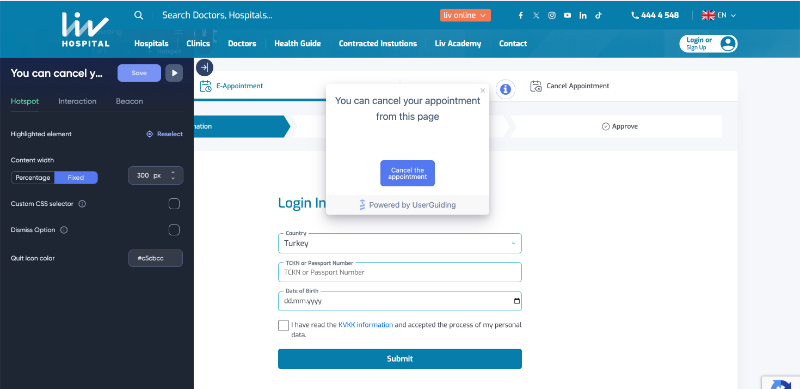
👉🏻 With UserGuiding, you can build custom checklists into the interface that mark each step as completed, while triggering nudges for incomplete items.
Using feedback loops to iterate
Good onboarding evolves with feedback.
Both patients and staff are uniquely positioned to tell you what was confusing, what was missing, and what helped most during their onboarding/ visit.
If a user abandons onboarding in a mobile health app for exercise and diet monitoring, a quick in-app survey can reveal whether the questions were too long, confusing, or if there was a tech issue.
Same goes for hospital and traditional healthcare onboarding settings.
If a patient submits an incomplete or incorrect form, a brief follow-up survey can identify which sections were hard to understand or confusing.
💡 In a case study done by Deloitte, a healthcare organization embedded feedback and journey orchestration tools into the patient experience to uncover root causes of dissatisfaction, such as digital friction points.
This approach allowed them to identify and address up to 75% of dissatisfied patients, compared to less than 30% before, and led to a measurable improvement in their Net Promoter Score (NPS).
👉🏻 You can build these feedback loops directly into the onboarding interface using a tool like UserGuiding.
UserGuiding enables you to create in-app surveys and trigger them based on user actions, so that you get feedback at the most relevant time.
Here’s an example patient survey:

Challenges in healthcare onboarding
Bad onboarding directly impacts patient safety, compliance, and satisfaction. In healthcare, where the stakes are higher than most industries, these challenges are magnified.
Here's where organizations often struggle:
1- High staff turnover and burnout
Healthcare has one of the highest turnover rates across industries, with 22–30% annually in some roles. Constantly replacing staff puts pressure on HR and clinical teams, while rushed or incomplete onboarding creates underprepared employees.
Without structured processes, team morale drops, and onboarding becomes a cycle of repetition rather than integration.
2- Legacy systems and fragmented tech stacks
Many healthcare organizations still operate with siloed data and outdated tools: onboarding data lives separately in EHRs, HRIS platforms, and even paper files.
These legacy systems lack integration, causing:
- Repetitive data entry
- Onboarding delays
- Higher risk of data breaches
The result is a disjointed experience for both staff and patients, which slows down everything from credentialing to care access.
3- Administrative overload
Patients often face overwhelming paperwork during onboarding; forms for insurance, consent, medical history, and more.
According to research, the average patient visit lasts 121 minutes, but only 20 minutes involve actual clinical care. The rest is admin time.
Staff aren't exempt either, they must verify licenses, scan documents, and cross-check insurance, manually. This slows down both onboarding and care delivery.
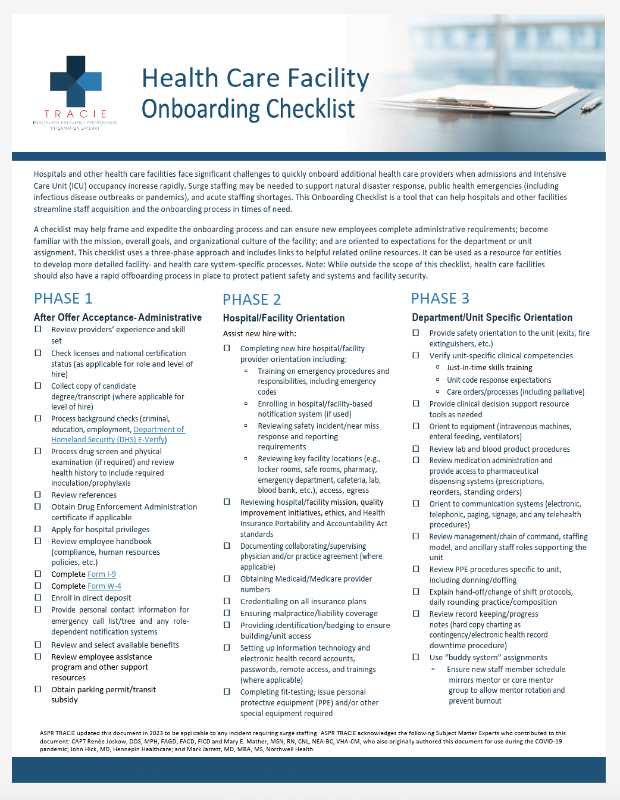
A healthcare facility employee onboarding can consist of around 50 steps of actions and checklist items to complete.
Here’s an example checklist with more than 30 tasks:
4- Low patient digital literacy
Digital onboarding assumes a baseline tech fluency, but many patients struggle with online portals, forms, and mobile tools.
In telehealth, this is particularly critical.
A streamlined, supportive onboarding flow can determine whether a patient successfully receives care or disengages entirely.
Language is another barrier: medical jargon and unclear instructions can make patients feel anxious and unsure, leading to skipped questions, missed appointments, or poor treatment adherence.
5- Regulatory compliance pressure
Healthcare onboarding must comply with HIPAA, OSHA, JCAHO, and other industry regulations from the start. Missing a training module or consent form can put the entire organization at legal or accreditation risk.
This compliance layer often slows onboarding down and increases the documentation burden for everyone involved.
6- Lack of personalization
Most onboarding flows rely on generic checklists or outdated playbooks, but healthcare needs more flexible, role and condition-specific pathways.
Patients with different care needs, such as postnatal recovery, mental health, or chronic condition management, require tailored education and task flows.
Similarly, a front desk assistant and an emergency nurse have vastly different onboarding requirements.
With tools like UserGuiding, you can create dynamic onboarding paths that adjust based on role, condition, or journey stage. For instance, you can:
- Limit admin staff onboarding to EHR and scheduling workflows.
- Deliver bite-sized tooltips and checklists based on context or survey answers.
Suggested tools and platforms for healthcare onboarding
Healthcare onboarding relies on several types of software platforms, each serving a specific role in streamlining HR, training, compliance, and patient data management.
Here are the most popular ones 👇🏻
HR & Onboarding Platforms
These tools manage employee lifecycle processes, including recruitment, onboarding workflows, document management, and performance tracking. They help automate administrative tasks and ensure smooth integration of new hires.
Examples include:
- Workday: Comprehensive HR and finance platform for workforce management.
- BambooHR: User-friendly HR software focused on small to medium-sized businesses.
- Eddy: Simplified onboarding and HR management for growing teams.
- UKG: Enterprise workforce management and HR solutions.
- UserGuiding: No-code onboarding software for creating interactive product tours, checklists, surveys, user guides, and more.
Healthcare Learning Management Systems (LMS)
These platforms deliver training and compliance courses tailored to healthcare professionals, tracking certifications and continuing education requirements.
Examples include:
- MedTrainer: Compliance and education platform for healthcare organizations.
- HealthStream: Training and workforce development solutions.
- Relias: Learning platform focused on healthcare skill development and compliance.
⚠️ While in theory LMS and onboarding tools might function similarly, LMS differ in their specialized focus on compliance training and healthcare regulations, providing structured courses to meet industry standards.
Whereas onboarding tools emphasize personalized, interactive guidance through day-to-day workflows and system usage.
Credentialing and Compliance Solutions
These tools verify licenses, manage background checks, and ensure ongoing regulatory compliance for clinical staff.
Examples include:
- Symplr: Credentialing and compliance management for healthcare providers.
- Verisys: Automated provider screening and monitoring services.
- Silversheet: Cloud-based credentialing and privileging platform.
⚠️ If we are to compare credentialing tools with LMSs, credentialing tools primarily manage and verify licenses, certifications, and compliance credentials to ensure regulatory adherence.
While LMSs deliver and track educational content, training programs, and ongoing professional development across a wider range of topics.
Electronic Health Record (EHR) Solutions
EHR systems store and manage patient medical records, appointment scheduling, billing, and clinical workflows. They often integrate with onboarding processes for staff and patients.
Examples include:
- Tebra: EHR platform designed for small practices with telehealth features.
- NexHealth: All-in-one patient experience platform integrating scheduling and EHR data.
- Epic: Widely used, comprehensive EHR system for large healthcare organizations.
- Oracle Health: Enterprise EHR and health management solutions.
- Meditech: EHR software focusing on hospital and clinic workflows.
Last words…
Healthcare onboarding is a high-stakes task, and getting it right sets the foundation for patient safety, staff retention, and compliance.
Effective onboarding drives long-term success for both patients and employees.
Quick checklist:
- ✅ Do personalize onboarding journeys
- ✅ Do automate repetitive tasks and reminders
- ✅ Do gather and act on feedback
- ❌ Don’t overload users with unnecessary information
- ❌ Don’t ignore tech access or training needs
- ❌ Don’t neglect clear communication and support
Frequently Asked Questions
What is the best way to onboard new employees in a hospital setting?
The best approach is a structured, phased onboarding plan tailored to each role. Use digital onboarding portals, 30/60/90-day check-ins, and automated reminders to reduce admin burden. Focus early steps on compliance, tech access, and workflow training. A personalized experience, combined with feedback loops and clear documentation, ensures employees feel supported and confident from day one.
How does digital patient onboarding improve healthcare outcomes?
Digital patient onboarding reduces paperwork, speeds up registration, and minimizes manual errors. By automating routine steps like consent forms, insurance checks, and health surveys, clinics can focus on care rather than admin. Patients feel more in control and informed, leading to better adherence to care plans and fewer missed appointments. In turn, this boosts satisfaction and improves long-term health outcomes.
What does the healthcare onboarding checklist for new clinical staff include?
It typically includes credential verification, compliance training, EHR system access, device provisioning, and facility orientation. Hospitals also include department-specific workflows and mandatory certifications like BLS. Many organizations break the checklist into 30/60/90-day phases and use automation tools to track progress and prompt next steps, ensuring every requirement is completed efficiently and on time.
Patient onboarding vs. registration: What's the difference in healthcare workflows?
Registration is just one part of onboarding, mainly about collecting basic patient data. Onboarding goes further by guiding patients through consent forms, insurance verification, intake surveys, and how to use digital tools like patient portals or telehealth platforms. A good onboarding experience educates patients, builds trust, and prepares them for care, not just essential paperwork.
What are the tools used for employee onboarding in healthcare organizations?
Healthcare HR teams use platforms like Workday, BambooHR, Eddy, and UserGuiding for digital onboarding flows. For compliance and ongoing education, they rely on LMSs like HealthStream, MedTrainer, or Relias. Credentialing platforms like Symplr and Silversheet handle license tracking and background verification. These tools reduce onboarding time, ensure compliance, and improve retention.
How do you reduce errors during patient onboarding in electronic health records (EHR) systems?
Start by simplifying forms and guiding patients through them with clear instructions or tooltips. Use automation to pre-fill known data and validate entries in real-time. Embedding feedback widgets and AI assistants can catch confusion early. Integrating EHRs with digital onboarding tools also helps reduce redundant data entry and common mismatches.
What are the HIPAA-compliant onboarding platforms for healthcare employees?
Platforms like MedTrainer, Relias, HealthStream, and Symplr offer HIPAA-compliant onboarding and training environments. Tools such as UserGuiding can be configured to meet HIPAA requirements when deployed securely. These platforms ensure sensitive data stays protected while still delivering smooth, role-specific onboarding experiences for healthcare teams.
What does a step-by-step patient onboarding process for telehealth clinics involve?
It begins with registration and consent, followed by verifying insurance and uploading medical history. Next, patients get guidance on using the telehealth platform, often through interactive walkthroughs. Clinics may include short tutorials, FAQs, and chatbot support to ease navigation. Automated reminders and surveys help patients stay on track and engaged throughout the process.
What are the key metrics to track in healthcare employee onboarding programs?
You should monitor time-to-productivity, onboarding completion rates, and early turnover rates. Feedback scores from newly hired employees can also highlight friction points. Tracking system access delays or compliance training lags helps address bottlenecks. Metrics like Net Promoter Score (NPS) or onboarding satisfaction give insight into how effectively your process supports long-term success.

.png)










