.svg)
.svg)
.svg)
.svg)



.svg)




.svg)
.svg)


TL;DR
- Customer support costs can spiral as businesses scale, especially when the same questions flood your team. Without proper in-app guidance and self-serve support, users get frustrated, and your support team spends too much time on simple, repetitive issues.
- The best practices for reducing support costs include:
- Offering contextual, in-app support with resource centers and in-app knowledge bases that meet users where they are.
- Supporting users with preventive in-app guidance through walkthroughs, tooltips, and nudges.
- Using AI chatbots to provide instant answers 24/7.
- Centralizing self-serve resources with standalone knowledge bases.
- Continuously monitoring feedback and usage data to refine support content and improve resolution rates.
- With UserGuiding, you can implement all these practices in one platform, reducing tickets, lowering costs, and keeping your customers satisfied.
Why are customer support costs so high?
Support costs tend to rise quickly as your business scales.
Every new user brings questions, frictions, and small problems, most of which are surprisingly common across the board.
Support teams, aware of the high ticket volumes, spend much of their time answering FAQs. While they’re busy resolving those, more tickets pile up in the queue, waiting for the very same answers.
Customers face delays, and companies often respond by hiring more support agents to keep up, which causes costs to climb even faster.
So you end up with..
- A backlog of repetitive tickets,
- Higher operational costs, and
- Frustrated customers.
What makes this even more painful is that most of these queries are about simple, recurring issues that could easily be prevented or resolved directly in the product.
With the right in-app interventions, users could find answers instantly.
And your support team would have more time and energy to focus on the complex, high-impact queries where their expertise really matters.
What are the best practices for reducing support costs?
In an alternate universe, your customers are happier because support doesn’t add extra friction or frustration on top of their product problems. Meanwhile, your support team breezes through tickets, delivering great service and keeping costs under control.
Now, do you need a magical portal to get there? Nope.
All it takes is adopting automated in-app support practices.
Here are the deets 👇🏻
#1 Offer contextual help where users need it
Most users don’t want to leave what they’re doing just to find answers, especially for small questions or friction points. Pushing them outside your app to get help can actually create more friction.
Instead, you should meet users where they are by providing contextual in-app support.
👉🏻 There are two main approaches here:
- Solution-based support: Make self-serve materials like help articles, tutorials, FAQs, and how-to videos available directly inside your app.
This way, users can get the answers they need without ever leaving the product.
- Preventive support: Guide users proactively with interactive guides, walkthroughs, tooltips, and other in-app prompts to prevent friction before it happens.
#2 Use automation and AI for repetitive or common questions
As we’ve said in the beginning, many support tickets come from questions that repeat over and over. Questions that don’t really need a human touch.
So, you can let automation and AI handle them.
👉🏻 By using an AI-powered chatbot or assistant within your app, you can provide instant answers to common queries, guide users to relevant resources, and even suggest interactive guides or walkthroughs.
In short, AI support assistants are the sweet spot between self-serve resources and human agents.
They keep the efficiency of self-service while adding the conversational, problem-solution approach of a support team.
#3 Blend self-service resources (FAQs, guides) with live support
All these in-app support practices (interactive tutorials, resource centers, AI assistants, etc.) are not to replace support teams.
We still need human involvement at some points.
Either because the problem a customer is facing is truly unique and requires human intervention, or simply because some clients want the reassurance of talking to a real person.
In fact, many enterprise or corporate customers are even willing to pay extra for that level of attention.
So, don’t make your support team completely unavailable or limit their role to just creating support materials…
UserGuiding can help you!
If you’re calculating the cost of separate tools for AI agents, knowledge bases, and in-app guides, and starting to think that adopting these practices might be even more expensive than hiring additional support agents, let us stop you there and introduce UserGuiding.
UserGuiding is an all-in-one product adoption platform that brings together the tools and functionalities you need to implement all the support practices we’ve just discussed (and more!).
Here’s what UserGuiding has to offer:
1) Resource centers and knowledge bases embedded directly into the product
When help is available right inside the product, users don’t lose momentum by leaving the app to look for answers.
With UserGuiding, support materials can live in a resource center widget, complete with search functionality. It can include everything from announcements and surveys to checklists, articles, and even external links.
And if you already have a knowledge base, it’s easy to integrate it, or you can create a new one directly in UserGuiding.
Here’s an example resource center created with UserGuiding:
Beside linking your knowledge base with your in-app resource center to highlight some help materials, you can also add your knowledge base as a separate tab directly to your resource center widget, too.
Here’s how it looks:
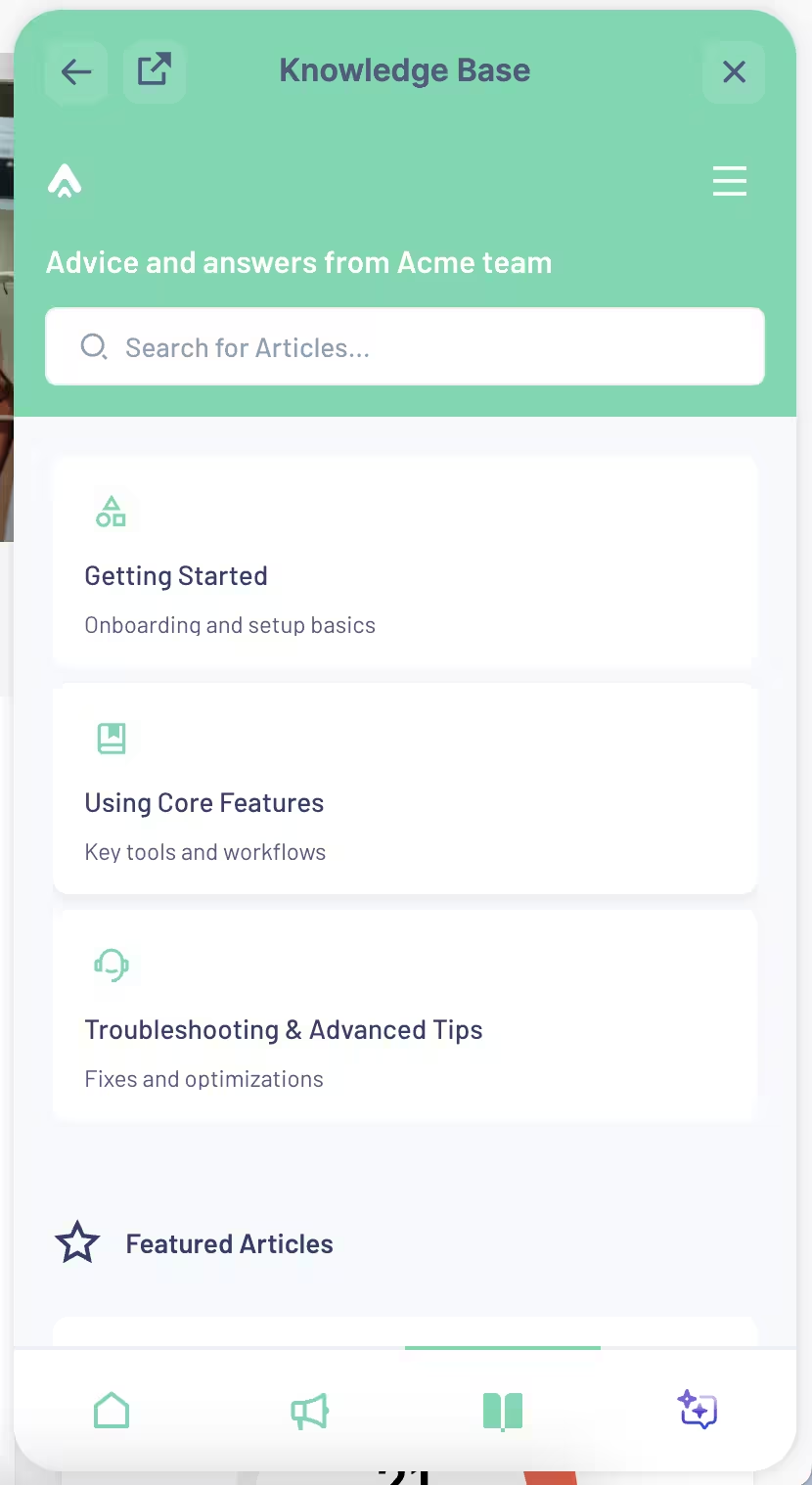
📌 Adding your knowledge base to your RC widget allows you to:
- Use your knowledge base’s existing organization (categories and labels) inside your app
- Reflect any edits to your KB instantly in the in-app widget, too
2) Standalone knowledge base to centralize help materials outside of your app
A knowledge base gives you one clean, centralized place to publish support articles, FAQs, and tutorials under your own domain.
Instead of having documentation scattered across different web pages, hidden in Notion files, or stored in inconsistent formats, everything lives in one structured hub that’s easy to maintain and search.
- ✅ Customers save time and energy because they can find clear, reliable answers in one place.
- ✅ Your internal teams save effort, too, since they also need access to product knowledge and quick solutions for technical questions.
Here’s an example knowledge base created with UserGuiding:
As you can see here, too, with UserGuiding’s knowledge bases, you can:
- Create different categories for different features, use cases, or even onboarding
- Highlight articles and FAQs for easier access
- Recommend related articles at the end of each article
- Collect quick customer feedback about help materials with emojis
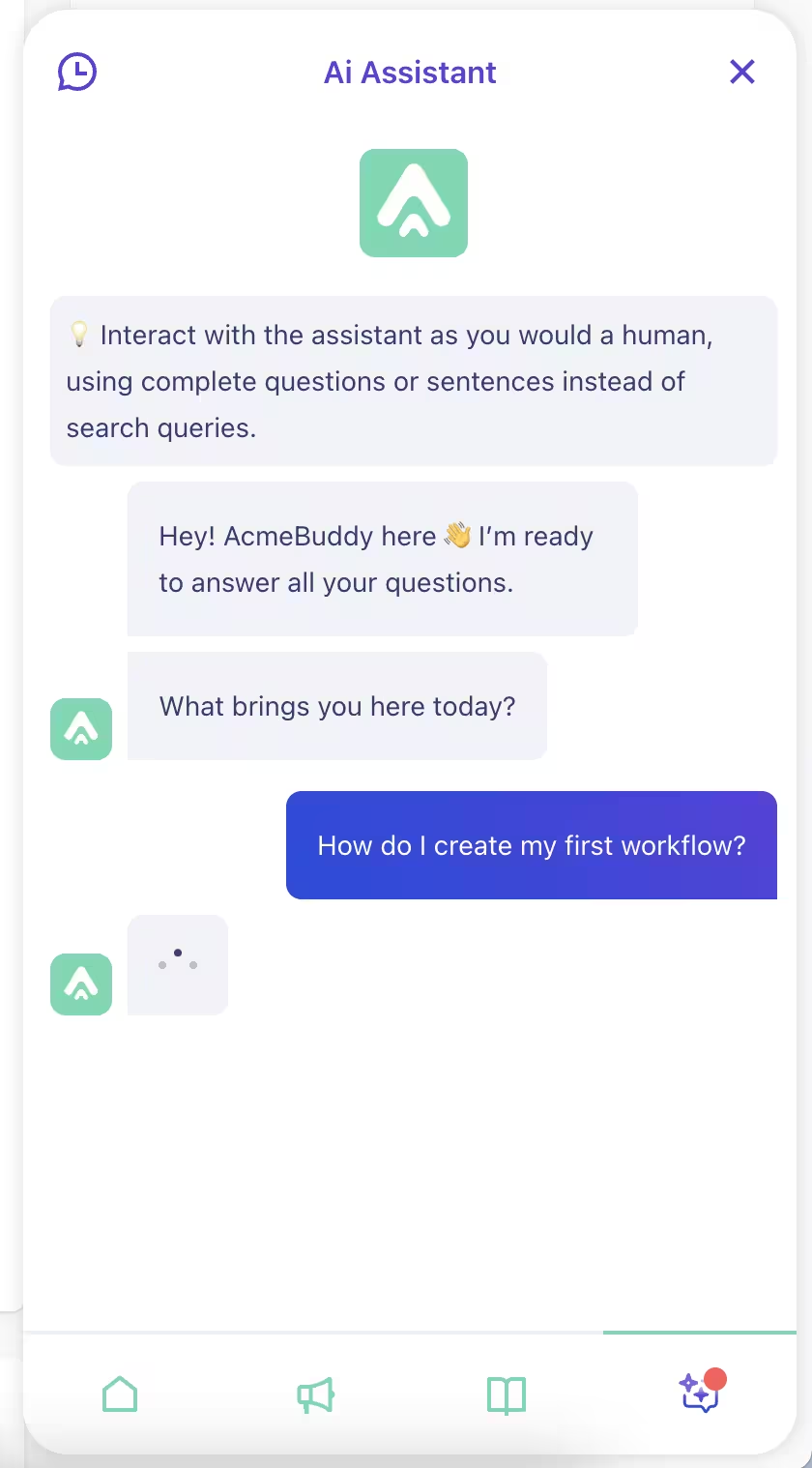
3) In-app AI chatbots for instant answers
AI chatbots provide quick, conversational help for common questions 24/7 right in the product.
They make self-serve support more than just reading documentation.
By feeding your AI assistant with knowledge base articles, interactive guides, FAQs, or external resources, you can turn it into a practical, interactive helper. It can even recommend interactive walkthroughs and guides you create with UserGuiding to users.
And when a question is too complex, the AI can seamlessly refer users to your support team, ensuring no one gets stuck.
With UserGuiding’s AI support chatbot, you can…
✅ Reduce the number of repetitive support tickets
✅ Improve user satisfaction by delivering instant answers
✅ Let your support team focus on more technical or high-impact issues
✅ Track common questions to identify knowledge gaps and optimize content
4) Contextual tooltips, hotspots, and walkthroughs for guided help
Support doesn’t (or at least, shouldn’t) only step in after a problem appears.
True support also means helping users avoid friction in the first place and ensuring they enjoy a smoother product experience.
🚀 With UserGuiding, you can provide this kind of preventive, in-app support by:
- Offering interactive, step-by-step walkthroughs for complex workflows
- Reducing mental load with simple tooltips that explain elements in context
- Nudging users to complete actions correctly with hotspots and subtle prompts
- Delivering reminders or error messages that not only flag what went wrong but also explain how to fix it instantly
- Highlighting additional support materials (like product tours or explainer videos) through well-placed hotspots
Here’s an example product tour created with UserGuiding:
And here’s an example hotspot modal with a video in it:

Pro usage tips for effective in-app support
1️⃣ Feed your AI chatbot with various resources to offer relevant solutions. You can use your knowledge base materials, separate PDFs and documents, external URLs, and even your interactive guides as AI assistant sources.
2️⃣ Continuously update help content based on user feedback. You can get quick feedback (thumbs up/down) on each article in your knowledge base.
- You can also gather feedback on the answers the AI assistant provides to users. By filtering the thumbs-down responses, you can identify topics the AI assistant could not handle and add more sources to increase its resolution rate.
3️⃣ Escalate complex issues seamlessly to human agents. UserGuiding’s AI assistant allows you to set a fallback action that directs users to live chat agents (your support team) when a question remains unresolved.
- This ensures users are never left alone when self-serve support isn’t enough, while still giving your human team a chance to help.
4️⃣ Test different support triggers. Think of UI/UX design as a science experiment. You need to experiment with when and where in-app help appears to maximize effectiveness.
- This is especially important for preventive support elements like tooltips, hotspots, and guides.
5️⃣ Make support options easy to discover. Ensure users can quickly find AI support and resources without extra clicks.
- This is crucial for resolution-focused support, such as in-app resource center widgets.
What positive outcomes can you expect with UserGuiding?
Companies that streamline their support experience with UserGuiding see fewer support tickets, lower operational costs, and happier customers.
Here are some example success stories:
- Brian.study saved over $15,000 in support operation costs by centralizing help resources with knowledge bases and resource centers.
- Cuepath reduced support calls by 72% through interactive guides, walkthroughs, and resource centers.
- Forvis Mazars decreased support tickets, lowered costs, and saved countless hours with improved onboarding and guidance thanks to onboarding checklists and interactive guides.
- Grupo IOB minimized support requests while keeping customers engaged and informed with checklists, guides, and individual tooltips.
Final words…
You don’t have to choose between customer happiness and low support costs.
You can actually have them both if you plan your support practices wisely.
When users can quickly find the answers they need and get help when they need it, your support operations become more efficient, and your customers become more satisfied and engaged.
Ready to cut support costs and boost customer satisfaction?
👉🏻 Start improving your in-app support with UserGuiding today.

.png)