


.svg)
.svg)
.svg)
.svg)



.svg)


.svg)
.svg)


Heard about Whatfix but still scratching your head over what does what? Which features belong to which product? How to actually use them?
We get it.
Whatfix’s product and pricing info is like a kid obsessed with dinosaurs: It throws out a ton of facts all at once, but half of it feels like gibberish unless you’re really into dinos.
So in this article, we’ll help you make sense of it by covering:
- Whatfix’s key features and how they actually work
- The pros and cons that matter
- Whether there’s a better fit out there for you
Let’s dig in 🦖
TL;DR
- Whatfix is a product suite consisting of 3 solutions that are designed to help users learn and engage with software across multiple platforms.
- DAP is used for creating in-app guidance like flows, tooltips, and announcements to improve user onboarding and adoption.
- Product Analytics tracks user behavior and helps you understand engagement and optimize user journeys.
- Mirror allows you to create safe, mirrored environments for employee training and content creation without risking real data.
- You can also use Whatfix for surveys, user segmentation, and collecting feedback within your app.
- The platform does an amazing job supporting multi-platform use and offers advanced analytics and professional services.
- However, it doesn’t meet expectations in usability, personalization, and ease of content maintenance. Plus, the pricing is high, complex, and lacks transparency. The average cost is more than $32,000 per year, Vendr states.
- So, if you’re not sure whether or not it’s the best option for you, maybe you should consider a different solution with better usability, pricing, and feature depth, like UserGuiding!
- You can start your free trial and see the value with your own eyes.
What is Whatfix?
Whatfix is a comprehensive suite of solutions designed to enhance product adoption, improve user experience, and drive engagement across digital platforms. The suite includes 3 products: the Digital Adoption Platform (DAP), Product Analytics, and Mirror.
These products can be used individually or combined to suit your specific needs.
Together, they empower you to design and monitor user journeys, create intuitive in-app experiences, and gather user feedback.

What is Whatfix used for?
Whatfix offers a lot. So, different businesses choose it for different reasons and goals. However, we can say that most SaaS companies use Whatfix to:
- Guiding new users through product features with interactive walkthroughs (DAP)
- Reducing onboarding time and training costs (DAP)
- Supporting employee adoption of internal tools and software (DAP)
- Sending in-app announcements or updates (DAP)
- Highlighting new features or important changes (DAP)
- Gathering user input through surveys or feedback prompts (DAP)
- Tracking how users interact with your product (Product Analytics)
- Identifying friction points or drop-offs in user journeys (Product Analytics)
- Replicating live apps to create training or demo environments (Mirror)
- Allowing safe practice without affecting real data (Mirror)
What are Whatfix’s top use cases and features?
As we’ve mentioned, Whatfix offers 3 distinct solutions: the Digital Adoption Platform (DAP), Product Analytics, and Mirror. However, Product Analytics and Mirror are typically purchased as complementary products to DAP, which is the most comprehensive and feature-rich of the three.
That’s why, rather than examining each product in isolation, we’ll explore them collectively as part of the Whatfix suite and explain the key use cases and features in a more integrated way.
At this point, we’re not thinking about the plans and product costs.
So, let’s see what we can get out of Whatfix at 100%.
User/Employee Onboarding & Training
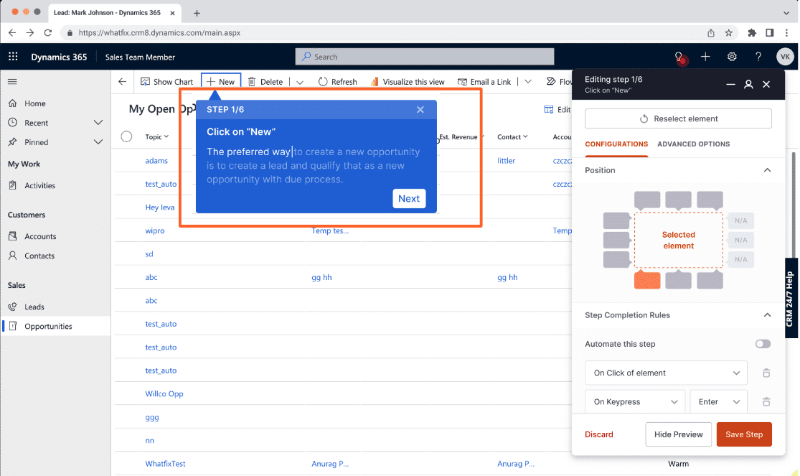
- Flows: You can create step-by-step guides and tutorials with Whatfix flows. The flow editor allows you to add buttons, videos, images, and even audio clips, as long as they’re hosted on a supported file-sharing platform and use a supported format.
Here’s how the flow builder looks when you edit a step:
Whatfix also allows you to link flows or branch users into different pathways based on their actions so that you can dynamically personalize tutorials and deliver the most relevant learning experience for each user.
- Smart tips: Smart tips are Whatfix’s version of tooltips –a.k.a. small text boxes. They help you deliver additional, context-specific information to users without overwhelming the interface. Smart Tips can be triggered by either a click or a hover action. Since they appear only when the user interacts with them, they provide guidance without causing distractions.
Here’s an example tooltip built with Whatfix:

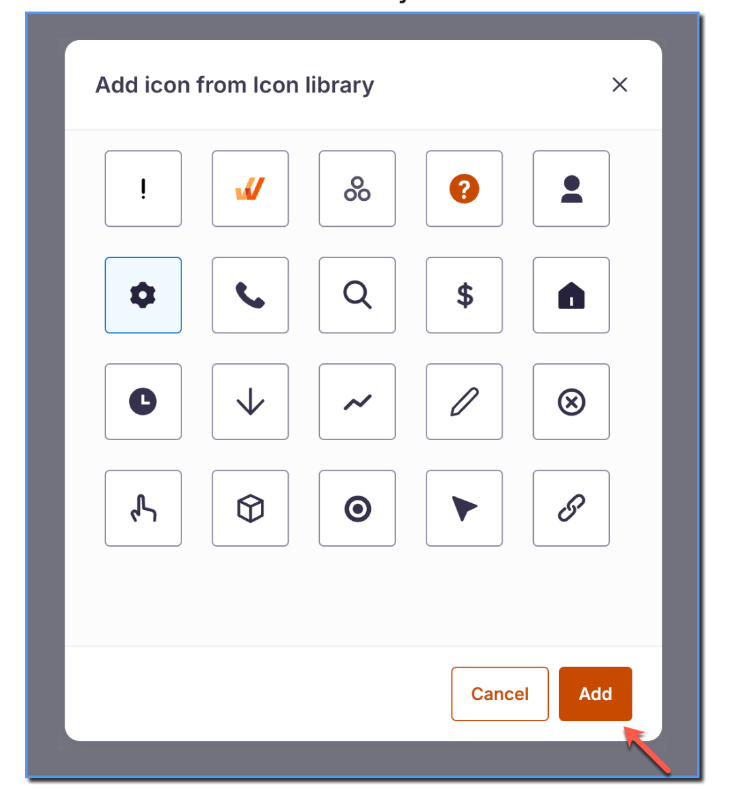
Whatfix initially offers 3 default icon types for Smart Tips in the builder: one for errors (!), one for information (i), and one for general tips (?). From the styling page on the platform, you can customize these further and add additional icons to better fit your needs.
However, the default icons have a very basic appearance and may not align well with the visual design of your own platform.
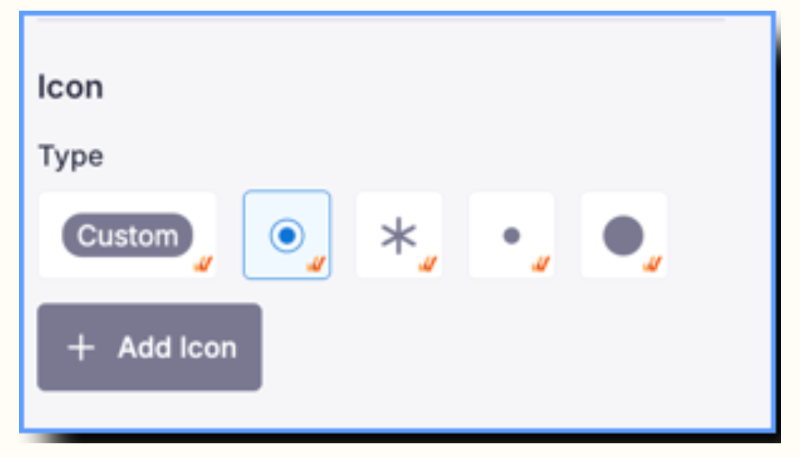
- Beacons: Beacons are the shiny version of tooltips (or Smart Tips, if we’re speaking Whatfix). The key difference? A beacon comes with an animated icon that grabs attention.
Whatfix gives you 4 types of pulsating icons to choose from in the builder, but if those don’t match your look, you can also upload your own custom design.
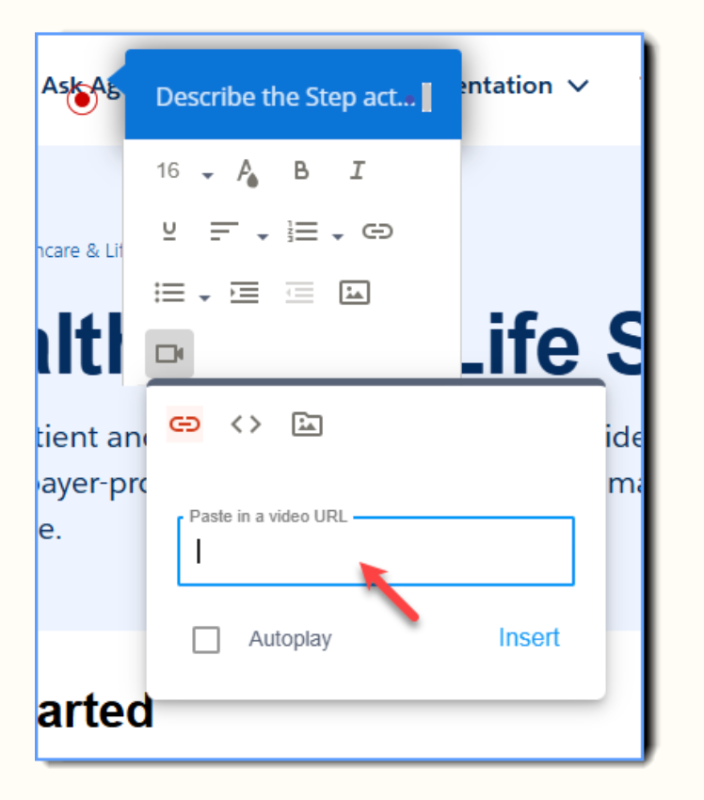
You can also add multimedia elements (videos, images, etc.) or link a survey to a beacon, as well. You can add a video using a URL, embed code, or by uploading it directly from your local device.
- Task lists: You can create onboarding checklists that include key guides, tutorials, articles, and tasks your users need to hit those AHA! moments with your product as quickly as possible.
Task lists also help your users to track their own progress and access learning materials easily to complete at their own pace and even revisit them later on.
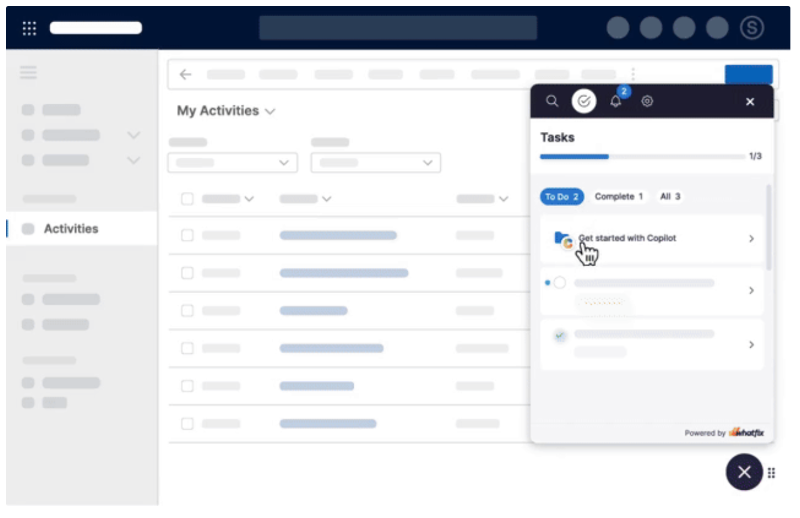
You can create different task lists tailored to specific user types or segments, each aligned with their unique goals. You can also make certain tasks dependent on the completion of previous ones (sequential tasks).
Another cool feature of Whatfix task lists is the ability to create task groups. If your checklist is getting crowded or you want to organize tasks more logically beyond just putting them in a sequence, you can group similar or related tasks into categories and collapse them to keep things tidy.
This is especially helpful for employee onboarding, where having a longer checklist is more acceptable (and sometimes necessary), unlike customer onboarding, where too many items can feel overwhelming.
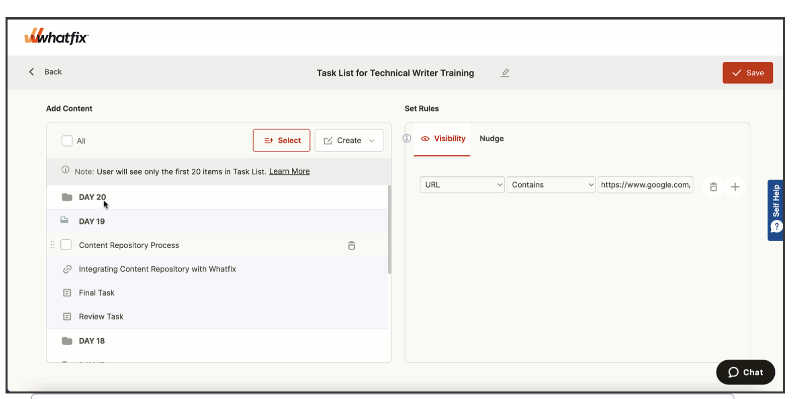
You cannot create subgroups within groups, though.
And that’s okay. It’s not Notion…
- Simulation (Mirror): Mirror is a standalone solution within the Whatfix suite that lets you capture specific screens to create mirrored environments. If there is any sensitive data or details you want to protect, you can choose to blur them after capturing the screen.
You can also build your training materials, such as flows, directly within this safe environment.
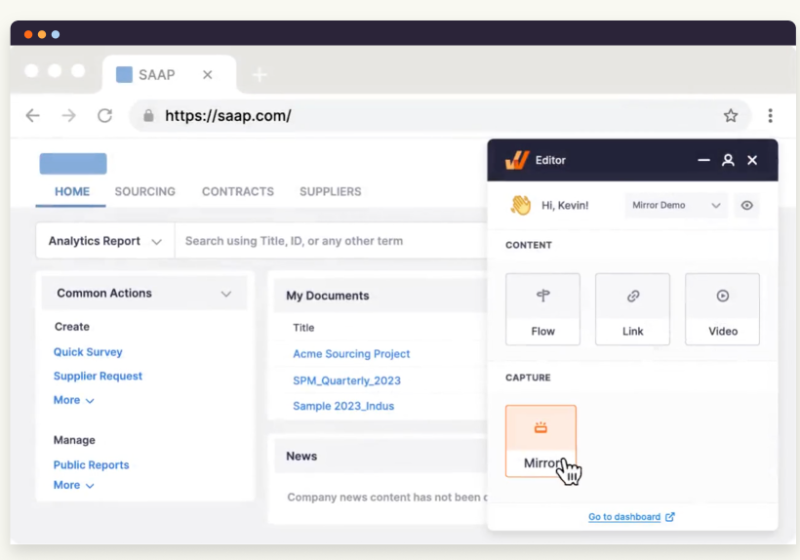
Though Mirror can be used for both customers and employees, its primary use case is for employee training and Learning & Development (L&D) teams.
It enables you to create realistic, interactive scenarios and replicate complex processes within a safe environment. This allows employees to practice workflows, experiment with settings, and learn new tools without risking disruptions to live systems. Mirror also supports the creation of customized training modules tailored to different roles or skill levels.
In-app Communication & User Feedback
- Pop-up modals: In addition to Smart Tips and Beacons, Whatfix offers announcement modals (pop-ups) to communicate directly with your users.
Compared to Smart Tips and Beacons, pop-ups are larger and much more eye-catching. Because of their size and prominence, they’re not typically used for ongoing guidance, as too many pop-ups can quickly become tiring and annoying.
However, when used strategically, for example, to announce new features, special deals, or major events like webinars, they can deliver the engagement you need quickly and effectively.
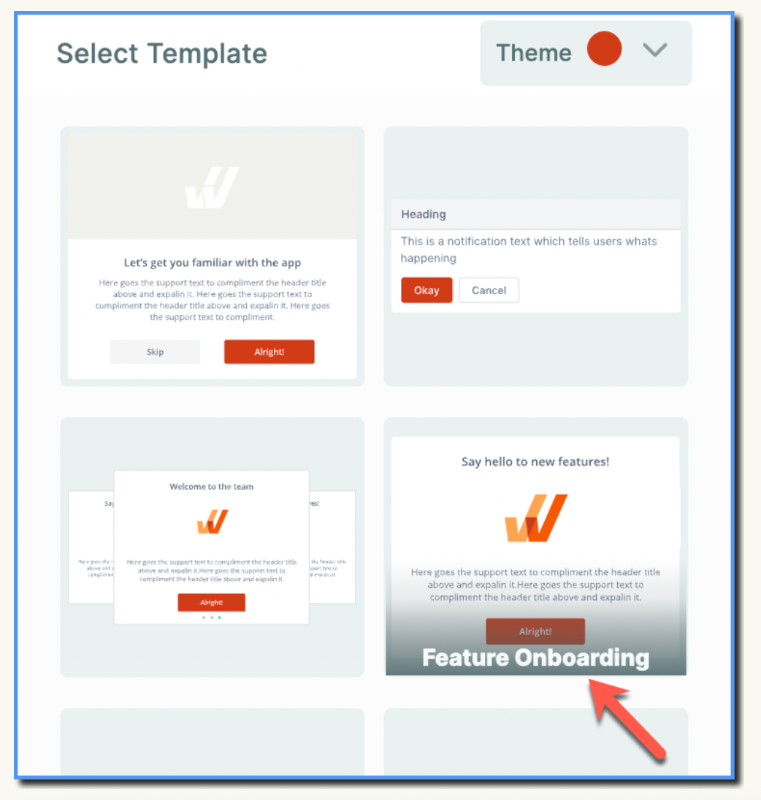
Whatfix provides several pop-up templates designed for different use cases, such as welcoming new users, announcing features, or kicking off a product walkthrough. While the templates look fairly similar, exploring these options can spark ideas and inspire you to customize them to fit your needs.
You can also enhance your pop-ups by adding buttons, visuals, links, or even stacking multiple pop-ups together for a richer user experience.
- Surveys: So far, we’ve talked about features that allow you to communicate information to your users. It’s time they communicate their ideas and notions to you, now.
With Whatfix, you can create custom NPS and in-app surveys to gather user feedback.
While the platform offers fewer templates compared to pop-up modals, it makes up for it with a wide variety of question types. You can include text boxes, single choice, multiple choice, opinion scales, NPS scores, and star ratings.
Additionally, you can design quizzes with predetermined right and wrong answers for testing knowledge or training effectiveness.
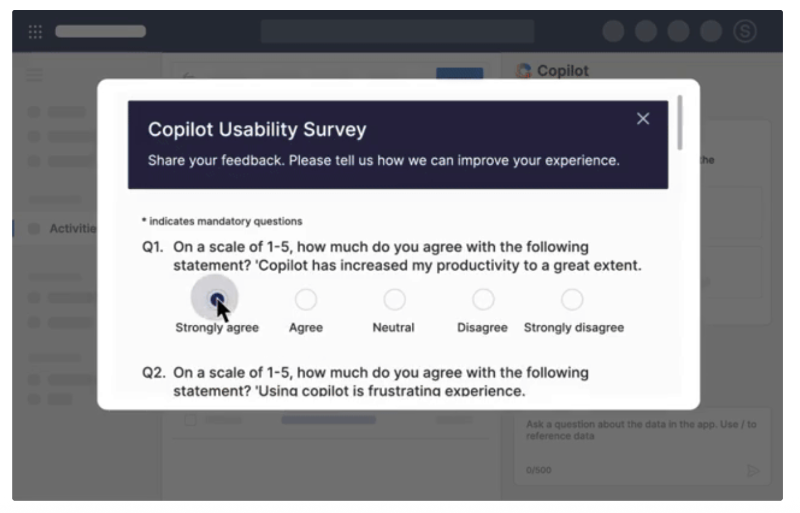
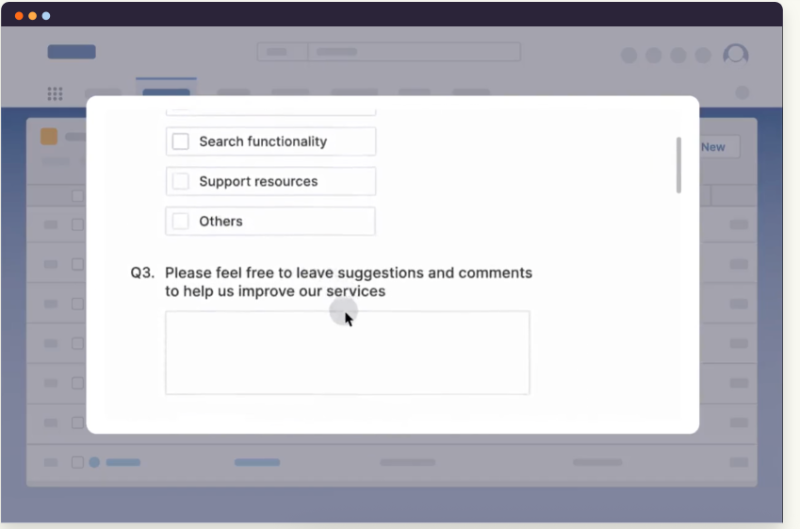
Whatfix surveys aren’t the most interactive or visually engaging in-app surveys. Although you can interact with the questions, they tend to look quite static since all the questions appear together in a single pop-up modal instead of being shown one by one with smooth animations.
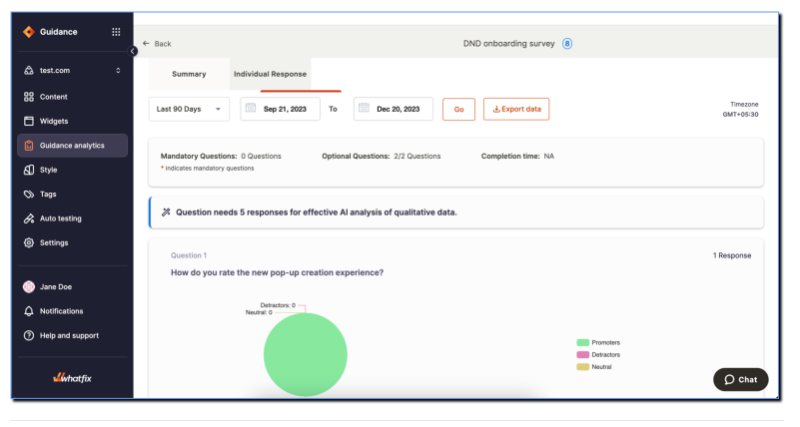
You can track NPS scores, user insights, and quiz performance on the survey analytics page. This page provides summary dashboards to help you spot trends, and it also lets you drill down into individual responses and detailed quiz results.
In-app Experience Management
- User journeys: The Whatfix extension captures user events to help you understand how users interact with your platform and complete specific tasks. You can then create Sankey charts to visualize user journeys and engagement patterns, gaining deeper and actionable insights into end-user behavior.
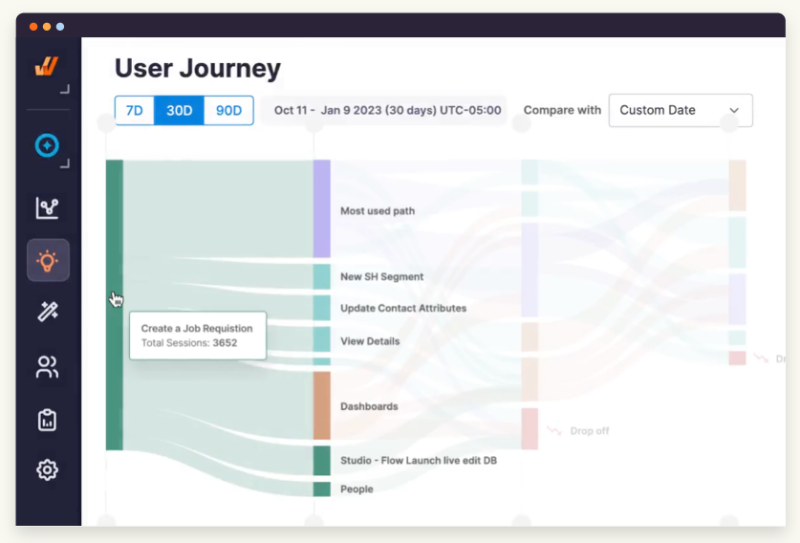
You can use Whatfix user journeys to identify where users drop off or deviate from the “ideal path” while completing a task. This insight helps you improve and optimize your processes.
Additionally, you can use Whatfix AI to generate user journey charts for specific segments within defined time frames.
Whatfix AI features a conversational interface that lets you ask questions to better understand user behavior and engagement. It automatically identifies relevant events, applies the appropriate filters, and visualizes the data for you.
⚠️ Whatfix launched Whatfix AI in September. There is also a required data migration process that may take some time, along with the need to share non-PII metadata with OpenAI.
- Segmentation: Whatfix lets you personalize experiences and control which materials are shown to different users. However, it’s not very easy or intuitive, since it operates differently from common segmentation methods.
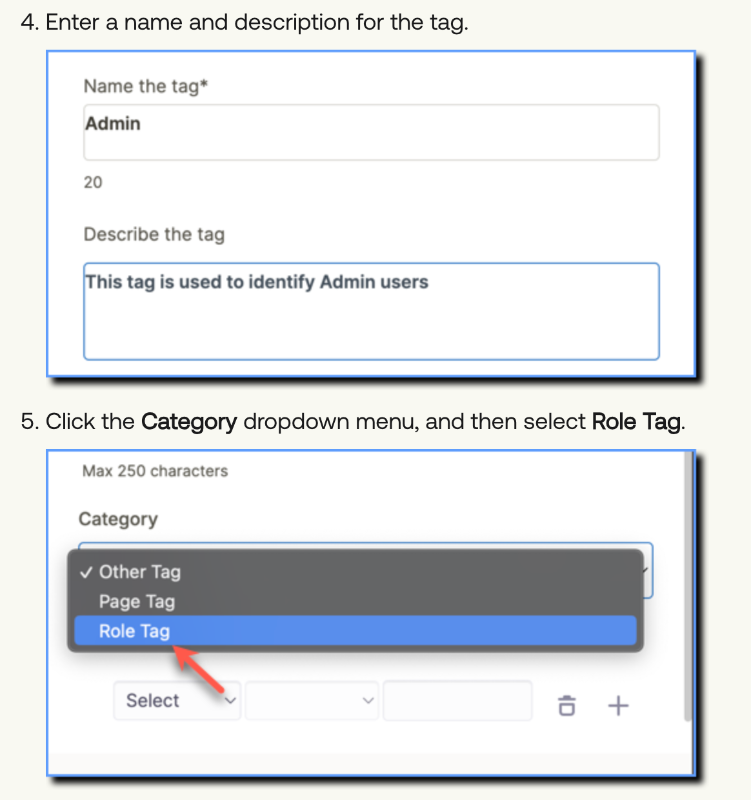
You use “Tags” to group relevant materials for a specific user segment.
You can create auto tags, role tags, page tags, and miscellaneous tags (tags for a specific project, let’s say). So, instead of creating segments and then choosing them for materials, you choose tags for materials and create segments through materials, if that makes sense.
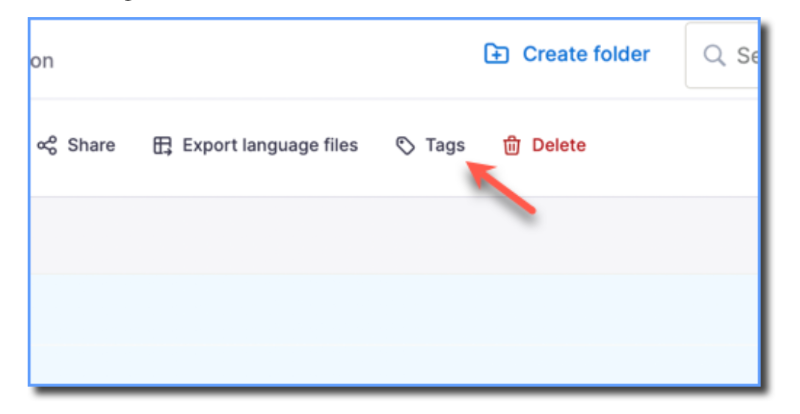
For role tags, you can label content with tags like “Translators,” “HR,” or “Account Managers” to ensure each user sees the material relevant to their role.
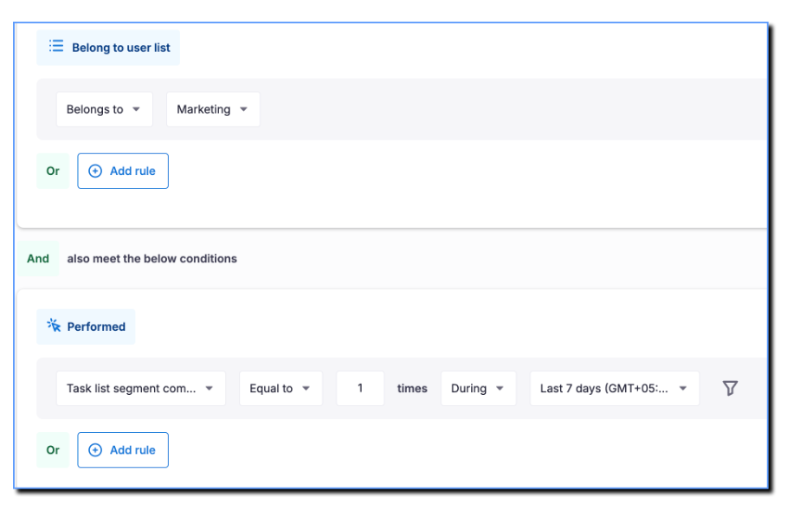
⚠️ You can create static cohorts (a.k.a. user lists) the traditional way of segmentation, by selecting customer and event attributes and using AND/OR rules to define them. However, unless you’re part of the beta trial, you can’t use these static cohorts for visibility rules.
You need to reach out to the Whatfix support team to be a part of the trial.
Product Analytics and User Engagement Reporting
- Cohorts: Whatfix has several reporting options, one of which is cohorts. With cohorts, you get to analyze user behavior for specific groups based on certain criteria (kind of like segments, if they actually worked like normal segments).
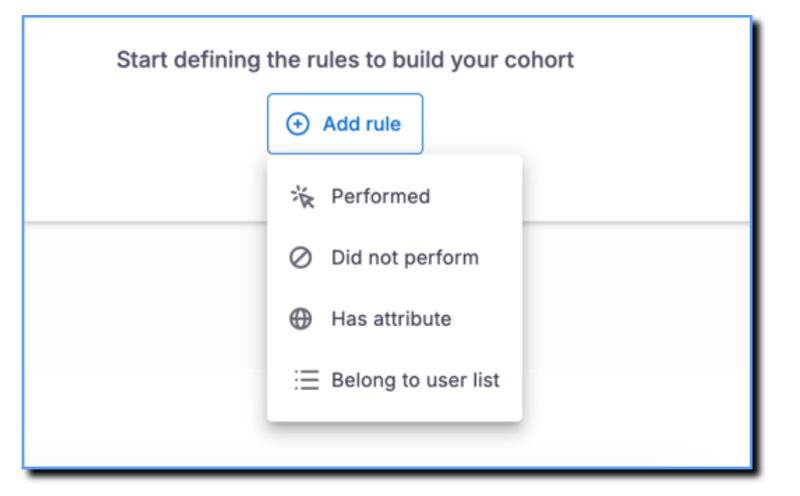
You can then use the cohorts to create funnel or trend insights.
- Funnels: Funnels are sequences of user events that track a specific path. Remember when we said user journeys show where users drop off or how they move through tasks? Think of funnels as their smaller, more task-specific cousins.
A single user journey can include multiple funnels, each zooming in on a particular process or flow.
Here’s how Whatfix compares funnels and user journeys:

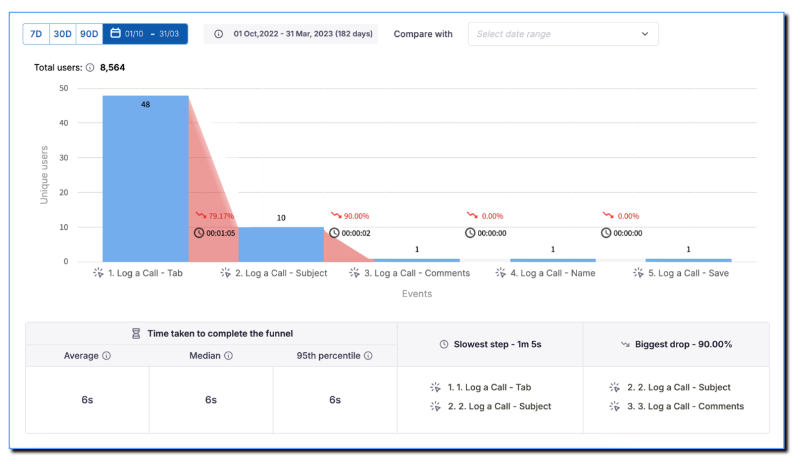
Whatfix allows you to create 2 different types of funnels: Conversion funnels and productivity funnels.
A conversion funnel helps you to monitor how users engage with your product from their initial encounter until they become paying customers. A productivity funnel, on the other hand, shows you the steps and time a user takes to complete a specific task, thus showing you the friction(s) they face along the way.
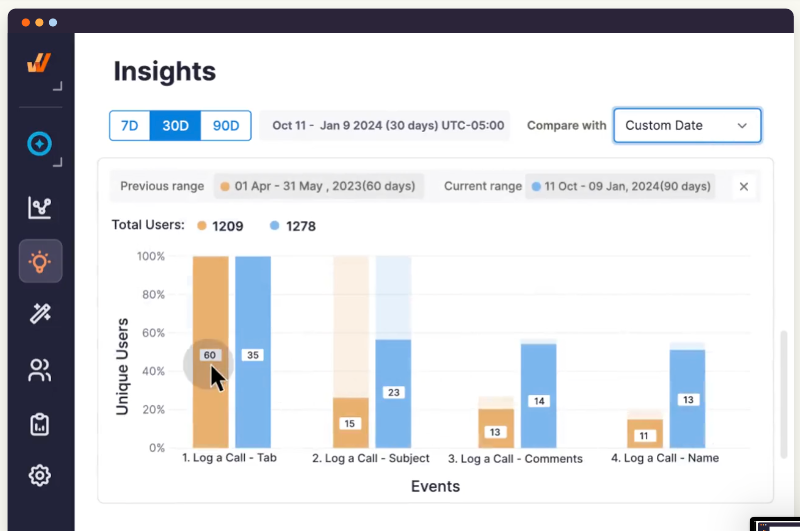
Here’s a more detailed view of an example funnel analytics:
- Trend insights: You can create custom engagement reports to visualize exactly the data you need to understand user behavior. Just pick the event, event breakdown, user, and user breakdown you're interested in, and Whatfix will generate the chart for you.
You can then save and download the report you’ve created to share with stakeholders and support decision-making.
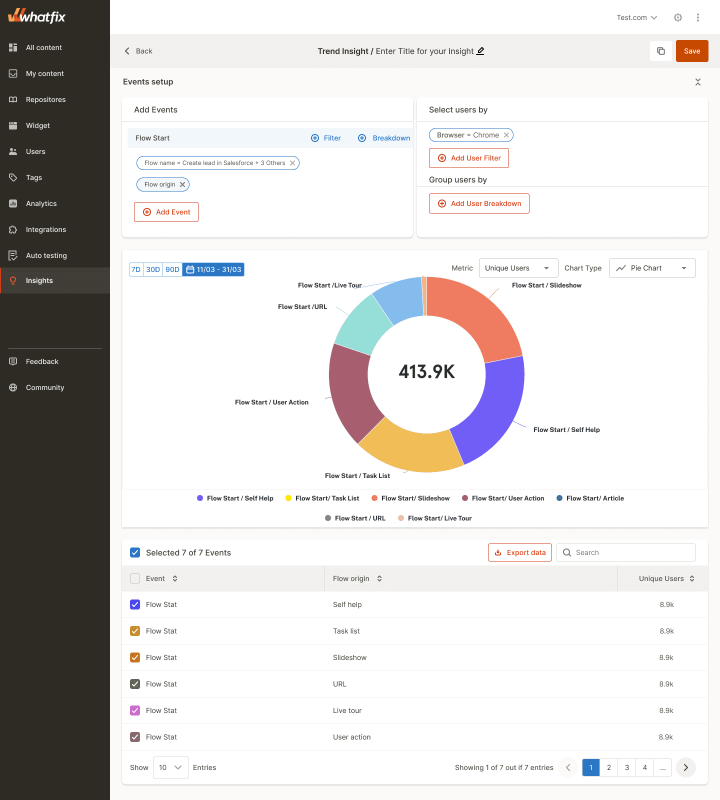
⚠️ Besides user journeys, you can use Whatfix AI to generate trend insights, too.
In-app Support
- Self help: Whatfix includes an in-app widget where you can gather important content like help materials or tutorials for 24/7 self-serve support directly within your platform. Under each item, users can see the content type (interactive flow, article, video, PDF, etc.) and use a search bar to quickly find what they need.

Similar to task lists, you can create categories and group content within your self help widget for better organization and a more logical presentation.
You can also create different self-help widgets for different user types. This is especially useful when your platform serves users with different roles, use cases, and capabilities. It lets you pin the most relevant content for each group.

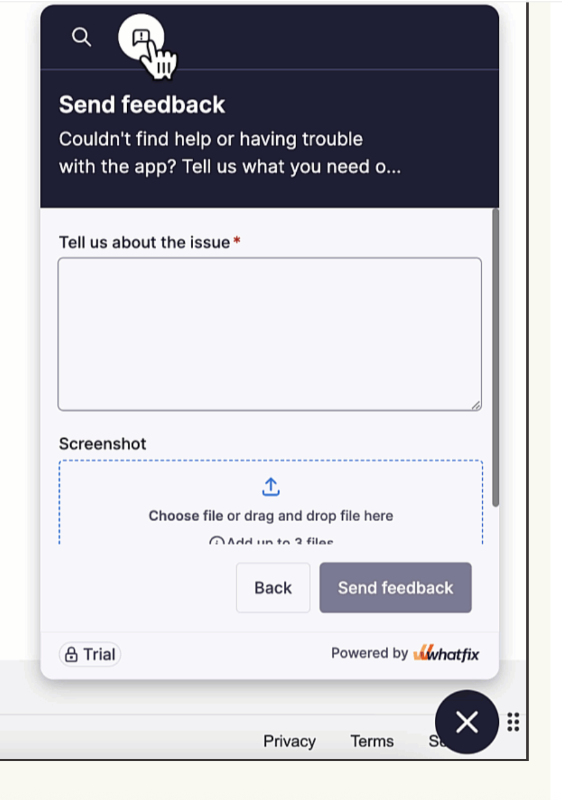
Additionally, Whatfix lets you collect user feedback from the self-help widget. Users can report bugs and crashes, and even attach screenshots of error screens for better clarity.
How much does Whatfix cost?
Whatfix has a fairly complex pricing structure. Different products support different platforms, and the pricing tiers vary across products.
And what is worse is that they don’t disclose any pricing information...
Thankfully, people talk.
According to Vendr data, the average cost of Whatfix is almost $32,000 per year, which corresponds to almost $2,500 per month.
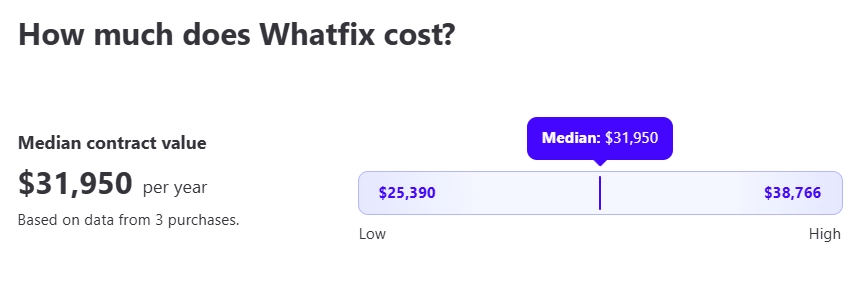
So, it’s not typically a solution for startups or small businesses; it’s mostly used by medium to large companies and enterprises. That said, it’s still “more affordable” than some of its competitors, like WalkMe (which averages over $37,000 per year).
That’s why many enterprise-level customers find Whatfix’s pricing reasonable, especially considering the platform’s capabilities and potential.

That’s why we’ll leave the numbers for you to judge and get back to the pricing plans. Here’s a visual map you can follow to understand Whatfix’s pricing tiers:

For the Digital Adoption Platform (DAP), pricing differs if you’re using it on Web & Desktop versus Mobile applications or operating systems like Windows and Mac. Web & Desktop users can pick from Standard, Premium, or Enterprise plans, while Mobile and OS users have access to a single Standard plan.
Product Analytics is sold separately with its own three-tier plans for Web & Desktop apps. Mirror, the most limited product, supports only web-based applications and comes with one standard plan.
Pricing also depends on user licenses, calculated either by monthly active users for external customers or by employee count for internal use. Additionally, Whatfix offers optional add-ons like on-premise authoring, white labeling, extended support, and dedicated customer success or project management services.
👉🏻 If you’re looking for more information on Whatfix’s pricing and what its customers say about it, check out our detailed review.
What are the pros of Whatfix?
There are several advantages of Whatfix that many competitors can’t easily match, and these features might just convince you to choose Whatfix.
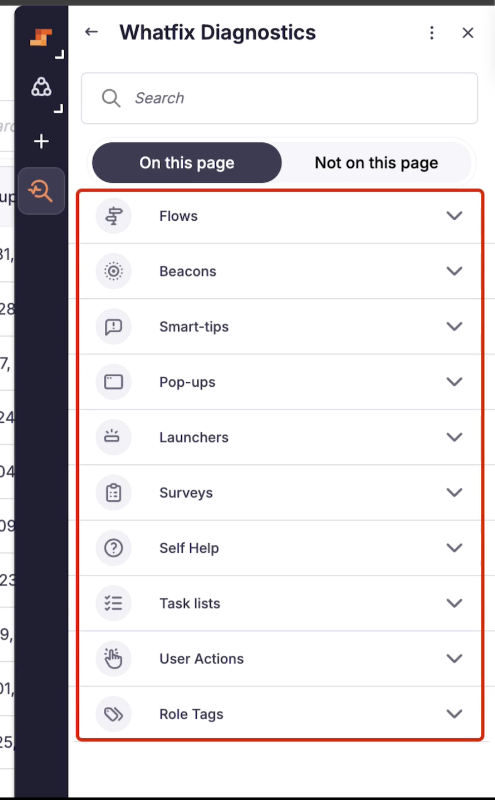
- Whatfix Diagnostics: Whatfix Diagnostics is a troubleshooting tool for your content. If a flow step crashes unexpectedly, let’s assume, Diagnostics pinpoints the issue and generates a report to help you fix it. This means you won’t have to rely on your technical team constantly to maintain your materials.
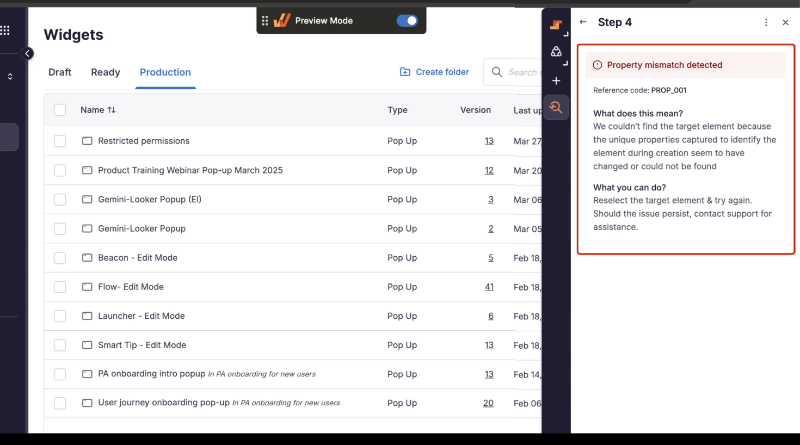
You can access diagnostics from the extension and use it for all your flows, beacons, smart tips, surveys, launchers, pop-ups, task lists, self help, user actions, and role tags.
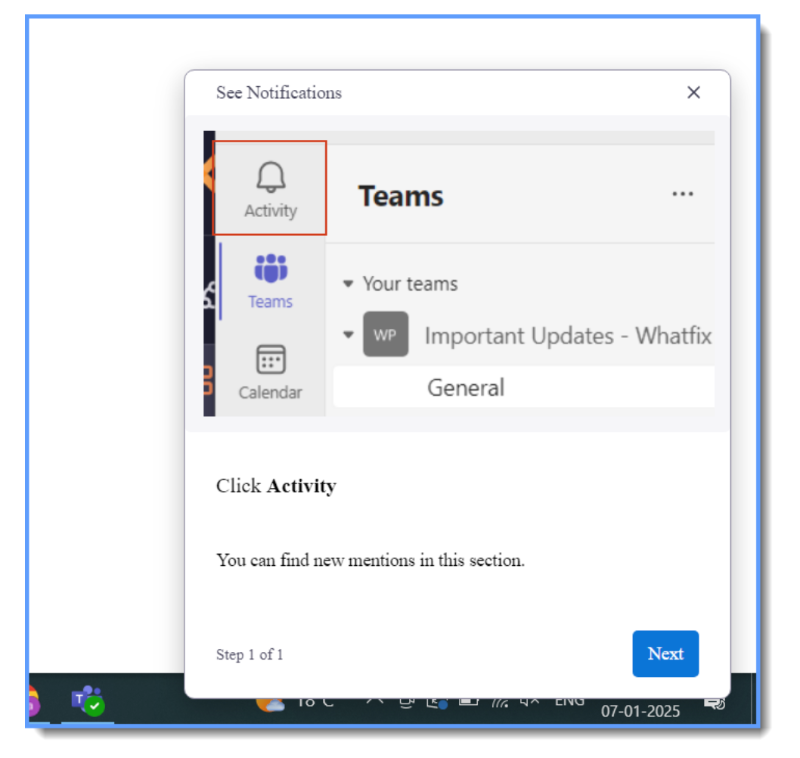
- Flow Standby: Whatfix ensures that users can continue a flow even if an error occurs at a specific step. If a crash happens, Whatfix refers to previously captured screenshots of the tooltip, displays the relevant information as a pop-up, and lets the user proceed to the following step.
This incident, then, is recorded in the flow failure report.
- Whatfix Simulation (Mirror): Simulation is a unique feature that none of Whatfix’s major competitors in the DAP and in-app engagement space currently offer. It’s not part of Whatfix’s DAP itself, but you can still get it separately and use it alongside the platform’s guidance tools.
- Solid Analytics and Real-time Reporting: Whatfix’s analytics capabilities are quite advanced and comprehensive, especially since they’re also offered as a standalone product. While the platform can be a bit complex to use, and you might find even more powerful tools for the same cost (like those offering session replays or heatmaps), it still stands out as a clear advantage over many other DAPs.
- Meets Enterprise-level Expectations: Whatfix is a high-investment tool, but it delivers solid value, especially with its multi-platform DAP support and extensive professional services that help drive ROI. It also gives you the option to host content on your own network. While these features might be beyond the needs of startups and SMBs, they can be essential for larger organizations and enterprises.
What are the cons of Whatfix?
Life is not all moonlight and roses. Whatfix has its flaws and disadvantages, too 👇🏻
- Steep Learning Curve and Complex Implementation: Whatfix is, technically, a no-code solution. However, this doesn’t mean that it’s a piece of cake, or you can start using it right away.
The platform has a heavy learning curve and long implementation times.
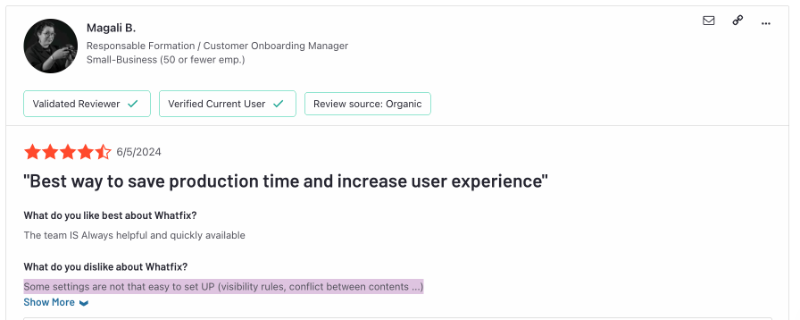
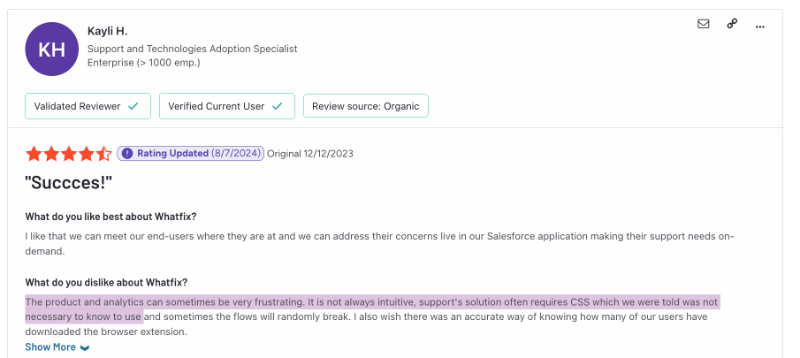
- Requires Technical Knowledge: If you’ve never used a DAP or analytics tool before, Whatfix can feel overwhelming. The platform isn’t exactly beginner-friendly, and while they might say CSS skills aren’t required, trust us (and many former customers): they absolutely are.
- Boxy and Outdated End Materials: We’ve shown several end-products you can create with Whatfix in this article, and you’ve probably noticed that they’re not exactly great-looking.
While you can achieve something decent with hours of styling and CSS-level tweaks, the default appearance of Whatfix content really does feel… well, straight out of the box. And when it comes to things like survey interactivity, there’s not much you can do to improve it.
- Complex Segmentation: Personalization and segmentation are essential for both in-app experiences and reporting. While Whatfix delivers strong DAP and analytics features, tailoring them to specific users is very hard.
Tags and static cohorts?
Let’s just say, sometimes, breaking away from what competitors do isn’t the smartest move, especially when they offer intuitive, rule-based segmentation that actually makes sense.
- Hard to Maintain: We’ve mentioned that Whatfix is primarily an enterprise-level solution, which naturally means a lot of content builds up over time. So, you'd expect the platform to make updates and maintenance easy.
But according to several Whatfix users, that’s not quite the case. As materials pile up, the platform can feel heavy, and keeping things updated becomes a time-consuming, sometimes frustrating process.

- Confusing and Opaque Pricing: And finally, let’s not forget the cost of the platform. Choosing a pricing plan? Practically a puzzle. The differences between plan capabilities aren’t clearly laid out; we don’t even know what exactly comes with the Enterprise plan.
There are no starting prices, no MAU-based estimates…
So, get ready to spend a lot of time with the sales team just to figure out a plan that fits. And if you’re eyeing more than one product? May the Force be with you.
A better alternative to Whatfix: UserGuiding
Whatfix is a versatile solution with many good features, but there’s even a better solution: Meet UserGuiding!
UserGuiding is a no-code, all-in-one product adoption platform that enables you to create engaging and personalized in-app experiences and product messaging, as well as offer automated support and gather user feedback.
Here’s what you get with UserGuiding:
- Product tours
- Onboarding checklists
- Hotspots and tooltips
- Announcement modals (banners, slideouts, pop-ups, etc.)
- NPS and custom in-app surveys
- AI assistant
- Resource center (in-app)
- Knowledge base (standalone)
- Product updates (standalone)
- Segmentation
- Analytics

As you can see, Whatfix and UserGuiding share quite a few common features and capabilities, and that’s true for most DAPs and in-app experience platforms. After all, there are only so many tried-and-true methods in this space.
That said, the two platforms part ways in some pretty important areas like usability, depth of features, and, of course, pricing.
Let’s go over them one by one.
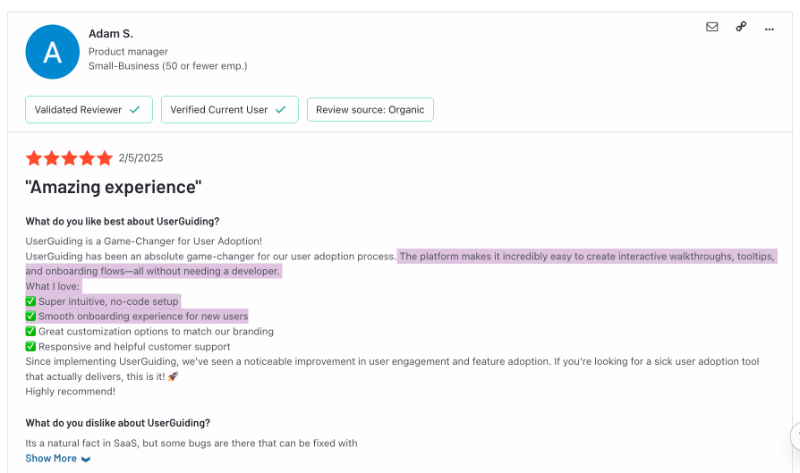
- Usability: UserGuiding is a true no-code platform with a user-friendly and intuitive interface. The implementation time is very short, and in fact, you can start creating materials on your own within minutes.
The platform also doesn’t require any technical knowledge, as it has an easy-to-use drag-and-drop feature builder/extension.
- Easier Customization and More Modern Looks: We’ve already taken a few jabs at Whatfix’s end-product quality, and you’ve seen the evidence yourself. So, let’s be honest: the bar isn’t that high.
But UserGuiding clears it with ease.
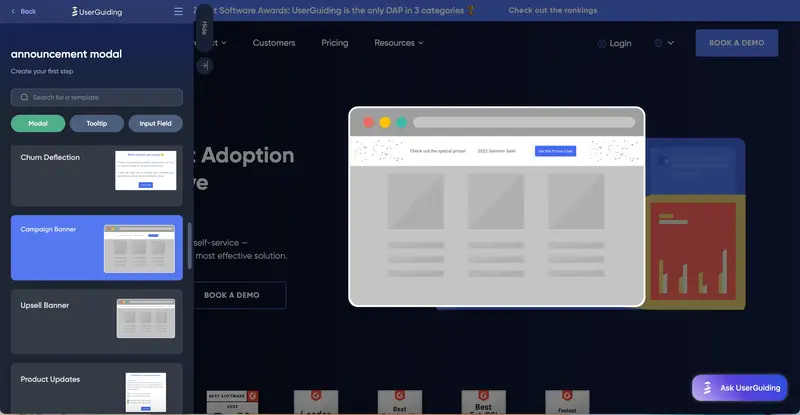
The default look of the content you build with UserGuiding (no CSS needed) is noticeably more modern. And when it comes to customization, the no-code builder offers way more flexibility. You can tweak designs to match your brand without writing a single line of code, though CSS is still there for those who want it.
On top of that, UserGuiding gives you a wider selection of templates for things like surveys, tooltips, and announcement modals. You can pick based on use case or design style.
- More Capabilities for In-app Support: Whatfix is a very comprehensive solution, so much so that they divide their offerings into 3 distinct products. However, it’s still pretty limited when it comes to the most important and key use cases of better product adoption.
A good and automated customer support. Both in-app and also outside of it.
While you only get an in-app resource center (Self Help) with Whatfix, with UserGuiding, you also get an AI agent and a standalone knowledge base that allows you to manage all your self-serve support materials and practices within one platform.
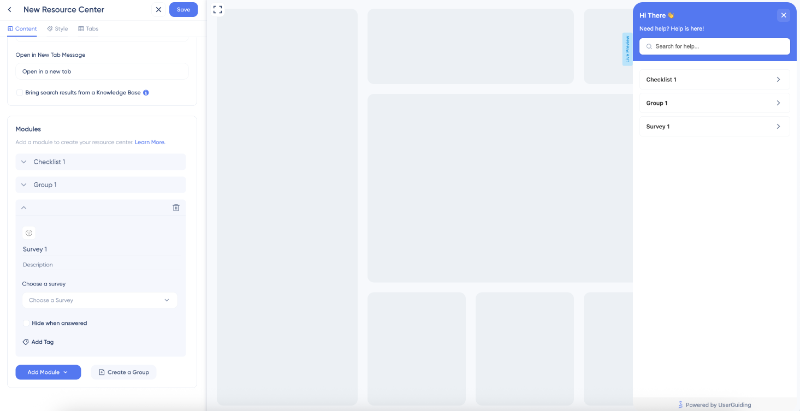
UserGuiding’s in-app resource center looks and functions a lot like Whatfix’s Self Help widget. You can add guides, checklists, and articles, link it to your knowledge base so users can search for content directly within your product, and group materials for better organization.
Here’s what the feature builder looks like:
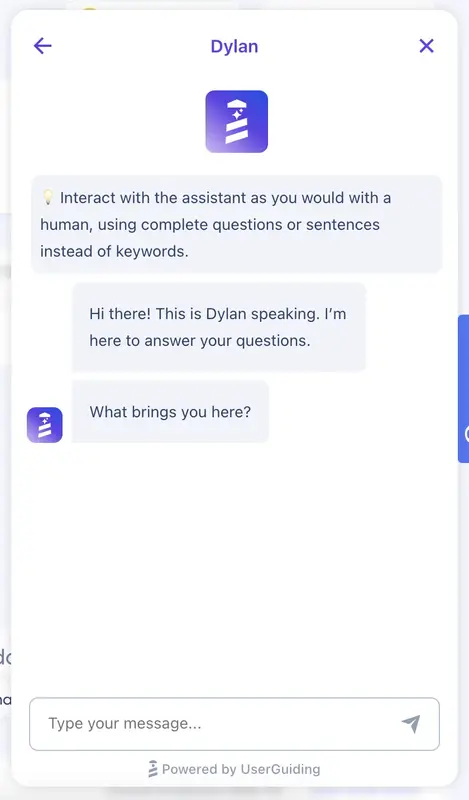
To take in-app support a step further, UserGuiding also offers an AI-powered agent that you can train using your knowledge base. It acts like a conversational chatbot, answering user questions and guiding them toward success.
Plus, if you’ve created in-app content like tutorials or walkthroughs, the AI can prompt users to engage with them when relevant.
You can also create a standalone knowledge base or help center directly with UserGuiding, which powers both your AI agents and in-app resource centers. Whatfix, on the other hand, only lets you integrate third-party knowledge bases built on external platforms, meaning extra costs and setup effort.
With UserGuiding, there’s no integration hassle or added friction.
Here’s an example of what a knowledge base built with UserGuiding looks like:

- Also for Off-product Communication and Engagement: Whatfix DAP supports in-app communication and engagement across multiple platforms: web, mobile, desktop, and even OS. But when it comes to reaching users outside of your product, Whatfix doesn’t offer much.
UserGuiding, however, steps up with Product Updates.
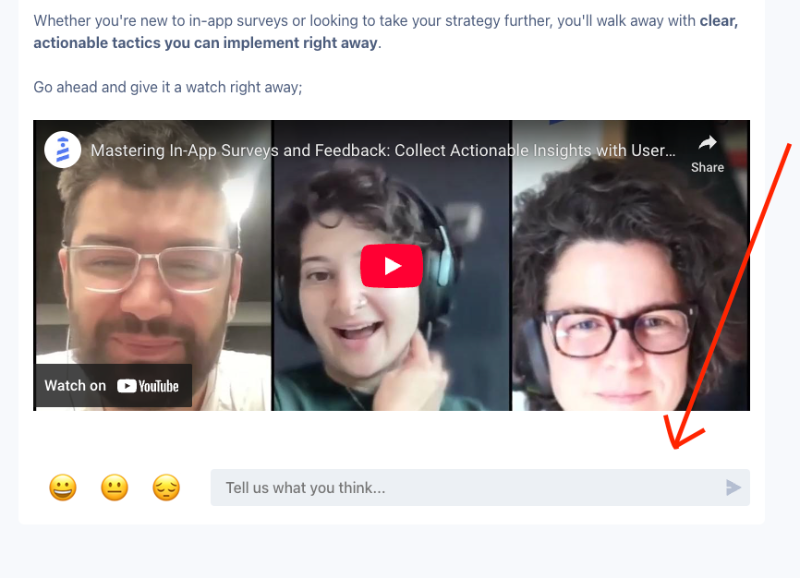
This feature lets you create a centralized hub for all your release notes, from new features to UI/UX improvements and bug fixes. It’s a go-to space where both your customers and internal teams can stay up to date with everything that’s new.
Here’s how it looks:

You can also collect anonymous feedback and emoji reactions under each release note. This turns your updates into a two-way conversation and gives customers a quick way to share how they feel about what’s new.
How much does UserGuiding cost?
UserGuiding has transparent, MAU-based pricing that allows you to estimate your cost based on your needs and expectations.
There are 3 pricing tiers: Starter, Growth, and Enterprise.
The Starter plan kicks off at $249/month (billed annually), and the Growth plan starts at $499/month (also billed annually). These prices cover up to 2,000 MAU.
And if you prefer flexibility over commitment, UserGuiding’s got you, in that case, too. Monthly billing is available for all plans. You’ll save about 30% with the annual plan, but the monthly option is there if you’re not ready for the annual option.
The feature limitations and usage caps are clearly outlined on UserGuiding’s pricing page, too. So, you know what you get with each plan.
Starter plan is designed to cover the core needs of growing teams. It includes must-have features like interactive guides, surveys, checklists, hotspots, a resource center, and basic analytics, which is enough to get small to mid-sized businesses up and running.
While there are limits on how many active materials you can have, it’s still a solid starting point.
If you need more flexibility and control, the Growth plan unlocks advanced capabilities like custom CSS, localization, A/B testing, and goal tracking. It also lifts many of the usage caps, giving larger teams room to scale.
Both plans come with 50 free AI assistant resolutions, adding even more value right out of the box. Also, AI features (Lighthouse included) are available across all plans.
In short…
Whatfix is a powerful platform with enterprise-level capabilities, especially when it comes to multi-platform support and detailed analytics. It’s packed with features, but also comes with complexity, steep pricing, and a learning curve that might not suit every team.
If you’re a growing business that needs speed, simplicity, and a modern in-app experience without relying on CSS or navigating a maze of pricing tiers, Whatfix might not be the best fit.
That’s where UserGuiding stands out.
With clearer pricing, a much friendlier interface, and all the core features most teams actually need to drive adoption, UserGuiding can be the fit you’re looking for.
Just putting it out there 👀
Frequently Asked Questions
What is Whatfix, and how does it improve digital adoption in enterprise software?
Whatfix is a digital adoption platform (DAP) built to support enterprise software users. It overlays your product with guidance elements like walkthroughs, tooltips, and checklists. These help users navigate workflows, complete tasks, and get the most out of your platform. It’s especially useful for complex systems with steep learning curves. With Whatfix, teams can drive adoption, boost productivity, and minimize confusion without relying heavily on external training.
What is Whatfix used for in employee onboarding and training workflows?
Whatfix helps companies onboard employees by guiding them inside the software they’ll use. You can build interactive walkthroughs, onboarding checklists, and task lists to train new hires without extra calls or manuals. Teams can also create quizzes and collect feedback to improve the training process. That way, employees learn by doing and become productive faster. There’s also Whatfix Mirror, which allows employees to practice workflows in a risk-free environment. It’s especially useful for complex systems like ERPs or CRMs. Combined, these tools help new hires get up to speed faster and with more confidence.
What are the key features of Whatfix, and how do they support product adoption KPIs?
Whatfix comes with a variety of tools, including in-app guides, tooltips, surveys, analytics, and user journey tracking. These features let you walk users through tasks, monitor engagement, and fix drop-offs. You also get advanced reporting to measure adoption metrics like activation, retention, and task completion. While styling and customization may take work, the overall feature set helps teams understand behavior and take action to drive stronger product adoption.
What are the use cases of Whatfix for HR platforms, CRMs, and ERP systems?
HR tools, CRMs, and ERPs are often complex and come with large-scale user bases. Whatfix helps by making these systems easier to use. You can build flows to explain new features or support task execution. It’s especially helpful during rollouts, policy changes, or compliance training. You can also tailor content by role to ensure the right people see the right content, even if the segmentation method requires effort.
What’s the difference in functionality and use cases between Whatfix and WalkMe?
WalkMe focuses heavily on employee onboarding and boosting productivity through advanced workflow automation and internal tools like SaaS spend management. It’s great for organizations that want to streamline complex internal processes beyond just user guidance. Whatfix, meanwhile, offers strong in-app guidance and digital adoption features across multiple platforms but lacks WalkMe’s deeper automation and internal operations capabilities. So, WalkMe is often preferred for comprehensive employee enablement, while Whatfix shines in multi-platform user adoption.

.png)










