.svg)
.svg)
.svg)
.svg)



.svg)



.svg)
.svg)


TL;DR
- Users rarely use all the features you build; not because they don’t need them, but because they don’t discover them at the right time or in the right context. In order to solve this issue, you need to change how you announce and promote your features.
- With feature activation and adoption, it all boils down to quick value perception, personalized messaging, and guidance.
- The best practices for driving feature adoption include:
- Announcing new features with timely, in-app prompts
- Segmenting messages by role and behavior to keep them contextual
- Guiding users step-by-step with walkthroughs and checklists
- Reinforcing updates with changelogs/product updates, and reminders
- Personalizing promotion based on user goals and maturity
- Localizing content to remove friction and build trust
- The good news? You don’t need a ton of tools or dev time. UserGuiding gives you everything you need to boost feature discovery and adoption. One platform, zero code.
Why aren’t users adopting your features?
As products evolve and add more features and capabilities, most users only end up using a fraction of what’s available. They learn the basics, maybe a few extras, but then stop exploring.
This leaves valuable functionality hidden in plain sight.
And when users only scratch the surface, the ripple effects are serious 🌊:
- They perceive the product as limited, even though it has more to offer.
- Your investment in new features feels wasted when adoption stalls.
- Retention and engagement dip because users don’t see ongoing value.
- Advanced capabilities that could drive upsells or upgrades go unnoticed.
- Competitors look more innovative simply because they showcase their updates better.
What are the best practices for boosting feature adoption?
The good news is…
The problem isn’t the quality of the features you build, it’s how (and when) users discover them. Even your best features fail to make an impact without consistent education and visibility.
So the solution is more straightforward than a new business idea.
Here’s what you need to do 👇🏻
#1 Announce features with in-app prompts during key (and relevant) workflows
The most effective feature announcements happen when the feature is immediately relevant to the task a user is performing.
This is why in-app announcements outperform emails almost every time.
With email, you can never be sure you’re reaching users at the right moment. Even with advanced automations, messages often get buried under newsletters, support tickets, and daily clutter.
✅ But when you promote a feature inside the product, you:
- Ensure perfect timing (users see the feature when it matters)
- Boost engagement (mid-action prompts feel like help, not ads)
- Increase adoption consistency (everyone gets the right nudge based on usage and engagement patterns)
#2 Segment messages by role and usage patterns
In-app feature promotion is more effective than email, but it still requires further effort to achieve successful engagement. User segmentation increases the contextuality and relevance you achieve with in-app messages and announcements.
Different users have different needs and priorities, and thus are interested in different features.
That means the path to adoption isn’t the same for everyone.
Segmentation and targeting allow you to guide each user towards the most relevant features to their roles, needs, and expectations.
➡️ Segmentation in in-app messaging can look like:
- Showing role-specific pro usage tips (for managers vs. team members).
- Highlighting advanced features and capabilities to power users.
- Nudging new/trial users who haven’t finished the onboarding checklist.
- Guiding users who skipped tutorials to revisit key tips.
- Promoting premium features and upgrades to active and loyal users.
#3 Guide with interactive walkthroughs or checklists
With in-app messages and nudges (like tooltips, hotspots, and popups), you can increase your feature awareness and ensure that your users know that there are (more) capabilities for their success.
However, awareness doesn’t guarantee adoption.
Users need guidance on how to get value out of the introduced features to truly start using them and make them a part of their workflow.
You can achieve this with interactive walkthroughs and checklists.
For example, you can…
- Trigger walkthroughs directly from your announcement hotspots.
- Break down feature discovery into small, achievable steps with checklists.
- Create quick and personalized routes to value realization (aha moments).
#4 Reinforce via changelogs and updates
Even with contextual prompts, some users will miss new features. Or simply postpone them for a later time and thus need off-app sources to remember.
That’s why reinforcement is key.
Product update hubs, changelogs, and in-app update boosters give users multiple chances to discover and/or re-engage with a feature.
📌 Here’s a quick outline of what successful feature promotion looks like:
- Start with a contextual in-app announcement. Use a modal, hotspot, or banner to reach a relevant user segment (based on attributes or engagement patterns) at the right time and place.
- Guide users with walkthroughs or checklists. From the announcement, trigger an interactive tour. You can also create onboarding checklists and trigger your walkthroughs from there.
- Reinforce with advanced tips. After the first interaction, keep the feature visible with tooltips, nudges, or hotspots that show users how to integrate it into their workflow.
- Keep an off-app hub for your releases (a changelog or a product updates page). Unlike ephemeral in-app prompts, standalone release notes ensure updates stay accessible, with room for deeper explanations and examples.
- Bring off-app announcements into the app. Link your product updates page to the in-app resource center, and boost major releases with a slideout or pop-up so they stay visible.
UserGuiding can help you!
If you’re wondering whether all these best practices require juggling multiple tools, they don’t.
With UserGuiding, you can do it all in one place.
UserGuiding is a no-code, all-in-one product adoption platform that helps you drive feature discovery, boost engagement, and increase adoption through interactive experiences.
👇🏻 Here’s what you can create with UserGuiding:
1) Tooltips to trigger contextual nudges
Tooltips are one of the simplest yet most effective ways to guide users without overwhelming them. They appear exactly where the user’s attention already is, add quick context or prompt the next step.
For example, you can use tooltips to point out filters on a dashboard, or explain an icon that might not be intuitive on its own.
Here’s a tooltip that highlights a specific dashboard view:

🚀 With UserGuiding, you can:
- Design tooltips from templates or from scratch with a drag-and-drop no-code builder.
- Add media like GIFs or images to make the nudge more engaging.
- Decide when and where the tooltip shows up (based on page, element, or user behavior).
- Trigger guides, links, or popups directly from tooltips for deeper exploration.
⚠️ Don’t overcrowd your UI with too many tooltips. Try to use them sparingly and only where context is key.
2) Hotspots to highlight features in context
Hotspots work like subtle signposts inside your product.
They’re more noticeable than tooltips because they use beacons (little markers that catch the eye). If you want to stay subtle, you can use static beacons. If you need something more attention-grabbing, you can go with pulsating beacons.
Here’s an example hotspot with an embedded video:
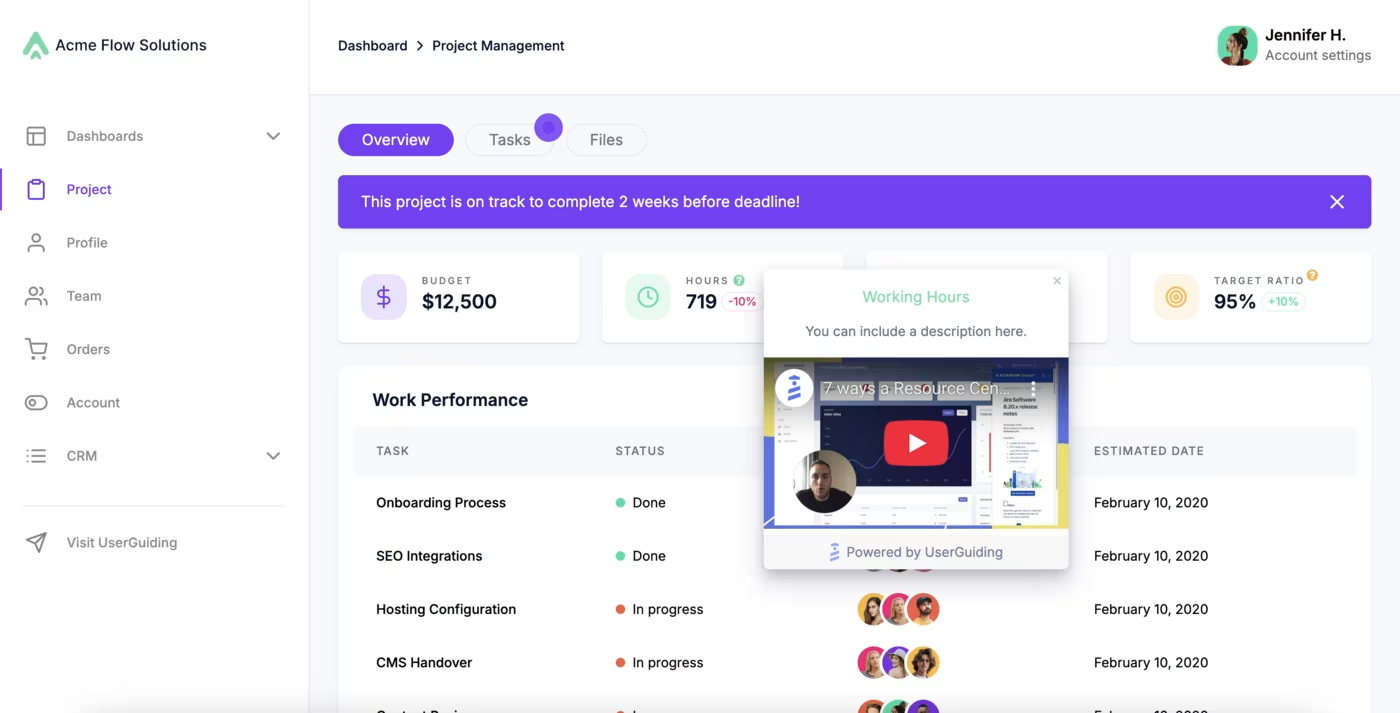
You can use UserGuiding’s hotspots to:
- Announce new features without blasting users with a pop-up modal.
- Encourage exploration of underused features.
- Trigger guides or videos when users engage with the hotspot.
3) Guides to point out relevant features
Sometimes, a single tooltip or hotspot isn’t enough to drive adoption. That’s when interactive guides and product tours come in.
Guides string together multiple steps to walk users through a feature in context, step by step, right inside your product. They typically combine tooltips and modals, and you can enrich them with visuals like screenshots, GIFs, or even videos to make learning more engaging.
To keep users motivated, it’s also a good practice to add a progress indicator, like a progress bar or “steps left” counter.
Here’s an example modal that triggers a guide for learning how to track an order:
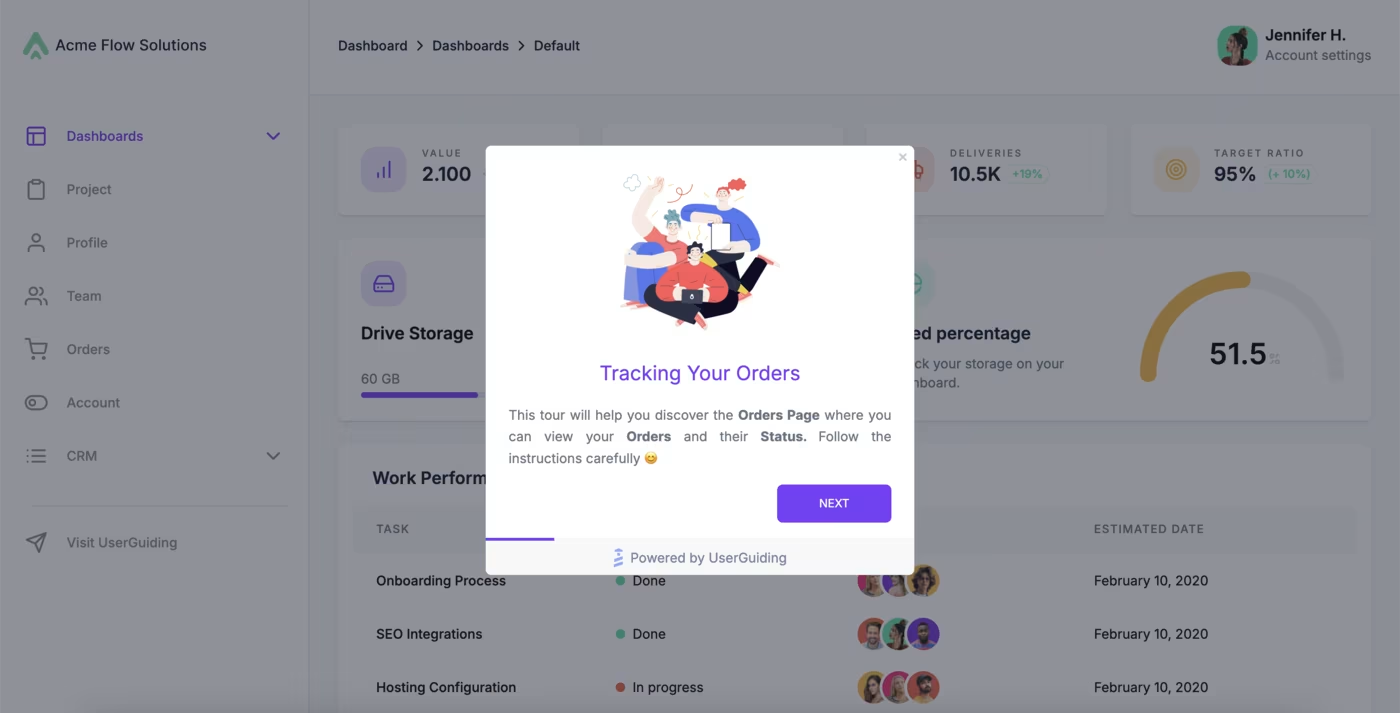
With UserGuiding’s guides, you can:
- Launch guided tours from modals, hotspots, or checklists.
- Walk users step-by-step through workflows to bring them to value realization.
- Personalize guides for different segments, so each user only sees what’s relevant and how they can use your product for their use case.
- Track completion and engagement to see what resonates with your users.
⚠️ Like onboarding flows, guides should be short (preferably less than 6 steps) and purposeful. Try to break longer processes into smaller guides that users can access from a checklist or resource center, and offer flexibility with skippable steps.
⚡ On average, a company manages 15 interactive guides to offer quick and tailored guidance.
4) Segmentation for targeted messaging
No matter how good your tooltips, hotspots, or guides are, they’ll fall flat if everyone sees the same thing. Context comes from showing the right message to the right user at the right time.
⚡ That’s why among products that offer in-app experiences and messaging, 74% of them personalize their content with segmentation.
And on average, a company manages 15 segments.
Here’s an example scenario:
Imagine a task management tool, let’s say Trello, experiencing low engagement with its templates. To boost template discovery and help users get comfortable starting a new view, the platform triggers a modal with two goals:
- Understand users and their general tendencies.
- Offer relevant walkthroughs tailored to their needs.

Depending on the user’s choice (and their response, of course), the platform launches a guided tour showing how to use a specific template along with best practices.
For instance, selecting the Kanban option could trigger a tour like this:
Besides a manually segmented experience, where users choose their own path, you can also create tours and experiences that are automatically triggered for specific user groups (segments) you define in advance.
With UserGuiding’s segmentation, you can:
- Target users based on user/customer attributes (role, plan, country, etc.).
- Segment by behavior (finished onboarding, used a feature, skipped a step).
- Upload custom user segments via CSV.
⚠️ Effective segmentation keeps your messaging relevant, avoids “banner blindness,” in your users, and drives higher adoption.
5) Performance tracking for onboarding materials
Creating in-app experiences is only half the job, you also need to know what’s working. UserGuiding gives you detailed reports on every guide, tooltip, and hotspot.
For example, the Reports tab for the Guides shows:
- Total Seen → how many times a guide or tooltip was viewed.
- Total Completion → how many users finished it.
- Completion Rate → % of users who went all the way through.
- Step Completions → where users drop off in a guide.
- Click Actions → which CTAs/buttons are clicked, with % and counts.
⚠️ With button click tracking, you can A/B test CTAs to see which wording or placement gets more clicks.
6) Impact reports to understand how material engagement influences goals
Reports tell you how users interact with onboarding materials. Impact reports go further: they show how those materials (and actions inside them) contribute to actual product goals.
So before talking about impact reports, let’s very briefly talk about goals.
UserGuiding allows you to set and track goals to gain insights into user engagement and overall performance.
By default, goals can be based on UserGuiding’s material interactions, but you also have the option to create custom event-based goals for more precise insights. But you need to send custom attributes for the latter.
And impact reports are where you can visually assess how well users achieve defined goals on your platform.
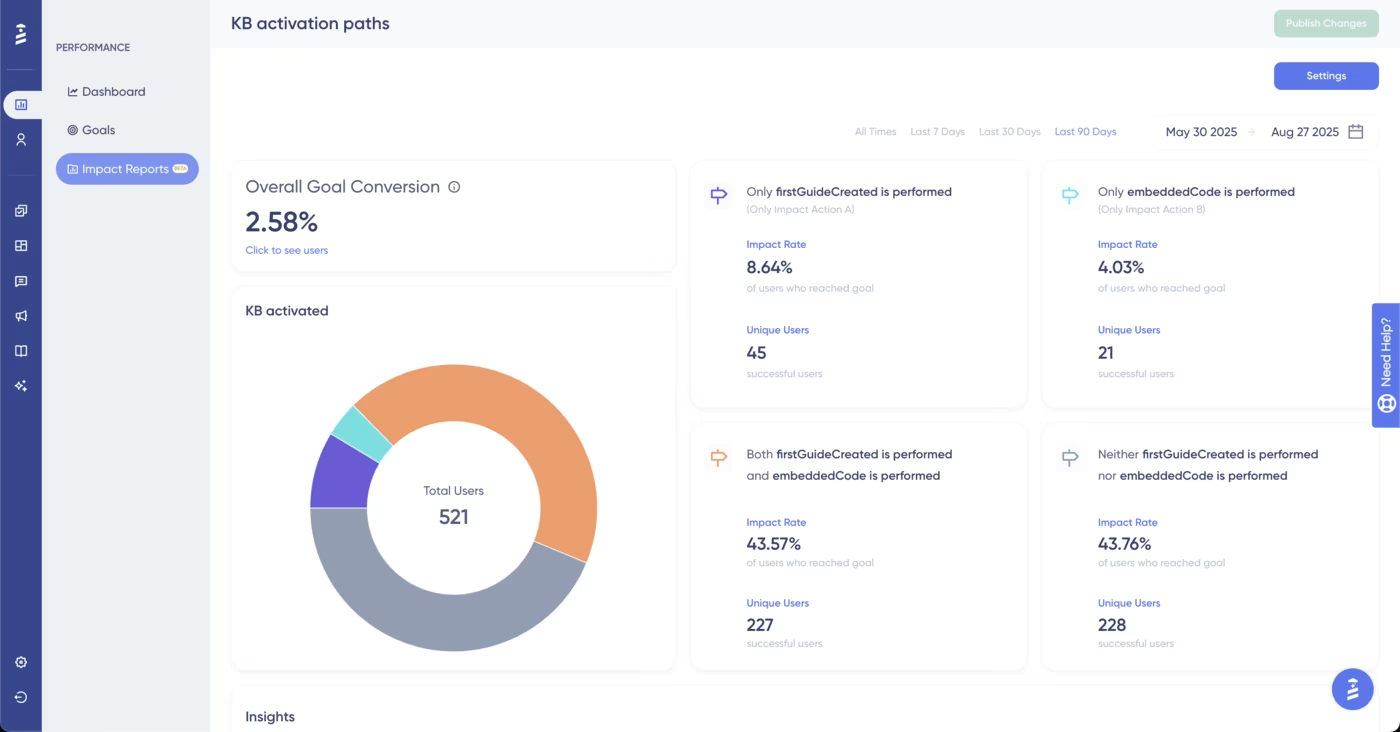
With Impact Reports, you can:
- Track overall goal conversion rates and compare them week to week.
- Break down which impact actions helped drive goal completion.
- See a clear picture with visual charts and insights.
For example, you might discover that users who completed an “Orders Page” guide are 3x more likely to create their first order. That’s the kind of insight that tells you what onboarding content is really moving the needle.
Pro usage tips for successful feature discovery and adoption
1️⃣ Introduce features in small, task-focused steps. Micro-learning keeps users engaged and prevents cognitive overload.
2️⃣ Highlight quick wins and time savings. Users are more likely to adopt what makes their lives easier. Showcase the immediate value of your key features in ways that connect to their real use cases.
3️⃣ Gather feedback to improve onboarding. It’s rare to nail the most effective, helpful, and optimized flow on the first try. That’s why it’s essential to listen to actual users through feedback loops and refine continuously.
- 42% of companies that offer in-app experiences utilize in-app surveys to collect feedback and improve their onboarding based on real customer insights.
4️⃣ Promote features based on customer goals. A power user and a beginner will value different features, or even different aspects of the same feature. Personalization ensures your messaging feels relevant and increases the likelihood that users will engage with your recommendations.
5️⃣ Localize content to match the user’s language and region. Breaking down language barriers is one of the simplest ways to improve adoption. (And always a good start to build trust)
👉🏻 Check out our product adoption report to see how 500+ companies across 50+ industries are onboarding their users.
What positive outcomes can you expect with UserGuiding?
Companies leveraging UserGuiding’s interactive UX elements, such as product tours, hotspots, and checklists, have seen dramatic improvements in feature adoption and user engagement.
Here are some highlights:
- Indicata → Product tours drove a 47% increase in feature adoption during a new functionality launch. In just the first 7 days, 47% of active users engaged with the feature tour, and 34% interacted with the supporting hotspots.
- Plandisc → Hotspots improved feature adoption by 15% in just one week for a key capability, while also boosting user retention.
- Kariyer.net → By using segmentation, checklists, and tooltips, they personalized onboarding for different employer roles without relying on developers. This approach reduced confusion, boosted activation and engagement, and sped up onboarding iterations.
Final words…
Driving feature adoption comes down to clarity, relevance, and timing in messaging.
With UserGuiding’s interactive elements, you can showcase value when it matters most, helping users not just discover features, but actually use and adopt them.
Want to turn more features into success stories?

.png)