

.svg)
.svg)
.svg)
.svg)



.svg)




.svg)
.svg)

Customers tag you on social media to ask for help. They share important context in emails. Their web data tells what they’ve been engaging with the most. But none of this data is connected to a single platform.
It is fragmented and lives in silos.
And as a result, your team has to surface customer history, see where customers drop off, and bring the pieces of this puzzle every time to map out the customer’s engagement journey.
With a system like this, things fall through the cracks more easily, and the fragmented data will eventually mislead your team and cause your customer to wait too long for a simple fix.
Then, they will cancel their subscription. So to scale your retention as a SaaS business, you need to unify all engagement data points.
And customer engagement platforms with CRM (customer relationship management) integrations are the best way to do that. They sync real-time behavioral data with static CRM records, then trigger personalized campaigns.
In this post, we’ll compare the top 10 tools that will get this job done in 2026.
TL;DR
- Customer engagement platforms with CRM integrations sync real-time behavioral data with CRM records to trigger personalized campaigns.
- A unified customer profile adds context to interactions and allows teams to engage when intent is highest.
- No-code customer engagement tools give you speed, simplicity, and accessibility for non-developers. On the other hand, API-driven customer engagement tools offer deep customization, control, and flexibility for developers.
Why A Unified Customer Profile Is Non-Negotiable in 2026
Customer engagement is no longer a sequence of disconnected touchpoints. It’s a continuous data loop. When social engagement, website behavior, and CRM records are unified, every customer action becomes an actionable signal.
The process is straightforward: Social campaigns drive traffic → Website behavior reveals intent → CRM updates instantly.
Instead of discovering interest days later, teams respond the moment a signal appears. And such a unified system connects three operational layers: Social, Web, and CRM.
1) Social: Entry Point
A prospect clicks on a social campaign or organic post. Tracking parameters capture campaign source, audience segment, and message variation.
2) Web: Intent Signals
Once on the website, behavioral analytics track meaningful activity:
- Product or feature page visits
- Pricing page views
- Content downloads
- Demo or trial interactions
Each action adds context to the visitor profile.
3) CRM: Real-Time Intelligence
These events stream directly into the CRM. Known contacts are enriched; unknown visitors generate new profiles. Sales and customer success teams now see live engagement signals instead of static records.
Behavioral analytics transforms CRM from a contact database into an intelligence engine. Key capabilities include:
- Predictive churn alerts based on engagement decline
- Dynamic lead scoring from real-time behavior
- Personalized onboarding triggers tied to product interest
- Intent-based segmentation from behavioral patterns
- Automated sales notifications for high-value actions
This allows teams to engage when intent is highest, not after momentum fades.
Best Integrated CRM and Analytics Software: Comparison at a Glance
Don’t have the time to read through all the tools yet? We’ve gathered a table to give you the highlights:
💡 This table was created by using real user reviews on platforms like Reddit, G2, and Capterra.
Deep Dive: 10 Platforms for Customer Engagement and CRM Sync
Here’s the full breakdown of the top 10 platforms to sync your customer engagement efforts with a CRM.
At the end of each tool’s breakdown, you’ll find a “No-code score” between 1 and 10. This score is determined based on three factors:
- Native no-code builders/automation
- How much technical setup is required
- How often teams need developers for integrations or advanced use
#1: Service Creatio
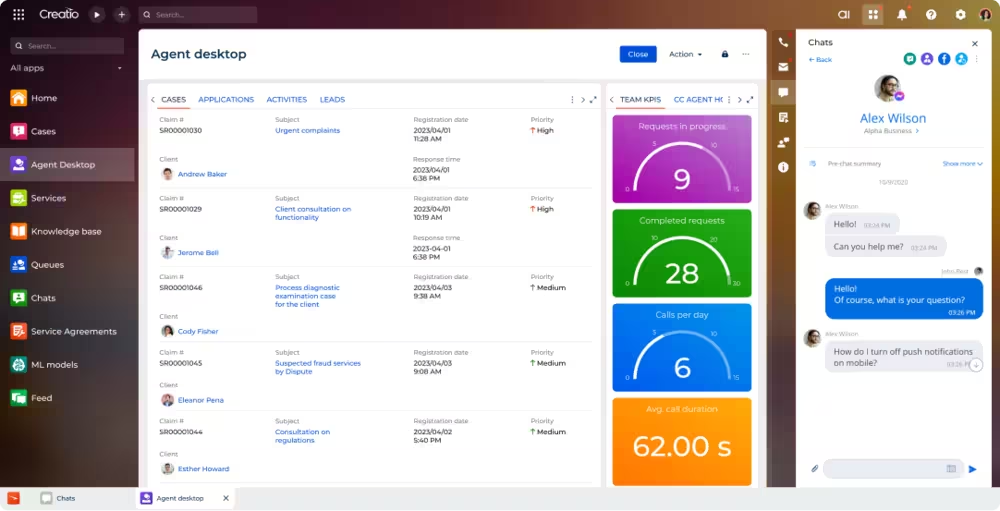
Service Creatio is an AI-powered, no-code platform that manages full-cycle customer service. Here’s a breakdown of its highlights 👇
Best for: Agentic customer service with AI automations
Core features:
- 360 degree customer view: One central view of all customer interaction history across every communication channel you use
- Case management: Automated case registration and classification (via email, phone, forms), smart routing, escalation paths, and full lifecycle support
- Multi-channel and contact center tools: Omnichannel support, unified agent desktop, and intelligent queue systems
CRM integration: Integrates with Zapier and the API collection uses OData 3 and 4
Scaling price reality: After choosing a platform plan (starting at $25/mo per user), you can add Service for an additional $15/mo per user.
✅ Pros:
- Minimal coding for customization
- Easy to use
- Responsive support
❌ Cons:
- Limited customization
- Unreliable product stability
⭐ No-code score (1-10): 9
Why:
Service Creatio is built specifically as a no-code workflow and CRM platform. Most automations, case routing, and service processes can be built visually without developers. Customization is largely done through visual tools.
Deduction:
- Some deeper integrations rely on APIs (OData)
- Complex enterprise workflows can still require technical configuration
Overall, it’s one of the strongest no-code CRMs in the service category.
#2: HubSpot
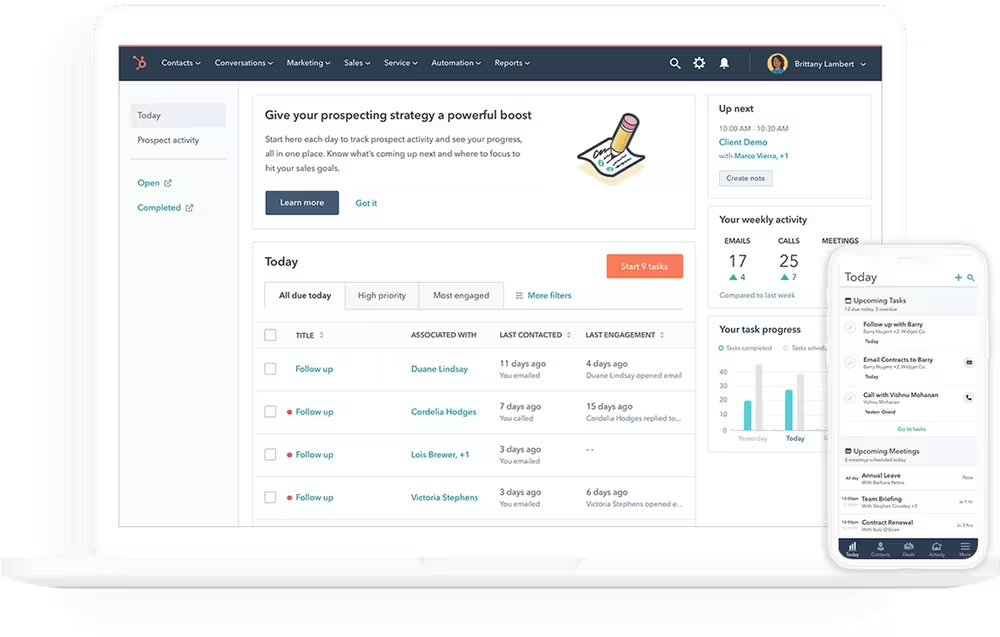
HubSpot, mostly known for its marketing services, also offers a free CRM system for startups and small businesses. It unifies customer data and sales tools in a single system.
Here’s the full breakdown 👇
Best for: Full customer context and reporting
Core features:
- Unified customer view: Create contacts, keep records up to date, and bring all communication history together
- Pipeline management: Visualize your entire sales cycle, assign tasks, and improve forecasting
- Reporting dashboard: Create a single source of truth for all your marketing, sales, and customer service teams and make it visible 24/7
CRM integration: Integrates with Salesforce and Apollo.io
Scaling price reality: Free with the option to upgrade. The premium customer service tool has plans ranging from $9/mo per seat to $150/mo per seat.
✅ Pros:
- Centralized organization
- Intuitive UI
- Simple lead management
❌ Cons:
- Limited customization
- Pricing
- Limited mobile app capabilities
⭐ No-code score (1-10): 8
Why:
HubSpot is extremely non-technical user friendly. Marketing automation, pipelines, dashboards, and workflows are built through visual tools.
Deduction:
- Advanced customization is limited without developers
- Larger companies often rely on integrations or custom apps
Great for no-code operations, but less flexible for heavy customization.
#3: Zoho CRM
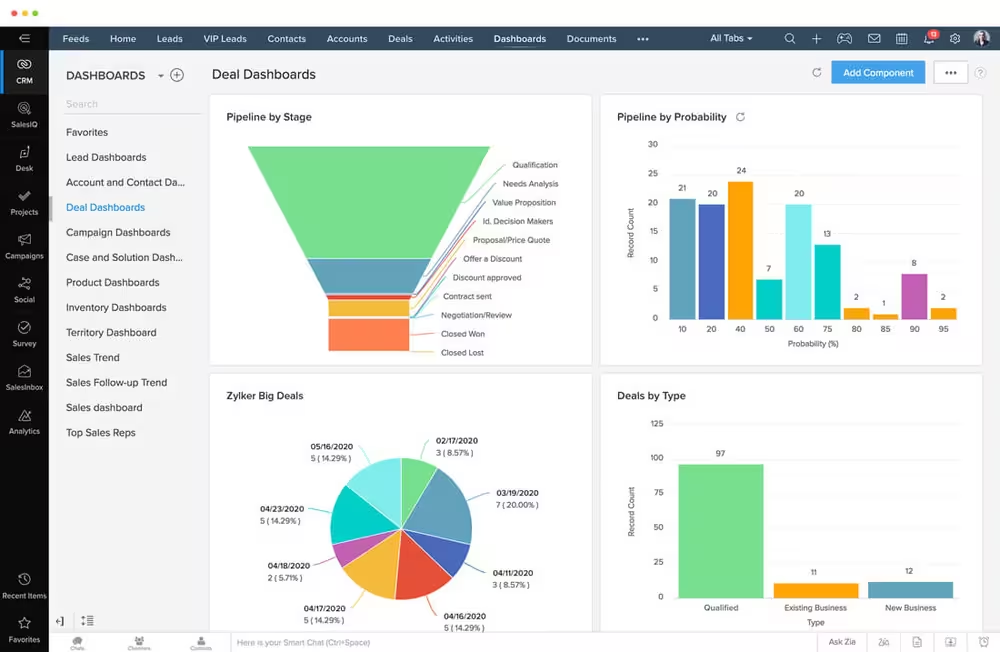
Part of the Zoho ecosystem, Zoho CRM is a cloud-based 360-degree CRM built for managing sales, marketing, and customer support processes. It mainly serves mid-to-enterprise SaaS businesses.
Here’s what Zoho CRM offers 👇
Best for: Cost-conscious teams needing a native CRM and engagement platform
Core features:
- Zia (AI assistant): Provides conversational insights, anomaly detection, data enrichment, and predictive forecasting to improve efficiency
- Process management: Defines and enforces sales processes to guide team members through each stage, from lead to closure
- Customization and Canvas: Allows tailored layouts, custom modules, and drag-and-drop design using Canvas to match specific business needs
CRM integration: Zoho CRM is a standalone CRM platform, but includes over 1,000 integrations to extend its CRM capabilities
Scaling price reality: Offers four plans — Standard, Professional, Enterprise, and Ultimate. The prices range from $14/mo per user to $52/mo per user when billed annually. Add-ons and bundles may increase the price.
✅ Pros:
- Ease of use
- Extensive integration suite, especially with the Zoho ecosystem
- Effective lead management
❌ Cons:
- Slow loading times
- Long support wait times
- Overwhelming user interface
⭐ No-code score (1-10): 7
Why:
Zoho offers Canvas drag-and-drop customization, automation rules, and workflows that non-technical users can configure.
Deduction:
- The interface can be complex
- Advanced automation often requires scripting (Deluge)
It’s partially no-code, but power users often dip into low-code.
#4: Zendesk
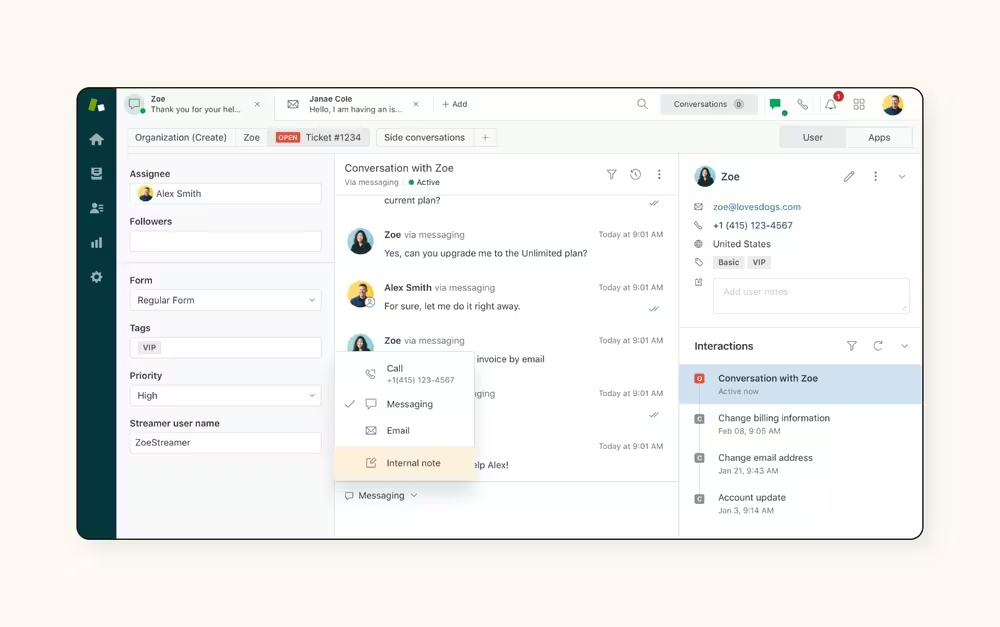
Zendesk is an AI-powered customer service solution that brings together customer conversations from all channels in one dashboard.
The agent workspace helps agents effectively manage and respond to every conversation with full customer context.
Here’s a breakdown of its highlights 👇
Best for: Support-led organizations that want to integrate engagement into support flows
Core features:
- AI agents and automation: Resolves complex issues on any channel, uses reason to respond to queries, and automates manual tasks with AI so agents can focus on complex queries
- Ticketing: Brings email, messaging, phone, and social media into a single dashboard and gives the agents the right information in a shared inbox
- Quality assurance: Provides AutoQA scores, spots critical issues, and automates quality reviews
CRM integration: Zendesk Marketplace offers more than 300 CRM integrations
Scaling price reality: Offers four plans for customer service — Support Team, Suite Team, Suite Professional, and Suite Enterprise. These plans range from $19/mo per agent to $169/mo per agent, billed annually. You can bundle the customer service suite with Zendesk’s Copilot.
✅ Pros:
- Unified Zendesk ecosystem
- Customer support tracking
- Efficient ticket management
❌ Cons:
- Limited features for smaller teams
- Steep learning curve
- Ticketing issues that disrupt the workflow
⭐ No-code score (1-10): 7
Why:
Zendesk has strong workflow automation, routing rules, and configuration tools that support teams can manage without developers.
Deduction:
- Advanced customization often requires apps or APIs
- Complex integrations require technical setup
Strong operational tool, but not designed primarily as a no-code platform.
#5: Countly
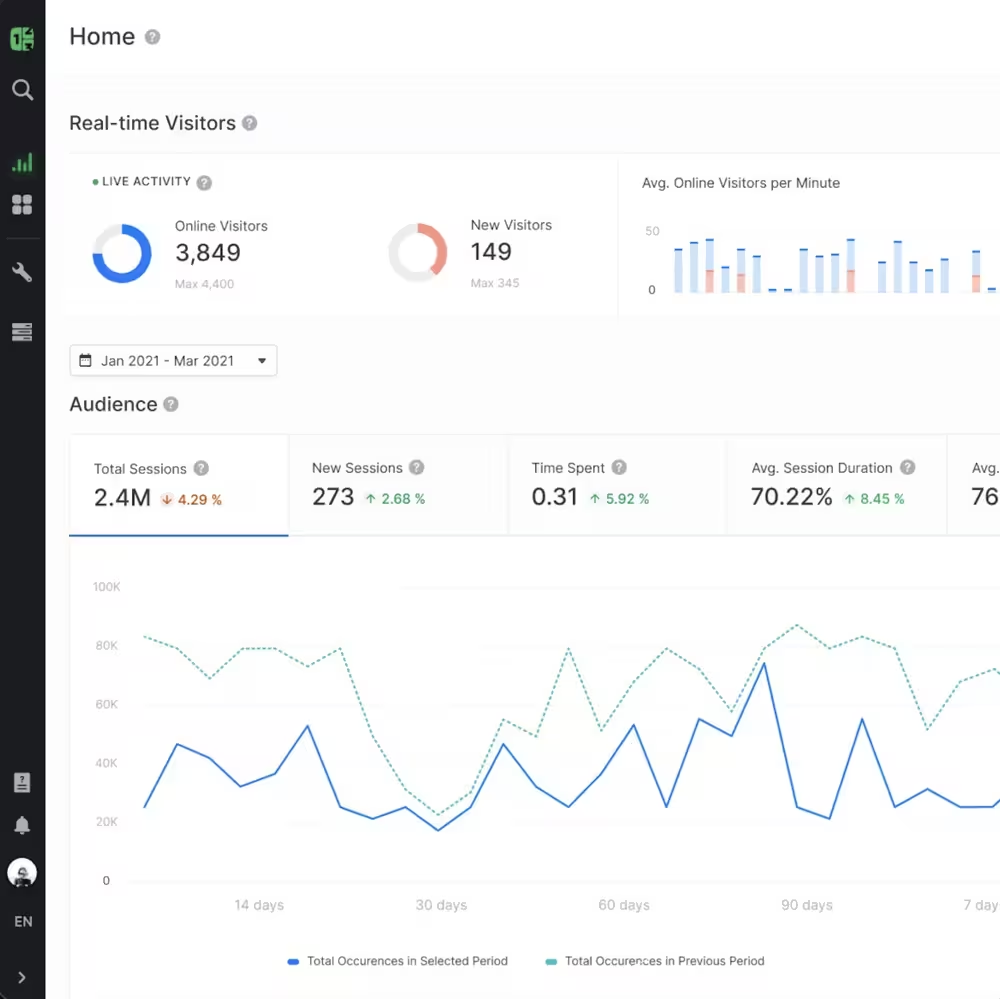
Countly is a first-party digital analytics and customer engagement platform that lets you capture, analyze, and act on behavior data in real-time from any device or touchpoint while keeping everything private.
Here’s what Countly offers 👇
Best for: Teams prioritizing first-party data ownership and self-hosting options
Core features:
- Behavioral analytics: Tracks user actions, sessions, and events in real-time, including funnels, cohorts, and user journeys
- Remote configuration: Dynamically alters app behavior without requiring users to update
- Data ownership: Offers on-premise or private cloud deployment, ensuring full control over data
CRM integration: Open APIs and flexible data ingestion methods designed to enhance user context
Scaling price reality: Offers four plans for customer service — Lite, Flex Free, Flex, and Enterprise. Lite and Flex Free are trial plans to show Countly’s capabilities with the former being self-hosted and the latter a private cloud. The Flex plan starts at $40/mo while Enterprise is customly billed.
✅ Pros:
- Simple interface
- Mobile data analysis
- Open source
❌ Cons:
- Limited feature capabilities
- Manual coding
⭐ No-code score (1-10): 4
Why:
Countly focuses on analytics infrastructure and first-party data collection, not no-code automation.
Deduction:
- Event tracking requires SDK implementation
- Setup typically involves developers
- Self-hosting increases technical overhead
Powerful platform, but developer-dependent.
#6: Amplitude
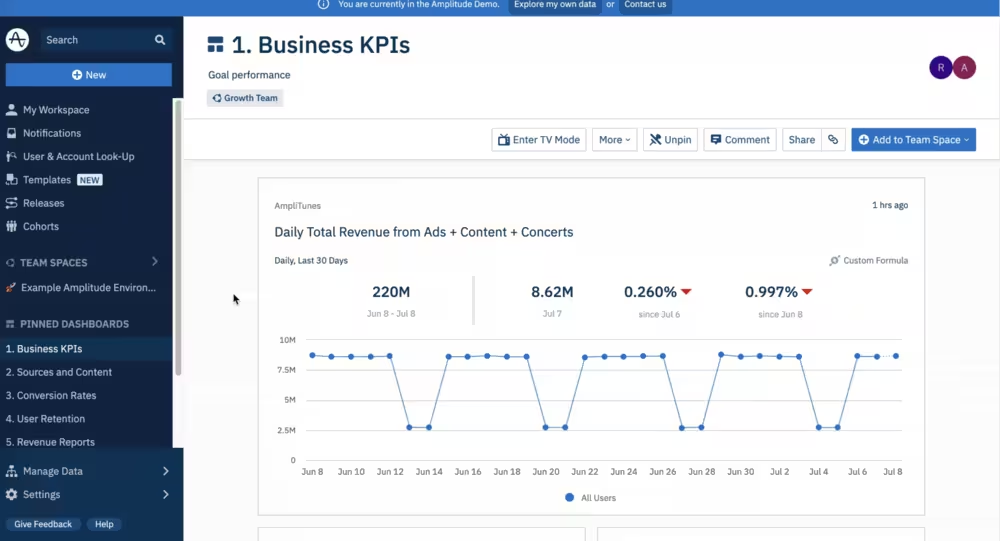
Amplitude is a behavioral analytics leader, specializing in onboarding optimization, retention and cohort analysis, feature adoption and engagement.
Here’s what Amplitude offers 👇
Best for: Data-driven product teams needing advanced behavioral analytics
Core features:
- CRM dashboard: Analyzes interactions, lead status, and sales performance by visualizing CRM data
- Behavioral analytics and event tracking: Tracks specific actions (events) users take within a product to understand engagement, rather than just page views
- User cohorting and segmentation: Groups users based on shared behaviors, demographics, or actions
CRM integration: Amplitude pairs with Salesforce, HubSpot, and Braze
Scaling price reality: Offers four plans — Starter, Plus, Growth, and Enterprise. The Starter plan is Free, while the other plans range from $49/mo to custom billing.
✅ Pros:
- Versatile data slicing
- Powerful reporting features
- Intuitive interface
❌ Cons:
- Pricing
- Missing features (especially for data visualization and formula application)
⭐ No-code score (1-10): 6
Why:
Once data is instrumented, the analytics interface is very no-code friendly for segmentation, dashboards, and cohorts.
Deduction:
- Initial event tracking requires engineering
- Product instrumentation is developer-heavy
Non-technical teams can analyze data easily, but developers must implement tracking first
#7: Pendo
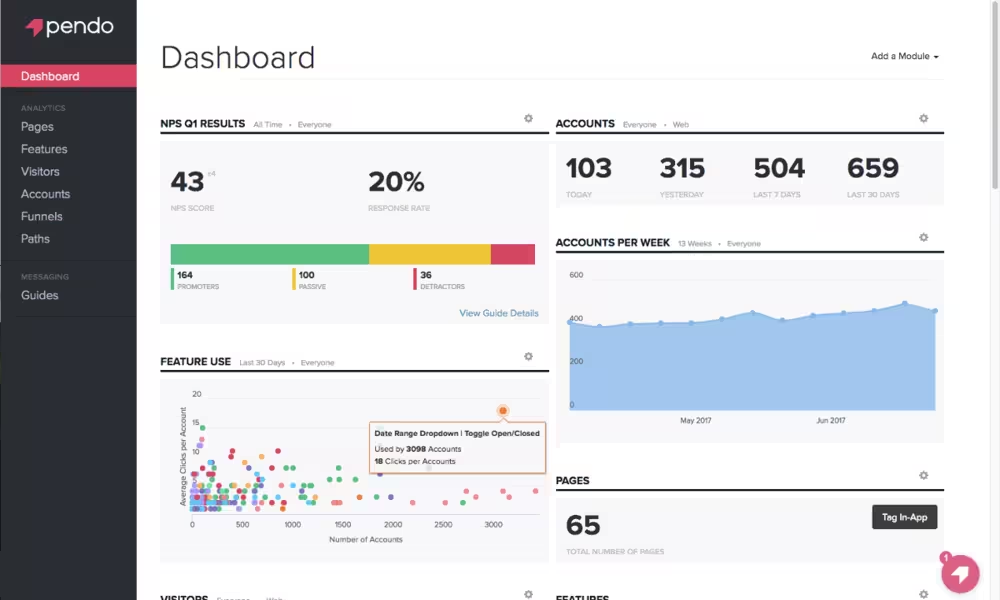
Pendo is an analytics and product adoption platform that focuses on creating better experiences for customers and employees.
Here’s a breakdown of its highlights 👇
Best for: Product teams that need in-app onboarding without development cycles
Core features:
- Product analytics: Tracks and visualizes user journeys, app usage, and specific product engagement scores
- In-app guides: Delivers targeted and interactive product walkthroughs, onboarding messages, and tooltips to educate and engage users
- Pendo Listen: Collects and analyzes qualitative user feedback to validate ideas and prioritize product roadmaps
CRM integration: Offers CRM integrations through two-way data syncing to bridge product usage with insights, using Salesforce, HubSpot, and Snowflake
Scaling price reality: Offers four plans — Free, Base, Core, and Ultimate. All plans except for Free are custom-priced and have custom monthly active user (MAU) limits.
✅ Pros:
- Detailed analytics feature
- Strong in-app guidance capabilities
❌ Cons:
- Steep learning curve
- Pricing
⭐ No-code score (1-10): 8
Why:
Pendo is built for no-code product experience management:
- Visual guide builder
- In-app messaging
- Feature tagging without code
Deduction:
- Initial setup and product instrumentation may require developers
Very strong no-code experience once deployed.
#8: Braze
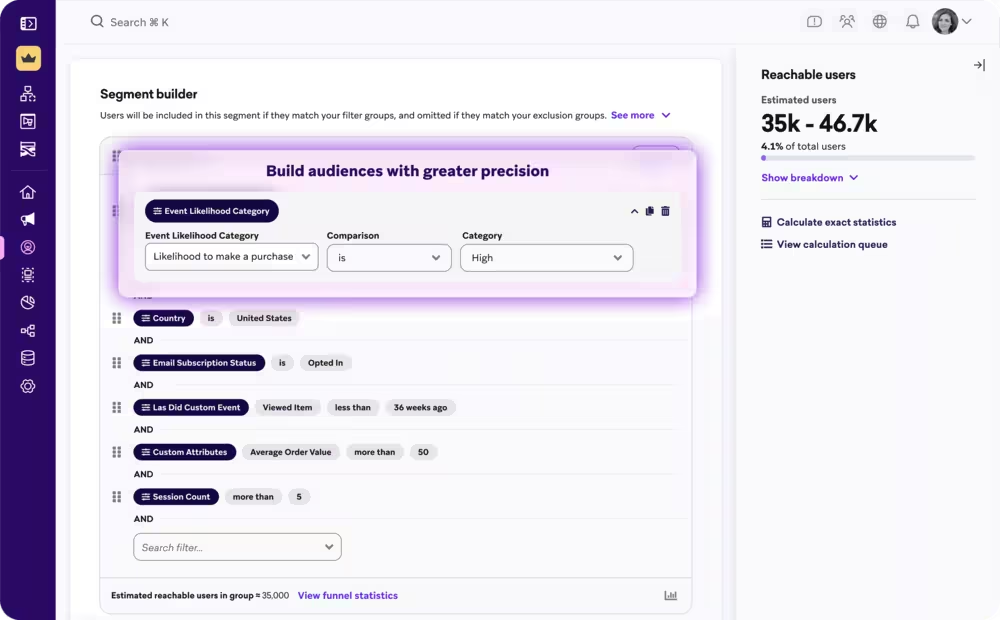
Braze is a cross-channel messaging and journey orchestration platform for analyzing customer engagement.
Here’s a breakdown of its highlights 👇
Best for: Growth teams focused on multi-channel campaigns at scale
Core features:
- Cross-channel orchestration: Delivers consistent experiences across mobile, web, email, and SMS, enabling push notifications and automated follow-ups
- Braze canvas flow: A visual, drag-and-drop journey builder that allows marketers to automate complex user workflows and personalize messaging based on real-time behavior
- Data ingestion and segmentation: Collects live data from various sources such as SDK and API to create detailed customer profiles and dynamic, real-time audience segments for targeted campaigns
CRM integration: Acts as an execution layer for real-time customer engagement and uses CRM data (from Salesforce, Microsoft Dynamics, or HubSpot) to trigger personalized omnichannel messaging
Scaling price reality: Doesn’t offer public, tiered pricing. Vendr reports $88,506 as the average contract value.
✅ Pros:
- User-friendly interface
- Personalized, real-time customer journeys
- Hands-on customer support and regular check-ins
❌ Cons:
- Limited landing pages
- Analytics
- Learning curve
⭐ No-code score (1-10): 6
Why:
Braze Canvas provides visual journey orchestration, segmentation, and campaign automation.
Deduction:
- Requires developer SDK implementation
- Data pipelines and integrations are technical
Great marketing tool, but not purely no-code.
#9: Intercom
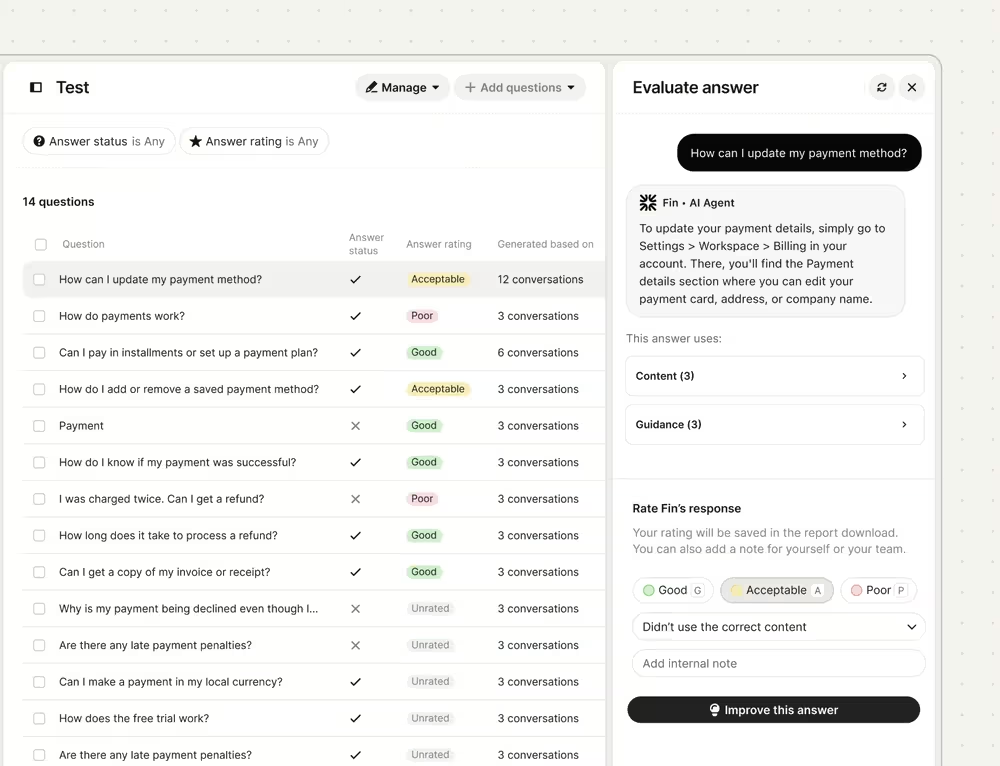
Intercom is an AI-driven customer service platform that specializes in conversational engagement and product-led growth.
Here’s what Intercom offers 👇
Best for: Product-led teams that need in-app messaging and support
Core features:
- Fin AI agent and Copilot: Resolves customer issues instantly using knowledge base content, while the Copilot assists human agents with response drafting and summarization
- Conversational support funnel: Allows customers to self-serve through bots, or routes them to a human agent, aiming to reduce ticket volume
- Shared inbox: A collaborative workspace for teams, allowing them to manage customer interactions from multiple channels in one place
CRM integration: Native CRM integrations through Intercom App Store
Scaling price reality: Offers three plans — Essential, Advanced, and Expert. The plans range from $29/mo per seat to $132/mo per seat when billed annually. Fin AI agent is billed separately, $0.99 per Fin outcome.
✅ Pros:
- Easy navigation
- Powerful query resolution
- Efficiency in handling customer queries
❌ Cons:
- AI limitations
- Pricing
⭐ No-code score (1-10): 8
Why:
Intercom is designed for non-technical support and product teams:
- Chatbots
- Messaging flows
- Automation rules
- Knowledge base setup
Deduction:
- Deep customization or product data integration may require developers
Very accessible for product-led teams.
#10: Twilio
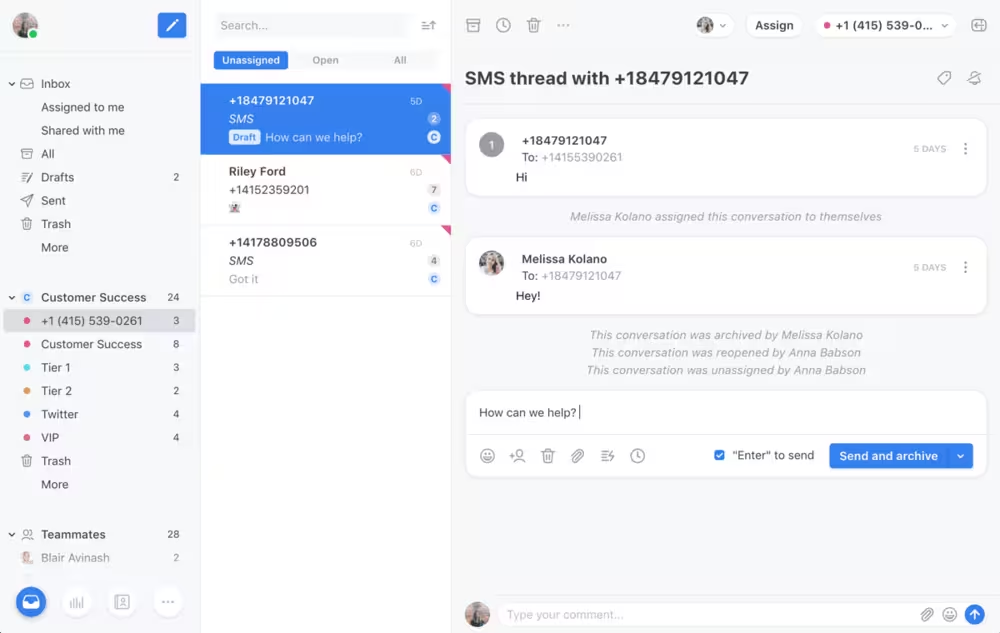
Twilio is a developer-first communications platform that provides APIs for developers to integrate voice, messaging, video, and email functionalities into apps. It helps companies build personalized customer engagement experiences without managing backend infrastructure.
Here’s what Twilio offers 👇
Best for: Teams that require highly customizable communication APIs
Core features:
- Programmable SMS, messaging, and voice: Builds complex IVR systems and call-tracking solutions for voice calling, while also offering SMS, MMS, and over-the-top (OTT) messages like WhatsApp in over 180 countries
- Email API: Enables high-deliverability transactional and marketing emails through SendGrid
- Twilio Studio: A drag-and-drop visual builder that creates communication workflows (such as chatbots and call centers) without extensive coding
- Twilio Flex: A fully programmable and customizable cloud-based contact center platform
CRM integration: API-based integrations available
Scaling price reality: Breaks down plans into six categories — Communications, Customer Data, Authentication, Conversational AI, Builder Tools, and Support. Pricing is based on usage.
✅ Pros:
- Easy setup
- Easy API integration
❌ Cons:
- Pricing
- Difficult configuration
- Messaging difficulties, especially with SMS resolution
⭐ No-code score (1-10): 3
Why:
Twilio is fundamentally a developer platform built around APIs.
Deduction:
- Most implementations require engineering
- Workflows are typically built through code
- Twilio Studio helps, but still technical
Extremely powerful, but not a no-code platform.
No-Code vs API-driven: Choosing Your Integration Strategy
Speed. Simplicity. Accessibility for non-developers. That’s what you get with no-code customer engagement tools.
API-driven customer engagement tools, on the other hand, offer deep customization, control, and flexibility for developers.
With no-code engagement tools like UserGuiding, Pendo, or Userpilot, you get interactive product tours, drag-and-drop builders, and pre-built templates like onboarding checklists or surveys to gauge interest and automate workflows (especially onboarding) without writing code.
No-code tools, especially for SaaS businesses, have a unique advantage: autonomy. You don’t have to create a Jira ticket to make changes in a campaign. That’s not possible with API-driven tools.
API-driven customer engagement tools act more as a digital bridge, involving developers writing custom code to integrate services and systems to create seamless customer journeys.
These systems provide granular control and allow developers to build solutions with custom logic. Because they have a hands-on approach, scalability is easier to manage. Meanwhile, API-driven tools also allow for greater control over security, data handling, and encryption tools.
But API-driven and no-code tools have a clear distinction: total cost of ownership.
No-code engagement tools usually have a lower upfront cost, namely subscription fees. But hidden costs can stack up pretty fast: per-user license fees spikes and premium support for advanced integrations.
API-driven engagement tools incur higher upfront developer costs and ongoing maintenance.
Building apps from scratch naturally requires significant upfront investment in design, coding, and testing. Keeping up with security patches, API changes, and performance updates also require costly maintenance.
Here’s a breakdown of key differences between no-code and API-driven customer engagement tools 👇
💡 Bottom line: No-code tools are usually a better fit for small-to-medium-sized businesses that want to automate parts of the customer journey and experiment quickly. API-driven tools usually fit complex enterprise needs and high-performance apps better.
First-party Data and Privacy: The Stealth Competitive Advantage
In 2026, the real advantage in engagement tooling is data ownership. Modern SaaS engagement platforms must prioritize first-party data, as third-party data is disappearing due to browser restrictions and stricter privacy laws. First-party data remains accurate, durable, and fully owned by the organization that collects it.
This shift exposes a major weakness in fragmented engagement stacks.
Many marketing and customer platforms rely on constant data syncing across multiple tools, such as CRM, analytics, messaging platforms, support systems, and marketing automation.
But every sync copies customer data into another system. Security teams call this Privacy Leak Surface Area.
The more tools you sync, the larger the exposure. A stack with five integrated tools means five infrastructures, five permission models, and five potential failure points. One misconfigured integration can expose the entire customer dataset.
Unified platforms reduce this risk by keeping behavioral events, customer profiles, and engagement workflows inside a single governed data layer. The result is tighter compliance, cleaner data, and far fewer privacy risks.
To make this process simpler for you, we’ve gathered a checklist. Before adopting an engagement platform, verify it includes:
- ✅ First-party behavioral data collection
- ✅ Centralized customer profiles
- ✅ Minimal cross-tool data syncing
- ✅ Role-based access controls
- ✅ Consent management for General Data Protection Regulation and California Consumer Privacy Act
- ✅ Audit logs for data access and changes
- ✅ Secure APIs with controlled data exposure
Frequently Asked Questions
What is the difference between a CRM and Customer Engagement Platform (CEP)?
A CRM focuses on storing and organizing customer data and sales pipelines, whereas a Customer Engagement Platform (CEP) is service-oriented, designed to trigger real-time, multi-channel interactions based on behavioral data. While a CRM acts as the "brain" or database, the CEP acts as the "voice" that communicates with the customer.
Which customer engagement platforms offer the best AI and automation features?
For 2026, Creatio Service leads with native AI skills for workflow automation, while Braze offers superior AI-driven journey orchestration for cross-channel messaging. HubSpot also provides robust AI features for support ticket routing and generative content, though these often require higher-tier subscriptions.
How can I track social media interactions and website visits in one unified profile?
To unify social and web data, you need a platform with a 360-degree customer view, like Zoho CRM or HubSpot Service Hub. These tools use tracking scripts and social APIs to map anonymous website sessions and social engagement to a single lead record, allowing for highly personalized follow-up campaigns.
What are the most cost-effective alternatives to HubSpot for engagement tracking?
For teams avoiding HubSpot’s "pro-tier" price jumps, Zoho CRM and Creatio offer more predictable composable pricing. Additionally, using a no-code adoption tool like UserGuiding in conjunction with a base-tier CRM can provide enterprise-level engagement features at a fraction of the cost.
Is it better to use a unified analytics/engagement tool or a best-of-breed integrated stack?
A unified tool reduces data latency and integration maintenance, making it ideal for teams prioritizing speed. However, a best-of-breed stack (connecting tools like Mixpanel for analytics and UserGuiding for engagement via Zapier) allows for more specialized functionality at each stage of the user journey.
What is an integrated CRM platform?
An integrated CRM platform is a centralized system that connects natively with external marketing, sales, and analytics tools. This integration ensures that data flows bi-directionally in real-time, allowing teams to launch campaigns based on the most current customer behavior stored in the CRM.
Which platforms support first-party ownership and strict privacy compliance?
Countly is a market leader in first-party data ownership, offering self-hosting options. Creatio and Zendesk also provide robust data governance frameworks that help SaaS companies meet GDPR and CCPA requirements by centralizing data rather than dispersing it across multiple unverified third-party integrations.
How do I automate push notifications based on real-time behavioral analytics?
Automation is achieved by setting "event triggers" within your engagement platform. For example, if a user abandons a specific feature (the event), the platform identifies the user’s ID and triggers a push notification through an integrated channels like Braze or CleverTap, encouraging the user to return.
Are there no-code platforms for managing user engagement workflows?
Yes, platforms like UserGuiding, Pendo, and Intercom allow non-technical product managers to build and trigger engagement workflows (such as in-app guides or surveys) without writing code. These tools typically use a visual drag-and-drop editor to map out user journeys.
How does predictive modeling improve user retention in engagement platforms?
Predictive modeling uses historical data to identify patterns that precede churn. Engagement platforms like Amplitude use these insights to automatically flag "at-risk" users and trigger proactive engagement campaigns, such as special offers or personalized outreach, before the user cancels their subscription.

.png&w=3840&q=75)