


.svg)
.svg)
.svg)
.svg)



.svg)


.svg)
.svg)


Did you know that around 94% of users judge a website based on its design? If that doesn’t show you how important user experience is, then I don’t know what will.
Seriously, you can have the biggest marketing budget or new features in the pipes every other quarter, but if you cannot nail user experience optimization, you cannot stay afloat for long.
A misstep in UX can lead to high email bounce rates, low site conversions, and frustrated users overall (who will have one foot out the door by the time you understand the problem).
The truth is, great user experience doesn’t just happen. It takes real work.
As a UX leader, that means doing things right. As a team member, it means staying consistent and aligning with the bigger picture.
Paul Boag, Founder of Boagworks and host of UX Insights - User Experience Leadership and Strategy podcast, advises to “offer [your team] a curated list of tools that they can easily use and fit into their organization's context. Even better, give them a bit of guidance and training on how to start using them. This helps people act quickly and correctly without the need to consult you every time.”
Think of this article as one of those tools. With it, you’ll skip the guesswork and find user experience optimization software that actually fits your business.
Ready? Let’s dive in.
TL;DR
- User experience (UX) optimization software is used to test, measure, and enhance how users interact with digital interfaces.
- It is different from UX design tools in that design tools focus on creating and prototyping UX/UI designs.
- UX research is an important part of the UX optimization process.
- Core features of UX optimization software are heatmaps, click tracking, session replay, A/B and multivariate testing, on-site surveys and feedback, funnel and path analysis, integrations, data privacy, and personalization engines.
- Tools like Hotjar, FullStory, UserGuiding, and Contentsquare can help with different stages of optimization.
- AI will play a big role in the future of UX optimization through predicting, selecting what matters, and using it to shape your next move.
What is user experience optimization software?
User experience (UX) optimization software is a suite of tools used to test, measure, and enhance how users interact with digital interfaces.
But… How is it different from UX design or UX analytics tools?
User experience design tools like Figma and Adobe XD focus on creating and prototyping UX/UI designs, while user experience analytics software like Google Analytics and Hotjar track and analyze user behavior to inform UX decisions.
UX optimization software like UserGuiding and Optimizely, on the other hand, helps improve UX through tools like A/B testing, personalization, or in-app guidance.
And the first step to UX optimization goes through UX research. This is the process where you study your user base to understand their behaviors, needs, motivations, and pain points when interacting with your product.
Surveys, interviews, usability tests, data analysis… All part of this process. Nielsen Norman Group suggests creating a “research repository” to track and store user research in a central place. This repository includes collaboration software, user-research platforms, and database tools.
Guess what? So does the UX optimization process. Additional tools/features that fall into this category include:
- Heatmaps and session recordings
- User onboarding tools
- A/B testing platforms
- Feedback & survey tools
- Journey analytics
- Behavior analytics platforms
Let’s take a closer look at each👇
Core features to look for in UX optimization software
If you think it’s hard to define what UX optimization software is, wait until you hear about what its core features are… It is a total enigma situation. 🕵️♀️
Well, not anymore.
In this section, we’ll share the essentials of UX optimization software before you make a purchasing decision.
⚠️ Heads up: Some of these features might live in separate tools (and that’s okay!). The goal is to build a stack that works together.
Heatmaps and click tracking
Want to know what’s hot (and what’s not) on your site? Heatmaps and click tracking show where users click, scroll, or hover, so you can stop guessing what catches their eye.
With tools like Hotjar, you can quickly realize that the CTA you thought was brilliant is buried below the fold and barely getting noticed.
Session replay
Ever wish you could watch your site through your users’ eyes?
Session replay tools do just that.
Platforms like FullStory let you watch real user sessions: every scroll, click, and hesitation. So you can pinpoint friction in the user journey without relying on guesswork.
A/B and multivariate testing
Why debate over button color with your teammates when you can just test it?
A/B testing lets you try two versions of a page or element to see which performs better. And multivariate testing takes it a step further, tweaking several elements at once.
With Optimizely, for instance, marketers can experiment with different headlines, layouts, or even entire page designs, no developer needed.
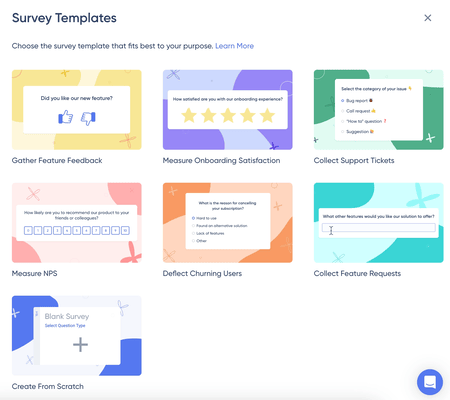
On-site surveys and feedback widgets
Numbers tell you what’s happening, but only users can tell you why. On-site surveys and feedback widgets pop up right when it matters, like when someone hesitates on the checkout page or is about to bounce.
UserGuiding makes this super easy with built-in NPS surveys and custom feedback forms you can launch without writing a single line of code.
Whether you want to ask “Was this guide helpful?” or “What’s missing from this page?”, you can trigger questions contextually, get honest answers, and make smarter UX decisions based on real-time feedback, not assumptions.
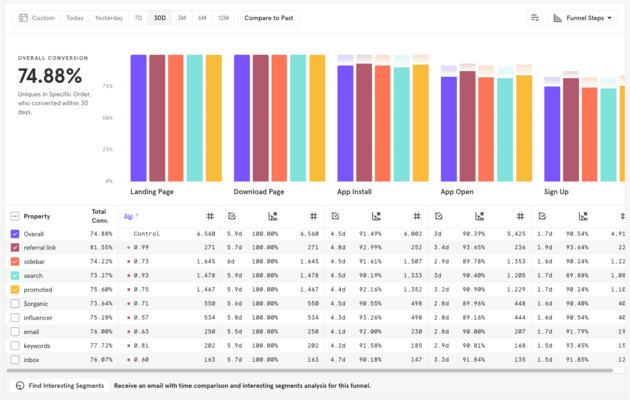
Funnel & path analysis
Funnels map out how users move through key flows (like signups or checkouts) and path analysis reveals the real (often messy) routes users take.
Mixpanel is usually a go-to here, helping you spot where people drop off or loop endlessly between pages like Pricing → FAQ → Home, never quite converting.
Personalization engines
Personalization tools adapt your site to each visitor, tailoring content based on who they are or what they’ve done.
Think: product recommendations that change in real time, banners that greet returning users by name, or offers based on location.
Dynamic Yield makes this possible at scale, turning static experiences into dynamic, user-specific journeys.

Integrations (CMS, CDPs, etc.)
Great UX tools don’t operate in a vacuum. The real power comes when they integrate with your CMS, CRM, analytics, or customer data platform.
For example, Hotjar syncs seamlessly with WordPress and HubSpot, letting you connect behavioral insights with marketing and content data in one flow.
Data privacy compliance (GDPR, CCPA)
Collecting user data is powerful but also risky if you’re not playing by the rules. Tools that bake in data privacy features help you stay compliant with regulations like GDPR and CCPA.
18 best UX optimization tools in 2026
Here’s a truth that’s often overlooked: UX optimization tools aren’t just for designers anymore. The best platforms empower your whole team (product managers, marketers, developers, and support) to prioritize the user experience without needing a UX degree.
Paul Boag says it best. “By equipping others, you're embedding UX into their daily practices, and you're helping them build good habits,” he states, “And finally, you're removing one more excuse for not putting the user first.”
To help you put the user first, we’re going to compare the best UX optimization tools in the market across key categories: heatmaps, session replays, A/B testing, feedback, and full-experience analytics.
With that mindset, here are 18 UX optimization tools that don’t just analyze user behavior, they help your team act on it👇
Behavior analytics & heatmaps
Hotjar
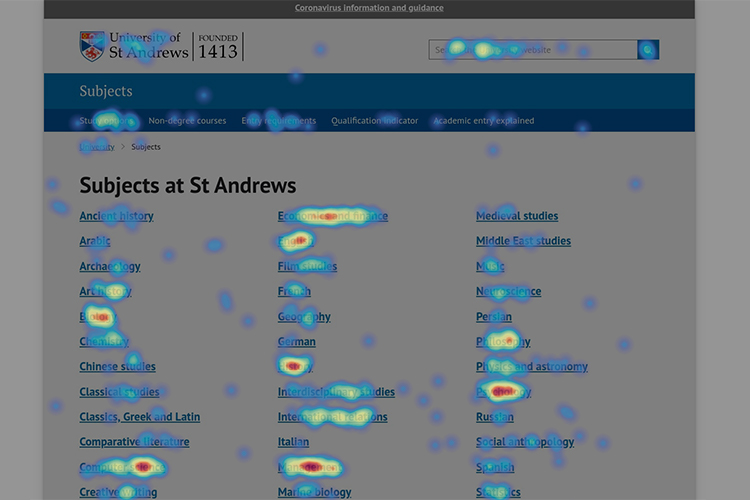
- Best for: Clear visualization of every user interaction to understand what catches users’ attention
- Notable Features: Heatmaps, session recordings, feedback tools (surveys and polls)
- Price Range:
- Basic: Free forever.
- Plus: $32/month, billed annually.
- Business: $80/month, billed annually.
- Scale: $171/month, billed annually.
- Limitation: Unclarity on which sessions are recorded. Some users report that the recorded sessions were irrelevant or from countries that they don’t target.
Lucky Orange
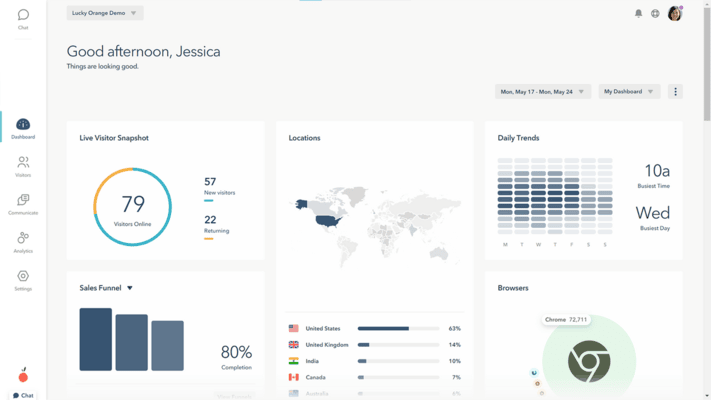
- Best for: Using heatmaps to analyze why web visitors do or don’t convert into sales or leads
- Notable Features: Dynamic heatmaps, page insights, conversion funnels
- Price Range:
- Free: Free.
- Build: $32/month, billed annually.
- Grow: $72/month, billed annually.
- Expand: $184/month, billed annually.
- Scale: $720/month, billed annually.
- Enterprise: Custom pricing, billed annually.
- ⚠️ Storage add-ons are available for extra cost.
- Limitation: Session recordings might lag or not record properly to gather insights.
Smartlook
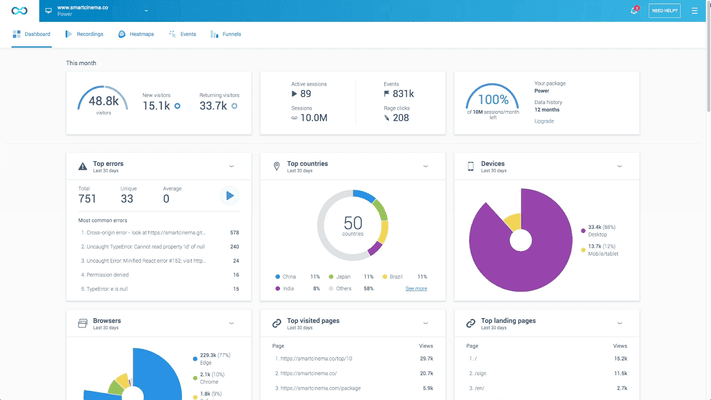
- Best for: Session recordings and event funnels on web and mobile
- Notable Features: Heatmaps, crash reports, web and mobile analytics
- Price Range:
- Free: Free.
- Pro: $55/month.
- Enterprise: Custom pricing.
- ⚠️ Features like product analytics and organization management are available as add-ons.
- Limitation: Data retention limited on lower tiers. Filters and UI sometimes can be unintuitive.
Session replay & digital experience analytics tools
FullStory
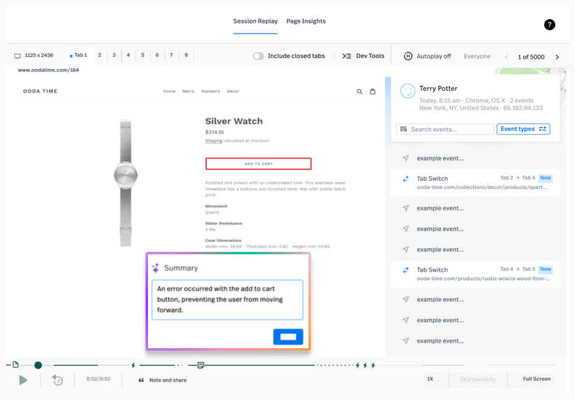
- Best for: Deep behavioral analytics and UI sentiment
- Notable Features: Fullcapture (automagic event capture), session replay, sentiment signals, product analytics
- Price Range:
- Custom pricing based on products (Analytics, Workforce, Warehouse).
- Limitation: Learning curve as it offers different products with different capabilities and first-time users find it overwhelming.
Microsoft Clarity
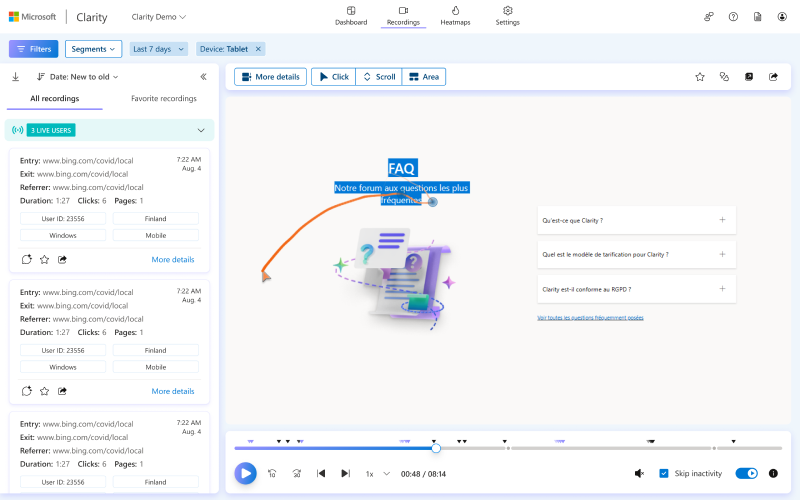
- Best for: Copilot and free session replays
- Notable Features: Heatmaps, session replays, rage-click detection, error monitoring, filters
- Price Range: Free with no limits.
- Limitation: Delays in recording, lacks support, data ownership clarity, and advanced scaling.
LogRocket
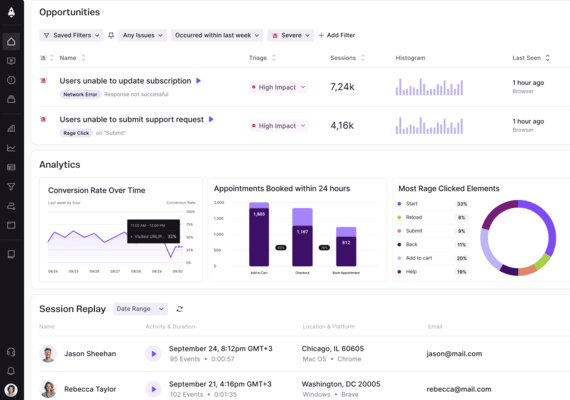
- Best for: User behavior tracking and front-end performance monitoring
- Notable Features: JS error tracking, network logs, UX analytics, session replays
- Price Range: Different pricing for mobile and web.
- Free: Free forever.
- Team: Starting at $69/mo, billed annually (web); $139/mo, billed annually (mobile).
- Professional: Starting at $295/mo, billed annually (web); $350/mo, billed annually (mobile).
- Enterprise: Custom pricing.
- Limitation: Pricing can get expensive as your session volume increases. Users also report session search can feel limiting at times.
User onboarding tools
UserGuiding

- Best for: Product adoption and no-code, personalized in-app guidance
- Notable Features: Onboarding flows, tooltips, checklists, and knowledge base
- Price Range:
- Starter: From $249/mo, billed annually.
- Growth: From $499/mo, billed annually.
- Enterprise: Custom pricing.
- Limitation: Less suited for deep analytics or behavioral insights.
Appcues

- Best for: No-code user onboarding and engagement flows
- Notable Features: NPS, release notes, A/B-testing of guides
- Price Range:
- Start: $375/mo for one app, billed annually.
- Grow: $800/mo for one app, billed annually.
- Enterprise: Custom pricing.
- Limitation: Expensive and some features are less customizable.
Userpilot
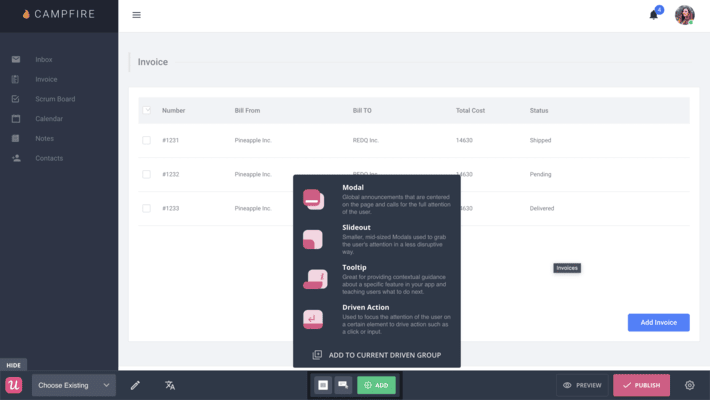
- Best for: Product adoption and contextual onboarding
- Notable Features: Checklists, tooltips, microsurveys, segmentation
- Price Range:
- Starter: $299/mo, billed annually.
- Growth: $799/mo, billed annually.
- Enterprise: Custom pricing.
- Limitation: There’s a learning curve to get the most out of the tool. Users also report that scaling needs clearer documentation for different personas.
A/B testing & experimentation platforms
VWO Testing
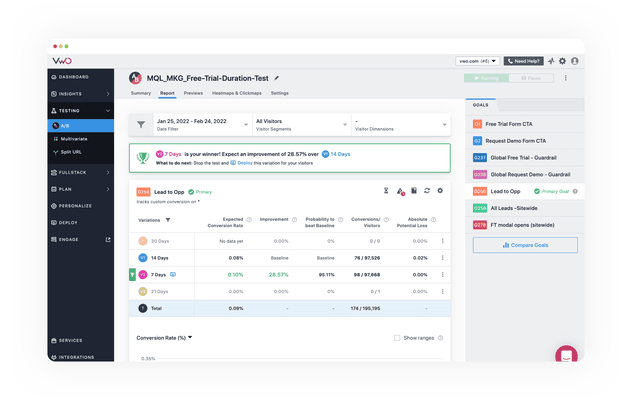
- Best for: Web testing and conversion optimization
- Notable Features: A/B/ testing, multivariate testing, heatmaps, session recordings
- Price Range:
- Growth: $665/mo, billed annually.
- Pro: $1,336/mo, billed annually.
- Enterprise: Custom pricing.
- Limitation: Behavior analytics might feel basic as the primary focus is on testing.
Statsig
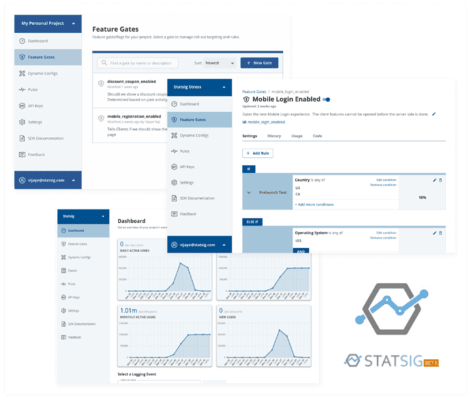
- Best for: Product experimentation and feature flags
- Notable Features: Experimentation, feature flags, product analytics, session replay via integration
- Price Range:
- Developer: Free.
- Pro: $150/mo.
- Enterprise: Custom pricing.
- Limitation: It’s still an emerging platform, so users might find it too complex and hard to navigate compared to legacy providers.
Optimizely
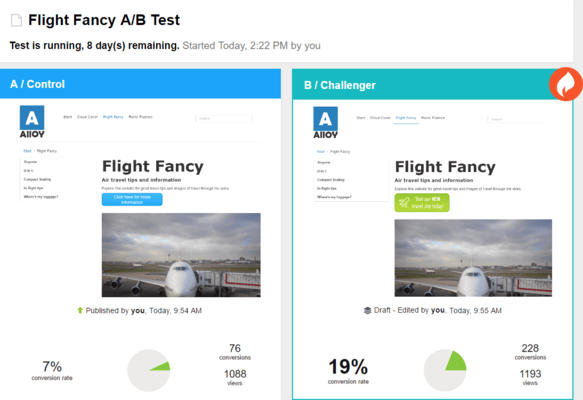
- Best for: Enterprise-grade experimentation and DX optimization
- Notable Features: Feature flags, A/B testing, personalization, real-time analytics
- Price Range:
- Custom enterprise pricing for different products.
- Limitation: Some users find Optimizely very expensive while others note that they need heavy engineering support.
Feedback and survey tools
Survicate

- Best for: Website surveys and feedback collection
- Notable Features: On-site surveys, NPS, feedback widgets, email surveys
- Price Range: Two pricing systems named Essential Plans and Advanced Plans.
- Essential Plan has a free tier and starts from $79/mo.
- Advanced Plan starts from $299/mo.
- Limitation: Some features may require additional manual control and the data analysis might feel less comprehensive than other tools in the market.
Typeform

- Best for: Interactive surveys and forms
- Notable Features: Conversational UI forms, quizzes, logic jumps, API
- Price Range:
- Basic: $25/mo, billed annually.
- Plus: $50/mo, billed annually.
- Business: $83/mo, billed annually.
- Enterprise: Custom pricing.
- Limitation: Survey tool only and some users find it is limited when it comes to customization.
Qualtrics
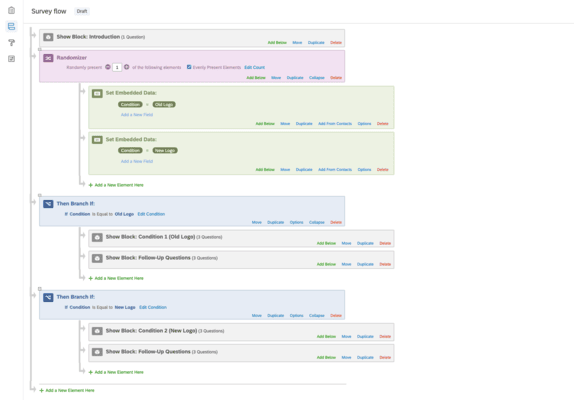
- Best for: Enterprise-grade survey & CX research
- Notable Features: Advanced surveys, text analytics, experience management suite
- Price Range: Enterprise-level custom pricing for all plans.
- Limitation: Users often note steep learning curve.
Journey analytics and experience intelligence platforms
Contentsquare
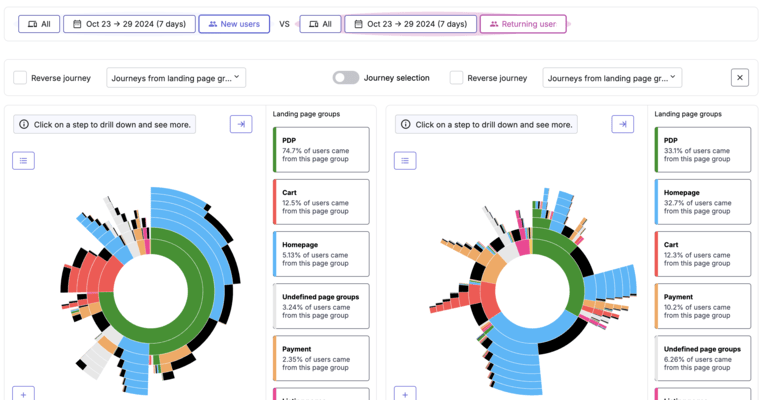
- Best for: Holistic digital experience analytics
- Notable Features: Zone-based heatmaps, journey analysis, frustration scoring, VoC, revenue impact
- Price Range:
- Free: Free forever.
- Growth: $40/mo.
- Pro: Custom pricing.
- Enterprise: Custom pricing.
- Limitation: Developer maintenance is needed with the app’s features or integrations with other 3rd party tools.
Heap
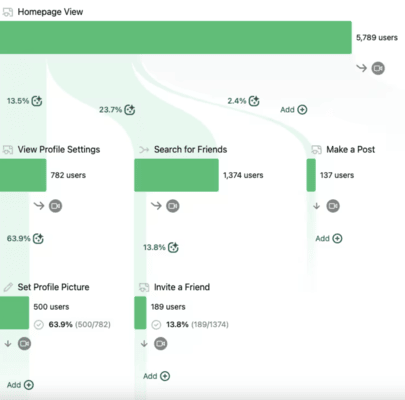
- Best for: Autocapture event analytics
- Notable Features: Auto event capture, retroactive funnels, path analysis
- Price Range: Free plan and custom priced growth and enterprise plans.
- Limitation: Because of the amount of data Heap tracks, it can be difficult to filter what is useful.
Quantum Metric
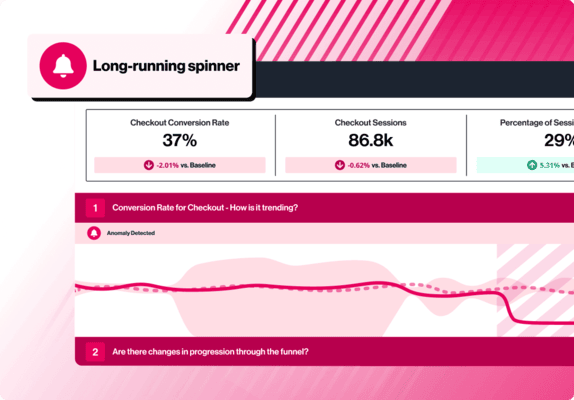
- Best for: Real-time experience monitoring and friction detection
- Notable Features: AI anomaly detection, session replays, heatmaps, performance monitoring
- Price Range: No public pricing information is available. You need to contact the company.
- Limitation: Users report lagging in reporting and speed.
Comparison table of user experience optimization tools
How to choose the right UX optimization tool
If you’ve made it this far, it is more than likely that you might be experiencing an overload of options and opinions. That is why we’ve dedicated this section to put things as simply as possible.
No questions, no second-guessing, no what-ifs…
Follow these steps to find the best UX optimization tool for your business👇
Consider business size and team type
Start by mapping what each team needs primarily. For example, design teams usually focus on visuals, layout testing, and user behavior, while marketing teams focus on Conversion funnels, user feedback, and A/B testing.
Then, talk to each team lead and define what metrics or questions they need answers to such as, “Why are users dropping off this form?” and “Which features drive retention?”
Budget range: freemium vs enterprise
Different tools serve different scale levels, so choose a tool that fits your growth stage.
Avoid overpaying for enterprise tools too early, or under-investing when you're scaling rapidly.
Try 2–3 freemium tools to identify which best supports your team’s workflow. Scale up only if data retention or feature limits hinder your goals.
Type of optimization needed: qualitative vs quantitative
You need to define what qualitative and quantitative optimization looks like to you. For example, qualitative optimization might mean understanding why users behave a certain way (watch sessions, read feedback). Quantitative optimization, on the other hand, might mean tracking what users are doing (events, metrics, funnels).
Then, ask yourself: Do we need session replays to explore UX pain points? Do we need event-based analytics to test and validate behavior trends?
Integrations
Before you jump into another subscription, look at your existing stack. Make a list of your core platforms (CMS, CRM, analytics, CDP) and ensure the UX tool either integrates natively or via Zapier/Webhooks/API.
Future of UX optimization software
Here’s the thing: UX isn’t just about fixing what’s broken anymore. It’s about staying ahead. The best teams today aren’t just reacting to user behavior; they’re predicting it, personalizing it, and respecting privacy while doing it.
Long story short, the future of UX optimization software will look like this: rise of AI in UX personalization, privacy-friendly user insights, predictive UX, and no-code experimentation platforms.
Rise of AI in UX personalization
AI is no longer just a buzzword.
It’s quietly taking over the UX world. We’re talking tools that don’t just recommend content, but adjust the entire user journey based on behavior patterns.
AI helps tailor experiences in real time, often without anyone needing to lift a finger. Think of it as personalization on autopilot. And as platforms evolve, expect these systems to get sharper, faster, and intuitive. And most importantly, be consumer products, or as Henry Modisett from Perplexity AI puts it, “being for the general public” rather than only tech-savvy people who can figure it out on their own.
Privacy-friendly user insights
Data privacy isn’t optional, it’s the new baseline. Users are savvier, regulations are tighter, and UX teams need to deliver insights without crossing the line.
The future?
First-party data, anonymous tracking, and zero-cookie analytics. It’s about getting the full picture without peeking over someone’s shoulder. The tools that prioritize user trust without sacrificing insights will come out on top.
Predictive UX
Here’s where things get wild.
Predictive UX doesn’t wait around for users to churn. It sees the signs before they even hit the exit. Think rage clicks, hesitation, abandoned flows. Smart tools now flag these in real time, letting you step in before frustration boils over into lost revenue.
Sarah Gibbons from Nielsen Norman Group compares this shift to “apple picking,” which is “... this idea of … putting a prompt into AI and getting a lot back and then picking out the pieces that you want to bring forward into your next prompt.”
So you’re not just reacting anymore, you’re collecting key behavioral signals, selecting what matters, and using it to shape your next move.
Predictive UX is about harvesting the right data at the right time, so you can act fast and stay ahead of the drop-off.
No-code experimentation platforms
Gone are the days when launching a simple A/B test meant filing a dev ticket and waiting two weeks. No-code platforms are democratizing experimentation.
Now, marketers, designers, even your CX folks can test headlines, tweak layouts, or adjust CTAs live. No engineers needed.
It’s faster, more agile, and honestly, long overdue.
Final thoughts…
Let’s recap: UX optimization tools are one of the best ways to improve how users interact with your product or just get a sense of what motivates users and helps them take action in your app.
And the right UX tool can turn insights into revenue. With the right tool, you’ll have the insight to change your product to fit into users’ needs. UserGuiding is one of those.
With interactive product tours, surveys, and in-app messaging, you can meet users wherever they are in their journey.
Want to take on this challenge?
🚀 Be our guest and start your free trial! 🚀
Frequently Asked Questions
What are the best user experience optimization tools for SaaS platforms in 2026?
Top UX tools for SaaS in 2026 include FullStory for session replay and frustration signals, Heap for retroactive analytics, UserGuiding for onboarding personalization, and Statsig for feature experimentation.
How do you choose UX optimization software based on conversion rate performance metrics?
Start by identifying where users drop off in your funnel. Use tools like VWO or Heap for quantitative testing and insights, and pair them with FullStory or Hotjar for qualitative context. Look for platforms with built-in experimentation, journey mapping, and event tracking to directly tie UX changes to conversion rate improvements.
What are the top free user experience optimization tools with session replay and heatmap features?
Microsoft Clarity is the top free UX tool with unlimited session replays, heatmaps, and rage-click detection. Hotjar offers a freemium plan with basic heatmaps and recordings, while Lucky Orange adds live chat to its free analytics. These are ideal for startups and small teams seeking visual behavior insights without upfront cost.
How does FullStory compare to Hotjar for enterprise-level UX optimization?
FullStory offers advanced session replay, mobile support, and AI-driven frustration signals, which are ideal for enterprise teams needing deep behavioral analytics. Hotjar, while easier to set up, focuses more on surveys and heatmaps. FullStory integrates better with data warehouses and scales more effectively for teams managing large digital experience ecosystems.
What are the best UX optimization tools for increasing user retention and engagement rates?
To boost retention, use Heap for funnel tracking, FullStory to spot friction, and Quantum Metric for real-time anomaly alerts. Pair with UserGuiding to deliver personalized in-app experiences. Together, these tools help identify drop-off points and proactively engage users before they churn, improving long-term user engagement.
What are the affordable user experience optimization software for startups under $100/month?
Affordable UX tools include Microsoft Clarity, Hotjar, and Lucky Orange. These platforms offer heatmaps, session replays, and basic analytics—ideal for startups aiming to improve UX without exceeding their budget. They provide solid value before scaling to more robust enterprise options.
What are the user experience optimization tools with built-in A/B testing and personalization features?
VWO, Statsig, and Optimizely offer robust A/B testing with built-in personalization. UserGuiding and Appcues let product and marketing teams run no-code onboarding experiments tailored to user behavior. These tools combine UX analytics with in-app customization to validate changes and boost engagement across key user segments.
How do product teams use UX optimization software to reduce churn?
Product teams use tools like FullStory and Heap to identify friction points, then test improvements using VWO or Statsig. Behavior analytics and predictive signals (like rage clicks) highlight issues early. By addressing pain points and personalizing experiences, teams prevent drop-off and strengthen user loyalty over time.
What are the best tools for collecting in-app user feedback to improve the digital experience?
Top feedback tools include Hotjar, Survicate, and Typeform. Hotjar provides real-time surveys and feedback widgets; Survicate offers targeted in-app surveys and NPS; Typeform allows interactive form-based feedback. These tools help teams collect actionable insights from users directly within the product to guide design and feature updates.
What does a feature checklist for evaluating user experience optimization platforms in 2026 include?
Look for session replay, heatmaps, A/B testing, retroactive analytics, mobile tracking, and AI-driven alerts. No-code editors, CRM and CDP integrations, and privacy-first design are key in 2026. Choose platforms that support experimentation, feedback collection, and scalable data storage to meet team needs across marketing, product, and design.

.png)










