.svg)
.svg)
.svg)
.svg)



.svg)



.svg)
.svg)


TL;DR
- Users often churn before experiencing your product’s value because onboarding is too slow, generic, or overwhelming. Accelerating time-to-value keeps users engaged and reduces early churn.
- The best practices for accelerating time-to-value with onboarding include:
- Segmenting users based on role, industry, company size, or behavior.
- Tailoring onboarding journeys to each segment’s goals, pain points, and workflows.
- Breaking guidance into manageable steps with checklists, hotspots, and progressive nudges to avoid overwhelming users.
- Personalizing dynamically using in-app behavior.
- Celebrating milestones, quick wins, or task completions with in-app messages, progress bars, badges, or incentives.
- Announcing updates and tracking engagement to continuously improve journeys and help users find value faster.
- With UserGuiding, you can put all these best practices into action so users discover value faster, stay engaged longer, and churn less.
Why is long time-to-value a fast track to churn?
Users rarely stick around to form a full opinion about a product or its value.
Within minutes, they decide whether it’s worth their time, and if they don’t see any potential right away, they’re gone.
A slow or generic onboarding experience only makes this worse.
When users are forced through irrelevant steps, struggle to find key features, or can’t see immediate benefits, engagement drops fast.
➡️ This all leads to…
- Customer success teams trying to patch gaps in understanding and regain user interest by repeating the same guidance over and over.
- Users losing patience and looking for faster alternatives, often churning before they reach their first “aha!” moment.
What are the best practices for reducing time-to-value?
If poor onboarding is the entrance to long TTV (and eventually customer churn), then, a smooth and value-driven onboarding is the hook that keeps users engaged.
Because onboarding is your chance to show new users your product’s potential, guide them toward quick wins, and convince them to stick around long enough to experience real value.
Here’s how to seize this opportunity and deliver an onboarding experience that delights your users and drives results for your business 👇🏻
#1 Segment users by role, industry, or use case
Segmentation is the foundation of a personalized onboarding experience.
Not all users have the same goals, workflows, or familiarity with your product, so showing everyone the same steps often leads to confusion or disengagement.
There are mainly two ways to segment users effectively:
- By user, customer, or company attributes (Role, industry, company type/size, subscription plan, etc.)
- By in-app engagement and behavioral data (Which features they’ve used, requency and recency of usage, actions completed or skipped during onboarding)
Creating user segments based on common attributes or engagement patterns allow you to personalize onboarding without curating very specific flows for each and ever user.
✅ So, it ensures scalability as well as relevance.
💡 Pro Tip: You can use onboarding surveys to collect insights about users’ goals, use cases, and technical background. This information will allow you to assign them to the most relevant segments right from the start and deliver tailored onboarding content.
#2 Map journeys to their goals and workflows
Once you’ve segmented your users, the next step is to align onboarding journeys with their specific goals and workflows.
This means tailoring the sequence of onboarding steps and guidance to what each user segment actually needs and already uses in their existing setup.
Ask yourself for each segment:
- Do they need a specific integration with a tool they already use?
- Do they need to see the full setup flow because they’re a developer or technical user?
- Do they need guidance on permissions, settings, or configurations specific to their role?
- Do they need to focus on a particular key feature because it aligns with their role or objectives?
- Which interactions will deliver the fastest “aha!” moment for this user segment?
Remember: onboarding flows are not a chance for you to showcase every feature your product offers or bombard users with a long list of commands.
They exist primarily for your users, and that’s why they should be designed around their pain points, goals, and expectations.
#3 Deliver guidance progressively instead of all at once
Overloading users with too many steps or too much information at once leads to frustration and disengagement.
Even if every step seems essential for value realization.
To keep users engaged throughout the journey and make onboarding feel effortless…
- Break down long tours or guides into manageable, meaningful chunks that users can complete without losing focus.
- Use checklists to organize tasks into a clear roadmap, helping users track their progress and stay motivated.
- Eliminate unnecessary steps or save them for later stages once users have mastered the basics.
- Trigger tooltips, modals, and hotspots contextually, surfacing guidance only when it’s relevant to the user’s current actions and timing.
#4 Use in-app data to personalize content dynamically
A static, one-size-fits-all onboarding flow often misses the mark.
Instead of preventing confusion, it creates more of it.
We’ve already covered how role-based segmentation helps, but even role-based personalization can fall short, sometimes.
Why?
Because users with the same role or plan don’t always behave the same way.
Some users follow the recommended onboarding path and complete tutorials, while others prefer to explore on their own. They skip important steps and miss the tailored guidance you’ve built for them.
To guide users who stray from the expected path, you can leverage in-app engagement data to personalize onboarding dynamically based on real behavior.
Here’s how to make it work:
- Track feature usage and task completion: If a user skips a key step, you can trigger a tooltip, checklist item, or nudge to get them back on track.
- Adapt guidance in real time: Instead of forcing everyone through a rigid sequence, surface the next logical action based on what the user has (or hasn’t) done.
💡 Pro Tip: Dynamic personalization works wonders for returning users too.
If someone revisits your app after a long break, you can refresh their onboarding with updated materials, highlight new features, and guide them toward quick wins to rebuild momentum.
#5 Gamify the onboarding experience
Gamification makes onboarding more engaging by turning progress into something users can see, celebrate, and feel proud of. You can achieve the sense of success with elements like celebrations, animations, scoreboards, badges, and challenges.
Even in products with a professional or serious brand image, subtle gamified touches fit right in.
Just look at LinkedIn.
Despite being a very serious networking and business platform, it boosts engagement with features like daily games, leaderboards, streaks, and badges.
Here are a few simple but powerful ways to gamify your onboarding:
- Celebrate milestones with in-app messages, progress bars, or light animations.
- Show progress visually with checklists, trackers, or streaks.
- Reinforce achievements with badges, leaderboards, or other rewards.
💡 Pro Tip: Tie gamification to meaningful onboarding interactions. For example, celebrate the first integration a developer completes or the first campaign a marketer launches, so each milestone feels relevant and personal.
Or, you can also incorporate incentives like extra trial days or credits that can be used within the app once onboarding tasks are completed. This not only gamifies the process further but also motivates users to keep going.
And before they know it, they’re already engaging deeply with your product and hitting those aha! moments one after another.
UserGuiding can help you!
You’re only as strong as your toolkit.
In order to deliver an effective, personalized onboarding experience that guides users to value quickly, you need a tool that’s flexible, easy to use, and built for personalization at scale.
UserGuiding gives you all the features to design, launch, and optimize onboarding journeys for your users.
Without coding.
And without spending months learning a so-called no-code tool. 👀
1) Onboarding tours and walkthroughs for each segment
Onboarding tours are a powerful way to guide new users through your product and show them exactly what they need to know to get value quickly.
Walkthroughs, on the other hand, allow you to explain workflows and feature use cases step by step, so users not only know what you offer, but also how they can utilize your features.
And with UserGuiding, you can create both.
Here’s an example product tour created with UserGuiding:
You can create similar tours and walkthroughs specific to different user segments, personas, and use cases so that new users won’t lose their initial interest in the product while you go on and on about features that are not really useful to them with a big and generic onboarding tour.
➡️ For example, let’s assume you have an all-in-one CRM platform:
- For sales agents, you can showcase lead tracking, deal pipelines, and follow-up reminders.
- For support agents, you can highlight ticket management, knowledge base access, and response templates.
- For success agents, you can guide them through onboarding dashboards, customer health tracking, and renewal alerts.
💡 Pro Tip: Try to keep your guides under 6 steps, as long guides can cause frustration and early drop offs.
2) Onboarding checklists to visualize the onboarding process
You’ve created your guides and walkthroughs, and now you need a place to keep them organized and present them clearly to your users.
Onboarding checklists act as a roadmap, offering a clear list of actions or guides that users can follow to unlock the product’s value. They also prevent missed opportunities and ensure that users engage with the right key features.
At the same time, checklists reduce the frustration of exploring a new product alone by giving users a structured path to follow and a sense of direction from the very first interaction.
So they’re beneficial both for your users and your business.
Here’s an example onboarding checklist created with UserGuiding:
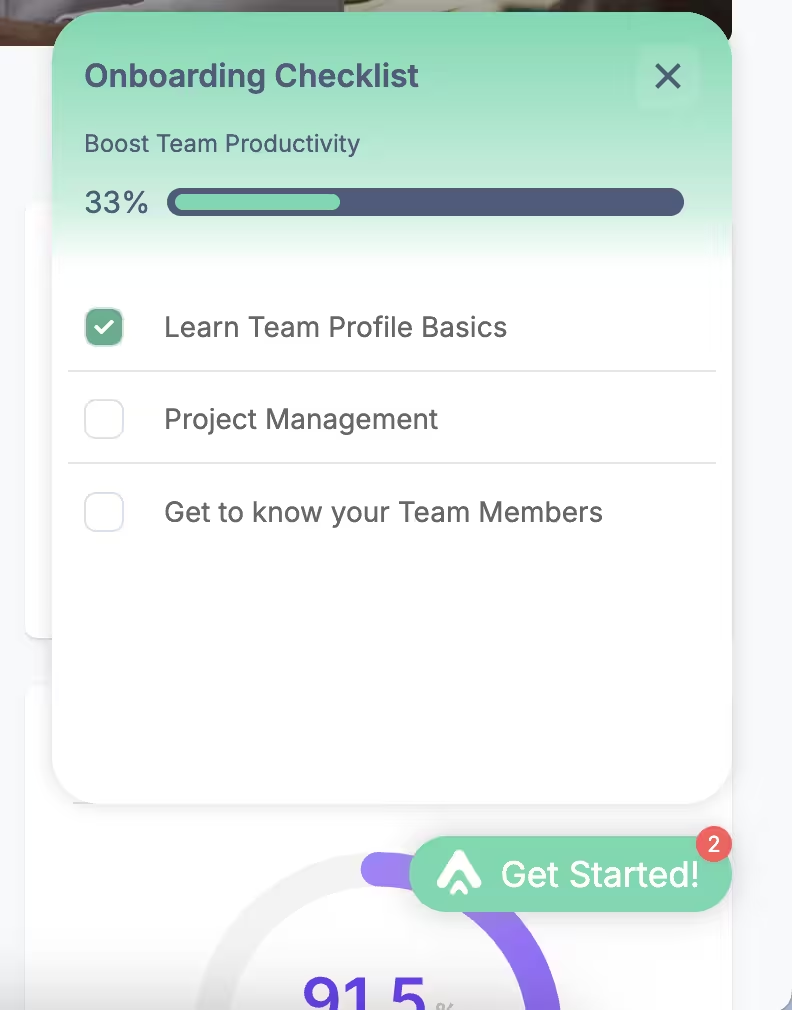
With UserGuiding, you can create checklists with…
- Interactive guides as well as external links
- Progress bars as well as progressive task disclosure
- Completion animations
💡Pro Tip: Try to keep your checklists focused and compact, as seeing too many tasks can intimidate and discourage users from engaging with the checklist, even with a progress bar.
You should prioritize tasks that are key to value realization and leave tasks like account setup or data migration for later stages.
You can create guides for these non-priority tasks as well and include them in checklists, but consider keeping them in the in-app resource center.
⚡On average, a company uses 3 checklists with 5 items on each.
3) Hotspots to draw attention to what matters most to each user persona
Once users start exploring your product, they might not immediately notice the most important features that lead to value.
Hotspots are small, visually distinct cues that highlight key elements directly within your app, nudging users to interact with them.
✅ By using hotspots strategically, you can:
- Direct users to features crucial for their goals or workflows.
- Encourage trial users to explore high-value actions they may otherwise miss.
- Reinforce lessons from walkthroughs and checklists by guiding attention in context.
With UserGuiding, you can create hotspots that trigger based on user actions, page views, or other in-app behavior. This ensures that guidance is timely, contextual, and relevant to each user segment.
Here’s an example hotspot created with UserGuiding:

⚡On average, a company uses 5 hotspots.
4) Product updates to announce improvements and quick wins
Product updates allow you to showcase new features, enhancements, or quick wins directly within the app, keeping users engaged and aware of how the product evolves.
With UserGuiding, product updates are accessible both as a standalone page and as a separate tab in the in-app resource center widget, so all release notes can be viewed anytime within the product.
This ensures users always have a reference point for improvements.
Here’s how the product updates tab looks in the RC widget:

You can also use product update boosters, which are slide-out modals and/or tooltips that promote new features as soon as users enter the app. This ensures they notice the update even without large announcement modals or banners.
Here’s what boosters look like:

5) Material engagement tracking to improve journeys
To continuously optimize onboarding, you need insight into how users interact with your guides, checklists, hotspots, and other onboarding materials.
Material engagement tracking lets you monitor user progress, see where they drop off, and adjust journeys to reduce time-to-value.
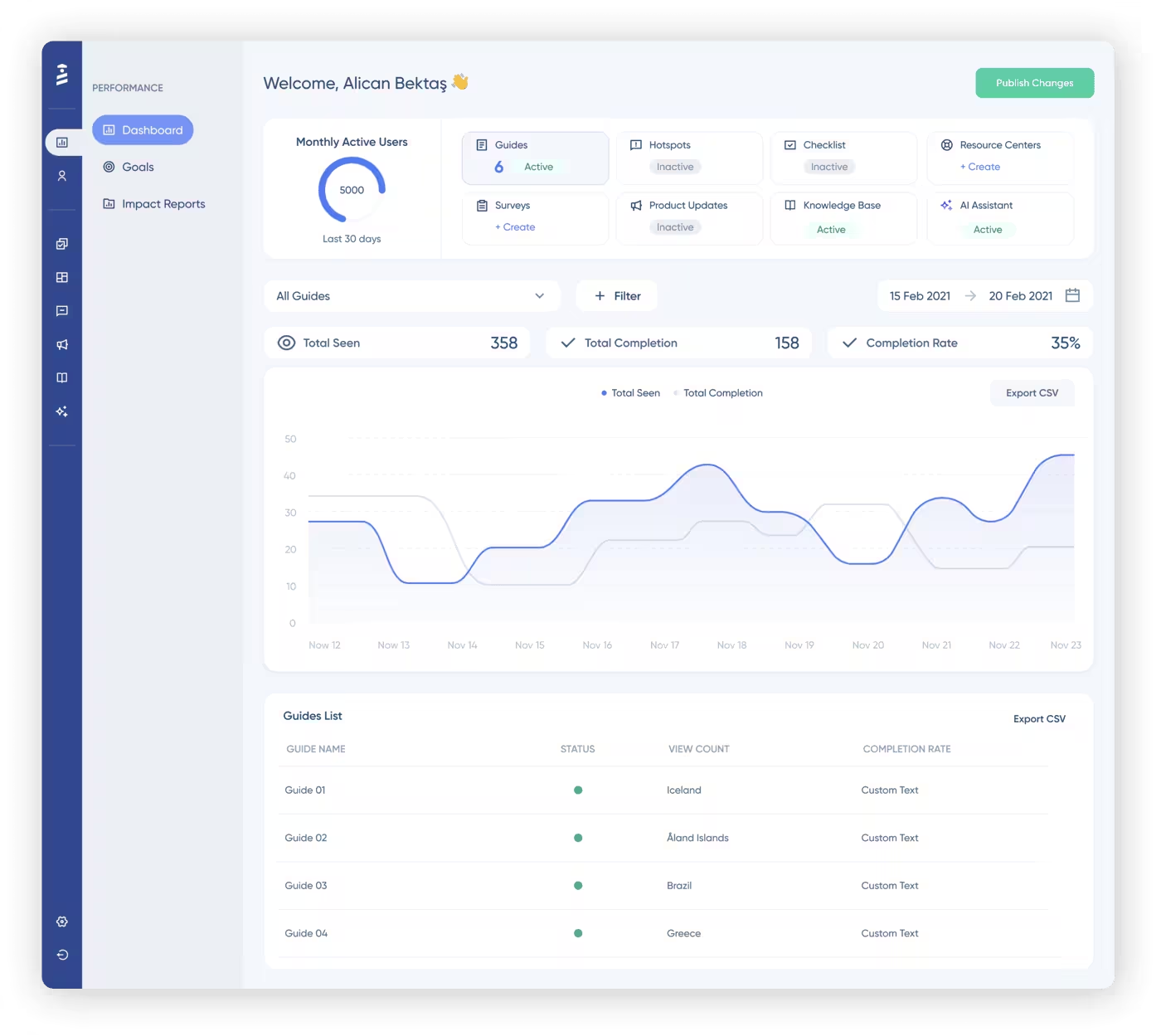
✅ With UserGuiding’s performance dashboards and reports, you can…
- Track completion rates for guides, checklists, and onboarding materials.
- Access step-level engagement analytics.
- Monitor click actions.
- Segment users to analyze engagement by role, plan, or attribute.
- Set goals and generate impact reports to measure what drives results.
Here’s what the performance dashboard in the UserGuiding panel looks like:
Pro tips for creating value-driven first experiences
1️⃣ Start segmentation with a few core properties (role, industry, company size, pricing plan) before adding complexity. When creating user segments and tailoring onboarding materials, engagement data and user history are invaluable.
- But at the very beginning, you won’t have much of this information. In the meantime, you can leverage onboarding survey answers and known customer or user attributes to create segments and personalize experiences based on these core properties.
2️⃣ Combine engagement data with profile data for richer journeys. Over time, as users interact with your product, you’ll gather behavioral insights in addition to the customer or user attributes you initially used to personalize onboarding.
- Combining these data sets lets you deliver even more targeted guidance and nudges. For example, you can trigger guides or tooltips when a user with a specific role hasn’t completed a key action.
- In short, richer data means more precise, effective user journeys.
3️⃣ Keep steps short and goal-oriented to reduce friction. Long or complicated onboarding flows overwhelm users and increase drop-offs.
- You need to break your onboarding checklists and walkthroughs into bite-sized actions that focus on one objective at a time.
4️⃣ Communicate value with quick wins. Early wins reinforce why users chose your product. You should identify actions that immediately demonstrate benefits, like completing a setup task or using a key feature, and celebrate these moments within the product.
- Quick wins boost confidence and motivate users to continue exploring.
5️⃣ Celebrate milestones with in-app messages or updates. Recognition reinforces engagement and helps users feel accomplished. You can use in-app banners, modals, or notifications to highlight completed steps, unlocked features, or goals achieved.
- These small celebrations increase retention by making progress visible and rewarding. Plus, they also gamify the experience, making learning fun and engaging.
6️⃣ Localize early and deliver onboarding in the user’s language to remove friction. Even small translations can drastically improve comprehension, confidence, and engagement.
- Additionally, localizing your onboarding experience leaves a strong positive first impression on new users and helps build trust in your business from the very start.
7️⃣ Test and optimize with A/B testing. No onboarding flow is perfect on the first try. You should run A/B tests on different guide sequences, messaging, or triggers to see which variations lead to faster activation and higher engagement.
What positive outcomes can you expect with UserGuiding?
When companies personalize onboarding and in-app experiences with UserGuiding, they drastically shorten time-to-value while boosting engagement and retention.
🚀 Here are some highlights:
- Kariyer.net used segmentation to create tailored onboarding flows, which significantly increased activation and engagement rates across their user base.
- Zakeke improved conversion rates by personalizing onboarding experiences to match different customer profiles, leading to more users reaching their “aha!” moment faster.
- Twin Science leveraged segmentation to introduce different learning materials to two distinct user groups without writing a single line of code.
Final words…
Reducing time-to-value starts with understanding your users and delivering the right guidance at the right moment.
Personalized journeys…
- Help users reach their “aha!” moments faster,
- Increase engagement, and consequently,
- Lower churn.
🪡 Start creating tailored onboarding experiences with UserGuiding today.

.png)