.svg)
.svg)
.svg)
.svg)



.svg)


.svg)
.svg)


TL;DR
- Customer satisfaction isn’t lost overnight; it fades quietly as users skip features, disengage, or churn without telling you why. And the way to prevent this is to actively listen.
- The best practices for understanding users and uncovering dissatisfaction include:
- Keeping surveys short, contextual, and under 2 minutes so response rates stay high.
- Applying survey logic rules to tailor follow-up questions based on user responses.
- Balancing quantitative data (ratings, scores, emojis) with qualitative insights (open-ended questions) and analyzing them together to spot trends, recurring friction points, and differences between user segments.
- Triggering surveys right after meaningful interactions, such as onboarding, feature use, or support chats.
- Tracking how sentiment shifts over time (e.g., before/after an update) to see whether changes truly improve the experience.
- Acting on the most critical insights, like recurring usability pain points or power-user requests.
- Closing the feedback loop and informing users about the updates inspired by their insights, so users can see their feedback making a difference.
- With UserGuiding, you can put all these practices into action and ensure customer satisfaction stays strong instead of slipping away.
Why is customer happiness so hard to maintain?
At first glance, keeping customers happy feels straightforward: build a great product, deliver value, and the rest takes care of itself.
But in reality, it’s rarely that simple. And you probably know that…
The real challenge is that dissatisfaction often builds quietly.
Customers disengage, skip over important features, or simply stop logging in. If you’re not capturing their feedback at the right moment, you’re left guessing about what went wrong.
Was it a confusing workflow? Missing functionality? A support interaction that didn’t resolve their problem?
⚠️ No structured feedback = Hidden root causes.
To make matters worse, when you can’t identify or act on those pain points…
- Negative experiences spread faster than positive ones.
- Your support team gets swamped with recurring issues.
- You cannot prevent friction or poor experiences and adoption stalls.
What are the best practices for improving customer happiness?
Customer happiness is fragile, yes, but with a proper system, you can:
- Listen to your users,
- Learn from their experiences, and
- Make the necessary updates to boost their satisfaction.
Here’s what you need to do 👇🏻
#1 Use short, targeted surveys inside the product
The key to collecting actionable feedback is making it as easy as possible for users to respond. Long or complicated surveys quickly discourage participation, leaving you with incomplete data or skewed insights.
To balance depth and usability, focus on one task at a survey.
- One NPS for measuring overall user satisfaction
- One onboarding satisfaction survey
- One feature satisfaction survey dedicated to a specific feature
The number of questions and available answer options should be enough to produce meaningful results, but not so overwhelming that users abandon the survey.
Ideally, surveys should take less than 2 minutes to complete.
💡 Pro Tip: Disclose questions gradually to avoid frustrating users at first sight. Showing only one question at a time encourages users to engage with the survey.
Other practices you can adopt to increase user motivation include:
- Be transparent about the total number of questions or the estimated time to complete the survey. You can add a progress indicator or step counter.
- Present easier-to-answer questions (like multiple choice, rating, or emoji questions) before more time-consuming ones.
- Make some questions optional or skippable, especially in longer surveys.
#2 Ask both quantitative and qualitative questions
Quantitative questions like ratings, emojis, NPS scores, or satisfaction scales give you measurable data to track trends over time.
But they don’t explain why users feel a certain way.
For that information, you need qualitative questions, like open-ended questions.
✅ Mixing quantitative and qualitative questions is also important, as…
- Quantitative questions are easier and faster to answer, which keeps response rates high.
- Qualitative, open-ended questions generally see lower participation.
- Pairing them helps balance survey engagement and insight quality.
💡 Pro Tip: The number of questions you ask and the number of options you provide in multiple-choice questions directly impact the quality of your data.
For quantitative surveys, you want enough options so users can find an answer that fits, but not so many that responses become scattered and hard to interpret.
A 10-option question answered by 10 users will rarely reveal meaningful trends, whereas the same question answered by 100 users can provide clear patterns and actionable insights.
So, there’s no standard or average number of questions or options you should use in your in-app surveys.
#3 Trigger surveys after key user interactions
Timing is everything. Triggering surveys immediately after meaningful actions like completing onboarding, using a new feature, or contacting support ensures feedback is relevant and fresh.
Plus, users are more likely to provide insights when the experience is recent.
When time passes, or you reach out through email, for example, people are less likely to remember their experience, or they may be unavailable to provide feedback.
With in-app surveys, you can ensure both contextuality and timeliness.
#4 Centralize and analyze feedback for patterns
Collecting feedback is only useful if you take the time to understand it.
By carefully analyzing both quantitative and qualitative responses, you can identify trends, recurring questions, and common pain points across your user base.
- Are satisfaction scores consistently high or low for specific areas, like onboarding, support, or a key feature?
- Are there patterns in feedback across user segments, like new vs. experienced users or different roles, indicating some groups struggle more?
💡 Pro Tip: You should also monitor how feedback trends change over time, for example, before and after a feature update or UI improvement.
Sometimes, what you think people would love is not what they actually prefer.
#5 Act on gathered insights to improve product/service and UX
You’ve conducted the survey, collected the feedback, and analyzed the results, so now it’s time to turn insights into action.
Every piece of feedback, whether quantitative or qualitative, is an opportunity to enhance your product, service, or user experience. But you need to prioritize the most critical issues, such as the most common pain points, and the requests of power users.
For example, if multiple trial users mention difficulty completing a key workflow, make that a priority for UX improvements and create an interactive guide for it, maybe.
🎯 The goal is to close the loop: show users that their feedback drives real changes.
UserGuiding can help you!
To adopt these best practices, you need a solid tool.
A tool that offers easy-to-customize survey templates for different use cases, or allows you to create surveys from scratch with a wide range of question types.
A tool that lets you create surveys with complex survey logic to personalize follow-up questions based on user answers.
A tool that is so easy to use that you can create multiple surveys and run A/B tests effortlessly.
That tool is UserGuiding.
Here’s what you can create with UserGuiding’s no-code survey builder 👇🏻
1) Surveys to capture satisfaction trends
In-app surveys are quick, lightweight microsurveys that run directly inside your product. Depending on their purpose and the types of questions they include, they often have more specific names, like onboarding satisfaction surveys or feature adoption surveys.
At a higher level, though, these survey types can usually be grouped into two main categories: satisfaction surveys and feedback forms.
Satisfaction surveys are designed to be short and effortless for users, typically containing 2 questions.
They often use simple response formats, such as emoji reactions, thumbs up/down, star ratings, or scales that make it easy for users to provide feedback without much effort.
Some common examples of satisfaction surveys you can create with UserGuiding include:
- Customer Satisfaction (CSAT) surveys
- Net Promoter Score (NPS) surveys
- Onboarding satisfaction surveys
- New feature satisfaction surveys
- Customer Effort Score (CES) surveys
Here’s an example onboarding satisfaction survey with a star rating:
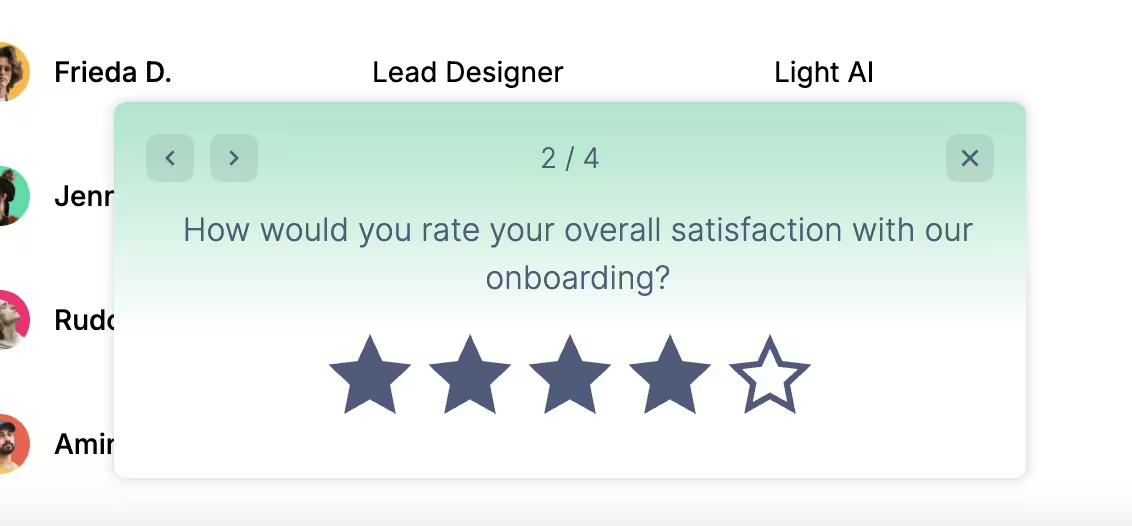
💡 Pro Tip: Since satisfaction surveys are designed to track trends over time, it’s important to place them at key touchpoints where user sentiment is most telling.
2) Feedback forms for deeper user insights
Feedback forms consist of more detailed questions, often with multiple-choice and open-ended formats.
While satisfaction surveys are designed to capture quick impressions and measure user sentiment after a specific interaction or experience, feedback forms aim to uncover the specifics of those feelings.
They encourage users to elaborate on challenges, share ideas, and express needs that aren’t easily captured by ratings or scales.
For example, with a feedback form, you can ask:
- “Which step of the onboarding process took the most time or caused confusion?”
- “What could have made your first experience with our product easier?”
- “What’s one thing that would make completing … faster or easier for you?”
- “How well does our pricing match the value you’re getting?”
- “What would make you consider upgrading to a higher plan?”
💡Pro Tip: Survey logic is a key element of both satisfaction surveys and feedback forms, as it allows you to trigger the right follow-up questions based on a user’s initial answer.
For example, if someone had a poor experience with a recent update or new feature, you wouldn’t want to ask them which part they enjoyed the most. Instead, you can direct them to share what caused the frustration.
And if a user states they had a positive experience, then you can go into more detail and ask what they liked the most.
Here’s how survey logic works in practice:
3) Product updates post feedback area to create two-way communication channels
With UserGuiding, in addition to the in-app surveys, you can also collect feedback (both quick emoji reactions and written comments) directly on your product updates page, right under each release note.
This gives users a lightweight way to engage with your announcements and share their opinions on new releases, even when you don’t have a dedicated in-app survey running at that moment.
It also transforms release notes from being one-way communication into an interactive channel where customers can voice their thoughts.
👉🏻 And, as we’ve seen, customers who voluntarily share feedback on updates are often more open to deeper communication. They’re the ones most likely to answer follow-up questions, participate in surveys, or provide detailed insights that drive product improvements.
Here’s how the feedback area looks on the PU page:
Pro tips for collecting and acting on feedback
1️⃣ Incentivize participation when necessary. You should try to shorten and optimize your in-app surveys or survey questions to increase the response rate, but sometimes you need to ask more than one follow-up question, or include several open-ended questions, which normally decreases response rates and survey engagement drastically.
- In those cases, if you really need detailed insights and long survey responses, you can offer incentives for users to spend the time and effort on your survey.
- These incentives can include credits to use in your product, plan discount codes, or gift cards/vouchers.
2️⃣ Share “you said, we did” updates to close the loop. You can use product updates or resource center articles to show users how their feedback shaped improvements. This will improve user trust in your business and showcase your customer-centric approach.
3️⃣ Segment feedback by user type for deeper insights. Analyzing responses by role, plan, or behavior helps you identify patterns and prioritize changes for power users.
- It also allows you to spot emerging trends and expectations common to specific customer groups.
4️⃣ Combine surveys with engagement data for context. In-app surveys are short, so even with open-ended questions, the results can be incomplete. Users might not describe every aspect of their interaction.
- By combining engagement analytics with survey results, you can monitor and compare patterns to see the full picture of the user experience.
5️⃣ A/B test the surveys. Question phrasing and types can radically impact the quality of responses you get from users. Whether you use multiple-choice or open-ended formats to ask the same question can change how users respond.
- Sometimes users don’t have the words for their problems, and you need to give them options to express themselves. Other times, giving options can limit the insights you receive.
- You need to try and see which question-question type combination generates better insights.
6️⃣ Utilize survey logic rules to create more dynamic and tailored surveys. Logic rules allow you to personalize the follow-up questions each respondent sees based on their previous answers.
- This way, you optimize your survey and prevent survey fatigue, since you avoid asking generic or irrelevant questions that don’t match the user’s experience or feedback.
7️⃣ Use surveys to gauge user interest in new features. You can also trigger surveys as a feature promotion method to see whether a feature generates interest among existing users.
- For example, if you’ve just released a feature, you can ask users whether they already use a different tool for that task, and depending on their answer, you can prompt them to try your feature or trigger a guide that explains how to migrate their data from that tool into yours.
What positive outcomes can you expect with UserGuiding?
Companies that use UserGuiding surveys and feedback forms see measurable improvements in customer satisfaction and product adoption.
🚀 Here are some highlights:
- Straico used surveys to measure product–market fit, reaching 52% PMF.
- Ideta increased NPS survey response rates by 25%.
- Igus collected valuable NPS feedback that helped optimize onboarding and website experience.
- Activesoft gathered 8,500+ survey responses in just over a year to better understand and engage their user base.
Final words…
Improving customer happiness starts with listening.
Short, well-timed surveys uncover pain points, while acting on those insights turns frustration into loyalty.
📋 Start collecting customer feedback with UserGuiding today.

.png)