

.svg)
.svg)
.svg)
.svg)



.svg)




.svg)
.svg)

If you're managing your roadmap across a spreadsheet, a slide deck, and a Slack thread, or tired of hearing "is this still coming?" about a feature you deprioritized months ago, you know you need one place where the plan lives and stays current on its own.
In this article, we've compared and analyzed the best product roadmap tools (12, to be exact) and also added user insights from real users on platforms like G2.
Short on time? Here's who each tool is best for 👇🏻
TL;DR
- UserGuiding: Best for teams that already use UserGuiding for onboarding and want a public roadmap and feature requests board bundled in, not a separate tool for sprint planning.
- Pendo: Best for enterprises and technical teams looking for an additional AI layer in their product research, planning, and analytics.
- Productboard: Best for product teams who want roadmapping, prioritization, and customer feedback to be the main product, not an add-on to another use case.
- Aha! Roadmaps: Best for structured product teams who want deep prioritization and planning tools, and don't mind paying for a full product suite to get them.
- ProductPlan: Best for product teams looking for advanced user and market research capabilities alongside roadmapping and planning.
- ProdPad: Best for teams who want a lean, outcome-focused Now-Next-Later roadmap instead of a timeline or Gantt chart, and are comfortable paying per module.
- Canny: Best for teams who want a lightweight, public-facing feedback-to-roadmap-to-changelog loop, priced around how many users give feedback rather than how many PMs manage it.
- Tempo (formerly Roadmunk): Best for teams already living in Jira or Azure DevOps who want a more visually polished, boardroom-ready roadmap layered on top.
- airfocus: Best for multi-team product organizations that live in Jira and want customizable prioritization scoring built into the roadmap.
- Jira: Best for engineering-led teams already running sprints in Jira who want a rough roadmap view without adopting a separate tool.
- Notion: Best for teams that already run docs, wikis, and tasks in Notion and want to build a roadmap as one more database.
- Linear: Best for engineering-led teams who want a fast, opinionated issue tracker with a genuine roadmap layer built in, without Jira's configuration overhead.
What to Look for in a Product Roadmap Tool
A roadmap is, at its core and in its simplest form, a table view of the tasks, projects, and new features and updates you're planning or currently developing. So, to be honest, you can create a roadmap using Google Sheets or an Excel spreadsheet. Or you can put up a whiteboard in your office, hand a few markers to your product team, and call it a day.
However, if you're here reading this, you've probably already tried those methods and either couldn't maintain them or outgrew them…
When choosing a dedicated product roadmap solution, here are a few things to consider:
- Multiple views for different audiences, and easy-to-use templates. The level of detail your developers need when planning the roadmap might not be relevant to sales or marketing, and your investors and stakeholders might want a different timeline than your product team does. Being able to easily switch between views, and/or create different views for different occasions and teams, is important. If you're upgrading from Excel, you deserve easily customizable templates, not the need to build everything from scratch as if you were using a notebook…
- Sharing controls for internal and external audiences. You'll want a private view for the team making trade-offs and a cleaned-up public or stakeholder view for customers and leadership.
- Built-in prioritization frameworks. RICE, weighted scoring, and value-vs-effort matrices exist because "loudest stakeholder wins" is not a strategy. A tool that scores and ranks items for you keeps prioritization decisions defensible when someone asks why a feature moved up the list.
- A real link between feedback and the roadmap. Tools that attach customer requests, support tickets, and sales notes directly to roadmap items, and notify requesters once something ships, help you close the loop. If there are communication and announcement capabilities that also let you close the loop on your users' feature requests and suggestions, that's a bonus.
- Integrations with the tools you already use. A roadmap should sync with Jira, GitHub, Slack, or the CRM your team uses. If there's no easy integration, whether native or at least through API and webhook capabilities, the tool is no different from a notebook.
- AI support that saves real time. Nowadays, several roadmap tools offer some AI layer, like summarizing feedback themes, drafting release notes, or suggesting priority scores. You should treat this as a bonus if it removes a task you currently do by hand, not as a reason to buy on its own, though.
- Security and compliance, especially around the AI features. SOC 2, SSO, and data residency used to be enterprise-only checklist items. Now that most roadmap tools have bolted on an AI layer, you might want to ask what happens to the data you feed into that feature, not just whether the core platform is certified. A lot of newer AI tooling sits outside the compliance scope teams already vetted.
- A public track record, not just a feature list. Most roadmap tools now cover the same core ground, so the real differences show up in support responsiveness, onboarding, and everyday usability rather than the spec sheet. Reviews on G2, Capterra, or Reddit are a reasonable way to surface that.
- Pricing that scales the way your team will. Per-editor pricing can be seen as a punishment for growing teams; per-workspace pricing can undercharge large ones. You should also check whether viewers and stakeholders need paid seats, and what gets locked behind the next tier (public vs. private roadmaps, for example).
The Best Product Roadmap Tools in 2026
UserGuiding
💯 Best for: Non-technical product teams that are product-led and are looking for scalable ways/solutions to be more user-centric in their product experiences and development processes.
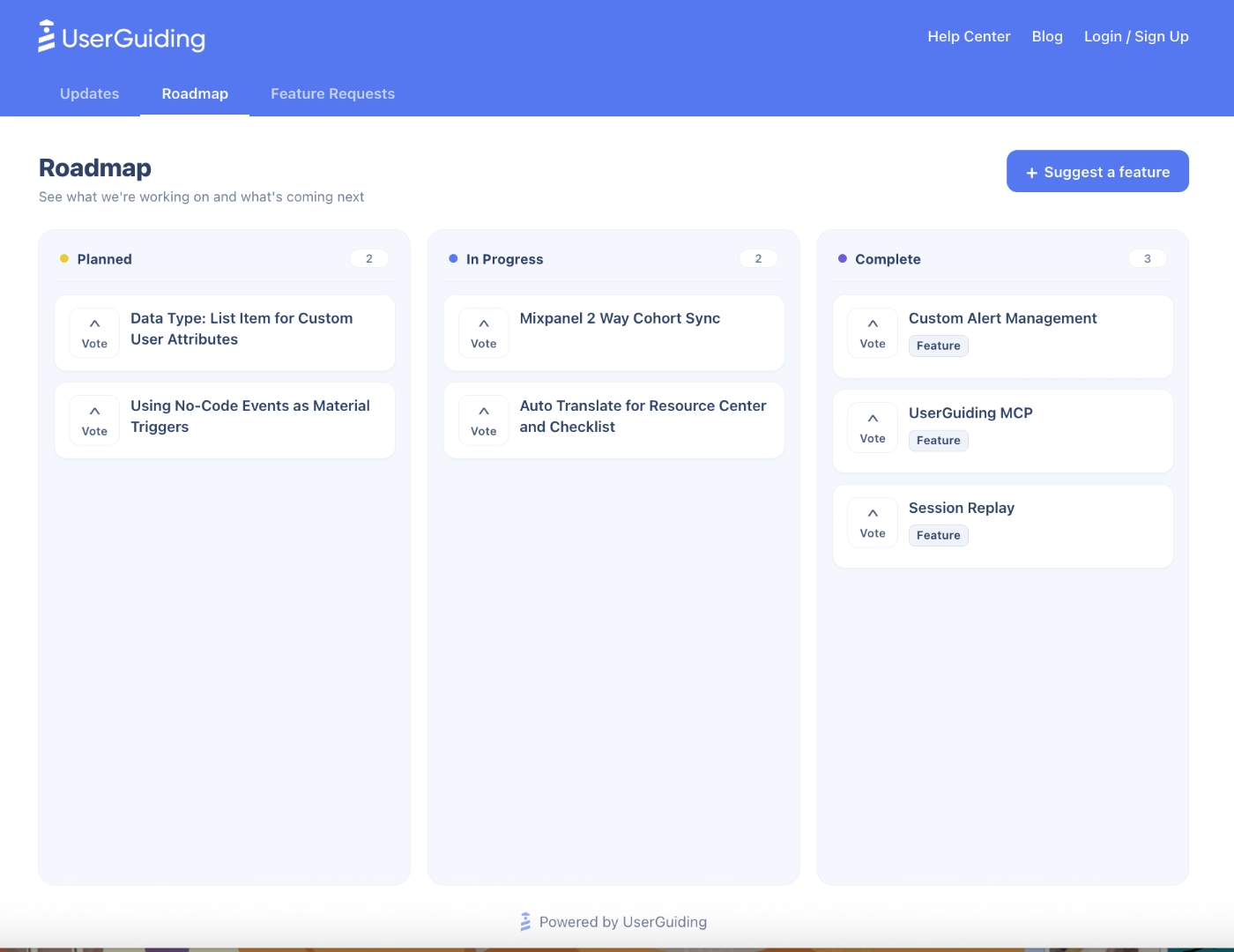
UserGuiding is an all-in-one, no-code product adoption platform, and it added a Public Roadmap and Feature Requests module recently. With this new feature, you can create public and/or private roadmaps and plan your upcoming releases and updates without writing a single line of code or spending weeks (or even months) to learn how to navigate the tool, as UserGuiding has an intuitive and user-friendly UI.
Here’s an example public roadmap created with UserGuiding:
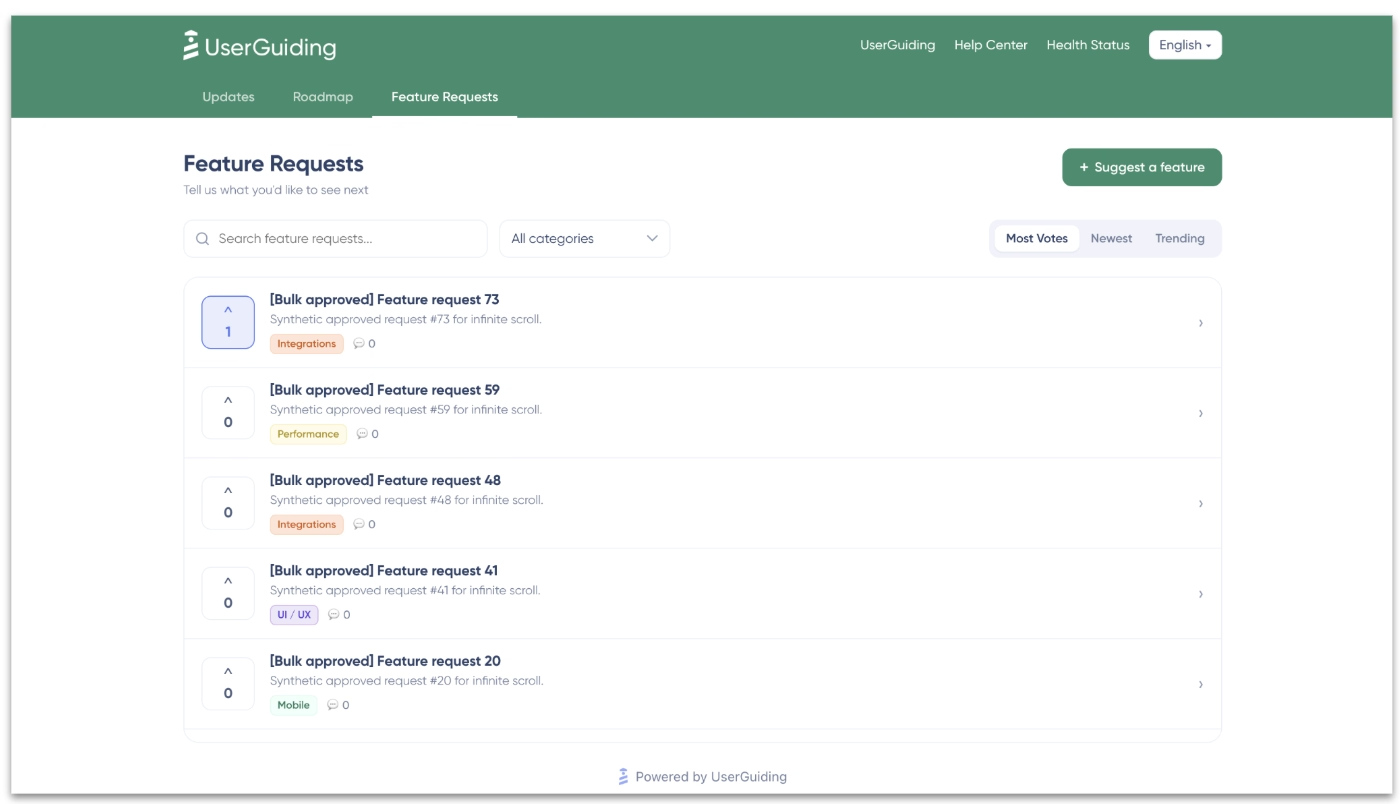
The feature request boards and Product Updates pages also help you to create a 2-way communication line with your customers. With the feature request boards, you can gather suggestions, conduct voting to detect the trends and popular requests, allow your customers to be part of your product development process. While with the product update release notes, you can announce new features and updates, as well as offering more detailed information about them.
Here’s an example feature request board created with UserGuiding:
Additionally, because UserGuiding offers a full suite of features for better feature engagement, product adoption, and automated, self-serve customer support, you can promote a feature (which was requested by your users and which was planned on the roadmap, for example) within the same platform.
You can create guides, in-app pop-up modals, banners, checklists, tooltips, hotspots around a new feature to increase its discovery and adoption.
Here are UserGuiding’s other core capabilities beside the roadmaps and feature request boards:
- Product tours
- Tooltips and hotspots
- Banners
- Checklists
- Resource centers
- Surveys and NPS
- Knowledge bases
- Product updates
- AI assistants
- Analytics
- Session replay
- No-code event tracking
- MCP (Model Context Protocol)
- Custom alerts
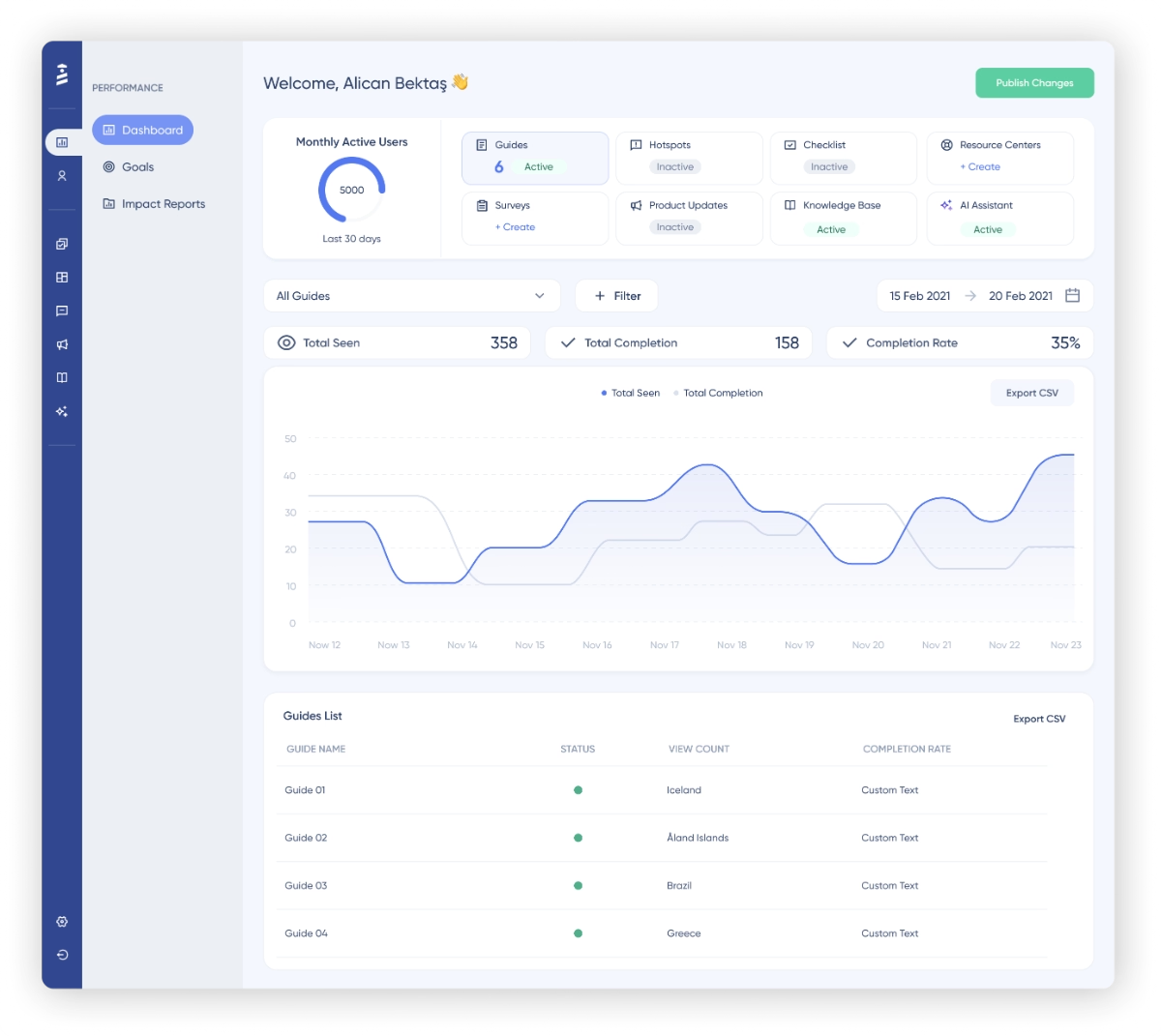
👉🏻 Check out UserGuiding’s features and use cases.
Pricing
Feature Requests and the Roadmaps are available on UserGuiding’s Growth plan (from $499/mo billed yearly, $699/mo billed monthly) and Enterprise (custom pricing). They're not included in Starter, which starts from $249/mo when billed yearly.
✅ UserGuiding’s Pros:
- Genuinely no-code with an easy and quick implementation (under an hour).
- Has little to no learning curve, plus, does not require constant handholding and/or your dev team’s maintenance support.
- Feature Requests and the Roadmap share one taxonomy. Promoting a request onto the roadmap takes one action instead of rebuilding it in a second tool.
- Bundled with UserGuiding's onboarding, surveys, and changelog tools, so feedback collection, roadmap communication, and shipped-feature announcements come from one platform instead of three.
- Transparent, flexible, and scalable pricing plans.
❌ UserGuiding’s Cons:
- Does not support native mobile apps or desktop apps. UserGuiding is built primarily for web apps.
👉🏻 Check out what UserGuiding’s users say about the platform and their experience with it.
🎁 Or, start your free trial with UserGuiding and check out the platform yourself!
Pendo
💯 Best for: Enterprises and technical teams who are looking for additional AI-layer in their product research, planning, and analytics.
Pendo is a digital experience and product adoption platform that has shifted its focus to agentic AI capabilities and optimizing internal AI adoption overall. However, it still offers decent product planning and roadmap capabilities, as well.
Pendo Listen, Pendo’s product planning suite, comes with sentiment analysis, idea validation and prioritization. Along with the roadmap feature, you can use Pendo to tie customer feedback and business outcomes together during the product planning process.
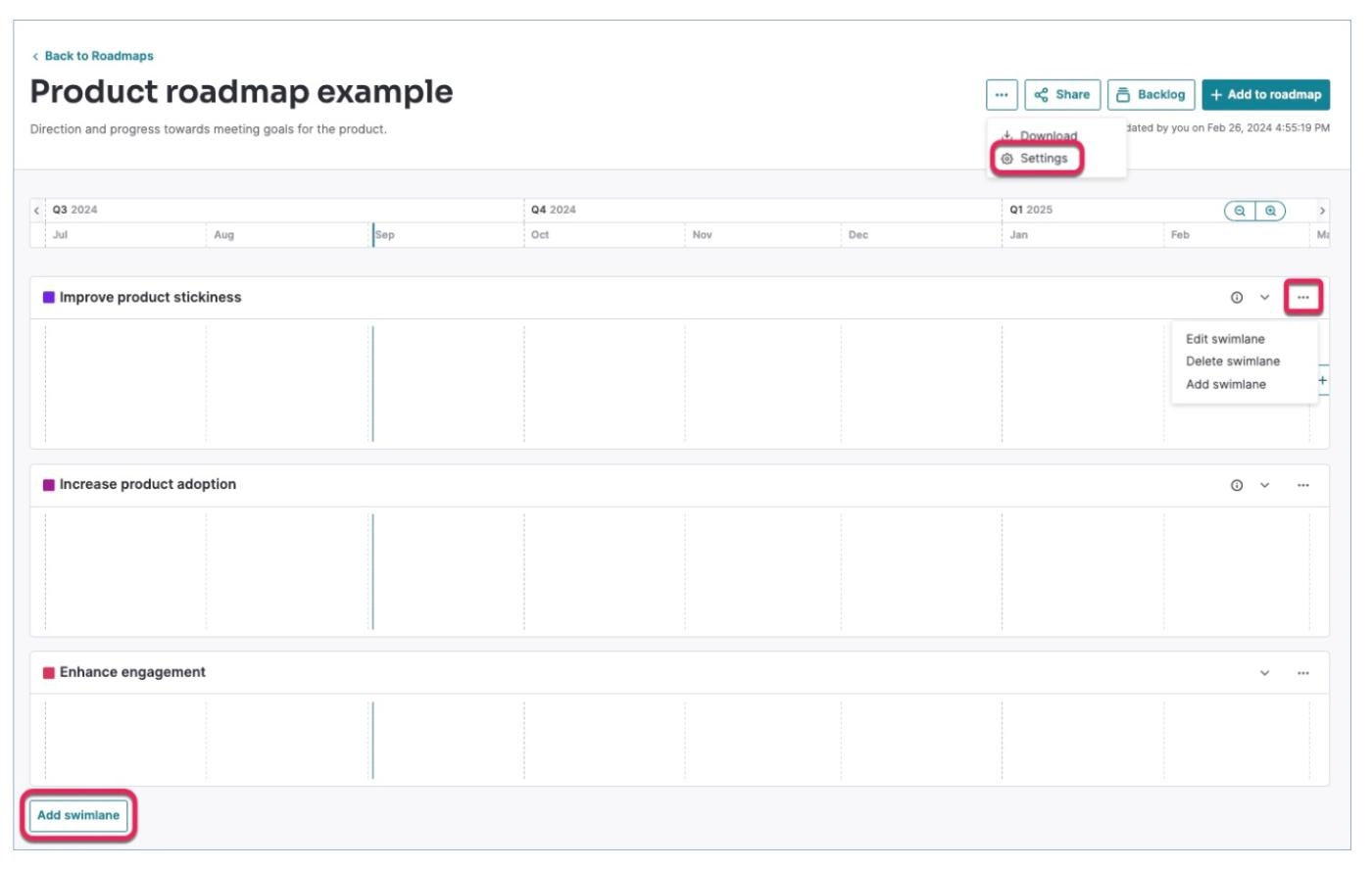
Beside the roadmap and feedback capabilities, Pendo’s other features include:
- Product analytics
- In-app guides (tooltips, walkthroughs, and announcements)
- Session replay
- Sentiment & surveys
- Orchestrate
- Agent analytics
- Predict (churn risk and expansion potential)
- Leo (Pendo's AI assistant)
- Pendo MCP
- Novus. A free AI agent (currently in beta) that monitors your product continuously and surfaces issues in Slack.
👉🏻 Check out Pendo’s features and use cases.
Pricing
Pendo’s pricing is opaque and a little bit confusing. There are 3 paid plans (Base, Core, and Ultimate), along with a free plan (Pendo free) for smaller teams who are just starting with in-app adoption and engagement, and another plan called Novus, which is also free currently, as it is still on BETA.
Basic roadmaps are included in all the paid plans and Pendo free. However, the full Product discovery module (idea validation/prioritization, customer portals, automated feedback triaging, AI feedback analysis, etc.), the one that links customer requests, votes, and dollar value to backlog items on a drag-and-drop board, is only available on Ultimate, Pendo's top paid plan…
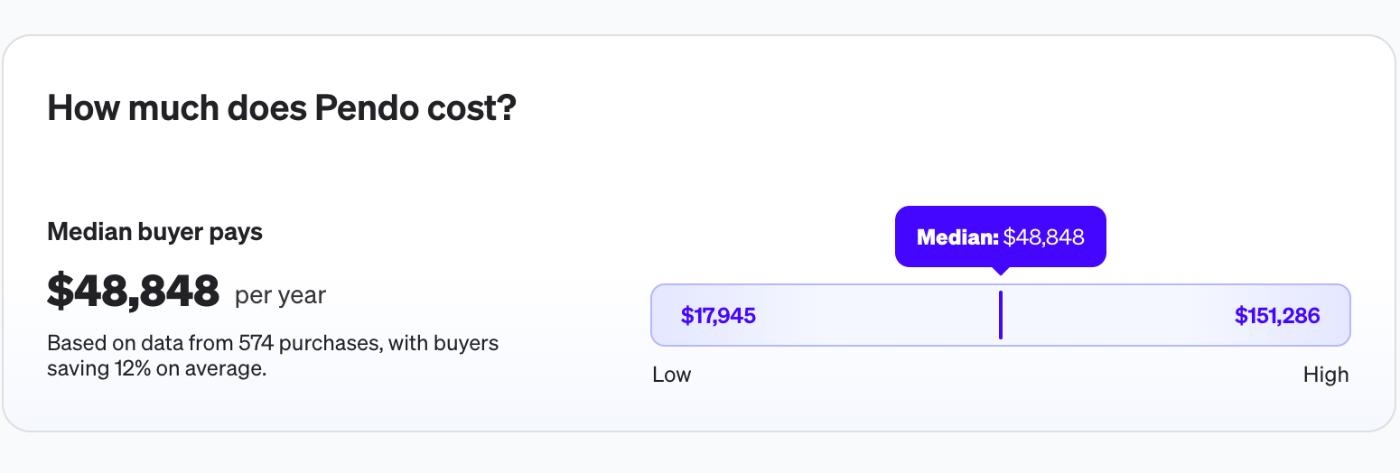
According to Vendr data, the average yearly cost of Pendo is around $49,000, which corresponds to approx. $4,000/mo.
Pros & Cons of Pendo
👍🏻 Product analytics, in-app guides, and customer engagement all live in the same platform, so if you need those too, beside the roadmaps, Pendo can replace several tools instead of one.
👍🏻 Offers an advanced AI and automation layer. Leo, Agent Analytics, and automated feedback triage help you make sense of engagement data and customer feedback fast.
👎🏻 Costs are opaque and climb a lot, especially once you want the more advanced capabilities Pendo is best known for.
👎🏻 It’s a technical tool and there’s a steep learning curve. Getting value out of Pendo requires ongoing upkeep, and most teams end up needing someone dedicated to running the platform.
Even a long-time Pendo customer says:
Usability has always been a headache. We've been a Pendo customer for many years. Set-up and implementation of the core product and new add-ons is cumbersome and difficult.”
Productboard
💯 Best for: Product teams who want roadmapping, prioritization, and customer feedback to be the main product, not the addition to another solution/ use case.
Productboard is a product management and planning tool that offers features and capabilities for surfacing customer insights, tying user feedback and requests with product development, justifying product decisions to stakeholders, and monitoring product initiatives and business goals/outcomes.
Compared to the two roadmap solutions we’ve talked about so far (UserGuiding and Pendo), Productboard is mainly a roadmapping solution, rather than a product adoption tool that also offers roadmapping capabilities.
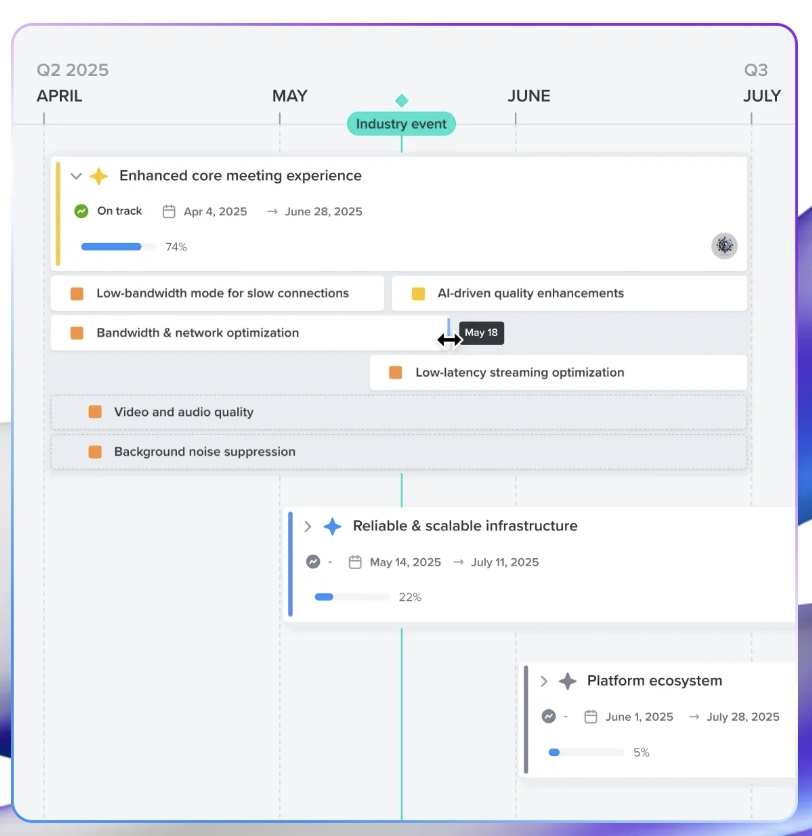
In 2026 Productboard rebuilt its workflow around Spark, an AI agent included on every plan that reads your feedback, specs, and roadmap as one connected system.
The platform’s other features include:
- Customer insights repository
- Strategic planning & objective hierarchy
- Product operations tools
- Customer boards & Product Portal (public-facing feedback collection)
- Productboard MCP
- Spark, Productboard's AI agent
Pricing
Productboard has 2 plans: Business and Enterprise, both priced per "maker" (the PMs who build roadmaps and set priorities), not per seat.
Business starts at $59/maker/month billed annually, with a 5-maker minimum, so the real floor is closer to $295/month, or $75/maker/month billed monthly. It includes unlimited roadmaps and prioritization, 500 Spark AI credits per maker each month, 25 contributors, and 2 Product Portals for collecting feedback publicly.
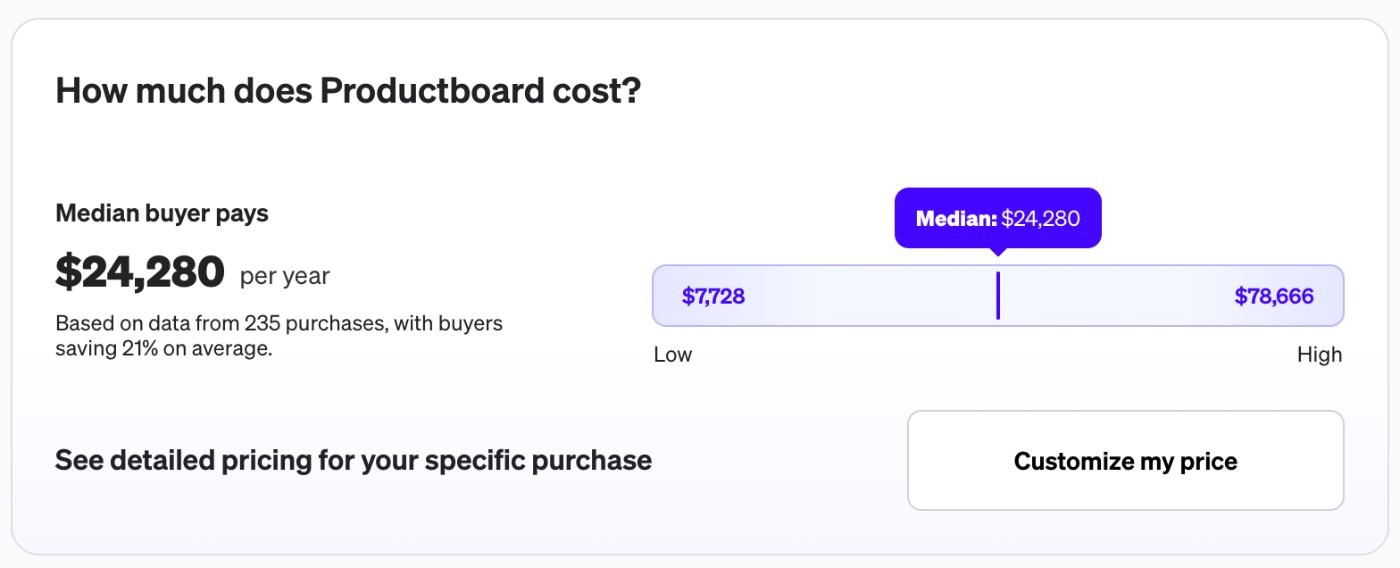
According to Vendr data, the median buyer pays around $24,280/year for Productboard, with actual contracts ranging from about $7,700 to $78,700 depending on team size and negotiated terms.
Pros & Cons of Productboard
👍🏻 Roadmapping, prioritization, and feedback are the core product here, so the roadmap tooling itself (custom formulas, dependency tracking, multiple release groups) goes deeper than tools where it's a secondary feature.
👍🏻 Offers a lot of views, filters, and dashboards to manage projects and customer feedback. However, we should note that several customers find this “flexibility” confusing and crowded.
I don’t like Productboard’s dashboard because it’s too crowded with information. It’s also hard to customize the views and takes time to get them right. I wish we had better reporting tools to look at our data.”
👍🏻 Comes with a lot of native integrations with popular platforms.
👎🏻 Pricing is maker-based with a 5-maker minimum, so cost adds up quickly once your PM team grows, and full public sharing controls are Enterprise-only.
👎🏻 The flexible data model that makes Productboard powerful also makes it harder to get started. Mapping your product to it correctly takes real setup time.
Getting started can be tricky especially for the new beginners, and the reason is because of the need to figure out how best to map your product(s) to the flexible data model that PB only allows for.”
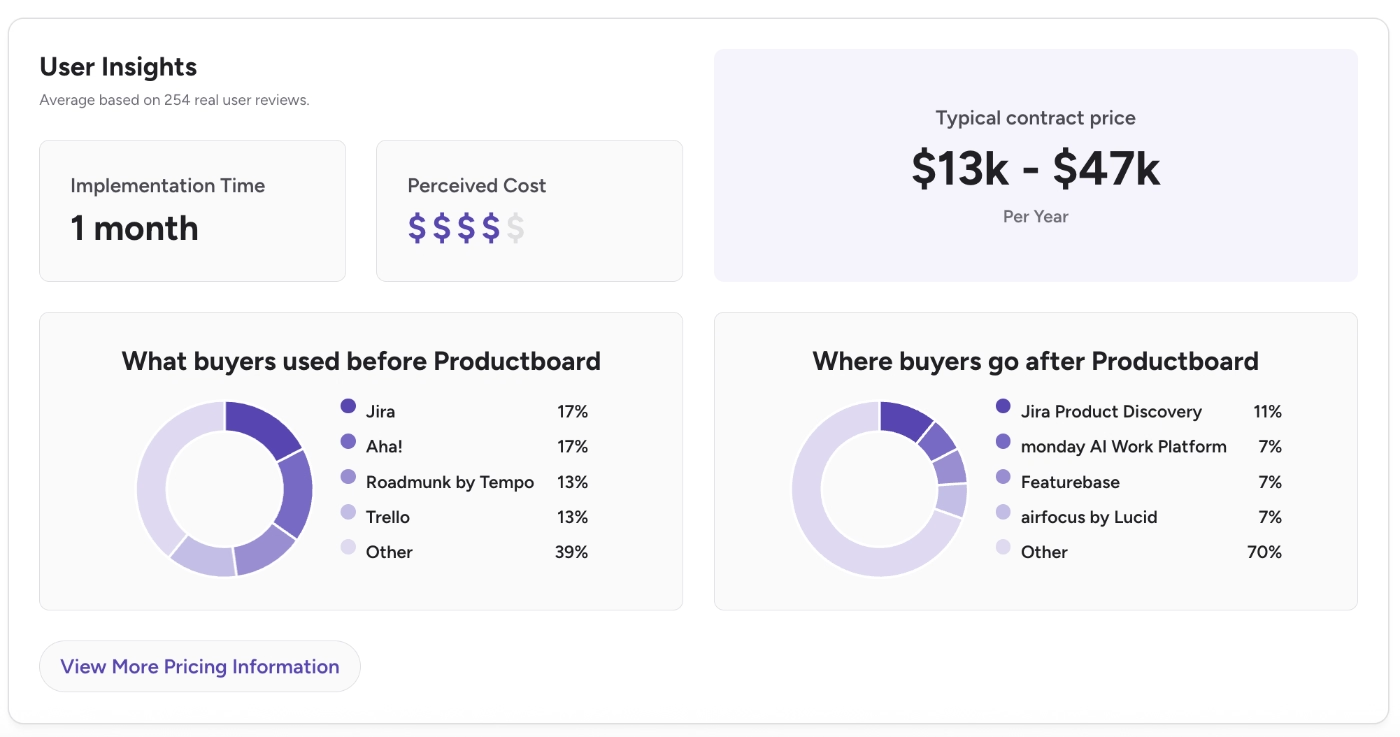
According to G2 data, Productboard’s closest competitors are Jira, Aha!, Tempo, Trello, Featurebase, and Monday AI. The platform’s initial implementation is around 1 month, and the perceived cost is rated 4 out of 5.
Aha! Roadmaps
💯 Best for: Businesses that require flexibility and a rich template gallery/customization options, when it comes to product planning and idea prioritization.
Aha! Roadmaps is a roadmapping and product management tool that offers features and frameworks to prioritize product ideas, manage customer feedback, and tie product planning with business goals/outcomes.
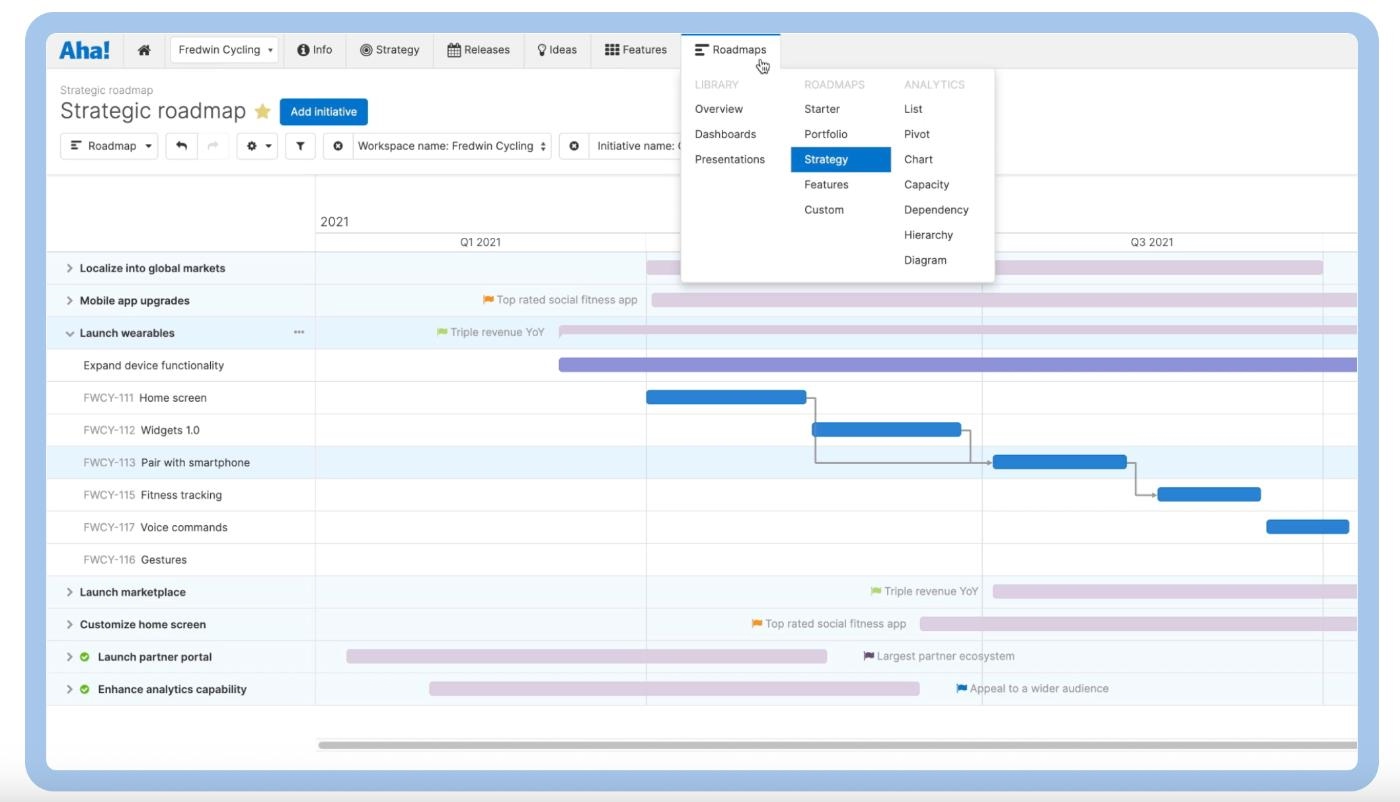
As the name suggests, Aha! Roadmaps is mainly a roadmapping tool and it offers a lot of templates, filters, views, and boards for different occasions. Aha! Roadmaps is one of the (if not the one) roadmap tool with the most view options, actually.
You can plan your roadmap based on OKRs, resources, requirements, dependencies, and different priorities. You can also build prototypes and documentation on the platform.
The platform's other features include:
- Idea and feedback portals
- Whiteboards for early concepts and brainstorming
- A product knowledge base
- Release and dependency management
- Elle, Aha!'s AI assistant
Pricing
Aha! Roadmaps is the roadmapping product inside a much larger suite (Aha! Ideas, Whiteboards, Knowledge, Develop, Teamwork, and the new Aha! Builder), so there are several tiers and bundles with different capabilities/features included in.
The Aha! Roadmaps Premium plan includes all the essentials and starts at $59/user/month (billed yearly).
There are also Enterprise and Enterprise+ plans, which start at $99/user/month and $149/user/month, respectively (both billed yearly).
Beside these plans, Aha! also some of roadmapping-relevant features in different bundles like Aha! Ideas, which starts at $39/user/month (billed yearly) or Aha! Develop, which starts at $9/user/month /billed yearly).
Aha! has a very transparent and flexible (though a little bit confusing) pricing structure, listing all the starting prices of all the plans, offering both monthly and yearly billing options, and bundle discounts. You just need to spend a little bit of time on their pricing page and compare feature lists to create the product you need. This structure ensures that both smaller and larger teams with different budgets can use the platform and feel they get the worth of their money.
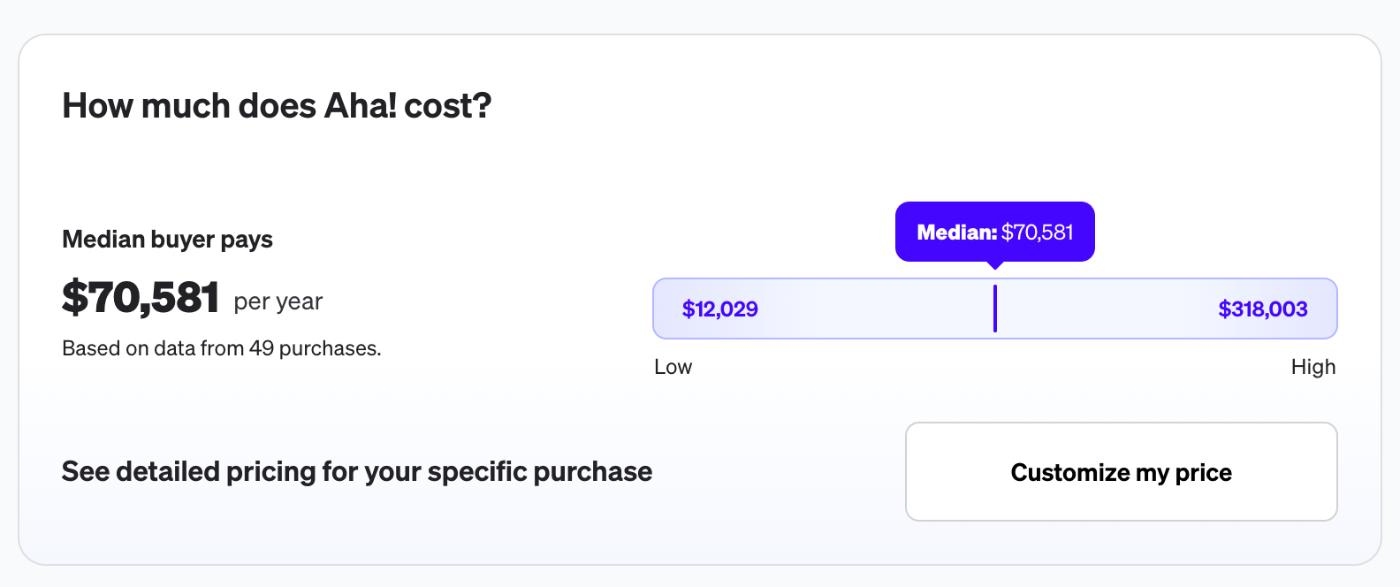
According to Vendr data, the average yearly cost of Aha! is around $70,500, which corresponds to around $5,800/mo.
Pros & Cons of Aha! Roadmaps
👍🏻 Prioritization goes deeper than most tools on this list.
👍🏻 Customization capabilities are very rich, thanks to its integrations and API.
Aha is extremely powerful and customizable. In case the enterprise license is used, the customization possibilities and advanced features are awesome. It is possible to really tailor the product behaviour to your personal needs. Additionally, the product is rich in APIs which allow it to extend the integration possibilities even more.”
The integration with DevOps is extremely efficient.
👎🏻 The modular pricing structure is good for a team that doesn’t need a lot of capabilities, however, with more modules and more seats (especially if you have a crowded product team), the cost of the platform can jump pretty easily.
👎🏻 The dashboards, views, and capabilities come with a steep learning curve, especially if you’ve never used a roadmap tool before or have used a simpler solution before.
Steep learning curve. Aha! has a lot of concepts to internalize (portals, ideas, initiatives, workspaces) and if you're coming from a simpler setup, expect to invest real time getting your workflows right before it clicks. Not a dealbreaker, but set realistic expectations for onboarding.”
ProductPlan
💯 Best for: Product teams who are looking for advanced user and market research capabilities alongside roadmapping and product planning features.
ProductPlan is a roadmapping and product intelligence tool that helps you conduct market research, run and analyze customer feedback you gather through surveys.
ProductPlan, too, offers a lot of prioritization methods and idea management capabilities as well as brainstorming areas in the platform until you fully develop an idea and add it to your roadmap. In this way, it’s similar to Aha! Roadmaps.
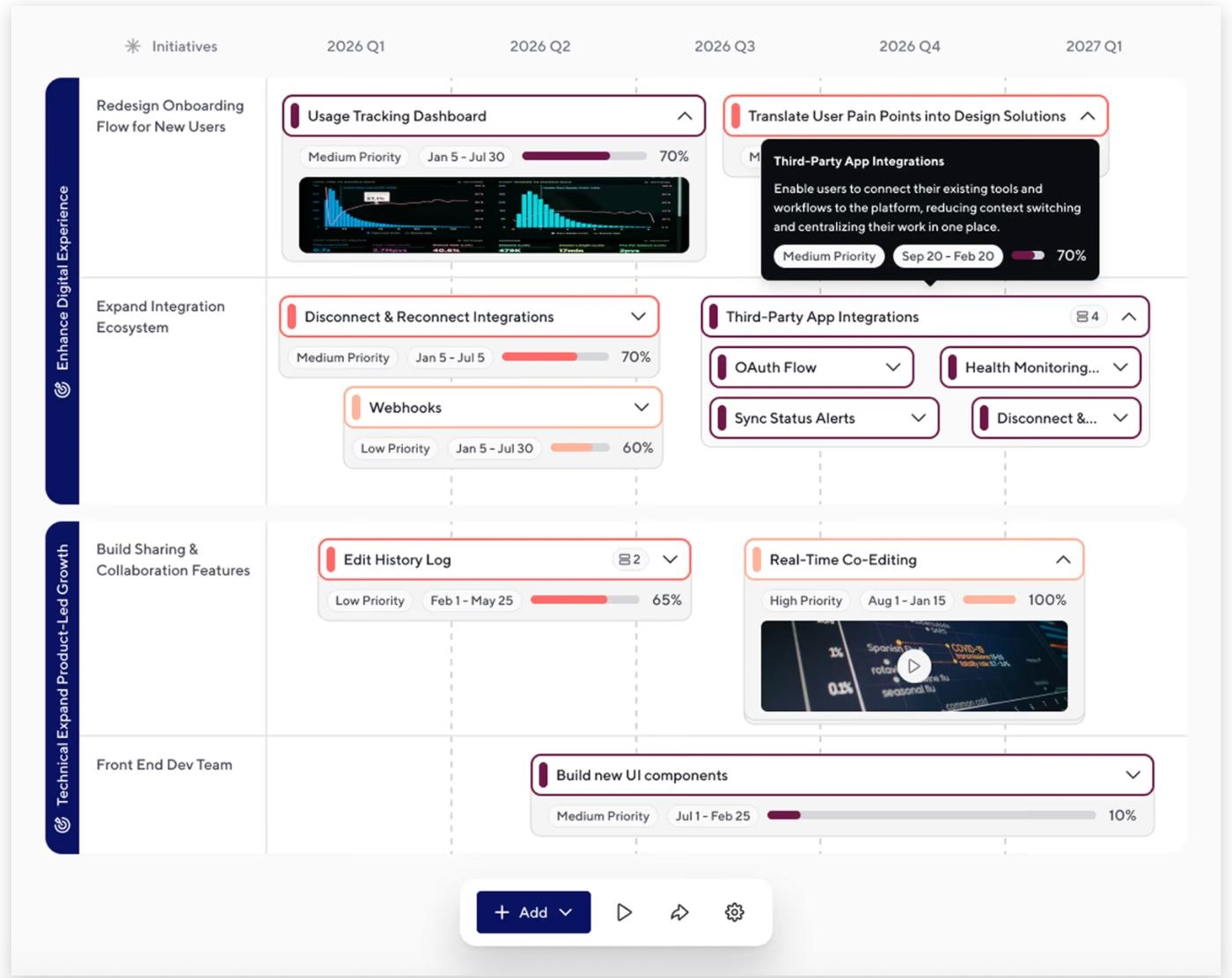
However, what distinguishes ProductPlan from the other roadmapping tools we’ve covered so far is its user research and survey features.
Both UserGuiding and Pendo have detailed and advanced in-app survey capabilities with several templates and many question types. However, in addition to surveys you can conduct with your own customers and audience, ProductPlan also offers its own audience for you to conduct market research. So, in this way, it’s more of a market research tool rather than a tool where you collect feedback and suggestions from your own users.
The platform’s other features include:
- Idea capture and management
- AI-moderated research surveys with customers
- Opportunity validation
- AI-suggested initiatives
- Objectives & Key Results (OKRs) linked to roadmap items
- Risk & dependency tracking
- Launch management
Pricing
ProductPlan no longer publishes self-serve pricing. It's moved to one plan, custom-quoted through a demo, that includes every feature and unlimited viewers, you only pay for the people actually building and managing roadmaps.
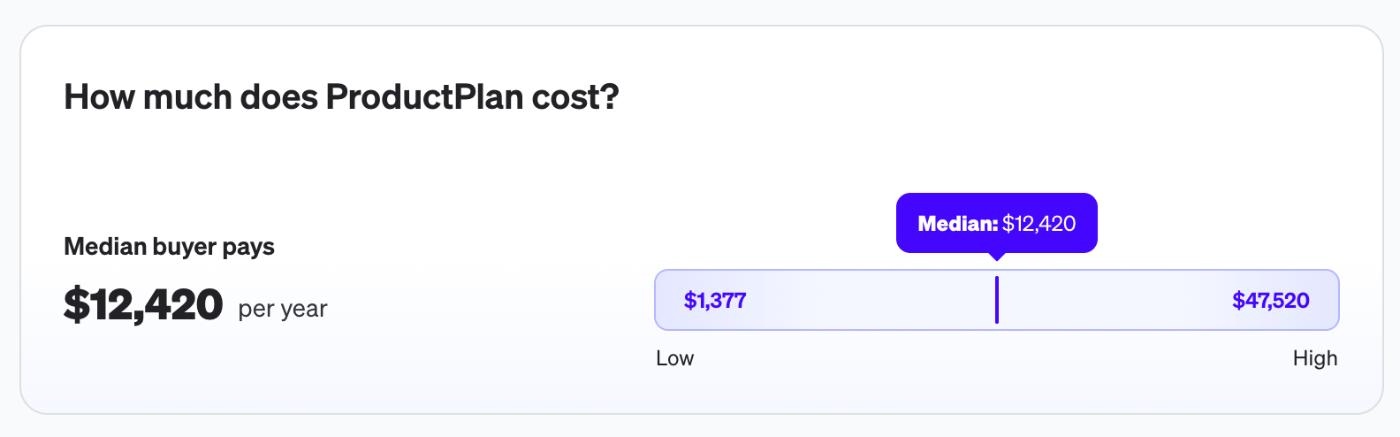
According to Vendr data, the median buyer pays around $12,420/year for ProductPlan, though that figure reflects the older Basic/Professional tiers and may not carry over cleanly to the new all-inclusive plan.
Pros & Cons of ProductPlan
👍🏻 Changing between different views is pretty easy. The platform’s modular structure allows you to drag and drop things and make little tweaks along the way.
I appreciate that I can combine several roadmaps and dependencies into a single view. This feature makes it much easier to manage and track everything in one place. It is also easy to move around things when dates and timings change, by drag dropping a bar/container ect. The colouring system keeps a clean look and allows you to quickly identify task-types.”
However, this flexibility can be a problem for some, as well, as some users state that the roadmaps built with ProductPlan are too sensitive and it’s easy to mess things up.
Here’s an example complaint from a user:
The integration takes time to figure out, what imports work and what doesn't and why. Also, the roadmap is super sensitive, if you just try to move it a bit, everything goes out of whack, and it syncs back to Jira, messing up plans.”
👎🏻 The integrations are hard to set up and configure.
Some customers also find the process tiresome as it requires a lot of manual work:
The biggest drawback is for its ability to integrate with other systems and databases seamlessly. So a lot of the data entry work seems very manual and time consuming. Some of the advanced features come up with a pretty hefty price tag. It also lacks some pretty basic reporting and analytics functionality.”
👎🏻 No transparent, published pricing anymore.
ProdPad
💯 Best for: Small and non-technical teams who're looking for a simpler and relatively comprehensive solution to centralize feature planning processes.
ProdPad is an easy-to-use product management solution for product planning, idea management, and customer feedback centralization.
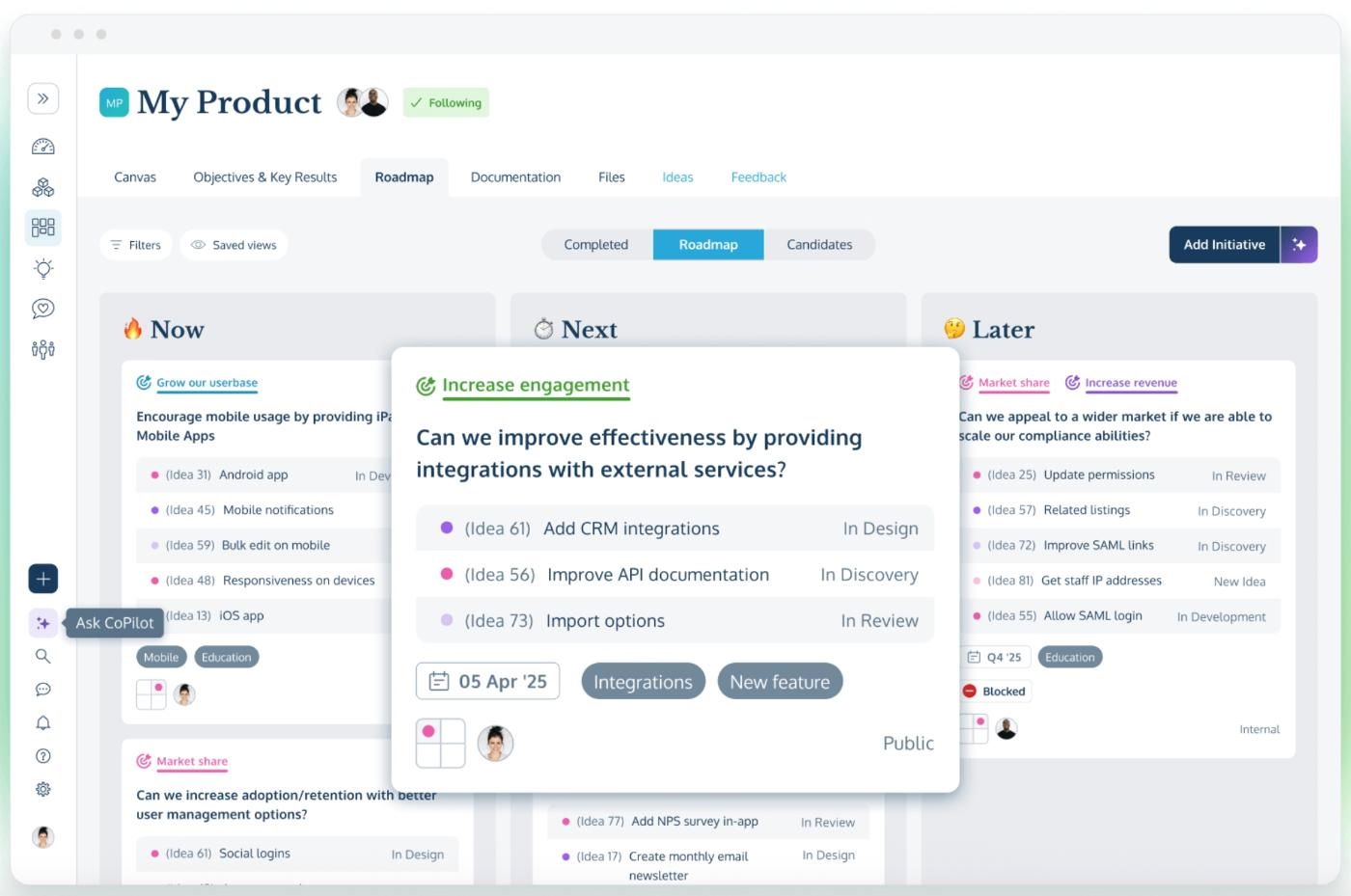
Other features include:
- Now-Next-Later and Kanban-style roadmap views
- Objectives & Key Results (OKRs)
- A Canvas for product strategy work
- Idea scoring and prioritization
- AI Copilot for drafting and summarizing
Pricing
The platform is modular. You can buy Roadmaps, Ideas, and Feedback separately, and every account gets free, unlimited Reviewers. Here are the starting prices of the modules:
- Roadmaps: $44/seat/mo (billed yearly)
- Ideas: $36/seat/mo (billed yearly)
- Feedback: $36/seat/mo (billed yearly)
There’s also a monthly billing option.
Pros & Cons of ProdPad
👍🏻 Easy to set up and get started with.
It's fast and easy to set up compared to other tools. The AI assistant is amazing. It saves loads of time and the responses are far better than using a standard LLM. The integrations are also great, especially the JIRA integration and the MCP. The tool fits into the way we work seamlessly.”
👎🏻 Customization capabilities and export options are often criticized.
Here’s what one user complains about:
... little to no customization of the roadmap. I'd like to see it exportable. We need to present our roadmap frequently and screenshots of it just stink and are uninformative. It would be ideal to have a spreadsheet like view of it. Also converting ideas to feedback and vice versa.”
Canny
💯 Best for: Teams who want a lightweight, public-facing feedback-to-roadmap-to-changelog loop.
Canny is an AI-powered customer feedback management tool that offers features and capabilities for collecting feature requests, managing product roadmaps, and announcing new features via a changelog.
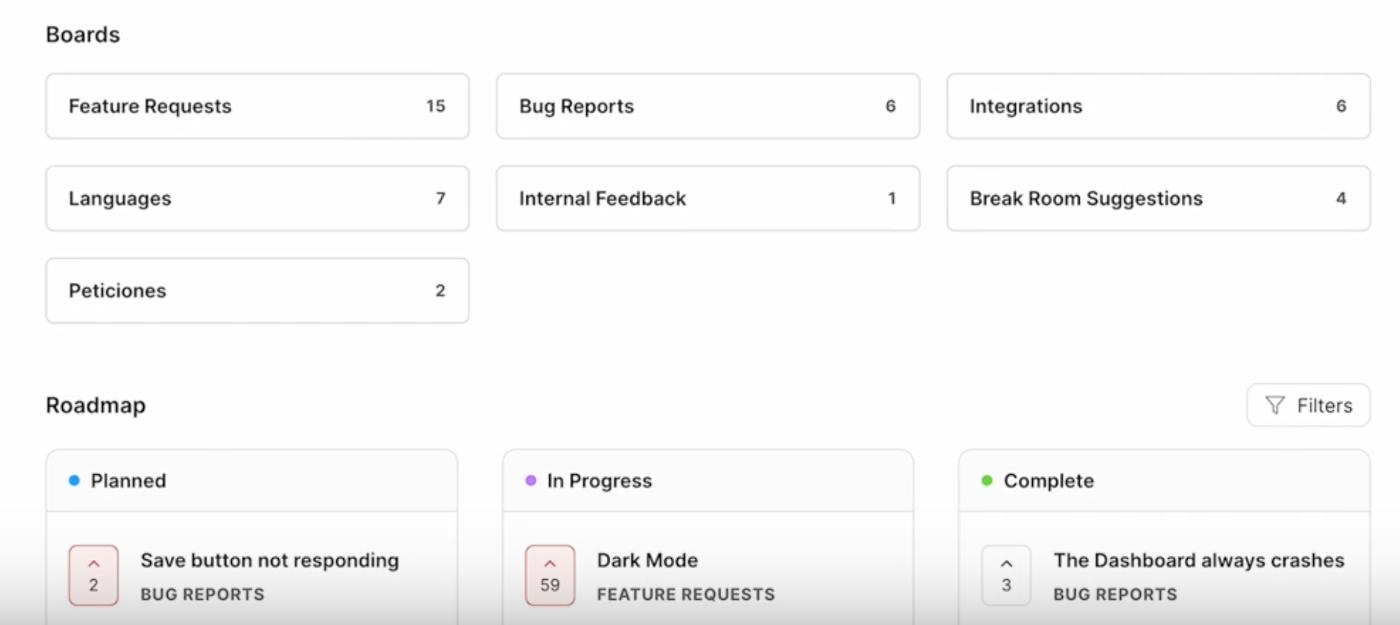
Autopilot, Canny's AI layer, can pull additional feedback straight out of support tickets, sales calls, and customer conversations in tools like Intercom, Zendesk, and Gong, deduplicating similar requests as it goes. From there, you score and prioritize what you've collected, build a roadmap, public or internal, and use the built-in changelog widget to close the loop with the people who asked.
Beside the roadmap and feedback capabilities, Canny's other features include:
- Autopilot
- Smart Replies and comment summaries
- User segmentation and MRR impact tracking
- Custom statuses and automated status-update emails
- A changelog widget you can embed directly in your product
Pricing
Instead of charging per PM or per editor, Canny prices around tracked users, meaning anyone who actually submits, votes, or comments on feedback. That makes it a lean option for a small team with a vocal but modest user base, though it changes the math once your roadmap gets popular…
- Free covers up to 25 tracked users and 5 admin seats, with unlimited posts, boards, Contributor seats, and a public roadmap and changelog included.
- Pro starts at $79/month billed yearly ($99/month billed monthly) for 100 tracked users, and adds project management integrations, custom domains, changelog emails, and Canny's MCP connectors.
- Business is custom-quoted for teams with 5,000+ tracked users.
There’s both monthly and yearly billing options.
Pros & Cons of Canny
👍🏻 Easy to pick up, for both the team running it and the customers using it.
👍🏻 Email and in-app widget features allow you to close the loop and communicate your requested updates to your users easily and contextually.
👎🏻 Some project management integrations are shallow enough to require real manual work.
👎🏻 Administration gets harder once multiple teams inside the same organization need their own boards.
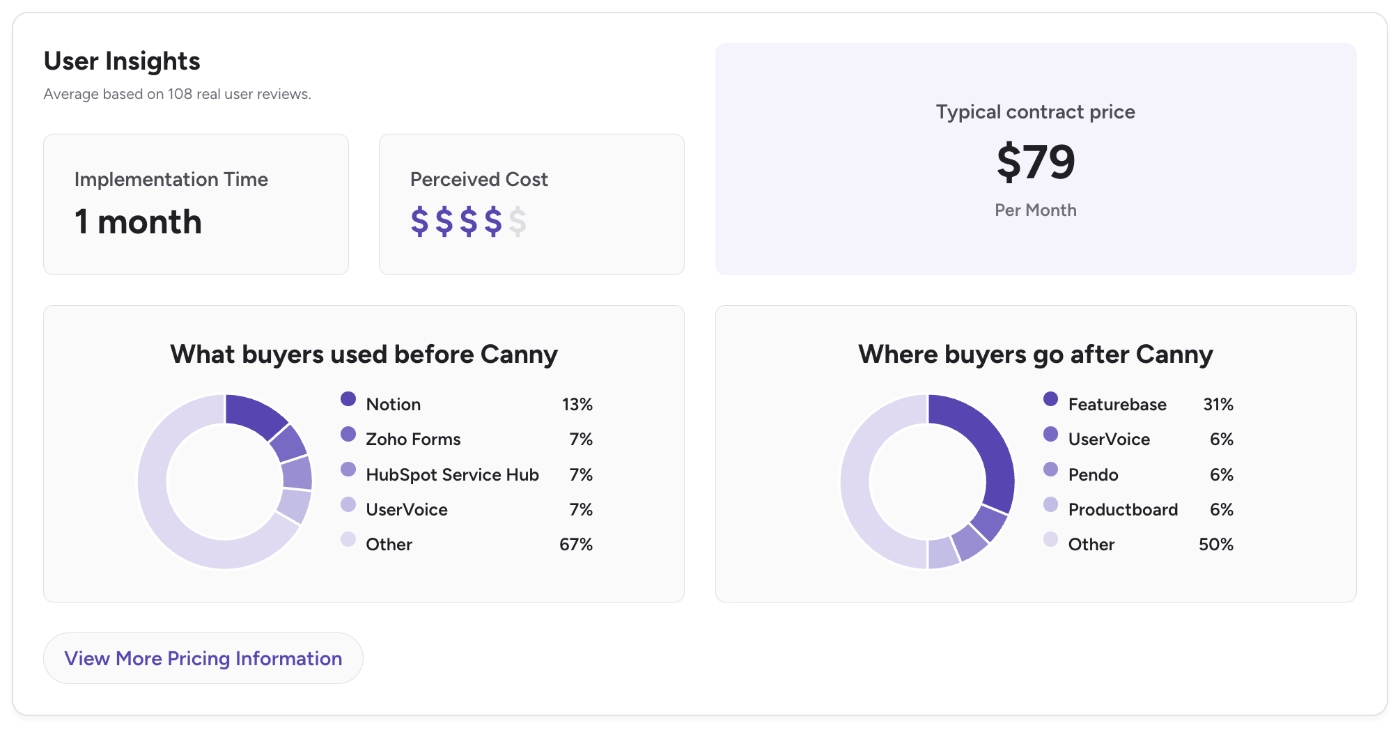
According to G2 data, Canny’s closest competitors include Notion, Zoho Forms, UserVoice, Pendo, Featurebase, and Productboard. The platform’s average implementation time is 1 month, and its perceived cost is rated 4 out of 5 by its users.
Tempo Strategic Roadmaps (formerly Roadmunk)
💯 Best for: Enterprise teams who want a more visually polished, boardroom-ready roadmap tool backed by a broader project and portfolio management suite.
Roadmunk was one of the original standalone roadmapping tools, and Tempo, a company better known for its Jira time-tracking and portfolio management apps, acquired it in 2021. In 2024 Tempo rebranded it to Strategic Roadmaps, a name change only, with the same underlying product, now sold as part of Tempo's wider project and portfolio management lineup rather than as a standalone app.
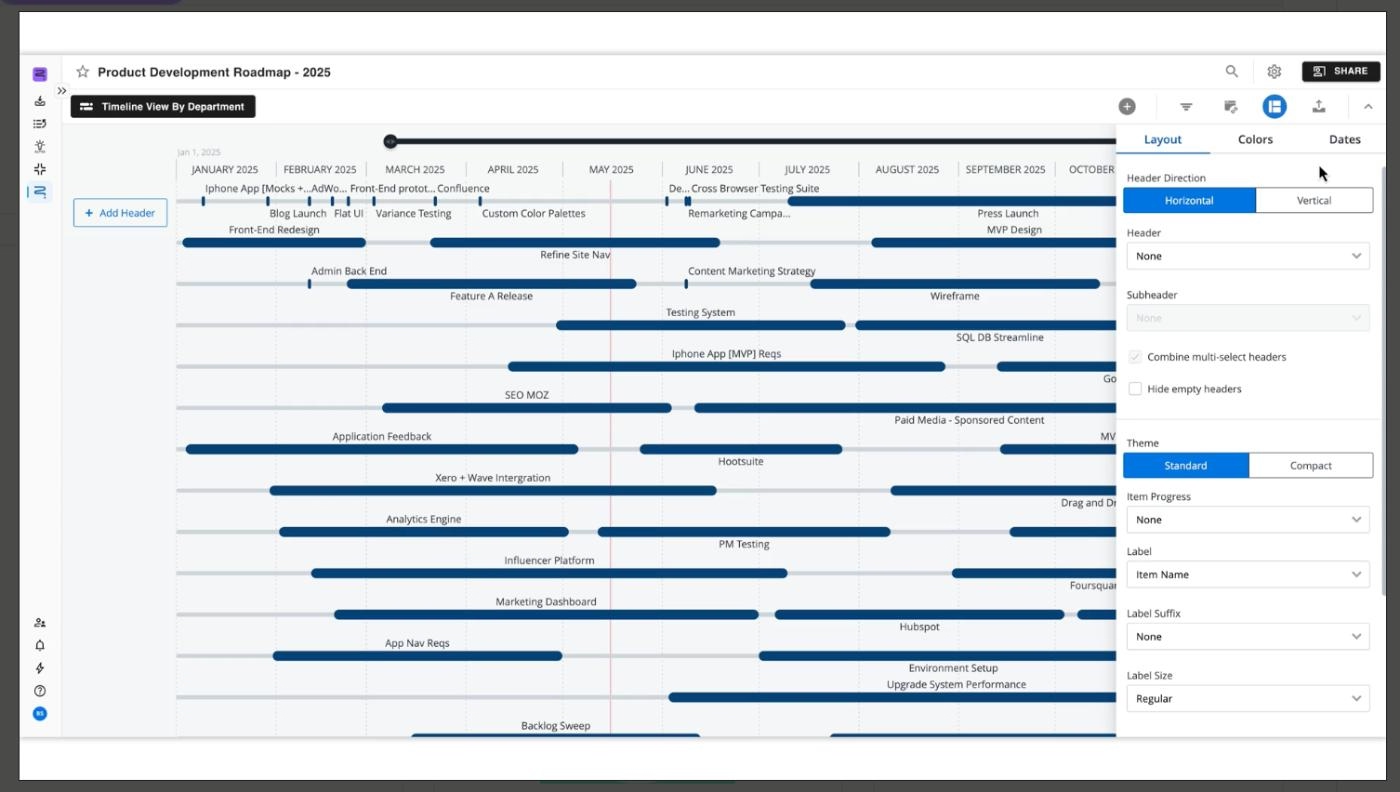
The core of the tool hasn't changed. You build roadmaps in timeline, swimlane, or table views, and you can roll several team-level roadmaps up into a single portfolio view for leadership. The Idea Manager lets you log feedback and product ideas, score them against built-in or custom prioritization frameworks, and promote the ones that make the cut onto the roadmap.
Pricing
Tempo Strategic Roadmaps prices per editor, with a limited number of reviewer seats bundled into each plan and extra reviewers billed separately.
- Starter costs $19/editor/month billed annually and covers unlimited roadmaps, one-way sync with Jira, Azure DevOps, and Trello, and 3 reviewer seats.
- Business, at $49/editor/month billed annually, adds feedback collection, the Idea Manager, portfolio roadmaps, dependency tracking, and 5 reviewers, with two-way Jira and Azure DevOps sync available as a $9/collaborator/month add-on.
- Professional, at $99/editor/month billed annually, builds in two-way sync by default, plus advanced visualizations, real-time publishing, usage reports.
- Enterprise is custom-quoted and adds private cloud hosting and custom reviewer counts.
Reviewers beyond what's bundled cost $5/month each, so a roadmap with a lot of internal stakeholders who only need to view and comment can add up on top of the per-editor price.
Pros & Cons of Tempo
👍🏻 Clean, customizable templates and multiple view types make it easy to show the same roadmap differently to different audiences.
👍🏻 The interface is approachable for teammates with different technical backgrounds, and it integrates well with the project management tools teams already use.
👎🏻 Pricing is per editor with reviewer seats capped and billed separately, and reviewers describe it as built more for mid-size and larger teams than small ones.
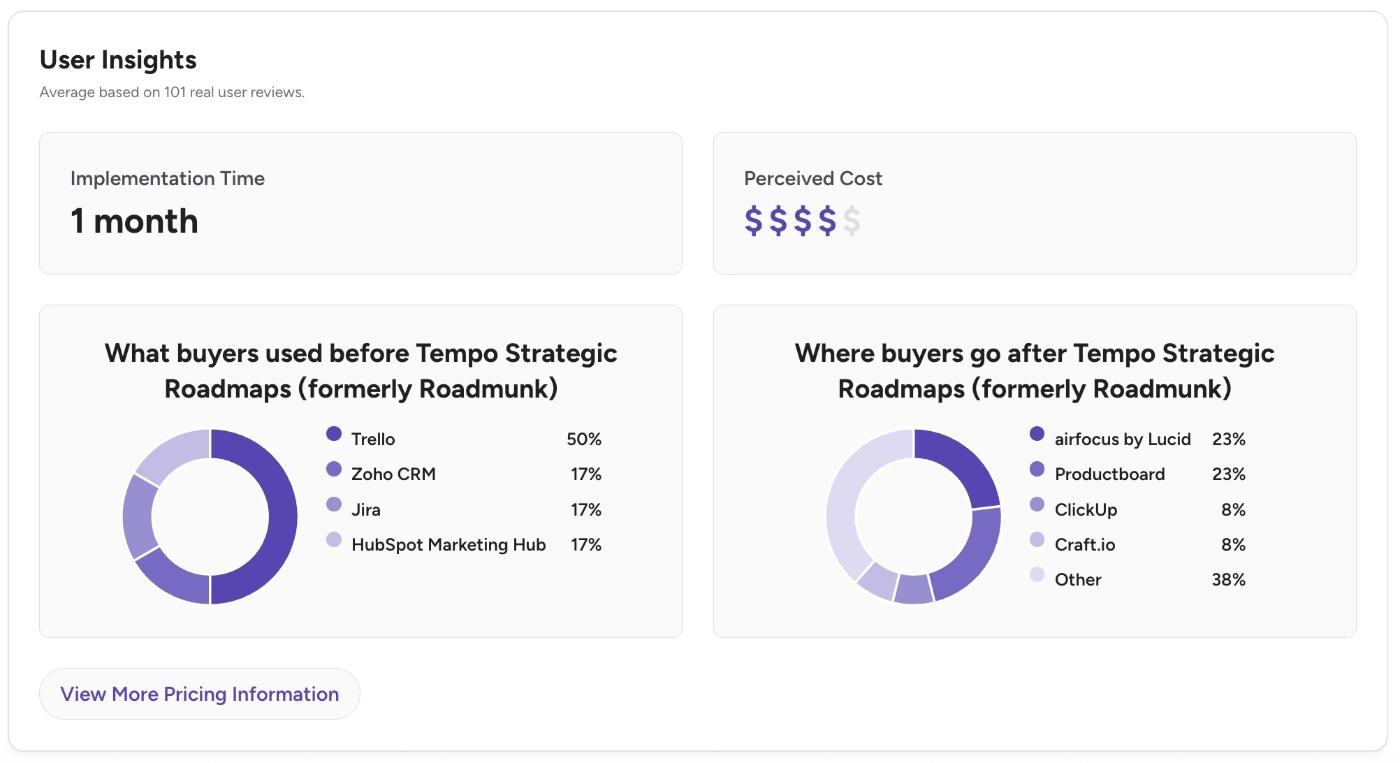
According to G2 data, Tempo’s closest competitors include Trello, Zoho, Jira, airfocus, and Productboard. The platform’s initial implementation takes around 1 month and its perceived cost is rated 4 out of 5 by its users.
airfocus by Lucid
💯 Best for: Organizations that want customizable prioritization scoring built into the roadmap.
Airfocus started as a flexible, prioritization-first roadmapping tool, and Lucid Software, the company behind Lucidchart and Lucidspark, acquired it in 2025. It's now sold as airfocus by Lucid, positioned as a "product intelligence platform" for organizations running several product teams at once rather than a single team's roadmap.
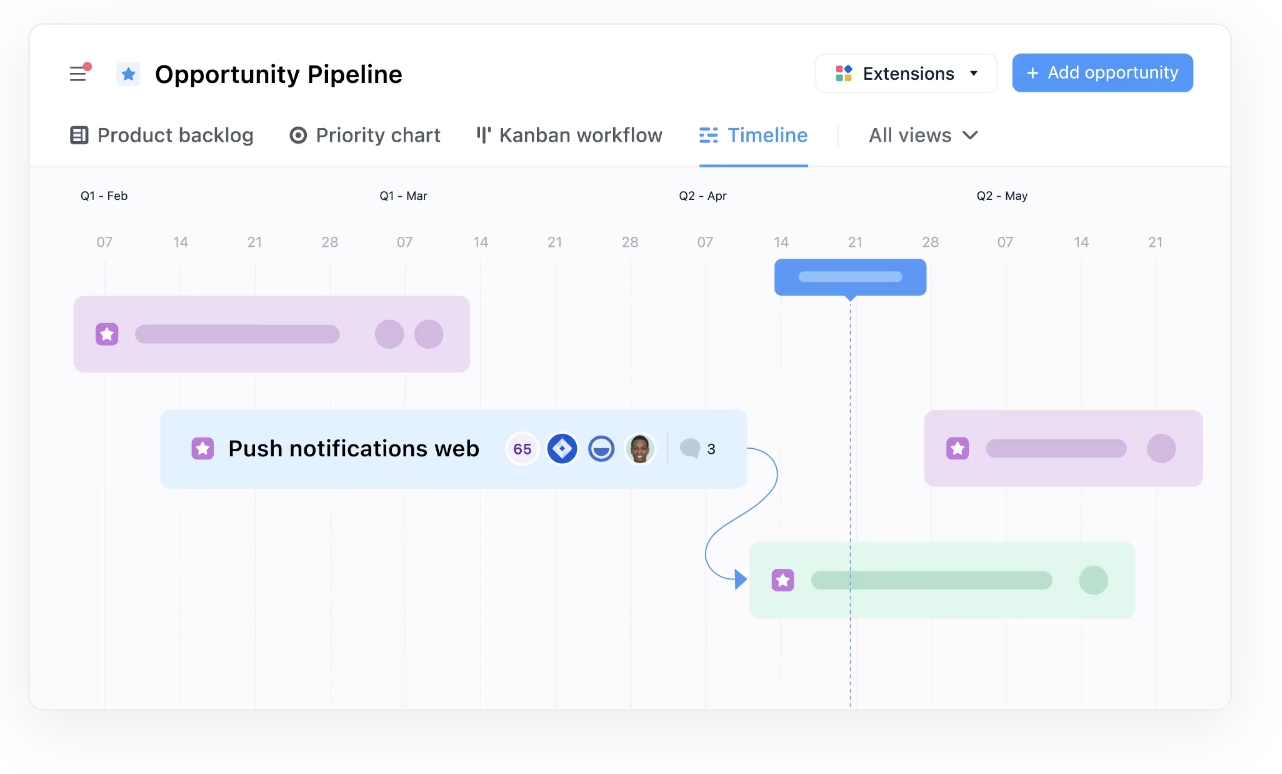
Its signature feature is customizable prioritization. Instead of one fixed scoring model, you build your own formula, or use the Priority Ratings or Priority Poker apps, weight it however your team defines value, and see the results plotted directly against the roadmap. Feedback collected through boards and a branded customer portal feeds into that same prioritization layer.
Beside the roadmap and feedback capabilities, airfocus's other features include:
- A branded customer or stakeholder portal for collecting feedback and votes
- Portfolio management and dashboards across multiple teams
- Capacity planning
- The airfocus agent, an Insights agent, and an MCP server for AI-assisted prioritization and reporting
Pricing
Airfocus no longer publishes transparent, self-serve pricing. There are two plans, Professional and Enterprise, and both are quoted after a demo call, with unlimited free contributors and workspaces bundled into either one.
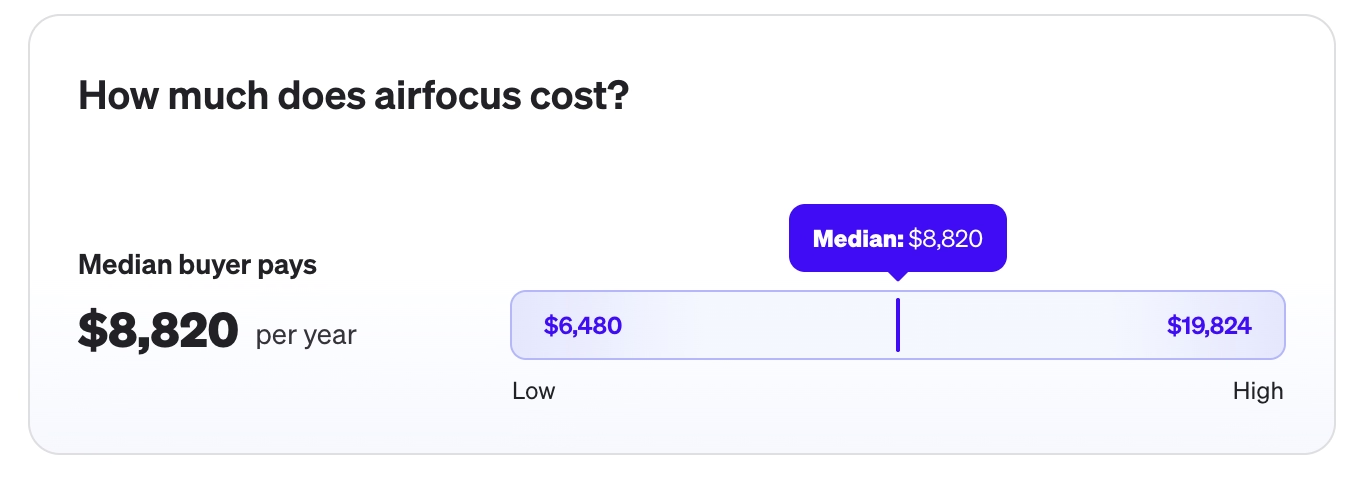
According to Vendr data, the median buyer paid around $8,820/year for airfocus, with contracts ranging from about $6,480 to $19,824.
Pros & Cons of airfocus
👍🏻 Customizable prioritization is a real differentiator from other roadmapping solutions.
👎🏻 It's built for prioritization and roadmapping, not for running the delivery work itself. Deeper task tracking or workflow automation still means keeping a separate project management tool around.
👎🏻 Airfocus has a steep learning curve. According to G2 statistics, the initial implementation takes 2 months.
Free & Low-Budget Product Roadmap Tools
Jira
💯 Best for: Engineering-led teams already running sprints in Jira who want a rough roadmap view without paying for or learning a separate tool.
Jira isn't a dedicated roadmap tool.
It's Atlassian's issue tracker and sprint planning tool, and the case for using it as a roadmap tool is that your engineering team is probably already living in it. Instead of maintaining a second source of truth, you build a rough roadmap out of the same backlog everyone's already updating.
What you get natively is Timeline view, a date-based, Gantt-style bar chart of epics and issues, available on every plan, including Free.
Atlassian also sells a separate product, Jira Product Discovery, built specifically for idea intake, prioritization, and roadmapping, with its own free tier and creator-based pricing on top. It's a closer fit to the feedback-to-roadmap workflow the rest of this list is built around, but it's still a second tool…
Beside the roadmap capabilities, Jira's other features include:
- Backlog, board, calendar, list, and summary views for the same underlying issues
- Advanced planning ("Plans"): cross-project dependency tracking and capacity management
Pricing
Jira's roadmap capability isn't priced separately. It's whatever Timeline view or Plans your Jira plan happens to include.
Free covers up to 10 users and includes Timeline view for a single project, along with backlog, board, calendar, and summary views.
Standard starts at $7.91/user/month billed monthly and raises the user cap to 100,000, but doesn't add anything to the roadmap itself.
Premium, at $14.54/user/month billed monthly, is where cross-project dependency management and capacity planning unlock, the features that make a Jira roadmap usable across more than one team. Enterprise is custom-quoted and adds advanced admin controls and multiple sites.
If a real feedback-to-roadmap workflow matters more than staying inside Jira, Atlassian's separate product, Jira Product Discovery, is free for up to 3 creators and then $10/creator/month on Standard or $25/creator/month on Premium.
Pros & Cons of Jira
👍🏻 If your team already runs sprints in Jira, a rough roadmap costs nothing extra and doesn't add a second tool everyone has to log into.
👍🏻 Deep customization and thousands of Marketplace integrations mean a Jira-based roadmap can flex to fit almost any workflow.
👎🏻 The features that make a roadmap genuinely useful across teams, cross-project dependencies and capacity planning, sit behind the Premium plan, so a real multi-team roadmap isn't actually free.
👎🏻 Jira wasn't built as a stakeholder-facing roadmap tool. There's no built-in public roadmap, customer voting, or changelog.
Notion
💯 Best for: Teams that already run everything else, docs, wikis, and tasks, in Notion and want to build a roadmap as one more database instead of adopting a dedicated tool.
Notion is a general workspace for docs, wikis, and databases, and the case for using it here is the same as Jira's: if your team already lives there, a roadmap can be one more database instead of a reason to onboard another tool.
There's no purpose-built roadmap feature.
You build one from a database with custom properties, filtered and grouped into a timeline, board, or Gantt-style view, usually starting from one of Notion's own or a community-built roadmap template.
However, because it's just a database, it's very flexible.
You decide what properties exist, status, owner, quarter, effort, a RICE score if you want one, what views different audiences see, and whether a page gets shared publicly. A roadmap database can also sit in the same workspace as your specs, meeting notes, and OKRs, so context lives next to the plan instead of in a separate app, and Notion AI can summarize those docs or help draft new roadmap items.
Pricing
Notion doesn't price roadmapping separately, since there's no dedicated roadmap feature. You're paying for the workspace, and the roadmap is one database inside it.
Free covers individuals, with basic databases, including subtasks and dependencies, basic forms, and a trial of Notion AI.
Plus, at $12/member/month billed monthly ($10/member/month billed annually), adds custom forms, unlimited charts, and unlimited file uploads, and is the entry point for a small team actually collaborating on a shared roadmap.
Business, at $24/member/month billed monthly ($20/member/month billed annually), adds Notion Agent, AI Meeting Notes, and granular database permissions, which are useful if a roadmap has stakeholders who should only see part of it.
Pros & Cons of Notion
👍🏻 Databases are very flexible and customizable (if you experiment with them).
👎🏻 Building a usable roadmap means building it yourself. There's no purpose-built prioritization scoring, customer feedback portal, or voting system, just a database you configure to approximate one.
👎🏻 Performance can slow down as a roadmap database grows, and reviewers flag a real learning curve for anyone setting one up from scratch.
Linear
💯 Best for: Engineering-led teams who want a fast, opinionated issue tracker with a native roadmap layer built in the platform.
Linear sits in a different spot than Jira or Notion on this list. It's still primarily an issue tracker built for engineering teams, but unlike Jira's bolted-on Timeline view or Notion's build-it-yourself database, Linear offers a real roadmap feature (Linear Plan) alongside its other capabilities.
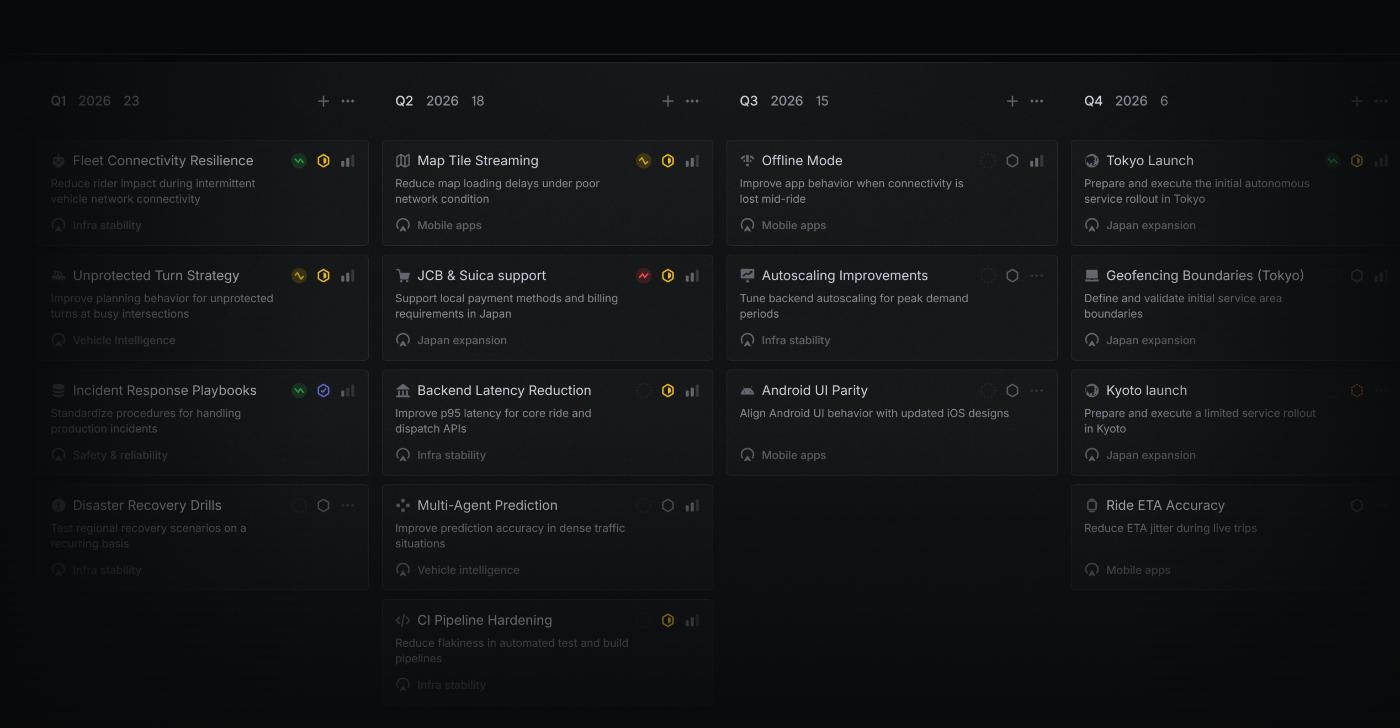
Beside the roadmap capabilities, Linear's other features include:
- Cycles for sprint-level planning
- Customer Requests, for tying feedback back to specific issues and projects
- Linear Insights, dashboards, and progress reports on the Business plan and up
- Linear Agent, AI-powered coding sessions, and an MCP server for AI tool access
- Linear Asks, for turning Slack messages, emails, and web forms into tracked issues
Pricing
Free covers unlimited members across 2 teams and 250 issues, with Initiatives, Projects, and Cycles all included. Basic costs $10/user/month billed yearly ($12/user/month billed monthly) and raises the team cap to 5 and removes the issue limit. Business, at $16/user/month billed yearly ($18/user/month billed monthly), adds unlimited teams, private teams and guests, Linear Insights and dashboards, and support integrations like Zendesk and Intercom. Enterprise is billed annually only, custom-quoted, and adds advanced admin controls.
Because the roadmap layer itself isn't gated, even a free team can build a Initiatives-and-Projects roadmap.
Pros & Cons of Linear
👍🏻 Deep native integrations with the tools engineering teams already use.
👎🏻 It's built for engineering-led planning, not for running a public-facing feedback loop. There's no customer voting, public roadmap, or changelog built in the way there is in Canny or UserGuiding.
Conclusion: Which Product Roadmap Tool Is Right for You?
We've covered a lot of ground in this list, from dedicated product management platforms like Productboard, Aha!, and ProductPlan, to adoption and feedback tools like UserGuiding, Pendo, and Canny, to the tools most teams already have, Jira, Notion, and Linear, that can be stretched into a roadmap without an extra bill.
We've looked at what each one actually does well, what its own users flag as frustrating, and roughly what it costs.
None of them win on every front.
So the decision is yours to make, based on your team's size, budget, and how much of the roadmap needs to face customers versus stay internal.
If you want to go deeper on how to actually build and run a roadmap once you've picked a tool, check out our detailed guide on product roadmaps.
Frequently Asked Questions
Should a product roadmap be public or internal-only?
Ideally, you keep both, for different audiences. An internal roadmap can hold unfinished ideas, rough priorities, and dates you're not ready to commit to. A public roadmap should only show what you're confident about, since customers read it as a promise. Most tools on this list, including UserGuiding, let you manage one internal roadmap and publish a filtered, customer-facing version of it, so you don't have to choose.
What's the difference between a roadmap tool and a full product management platform?
A roadmap tool visualizes what you're building and when, usually through boards, timelines, or Now-Next-Later views. A full product management platform, like Aha! or Productboard, wraps that view in the layers around it: prioritization scoring, customer research, OKRs, and reporting. If you only need to communicate a plan, a roadmap tool covers it. If you need to build and justify that plan, you likely need more.

.png&w=3840&q=75)