


.svg)
.svg)
.svg)
.svg)



.svg)




.svg)
.svg)

If your inbox has 200 feature requests in it, with 50 people wanting the same thing, worded 50 different ways, and your biggest account is asking for something your roadmap has no room for; life can be tough.
But hey, it also means people care, right.
Users telling you what would make them stick around is honestly a nicer problem to have than them keeping their silence until they churn.
The tricky part is turning all that noise into a process that helps you figure out what to build, what to skip, and how to keep everyone feeling heard along the way.
And that's exactly what we're getting into here.
In this article, we go over:
- What a feature request actually is and the 4 main types of feature requests you'll run into
- Where to actually collect feature requests, from forms to sales calls
- A simple 4-step process to capture, prioritize, ship, and follow up on requests
- A rundown of feature request management tools, in case you want some backup
So, let’s get started without further ado.
TL;DR
- A feature request is a suggestion for a new capability or a change to something that already exists, and it's not the same as a bug report, which asks to fix something that was supposed to work already.
- Feature requests break down into 4 types: improvement suggestions, new feature ideas, UI changes, and interoperability enhancements.
- Every feature request is technically feedback, but not every piece of feedback is a feature request, feedback is broader and doesn't have to point anywhere.
- The most common places to collect requests: dedicated forms, in-app surveys/widgets, public roadmaps and voting hubs, and sales/customer success conversations.
- Managing requests well keeps your roadmap grounded in real user needs, stops you from becoming a feature factory, and surfaces churn risks early.
- The process has 4 steps: capture, analyze and prioritize, implement and communicate, then follow up and announce once it ships.
- Once a feature ships, close the loop: announce it to the people who asked, help them find it, and check whether it actually solved their problem.
- Tools range from lightweight boards (UserJot, Upvoty, Fider) to full platforms (Productboard, UserVoice) to product adoption suites like UserGuiding that fold requests into the bigger onboarding and adoption picture.
What Is a Feature Request?
A feature request is a suggestion from a user, a prospective customer, or even someone on your own team, asking for a new capability or a change to something that already exists. A good feature request is a direct line into what your product is missing, straight from the people using it.
Feature requests keep communication with your users/customers healthy and open, so the relationship can continue and evolve over time.
You can also monitor the changing trends and user expectations in your market through feature requests, and stay relevant and competitive instead of being late or stagnant with your product feature roadmap, which is especially important in today’s environment of fast and constant feature shipments and releases.
Feature Request Types
Let's set one thing clear: bug reports are not feature requests.
A feature request entails an update, an improvement, an extension, and/or a totally new capability, whereas a bug report entails a fix. While you can fix a problem by updating the feature so much so that it almost becomes a new feature, or sometimes, a bug report asks for a "fix" that is actually a new feature on your side but the user might not have seen it so; a bug report generally asks you to restore something that was already supposed to work, not to build something that never existed in the first place.
So the test is simple:
- "Make this work the way it should" is a bug report.
- "Make this do something it's never done" is a feature request.
It’s worth keeping the two separate from the moment they come in, since they generally need different owners, priorities, and shipment timelines.
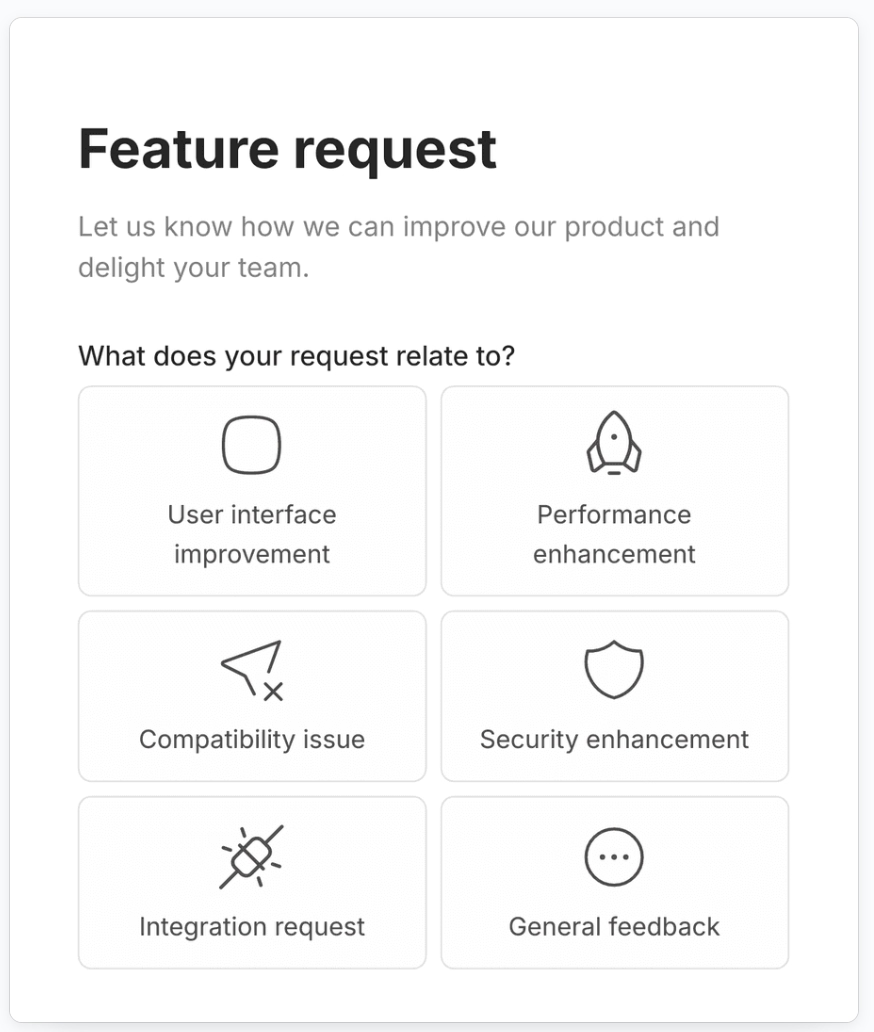
With that out of the way, feature requests themselves break down into 4 main types:
- Improvement Suggestions
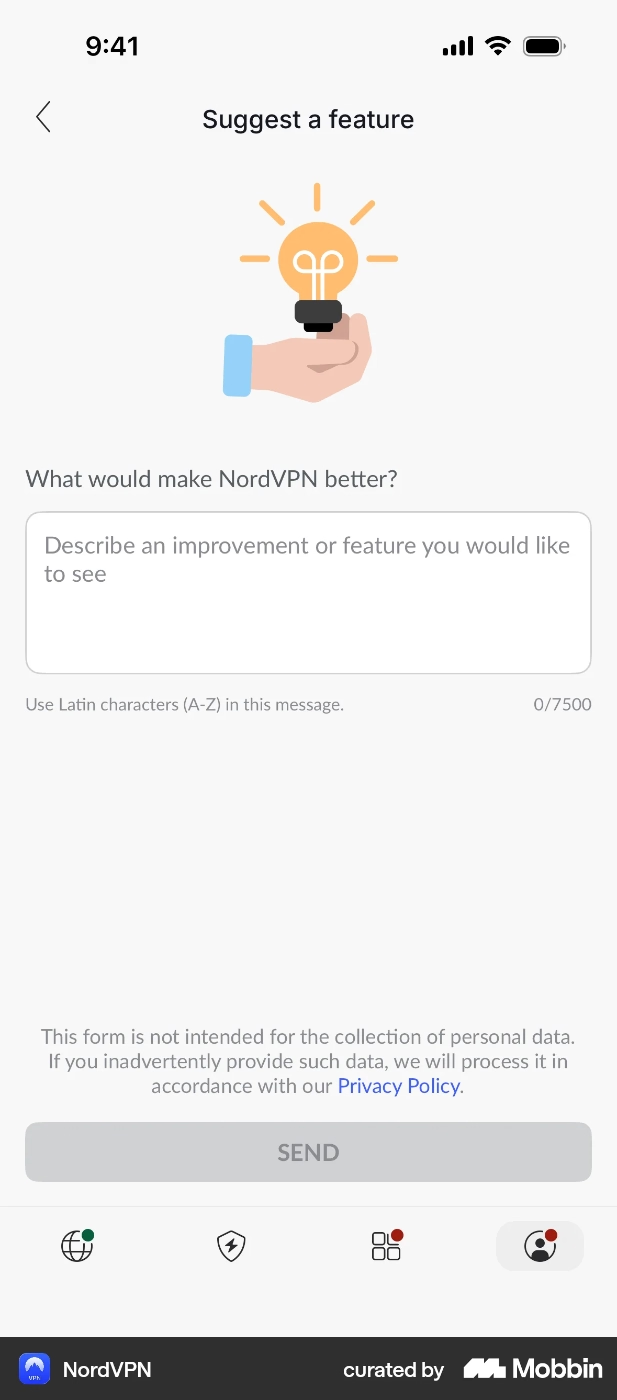
These are about something that already works, but could work better. The people who send improvement suggestions are usually your power users, the ones who've spent enough time in the product to feel where it's clunky.
Here’s an improvement suggestion form example from NordVPN:
- New Feature Ideas
These ask for something that isn't in the product at all yet. A user hits a wall, a use case your product doesn't cover, and instead of leaving, they tell you what's missing. These are the requests worth paying closest attention to, since they're often the earliest signal of a market you haven't tapped yet.
- UI Changes
These are requests to change how something looks or sits on the screen, like color, font, button placement, layout, rather than what it does.
Apple's full-screen incoming-call notification was, for example, for a long time, one of the most requested UI tweaks, as nobody wanted to fumble for the tiny banner while someone called for the third time in a row.
- Interoperability Enhancements
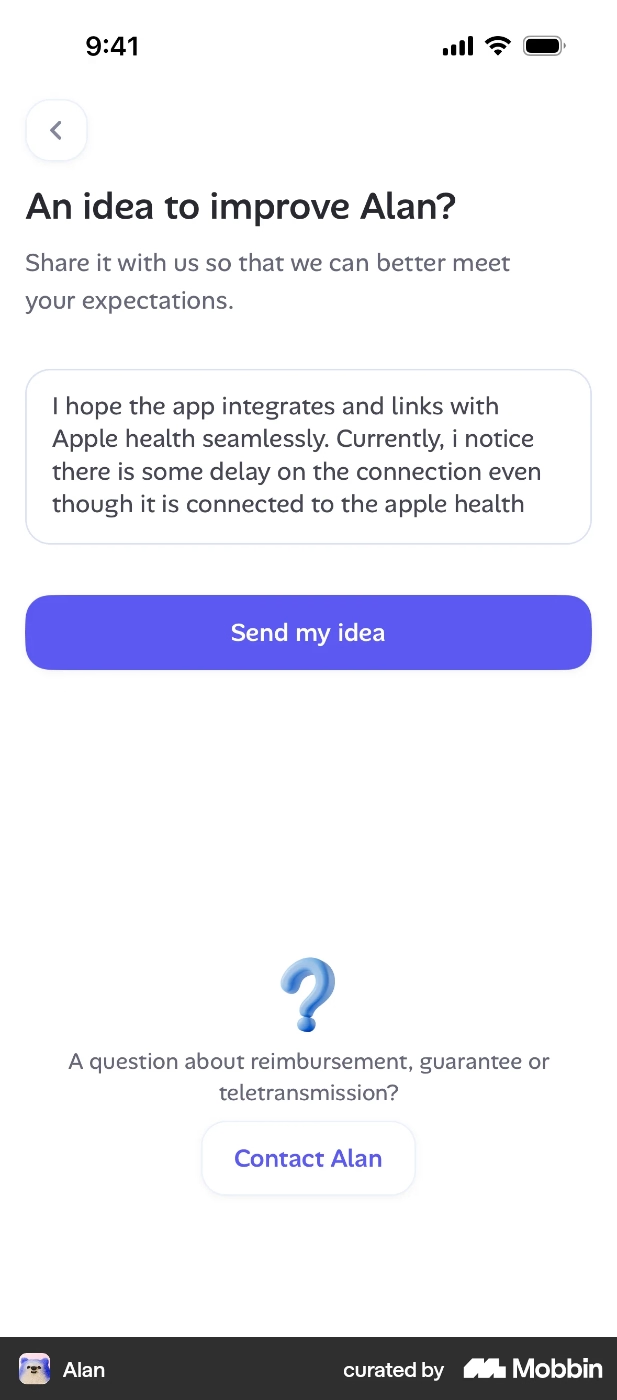
These are requests for your product to talk to other tools better and they tend to show up later in a product's life, once users have started building your product into a bigger workflow and start feeling the seams where it doesn't connect to the rest of their stack. They can also come up as other tools get more popular among your users.
A good example of interoperability enhancement requests are MCPs and AI integrations with tools like ChatGPT and Claude.
Here’s another example of an integration feature request for Alan, a healthcare and insurance app:
Feature Request vs. User Feedback
Both feature requests and user feedback are valuable and can be collected via similar methods, like in-app surveys/forms, emails, support and success conversations, and dedicated hubs like changelogs and product updates pages.
However, they of course provide different insights about the user experience, user expectations, market trends, and overall customer happiness.
User feedback is a broader category that refers to any reaction, opinion, complaint, or compliment about the product. It can come from users naturally, without you specifically asking for it, or, you can trigger a survey or create an opportunity to get feedback about a specific part of your product or a specific part of the user experience, like the onboarding process.
Similar to different types of feature requests, there are also different types of user feedback and different ways of collecting it. Sometimes, similar to bug reports, a piece of user feedback can translate into a feature request on your side.
Actually, we can say that every feature request is technically feedback, but not every piece of feedback is a feature request.
Another distinction worth noting between user feedback and feature requests is that user feedback is almost always user-sourced, but a feature request doesn't have to be. Support and sales teams file plenty of these internally, based on patterns they're seeing across conversations rather than any single complaint. This will be an important aspect in how you manage and prioritize your feature requests, later on.
Where to Collect Feature Requests
As we’ve said a few times already, there are several places where feature requests come. However, here are the most common 4 places (and methods, really) to gather and manage new feature requests 👇🏻
- Feature Request Forms
A dedicated form is a structured way to collect requests. Many SaaS teams put these forms under the support sections of their apps/platforms to ensure easy access for users who would like to suggest features and new capabilities.
Here’s an example feature request form from Rocket Money:
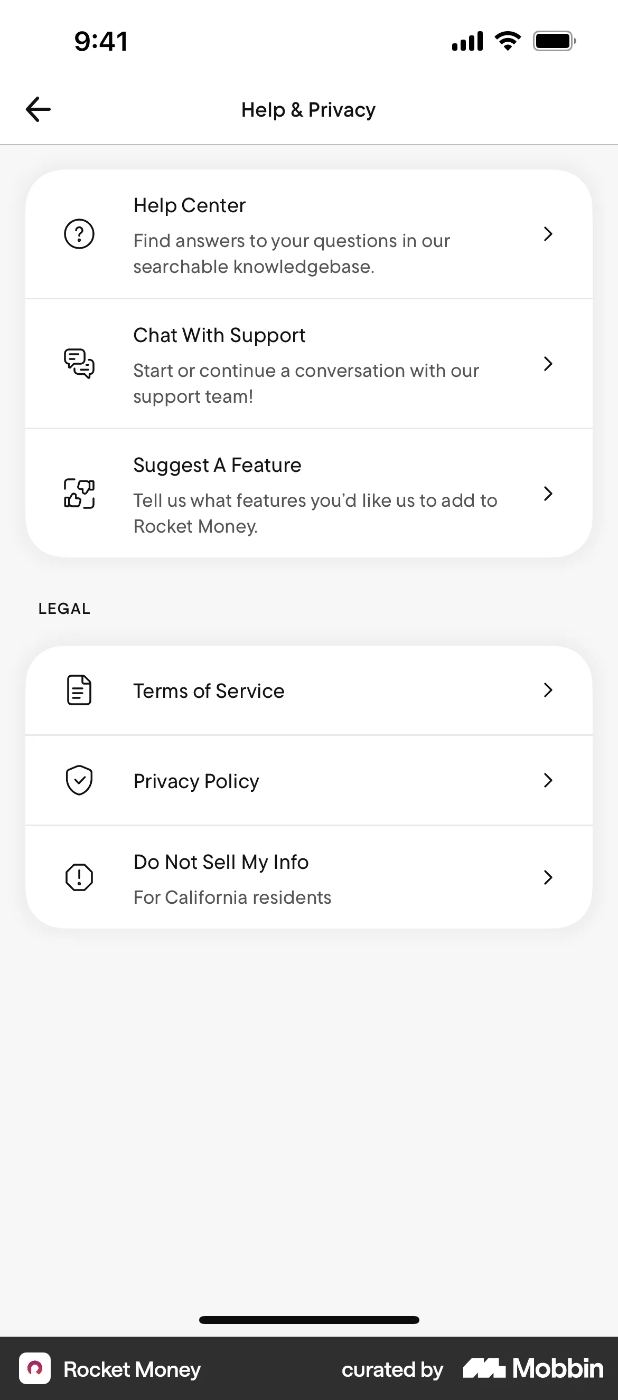
What you need to pay attention to if you’re opting for collecting feature requests through a form is that these forms are often not an intuitive (or integral by any means) part of the UX. So, a user needs to go out of their comfort zone and usual flow to communicate their ideas with you. While this might not be a problem for your power users who get a lot out of your product and would not mind paying the extra effort to go and find a form like this to submit an idea, many casual users, who might experience moments like “oh I wish there was this thing, too” or, “it would be awesome to be able to do that thing”, do not spend extra time to stop their flow and go and find a way to communicate with you…
Feature request forms can also be hard to manage on your side if you do not label/categorize them well, somehow, as they have the potential to turn into a big pile of letters, really.
With all that said, if you’re just getting started with feature request collection and you do not have a giant user base that will make you unable to read through the requests, request forms can be a quick and easy way to open up a line of conversation with your users.
- In-app Surveys and Widgets
In-app surveys and widgets allow users to communicate their ideas and feature requests while they’re still in the app. While request forms can also be opened and submitted right inside the app, they often take users to a separate page; even if they don't, they still require users to leave their workflow and navigate to different parts of the app.
With in-app surveys and widgets, friction is lower, and thus, the problem of users who are not very invested in your app not putting the effort to share their suggestions goes away (to some extent, at least).
The distinction between in-app feature request surveys and widgets is that widgets are UI modals that are easily accessible from any subpage of your app, while in-app surveys are microsurveys that have questions. So, you can embed a feature request survey into a widget (like an in-app resource center or a feedback widget) so users can access it anytime, anywhere in the app whenever they have an idea to share with you.
Or, you can also automatically trigger feature request/update/improvement surveys for specific user segments and/or specific user interactions and behavior.
Using in-app surveys and widgets for feature request collection also allows you to easily see trends emerging from different user segments and user personas, as many product experience and adoption platforms that enable you to create these modals also allow you to filter your answers (the feature requests you gather in this case) based on user attributes and/or account attributes.
Here’s an example feature request survey:
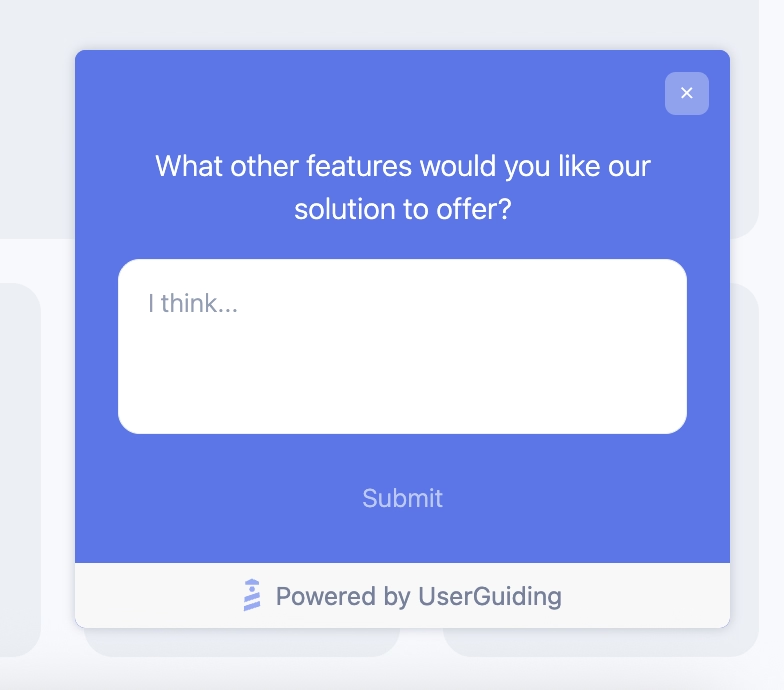
What you need to be careful with in-app surveys is not to be too naggy with them and trigger them after every user interaction. In-app surveys have a lot of potential for valuable and contextual insights from users, but triggering them very often and asking the user “How could we improve this feature for you?” or “What would you want this feature to do besides doing X?” can become pretty annoying for the user.
Additionally, just because an in-app feature request survey/widget does not divert the user from their actual task as much as a feature request form that lives on a different page, you should still be mindful about the time and energy you request from the user to submit their suggestions. This means that you should not ask more than 2 questions in a feature request survey.
Do not forget that your users, no matter how enthusiastic they’re about your app, are not part of your R&D team, and you cannot expect them to do all the ideation work…
- Public Roadmaps and Interactive Feature Request Hubs
Another way to collect and manage feature requests and feature improvement suggestions is public roadmaps and hubs. This method lets users both suggest new ideas/requests and see other users’ requests. In many feature request hubs, users can also vote on other users’ ideas.
Here’s an example feature request hub from Timepage:
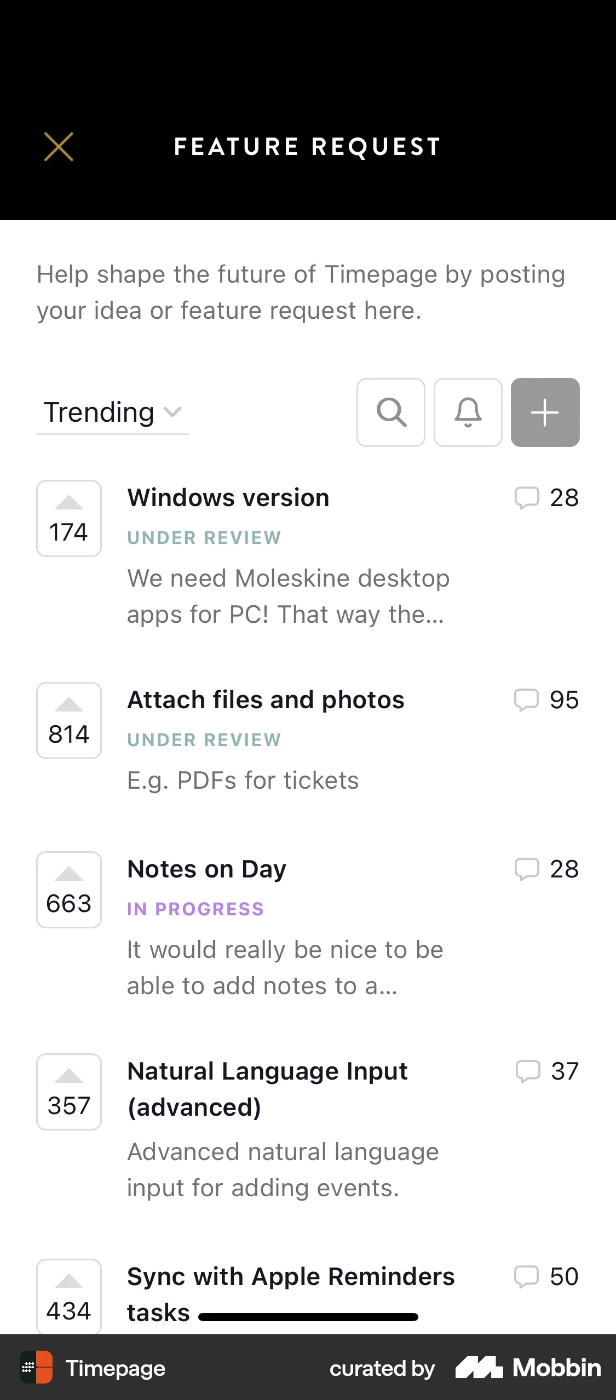
Building and managing a feature request hub like this, which also functions as a backlog of ideas as well as a product roadmap that allows users to see which of the feature requests are under development or consideration, might seem like it takes more effort compared to feature request surveys and widgets we’ve talked about before.
However, it’s actually much easier to manage, especially if you have a wide and active user base, and especially if you do not only want to seem like you collect requests 👀
The upvoting system also allows you to easily track trends.
And finally, in most of these interactive roadmaps and feature request hubs, users can set alarms for features they’ve requested to be notified if the request is under development and/or already live. This system shows how you actually listen to the feedback you receive from your users and update your product according to their changing needs and expectations.
You can, of course, send similar “The feature you’ve requested is now live!” notifications and updates to your users when you collect the request through forms or in-app surveys. However, seeing all the voting, as well as “under consideration” and “under development” status updates, and not just the final “it’s live” notification/email, can boost users’ trust and confidence in your user-centricity in product development.
- Sales & Customer Success Conversations
Sales demos have great potential for gauging emerging trends and market competition, since your prospects are probably going through demos or conversations with your direct competitors too, or at the very least, they've gone through their free trials or checked out their feature lists.
So you might hear about certain features your competitors are offering, but until you actually hear it from your prospects, what they think about those features, whether they even prioritize or expect them, you can't just blindly go and plan to match them yourself.
Customer success meetings, renewal calls, and regular check-ins are another often an underused channel for feature request collection and prioritization.
And because it's an actual conversation, not a form or a one-line ticket, your CS team can just ask "why" on the spot.
You just need to keep in mind that power users aren't really your average user, so what they're asking for is more about the edges of your product than the middle of it. While listening to their expectations and even prioritizing their requests from time to time is good for growing your best accounts, their requests are not necessarily a preview of what everyone else in your user base needs next.
So, sometimes, their asks might be outside of your product scope and you might need to say no to them and manage their expectations…
Why Feature Request Management Matters
✅ Stops you from turning into a feature factory.
✅ Keeps your roadmap grounded in what users actually want.
✅ Gives you a real prioritization signal instead of just going with gut feeling.
✅ Makes users feel heard, which does a lot for user retention and user happiness.
✅ Surfaces patterns and gaps early, before they turn into churn.
How to Gather (and Prioritize) Feature Requests
Step 1: Capture the feature requests and improvement suggestions
This step is actually what we’ve talked about so far with the feature request collection methods and places, really. The forms, in-app surveys, feedback widgets, public feature request hubs and roadmaps…
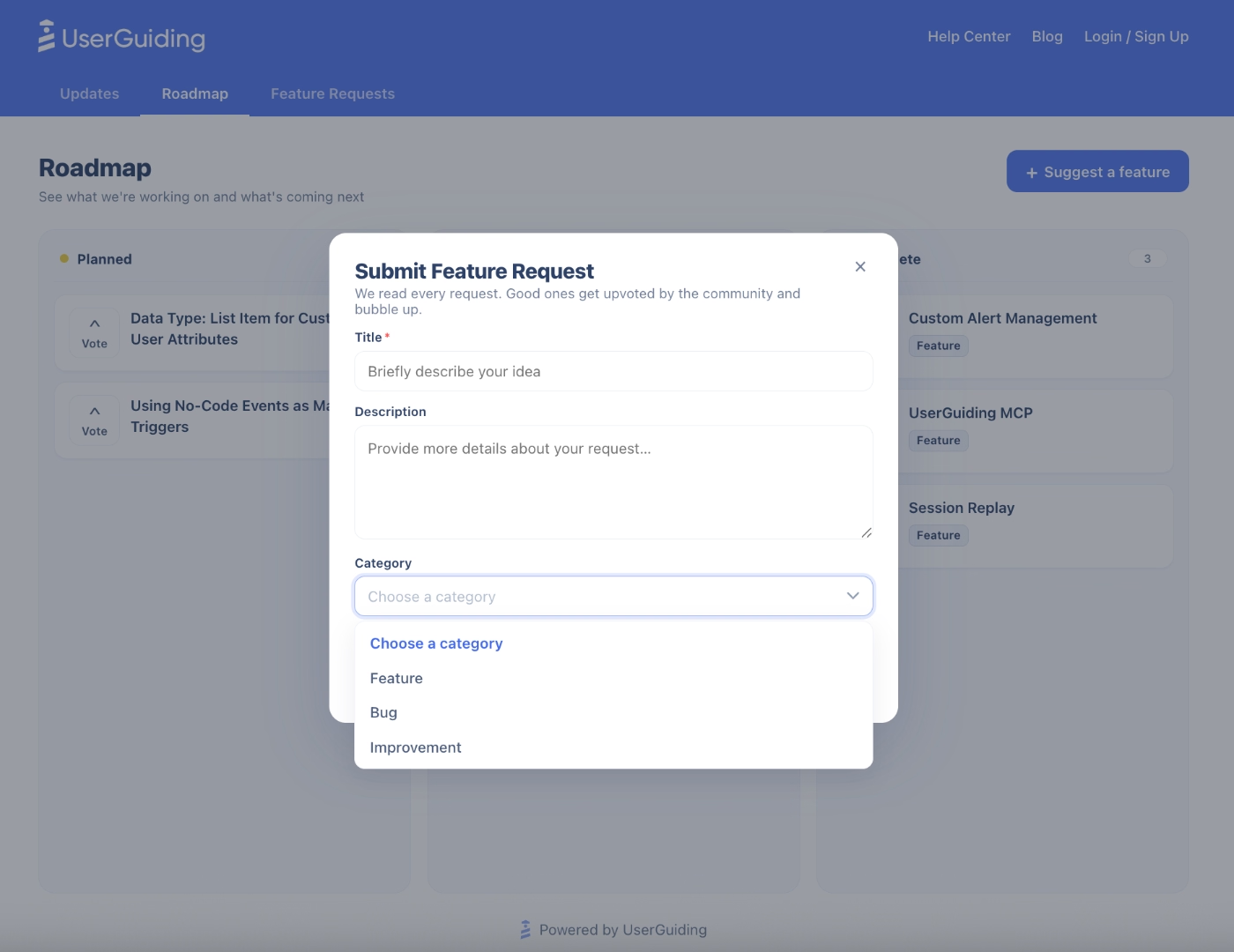
For example, within UserGuiding’s Product Updates page, you can create a feature request and upvoting section where users submit improvement suggestions and/or vote other users’ requests.
Here’s an example feature request modal, created with UserGuiding:
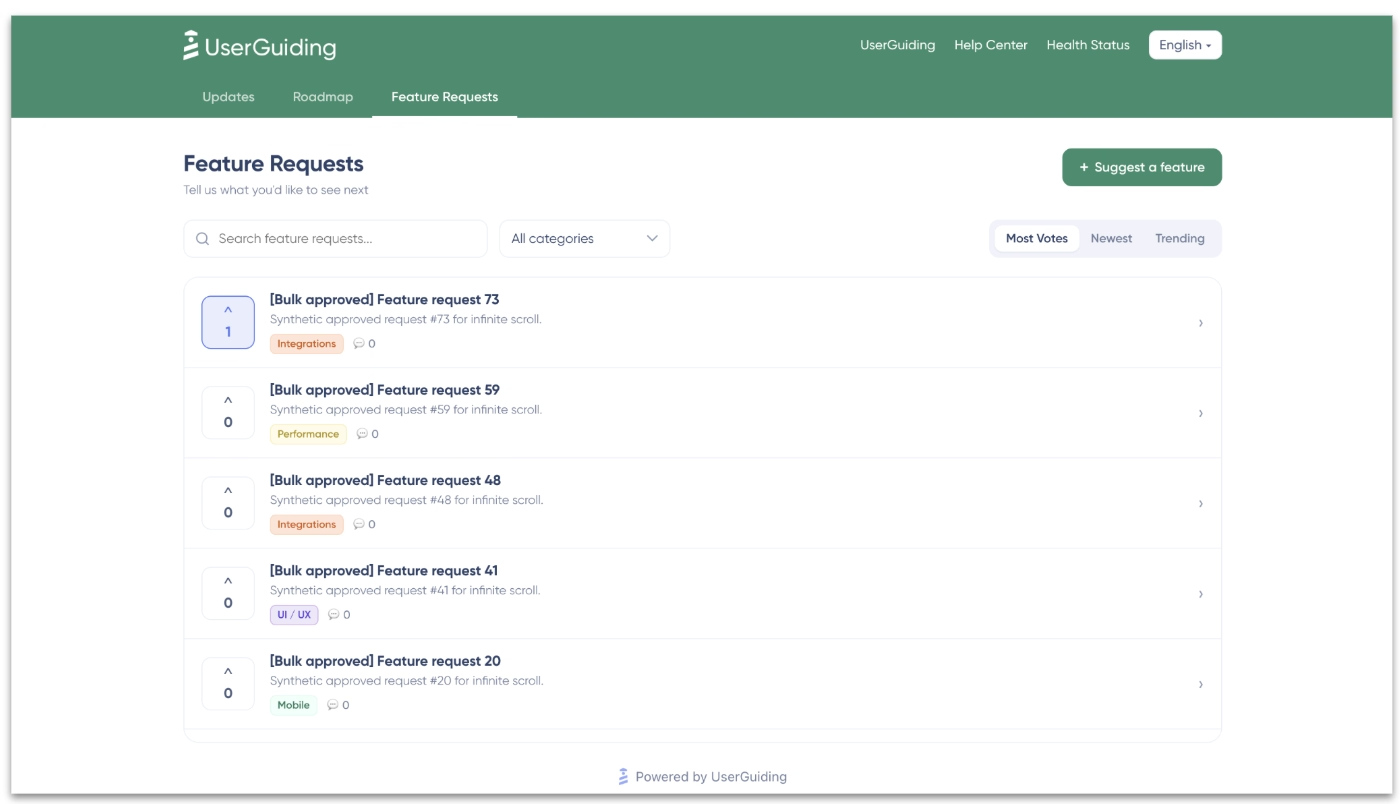
And here’s an interactive public feature request hub, again, created with UserGuiding:
Step 2: Analyze trends and prioritize
Once you've got requests piling up, the job is spotting which ones actually matter. While you can of course look at basic numbers like how many times a certain feature/capability is requested, then decide on whether or not to prioritize that request, there are certain frameworks of feature request prioritization that work better than that method.
- RICE (Reach, Impact, Confidence, Effort): Good if you want to weigh how many users a feature touches against how much work it is.
- ICE (Impact, Confidence, Ease): A lighter, faster version of the same idea, useful if you're prioritizing often and don't want a whole scoring ritual every time.
- Value vs. Effort: The simplest option, just plotting requests on a quick 2x2 and going after the high-value, low-effort ones first.
One more thing worth factoring in here is the weight of who's asking. 100 upvotes from free users can look more convincing than 5 requests from your biggest paying accounts, but those 5 might matter a lot more to your revenue.
However, as we've stated before too, just because a request is coming from your top accounts does not mean you should automatically start building that feature. If you're just starting out and have a few accounts, listening to your biggest accounts' requests might be doable. However, as you start to grow, gain a place for yourself in the competition, solidify your product's positioning and scope, and more importantly, gain more than a few big paying accounts, you'll realize that people's asks will not be that easily doable or prioritizable along with your maintenance and upkeep…
So, while it's important to listen to your customers, you're still the owner of the roadmap; you know your backlog, you know your positioning, your competitive edge, your wins and losses, your development capacity, your vision.
Do not feel pressured to release every request as fast as you can, or even whether to release it at all.
Step 3: Implement and communicate your progress
When you decide which feature requests to prioritize and which ones to plan for future development sprints but not really prioritize for the close future, you should communicate that decision to your users who have actually requested those things in the first place.
And the best way to do this is to create a public roadmap, which you can do with UserGuiding.
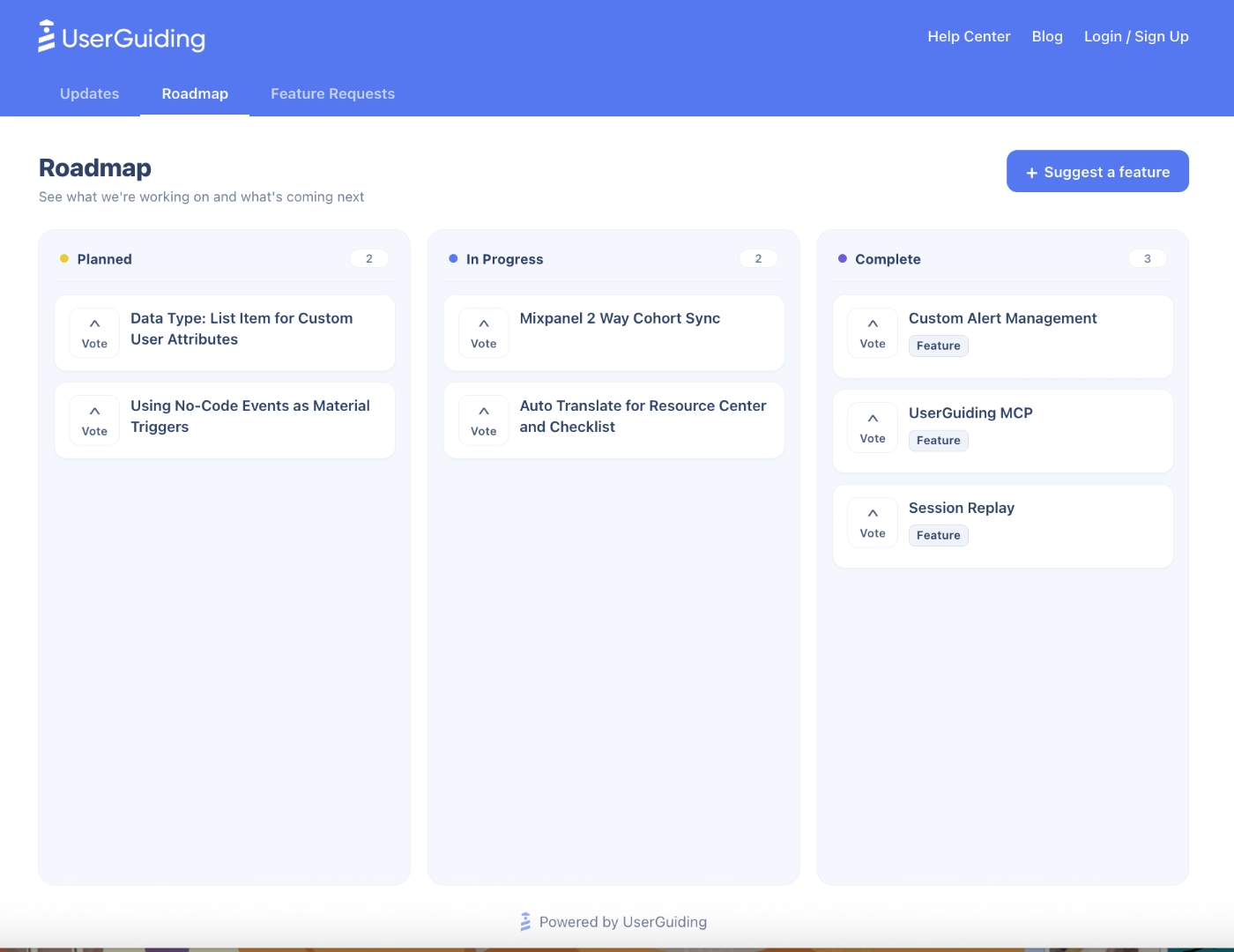
Through this roadmap, you can communicate with your users and show which features are under development and which are planned for the future.
Here’s an example public roadmap created with UserGuiding:
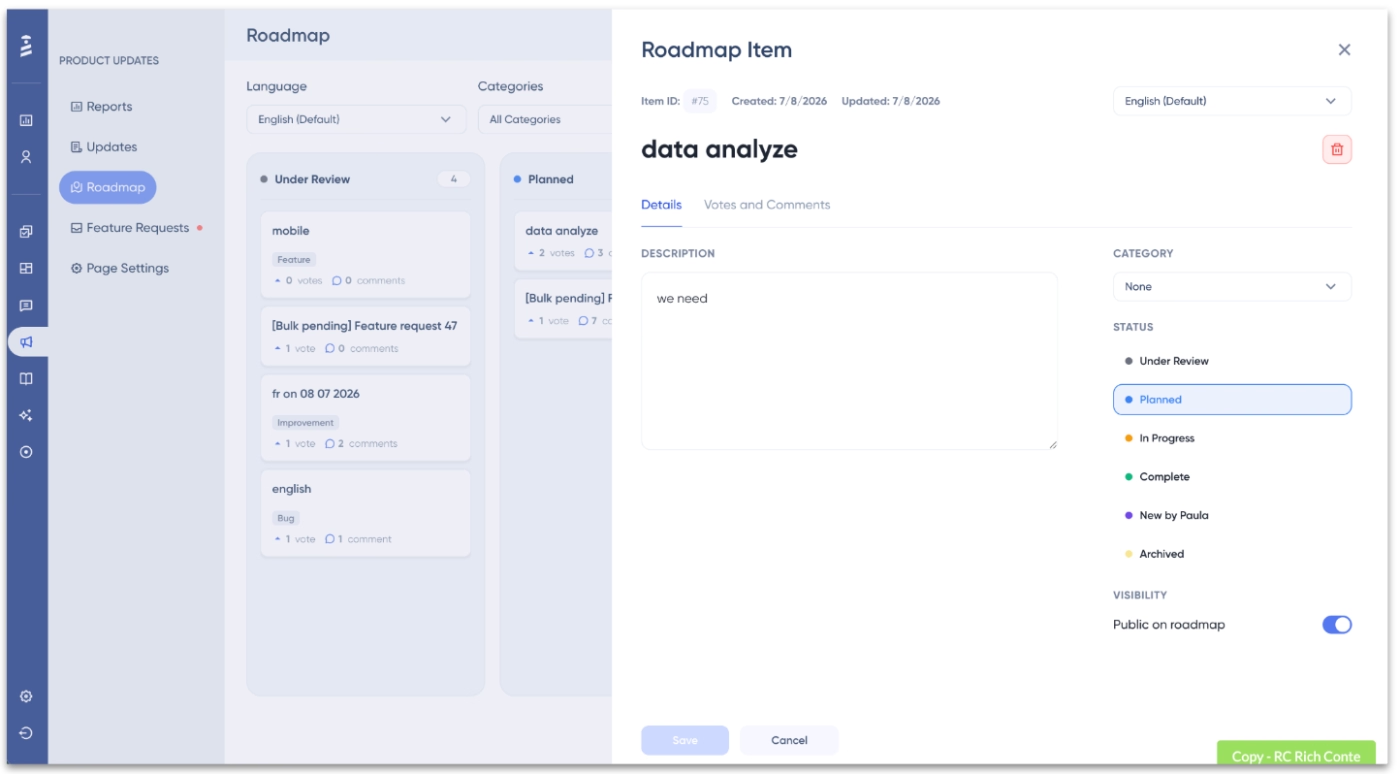
And here’s you manage this public roadmap without any code:
Step 4: Follow up and announce
Finally, for the requested features and updates that are completed and live, you can use several announcement methods, including release notes in product updates pages and in-app announcement modals like slideouts and pop-ups.
If you know who specifically asked for this feature (and if you've been capturing requests properly from Step 1, you should), you can send a quick "Hey, remember that thing you asked for? It's live" message to relevant user/customer segments via in-app communication and/or email.
This will make sure your new feature and/or update will get a higher discovery rate, especially from relevant user personas and segments who might activate it, and it’ll also help you close the feedback loop with your customers who spend time and energy to communicate their needs and ideas with you.
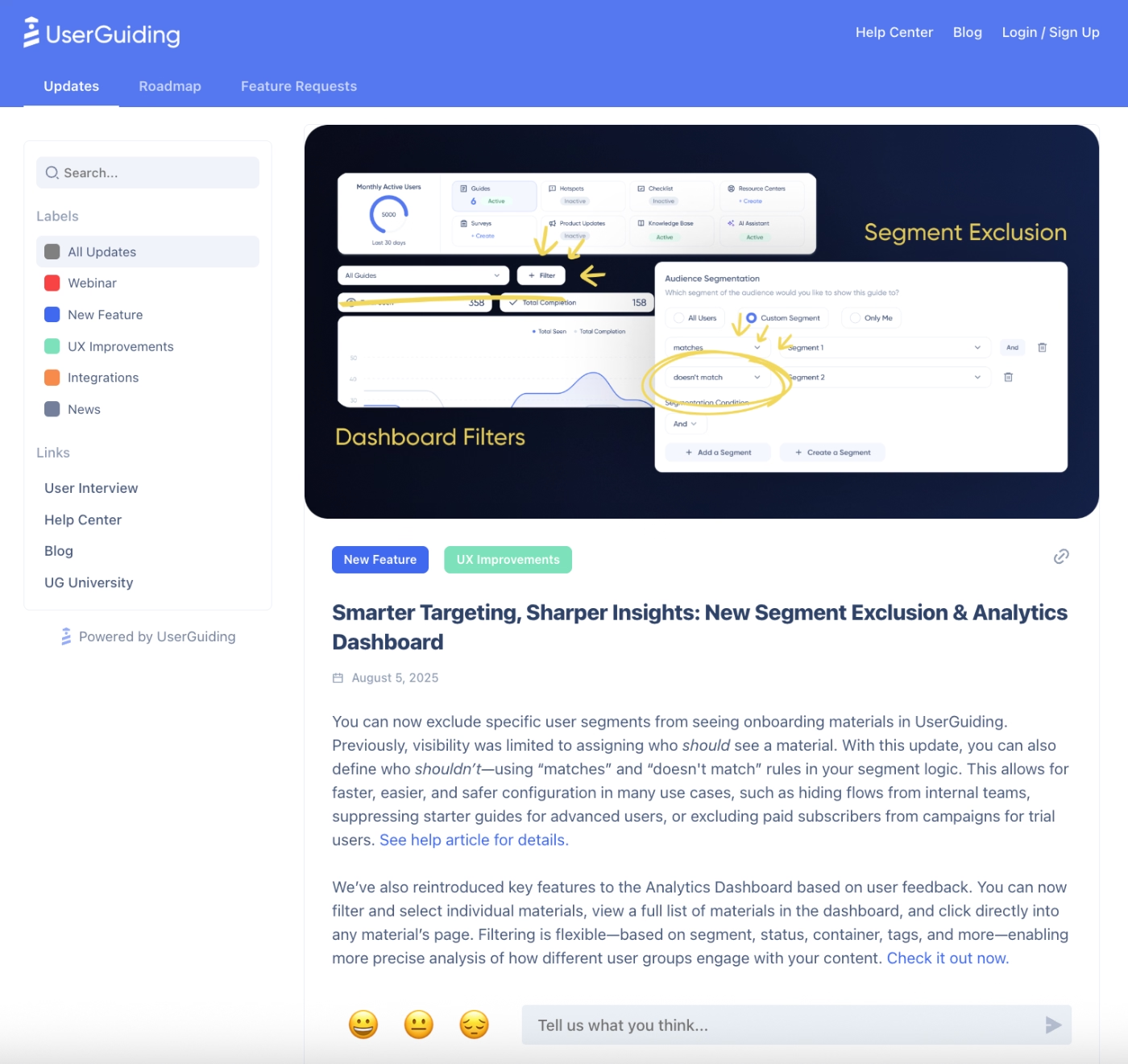
For example, you can write a release note and publish it in a central product updates hub, like this:
But also, in addition to that, you can run a targeted feature announcement campaign within your app through an in-app announcement modal like this:
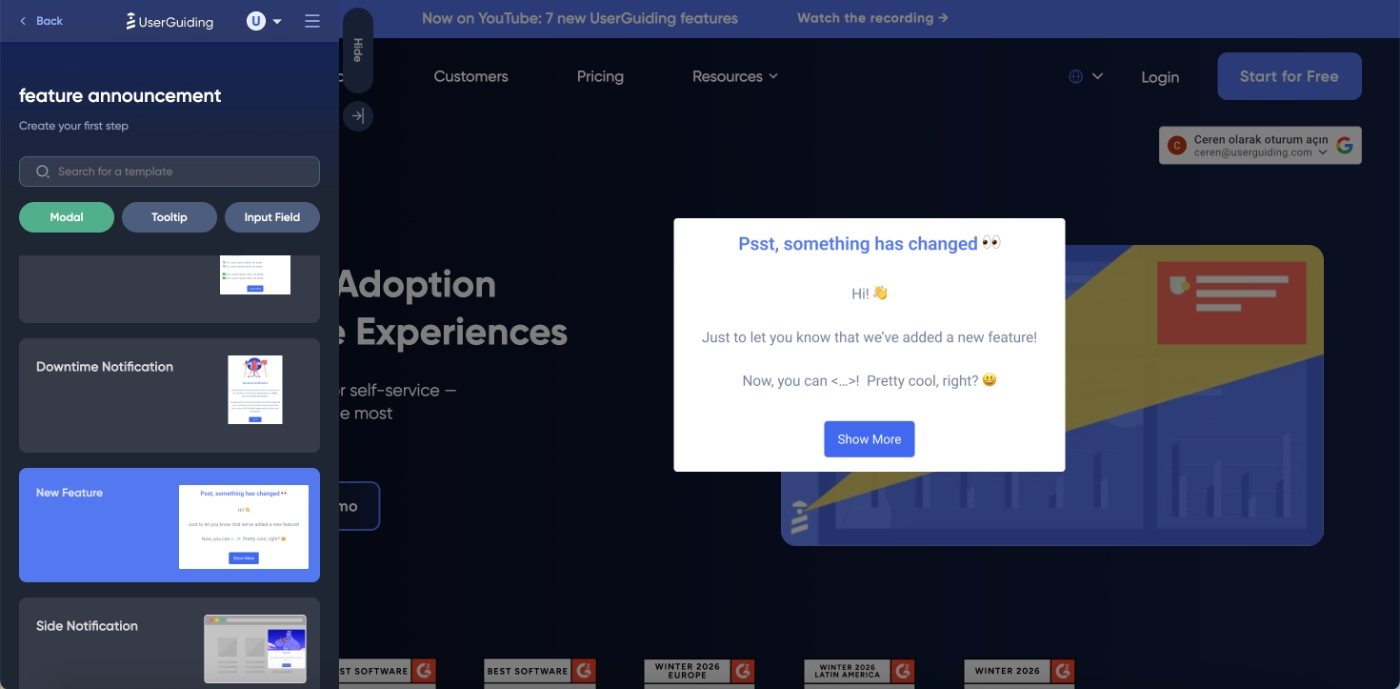
You can even trigger an interactive tutorial if you’re announcing a totally new feature/workflow:
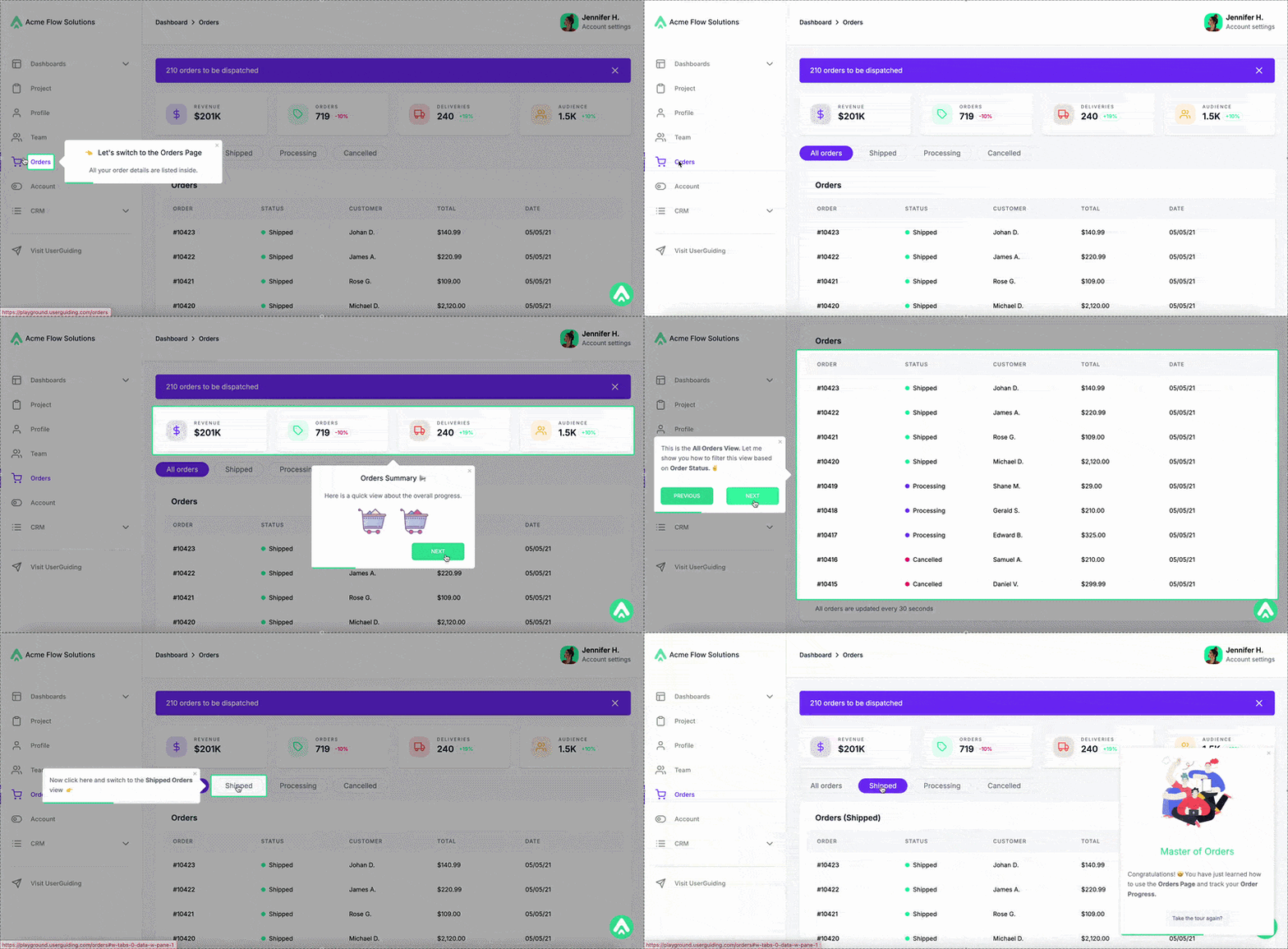
Important Feature Request Management Tips
✅ DO…
- Keep bug reports and feature requests in separate buckets from intake onward.
- Weigh feature requests by account value, not just raw volume.
- Tag and categorize requests as they come in, and analyze requests across different user segments.
- Pick a prioritization framework to gauge which requests/updates deserve resources first.
- Say no to a feature request if it's outside your product's scope or beyond your current development capacity.
- Circle back to the original requester once the feature ships.
- Onboard users to a new feature right after it ships.
❌ DON’T…
- Don't trigger a feedback survey after every single interaction.
- Don't ask more than a couple of questions in an in-app feedback survey.
- Don't treat your loudest users as your whole user base.
- Don't build something just because a competitor has it.
- Don't promise a timeline you're not sure you can hit.
- Don't say "we'll consider it" when you already know the answer is no.
Feature Request Management Tools
UserGuiding
UserGuiding is a no-code, all-in-one product adoption platform that offers features and capabilities for feature announcement, discovery, and adoption, as well as automated customer support, in-app communication, and guidance.
The platform’s main features include:
- Product tours
- Tooltips and hotspots
- Banners
- Checklists
- Resource centers
- Surveys and NPS
- Knowledge bases
- Product updates (with roadmaps and interactive feature request upvoting modals)
- AI assistants
- Analytics
- Session replay
- No-code event tracking
- MCP (Model Context Protocol)
- Custom alerts
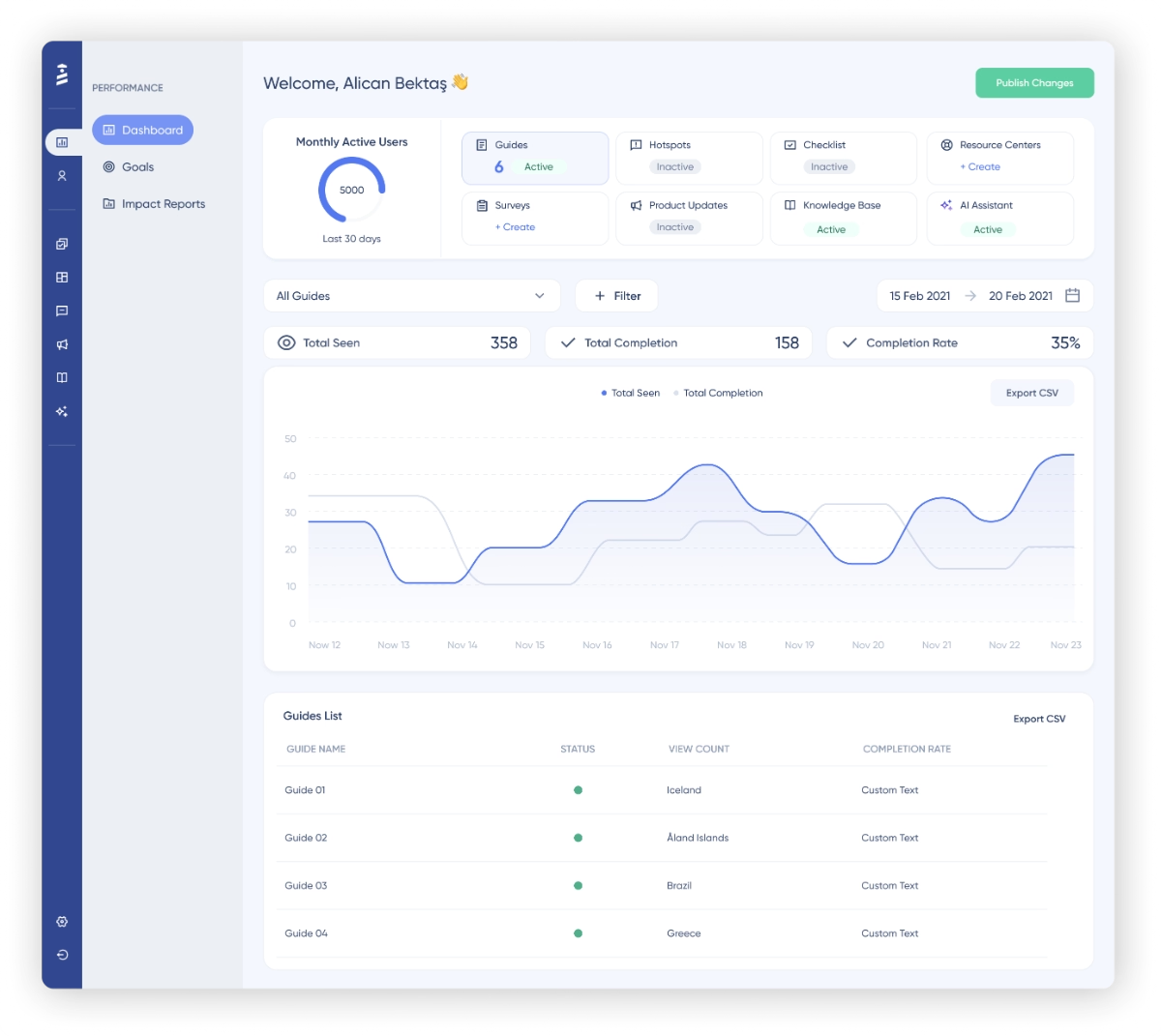
👉🏻 Check out UserGuiding’s features and use cases.
With UserGuiding, you can easily collect feature requests from your users via several methods, including dedicated feature request hubs, public changelogs, as well as in-app feature request surveys. You can also communicate your updates and progress to your users via both in-app communication models (like slideouts, banners, pop-ups, hotspots, and tooltips) and off-app pages like Product Updates.
UserGuiding’s product updates, feature requests, and roadmap pages also allow you to manage and categorize your feature requests/announcements systematically.
The platform’s other feature engagement capabilities allow you to increase the discoverability and adoption rates of your new features.
🎁 Start your free trial and see UserGuiding’s potential with your own eyes.
Pricing
UserGuiding has transparent and flexible pricing based on MAUs. There are 3 plans: Starter, Growth, and Enterprise, all offered as both monthly and yearly subscriptions.
- Starter: $249/mo for up to 2,000 MAUs (yearly)
- Growth: $499/mo for up to 2,000 MAUs (yearly)
All plans come with all the adoption essentials (guides, checklists, banners, resource centers, knowledge bases, product updates, AI assistants, engagement analytics, and surveys), with the Starter plan having reasonable usage caps.
✅ AI features (Lighthouse included) are available across all plans.
Roadmaps, feature requests, session replays, and custom alerts are offered in Growth and Enterprise plans.
👉🏻 Check out what UserGuiding’s users say about the platform and their experience with it.
Canny
Canny is an AI-powered feature request management and prioritization platform. It allows you to create dedicated hubs and portals for your customers to leave feedback and feature suggestions. Additionally, Canny offers agentic AI capabilities that go over your sales and support communications to capture any relevant suggestion and/or feature request coming from these conversations.
The platform's main features include:
- Feedback boards (public or private)
- Feature voting
- Public roadmaps
- Changelog / product updates
- Segmentation and filtering by user or account attributes
- Autopilot (AI-based feedback summarization)
- MCP connectors
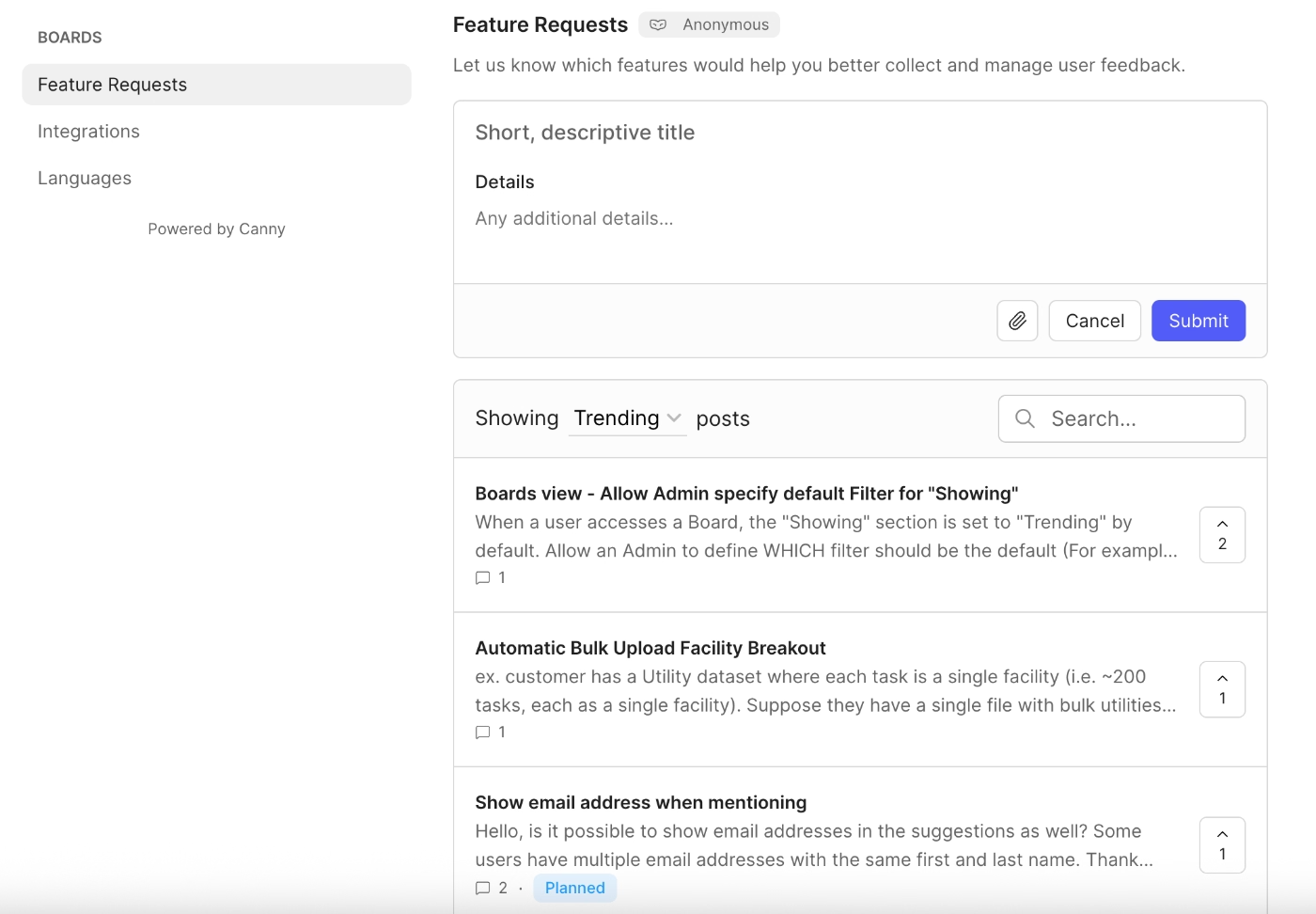
Pricing
Canny has 3 plans in total, one being a free plan. The paid plans scale with the number of tracked users, which refers to the number of users associated with feedback. Canny, too, offers a flexible and transparent pricing structure with a “tracked users” slider that allows you to estimate your costs as you scale.
Here are the starting prices:
- Free: $0/mo — 25 tracked users, unlimited feedback and boards, 5 managers
- Pro: $79/mo (billed yearly) — 100+ tracked users, PM integrations, advanced privacy, 10 managers (most popular)
- Business: custom pricing — 5,000+ tracked users, SSO and CRM integrations
There’s a monthly billing option for those who are not ready to commit to a yearly contract.
Featurebase
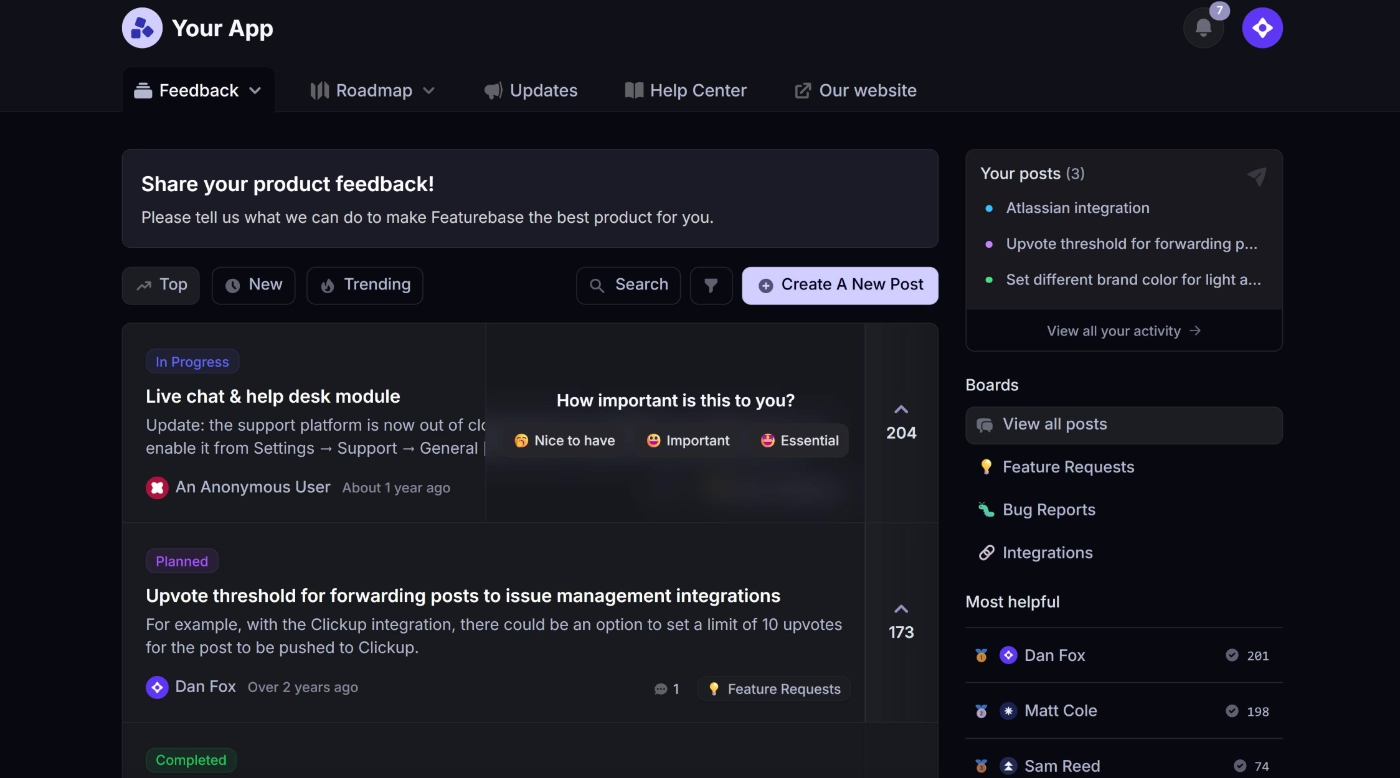
Featurebase is a support and feedback platform. Its main capabilities and features include:
- Unified inbox and live chat (help desk side)
- Feedback boards and feature voting
- Public roadmaps
- Changelog / product updates
- Surveys
- Fibi AI agent for replies, categorization, and workflows
- MCP
Pricing
Featurebase has 4 plans, one being free, priced per seat across two modules, Helpdesk and Feedback.
- Free ($0/mo) — 1 seat. Helpdesk: live chat, unified inbox & ticketing, mobile app, internal notes. Feedback: 1 board, 1 roadmap, public portal, vote on behalf, automatic loop-closing emails.
- Growth ($29/seat/mo, billed yearly) — adds email support and Fibi AI agent to Helpdesk. Feedback jumps to 5 boards/roadmaps, plus custom domain, in-app widgets, revenue-based prioritization, and AI duplicate-post suggestions.
- Professional ($59/seat/mo, billed yearly) — adds Slack support, workflows/automations, and SLAs to Helpdesk, plus SSO. Feedback goes to 10 boards/roadmaps, with Ask AI, AI deduplication, user segmentation, board privacy, moderation, and custom post fields. Includes 20 free Lite seats.
- Enterprise ($99/seat/mo, billed yearly) — unlimited boards/roadmaps, AI feedback tagging, a dedicated prioritization module, custom admin roles, Salesforce/HubSpot sync, custom invoicing, 50 free Lite seats.
Monthly billing is available too; Fibi AI resolutions are metered separately at $0.49 each.
UserVoice
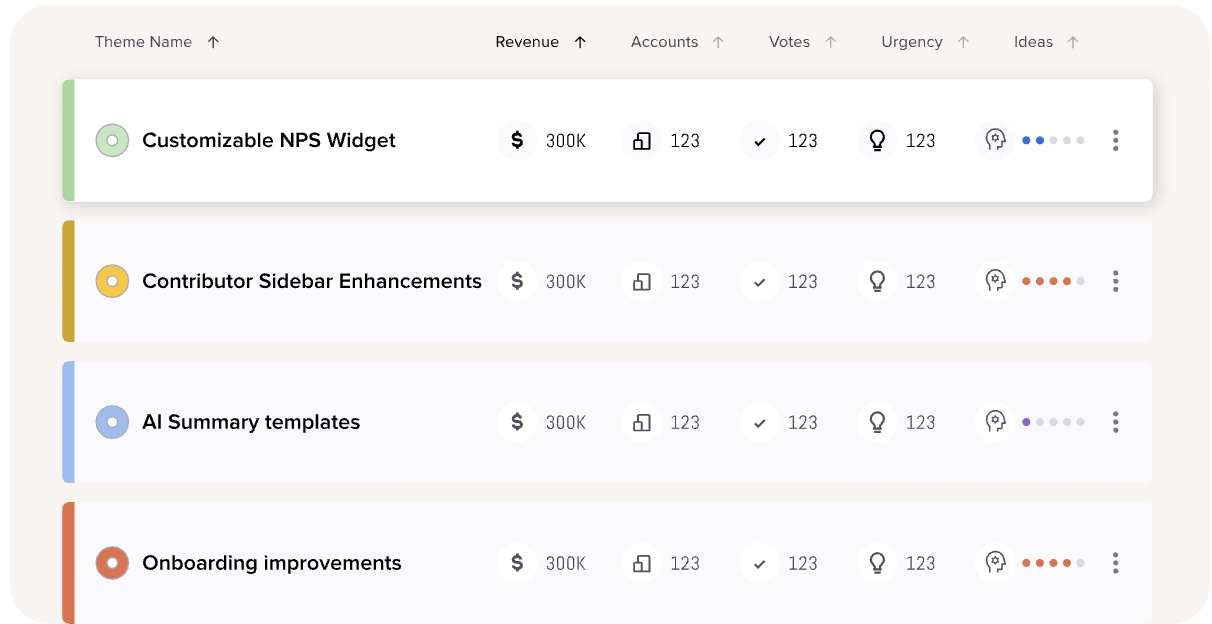
UserVoice is a customer intelligence platform for centralizing and managing customer feedback, sales communications, and support conversations. It's built to pull feedback from every connected tool, enrich it with account and revenue data automatically, and surface what to prioritize based on business impact.
The platform’s main capabilities include:
- Data integration (to pull feedback automatically from Salesforce, Zendesk, Gong, Slack, Jira, Azure DevOps, Gainsight, and others)
- Data enrichment (to attach user, account, and revenue/ARR data to feature ideas)
- AI Idea Insights (to summarize and surface important ideas across all feedback)
- Indexing (to rank ideas by customer impact, revenue, and demand)
- Theme detection (to surfaces emerging patterns and recurring themes)
- Segments (to break down feedback by customer type, plan, or account)
Pricing
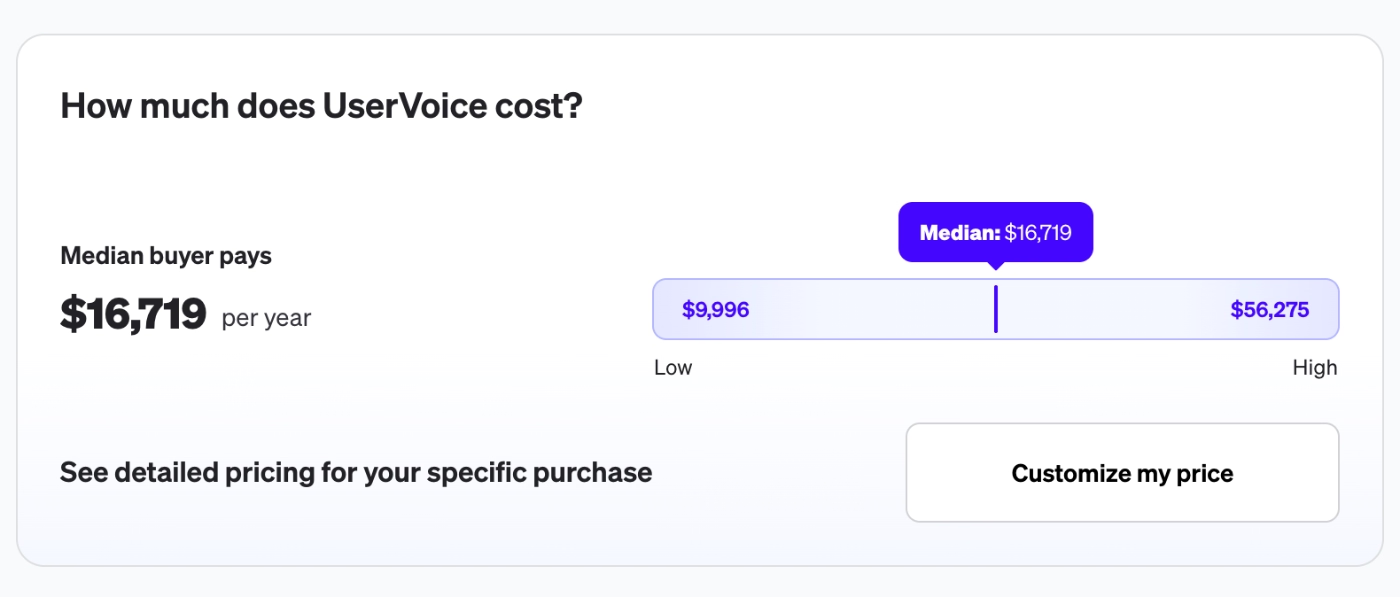
UserVoice doesn't publish fixed plans or transparent self-serve pricing. The platform’s cost scales with your feedback volume and the integrations you connect, with no per-seat charges.
There's also no self-serve signup; you'll need to book a demo to get a quote, though a 30-day free trial is available once you do.
According to Vendr data, average yearly cost of UserVoice is around $17,000, with some contract values reaching to $56,000.
⚠️ UserVoice is a complex tool that comes with a steep learning curve and a long implementation process that requires a lot of support and handholding. UserVoice itself states that the initial setup takes around 2 weeks and competing bits and pieces to go live can take up to 6 (or more) weeks…
Productboard
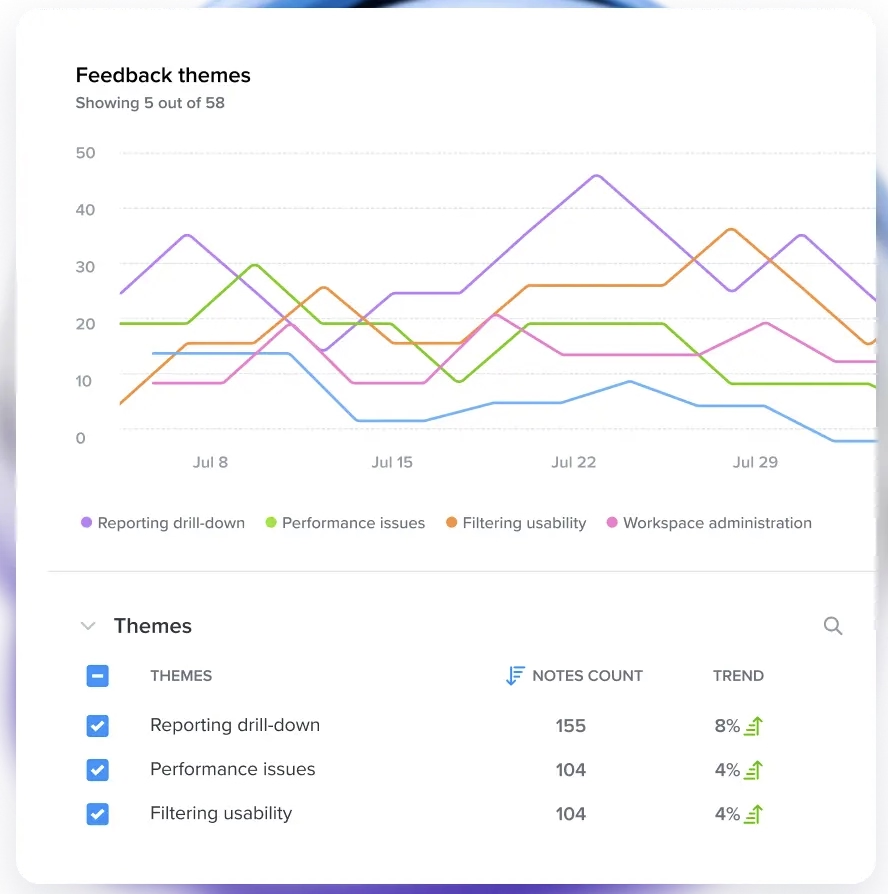
Productboard is a full product management platform built around its AI agent, Spark, which handles everything from summarizing feedback to drafting specs and roadmaps.
The platform's main features include:
- Feedback / insights repository
- Spark AI (feedback analysis, document generation, chat, MCP server/connectors)
- Prioritization scoring and custom formulas
- Roadmaps and release planning
- Customer-facing product portal
- Manual & dynamic customer segments (Plus+)
- Product usage integrations (Amplitude, Mixpanel) (Plus+)
Pricing
Productboard prices per "maker" (the PMs who own strategy) rather than per seat, so contributors who just submit or tag feedback don't count toward that total.
- Free ($0/mo) — 50 AI credits/month total, shared across the whole workspace (not per maker); 500 feedback notes, 25 contributors, 1 teamspace, 1 product portal.
- Plus ($19/maker/mo billed annually, $25/maker/mo billed monthly) — 250 AI credits per maker; adds manual & dynamic customer segments, feedback-loop closing, and usage integrations.
- Business ($59/maker/mo billed annually, $75/maker/mo billed monthly; 2 online or 5 contract makers minimum) — 500 AI credits per maker; adds unlimited feedback notes and teamspaces, a shared skills library, 2 product portals, and portal customization.
- Enterprise (custom; 5 makers minimum) — 800 AI credits per maker; adds unlimited contributors, SAML SSO, SCIM provisioning, custom roles, Salesforce integration, and live onboarding support.
⚠️ Free plan’s AI credit pool is shared across the whole team, while every paid tier allocates credits per individual maker.
Quackback
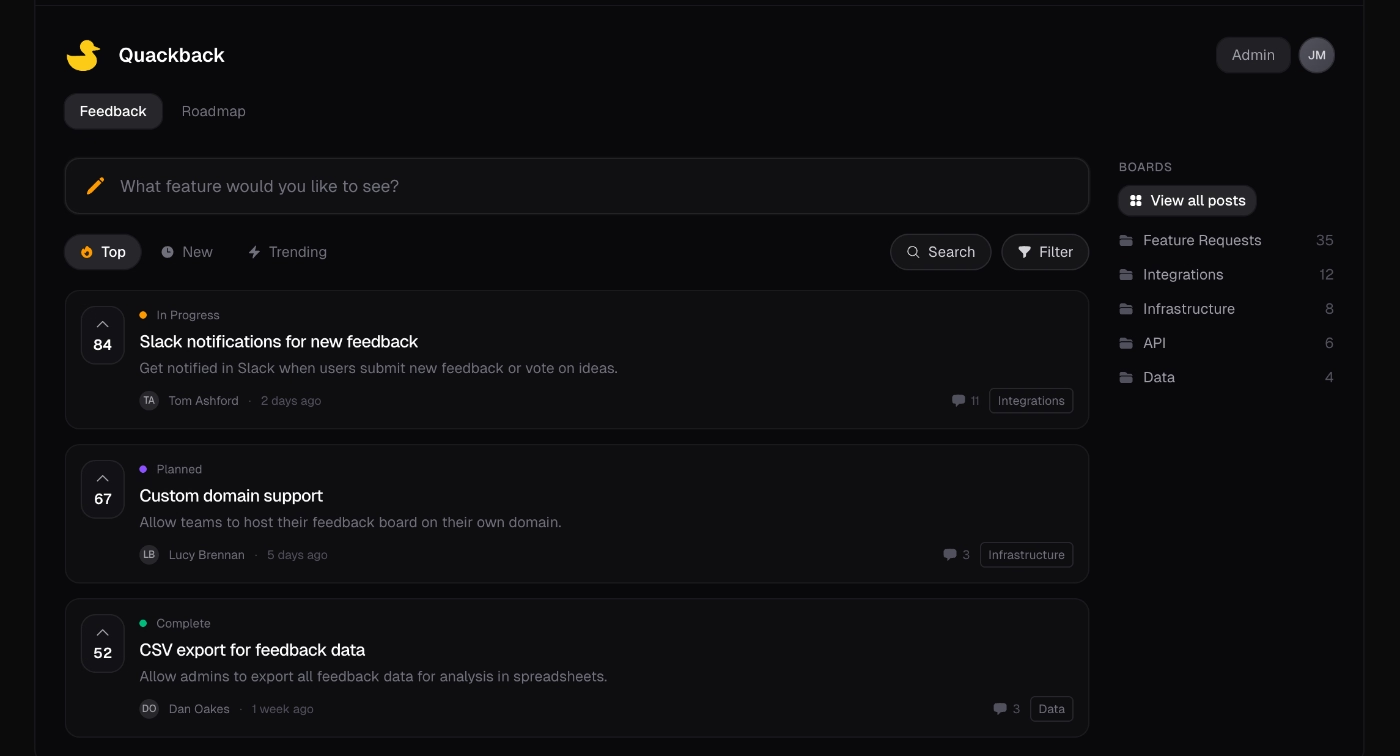
Quackback is an open source feedback management platform, hosted or self-hosted, with boards, voting, roadmaps, and changelogs. The platform’s claim is to be “the open-source alternative to Canny”.
Its main capabilities include:
- Feedback boards, roadmap, and changelog
- Live chat and help center
- Embedable widget for in-app feedback collection
- MCP server
Pricing
Quackback has 3 hosted plans, none of them free, but the entire product is also open source and free to self-host with no feature gates.
- Starter ($19/mo billed yearly) — 1 team member, 3 boards, 50 posts, unlimited customers and votes, live chat/help center, AI search/summaries/duplicate detection.
- Pro ($79/mo billed yearly) — everything in Starter, 10 team members, 10 boards, unlimited posts, custom domain, all integrations + webhooks, email support within 48 hours.
- Scale ($299/mo billed yearly) — everything in Pro, unlimited team seats and boards, single sign-on, 99.9% uptime SLA, email support within 12 hours.
⚠️ Quackback is not a no-code customer feedback and feature request management tool like some of the other tools we’ve analyzed in this article so far. It requires some coding and technical knowledge, especially if you’re gonna host it yourself, but even when you plan to use it with Cloud hosting.
Upvoty
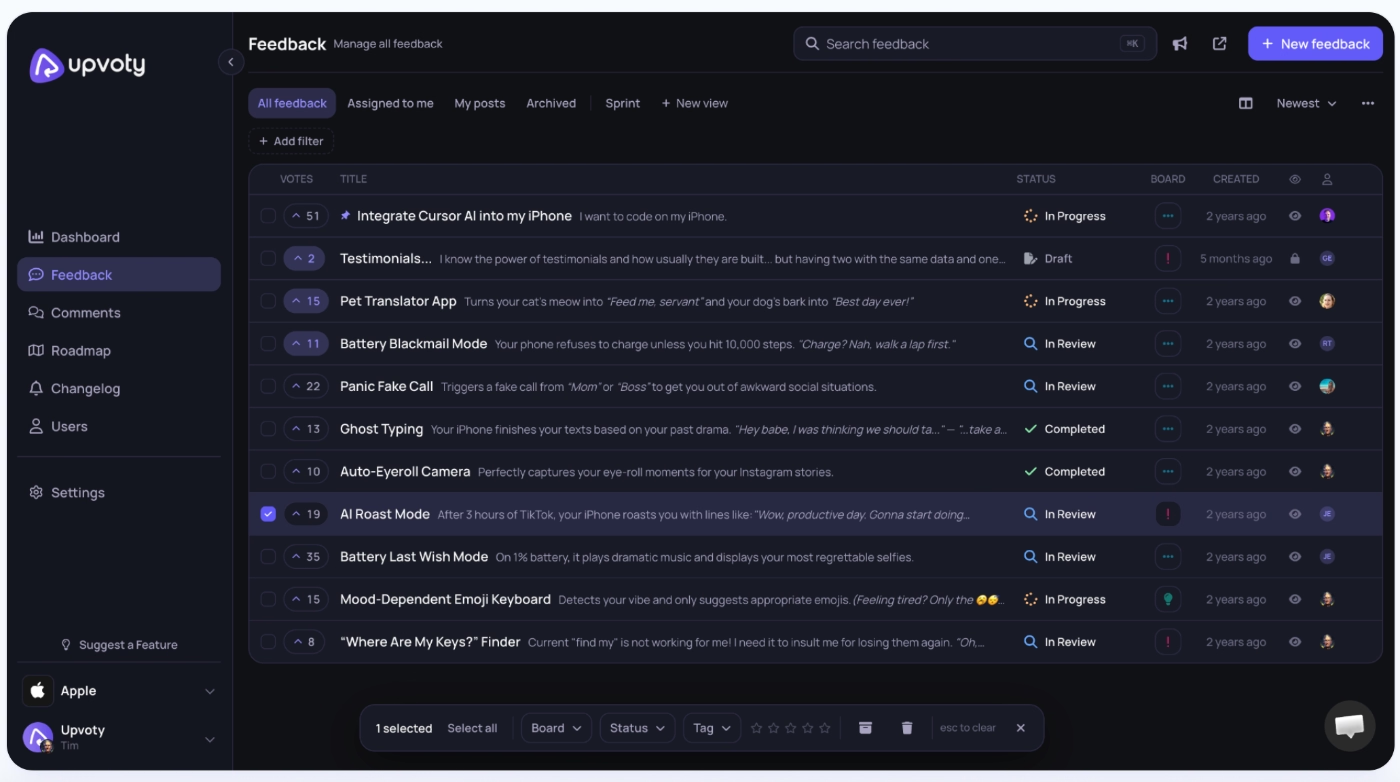
Upvoty is a feedback board, voting, roadmap, and changelog tool for product teams, with unlimited boards and tracked users included on every plan. The platform’s main capabilities include:
- Feedback boards and feature voting
- Public roadmap
- Changelog
- In-app feedback widget
Pricing
Upvoty has 3 plans and every plan comes with a 14-day trial.
- Power ($15/mo) — 1 project, unlimited boards and tracked users, public roadmap, custom branding/domain, custom SSO, API access, no branding, email support.
- Super ($25/mo) — everything in Power, plus changelog, all integrations, and priority support.
- Hyper ($49/mo) — everything in Super, plus unlimited projects, Upvoty MCP, and webhooks.
Annual billing saves 10% versus paying monthl
Fider
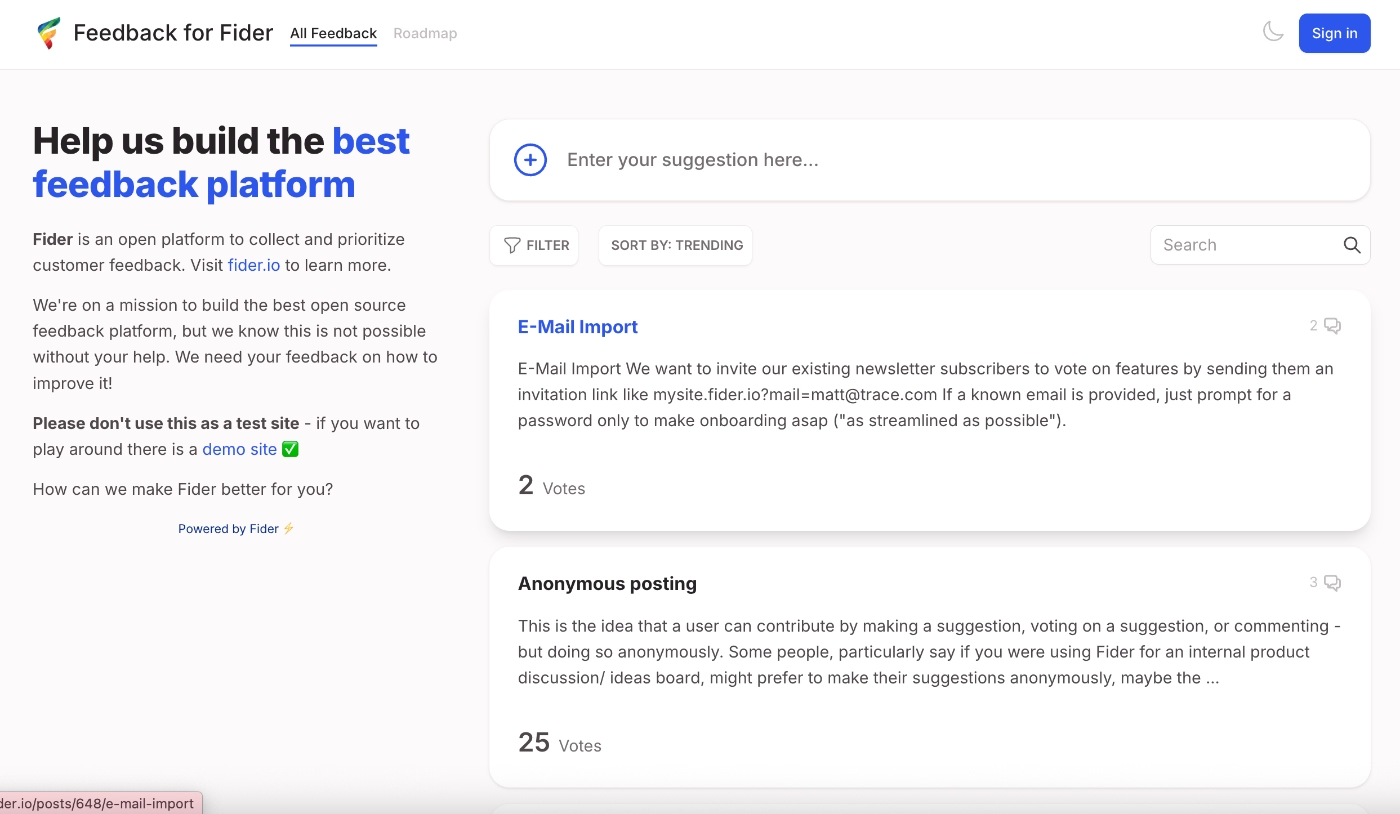
Fider is a light-weight product feedback and feature request management tool. Its main capabilities include:
- Submit → vote → discuss feedback boards
- Unlimited customers, voting, discussion, and members
- Custom branding and multi-language support
- Public API
- Self-hosting option (fully open source, same GitHub project)
Pricing
Fider is free to use with a generous fair-use limit (up to 250 feedback items) before you'd need to upgrade, and also free to self-host if you'd rather run it yourself.
For $25/mo, you can get content moderation and unlimited feedback items.
AnnounceKit
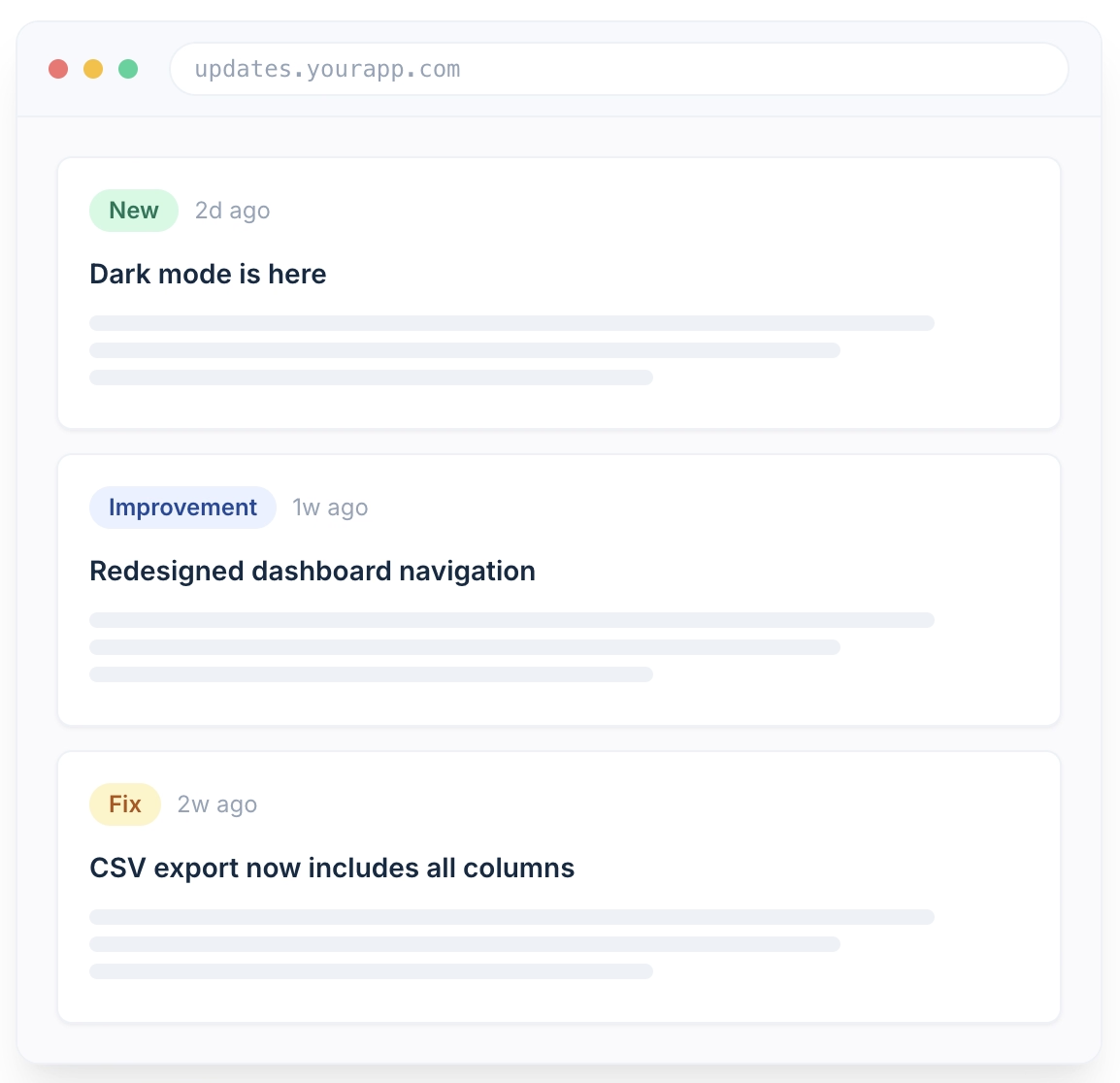
AnnounceKit is a product communication platform built primarily for changelogs and release announcements, with feature requests and NPS layered on as secondary modules.
The platform's main features include:
- Changelog and standalone updates page
- In-app widgets and in-app notifications
- Surveys
- AI-powered post editor
- Feature requests and public voting
- Multi-channel updates
- Mobile app announcements
- Segmentation and user tracking
- MCP server for AI-agent publishing
Pricing
AnnounceKit uses flat per-project pricing with no per-seat or MAU-based fees.
- Essentials: $79/mo billed annually ($89/mo billed monthly) — changelog, all widget types, roadmap, AI post editor, comments & reactions, post analytics.
- Growth: $129/mo billed annually ($149/mo billed monthly) — adds user tracking, segmentation, feature requests, advanced analytics, unlimited team members. (Most popular)
- Scale: $339/mo billed annually ($399/mo billed monthly) — adds post boosters, in-app notifications, multi-language, custom CSS, SSO & SAML.
- Enterprise: custom — RBAC, dedicated account manager, SOC 2 & Trust Center access, custom invoicing/contracts.
UserJot
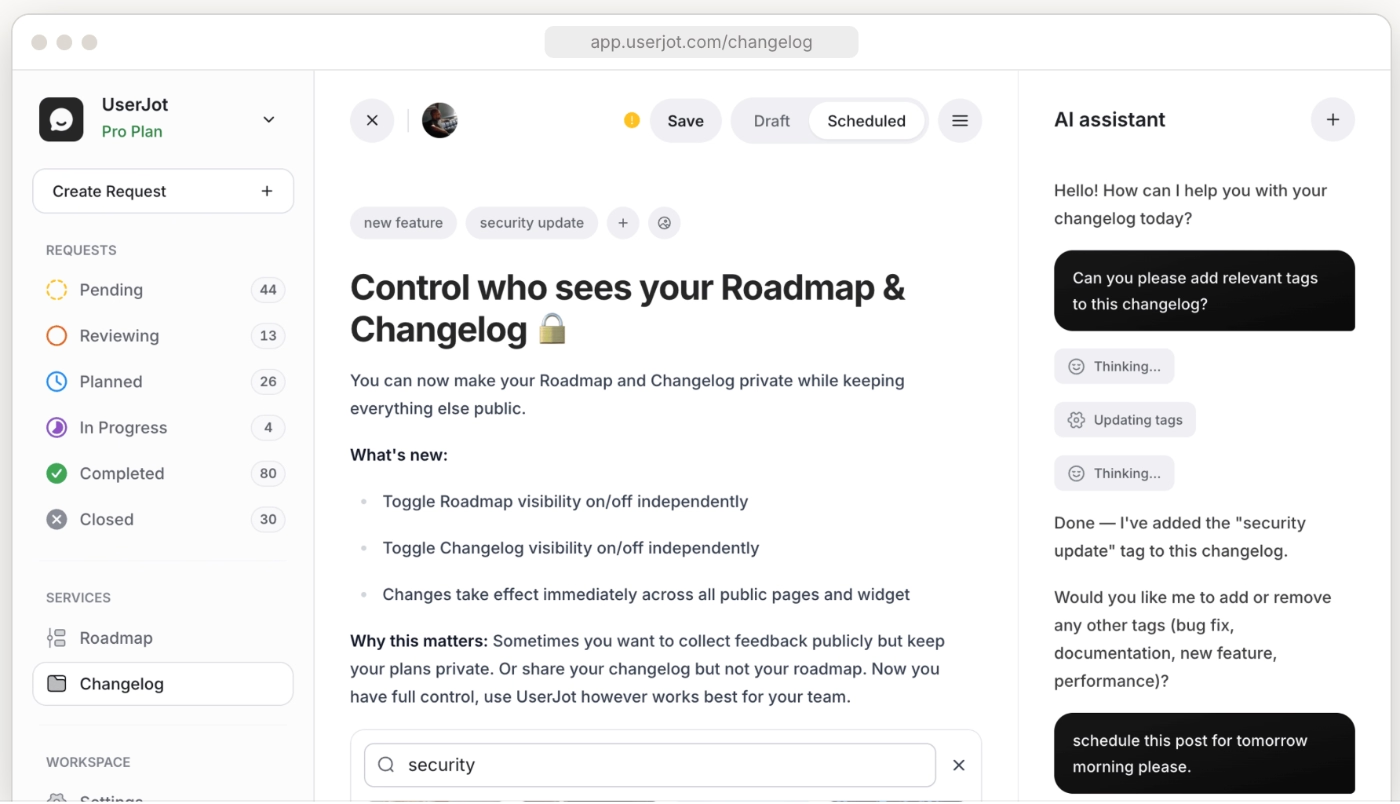
UserJot is a feature request software and its main capabilities include:
- Feedback boards, public roadmap, and public changelog
- Custom domain and private boards
- Guest posting and automatic login
- Single sign-on and public identity masking
- In-app widgets
- AI agents
Pricing
Unlimited users and unlimited posts on every plan, including free.
- Free ($0/mo) — unlimited posts and users, 3 admin roles, 2 feedback boards, public roadmap, public changelog.
- Starter ($29/mo) — everything in Free, plus custom domain, guest posting, automatic login, 5 feedback boards, private boards, one integration.
- Professional ($59/mo) — everything in Starter, plus unlimited boards, advanced search, SSO, unlimited integrations, unlimited admin roles, public identity masking.
To Sum Up…
In this article, we've talked about all the do's, don'ts, why's, and how's of feature request management. But if there's one thing to take away, it's that feature request management is getting more important by the day, since AI has made it easier than ever for teams to ship a lot of features, very fast, very often. But shipping fast isn't the same as shipping what actually matters.
The best way to make sure you're creating real value, and not just noise, is to keep your backlog and roadmap aligned with what your customers are actually asking for.
That means having…
- a place to collect requests,
- a way to prioritize them,
- the confidence to say no when something doesn't fit, and
- the follow-through to close the loop once you ship.
And if you'd rather not build that whole process from scratch with a patchwork of tools, UserGuiding can handle the collection, prioritization visibility, and post-launch adoption side of it in one place, no code required.
Frequently Asked Questions
What's the difference between a feature request and a bug report?
A bug report says something is broken and should be fixed to work the way it was always supposed to. A feature request asks for something that doesn't exist yet, whether that's a new capability or a change to how something currently works. The distinction matters because they need different owners and different urgency: bugs usually go straight to engineering, while feature requests go through prioritization first.
How do you prioritize feature requests when everything feels urgent?
Pick an actual framework instead of going by gut feeling or whoever's asking loudest. RICE, ICE, and Value vs. Effort all work, and each weighs impact against effort differently. Beyond the framework, factor in who's asking: a request from a handful of your biggest paying accounts can matter more than a hundred votes from free users, even if the raw numbers say otherwise.
What tools do product teams use to track feature requests?
Options range from lightweight, budget-friendly boards like UserJot and Upvoty, to open source platforms like Fider and Quackback, to fuller product management suites like Productboard and enterprise-focused tools like UserVoice. Some platforms, like UserGuiding, fold feature request collection into a broader product adoption toolkit alongside in-app guidance and analytics, so you're not managing a separate standalone tool just for requests.
Should you build every feature customers ask for?
No. Even good requests won't all make it onto the roadmap, and building everything asked of you is a fast way to lose your product's focus and turn into a feature factory. You're still the owner of your roadmap: you know your positioning, your development capacity, and your vision better than any single request does. Listen closely, but don't feel obligated to say yes to everything.
How do you tell a customer no without losing them?
Don't leave it at a flat no. Offer a workaround or an existing feature that gets them most of the way there, and be honest about why you're passing on it instead of giving a vague non-answer. If something's genuinely outside your scope or development capacity, building a half-baked version of it won't actually help the user, so it's better to keep expectations honest than to force a bad build.

.png&w=3840&q=75)