


.svg)
.svg)
.svg)
.svg)



.svg)




.svg)
.svg)

If you're feeling behind on market trends, unsure about what to build next, or unsure about your releases (which are quickened with AI, but now you don't know if you're building what your users are actually expecting from you), you know you need a way to connect your development process and product roadmap with customer insights. And that way goes via feature request management software.
In this article, we've compared and analyzed the top feature request management tools (17, to be exact) and also added actual user insights from each one's real users on platforms like G2.
So, let's get started.
TL;DR
- UserGuiding: bundles feature requests and roadmaps with a full product adoption suite (onboarding, guides, in-app announcements).
- AnnounceKit: leads with polished changelog and release communication, feature requests are a secondary layer.
- Featurebase: combines a feedback board and roadmap with a lightweight helpdesk and AI support agent.
- UserVoice: ties feedback to account and revenue data for enterprise-scale customer intelligence.
- Beamer: built for fast, no-code changelog and announcement broadcasting, with feature requests bundled in.
- Productboard: a full product management platform for structured, insight-driven prioritization.
- Canny: the established, dedicated feedback + roadmap + changelog tool, with AI-powered auto-capture.
- LaunchNotes: pairs AI-drafted release notes with feedback and roadmap tools, aimed at mid-market and up.
- ProductLift: the budget pick for small SaaS teams and agencies, with no per-user fees.
- Quackback: an open-source, self-hostable alternative to Canny with AI duplicate detection built in.
- UserJot: unlimited users and posts on every plan, including free, built for small/indie teams.
- Fider: a free, open-source, self-hosted feedback board for technical teams.
- Sleekplan: bundles feedback boards with CSAT/NPS surveys at a low starting price.
- Frill: unlimited admins and tracked users at a flat rate, with a clean, polished UI.
- Nolt: pairs feature request boards and roadmaps with community management tools.
- Upvoty: the cheapest entry point on this list, with unlimited boards and tracked users on every plan.
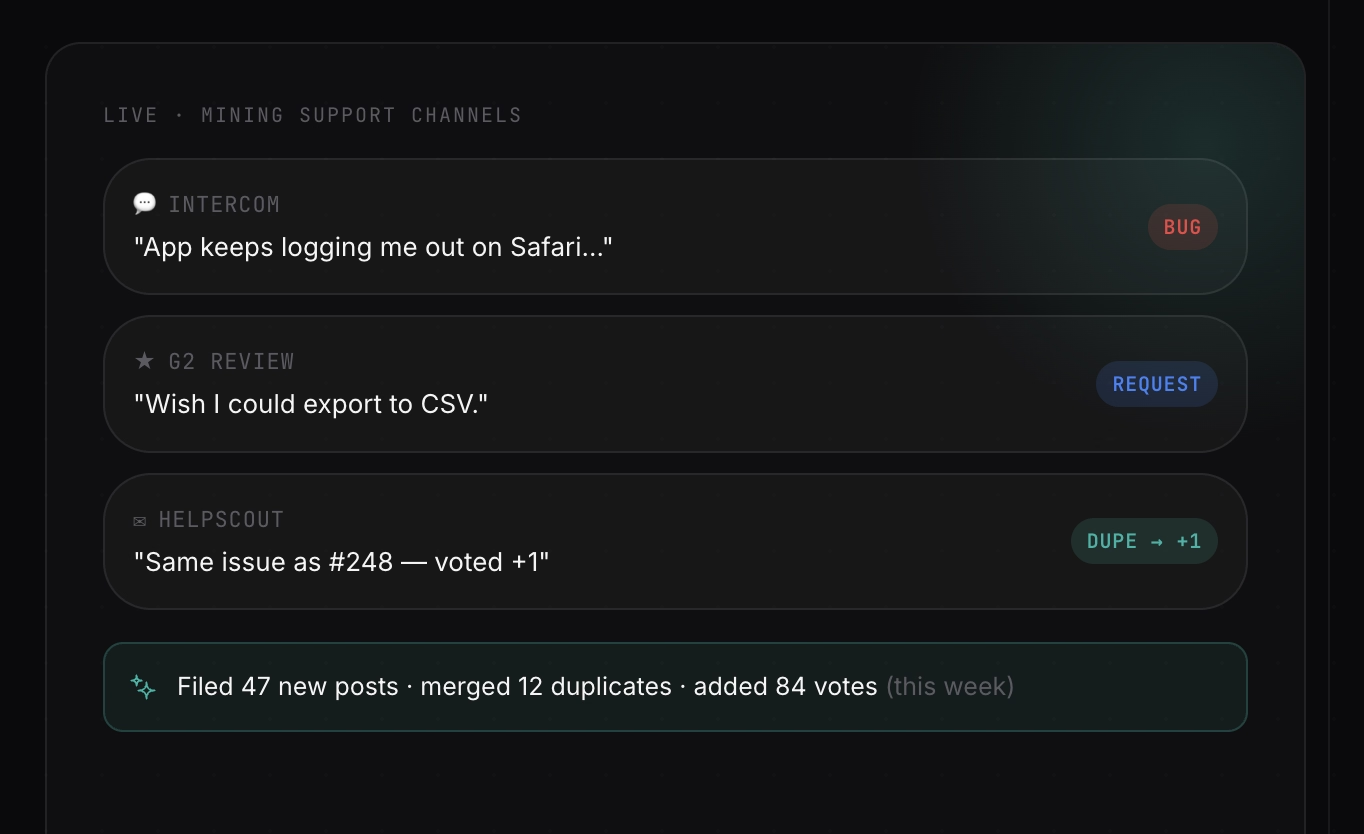
- Olvy: uses AI to mine feedback from support tickets, sales calls, and reviews rather than running a public voting board.
What to Look for in a Feature Request Tool
Feature request management can become a big mess if you don’t have the right tools and workflows to handle the flow of user feedback and recommendations. Especially if you’re a medium- to large-sized company and/or have a big and active user base who blesses you with their insights…
Without a good tool and feature request prioritization workflow in place, you might find yourself drowning in requests that are way out of your product scope and vision, prioritizing feature suggestions coming from not-very-high-value accounts (or missing the suggestions coming from high-value accounts among your lower-tier or freemium accounts), failing to justify your roadmap to your investors and stakeholders, or totally missing important market trends and customer expectations because of a misplaced feedback request form.
So, here’s what you should look out for in feature request management software in order not to experience these issues 👇🏻
- Feature request prioritization that weighs accounts, not just votes.
- Filtering that allows you to see suggestions/requests coming from different customer segments and user personas to detect emerging trends.
- Multiple ways of feature request collection (in-app surveys/widgets, standalone boards, multi-channel support, etc.)
- Capabilities that allow you to close the loop once you ship a requested feature, or start working on one (standalone roadmaps, in-app announcement modals, email support, etc.)
- Additional capabilities for customer support, product planning, or product adoption can be a bonus depending on your needs and existing toolkit.
And of course, scalable, customer-friendly pricing that allows you to estimate your costs as you grow, and flexible plans that won’t lock you down in multi-year contracts unless you’re ready to commit.
17 Feature Request Tools Compared at a Glance
The Best Feature Request Management Tools in 2026
UserGuiding
UserGuiding is a no-code, all-in-one product adoption platform that offers features and capabilities for product announcement, in-app engagement, automated self-serve customer support, and feature request management and product planning.
UserGuiding’s feature request capability lives inside its Product Updates module.
Customers submit requests through a dedicated tab, vote and sort by popularity, and admins triage submissions from an internal inbox before promoting the strongest ones to a public board.
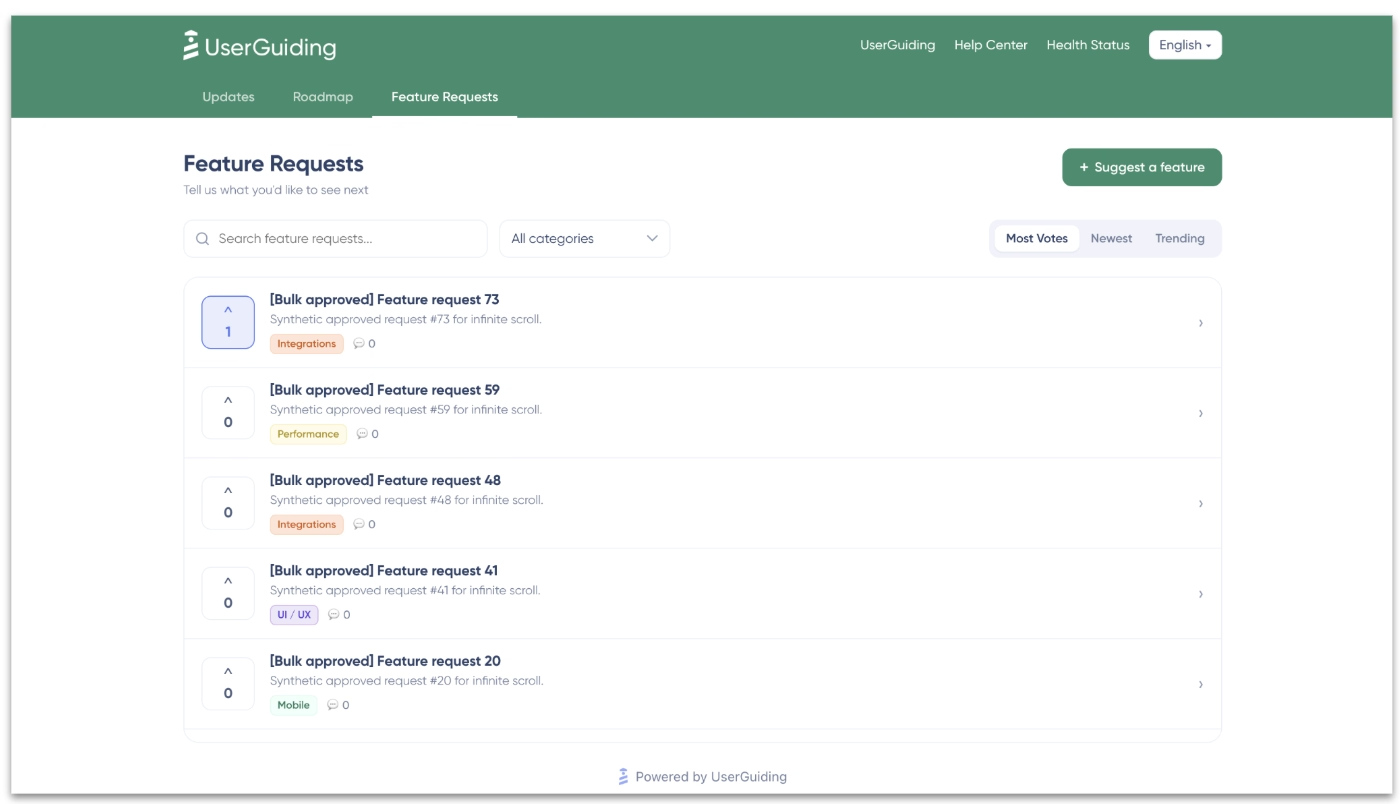
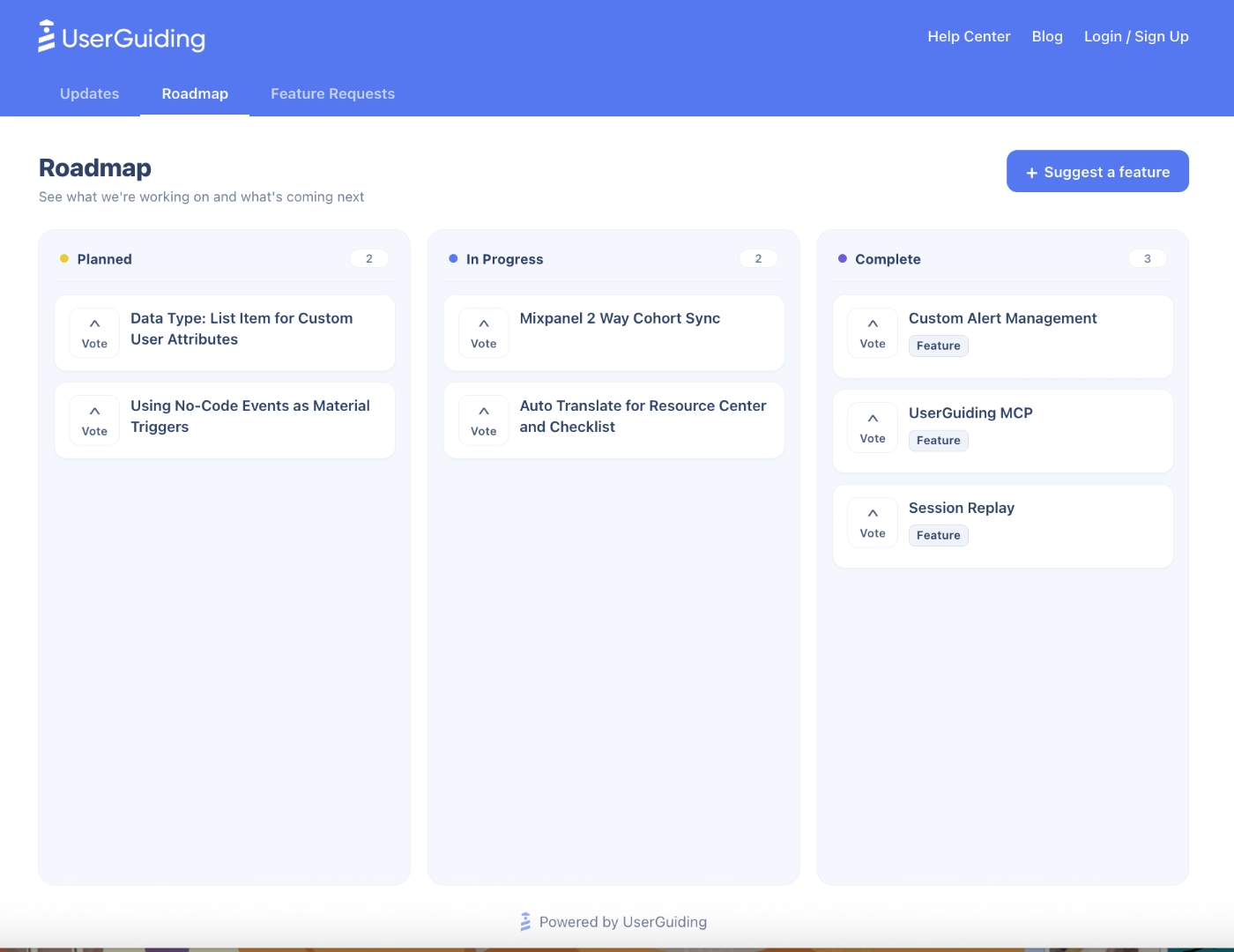
Beside the feature request board, UserGuiding also offers a roadmap board that allows you to share your backlog projects and the feature updates that are currently under development.
UserGuiding offers both public and private roadmaps.
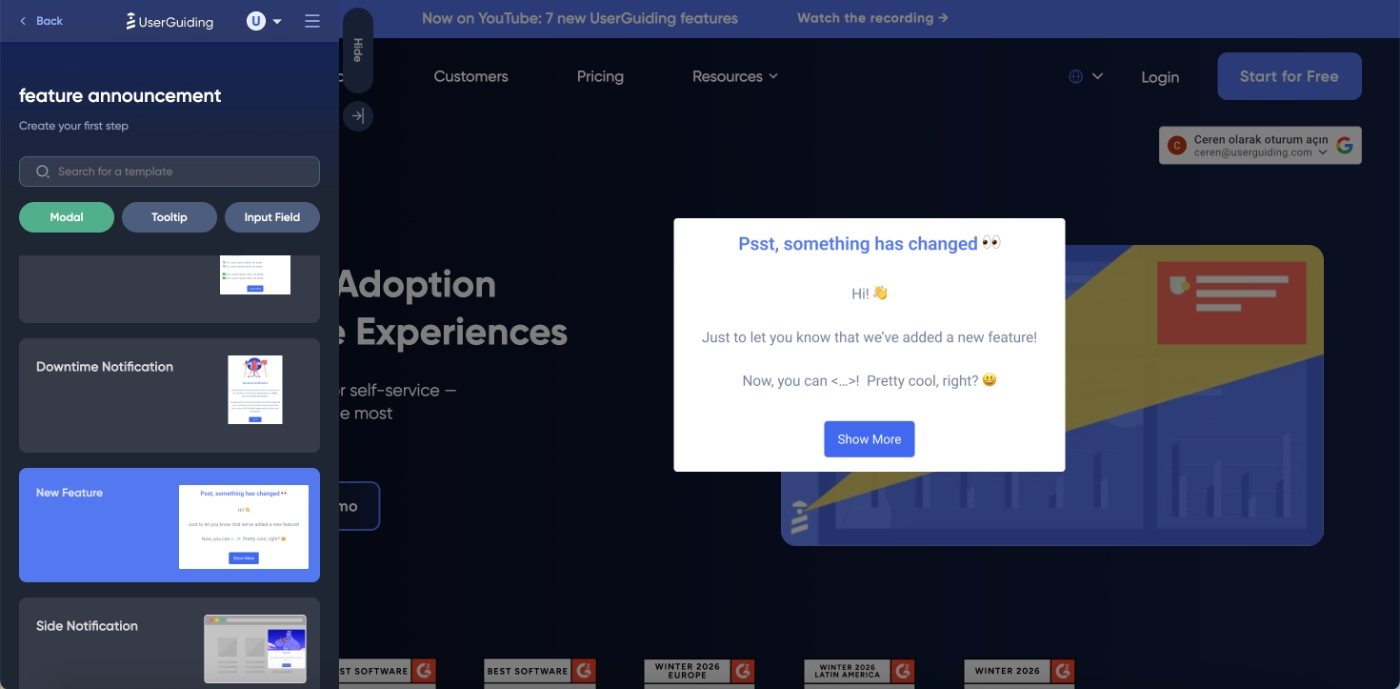
Once you’re live with a requested feature/update, you can then announce its details via the product updates page, as a release note, which looks like this:
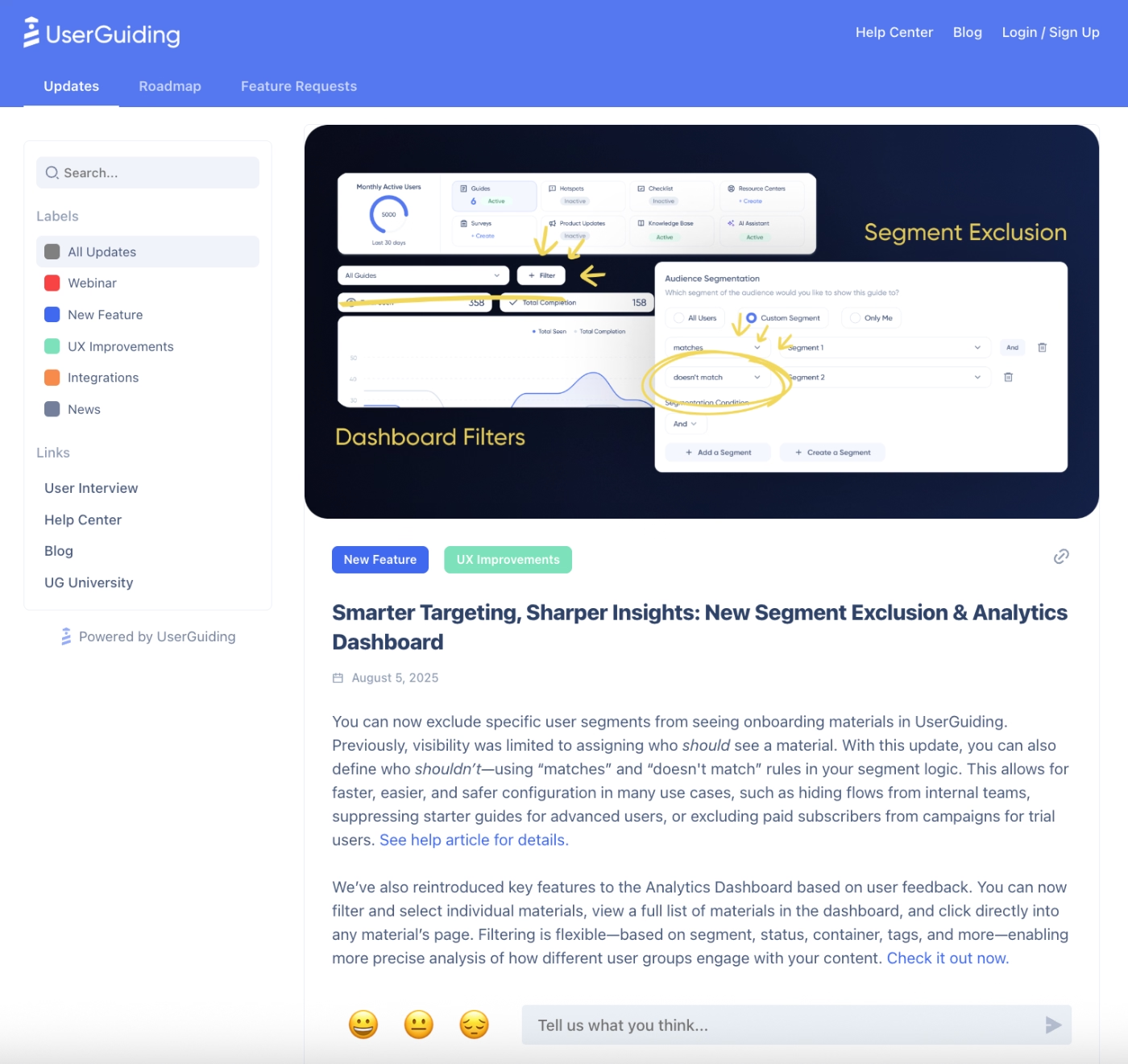
Or, you can also promote the feature within the app with pop-up modals, slideouts, banners, and hotspots. As UserGuiding is a product adoption solution, its onboarding and in-app engagement features like interactive guides, checklists, and tooltips allow you to not only close the loop by announcing a new feature but also promote it for higher engagement and interaction.
👉🏻 Check out UserGuiding’s features and use cases.
Pricing
UserGuiding has flexible and transparent pricing that is based on MAUs. There are 3 plans: Starter, Growth, and Enterprise.
- Starter starts at $249/mo for up to 2,000 MAUs (billed yearly)
- Growth starts at $499/mo for up to 2,000 MAUs (billed yearly)
While all the core in-app engagement, feature adoption, customer feedback, and automated support capabilities are included in all the plans (with varying feature caps, of course), feature request boards and roadmaps are included in Growth and Enterprise plans.
UserGuiding also offers a monthly billing option.
🎁 Start your free trial and see UserGuiding’s potential with your own eyes.
Pros and Cons: What do UserGuiding users say about the platform
👍🏻 UserGuiding is truly no-code, has little to no learning curve, and is easy to set up.
I like how easy it is to use UserGuiding, and I appreciate being able to tailor add-ons to my needs. It empowers the product manager with autonomy, reducing the need for developer resources to alert our clients about new features. UserGuiding makes communication with our clients easy by providing in-app alerts, unlike emails, which sometimes don't get the same response. The initial setup was very easy, and it has been seamless for us to use.”
👍🏻 UserGuiding offers automated localization capabilities for multi-language user bases.
UserGuiding is fully integrated with our product, and the features they’ve been building lately are great. The fact that it auto-translates into all the different languages we use to communicate with our customers is a lifesaver. We use posts on a weekly basis. And being able to see the performance of our communications is great!”
👍🏻 UserGuiding’s capabilities make it easier to communicate with customers and users.
We can now reach our users beyond our usual communication channels. At our company, we especially like the product updates pages. Before Userguiding, it was difficult to communicate product updates clearly and consistently; with Userguiding, it has become much easier and more reliable. Whenever I’ve had questions or doubts, I’ve been able to resolve them with help from the support assistant. We’re also planning to use the AI Assistant—we just need to expand our knowledge base first, so it has the right information to work with.”
👎🏻 UserGuiding doesn’t offer native mobile app support.
I find the lack of support for mobile applications challenging because some of our customers use the mobile app. It would be beneficial to have the ability to create guides that can be displayed in our mobile application.”
AnnounceKit
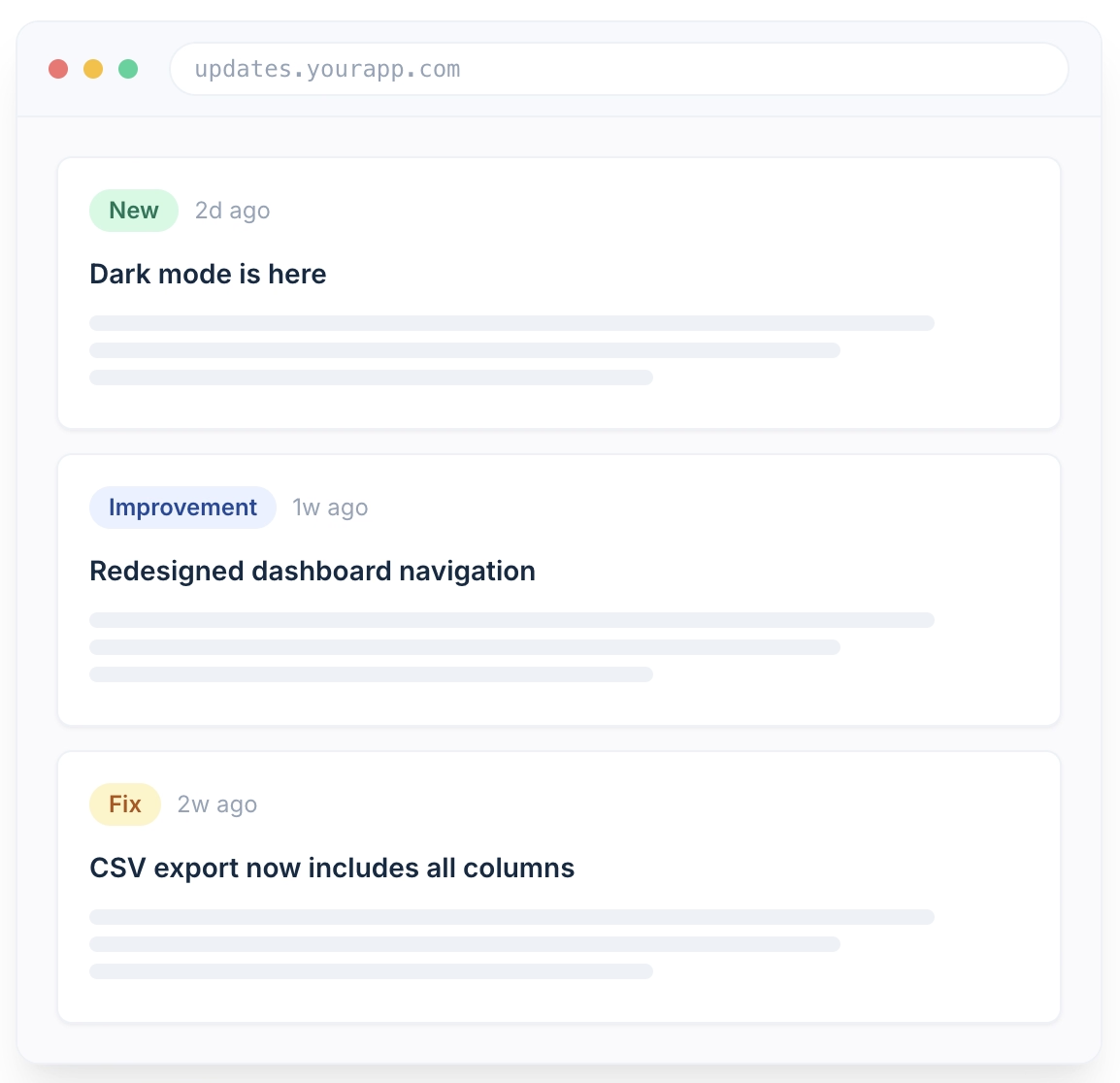
AnnounceKit is a product communication platform built for changelogs and release announcements. However, it also offers capabilities for managing feature requests and gathering customer feedback via NPS surveys.
The platform's main features include:
- Changelog and standalone updates page
- In-app widgets and in-app notifications
- Surveys
- AI-powered post editor
- Feature requests and public voting
- Multi-channel updates
- Mobile app announcements
- Segmentation and user tracking
- MCP server for AI-agent publishing
Pricing
AnnounceKit uses flat per-project pricing with no per-seat or MAU-based fees.
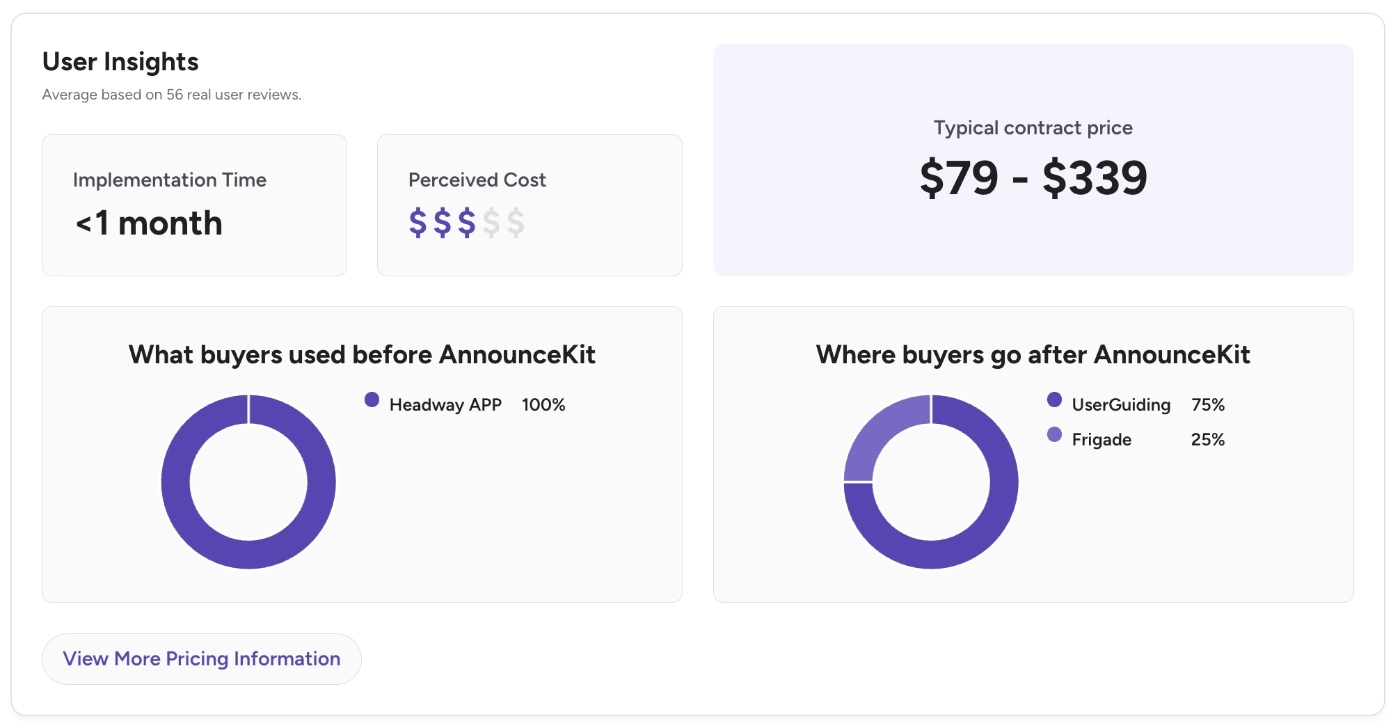
- Essentials: $79/mo billed annually ($89/mo billed monthly). Comes with changelog, all widget types, roadmap, AI post editor, comments & reactions, post analytics.
- Growth: $129/mo billed annually ($149/mo billed monthly). Adds user tracking, segmentation, feature requests, advanced analytics, unlimited team members.
- Scale: $339/mo billed annually ($399/mo billed monthly). Adds post boosters, in-app notifications, multi-language, custom CSS, SSO & SAML.
- Enterprise: custom pricing.
Pros and Cons: What do AnnounceKit users say about the platform
👍🏻 AnnounceKit is easy to set up and has an intuitive UI.
It's an easy way to get in touch with our customers and keep them aligned with our releases or any important changes. The UI is easy to use as well.”
👎🏻 Some capabilities of AnnounceKit, like email, require further development and customization.
While the primary use case is in-app updates, I wish there was more functionality around email updates.”
According to G2 data, AnnounceKit’s implementation takes less than a month.
The same data shows that 75% of (ex) AnnounceKit customers switch(ed) to UserGuiding due to complaints like limited analytics and limited customization.
Featurebase
Featurebase is a support and feedback platform. Its main capabilities and features include:
- Unified inbox and live chat (help desk side)
- Feedback boards and feature voting
- Public roadmaps
- Changelog / product updates
- Surveys
- Fibi AI agent for replies, categorization, and workflows
- MCP
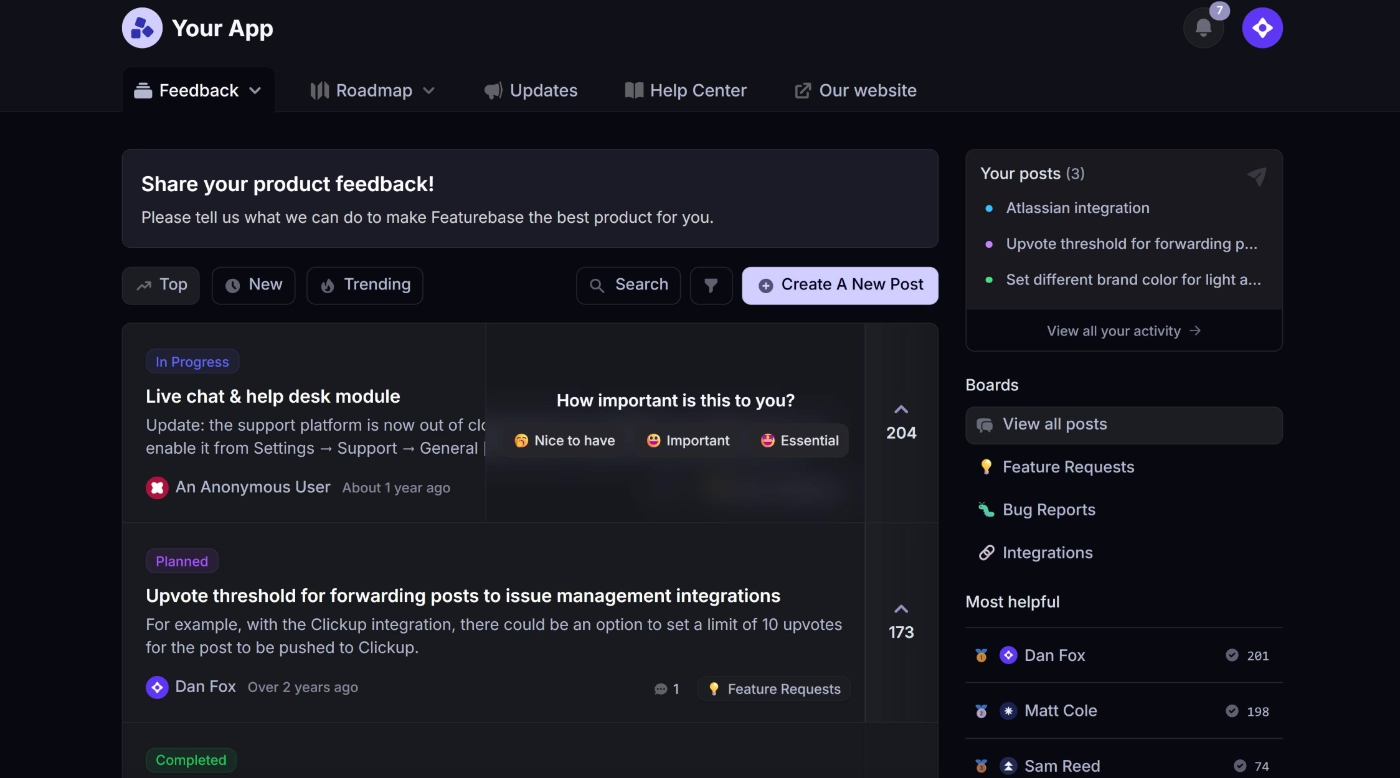
The platform is a good fit for small teams that want feedback and lightweight helpdesk functionality in one subscription instead of two.
However, it's a weaker fit for larger orgs needing deep branding customization or multilingual support at scale, since reviewers flag per-seat and per-language costs adding up, and a couple of users note the newer modules feel less mature than the core feedback board.
Pricing
Featurebase has 4 plans, one being free, priced per seat across two modules, Helpdesk and Feedback.
- Free ($0/mo) includes 1 seat. Helpdesk: live chat, unified inbox & ticketing, mobile app, internal notes. Feedback: 1 board, 1 roadmap, public portal, vote on behalf, automatic loop-closing emails.
- Growth ($29/seat/mo, billed yearly) adds email support and Fibi AI agent to Helpdesk. Feedback jumps to 5 boards/roadmaps, plus custom domain, in-app widgets, revenue-based prioritization, and AI duplicate-post suggestions.
- Professional ($59/seat/mo, billed yearly) adds Slack support, workflows/automations, and SLAs to Helpdesk, plus SSO. Feedback goes to 10 boards/roadmaps, with Ask AI, AI deduplication, user segmentation, board privacy, moderation, and custom post fields. Includes 20 free Lite seats.
- Enterprise ($99/seat/mo, billed yearly) adds unlimited boards/roadmaps, AI feedback tagging, a dedicated prioritization module, custom admin roles, Salesforce/HubSpot sync, custom invoicing, 50 free Lite seats.
Monthly billing is available too; Fibi AI resolutions are metered separately at $0.49 each.
⚠️ Several FeatureBase customers complain about the platform’s pricing modules not being very user-friendly, as the prices ramp up pretty quickly based on factors like multi-language support (which is a feature that is criticized heavily for not being useful enough, as well).
The pricing can become expensive quite quickly if you want to add more languages or access additional AI features. I wish pricing were more based on usage or activity rather than specific features. That would make it easier for an early-stage startup like ours to access more functionality early on and scale alongside the product.”
Pros and Cons: What do FeatureBase users say about the platform
👍🏻 FeatureBase offers a diverse toolkit for customer support, feedback, and feature requests.
The best thing about FeatureBase is how much it consolidates into one platform: community board, help center, feedback, roadmaps, and AI support all in one place. On top of that, Fibi (their support agent) sources its answers from all of those surfaces together, so the chatbot actually knows what users are asking about instead of just pulling from help docs.”
👎🏻 FeatureBase has a slightly higher learning curve and a longer implementation time; several users state that the platform can be overwhelming and confusing at first.
The only downside is the learning curve at the start—there are a lot of options for organizing feedback. Once we set up our workflow, it was smooth, but initial configuration took a bit of time.”
👎🏻 Some capabilities of the platform are not developed to their fullest potential, like the analytics.
The customization options for branding are somewhat limited, and the analytics dashboard could offer deeper insights into user behavior patterns. Additionally, automation features for notifications and workflows could be more flexible.”
👎🏻 FeatureBase’s integrations are not advanced and detailed enough. Many users complain about the existing integration with Slack not being enough to set up alerts and/or automate tasks.
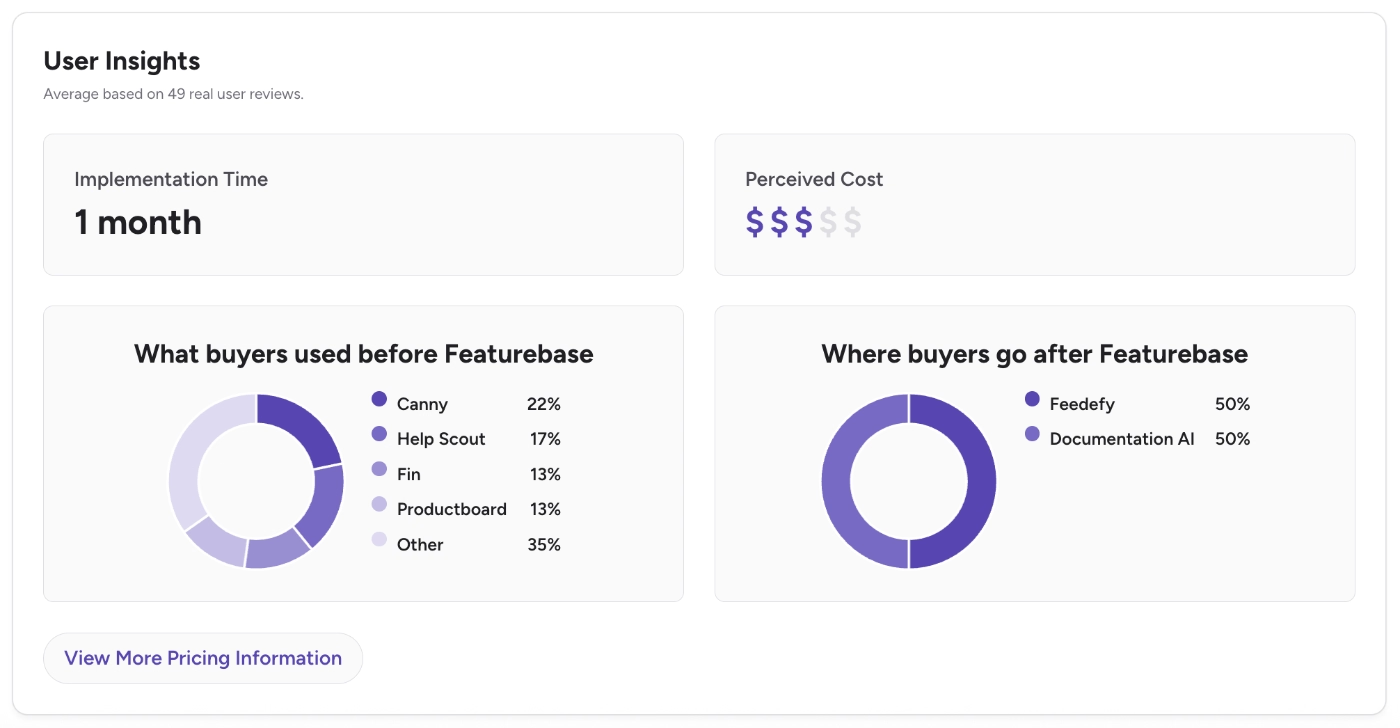
According to G2 data, FeatureBase’s implementation takes around a month to complete.
While the platform’s customers are ex Canny, HelpScout, Fin, and Productboard users, many (ex) FeatureBase customers also do switch(ed) to platforms like Feedefy and Documentation AI due to the complaints we’ve just listed above.
UserVoice
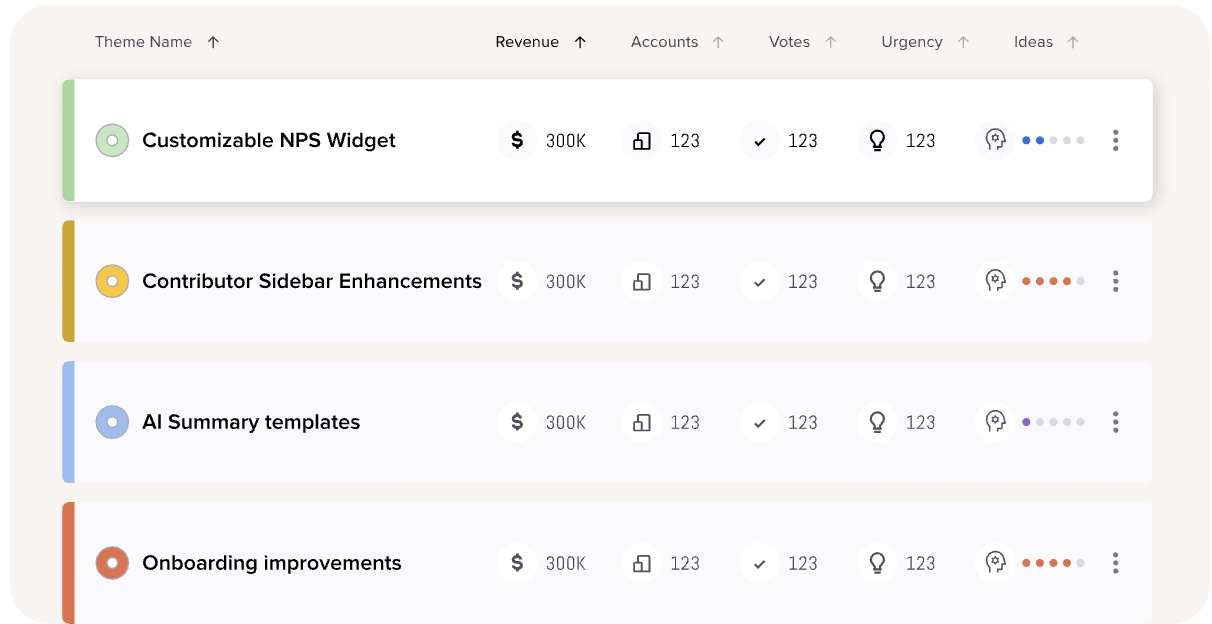
UserVoice is a customer intelligence platform for centralizing and managing customer feedback, sales communications, and support conversations. It's built to pull feedback from every connected tool, enrich it with account and revenue data automatically, and surface what to prioritize based on business impact.
The platform’s main capabilities include:
- Data integration and enrichment
- AI Idea Insights
- Indexing
- Theme detection
- Segments
Pricing
UserVoice doesn't publish fixed plans or transparent self-serve pricing. The platform’s cost scales with your feedback volume and the integrations you connect, with no per-seat charges.
There's also no self-serve signup; you'll need to book a demo to get a quote, though a 30-day free trial is available once you do.
According to Vendr data, the average yearly cost of UserVoice is around $17,000, with some contract values reaching to $56,000.
Pros and Cons: What do UserVoice users say about the platform
👍🏻 UserVoice allows for several ways of feature request submission, including internal submissions from customer success and customer support specialists.
My favorite feature is that CSMs can submit feedback on behalf of a user, so we always have a way to quantify a feature request with the accounts and users that want it.”
👎🏻 UserVoice has a steep learning curve.
It's a more complex system under the hood. There's a lot of information you need to understand and generate so that it can collect the most accurate feedback.”
Beamer
Beamer is a customer communication platform that has joined forces with Userflow, an onboarding platform, in 2024. The platform’s main capabilities include:
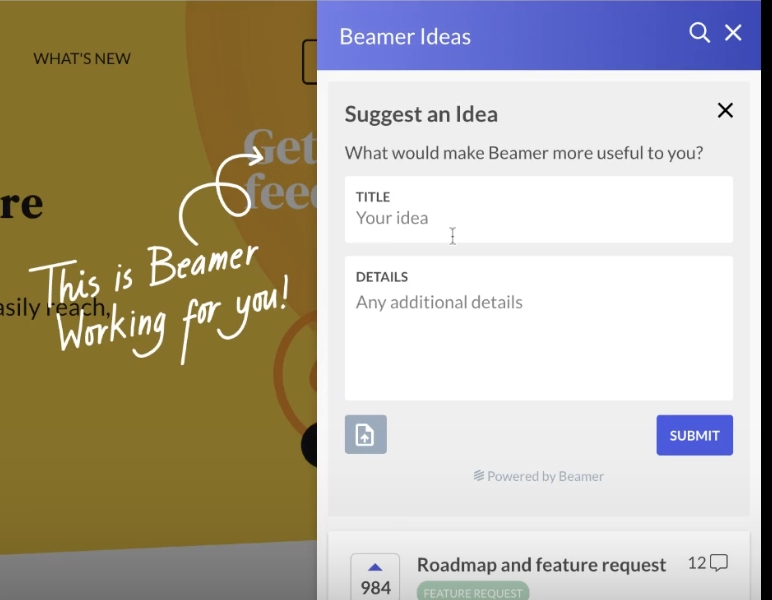
- Feature request (Ideas)
- Roadmaps
- Changelogs (with push notifications and in-app notifications)
- In-app surveys and email surveys
Pricing
Beamer has a transparent and flexible pricing strategy. There are mainly 3 tiers: Starter, Pro, and Scale.
- Starter starts at $49/mo (for yearly billing) for up to 5,000 MAUs
- Pro starts at $99/mo (for yearly billing) for up to 10,000 MAUs
- Scale starts at $249/mo (for yearly billing) for up to 50,000 MAUs
Beamer also offers a monthly billing option.
Beside these three plans, there are also 2 add-ons: Feedback Pro and NPS Pro.
While the core capabilities of Feedback and NPS, like public changelogs, feature request upvoting, roadmaps, and NPS surveys, are included in all the plans, with the Pro plans, you can unlock advanced capabilities like private changelogs, custom statuses, and even higher feature cap for NPS surveys.
These add-ons cost $99/mo, each.
As you can see, Beamer’s pricing structure allows companies of all sizes, from startups to enterprises, to find a bundle that fits their budget and user base.
Pros and Cons: What do Beamer users say about the platform
👍🏻 Beamer is easy to set up and quick to go live within hours.
I love how easy the setup is with Beamer. We could go live in just a few hours instead of spending a lot of time on configurations like with other software. This ease of setup makes it incredibly valuable to us.”
👎🏻 Beamer’s segmentation feature is not intuitive or advanced enough for a real use case.
It’s a hassle when it comes to segmentation—you have to do it manually, and it’s really difficult to integrate with HubSpot.”
👎🏻 Beamer’s integrations can be tricky to set up and limited.
The part I dislike about Beamer is that their native integrations rely on Zapier and recent Webhooks. There's a ton of external platforms that would have connected with Beamer natively, like CRMs, ESPs, Page / App Builders, etc.”
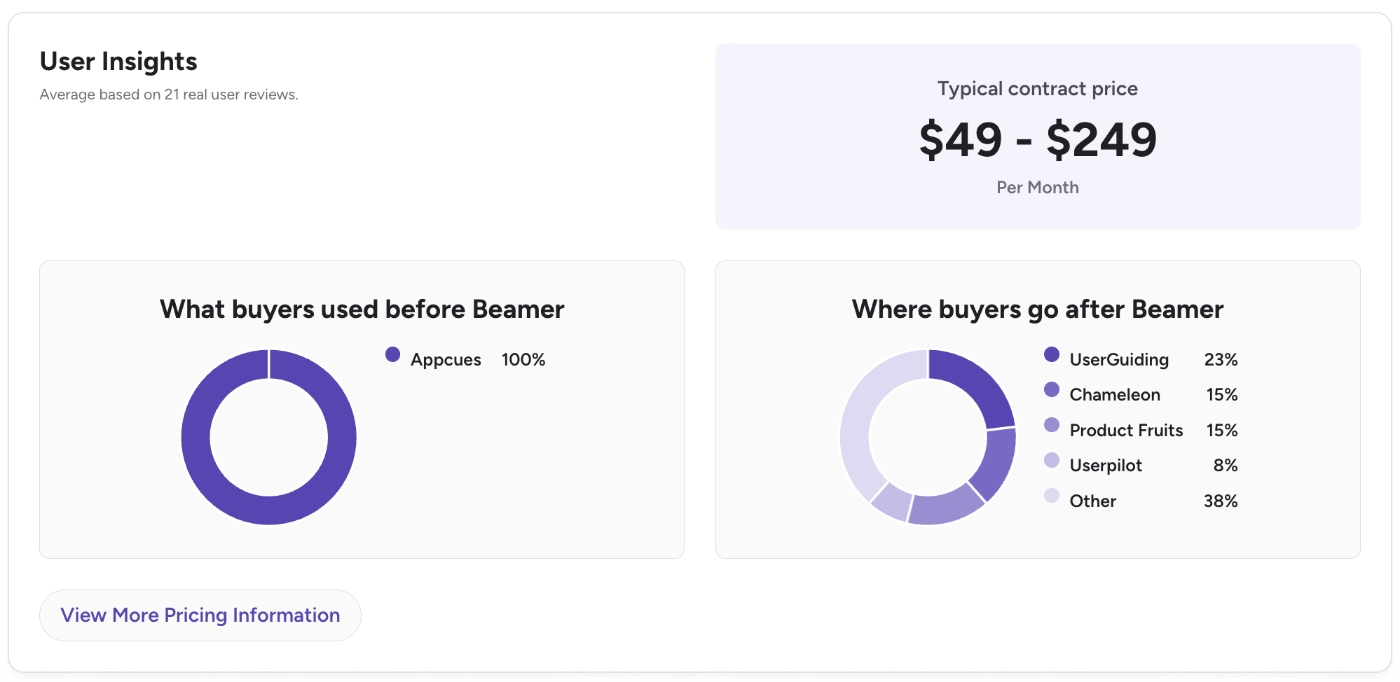
According to G2 data, the most popular tools (ex) Beamer customers switch(ed) to are UserGuiding (23%), Chameleon (15%), and Product Fruits (15%), while the most popular tool that Beamer customers switch from is Appcues.
Productboard
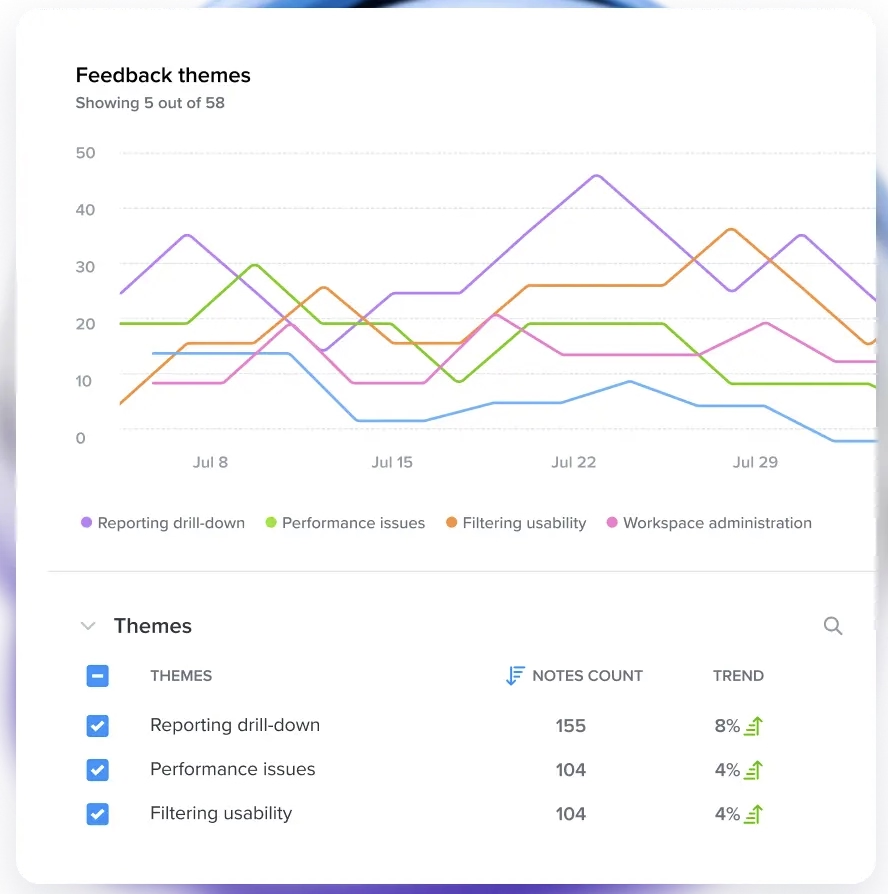
Productboard is a product management platform built around its AI agent, Spark, which handles everything from summarizing feedback to drafting specs and roadmaps.
The platform's main features include:
- Feedback / insights repository
- Spark AI (feedback analysis, document generation, chat, MCP server/connectors)
- Prioritization scoring and custom formulas
- Roadmaps and release planning
- Customer-facing product portal
- Manual & dynamic customer segments
Pricing
Productboard prices per "maker" (the PMs who own strategy) rather than per seat, so contributors who just submit or tag feedback don't count toward that total.
- Free ($0/mo) comes with 50 AI credits/month total, 500 feedback notes, 25 contributors, 1 teamspace, 1 product portal.
- Plus ($19/maker/mo billed annually, $25/maker/mo billed monthly) comes with 250 AI credits per maker; adds manual & dynamic customer segments, feedback-loop closing, and usage integrations.
- Business ($59/maker/mo billed annually, $75/maker/mo billed monthly; 2 online or 5 contract makers minimum) comes with 500 AI credits per maker; adds unlimited feedback notes and teamspaces, a shared skills library, 2 product portals, and portal customization.
- Enterprise (custom; 5 makers minimum) comes with 800 AI credits per maker; adds unlimited contributors.
⚠️ Free plan’s AI credit pool is shared across the whole team, while every paid tier allocates credits per individual maker.
Pros and Cons: What do Productboard users say about the platform
👍🏻 Productboard’s feature request capabilities work great alongside the platform’s product planning capabilities like prioritization and roadmaps. The platform serves as a one central hub for PMs to make product decisions.
Probably the strongest feature of Productboard is its ability to transform customer feedback into a powerful tool for product management. It has made our planning process better through the use of tools to analyze feedback and prioritize features on the platform. Furthermore, the use of the roadmap visualizations helps to keep the focus on product goals and the roadmap in the center, and has made development more focused and coherent across all teams.”
👎🏻 Productboard’s UI is messy and hard to navigate, especially the dashboards.
I don’t like Productboard’s dashboard because it’s too crowded with information. It’s also hard to customize the views and takes time to get them right. I wish we had better reporting tools to look at our data.”
👎🏻 Productboard has a steep learning curve.
There's a lot of complexity. It takes time to get up to speed and work fluently inside it.”
👎🏻 Productboard’s feature request management tags can be clunky and hard to use.
The tags on Insights once raised are clunky and hard to use.”
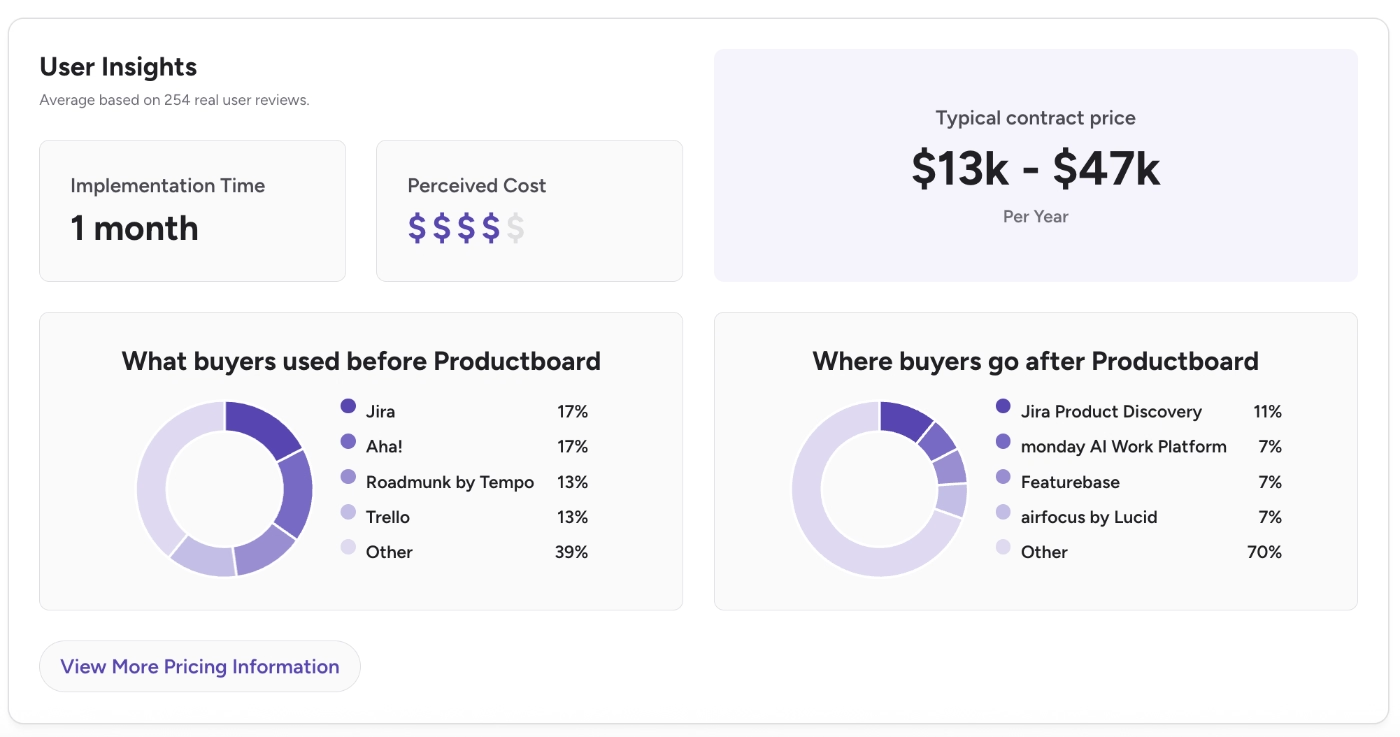
According to G2 data, Productboard’s customers are not very happy with the platform’s costs, which can typically easily reach mid-5-figure per year ($47k/yr).
As Productboard is a product planning solution, many of its closest competitors from which and to which its customers switch are other product planning solutions like Trello, Jira, and Monday. The only feature request management-focused solution among the tools that (ex) Productboard customers switch(ed) to is Featurebase.
Canny
Canny is an AI-powered feature request management and prioritization platform. Canny’s agentic AI capabilities review your sales and support communications to capture any relevant suggestions and/or feature requests coming from these conversations.
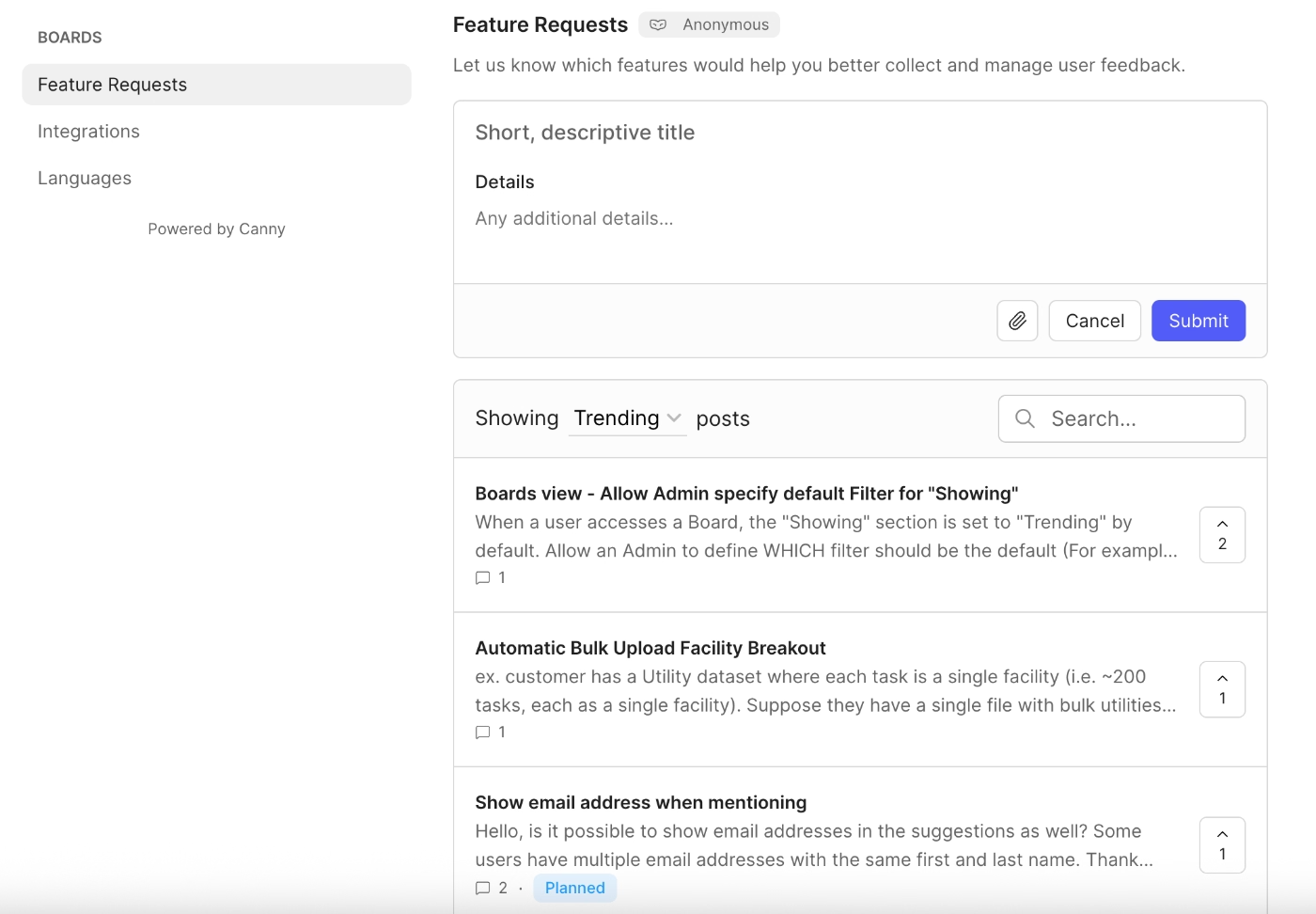
The platform’s main capabilities include:
- Feedback boards (public or private)
- Feature voting
- Public roadmaps
- Changelog / product updates
- Segmentation and filtering by user or account attributes
- Autopilot (AI-based feedback summarization)
- MCP connectors
Pricing
Canny has 3 plans in total, one being a free plan. The paid plans scale with the number of tracked users, which refers to the number of users associated with feedback.
- Free: $0/mo comes with 25 tracked users, unlimited feedback and boards, 5 managers.
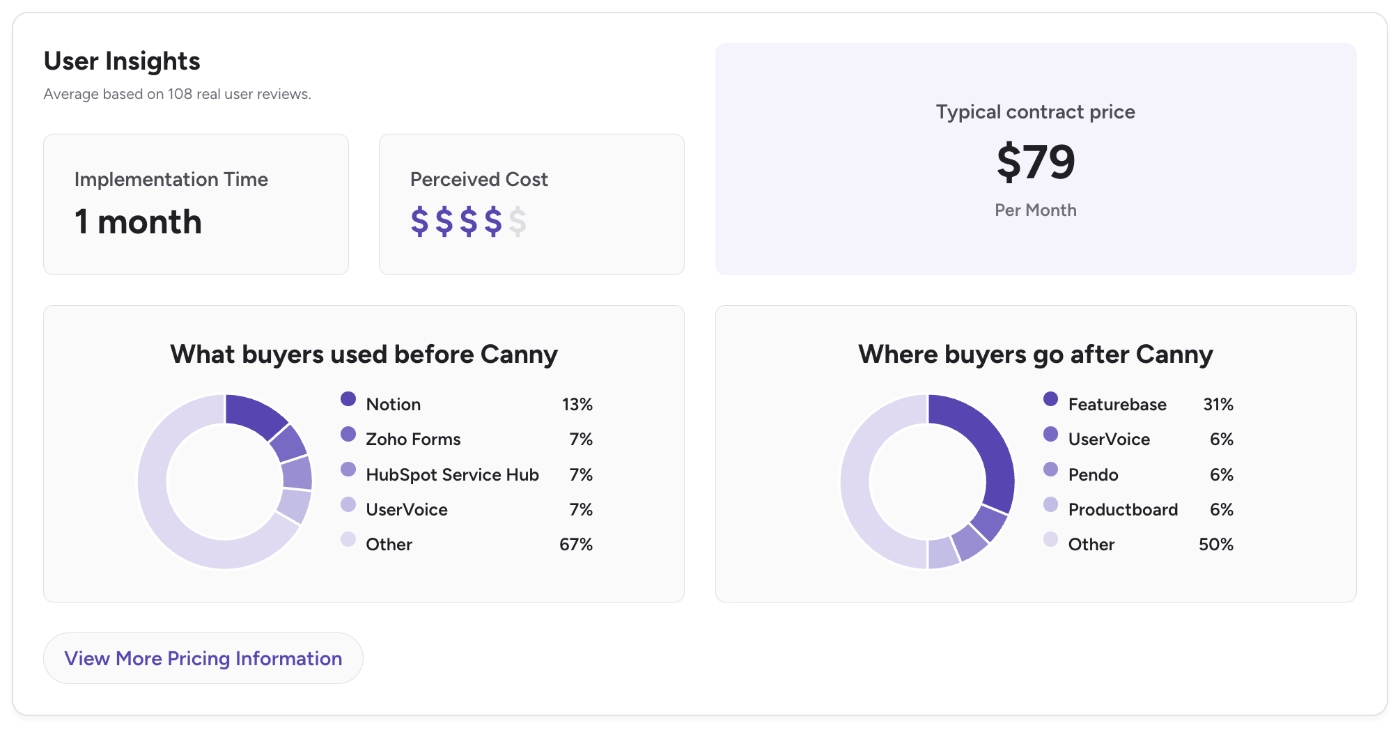
- Pro: $79/mo (billed yearly) comes with 100+ tracked users, PM integrations, advanced privacy, 10 managers.
- Business: has custom pricing and comes with 5,000+ tracked users.
There’s also a monthly billing option.
Pros and Cons: What do Canny users say about the platform
👍🏻 Canny offers its API for all the plans, including the free plan. Several customers state that they are able to build great flows via the API and integrate it into their apps smoothly.
Canny's public APIs have been super helpful for us to set up our workflows however we like. The tool is quite easy to understand and adapt. Custom fields, filtering options in views, and exporting filtered feedback data are pretty convenient in Canny.”
👎🏻 Canny is a basic solution for feature request management. Several customers complain about the platform’s lacking features.
It is very basic. Unless the PM makes comments, it is difficult to understand if there has been any progress. There is no way to close the loop when a feature has been released.”
According to G2 data, many Canny customers switch to the platform from other customer feedback and feature request management tools like UserVoice, HubSpot, and Zoho Forms. The popular tools that (ex) Canny customers switch(ed) to are Featurebase (31%), UserVoice (6%), Pendo (6%), and Productboard (6%).
Canny’s implementation, too, takes around a month.
LaunchNotes
LaunchNotes is an AI-powered product communication and product updates tool. Its main capabilities include:
- Release notes
- Changelogs
- Feedback inbox and automated email replies when a requested feature goes live
- Voting boards
- Sentiment analysis
- In-app widgets for roadmaps, product updates, and idea suggestions
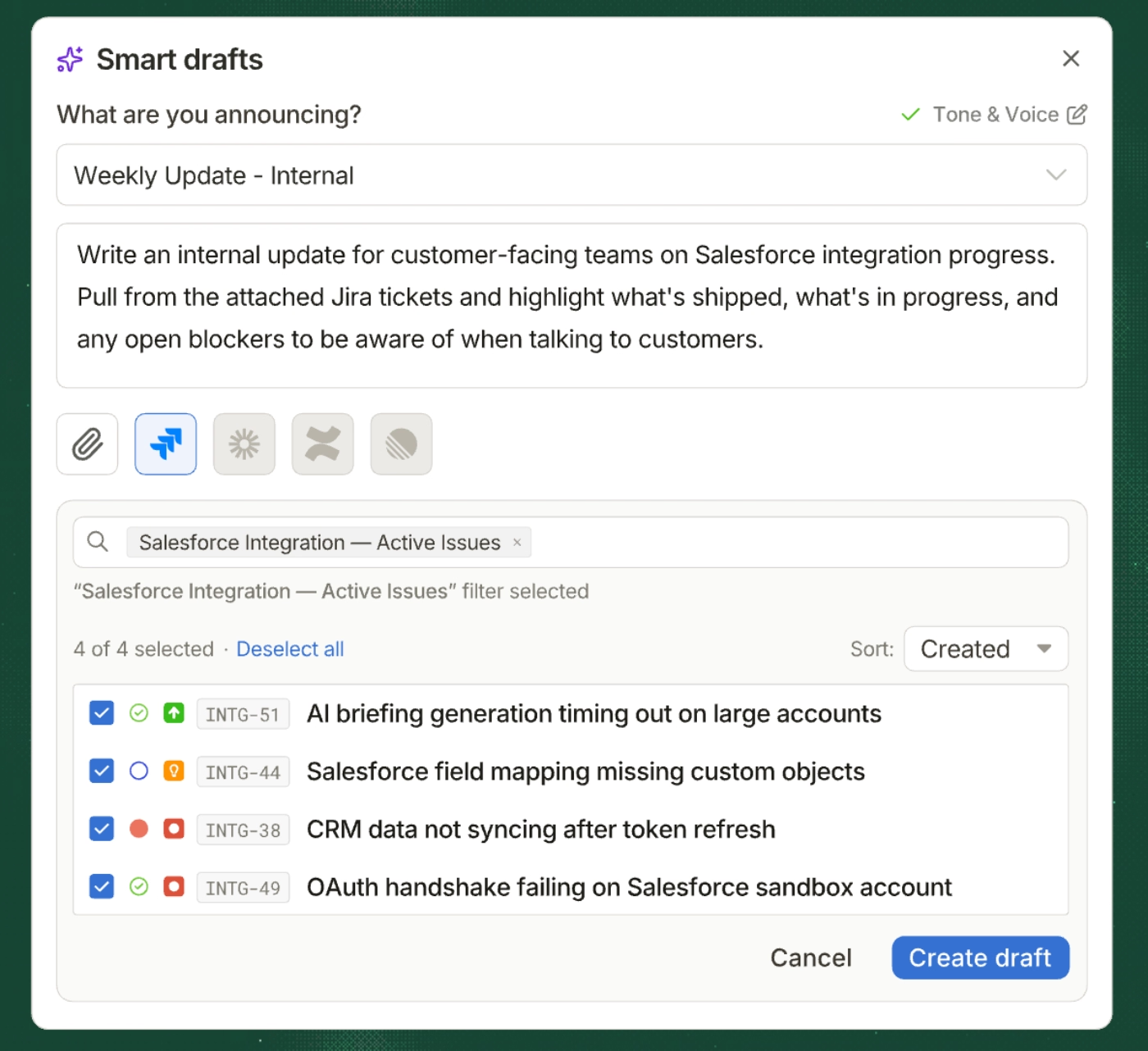
- Smart drafts (AI editor for release notes)
Pricing
LaunchNotes has 2 plans: Growth and Premium. The Growth plan starts at $249/mo when billed annually, and $299/mo when billed monthly.
Growth comes with all the basics of announcement, feedback, roadmap, and widget features. However, if you want the advanced features for branding, Jira task integrations, custom feedback forms, or advanced segmentation, you need to go with the Premium plan, whose starting prices are not publicly shared.
⚠️ LaunchNotes is not an easily scalable or accessible solution for SMBs. One LaunchNotes customer on G2 says:
LaunchNotes is moving upmarket into a more Enterprise-focused product dev platform, which I understand is important for the success of their business. However, in doing so, they're 10x the price and leaving behind all the SMBs that rely on their platform for just release notes. I would love to see an SMB-friendly pricing and packaging option. If pricing remains as high as it is, our startup will have no choice but to switch providers.”
Pros and Cons: What do LaunchNotes users say about the platform
👍🏻 LaunchNotes’ roadmap customization capabilities are highly praised by its users.
Roadmap items can be as detailed and stylized as I need them to be. Roadmap cards support rich text and images for easier-to-read content.”
👍🏻 LaunchNotes offers communication channels not only between users and product teams but also between stakeholders and product teams.
LaunchNotes provided a content surface and distribution method to keep our customers, partners, and internal teams updated on the releases of the product, as well as provided an opportunity for us to promote customer education and product marketing.”
👎🏻 Some capabilities of LaunchNotes are criticized for being superficial, like collaboration capabilities within the platform for teams.
I wish there was more opportunity for collaboration within the product. There are permissions available to have reviewers, but it would be great if reviewers could leave comments/ suggestions within the product and have that be visible to the content writers.”
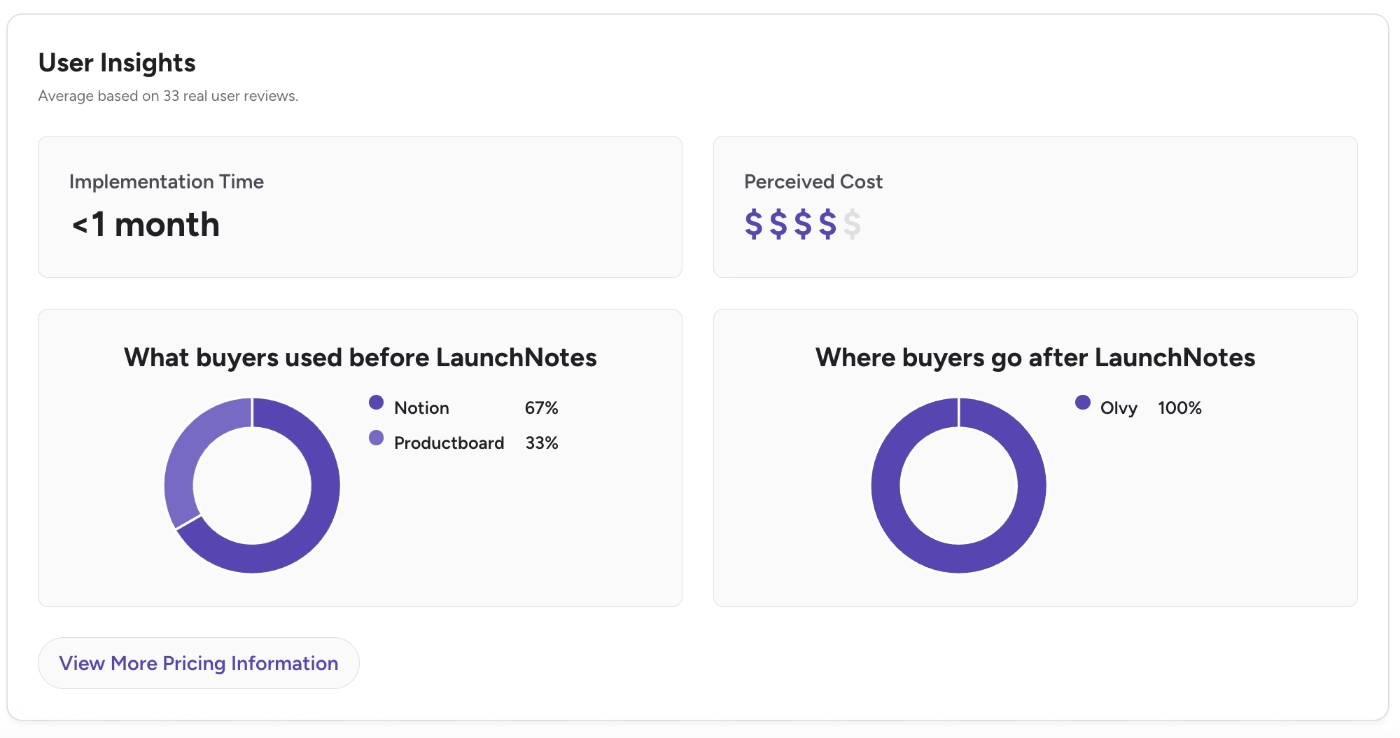
According to G2 data, LaunchNotes’ implementation takes less than a month. And the platform’s closest competitor to which (ex) LaunchNotes customers switch(ed) is Olvy, another AI-first customer insights and feedback management tool, which we’ll talk about later in this article, as well.
ProductLift
ProductLift is a product roadmap and customer feedback platform that is built to bring your user insights, suggestions, and feature requests in the same place your product team works on the backlog.
The platform’s main capabilities include:
- Roadmaps
- Knowledge bases
- Changelogs
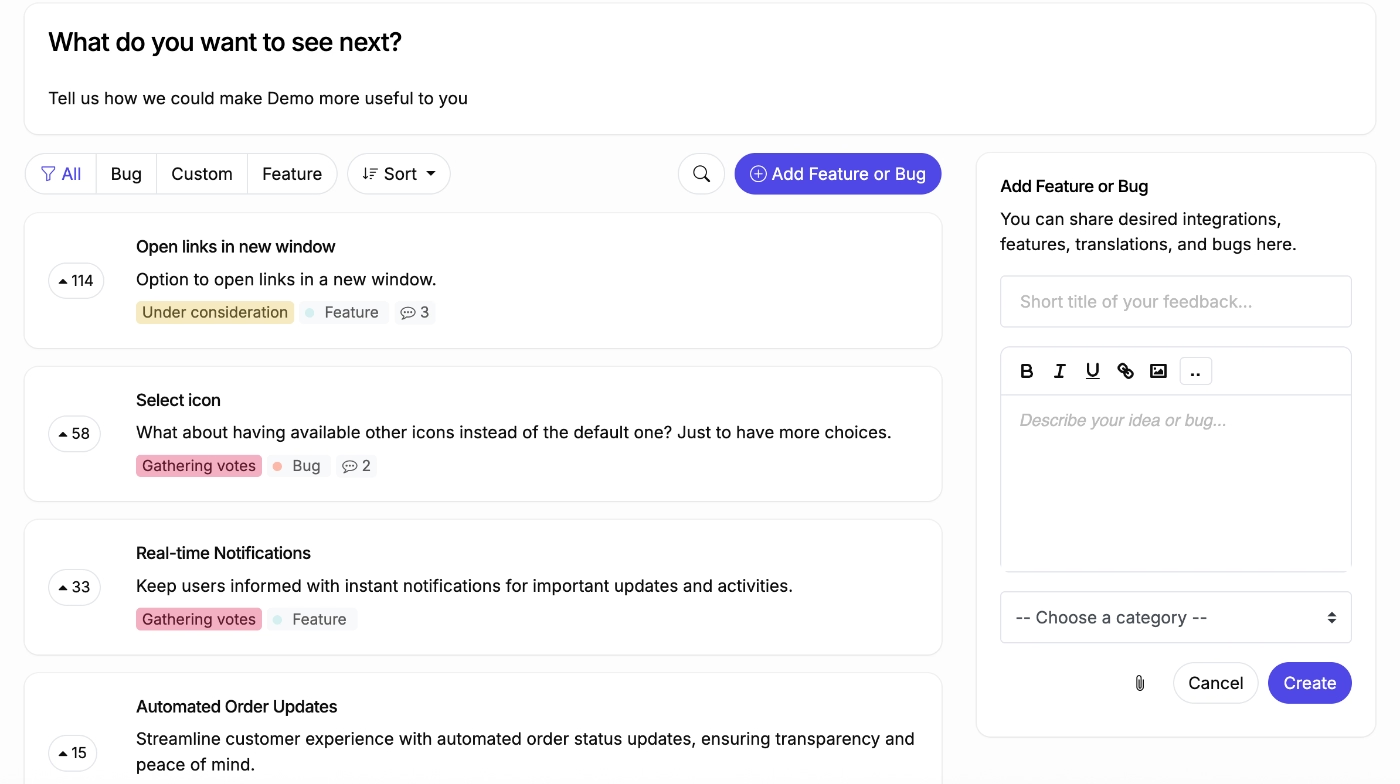
- Feedback portals
- Feature request prioritization frameworks and dashboards (RICE, ICE, MoSCoW, and Impact/Effort)
Pricing
ProductLift has transparent and overall budget-friendly pricing. There are 3 plans: Starter, Pro, and Business, all of which include all the core features (roadmaps, changelogs, public voting, anonymous voting, knowledge bases, and even localization and white-labeling).
All of these plans also do come with unlimited tracked users, so what you pay is not affected by the number of your users, which is actually revolutionary, to be honest, kudos to ProductLift!
What impacts the pricing is the number of admin seats, number of boards, AI credits, and integrations.
Starter comes with 2 admins and 2 boards, while Pro comes with 5 admins and unlimited boards, and Business comes with 25 admins and unlimited boards.
Here are the starting prices for the plans:
- Starter starts at $19/mo (billed yearly)
- Pro starts at $49/mo (billed yearly)
- Business starts at $129/mo (billed yearly)
There’s also a monthly billing option.
Pros and Cons: What do ProductLift users say about the platform
👍🏻 ProductLift is easy to setup and use, it also has a simple UI.
It´s pretty easy to setup and get started! You can customize almost everything.”
👎🏻 ProductLift’s native integrations are limited, requires utilizing webhooks to build workarounds.
If anything it would be great to see direct integrations with some of the mail providers so that we can pull users directly from our database. But with the availaibility of Webhooks this can be accomplished, just with a bit more work.”
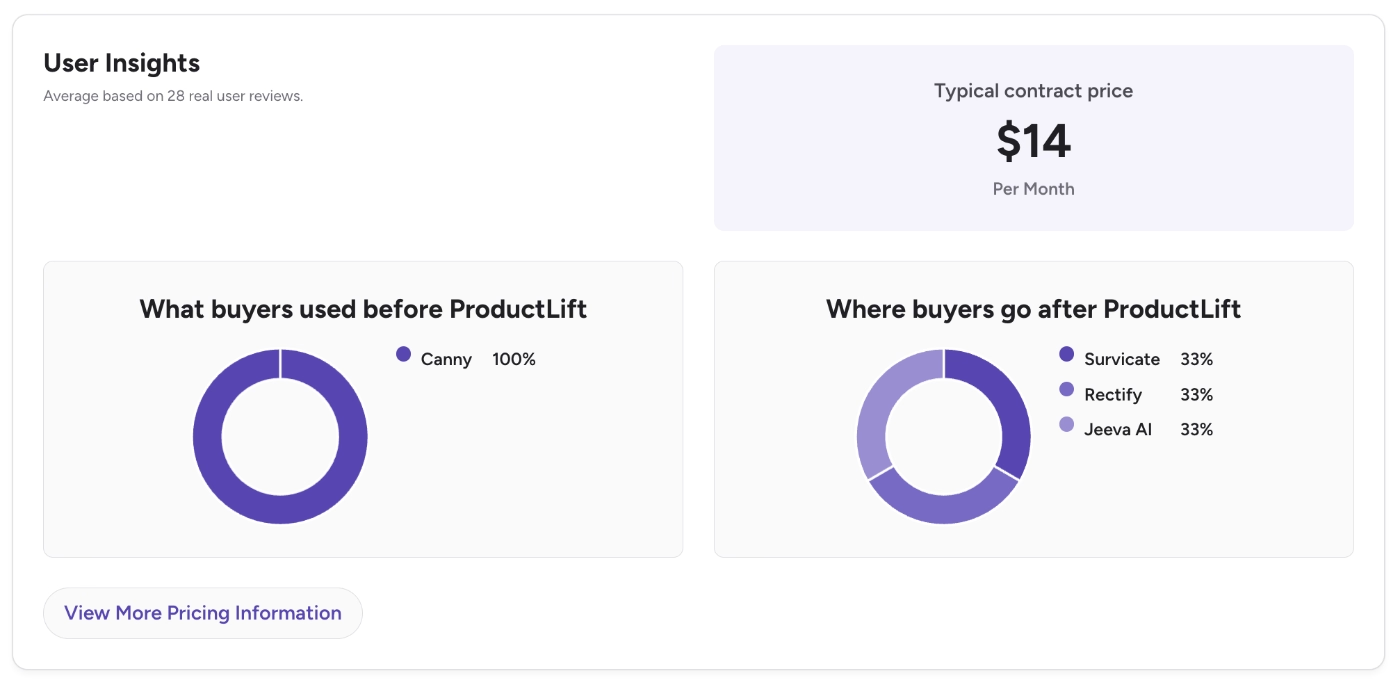
According to G2 data, many (ex) Canny users switch(ed) to ProductLift for reasons like cost and usability, while (ex) ProductLift customers switch(ed) to customer feedback tools like Survicate, Rectify, and Jeeva AI for more automation and agentic AI capabilities.
Quackback
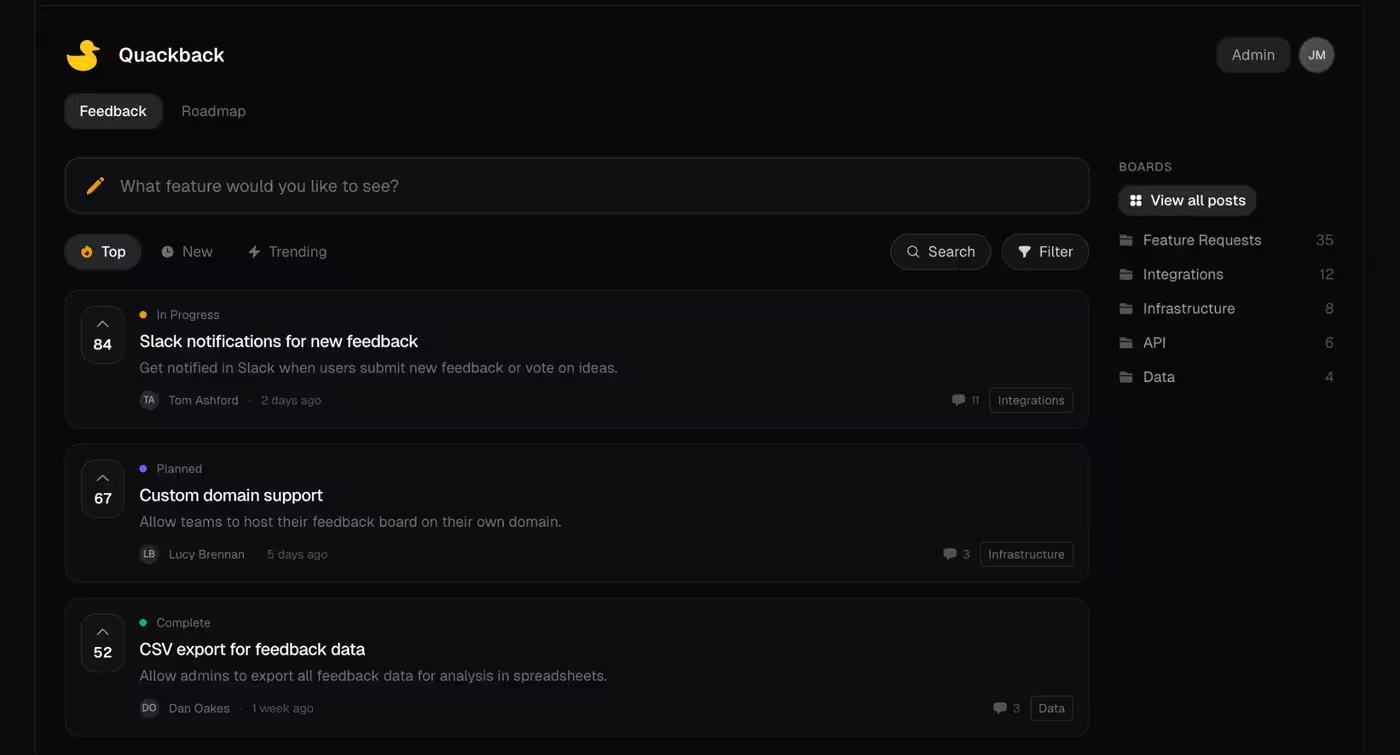
Quackback is an open-source feedback management platform, hosted or self-hosted, with boards, voting, roadmaps, and changelogs. The platform’s claim is to be “the open-source alternative to Canny”.
Its main capabilities include:
- Feedback boards, roadmap, and changelog
- Live chat and help center
- Embedable widget for in-app feedback collection
- MCP server
Pricing
Quackback has 3 hosted plans, none of them free, but the entire product is also open source and free to self-host with no feature gates.
- Starter ($19/mo billed yearly) includes 1 team member, 3 boards, 50 posts, unlimited customers and votes, live chat/help center, AI search/summaries/duplicate detection.
- Pro ($79/mo billed yearly) includes everything in Starter, 10 team members, 10 boards, unlimited posts, custom domain, all integrations + webhooks.
- Scale ($299/mo billed yearly) includes everything in Pro, unlimited team seats and boards.
Pros and Cons: What do Quackback users say about the platform
Quackback doesn’t have any user reviews on platforms like G2 or Capterra, however the platform’s pros and cons can be summed up as follows:
👍🏻 Quackback’s AI-powered duplicate detection is offered in every plan, even the Starter.
👎🏻 Quackback requires some technical knowledge and/or dev support, especially if you’re gonna host it yourself.
UserJot
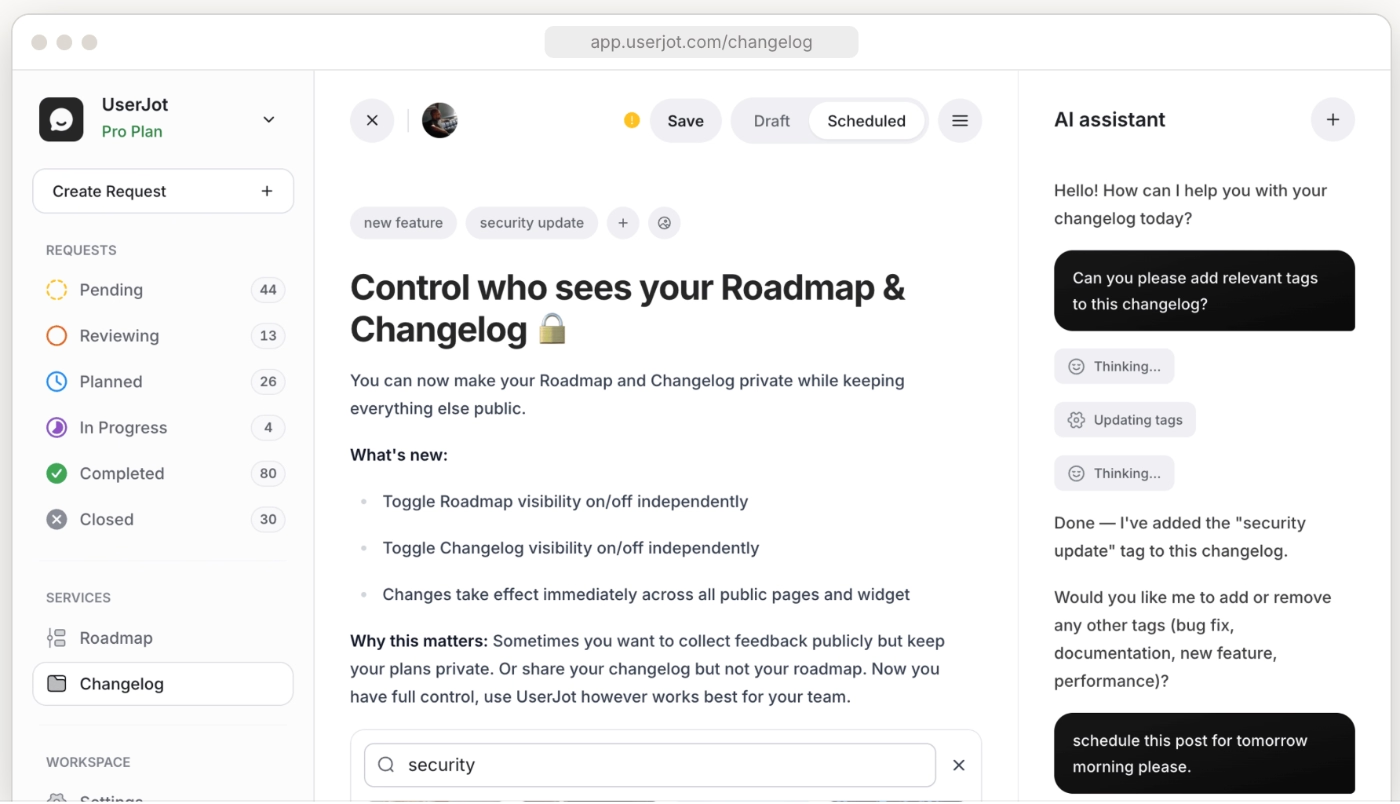
UserJot is a feature request software and its main capabilities include:
- Feedback boards, public roadmap, and public changelog
- Custom domain and private boards
- Guest posting and automatic login
- In-app widgets
- AI agents
Pricing
UserJot offers unlimited users and unlimited posts on every plan, including the free plan.
- Free ($0/mo) comes with unlimited posts and users, 3 admin roles, 2 feedback boards, public roadmap, public changelog.
- Starter ($29/mo) comes with everything in Free, plus custom domain, guest posting, automatic login, 5 feedback boards, private boards, one integration.
- Professional ($59/mo) comes with everything in Starter, plus unlimited boards, advanced search, SSO, unlimited integrations, unlimited admin roles, public identity masking.
Pros and Cons: What do UserJot users say about the platform
Similar to Quackback, UserJot, too, doesn’t have any user reviews on platforms like G2 and Capterra. This fact speaks to the platform’s recent founding (2024), and its lack of track record, actually, which might be an important aspect to consider, especially if you’re looking for a long-term solution and/or have security concerns.
Neither Quackback nor UserJot is SOC 2 compliant, for example.
Upon noting that, here’s how the platform’s pros and cons can be summarized:
👍🏻 UserJot’s automatic tags (planned, under review, pending, etc.), automatic stale request flagging, and automatic warnings when your roadmaps gets too crowded to realistically deliver on help you manage your feature requests.
👎🏻 UserJot doesn't have a track record yet, and it lacks key security compliance certifications.
Fider
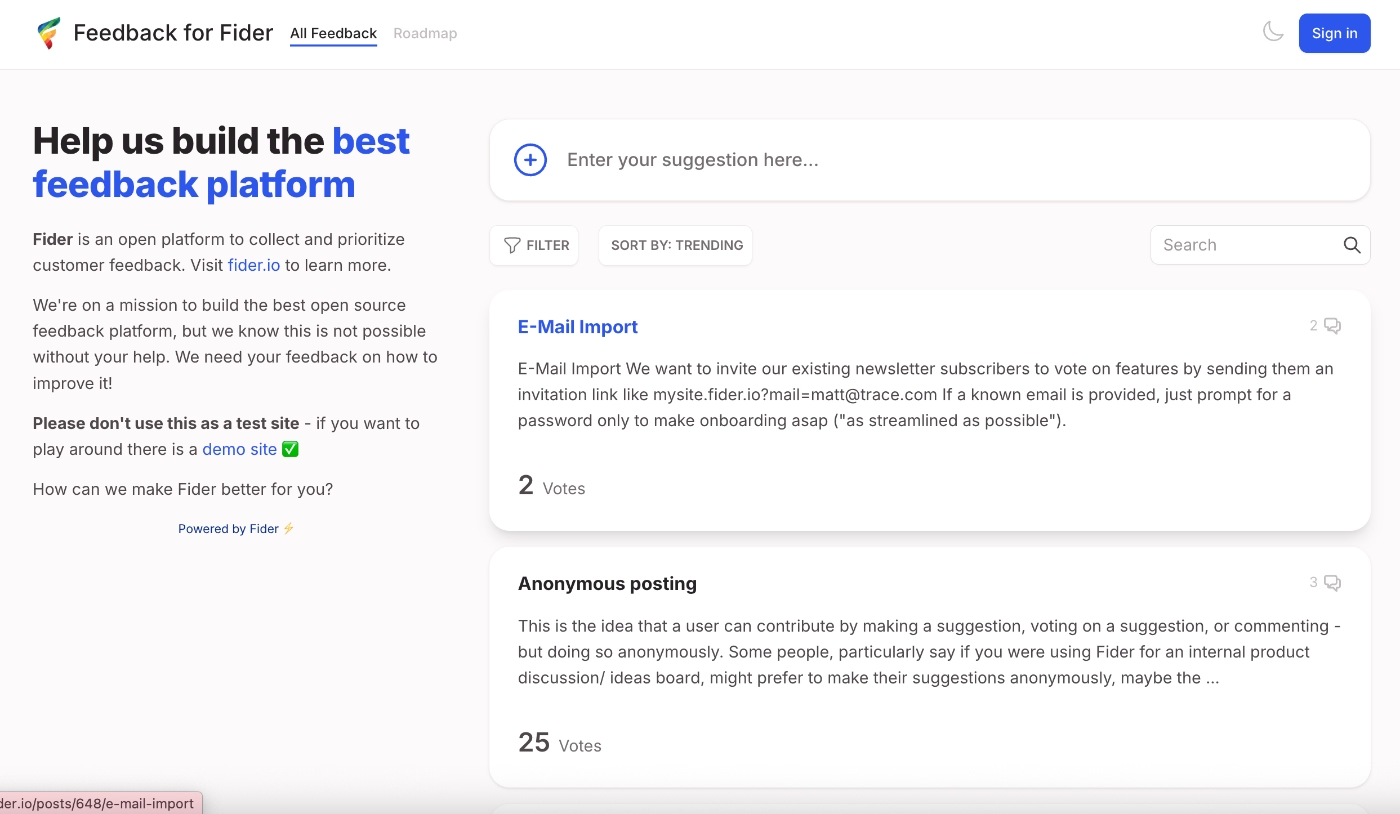
Fider is a lightweight product feedback and feature request management tool. Its main capabilities include:
- Feedback boards
- Unlimited customers, voting, discussion, and members
- Custom branding and multi-language support
- Public API
- Self-hosting option (fully open source, same GitHub project)
Pricing
Fider is free to use with a generous fair-use limit (up to 250 feedback items) before you'd need to upgrade, and also free to self-host if you'd rather run it yourself.
For $25/mo, you can get content moderation and unlimited feedback items.
Pros and Cons: What do Fider users say about the platform
Fider, too, doesn’t have an public reviews on G2 or Capterra.
👍🏻 Fider is lightweight and easy to self-host.
I needed a platform to collect customer feedback. I was previously using UserVoice, unfortunately their platform was getting too slow/complex for me and they also recently sunset their free plan. I ended up switching to self-hosted Fider, and, not only it was easy to install, but it also runs great and uses very few resources. The interface is a lot cleaner then UserVoice, so it's a lot easier for customers to add feedback.”
👎🏻 Fider doesn’t have any prioritization frameworks, so the feedback/ feature requests you gather through the platform can become a big pool of ideas if you do not manage it outside on your own.
👎🏻 Fider doesn’t have a lot of integration capabilities, integrations mainly work via Webhooks and API, so, you need to build them on your own to make sense of your data and feedback collection, or, to bring any data outside into Fider.
Sleekplan
Sleekplan is an AI-powered customer feedback management platform. Its main capabilities include:
- Feedback boards
- Roadmaps
- Changelogs and release notes
- Surveys
- AI-powered sorting and categorization
Pricing
Sleekplan has 4 plans: Indie, Starter, Business, Enterprise. Every tier, including the free one, gets unlimited tracked users, feedback items, and subscribers, tiers mainly differ on team seats, AI credits, and feature modules.
- Indie ($0/mo) comes with unlimited feedback and subscribers, feedback board, changelog and roadmap, and a single-admin workspace.
- Starter ($13/mo billed yearly, $15/mo billed monthly) comes with everything in Indie, plus 3 team seats, CSAT and NPS surveys, 1,000 AI credits/month, SSO, API access, webhooks, and standard integrations.
- Business ($38/mo billed yearly, $45/mo billed monthly) comes with everything in Starter, plus 10 team seats, 5,000 AI credits/month, topic analytics, custom domain, branding removal, custom statuses/categories, moderation tools, and premium integrations.
- Enterprise (custom pricing) comes with everything in Business, plus unlimited team seats, multi-workspace organizations, and custom contracts.
Pros and Cons: What do Sleekplan users say about the platform
👍🏻 Sleekplan’s AI agents automate a lot of the theme/trend detection, sentiment analysis, and feedback mining across several platforms and communication platforms via integrations.
👎🏻 Sleekplan’s customer service and support is criticized by some customers.
The main challenge is support. It takes days, if not weeks to get ahold of someone for help. They rely too much on AI chatbot, which doesn't always have the answer. They also don't update their product often.”
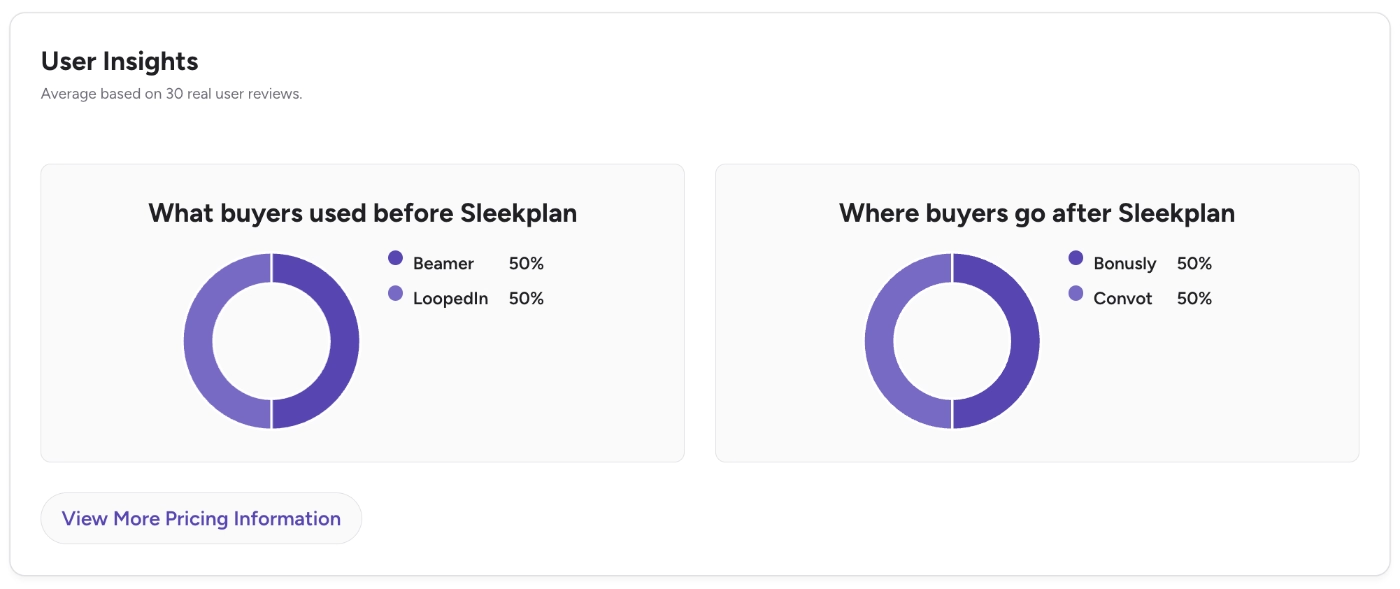
According to G2 data, Sleekplan’s closest competitors include Beamer, LoopedIn, Bonusly, and Convot.
Frill
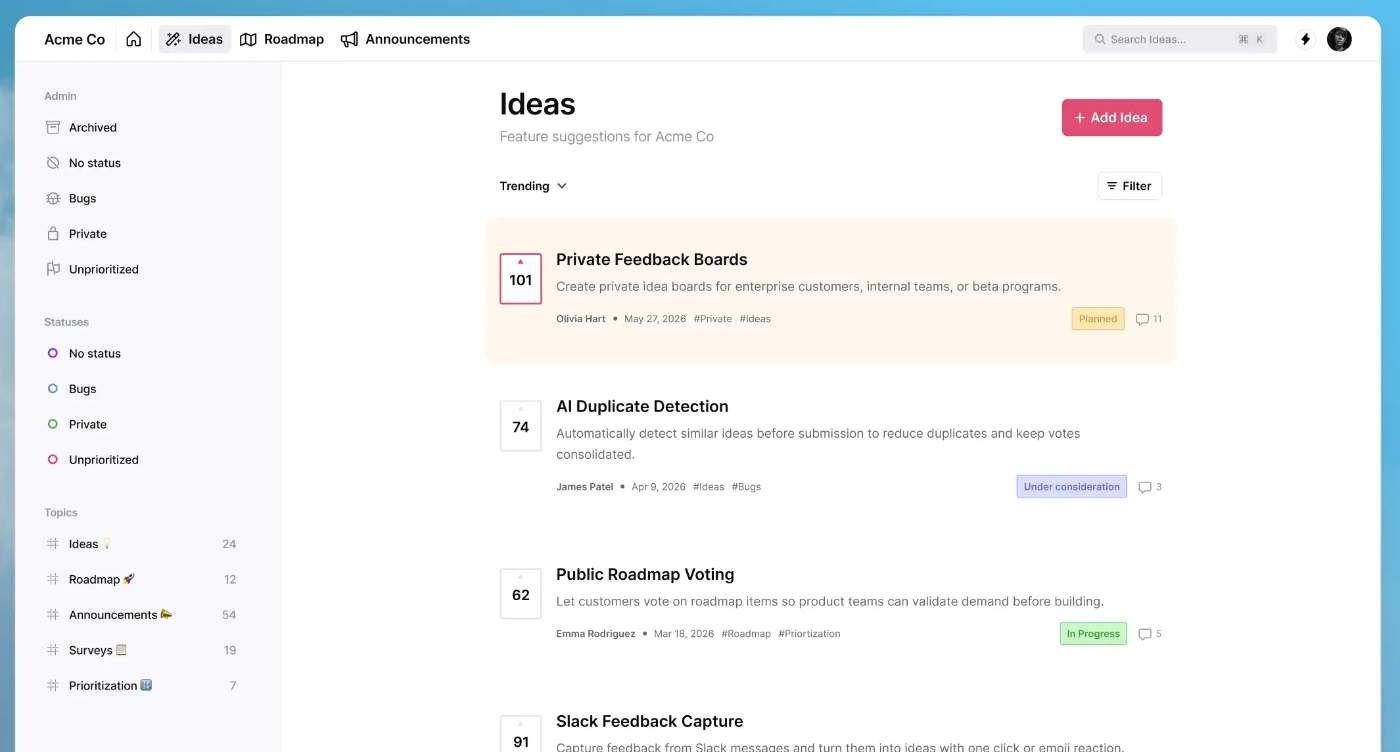
Frill is an all-in-one customer feedback management platform. Its main capabilities include:
- Ideas (feature request boards with upvoting)
- Roadmaps
- In-app surveys
- In-app announcements
- Diverse feature prioritization frameworks and dashboards
- AI browser extension to capture requests from helpdesk tickets
Pricing
Frill has 4 plans, all with unlimited admins and tracked users.
- Startup ($22/mo billed yearly, $25/mo monthly) comes with 50 active ideas, 1 survey, webhooks, API, and a custom domain.
- Business ($44/mo billed yearly, $49/mo monthly) comes with everything in Startup, plus unlimited active ideas and 3 surveys.
- Growth ($136/mo billed yearly, $149/mo monthly) comes with everything in Business, plus unlimited surveys, private/invite-only boards, white labeling, and smart duplicate detection.
- Enterprise ($319/mo billed yearly, $349/mo monthly) comes with everything in Growth, plus SOC 2 compliance, audit logs, and dedicated hosting/support.
Pros and Cons: What do Frill users say about the platform
👍🏻 Frill has a clean and easy to navigate interface.
Frill has a very nice and minimal UI /UX that is very easy to use. The clean interface makes it very pleasant to work with. All the features are well polished and make customizing status/themes very easy to use.”
👎🏻 Frill doesn’t offer granular customization and its out-of-the-box themes, styling, and positioning settings can be limiting for some design preferences.
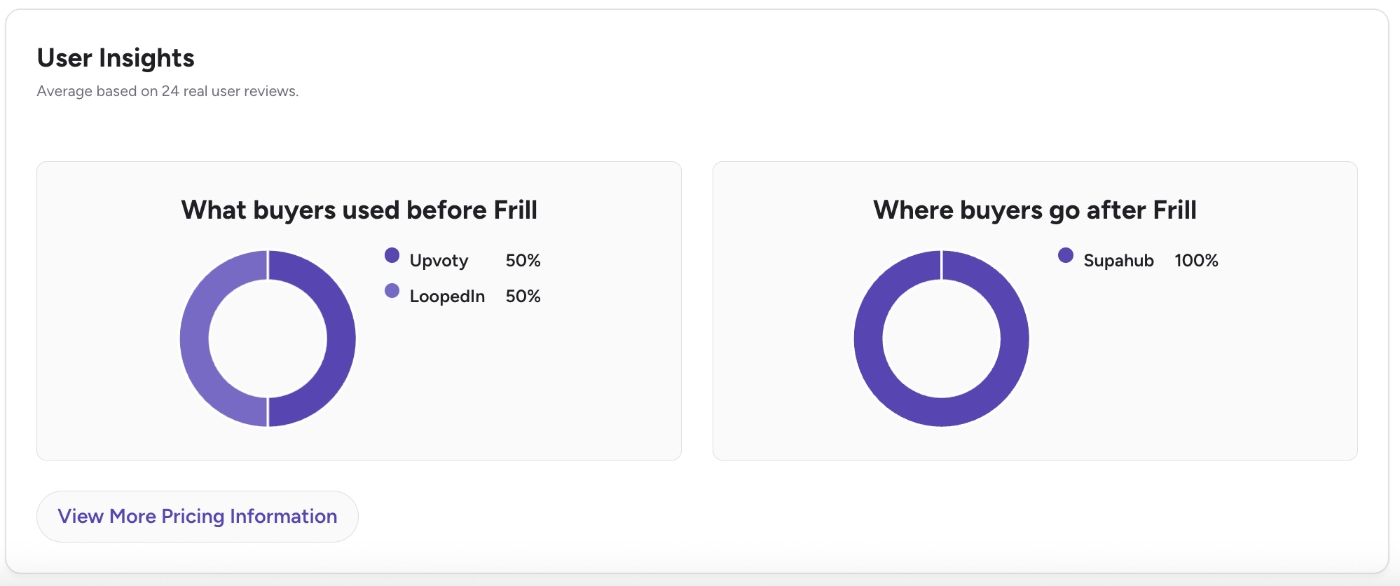
According to G2 data, Frill’s popular competitors include Upvoty, LoopedIn, and Supahub.
Nolt
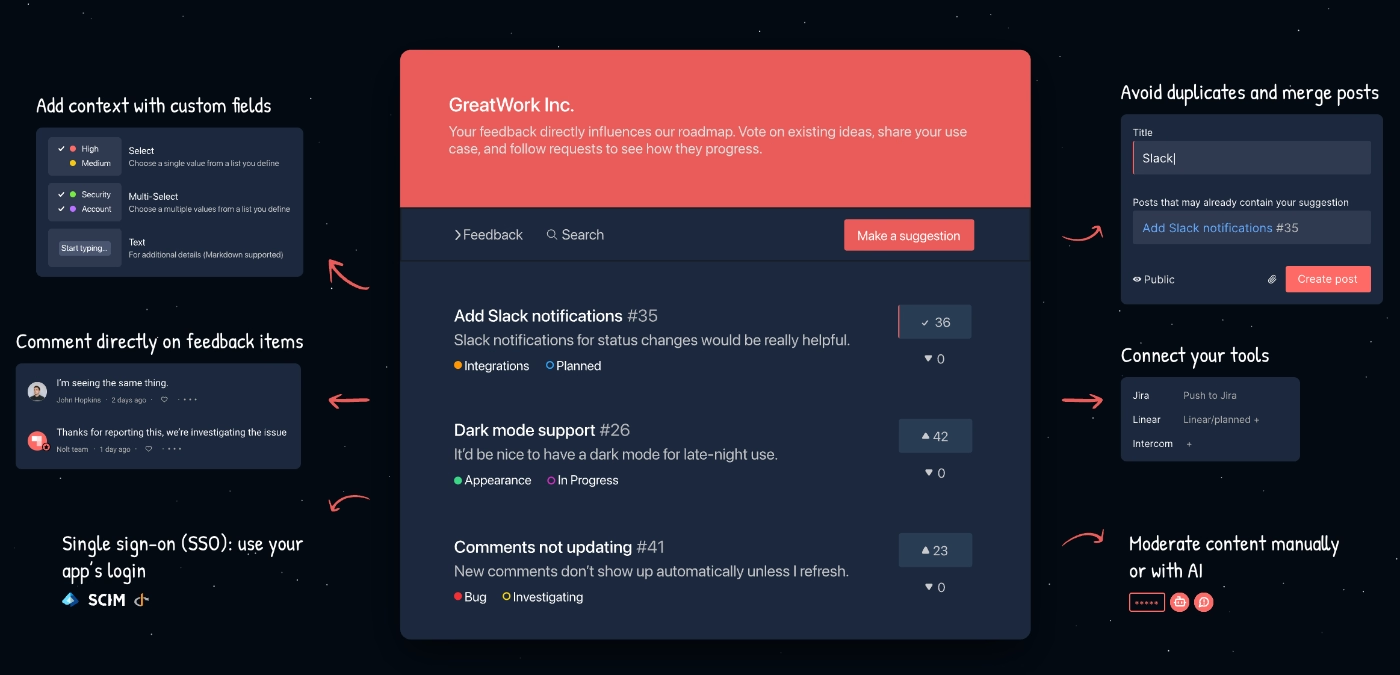
Nolt is a product community management and customer feedback platform. Its main capabilities include:
- Feature request boards
- Roadmaps (public and private)
- Community management capabilities
- In-app widgets
- Internal notes
Pricing
Nolt has 3 plans, both monthly and yearly billing options, and EU-hosting option, which changes the entry prices of the plans.
With the yearly billing and World-hosting (Non-EU) option, here are the starting prices:
- Essential: $29/mo. Comes with 1 board, option for private board, custom fields and statuses, and a roadmap.
- Pro: $69/mo. Comes with 5 boards, advanced community management capabilities, advanced integrations for task management platforms.
- Enterprise: Custom pricing. Comes with unlimited boards and AI assisted automated moderation.
Pros and Cons: What do Nolt users say about the platform
👍🏻 Nolt’s feedback trend analysis and visualization capabilities are praised by its customers.
The built-in analysis tools and visualization options are also handy for quickly gaining insights into suggestions.”
👎🏻 Nolt’s advanced capabilities can be hard to set up and implement.
SSL setup is a pain to setup and SSO is also a process.”
👎🏻 Nolt’s self-serve documentation can be lacking, several customers state that contacting support is essential to set some things up, but at least many state that their support is accessible and helpful.
It would be great to have more documentation on some things but support has been super responsive so it hasn’t been an issue.”
Upvoty
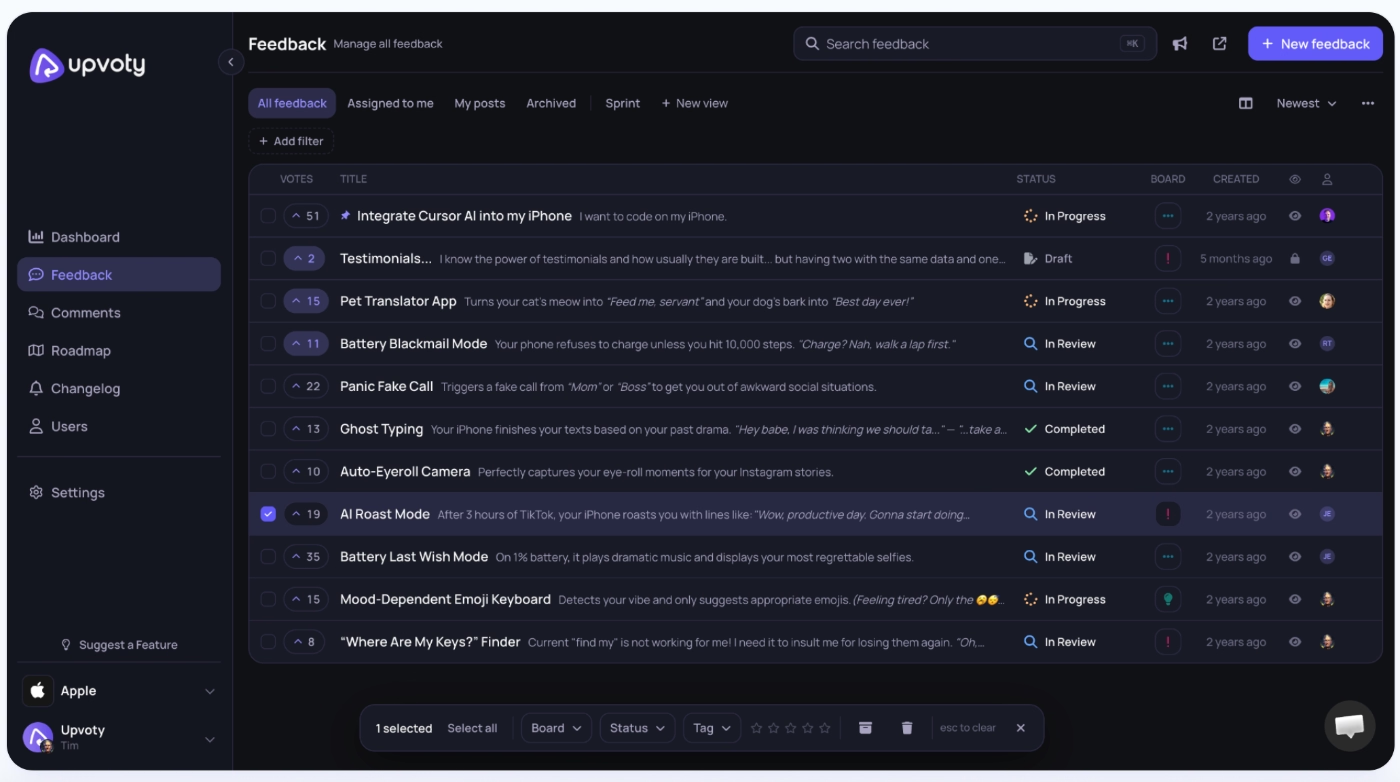
Upvoty is a feedback board, voting, roadmap, and changelog tool for product teams, with unlimited boards and tracked users included on every plan. The platform’s main capabilities include:
- Feedback boards and feature voting
- Public roadmap
- Changelog
- In-app feedback widget
Pricing
Upvoty has 3 plans and every plan comes with a 14-day trial.
- Power ($15/mo) comes with 1 project, unlimited boards and tracked users, public roadmap, custom branding/domain, custom SSO, API access, no branding, email support.
- Super ($25/mo) comes with everything in Power, plus changelog, all integrations, and priority support.
- Hyper ($49/mo) comes with everything in Super, plus unlimited projects, Upvoty MCP, and webhooks.
Upvoty also offers monthly contract option.
Pros and Cons: What do Upvoty users say about the platform
👍🏻 According to one of Upvoty’s users (a developer), the platform works very smoothly with React.
👎🏻 There are many customers complaining about Upvoty’s frequent and unannounced price jumps.
👎🏻 Several customers also complain about Upvoty’s dashboards, which do not give a lot of freedom to explore the data and feedback you gather via the platform’s boards.
We've used this app for around 6 months. We've been able to collect a lot of data. Unfortunately due to bad UX, we have lost most of the data that we've collected through this software.”
Olvy
Olvy is an AI-powered customer communication and support management platform that offers features and capabilities for not only feature request management and customer feedback, but also ticket management and sales conversations.
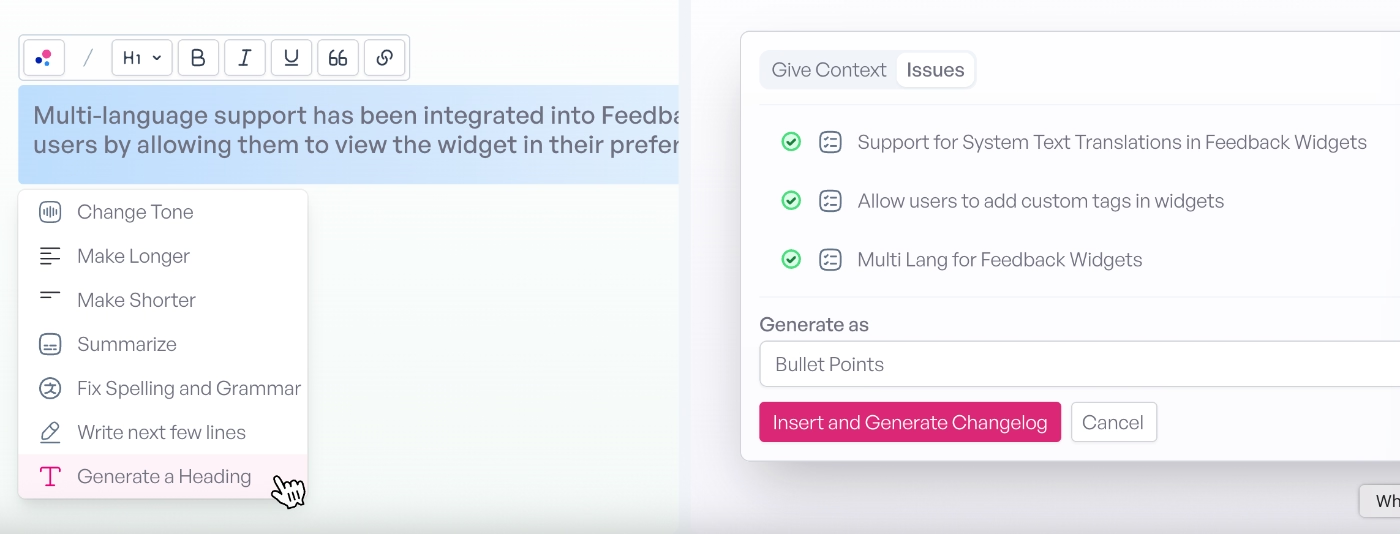
The platform’s main capabilities include:
- Unified feedback inbox (Slack, Discord, app stores, email, surveys, interviews, support tickets, sales calls)
- AI Auto-Listener Agent for filtering noise and detecting feedback
- Sentiment analysis and feedback-type classification
- Thematic/pattern clustering and AI-generated reports
- Branded, embeddable changelog
- AI-drafted replies and bulk-reply to similar feedback
- Push clean, categorized issues into Jira, Linear, or ClickUp
- Multi-language feedback translation
⚠️ Olvy doesn’t offer any feature for creating a public hub for feature requests and public upvoting ideas. It gathers its feedback and feature requests/suggestions from other channels via agentic AI. While you can still use the platform to get feature requests via feedback, it’s not a dedicated feature request management tool like some of the other solutions we’ve covered so far, per se.
Pricing
Olvy has 4 plans, priced around how much feedback volume you need analyzed.
- Free ($0/mo) comes with 1 builder, unlimited release notes, feedback/announcement widgets, and AI analysis capped at 25 feedback items/month.
- Essentials ($60/mo) comes with everything in Free, plus custom domain, release scheduling, no Olvy branding, and AI analysis up to 100 feedback items/month.
- Business ($240/mo) comes with everything in Essentials, plus 5 builders, unlimited integrations, CRM integrations, multi-language support, and AI analysis up to 10,000 feedback items/month.
- Enterprise (custom pricing) comes with everything in Business, plus SSO/SAML, audit logs, and white-glove onboarding.
These are the prices for the yearly contract option; Olvy also offers a monthly billing option.
Pros and Cons: What do Olvy users say about the platform
👍🏻 Olvy is overall user-friendly, and its agentic capabilities help with decision-making and feedback management, several customers state.
In my personal experience, I've found that Olvy does a great job of connecting with our users and collecting their real-time feedback. Its AI capabilities are somewhat helpful in digging into user insights and aiding in decision-making. While it offers a user-friendly interface, real-time insights, and excellent support, there's room for improvement to make it a more reliable partner in our decision-making journey.”
👎🏻 Olvy’s AI capabilities, while they are the main subscription reason for many of its customers, still need tuning and require human involvement in places.
They incorporate a lot of generative AI into the tool, both for rating, categorization, rewriting changelog etc. Some of it works really nice, and some others still need some tuning, but it's still in beta and will only get better from here.”
👎🏻 Olvy is not a dedicated feature request management tool; it doesn’t offer public idea suggestion and voting capabilities.
Conclusion: Which feature request tool should you go with?
We've covered a lot of the popular, new, and established feedback management, feature request, customer communication, product planning, and even product adoption platforms in this article. We've looked at their use cases and what their actual users say about each platform, too.
So, the decision is yours to make.
If you have more core questions about the best practices of feature request management, or the do's and don'ts of handling feature requests, check out our detailed handbook on feature requests.
Frequently Asked Questions
Do I need a dedicated feature request tool, or can I just use a spreadsheet?
A spreadsheet works fine at a handful of requests a month, but it breaks down fast once customers submit through multiple channels. You lose voting, duplicate detection, and any way for customers to see status without asking you directly. A dedicated tool earns its cost once you're spending real time manually organizing, deduplicating, or explaining "what happened to that thing I asked for" over email.
What's the difference between a feature request tool and a full product management platform and a product adoption platform?
A feature request tool is built around one workflow: collecting, voting on, and closing the loop on customer ideas. A full product management platform (like Productboard) adds strategic layers on top, like tying requests to company objectives, running formal prioritization scoring, and managing the broader roadmap process across multiple stakeholders. A product adoption platform like UserGuiding is different again: feature requests are just one small piece bundled alongside onboarding flows, in-app guides, and surveys, so you're buying a broader adoption toolkit rather than a dedicated feedback system.

.png&w=3840&q=75)