


.svg)
.svg)
.svg)
.svg)



.svg)




.svg)
.svg)


Too many product roadmaps focus on popularity rather than operational fit. Looking at 10 different logos and screenshots can hardly tell what fits your team’s planning style.
What works for one company (especially a famous one) can miserably fail for your company.
That’s why we focus on examples organized by format in this article. So you can pick a roadmap based on fit, revise it for your needs, and easily keep track of what’s working or not.
TL;DR
- A product roadmap is a visual summary that maps out the strategic process of vision, direction, and priorities of a product offering over time.
- There are two main types of product roadmaps: internal and customer-facing. Internal roadmaps usually include more details for stakeholders which customers don’t see. Customer-facing roadmaps, on the other hand, detail high-level themes and upcoming benefits for customers.
- Depending on how comfortable your team is with uncertainty and changing scopes, you can pick (or mix and match) these product roadmap formats: Now / Next / Later, Gantt-style, Interactive boards.
- UserGuiding helps you turn your roadmap into a map users can follow with its Public Roadmap and Product Updates features.
What Makes a Product Roadmap Example Worth Copying?
A product roadmap is a summary-level visual plan that shows where the product is headed, why you’re taking that direction, and how the product will get there over time. It also aligns stakeholders around long-term and short-term goals.
But what your team sees internally isn’t always the same as what customers see. Sometimes, internal (strategic) roadmaps don’t show what’s in the pipeline, especially if priorities aren’t clear yet. User-facing (public) ones detail high-level themes and upcoming benefits for customers. It’s a soft way to get them excited for the next product change, essentially.
And there are different ways to communicate these changes. The most common types are Now / Next / Later, timeline / Gantt-style, interactive, and public roadmap boards.
The best fit will depend on the audience (internal stakeholders vs customers) as much as how far out the team can plan with confidence.
3 Product Roadmap Examples by Format
Every product roadmap serves a different purpose. And some teams can sit well with uncertainty, while others have to move fast, so there’s less room for ambiguous plans. We picked three product roadmap examples by format. The list will help you see which format works best for your team and adjust elements as needed.
Here’s a quick view into three formats before we dive deeper into each 👇
1) Now / Next / Later Roadmaps
A Now / Next / Later product roadmap format uses work activity and certainty to categorize product development stages, rather than rigid calendar dates. The work is divided into Now (currently active), Next (upcoming priorities), and Later (long-term vision).
This format gives you the direction and steps to get there, but it doesn’t dictate what the order of things should be. It shifts team conversations from “When will this feature ship?” to “What customer problem are we solving?” And because it’s a flexible format, teams can easily re-prioritize goals as they learn more from users without breaking stakeholder trust.
An example for a B2B SaaS company wanting to reduce friction might look like this 👇
The example labels items around customer outcomes instead of flat feature names, so product updates are better aligned with what the customers need. Keep the Now column synchronized with active sprints, review and pull from Next monthly, and evaluate Later during quarterly strategic alignment.
2) Timeline / Gantt-style Roadmaps
A timeline or Gantt-style roadmap shows different phases of the product or the development process on horizontal calendar dates. This format shows exact start and end dates for every task, highlighting when one task must be finished before another can start. Because every phase is treated as set in stone, managers can easily see who’s working on what and when they’re busy.
Though timelines (or the Gantt-style) are traditionally used for projects, rather than products, more teams adopt it to organize product roadmaps.
Here’s an example of what it actually looks like 👇
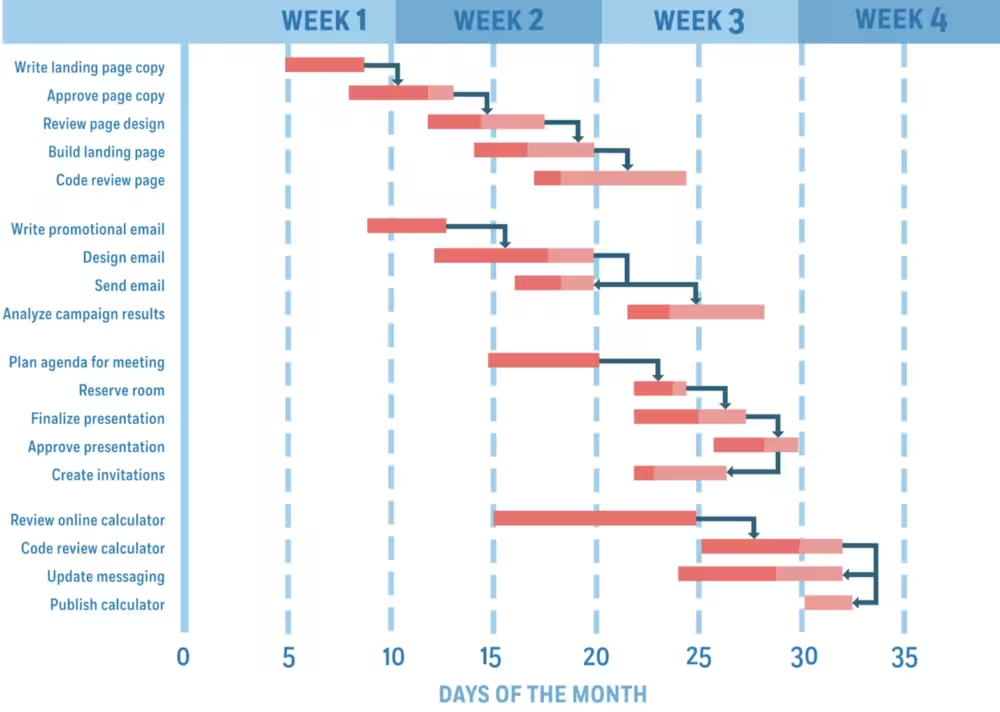
Though great for breaking down schedules, Gantt-style roadmaps can easily get out of hand. Individual tasks, check-ins, bigger features to be launched can easily overwhelm the chart and make it almost too difficult to read. That’s why it’s important to cherry-pick what to include in the roadmap.
3) Interactive Roadmap Boards / Upvoting Boards
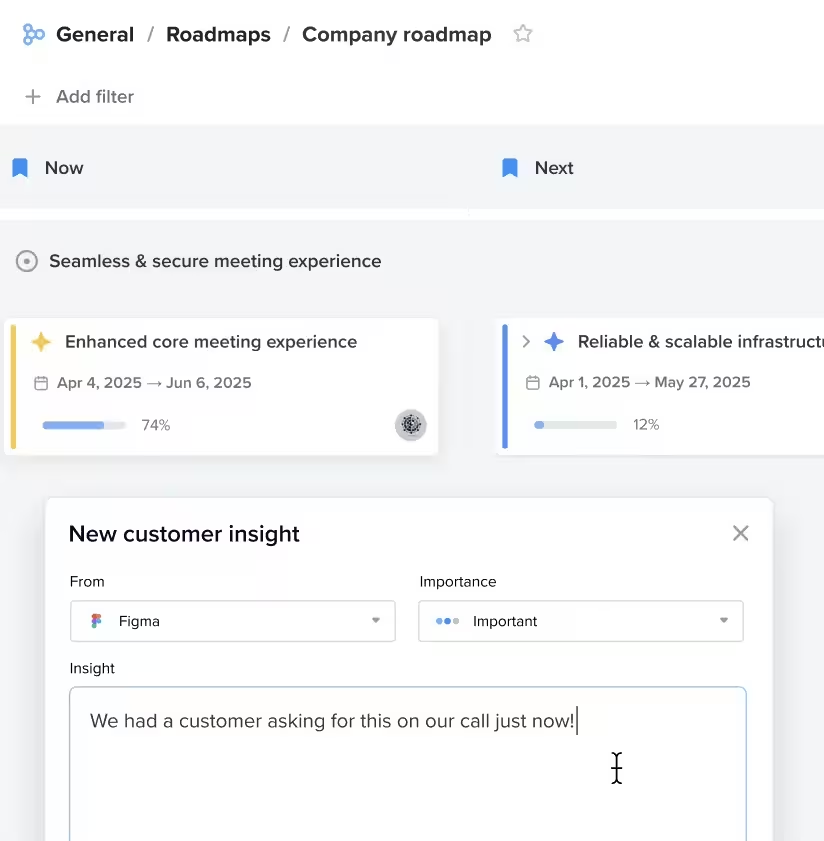
Interactive roadmap boards use interactive elements like drag-and-drop editor and real-time status updates. This format also functions as feature request and upvoting boards, so customers can be directly involved in the process — making it a community-driven format. Interactive roadmaps are a great way to establish trust with your customer base because you don’t even have to attach a dedicated feature-request tool behind it.
These roadmaps can also link customer feedback directly to roadmap features to validate/re-assess ideas. They also borrow the timeline format from Gantt style roadmaps and look very similar to them. Check this one out 👇
How to Pick the Right Roadmap Format for Your Team
Every team should have four evaluation criteria: team size, planning horizon, internal vs external audience, and how often priorities shift. Here’s why:
- Team size: A SaaS startup with ten team members can often handle hurdles more flexibly than an established enterprise company. Team size often determines how clear your goals need to be and how much focus you put on micro-tasks.
- Planning horizon: A planning horizon ensures that your roadmap matches your company’s market stability, funding cycles, and team speed. It also takes into account whether the long-term goals can easily change without disrupting the active progress your team is making.
- Internal vs external audience: Considering what your internal teams see versus what your customers or partners see is important to protect sensitive information, while clearly showing value to every stakeholder.
- Frequency of priority shifts: A great format absorbs shifts without causing the team confusion or massive manual rework. If your team is prone to priority shifts often, consider that the product roadmap should let them see changes instantly without interpreting messy tasks or timelines.
Product Roadmap Best Practices
The difference between a good product roadmap and a great one often comes down to two things: scope and the level of certainty you’re comfortable with. Once you establish these two, you can do four things to improve your product roadmaps:
- Keep the roadmap a living document: A product roadmap isn’t a static, one-time deliverable. You need to revisit and prune it on a set cadence to make sure that you can easily adapt to new customer needs, shifting market conditions, and changing team insights. Have a regular review cadence and validate your ideas with feedback from internal and external stakeholders.
- Tie roadmap items to outcomes: When you prioritize feature names over outcomes or customer problems, any slight change in the scope will set you ten steps back. If you want things to make sense even when the roadmap changes, you need to tie tasks and timelines to outcomes, because they measure actual results like user growth or revenue. It also makes saying “no” easier because you can easily reject requests that don’t support the main goal.
- Get buy-in from other teams: Getting buy-in from sales, engineering, and support before publishing a product roadmap catches conflicts early. Teams care more about a plan when they help shape it from the start. It’s also a great way to let team members plan their workloads better when they know what’s coming next. Involve teams in discovery and drafting sessions and learn what success looks like for each team in that quarter or year to get the ball rolling.
- Match detail level to audience: Internal roadmaps can show more, so ownership and goal alignment is clear. But public (or customer-facing) roadmaps don’t need that level of detail. In fact, it can be detrimental to stuff the roadmap with tasks and deadlines that customers themselves aren’t concerned about. Keep the public roadmaps high-level, so they stay informative while communicating what exciting thing is in the pipelines next.
UserGuiding Turns Your Roadmap into Something Users Can Follow
Whatever product roadmap format you decide to use, you’ll need user input to make the changes work somewhere along the way. Even if you initially start with an internal map. UserGuiding’s Public Roadmap and Product Updates features help you achieve that.
With the Public Roadmap feature, you can make progress and work visible to users, without adding extra details on their plate. They can track the status of items in the order you set, so the board reflects how your team actually works rather than copying someone else’s generic template.
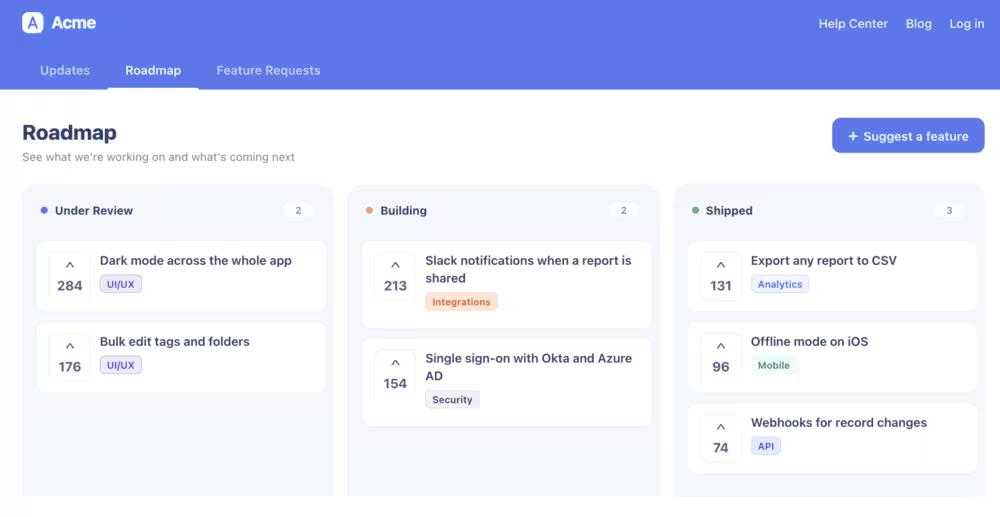
The Product Updates feature gives you a branded changelog page, where you can feature releases, bug fixes, and improvements. But it does one more thing that’s equally important: Users can submit and upvote feature requests inside the app.
Once an item ships, Product Updates announces it with reactions and notifications, so users can see their request turn into something real. And you successfully close the feedback loop.
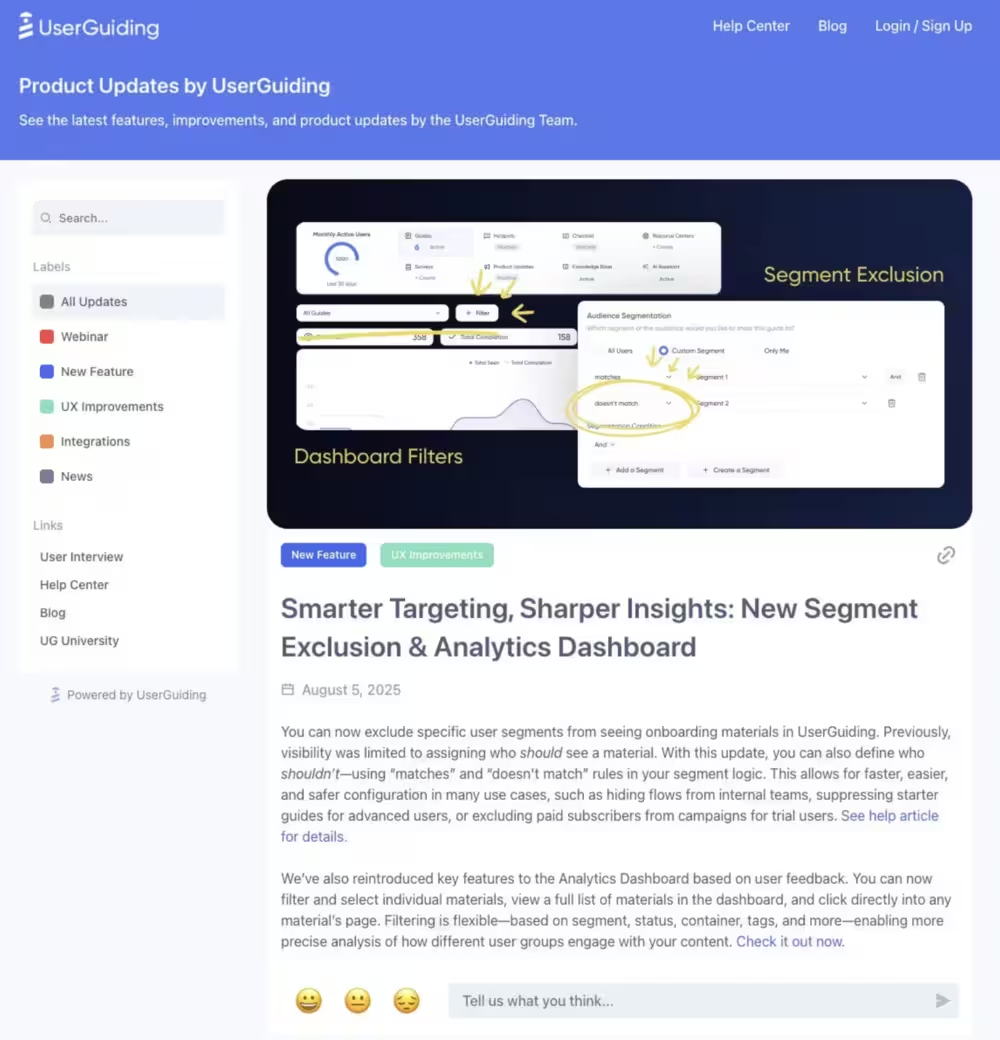
Here’s an overview of what your product updates can achieve with UserGuiding:
✅ Users can request features and vote on them.
✅ You can make product roadmaps public, so users can see your progress.
✅ Shipped / in-progress / planned tags keep work organized and easy to interpret.
✅ In-app changelog announcements push new releases to users automatically.
Here’s how Artia uses UserGuiding’s Product Roadmap feature 👇
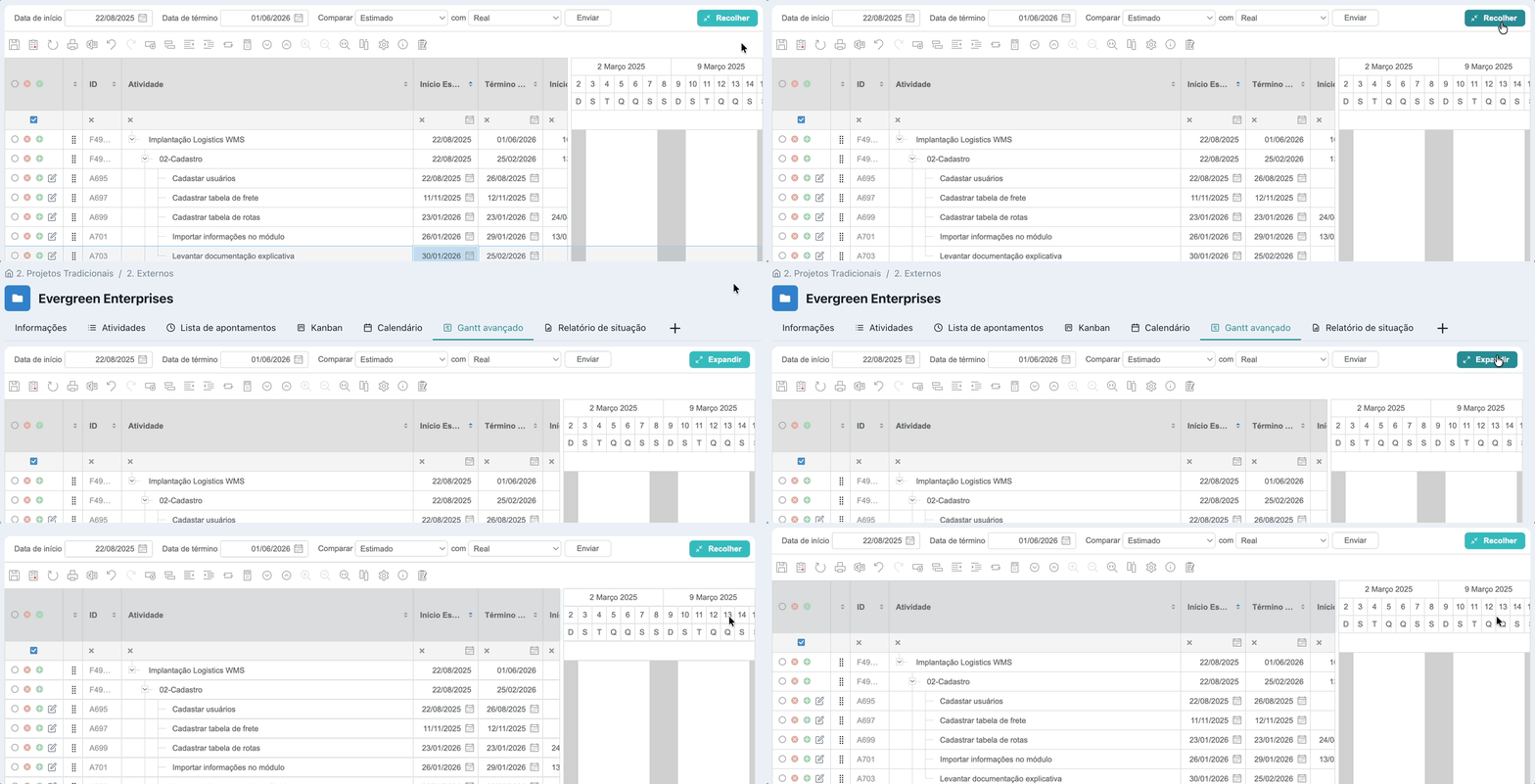
Ready to bring the executive and public product progress together? Explore UserGuiding with a free 14-day trial today.
In short…
Product roadmaps don’t have to be complicated, especially if you know you can have different formats in your arsenal. Depending on your commitment to strict deadlines or willingness to involve customer feedback directly into the progress, you can try different options to find the best fit for your team.
And if you want to mix and match public and internal roadmaps, UserGuiding can help. With Product Updates that keep user feedback in the loop and Public Roadmaps that make work visible to all stakeholders, your roadmaps can be self-reliant and as flexible as you want.
Frequently Asked Questions
What should be included in a product roadmap?
A product roadmap should clearly communicate what you plan to build, why it matters, and when you expect to focus on it. Most product roadmaps include:
- Product vision: The long-term direction for the product
- Goals and outcomes: The customer or business results you want to achieve
- Strategic initiatives: Major areas of investment or improvement
- Features or capabilities: High-level product work supporting each initiative
- Priorities: What the team plans to focus on first
- Timeframes: Broad horizons such as Now, Next, and Later or quarterly periods
- Status: Planned, in progress, or completed
- Success metrics: KPIs that measure whether initiatives achieve their intended outcomes
A good roadmap focuses on outcomes and strategy, rather than every single task or ticket.
Should a product roadmap be public?
A product roadmap doesn’t have to be public. Whether you publish one depends on your customers, market, competitive landscape, and how certain your plans are.
A public roadmap can build transparency, help customers understand upcoming improvements, gather feedback, and reduce repetitive feature requests. However, publishing detailed plans can create expectations, reveal competitive information, and make tentative ideas look like firm commitments.
Many teams maintain two roadmaps: a detailed internal roadmap for employees and stakeholders, and a simplified public roadmap focused on customer-facing priorities.
If you publish a roadmap, use broad timeframes and clearly communicate that plans can change. A public roadmap should inform customers without turning product plans into promises.
What’s the difference between a roadmap and a backlog?
A product roadmap communicates strategic direction, while a product backlog manages the detailed work needed to execute that strategy.
A roadmap typically contains goals, outcomes, strategic initiatives, major features, priorities, and broad timeframes. It helps product teams align executives, stakeholders, designers, engineers, and customers around where the product is going and why.
A backlog contains more granular items such as user stories, bugs, technical tasks, and feature requests. It helps teams determine what work should be done next.
The two are connected: roadmap initiatives can generate backlog items, and backlog insights can influence roadmap priorities. However, a roadmap should not simply be a backlog placed on a timeline.
How far ahead should a product roadmap plan?
Most product teams should plan their roadmap far enough ahead to communicate strategic direction without creating false certainty. A common planning horizon is around 6–18 months, although the ideal timeframe varies by company, product, and market.
Use more detail for near-term plans and progressively less detail for future initiatives. For example:
- Now: High-confidence work currently underway or starting soon.
- Next: Important initiatives likely to follow.
- Later: Strategic opportunities that require further validation.
Teams can also organize roadmaps by quarters. Avoid committing to exact feature-level dates too far in advance because priorities, customer needs, technology, and market conditions can change.
How often should you update a product roadmap plan?
A product roadmap should be reviewed regularly and updated when priorities or circumstances change. For many product teams, a monthly review combined with quarterly strategic planning provides a good balance.
Review the roadmap to assess progress, customer feedback, business priorities, market changes, dependencies, and new opportunities. Update it when new evidence changes what the team believes is most valuable.
Weekly changes are usually unnecessary unless the product environment is highly dynamic. Quarterly reviews are particularly useful for revisiting strategic priorities and planning the next horizon.
The goal isn't to constantly move dates or add features. A healthy roadmap evolves when new information changes priorities, while still providing stakeholders with a consistent view of product direction.
What tools do teams use to build a product roadmap?
Teams use a range of product roadmap tools, from simple spreadsheets to dedicated product-management platforms. The right choice depends on team size, planning complexity, collaboration needs, and existing workflows.
Common options include:
- Spreadsheets: Flexible and inexpensive for simple roadmaps
- Whiteboarding tools: Useful for collaborative planning and discovery
- Project-management software: Connects roadmap initiatives with execution
- Dedicated roadmap software: Supports prioritization, visualization, stakeholder communication, and customer feedback
- Documentation tools: Useful for combining product strategy with roadmap context
The best roadmap tool is one the team will actually maintain. Prioritize tools that make it easy to communicate priorities, explain strategic rationale, track progress, and connect product goals with execution.

.png&w=3840&q=75)