


.svg)
.svg)
.svg)
.svg)



.svg)




.svg)
.svg)


AI is the defining industry of 2026 and is on track to reach $1.01 trillion by 2031.
With growth at this scale, it becomes essential to understand how AI products onboard users, shape first impressions, guide them to value, and set the standard for UX across SaaS.
For this analysis, we looked at how 10 leading AI products welcome new users—studying their websites, signup flows, in-app experiences, support, and emails. From this research, we broke onboarding down into five key stages:
- Pre-signup
- Signup flow
- First-session onboarding UX
- Onboarding emails
- Activation markers
Keep on reading to see how AI tools make a strong first impression in 2025 👇
TL;DR
- AI onboarding is changing the game; it’s less about tutorials, more about seamless value.
- 6 of 10 tools rely on user content and reviews to earn trust from the start.
- Signup is short; most tools ask 3–5 quick, conversational questions.
- First sessions show value with tooltips fading, and embedded UX elements (like prompts and defaults) take over.
- Emails stay simple: Many skip them, but triggered, focused emails perform best.
- 40% let users try the product without creating an account, providing value before signup.
- The future of AI positions onboarding as no longer a phase but a continuous flow of value.
Our framework:
What is user onboarding?
User onboarding is the process of helping new users succeed with your product from day one. As Samuel Hulick puts it, it’s about increasing the chances that users reach their goals quickly and confidently.
Why do AI tools need their own approach?
AI tools play by different rules. They face challenges around trust, adoption, and ease of use, so their onboarding has to be clear, user-focused, and often simpler than traditional SaaS.
The 5 key stages of AI onboarding:
- Pre-signup: The website experience and first impressions.
- Signup flow: Short forms or surveys that personalize the journey.
- First session UX: The in-app experience during a user’s very first try.
- Onboarding emails: Follow-up messages that guide and educate.
- Activation markers: The moments that spark an “aha!” feeling and prove the product’s value.
Kate Syuma’s user onboarding approach: Growthmates method
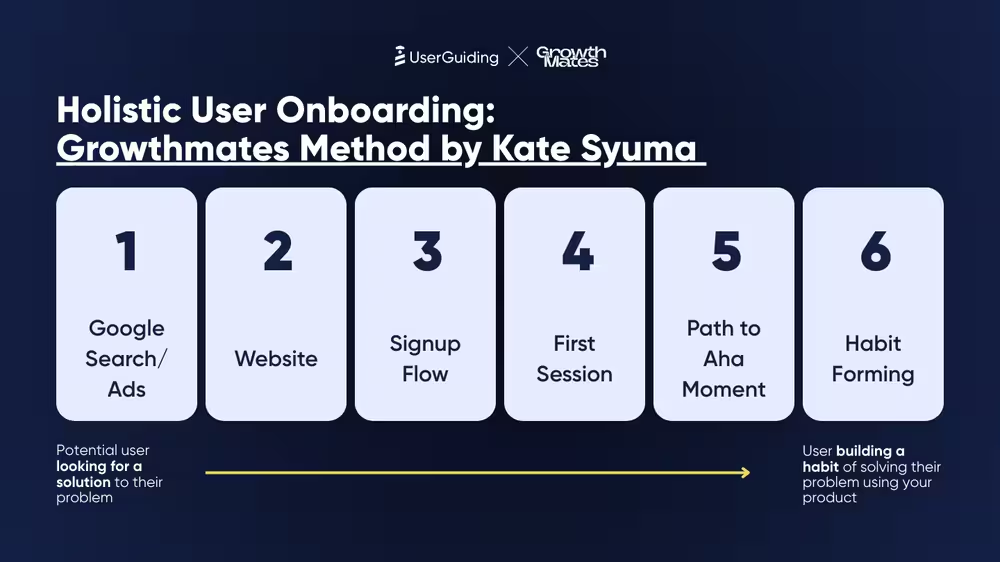
Growth expert Kate Syuma breaks onboarding into six simple steps that map the entire user journey:
👉 Google Search / Ads – A potential user starts looking for solutions.
👉 Website – They explore your product’s value and key differences.
👉 Sign up flow – Users share basic info and set up for success.
👉 First session – Their very first hands-on experience with the product.
👉 Path to Aha moment – The instant they see your core value in action.
👉 Habit forming – When using your product becomes part of their routine.
While these steps apply to most products, AI tools often skip or merge stages in 2025 to create smoother and faster paths to value.
AI onboarding analysis:
Before diving into the analysis, we’ve put together our findings in an interactive Miro board. You can explore the findings through:
- 140+ screenshots and GIFs that capture the journey from website to first session.
- 100+ expert insights from Kate Syuma, included in every pattern we analyzed.
- Color-coded elements marking each stage of the user experience for clarity.
Click here to check our full UX onboarding analysis on an interactive board 👈
1) Pre-sign-up: Building trust before users sign up
Pre-signup: All the interactions that happen before a user signs up, mainly through the website experience.
When people land on an AI tool’s website, they’re often skeptical and wonder if the product actually works. To answer that, 60% of the tools we studied leaned on user-generated content (UGC) and social proof.
Studies show UGC can boost website conversions by 29%, with 72% of consumers trusting reviews and testimonials more than branded content.
Out of the 10 AI tools we analyzed, 6 featured UGC or social proof on their websites, showcasing real user projects, reviews, and testimonials instead of flashy brand promises.
For example, Lovable highlights user-made projects so visitors can see the possibilities right away.

👉 The takeaway: Let your community do the talking. People trust other users more than polished brand copy.
Expert insight:
“Leading with a community-led growth strategy and showcasing user-generated content helps AI products build credibility upfront, especially in emerging categories where trust and early validation are key.” – Kate Syuma
2) Signup flows: Conversational and personalized
Signup flow: A short welcome survey that collects key details to personalize the experience and better understand new users.
Forget long, boring forms. Today’s AI tools keep signup short and personal, often asking just 3–5 questions about things like use case, role, or goals.
This builds familiarity, eases trust concerns, and often introduces pricing early, showing confidence in letting users choose what fits their needs.
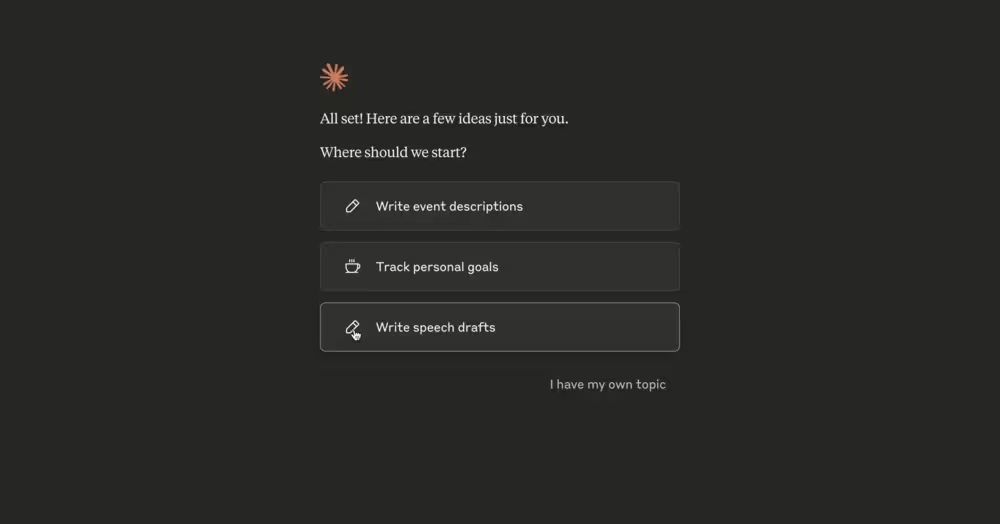
One standout example is Claude, which uses a conversational tone during signup. It even introduces pricing early, trusting users to choose what fits them best instead of hiding behind sales walls.


👉 The takeaway: Treat signup like a friendly chat, not a security checkpoint.
Expert insight:
“The motivation-action-outcome cycle has to operate quickly for AI tools with such a big market. Adapting a human tone and personalizing the experience play a big role here since it accelerates decisionmaking as well as activation starting from the first moments of product experiences.” – Kate Syuma
What do AI tools ask at sign up?
Across 10 AI products, the most common signup questions focused on:
- Use case (7 tools)
- User role (6 tools)
- Purpose (5 tools)
- First encounter or plan choice (4 tools each)
- Name (3 tools)
Less frequent were basics like age, company size, or whether users would download the app, which only appeared once.
👉 The takeaway: AI tools keep signup short, asking just enough to personalize the journey.
3) First session onboarding UX: Show, don’t tell
First-session UX: The make-or-break moment when users try the product for the first time.
Old-school onboarding with tooltips, checklists, and endless tutorials is fading. Only 4 out of 10 AI tools we studied still use them.
Most now focus on embedded experiences, such as empty states with CTAs, example prompts, and familiar interfaces, meaning the product teaches itself as you use it.
Most tools apply behavioral principles like learn-by-doing, defaults, and familiarity, and those with embedded experiences stand out by reducing cognitive load.
Perplexity, for instance, gives new users example prompts right away, so they see value in seconds without reading a guide.


👉 The takeaway: Let people experience the product’s magic first, and they’ll stick around.
Expert insight:
“AI tools, especially those used by developers, rightfully assume that their users are highly tech-savvy. And so, any extra popups, guides, or patterns that do not add to a smooth UX become an obstacle.” – Kate Syuma
4) Onboarding emails: Keep it simple
Onboarding emails: Messages sent to guide, educate, and support users as part of the onboarding journey outside the product.
Not every AI tool sends onboarding emails, and 20% skip them entirely. Of the 10 tools we studied, 2 had no onboarding emails and 1 sent none at all, while the remaining 7 focused on quick-win resources and 1 leaned on marketing success stories.
But those that do send short, clear, and actionable ones.
The real opportunity lies in personalized, triggered emails, which consistently outperform standard campaigns, achieving 35.6% open rates and 5.3% CTR.
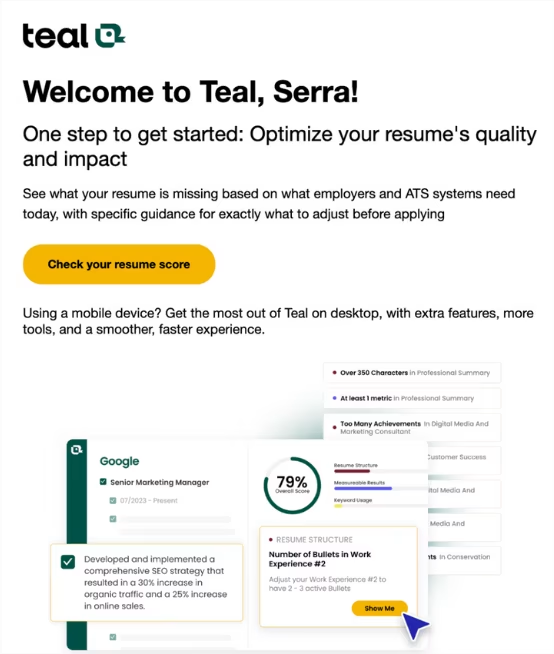
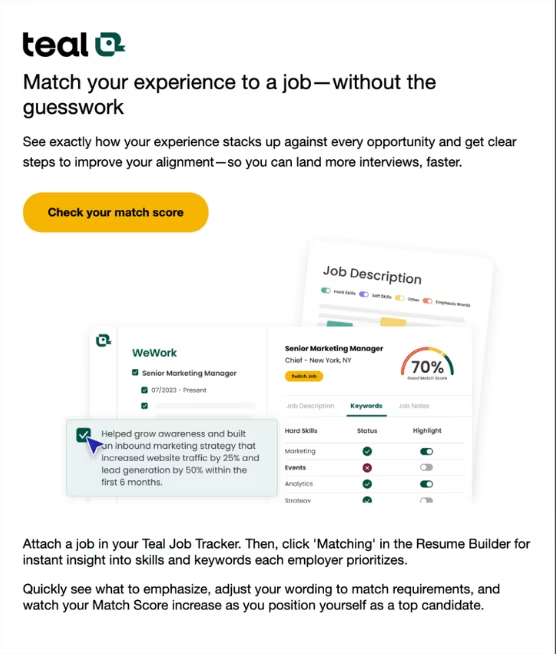
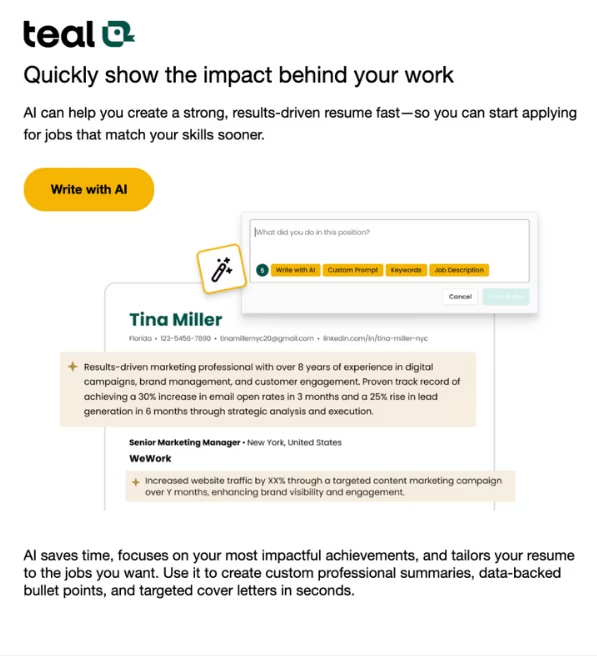
Take Teal, which sends clean emails with one image and a single call-to-action. No clutter, no distractions, just guidance toward the next step.
👉 The takeaway: Onboarding emails aren’t about length, they’re about timing and clarity.
Expert insight:
“With traditional onboarding often omitted in AI tools, there is an effort to make up for this lack of educational content via onboarding emails. The sentiment that value isn’t always found inside the product is unchanged.” – Kate Syuma
5) Activation markers: Value before sign-up
Activation markers: Key interactions that trigger a user’s aha! moment, either inside or outside the product.
One of the boldest trends we saw: 40% of AI tools give value before you even sign up.
Generative AI tools use on-site prompts to simplify signup and deliver faster value, boosting retention and reshaping how we approach time-to-value.
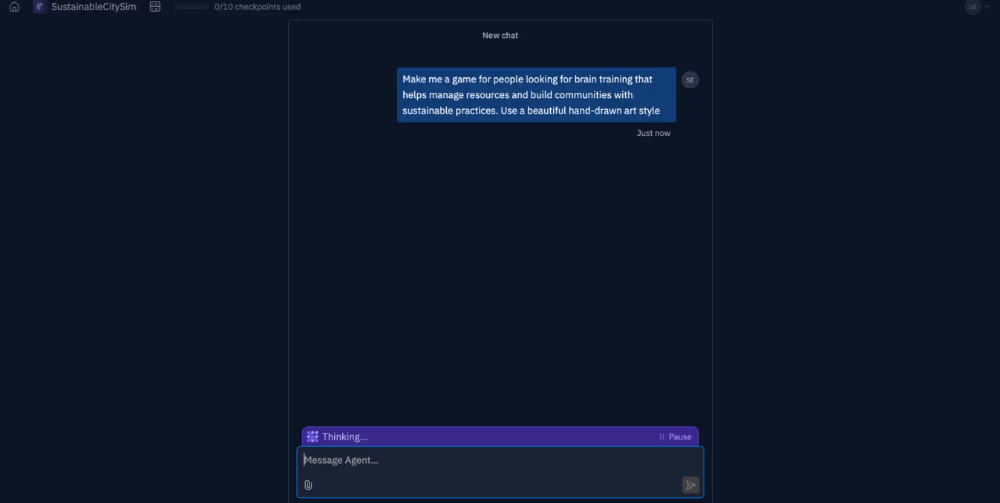
Replit is a great example, as it lets visitors run a prompt on its homepage. Once they see the results, signing up feels like the obvious next step, not a barrier.

👉 The takeaway: Let people try before they commit. When they already feel progress, signup becomes effortless.
Expert insight:
“By offering prompt fields and interactive inputs directly on their websites, many AI tools create an immediate shortcut to value, what we call a loginless experience. This approach taps into user motivation early, reduces friction, and reframes signup as a natural next step rather than a prerequisite.” – Kate Syuma
How does the activation path work?
- Setup moment: The user takes the first actions needed to experience the product’s value.
- Aha moment: They experience that value for the first time.
- Habit moment: Using the product becomes part of their routine.
More of the best practices…
HeyGen: Learn-by-doing principle

HeyGen uses an AI avatar as a friendly copilot, guiding users without being pushy.
Expert insight:
“HeyGen’s initial interaction resembles a traditional in-app guide but functions more like a copilot rather than a lengthy, intrusive guide. It incorporates the AI avatar to convey a tutorial message during onboarding. By being non-intrusive and original, HeyGen manages to offer a good first UX.” – Kate Syuma
ElevenLabs: Activation via effort reduction
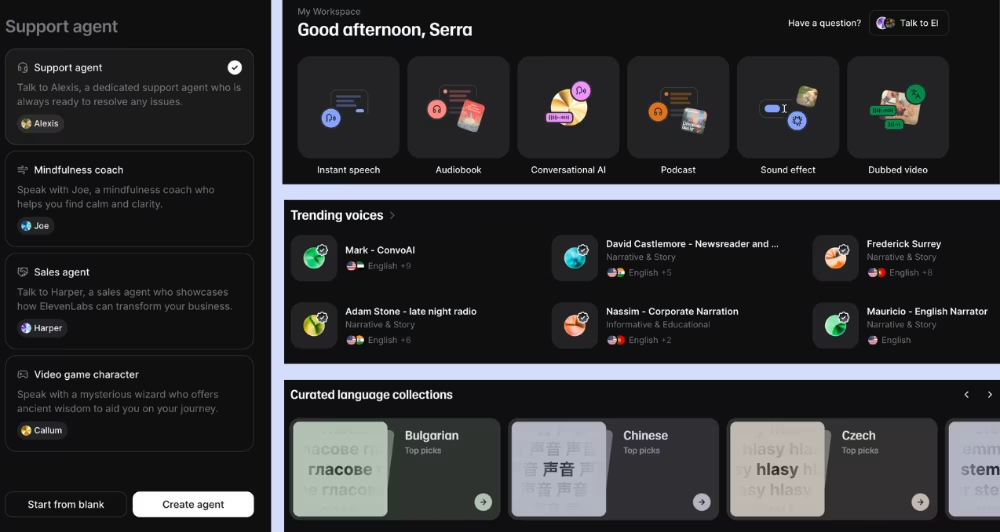
ElevenLabs relies on templates and defaults, so users aren’t overwhelmed with choices.
Expert insight:
“ElevenLab heavily uses templates and ready-to-use elements in its platform. This takes away from the potential cognitive load of starting with a new product, and leans on the power of defaults principle; users experience less friction since they are less likely to change what is already offered as a default.” – Kate Syuma
Expert takeaways:
1️⃣ Community builds trust: AI tools use user-generated content and social proof to strengthen credibility before signup.
2️⃣ Value comes first: Loginless features let users try the product before creating an account.
3️⃣ Personalization beats forms: A few contextual questions replace long signups.
4️⃣ Less hand-holding: Clean UI and familiarity replace tooltips and checklists.
5️⃣ Emails extend onboarding: With fewer in-app guides, emails drive activation and discovery.
👉 Onboarding in AI is getting smoother, faster, and smarter, and it’s only the beginning.
Some lessons for early-stage AI tools…
- Many AI tools assume users are comfortable exploring on their own.
- Across many tools, the clear trend is reducing friction, limiting hand-holding, and surfacing value early to match how users prefer to engage.
- The lack of traditional onboarding isn’t a gap, but a shift toward what feels natural.
- Embedded cues, loginless experiences, and community signals blend onboarding into the interface itself.
What is the future of user onboarding in AI?
Onboarding in AI is shifting from being a one-time phase to becoming a continuous flow. The motivation–action–outcome cycle is getting shorter, with many tools creating a sense of progress even before signup happens.
Elements like labor illusion, muscle memory, and user-generated content are shaping onboarding to feel ambient and natural rather than explicit and forced.
Not every product will follow the same path, but the direction is clear: Onboarding is evolving into the place where value continues, not just where it begins.
For more…
Check out other UserGuiding resources:
Check out other Growthmates resources:

.png)










