

.svg)
.svg)
.svg)
.svg)



.svg)




.svg)
.svg)

You already know that getting users to actually use your product (and stick around) is harder than it looks.
And onboarding is often the make-or-break moment.
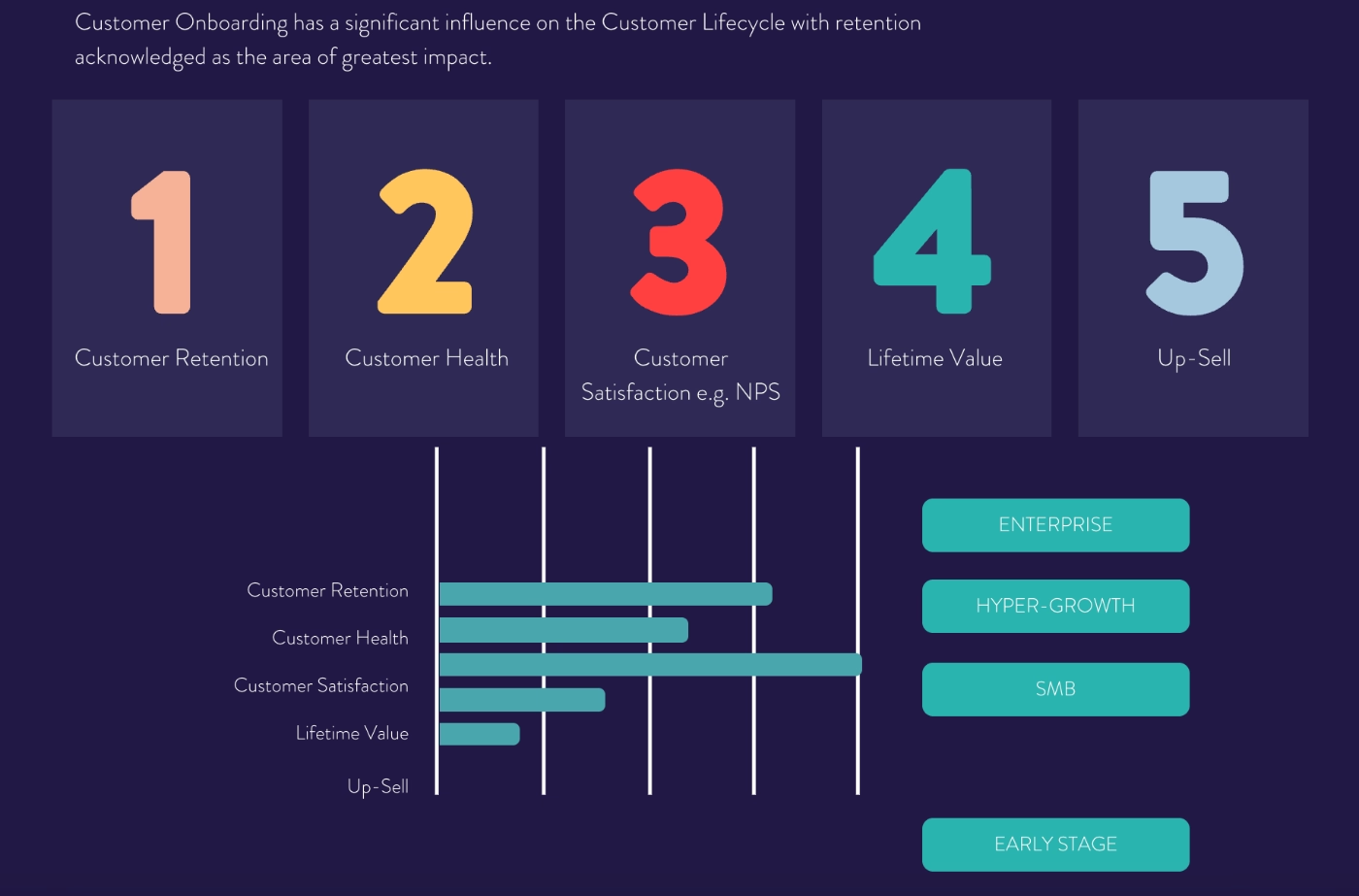
Research finds that successful customer onboarding has a significant impact on customer retention, satisfaction, health, and overall lifetime value (CLTV).
In this guide, we'll cover everything you need to know about B2B SaaS onboarding:
- What B2B onboarding is (and how it differs from B2C onboarding),
- Which onboarding model fits your business best,
- Best practices & metrics to track when it comes to B2B onboarding, and
- Real-life B2B onboarding examples to get inspired by.
Let's get into it. 👇🏻
TL;DR
- B2B SaaS onboarding is a structured process of guiding new users (and teams) to value. It goes well beyond setup and covers user education, feature adoption, and ongoing engagement across the entire customer journey.
- Compared to B2C, B2B onboarding is more complex: more users, more roles, higher stakes, steeper learning curves, and higher expectations.
- There are 3 onboarding models: high-touch (human-led), self-serve (product-led), and hybrid. Most modern B2B SaaS companies land on a hybrid; automated for the repeatable parts, human for the moments that actually need it.
- If you're going product-led or hybrid, UserGuiding can help you build all of your in-product onboarding layer (interactive guides, checklists, resource centers, AI assistants, and more) without writing a single line of code!
What Is B2B SaaS Onboarding?
B2B SaaS onboarding is the process of guiding new users, or sometimes new teams, through a product so they can get to value as fast as possible. It involves more or less the same steps and strategies of any type of onboarding (user onboarding, customer onboarding, employee onboarding, B2B onboarding, B2C onboarding, etc.):
- Understanding the user and their use case, often via an onboarding survey
- Introducing the platform with UX patterns like tooltips, pop-ups, product tours, etc.
- Explaining how to use the features with resources like in-app guides, videos, etc.
- Offering best practices and pro tips relevant to the user’s role, goal, use case, etc.
- Sharing inspiring stories, templates, studies, resources, etc. via email sequences
- Helping with account setup, customization, and migration, if necessary
If you’re not so familiar with onboarding, the last aspect of onboarding (account setup and customization) might be the only aspect of onboarding you associate the whole process with.
And that’s understandable.
For many SaaS companies, onboarding is a task mostly associated with the sales team…
They do a demo, show around a little, and help with the setup if the customer is a big team or an enterprise account.
However, user onboarding, especially B2B SaaS user onboarding, is (and should be) a much more detailed and structured process that requires planning, testing, and nowadays, some level of automation.
Rocketlane’s 2025 survey finds out that nearly 90% of organizations are actively investing in automation and AI to streamline onboarding processes, reduce manual workload, and achieve faster time-to-value; while 54.5% companies feel advanced onboarding tools with automation capabilities can help their team achieve onboarding excellence in the following years.
📌 In short, B2B SaaS onboarding is…
- A structured user education plan that involves both in-app and off-app training.
- An important part of early value realization and Aha Moment planning.
- Tailored and personalized for different teams, user personas, roles, and use cases.
- Automed and optimized via no-code 3rd party onboarding tools in 2026.
Pro Tip: While onboarding is often associated with the initial signup stage of the customer journey, it actually spans communication and education across multiple stages, not just signup or trial. Especially in B2B SaaS, (re-)onboarding can happen when:
- A former customer resubscribes after a period of inactivity
- A new team member joins the platform, even if the team has been using it for some time
- You release a new feature or UI update
But we will talk about re-onboarding later in the article.
B2B SaaS Onboarding vs B2C SaaS Onboarding
Let's start with the basics.
Onboarding, in the broadest sense, be it B2B or B2C, is the process of guiding a new user from "I just signed up" to "I get this, and I can see why I need it." It's a structured way of helping a user understand a new product, feature, or interface without leaving them to figure it out alone.
The end goal of any onboarding experience is the Aha Moment.
(For more information on the Aha Moment, let’s take you to our dedicated guide for finding and designing for Aha Moments.)
Now, B2B SaaS onboarding operates on that same foundation, but in a much more demanding environment.
Think about what "B2B" actually means in practice. You're not onboarding a single person who downloaded your app on a whim. You're onboarding a company, an organization that went through an evaluation process, involved multiple stakeholders, and made a deliberate decision to adopt your tool. They arrive with expectations, timelines, and often a migration on their hands.
That changes almost everything about how onboarding needs to work.
👉🏻 The users are different. You're not guiding one person through one flow but admins who need to configure the tool, team leads who need to set up workflows, and end users who just need to do their jobs in it. Each of them has a different definition of "this is working," and your onboarding has to serve all of them.
👉🏻 Your product is different, too. B2B tools are built for professional use cases, which means they tend to be more complex, more configurable, and significantly harder to navigate without guidance.
👉🏻 Finally, the stakes are different. When a consumer churns from a B2C app, they just uninstall it. When a B2B customer churns, they cancel a contract, potentially reverse a migration, and write a G2 review about it. The cost of a poor onboarding experience in B2B SaaS can be really high.
In fact, according to Precursive’s 2021 report, poor customer onboarding is the 3rd leading cause of early churn, following #1 reason, wrong product fit, and #2 reason, lack of engagement.
Considering how a good onboarding experience can actually help new users stay engaged with a product, and see the product’s potential and how it can fit their existing toolkit and workflows; we can actually say the top three reasons behind early churn are: poor onboarding, poor onboarding, and poor onboarding. 👀
📌 So, B2B SaaS onboarding, compared to B2C SaaS onboarding…
- Involves designing training for products with (naturally) steeper learning curves.
- Requires more segmentation and personalization based on more criteria.
- Has more impact on your ARPU and CLTV.
- Is expected and asked for more often by users.
B2B SaaS Onboarding Models
Because B2B SaaS onboarding spans multiple steps and strategies (with user education and communication happening across different channels and stages of the user journey), it's only natural that there are several ways to handle it.
There are mainly 3 approaches:
- Fully human-led, with live meetings and direct support
- Fully automated, self-serve and in-product
- A hybrid of both, varying by account type and communication need
Let’s go over each one by one 👇🏻
1. High-Touch a.k.a. White Glove Onboarding
High-touch onboarding means a human agent from your team (could be a sales rep, product specialist, or success manager) actively guides the customer through every stage of setup and adoption. This process involves dedicated kickoff calls, live product walkthroughs, regular check-ins, and an onboarding plan that's built around that specific customer's goals/workflows and tech stack.
This model makes a lot of sense for enterprise-tier products with high ACV and complex configurations.
If your product requires custom integrations, data migrations, or buy-in from multiple internal stakeholders, a white-glove approach ensures a smooth implementation.
Among the tools and methods white glove users use are webinars, video calls, phone calls, and even in-person meetings.
The obvious downside: it doesn't scale.
Every new account requires real time from real people, which means your CS costs grow linearly with your customer count.
And increasingly, customers don't even want it.
Gartner's 2024 survey found that 61% of B2B buyers now prefer a rep-free experience. The modern B2B buyer is self-sufficient and often prefers to explore on their own terms, without a CSM scheduling calls for things they could figure out themselves.
So while high-touch onboarding will always have its place at the enterprise end of the market, relying on it exclusively is both expensive and, for a growing share of customers, undesirable.
2. Self-Serve a.k.a. Low-Touch / Product-Led Onboarding
At the other end of the spectrum is self-serve onboarding. With self-serve (product-led) onboarding, the product itself does the guiding, and users move from signup to value without ever needing to talk to a human.
This doesn't mean leaving users to figure things out alone, though.
It means the product is equipped with in-app onboarding elements to guide users through key workflows at the right moment: interactive product tours, onboarding checklists, tooltips, hotspots, welcome modals, and a self-serve resource center they can open whenever they need help.
The experience is designed in a way that allows a motivated user to get to their Aha Moment entirely on their own.
This onboarding model is the backbone of PLG (product-led growth) companies, and it scales pretty easily. You can onboard thousands of new users simultaneously without adding headcount. Iteration is fast, too, you can A/B test an onboarding flow, measure the impact on activation, and ship a better version, all without involving engineering.
The other advantages of product-led onboarding include:
- Decreased onboarding duration,
- More chances for contextual onboarding,
- Higher conversion rates,
- Higher customer retention rates,
- Better customer success metrics tracking,
- Longer customer lifetime, and
- Lower churn rates
The catch is that self-serve onboarding takes some time to bring to perfection and involves some trial-and-error to do well.
(Check out our in-depth playbook for product-led onboarding for more information regarding the best practices to adopt and pitfalls to avoid.)
3. Hybrid Onboarding
Most mature B2B SaaS companies eventually land here, where onboarding combines automated, in-product guidance for the parts of setup that can be standardized, with human touchpoints reserved for the moments that benefit from (or actually require) them.
The idea is to stop using your CS team's time on things a well-designed product tour could handle, and start using it for the conversations where human involvement is necessary.
👉🏻 Like for conversations that signal premium care to enterprise accounts.
👉🏻 Or, when a team’s use case and/or setup is too unique to automate.
As Alexandra van Viegen explains here, most of the steps of a configuration/setup of most B2B SaaS tools can actually be automated, leaving your customer success team available for higher touch interactions that generate more value for your business.
This approach keeps onboarding costs manageable without sacrificing the relationship quality that some B2B customers expect.
How to Decide Which Onboarding Model to Use
Well, in this day and age, with all the competition in the market, with all the AI and automation people are accustomed to, with the shortened attention spans, with the globalization and diverse customer bases many B2B SaaS companies face…
Automated, self-serve, product-led onboarding meets many needs (on both your side and your users’ side).
Whether it's contextuality, scalability, or just meeting users where they actually are, the low-touch model is well-suited to how the SaaS market works today and where user behavior is heading.
But that doesn't mean every B2B SaaS company should dissolve their onboarding team tomorrow.
Depending on your product's complexity, configuration requirements, user base, and market expectations, high-touch or hybrid might still be the right call. And "hybrid" doesn't mean a clean 50/50 split either, you might lean heavily toward one end of the spectrum while borrowing elements from the other.
📋 So here's a practical guide to which model fits which situation:
UserGuiding Can Power Your In-Product Onboarding Layer!
So, if you’ve decided to go with product-led onboarding or hybrid onboarding and are looking for ways to create an automated, personalized, contextual, and engaging onboarding experience for your customers, well, look no further than UserGuiding!
UserGuiding is an all-in-one no-code product adoption platform that lets your product, marketing, or customer success team build and launch in-product onboarding experiences without touching the codebase.
With the platform’s intuitive UI and user-friendly editors, you can create interactive in-app experiences, UX modals, AI assistants, and standalone support hubs within minutes.
Here's what that looks like in practice 👇🏻
The core of UserGuiding is its interactive guide builder. You can create step-by-step product tours, tooltips, and walkthroughs that appear inside your product.
Here’s an example tooltip from an interactive onboarding tutorial created with UserGuiding:
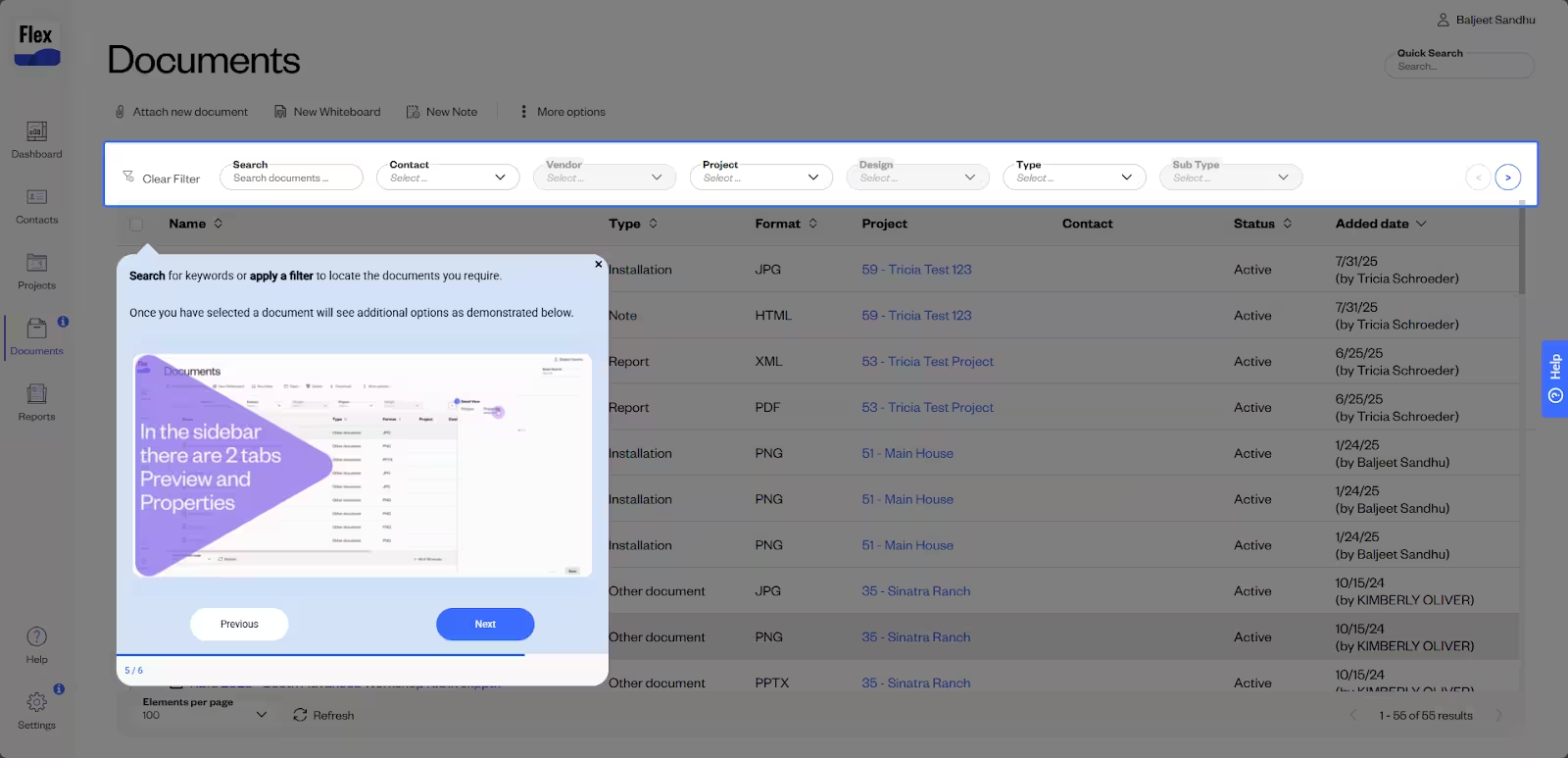
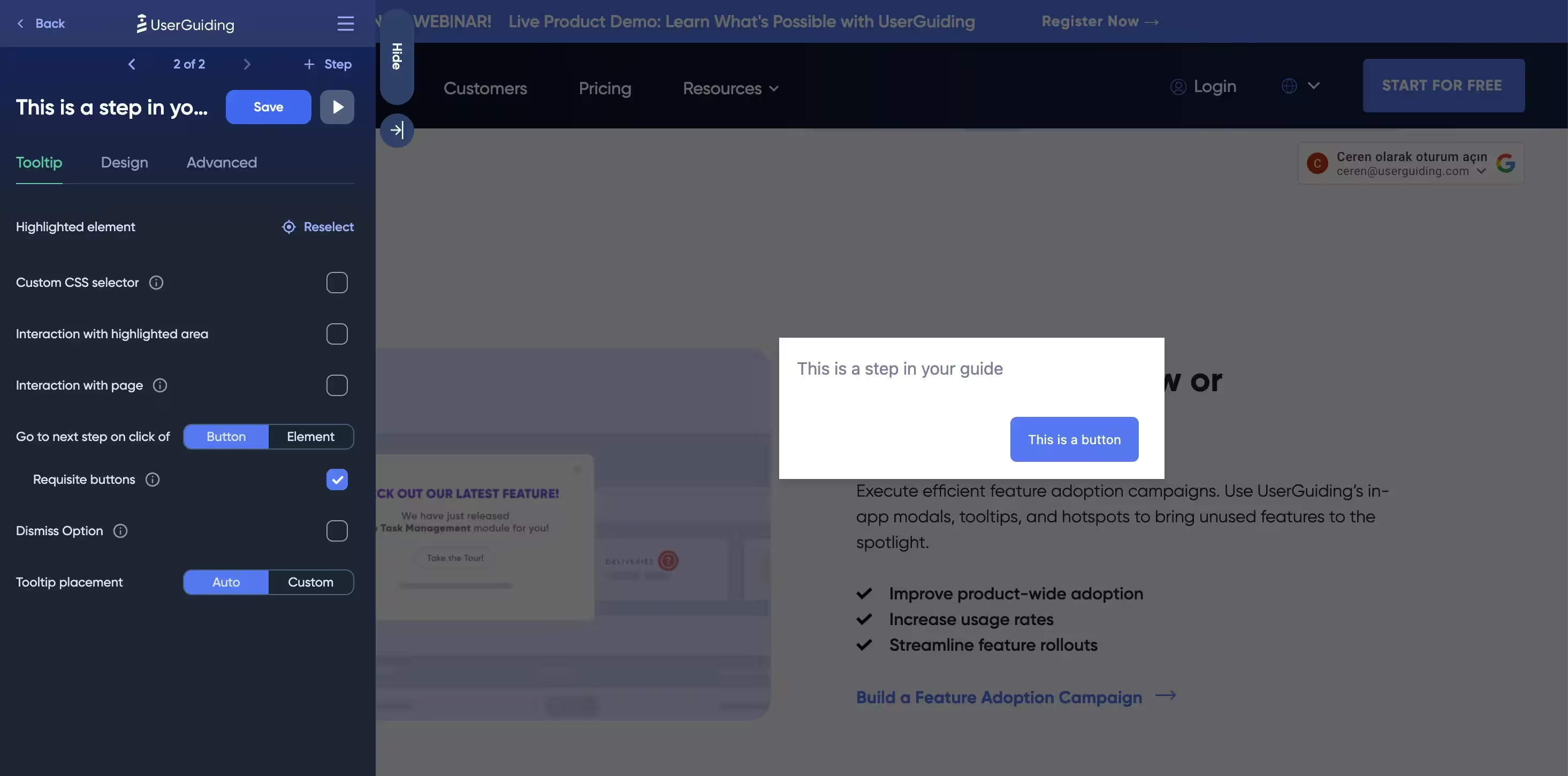
Everything is built in a visual, point-and-click editor that works through an extension. You select the element in your product you want to highlight, write your copy, set your trigger conditions, and publish.
Here’s what the guide builder looks like:
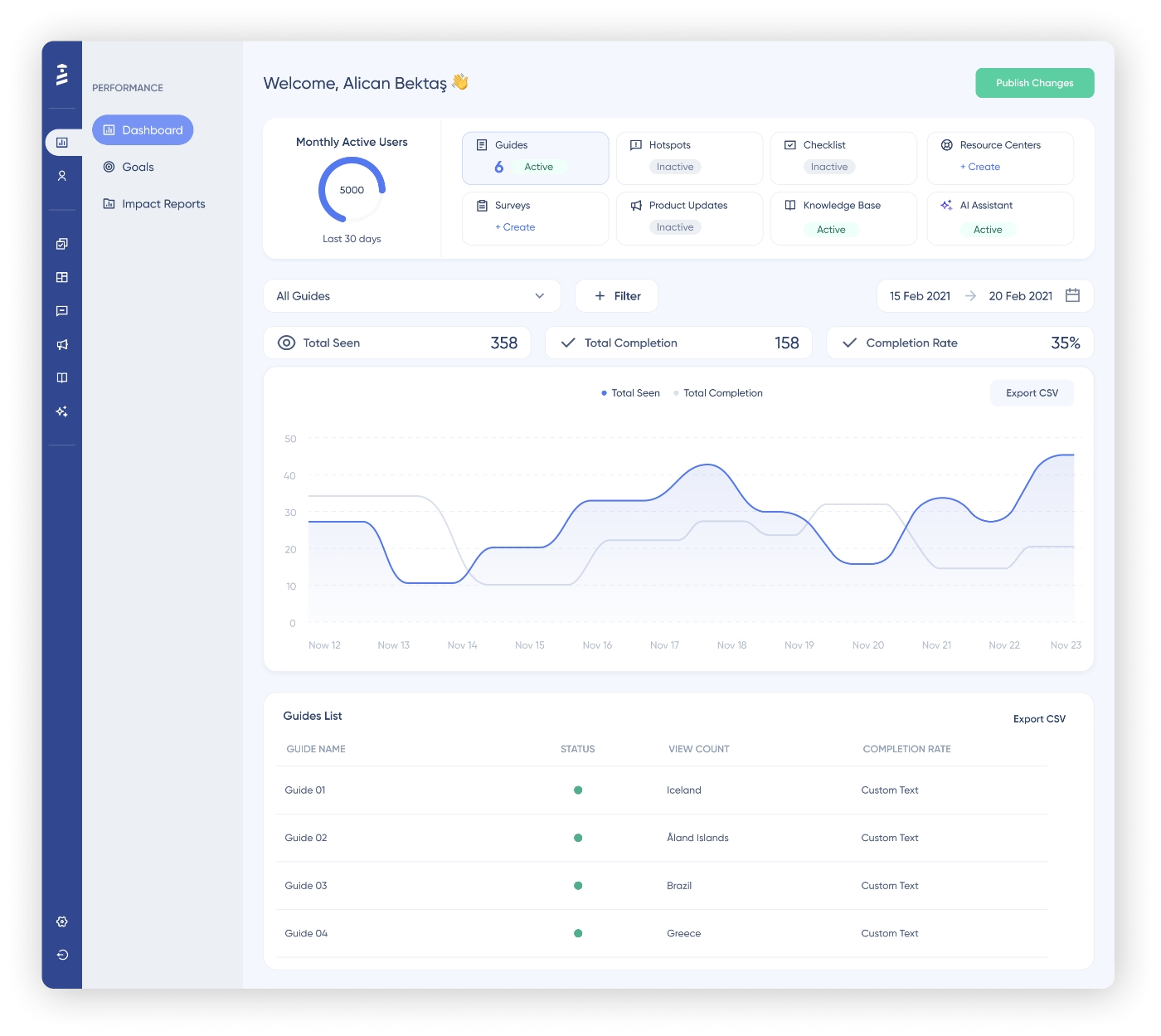
Once your guides are live, you get a full performance breakdown: how many users saw the guide, how many dropped off, which flows are driving activation, and which ones aren't. You can either monitor the performance and engagement trends of your guides (along with other materials you build with UserGuiding) through the main performance dashboard on the home page:
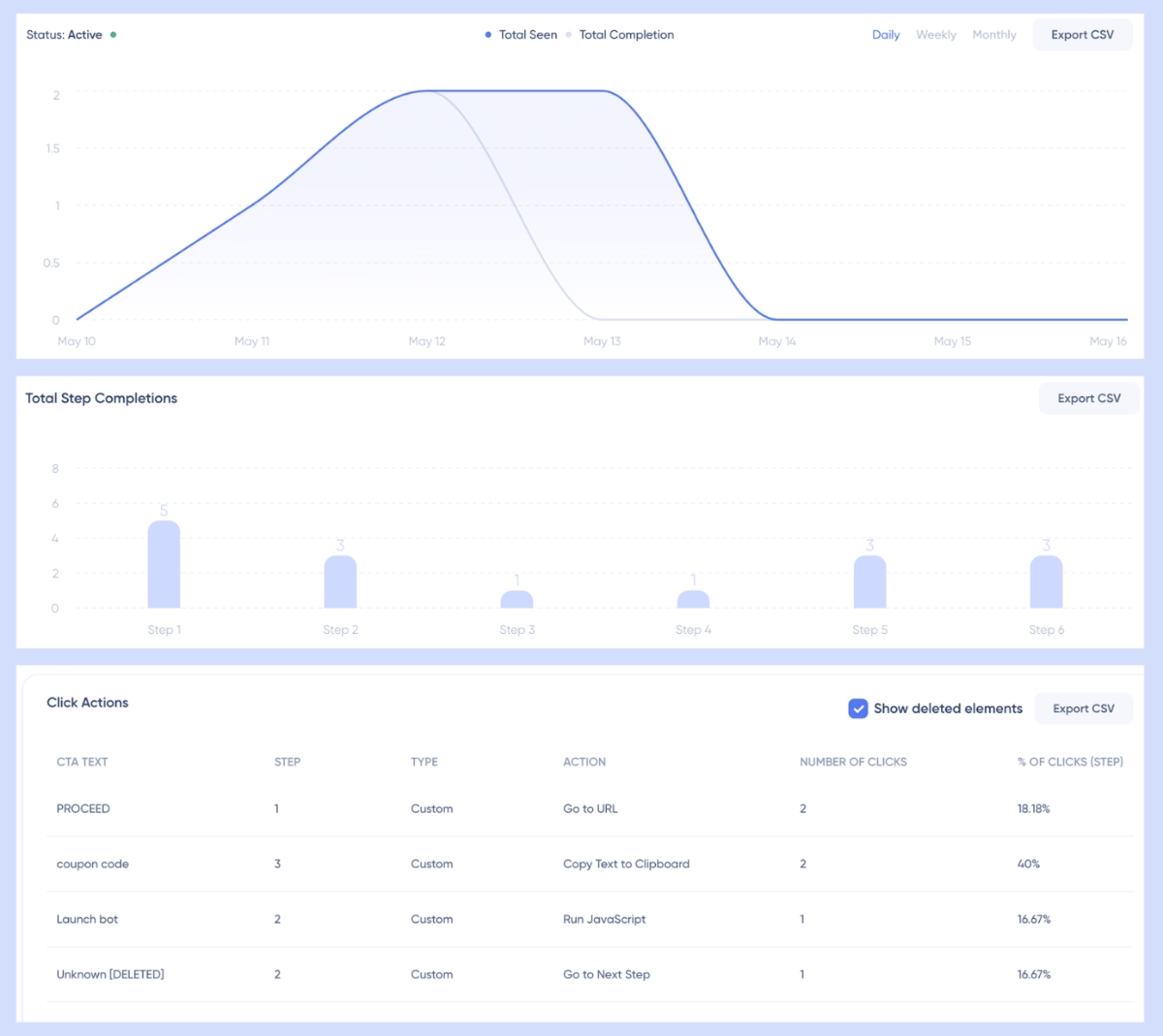
Or, you can go deeper with individual guide performance analytics and look at individual step analytics and click actions on each step with the guide reports, which are under the guides tab in the UserGuiding platform:
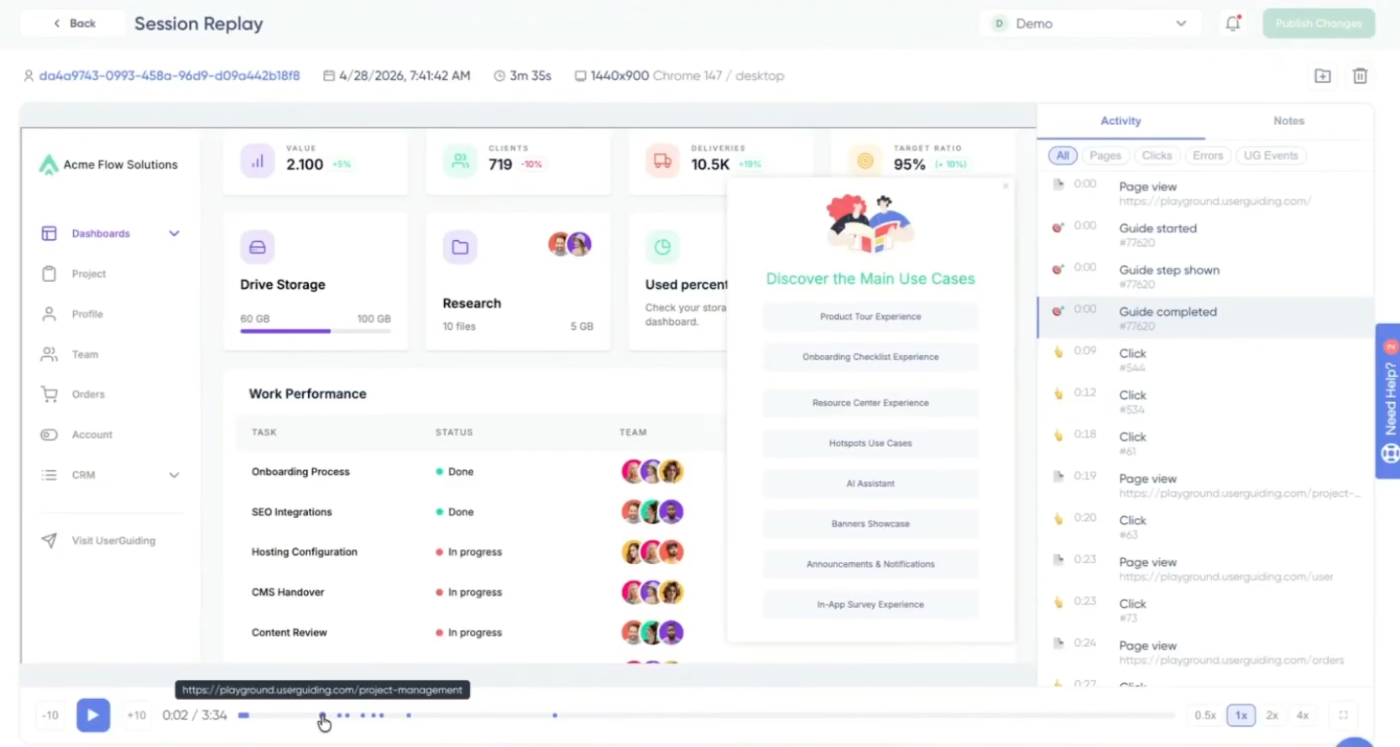
And if you want to go deeper than aggregated metrics, if you want to actually watch how real users move through your product, and where they click, UserGuiding's session replay feature lets you do exactly that.
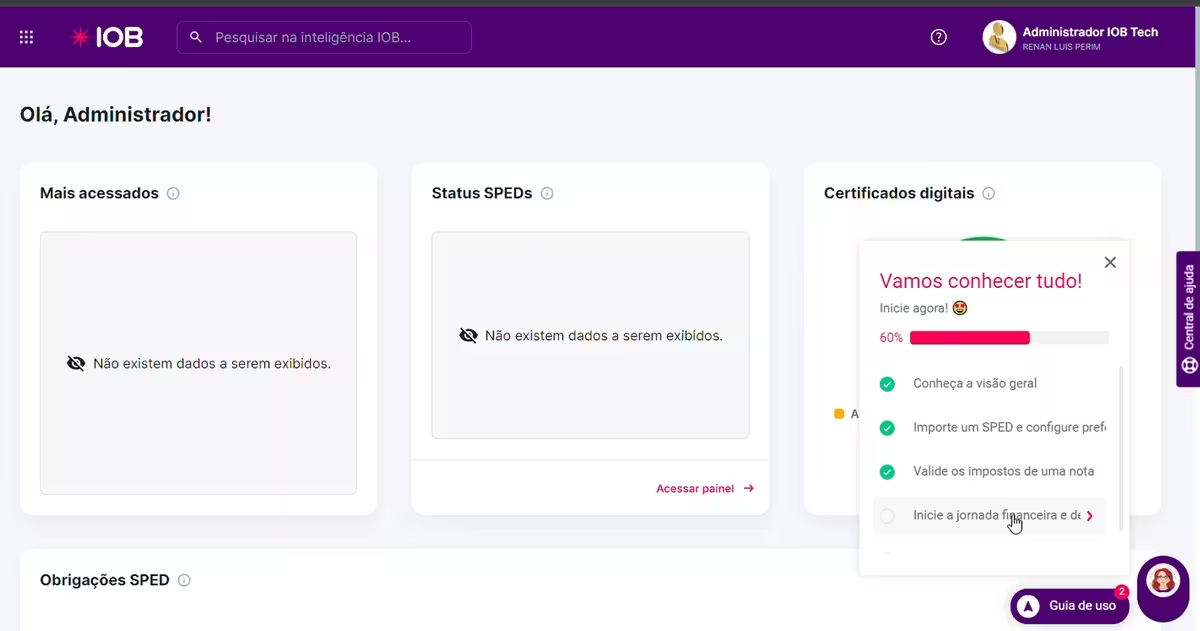
Alongside guided tours, UserGuiding lets you build onboarding checklists, which are structured lists of high-value actions that give new users a clear path to activation and make their progress visible.
Here’s an example onboarding checklist created with UserGuiding:
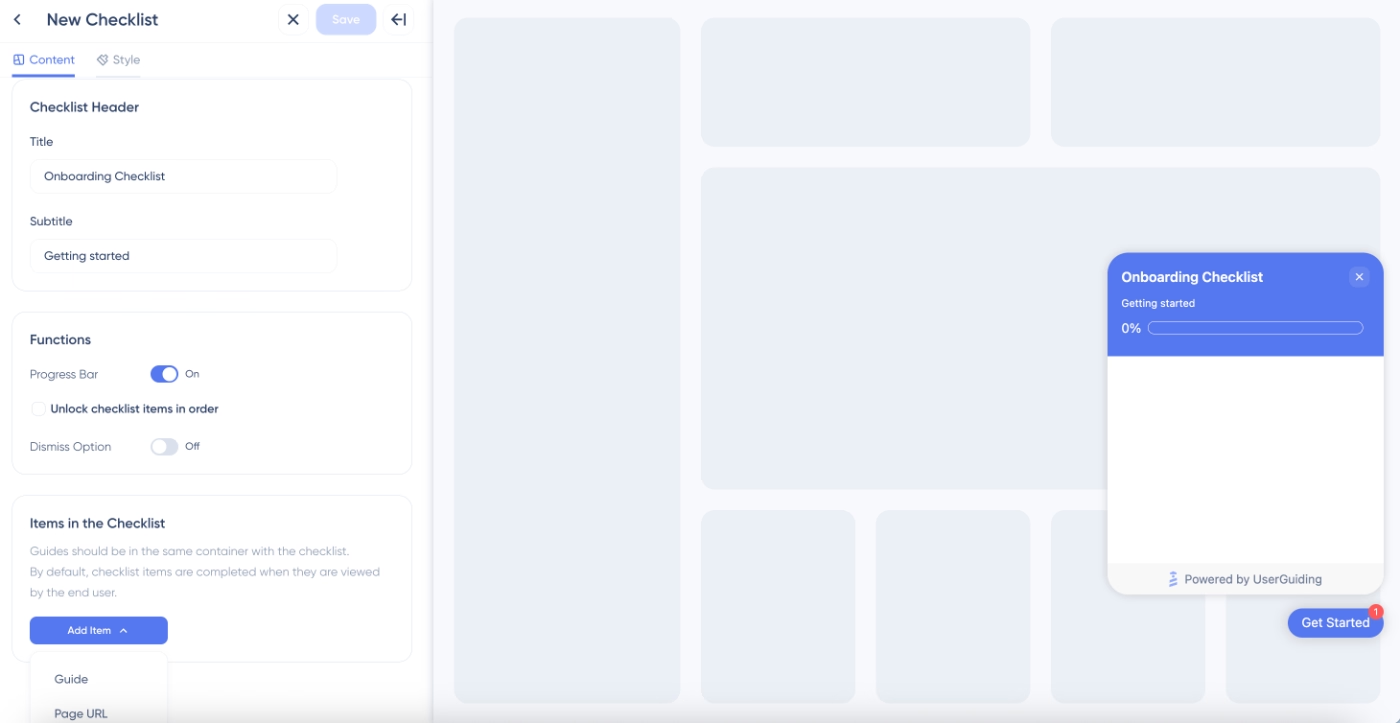
From UserGuiding’s intuitive checklist editor, you can control the tasks, the order, the completion triggers, and whether to pre-complete the first step. Here, you can also add your interactive guides as checklist items so the user is not only encouraged to engage with a feature but also is guided interactively.
Here’s UserGuiding’s checklist editor:
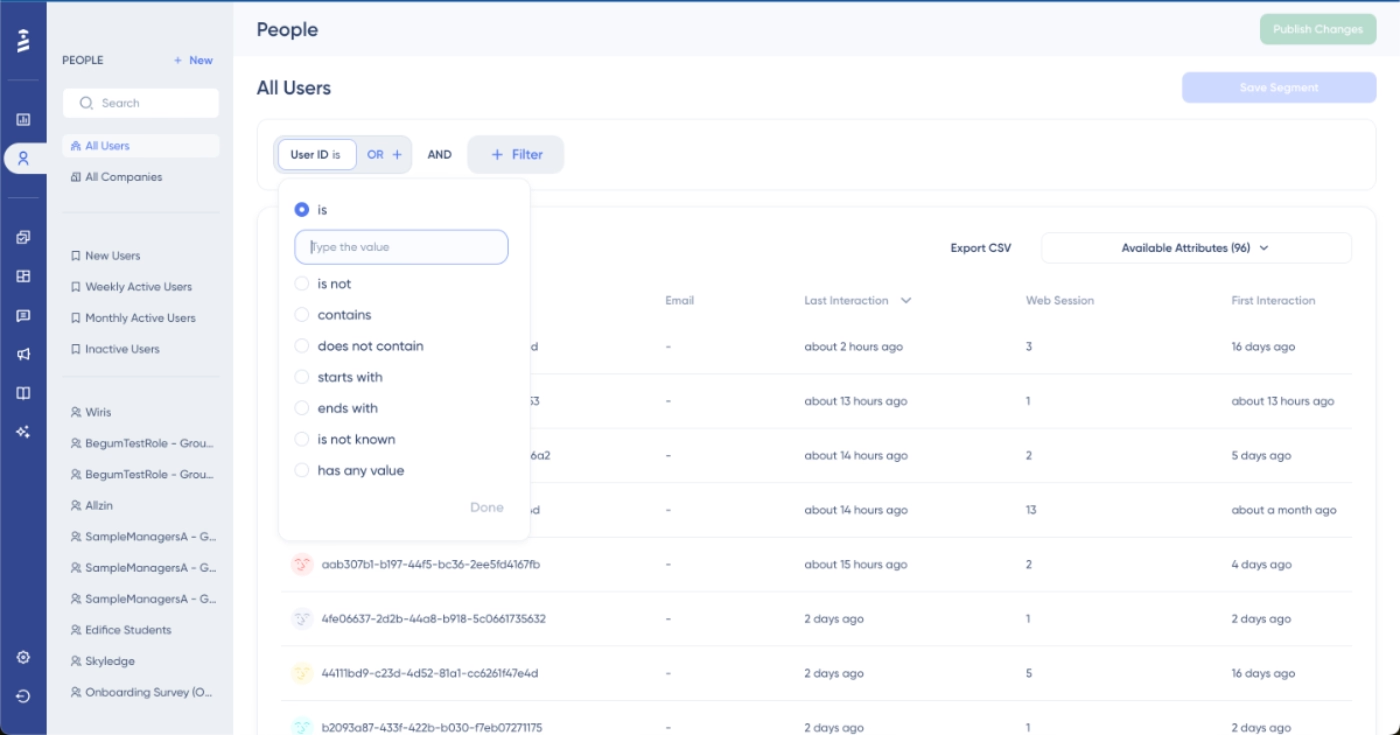
UserGuiding's segmentation editor lets you target guides, checklists, and any other in-product element based on user attributes, behavior, plan, role, or any custom property you pass in. This way, you can tailor experiences and shorten the path to value for each user persona.
UserGuiding’s segmentation feature is not complex at all; all you need to do is to decide on the criteria for your user segments (user attributes, engagement with other materials, etc.).
As long as you understand how And/Or rules work, you’re good to go.
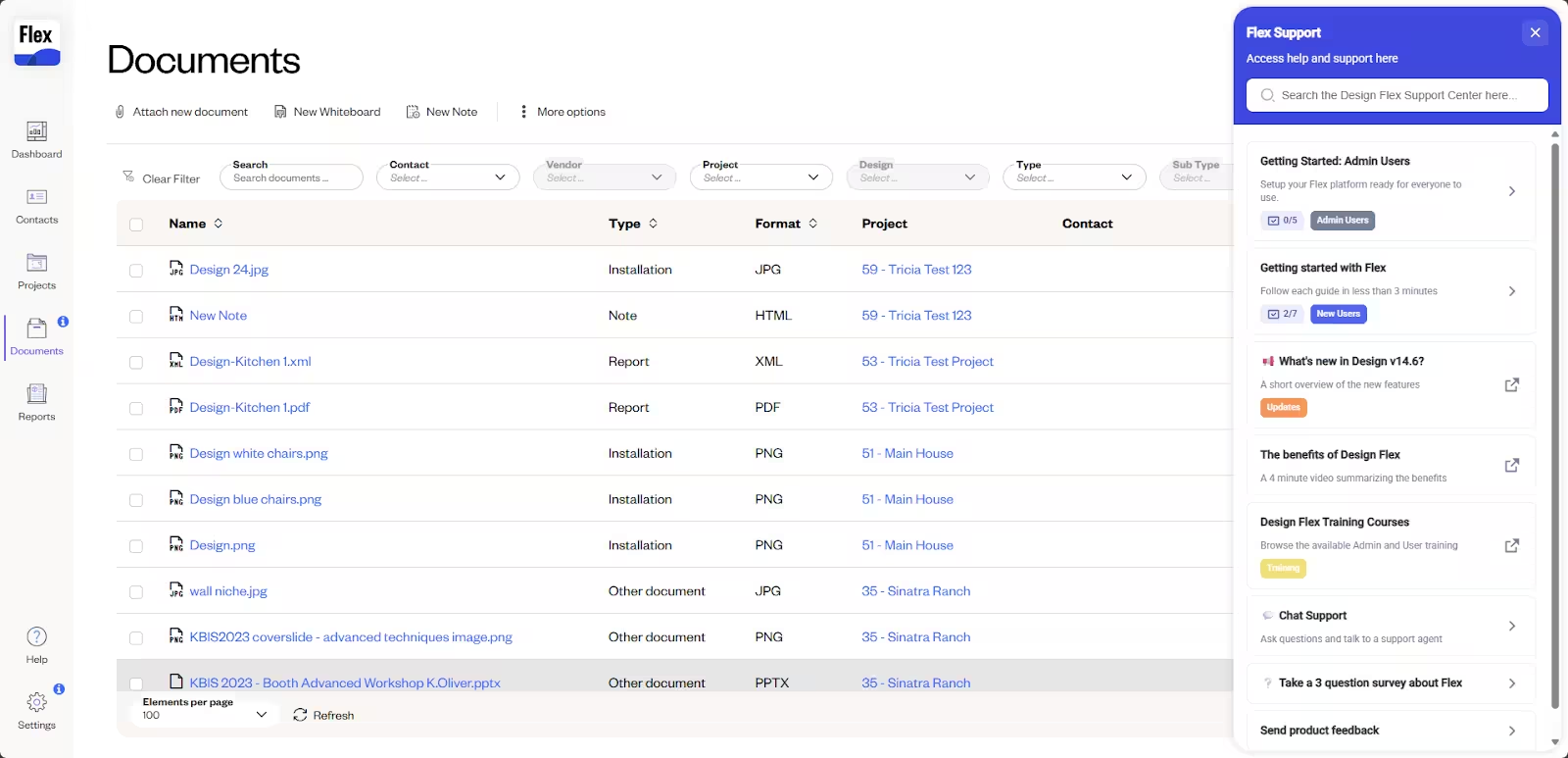
UserGuiding's in-app resource center provides users with a persistent, self-serve help widget that lives inside your product and is always accessible. You can create categories to organize your materials, add a search bar, link to external resources and web pages, or make your help articles and videos available directly in your app.
You can also store your onboarding materials, like checklists and interactive tutorials, in your resource center, so users can revisit onboarding whenever they need it.
Here’s an example resource center created with UserGuiding:
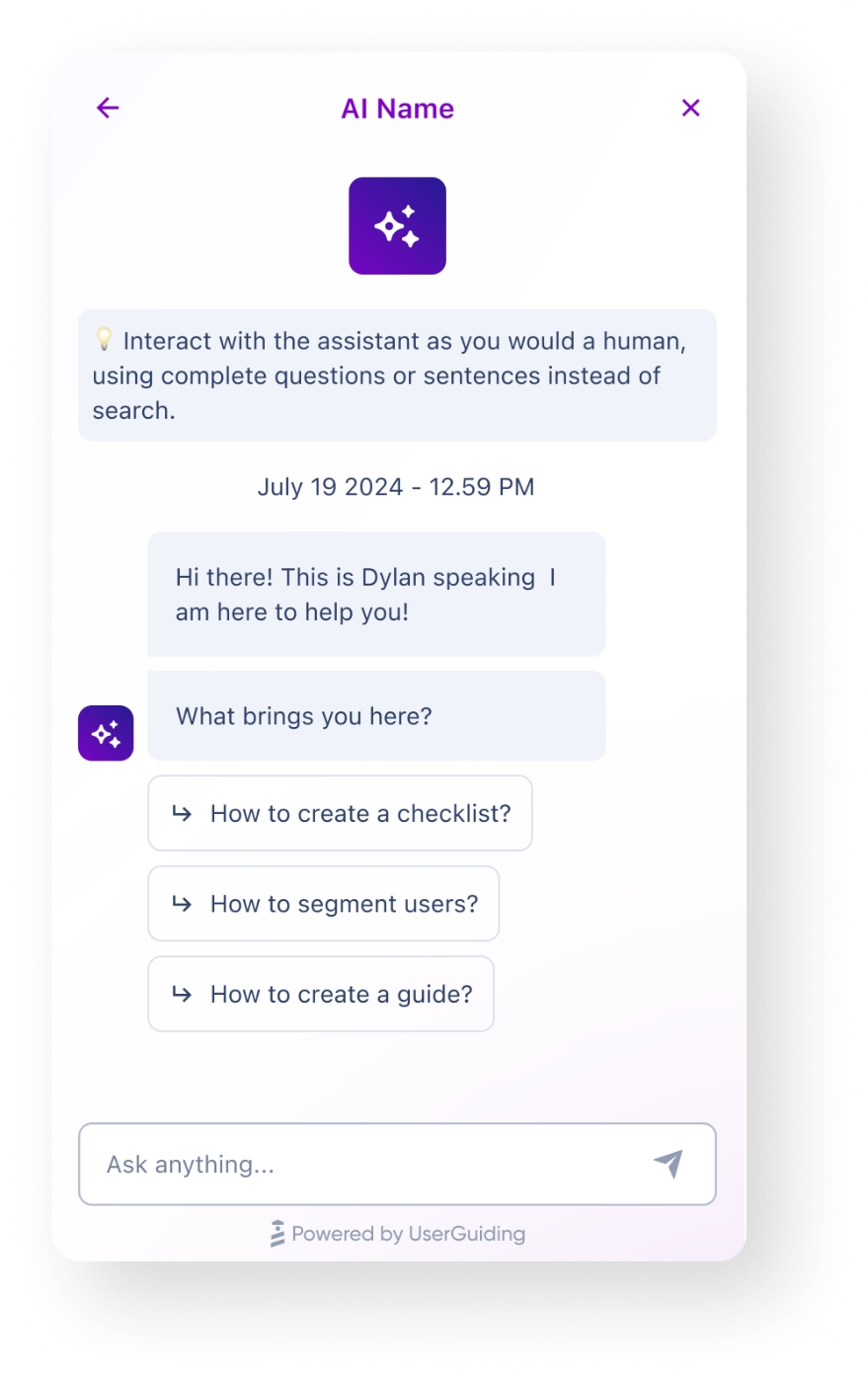
For teams that want to take self-serve support further, UserGuiding's in-app AI assistant lets users ask questions in natural language and get instant answers drawn from your knowledge base right inside your product.
You can feed the assistant with your support articles by linking it to your knowledge base, and even with your interactive tutorials. In that case, it can trigger relevant tutorials for the user based on their question.
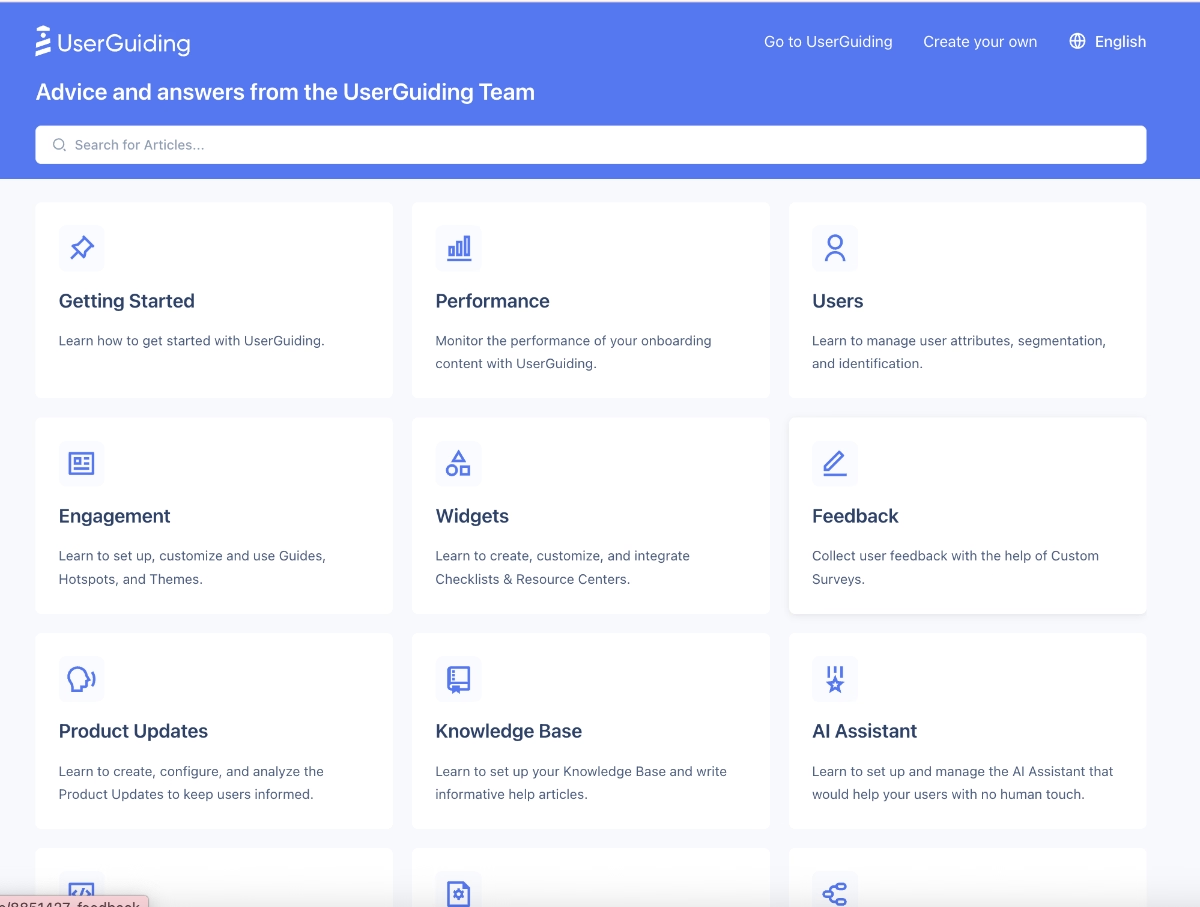
And if you want to extend your self-serve layer beyond the product itself, UserGuiding can power a standalone knowledge base, which is a public-facing help center that captures search traffic, reduces support volume, and gives users a dedicated and well-organized space to look for when they have a question in mind.
Intrigued?
🎁 You can check out our detailed UserGuiding use cases article, hear UserGuiding from its customers, or start your free trial and see what it can help you achieve firsthand.
8 B2B SaaS Onboarding Best Practices
#1 Personalize the path to value by segment
Userorbit’s 2025 study says that 82% of SaaS users expect an onboarding experience tailored to their role, goals, and use case. So it is wise to pay attention to user expectations and personalize your onboarding experience.
But what does that mean? Personalizing your onboarding experience. And more importantly, how do you do that?
Well, you can personalize your onboarding by:
- Conducting an onboarding survey to understand your users’ roles, use cases, goals, needs, existing tech stack, tech-savviness, etc.
- Creating several alternative paths to value for different use cases and user personas
- Highlighting different features/capabilities via checklists to different user segments
- Offering different pro tips and best practices depending on user roles
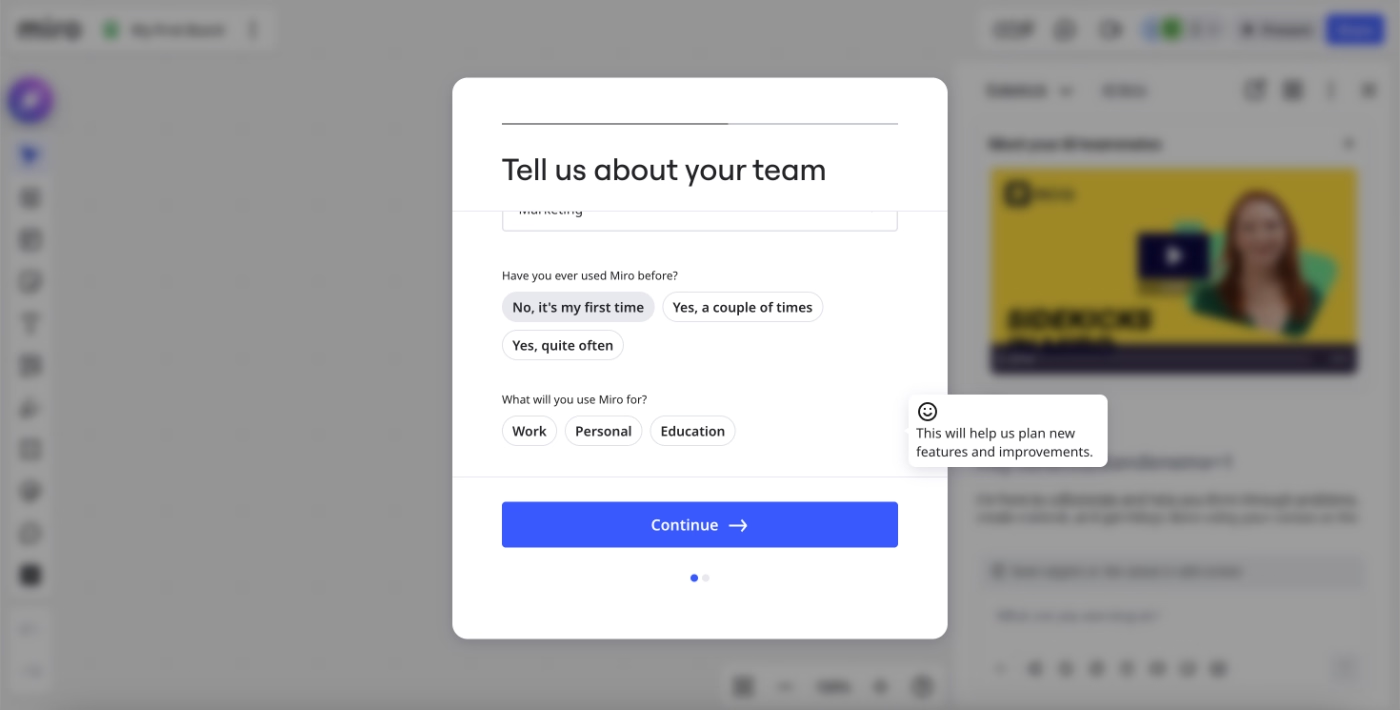
Here’s an example onboarding personalization survey from Miro that asks the user about their use case and familiarity with the platform:
#2 Use checklists to structure and gamify
Checklists are one of the highest-ROI onboarding elements in B2B SaaS. They give new users a clear, structured path to activation and make their progress visible, which dramatically increases the likelihood that they'll actually complete the onboarding process.
People are more motivated to take a recommended action or complete an onboarding task if they think it is manageable/doable quickly, with little effort, and if they see they’ve already committed to the process and have done something in the name of onboarding.
If there are fewer than 5-6 steps in an onboarding checklist, with one or two items already checked off.
And if there’s a progress bar, or little animations triggered after small task completions…
Well, in that case, the likelihood of onboarding engagement gets even higher.
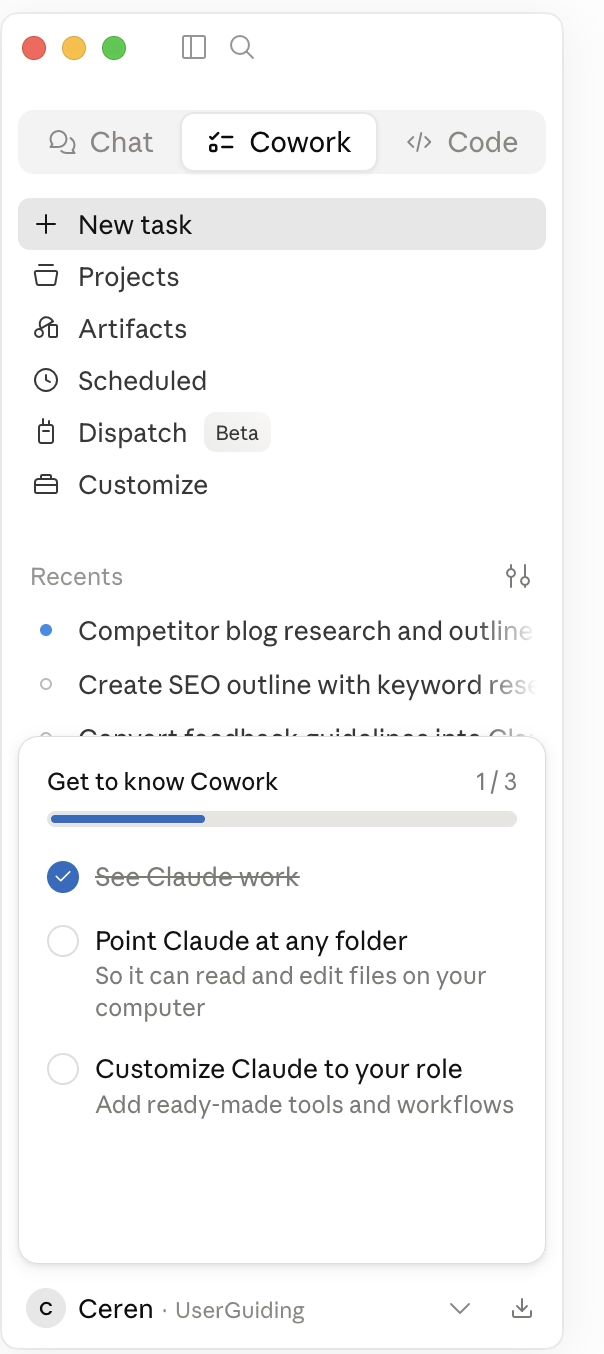
Here’s an example onboarding checklist from Claude that comes with one already-checked-off task, a progress bar, and a small, manageable task list with only 2 remaining tasks:
#3 Provide contextual in-product guidance
In-app guidance (product tours, walkthroughs, interactive tutorials, tooltips, etc.) is an important part of self-serve onboarding. However, there are pro tips and pitfalls to be aware of.
Just because a tutorial lives in your app doesn't automatically make it contextual or timely.
Long product tours with more than 6 steps, or guides that are triggered one after another without the user's interaction, eliminate contextuality. And they run the risk of creating annoyance.
To make your in-product guidance genuinely contextual:
- Trigger tooltips and walkthroughs based on specific user actions or events.
- Keep individual tooltips focused on a single action or piece of information.
- Limit product tours to 5–6 steps maximum; break longer flows into separate sequences.
- Test different trigger conditions and measure which ones drive completion.
- Use varied UX modals (like hotspots) and not just long walkthroughs.
- Refer users to additional resources (videos, help center articles, etc.) for further info.
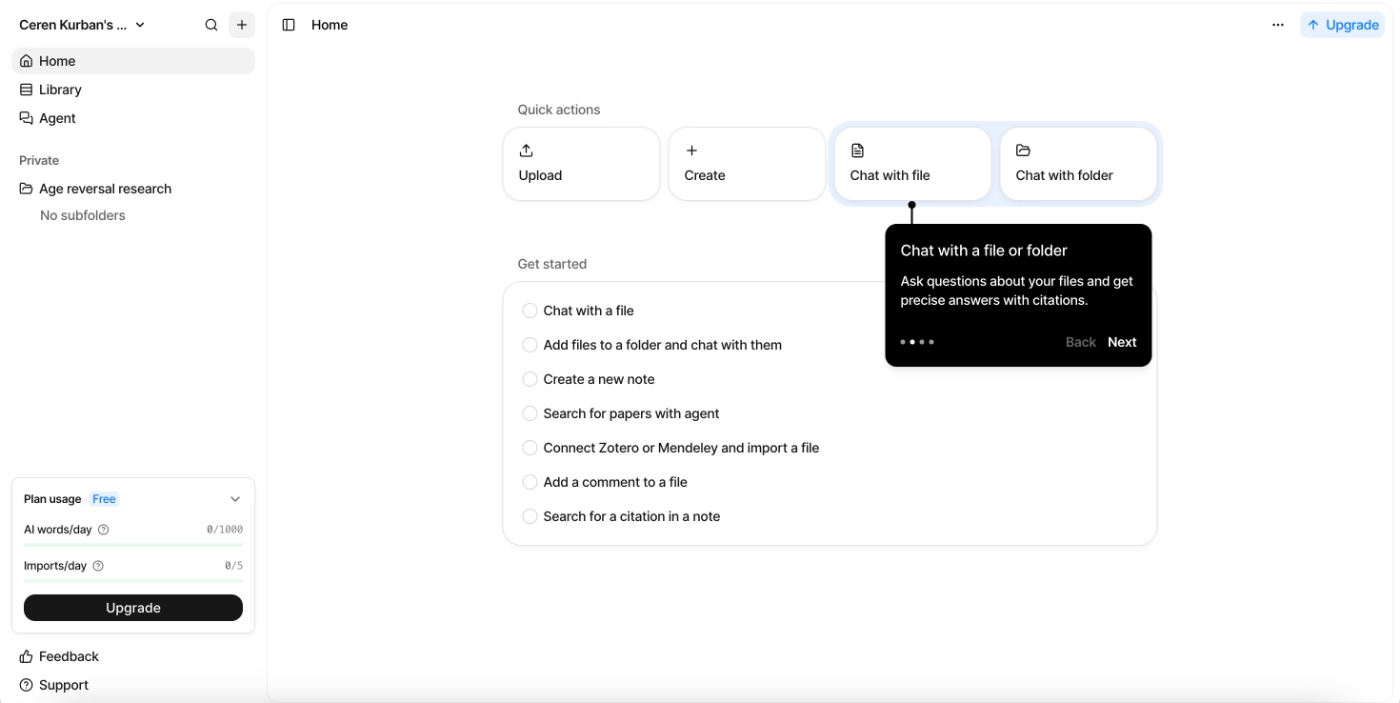
Here’s an example product tour from Anara that only goes over the key buttons and features on the UI with 4 tooltips:
#4 Reduce email reliance during onboarding
It's very common for B2B SaaS companies to build their onboarding around an email drip sequence. And while email has its place, relying on it too heavily creates a real problem: most users stop reading after the first few.
Here’s a (bad) example of overreliance on email during onboarding.
A new Apollo user says the extensive onboarding email sequence feels spammy, and they do not see the value and eventually stop reading the emails…
To reduce unhealthy email reliance in your onboarding:
- Move key onboarding guidance into the product.
- Use your in-app resource center to make tutorials and help articles available.
- Announce webinars, updates, and tips through in-app modals like slideouts.
- Reserve emails for re-engagement, for moments when a user has gone dormant, and you need to pull them back into the app.
#5 Build a self-serve support layer
A self-serve support layer gives users the ability to find answers on their own, preferably quickly, and without leaving your app. We’re talking about in-app resource centers and AI support agents.
And if the user is off the app when they're looking for answers, they should be able to find your support hub or knowledge base without much effort, either.
This matters more than most teams initially think. When a user gets stuck, and there's no easy way to self-serve, they either submit a support ticket and wait or they give up and churn quietly.
Neither is a particularly preferable outcome.
Some things you need to pay attention to while creating your self-serve support layer are:
- Keeping your content organized around capabilities and use cases, not just feature names, so that users browsing category titles and skimming article names will still get a sense of what your product can do, even if they don't read a single word.
- Creating categories for content most relevant to new users, like setup guides, getting started articles, common use cases, etc., so onboarding support is easy to find.
- Offering support in multiple formats (conversational AI chatbots, video tutorials, interactive guides, written articles) to match different user preferences.
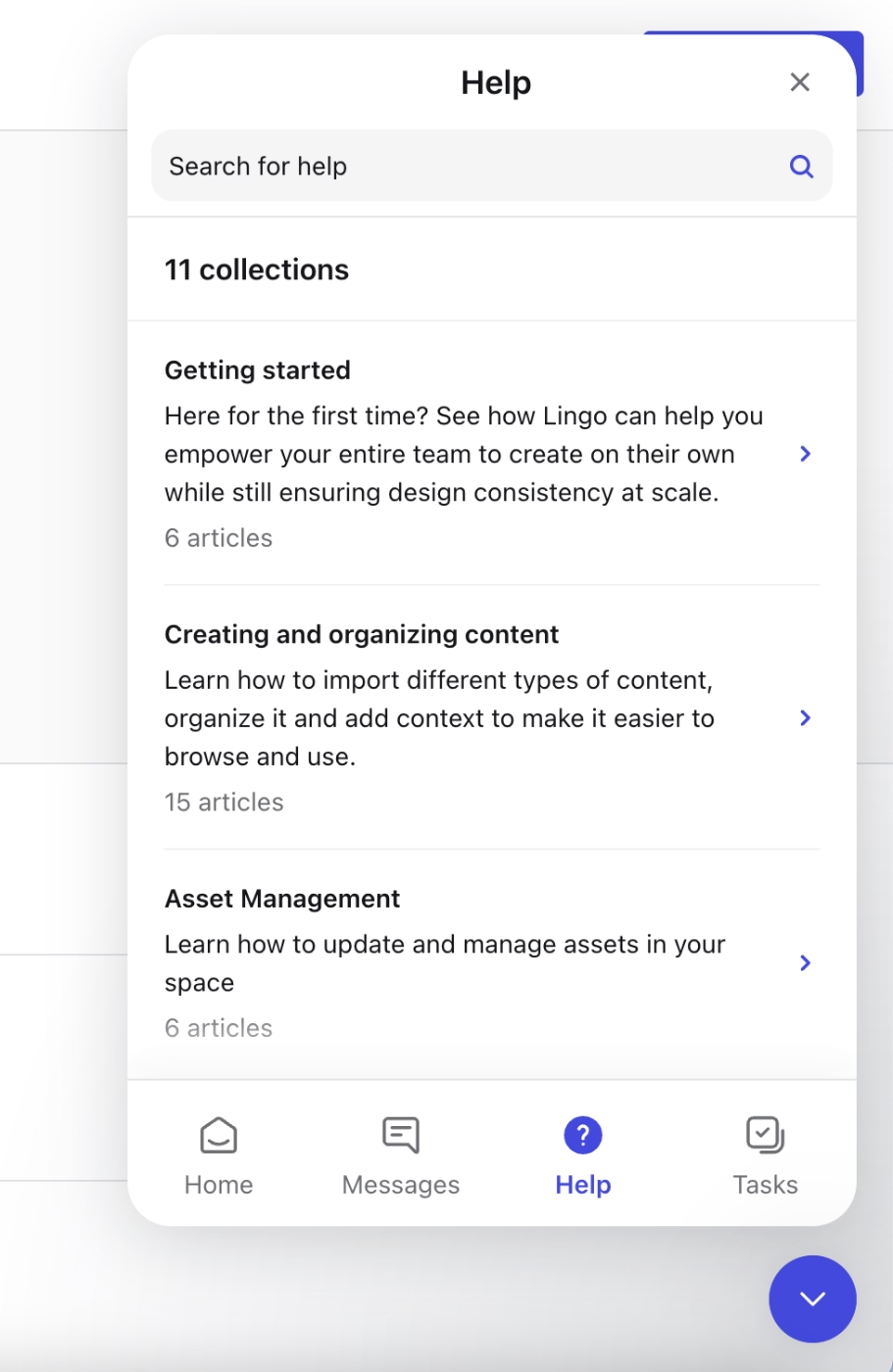
Here’s an example in-app resource center from Lingo that not only makes help center articles available within the platform but also offers use case-based collections for easy navigation:
#6 Measure, identify friction, and iterate
Onboarding is a process that needs to be measured, questioned, and improved continuously.
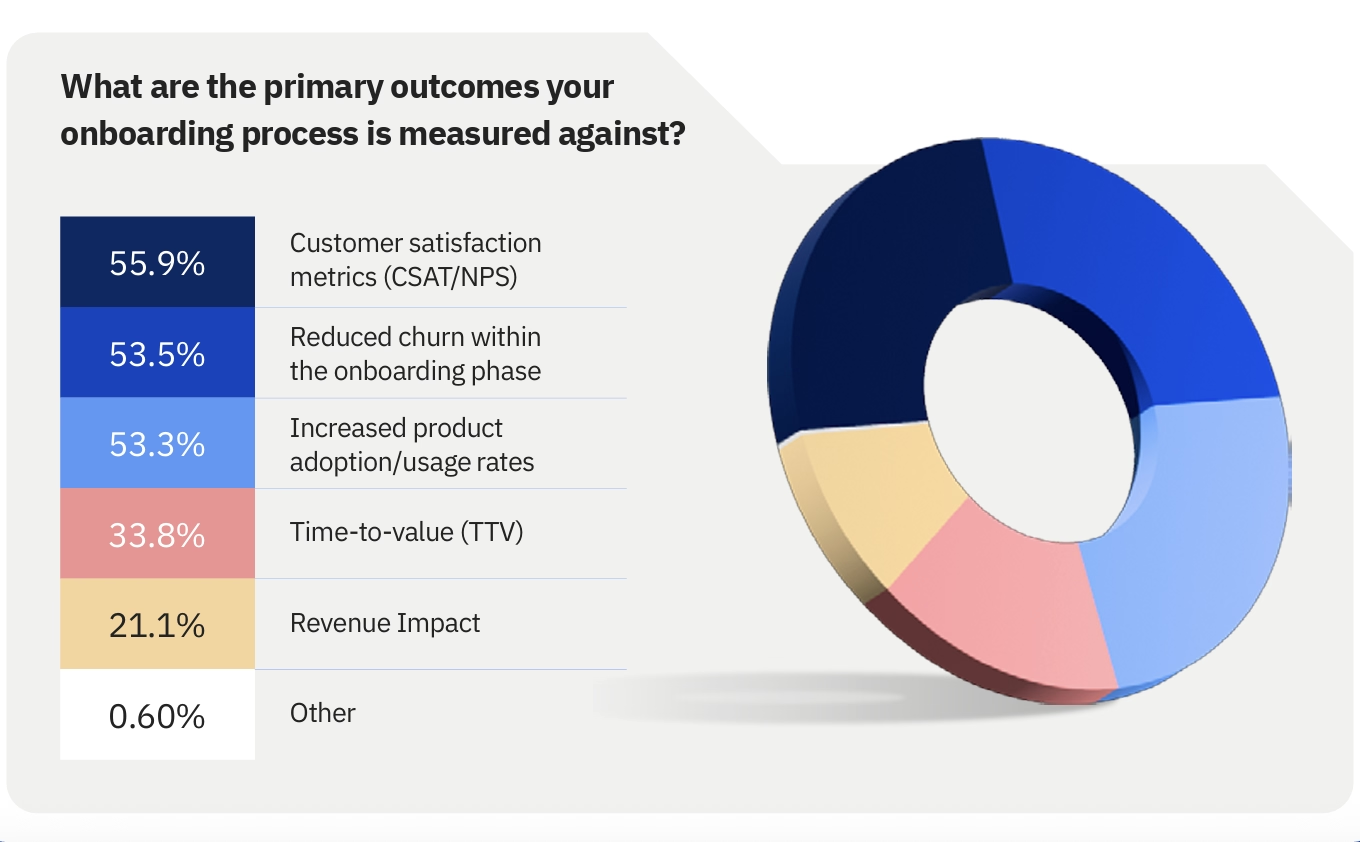
The first step is knowing what to measure. According to Rocketlane’s 2025 report, the top 5 metrics against which onboarding success is measured are: customer satisfaction metrics (CSAT/NPS), reduced churn during the onboarding period, increased product adoption, Time-to-value (TTV), and revenue impact.
But tracking metrics alone isn't enough.
You also need to understand which specific in-app actions predict activation and then design your onboarding to move every new user toward those actions.
Justin Hammond, a senior B2B SaaS growth strategist, says with his interview with Luke Marshall, the CEO of Baremetrics:
You want to be able to make statements like ‘Of the 100% of people who converted in the last 30/60/90 days, 60% of them did this action.’ So, look at all the unique actions that successful users, people who converted into paying customers, took within your app within a certain timeframe, within 24 hours, within 48 hours, within a week. What are those successful actions that all the people took? Then, build your onboarding around those actions. ”
Hammond explains that detecting the common actions that successfully convert and/or activate users, and building your own onboarding experiences in line with this “golden funnel,” will give you the highest chance of onboarding success and user conversion.
This, of course, takes some time and a trial-and-error process.
Or, at least, a decent amount of A/B testing with your onboarding.
Here’s the rest of Justin Hammond’s interview with Luke Marshall for more best practices and tips&tricks on how to optimize your onboarding process:
#7 Keep onboarding accessible and repeatable for future reference
Just like you cannot design and ship the perfect onboarding flow in your very first try, you also cannot “onboard” a user perfectly once and then leave them on their own. You should keep your onboarding materials accessible for several reasons.
New team members join accounts that have been active for months…
Users need to revisit a workflow they learned during onboarding but haven't used since…
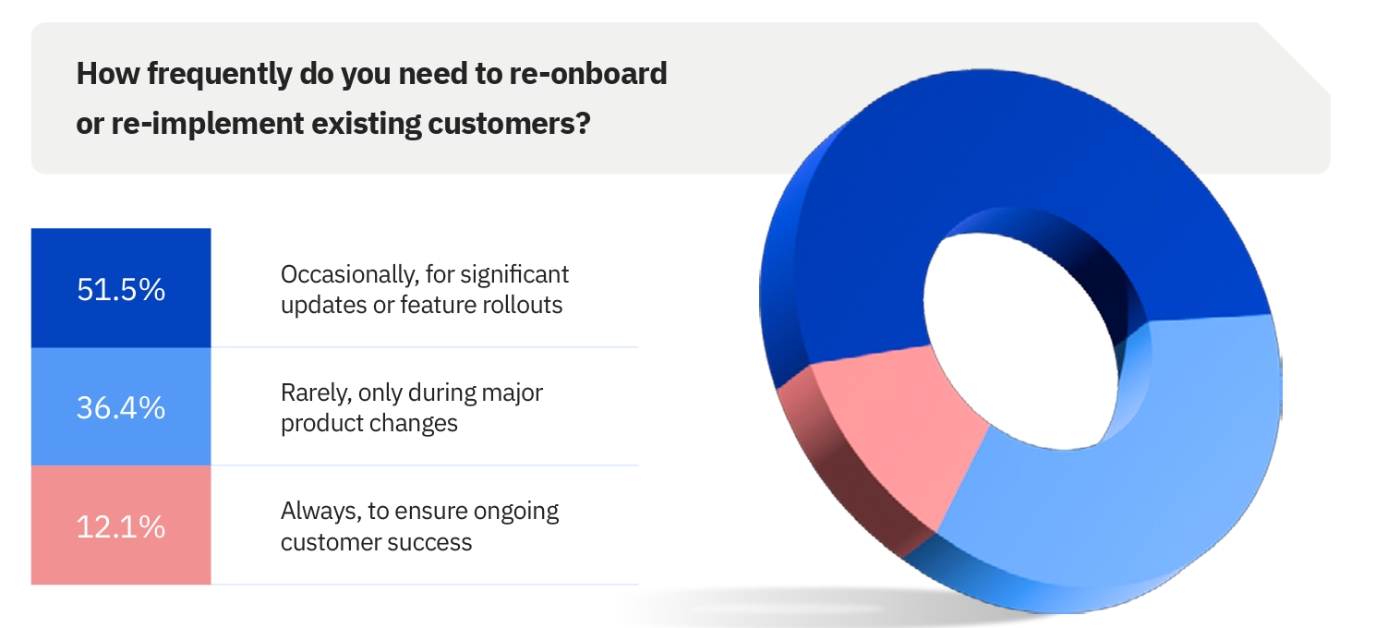
And yet Rocketlane’s 2025 survey finds that only 12% of companies regularly and strategically re-onboard their existing customers.
To keep your onboarding accessible and repeatable:
- Store your core onboarding walkthroughs in your in-app resource center so users can relaunch them at any time.
- Make your best practices guides and advanced feature documentation easy to find and share internally.
- Design onboarding so that a new team member joining an existing account can get up to speed independently.
- Periodically prompt dormant users with a re-onboarding nudge that surfaces features they haven't tried yet.
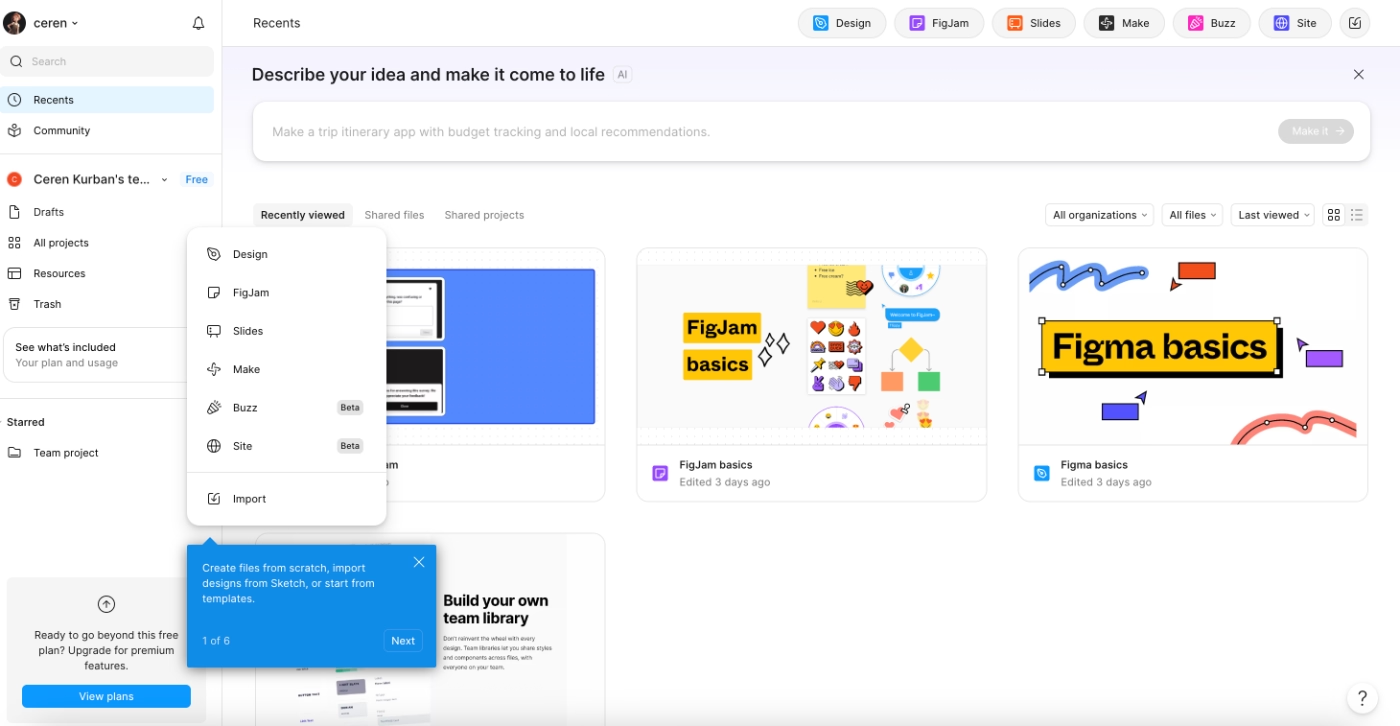
Figma does a good job of this, and keeps its core feature walkthroughs and best-practices decks accessible on the home page:
#8 Onboard existing users for new features and updates
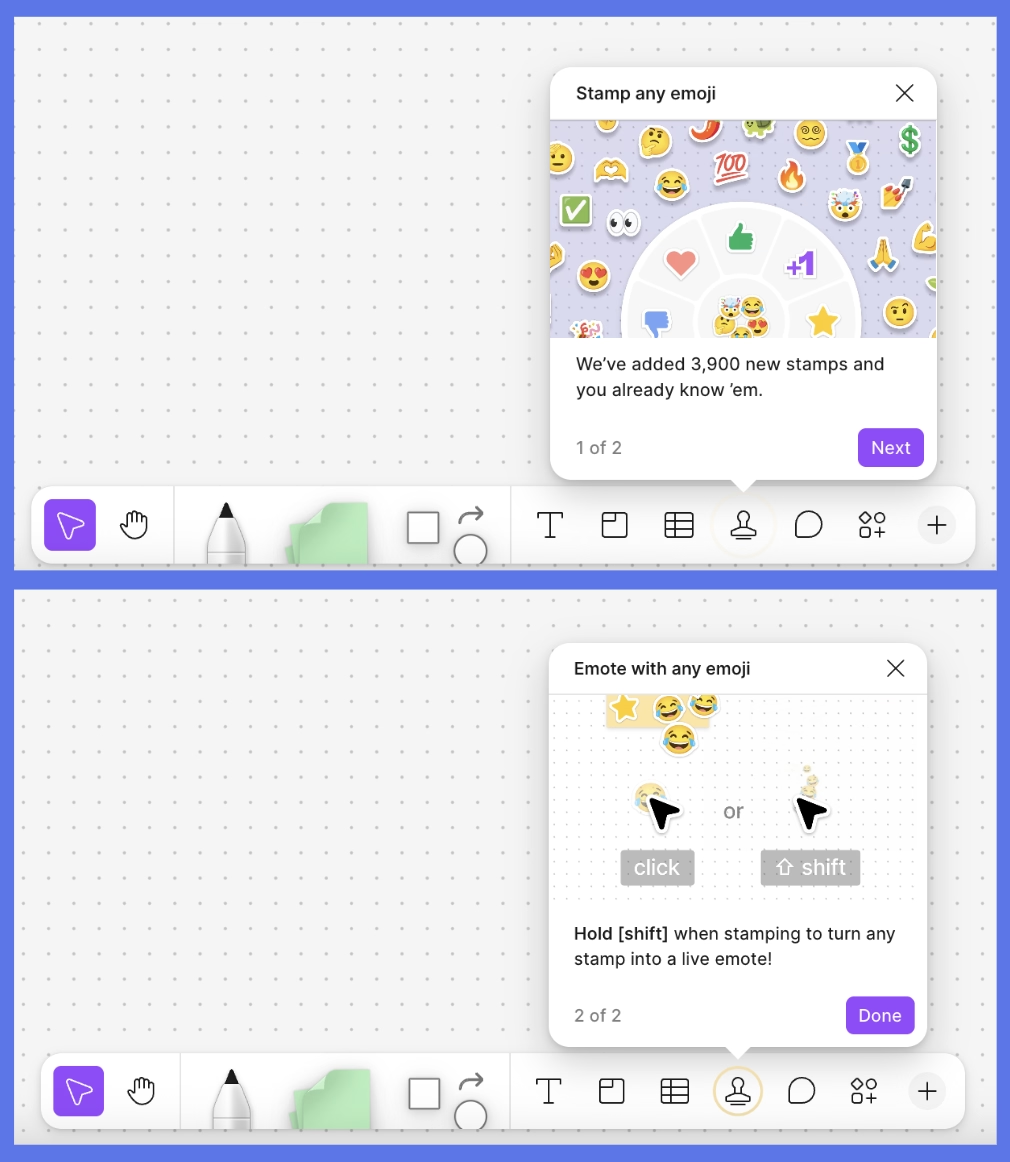
Users who've been in your product for a year don't automatically know about something you released last month. If they don't know it exists, they can't use it. And unused features are one of the clearest predictors of eventual churn.
All this means that onboarding is not only for “new users”, actually, but for “new” use cases, capabilities, features, flows, and UI designs.
Here’s how Figma onboards its existing users for new features, fo example:
B2B SaaS Onboarding Metrics to Track
- Product activation rate: The percentage of new sign-ups who reach your defined activation milestone.
- Time to first value (TTV): How long it takes from sign-up to the user's first activation event.
- Core feature adoption rate: The percentage of users regularly engaging with your key features within the first 30 days. Low adoption at this stage is an indicator of churn.
- Onboarding completion rate: The percentage of users who complete your primary onboarding flow.
- Trial-to-paid conversion rate: Directly tied to how quickly users reach their Aha Moment during onboarding. If this number is low, onboarding is usually a contributing factor.
- Signup-to-onboarding start time: Are users even beginning the flow after signing up?
- Signup-to-onboarding completion time: How long does the full flow actually take in practice vs how long you designed it to take?
- Multi-seat activation rate: In B2B, the percentage of accounts that expand from a single seat to team adoption after onboarding.
(Here’s a more detailed guide to measuring onboarding success.)
XX Real Life B2B SaaS Onboarding Examples
Customer.io’s in-app onboarding flow with sample data
One of the biggest friction points in B2B SaaS onboarding is the blank slate problem. A new user signs up, lands on an empty dashboard, and has no real way to understand what the product looks like when it's actually working. They can read the copy, watch a demo video, or click around, but none of that is the same as experiencing the product with real data in it.
Customer.io solves this by onboarding new users into a pre-populated environment.
Customer.io does not leave users alone with the sample data but offers in-app guidance via feature walkthroughs, too.
Here’s a tooltip that invites the new user to take a guided tour of the People page:
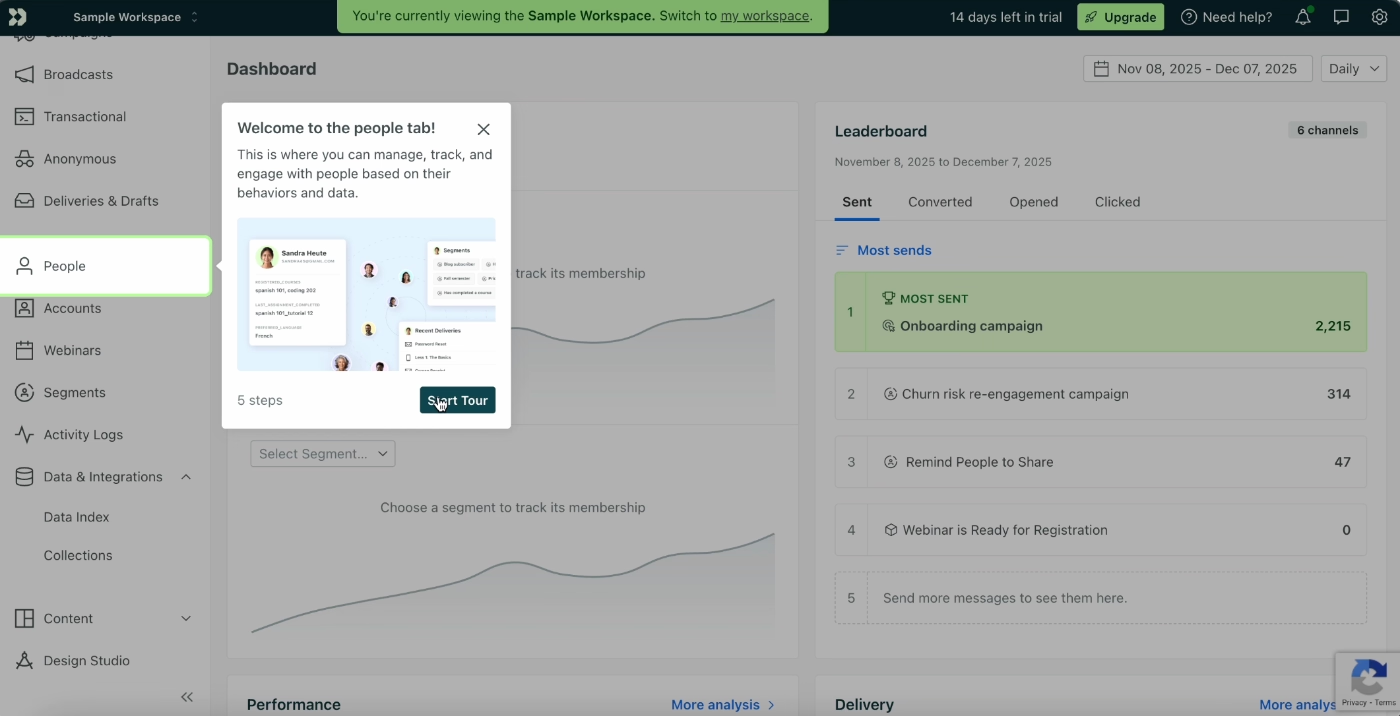
The tours are focused, meaning that each tour focuses on one feature/page and goes over the buttons on one subpage of the UI and/or capabilities of a specific workflow.
The tooltips have short, to-the-point descriptions of the features/buttons and their use cases.
Each guide is no more than 5-6 steps, as well.
Here’s an example step from the People tour:
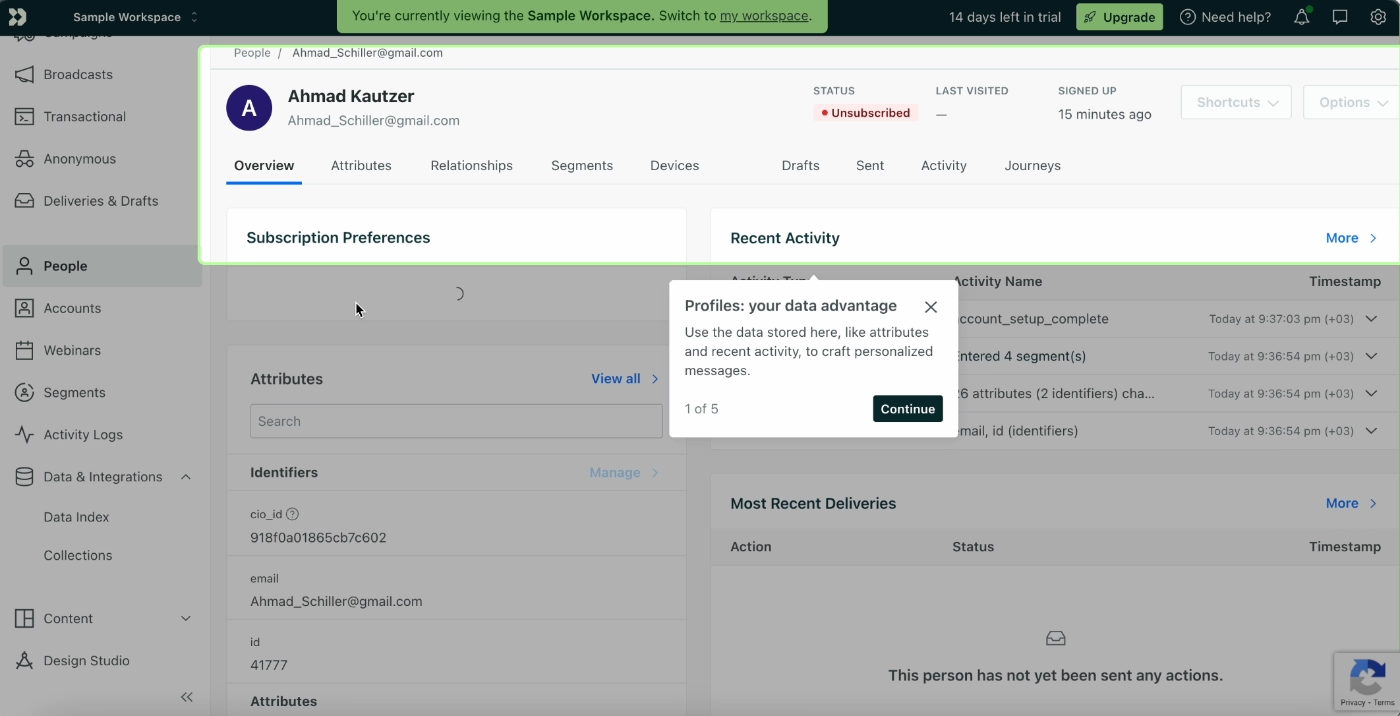
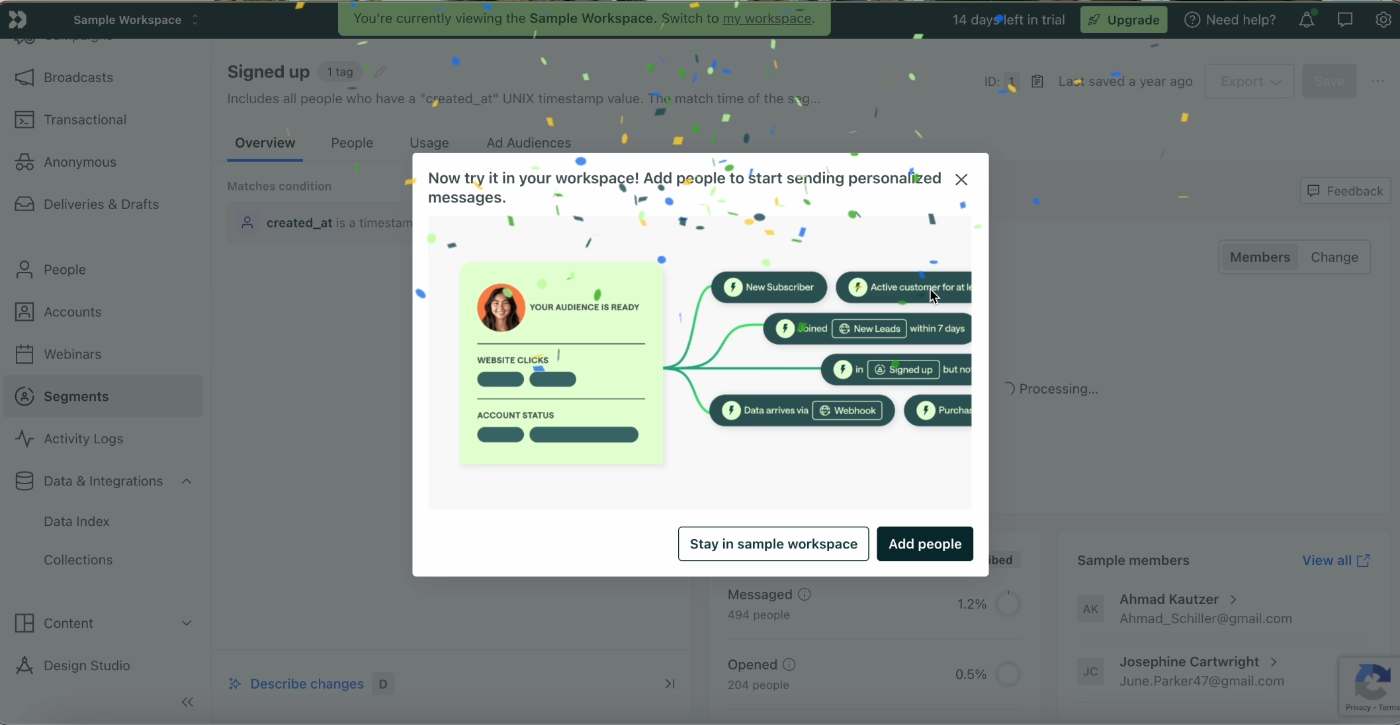
After the walkthrough/tour, Customer.io triggers a celebratory model with confetti and encourages the user to try out what they’ve learned with their own data and not just the sample data in the sample workspace.
✅ What is good about Customer.io’s B2B onboarding experience:
- Sample data removes the blank slate problem.
- In-app guidance is layered on top of the sample data.
- Tours are scoped tightly to one feature or page at a time.
- The exit modal celebrates completion and redirects users toward the next action.
Twilio’s onboarding personalization based on the tech-savviness of a new user
Twilio's product is inherently technical, but not all of its users are engineers. Some are developers who want to jump straight into the API. Others are operations or marketing people who need to get something built without writing a single line of code.
Sending both of them through the same onboarding flow would be a disservice to both.
Twilio handles this with a personalization survey early in the onboarding process that asks: How do you want to build?
The options map directly to the user's technical comfort level and tell Twilio everything it needs to know about what kind of setup guidance, documentation, and onboarding flow to surface next for this new user.
Here’s the survey:
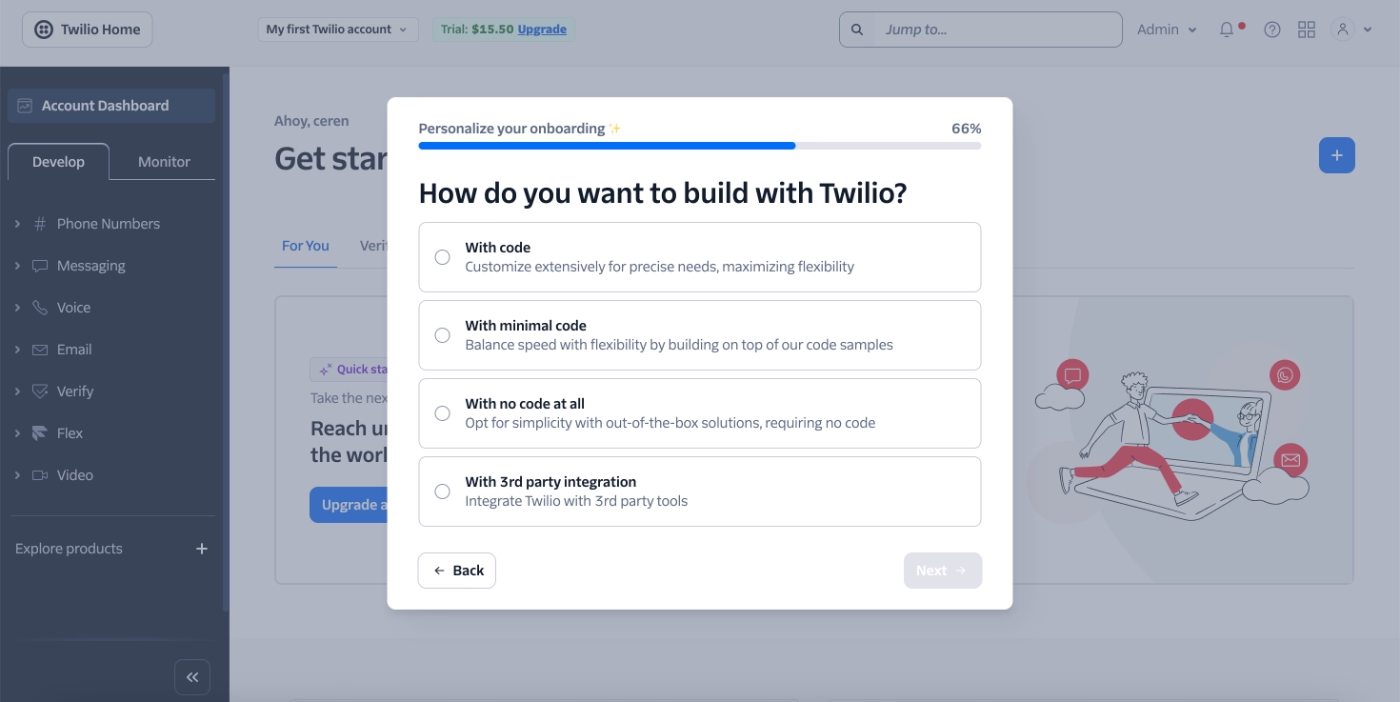
✅ What is good about Twilio's B2B onboarding experience:
- It allows Twilio to get to know its customer base.
- It doesn’t scare non-technical users away while also saving technical users time on unnecessary guidance.
- Gives a customer-centric and user-friendly brand image from the start.
Salesforce’s gamified advanced product onboarding
Salesforce is not the easiest B2B SaaS tool by any means… It has very powerful but complex capabilities, comes with a steep learning curve, and often times requires lengthy setup and implementation processes.
But the Salesforce team is aware of this complexity and structures its onboarding accordingly.
Trailhead is a fully gamified product education platform that turns ongoing learning into something users can actually enjoyably follow.
Because Salesforce has a lot of use cases, it runs a quick survey to personalize each new user’s learning experience and steer them towards the most relevant course (Trail).
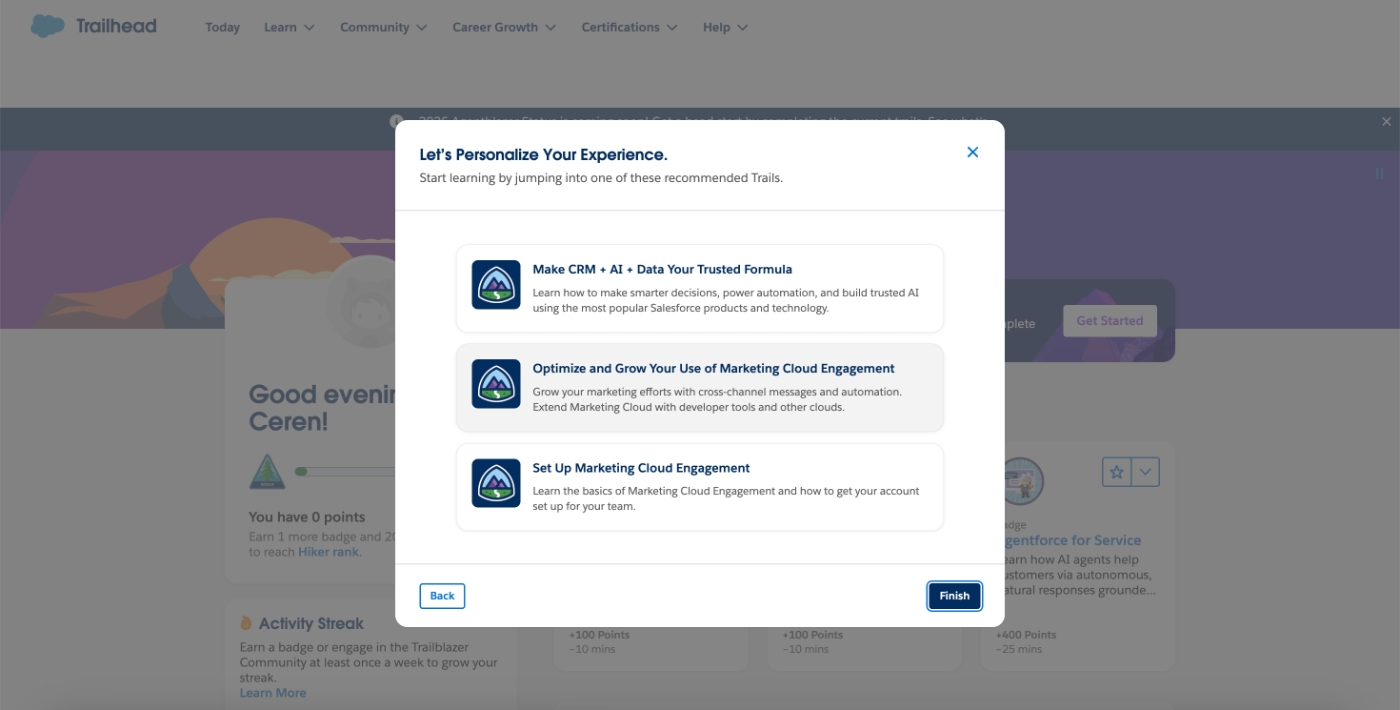
"Trails" are structured learning paths built around specific roles, use cases, and skill levels. A new Salesforce admin can follow the Admin Beginner trail. A sales rep has dedicated trails for pipeline management and forecasting. A developer has their own set of technical tracks.
Each Trail is broken down into individual modules, so users can progress at their own pace and pick up wherever they left off.
Here’s an example Trail:
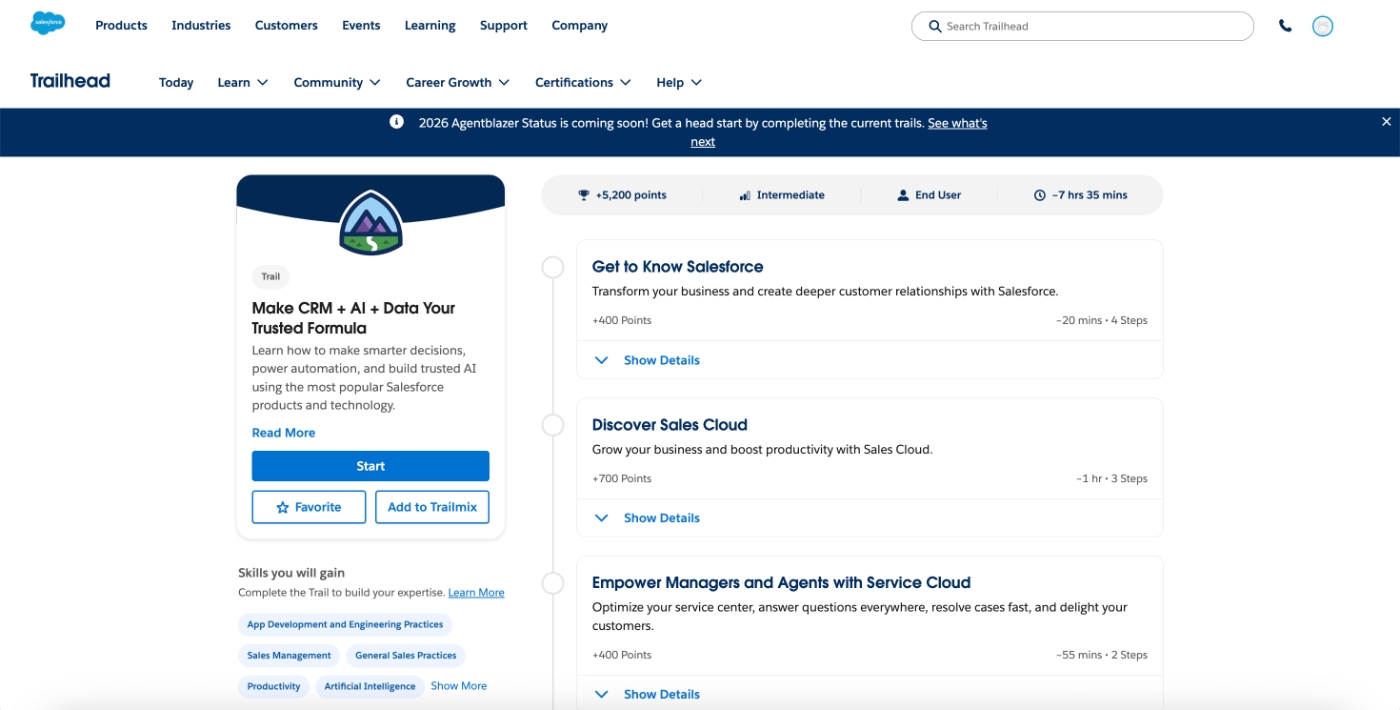
Salesforce’s Trailhead has a strong gamification layer.
Users earn points for completing modules and badges for finishing full trails. These accumulate into a public Trailhead rank, which is actually a recognized credential in the Salesforce ecosystem that professionals actively put on their LinkedIn profiles.
✅ What is good about Salesforce’s B2B onboarding experience:
- Trailhead extends onboarding well beyond the initial setup window.
- Learning paths are organized by role and use case.
- The points and badge system creates motivation to keep going (or starting).
- It builds community, as Trailhead ranks and badges are public, shareable, and recognized across the Salesforce ecosystem.
Linktree’s onboarding checklists with already-completed steps
Linktree's onboarding checklist is a clean, practical example of the endowed progress principle at work.
The checklist has 6 steps, but by the time a new user sees it for the first time, 2 of them are already marked as complete. These are tasks Linktree actually walked the user through during the signup flow itself.
So when the checklist appears, the user hasn't just "started" but they're already a third of the way done.
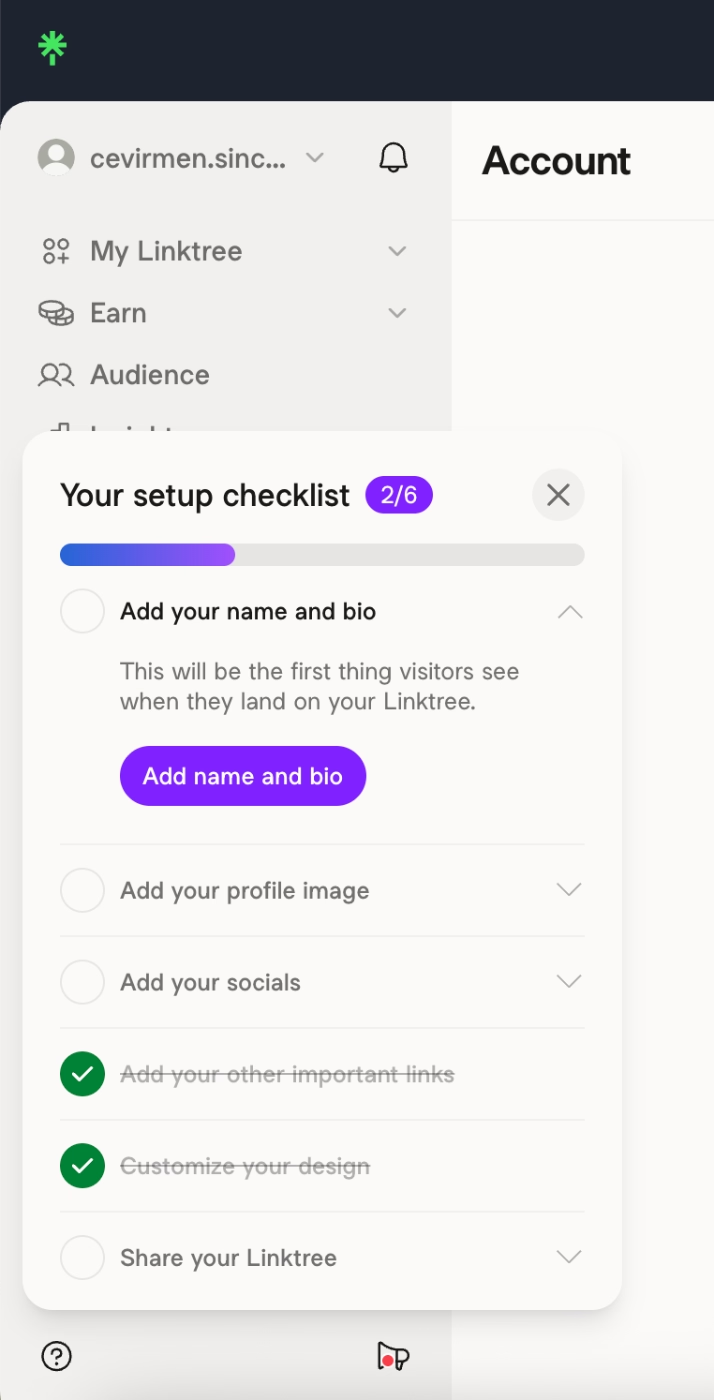
✅ What is good about Likntree’s B2B onboarding experience:
- The checklist is short. A 6-step checklist is manageable and not scary.
- Starting at 2/6 rather than 0/6 changes the user's mental framing of the tasks.
Rows’ onboarding tooltip that helps users get better AI outputs
Rows eliminates the initial account creation flow entirely and allows new users to start using the app before ever creating an account.
This is becoming more common with AI tools. ChatGPT does the same thing.
And the logic is to remove every barrier between the user and their first experience, and hope people will experience value faster.
But there's a pitfall that's specific to AI tools, and this zero-friction approach in general.
When a product delivers results within seconds, the quality of those results depends almost entirely on what the user puts in. A vague prompt gets a vague answer. And a new user who doesn't yet know how to use the tool well is very likely to get a mediocre first result, conclude that the product isn't that impressive, and leave.
What we’re trying to say is that zero friction can lead to zero perceived value if the first output isn't good enough to hook the user.
To address this issue and prevent quick but low-quality outcomes, Rows triggers a tooltip that encourages a new user to engage with the advanced filters to refine their input and get a better result.
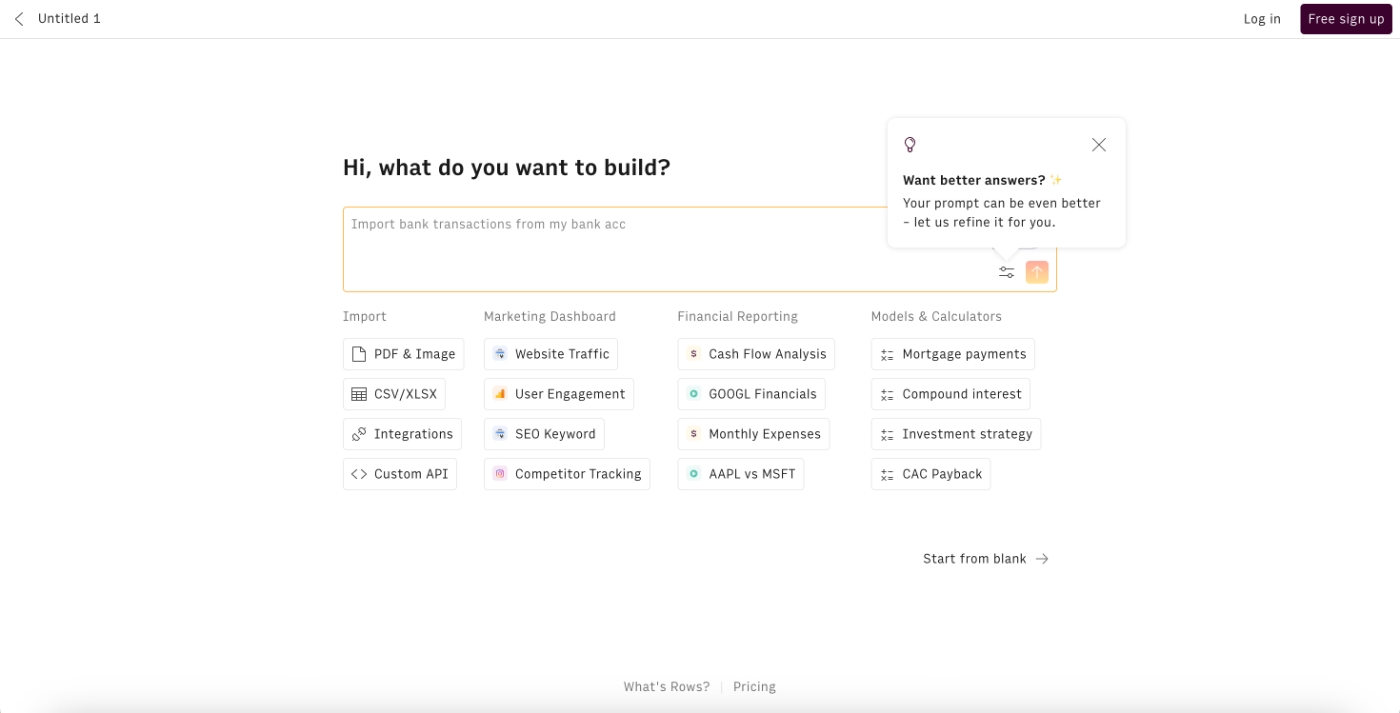
✅ What is good about Rows’ B2B onboarding experience:
- It protects the Aha Moment. The first output a user gets from an AI tool shapes their entire perception of it, and this well-timed tooltip increases the chance that the user’s first experience is a good one.
Coda’s optional in-app onboarding
Coda dedicates a sub-page in the app to its onboarding checklist, instead of using a floating widget. The page is still organized like a checklist, but the dedicated space allows for much more depth: each section has multiple steps, and every feature covered includes a video tutorial alongside the feature engagement checklist.
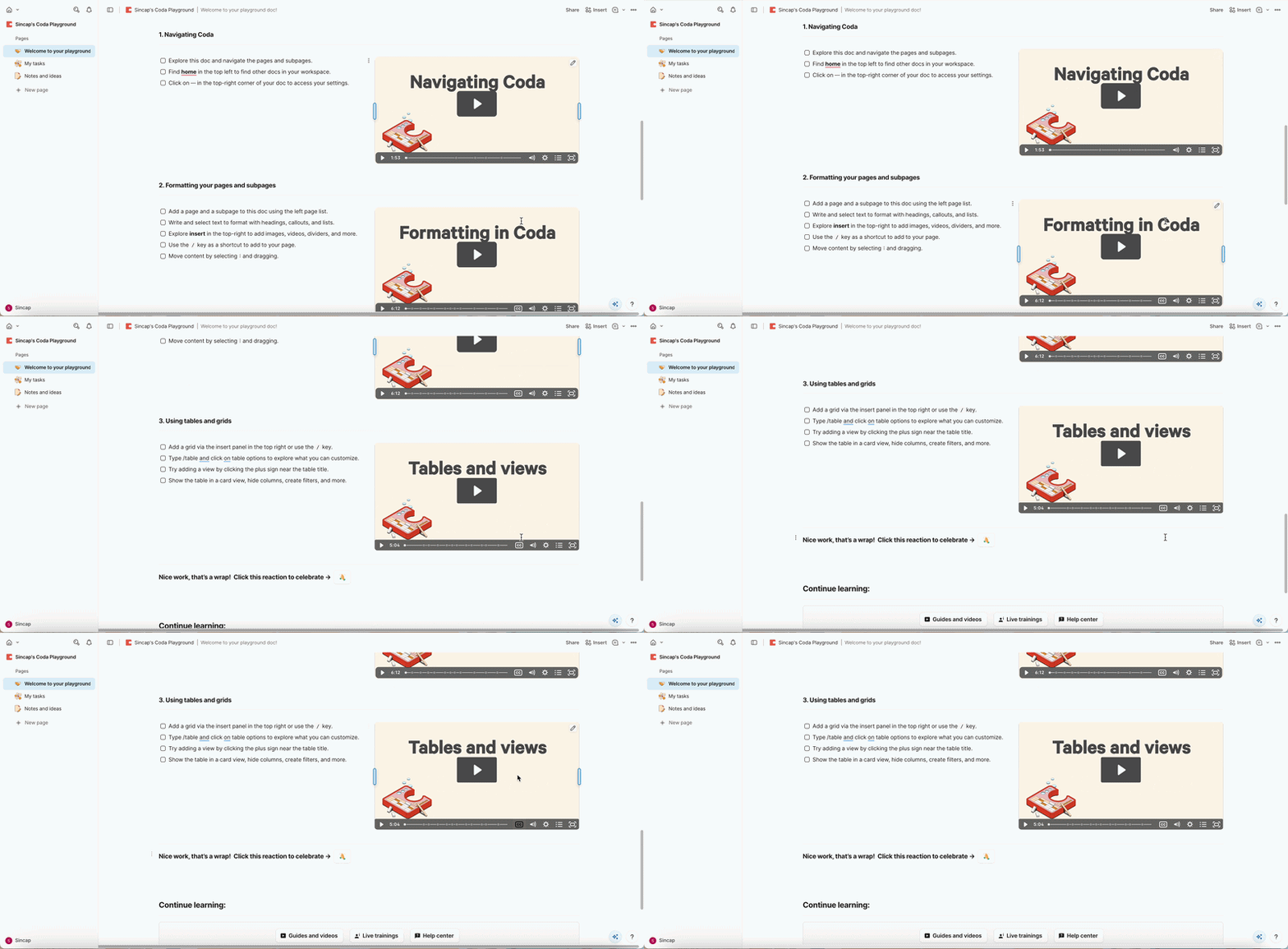
Alongside the hub, Coda also offers interactive in-app walkthroughs for individual features, but crucially, these are optional and not automatically triggered.
Here’s a modal that doesn’t continue with the next tour but asks the user whether they would like to take the next tour:
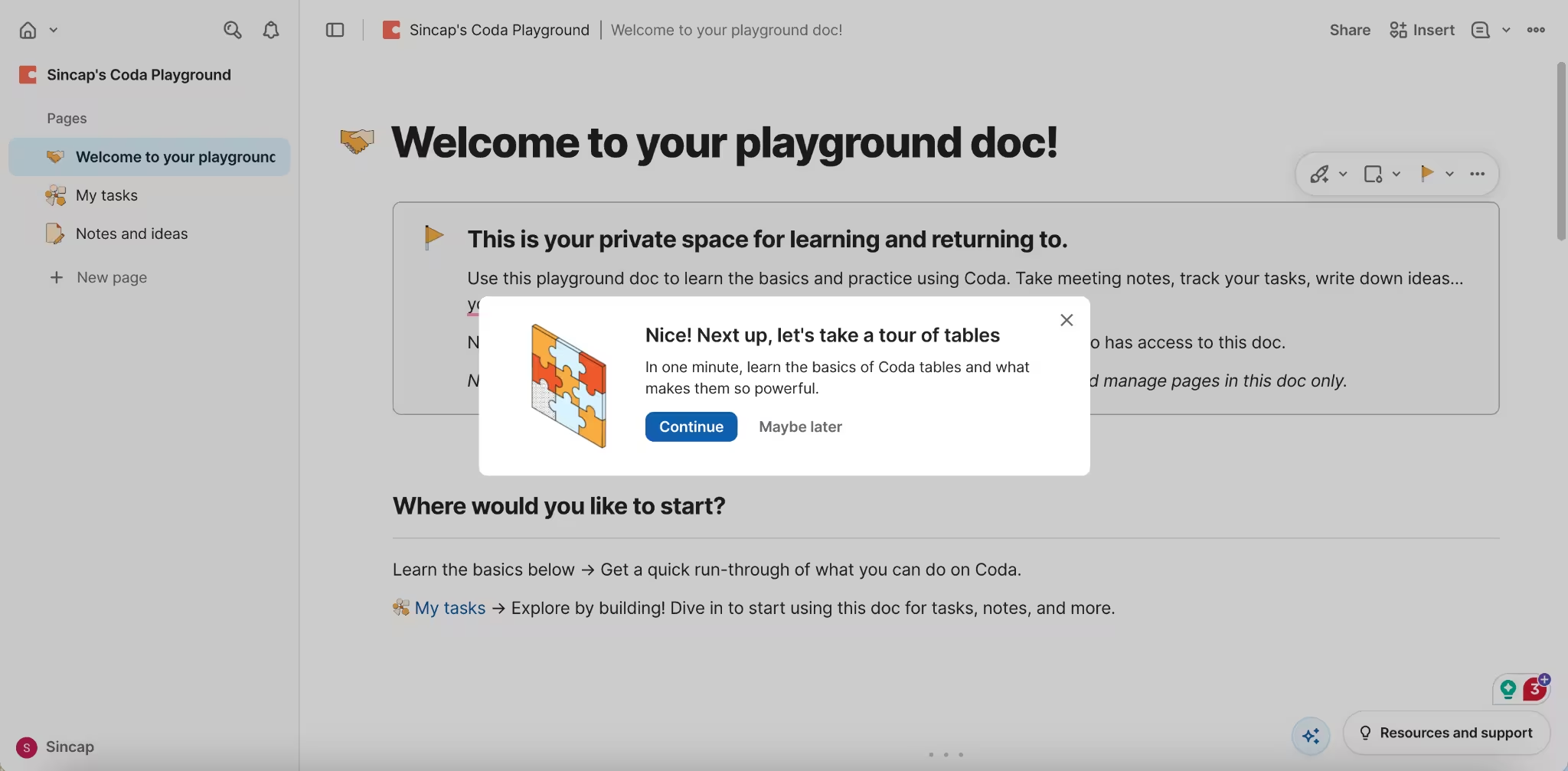
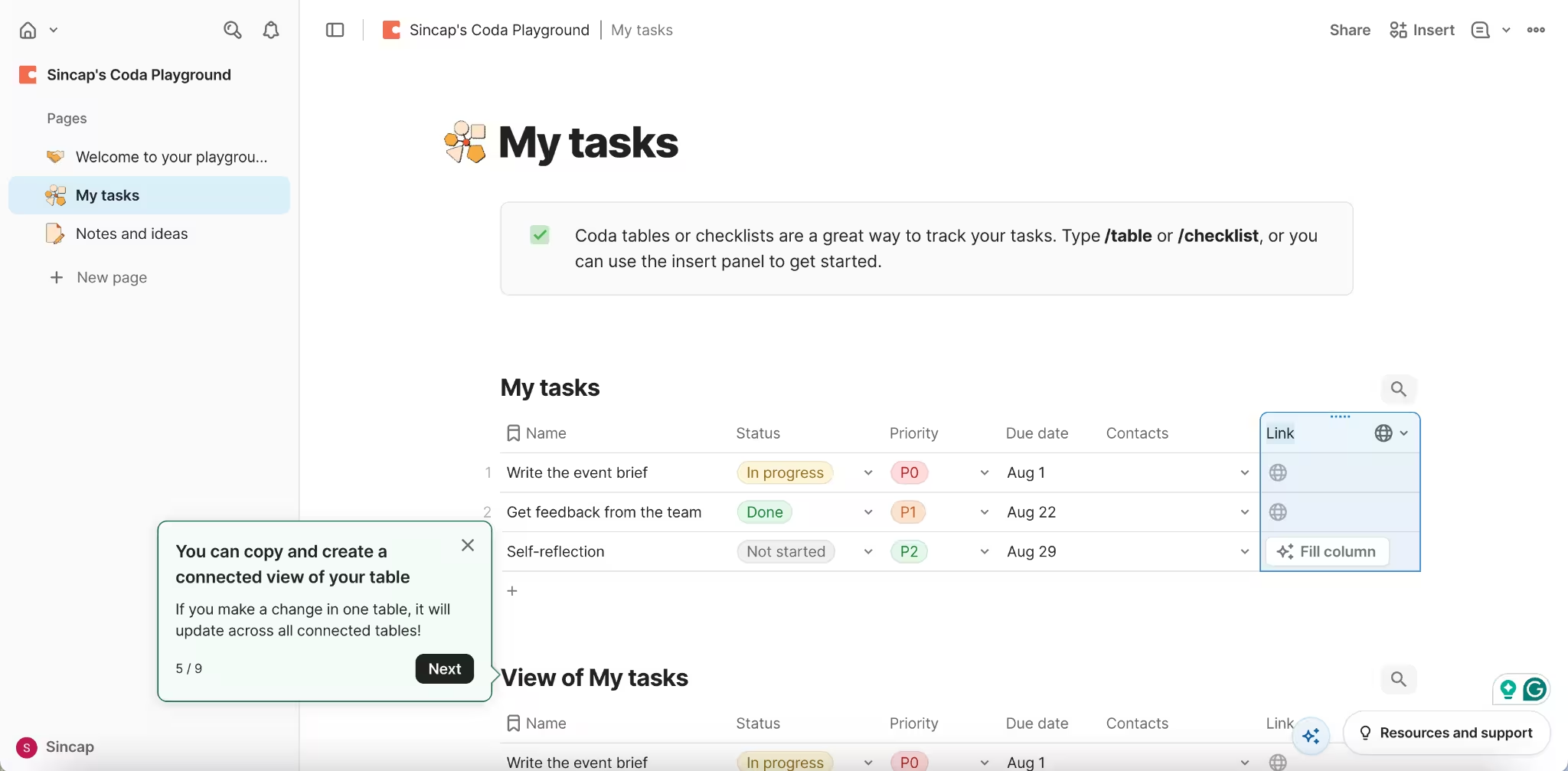
However, it's worth noting that some of Coda's tours run long, reaching 9 steps sometimes, which pushes past the generally recommended limit.
✅ What is good about Coda’s B2B onboarding experience:
- The dedicated onboarding page is the right call for a longer onboarding checklist.
- Making interactive tours optional respects the user's autonomy.
- Offers both interactive onboarding as well as video onboarding.
Front’s sandbox style in-app demos
Front onboards new users into a sandbox environment, which lives in the actual app, but only as a separate tab, and comes with sample data. So it’s similar to Customer.io’s onboarding approach, in a way.
Front, too, offers interactive in-app tutorials that go over the sample data and help users understand how the platform works, what the key workflows are, and how they can explore the sample data more meaningfully.
Here’s a tooltip that encourages the new user to take a tutorial that goes over the sample data:
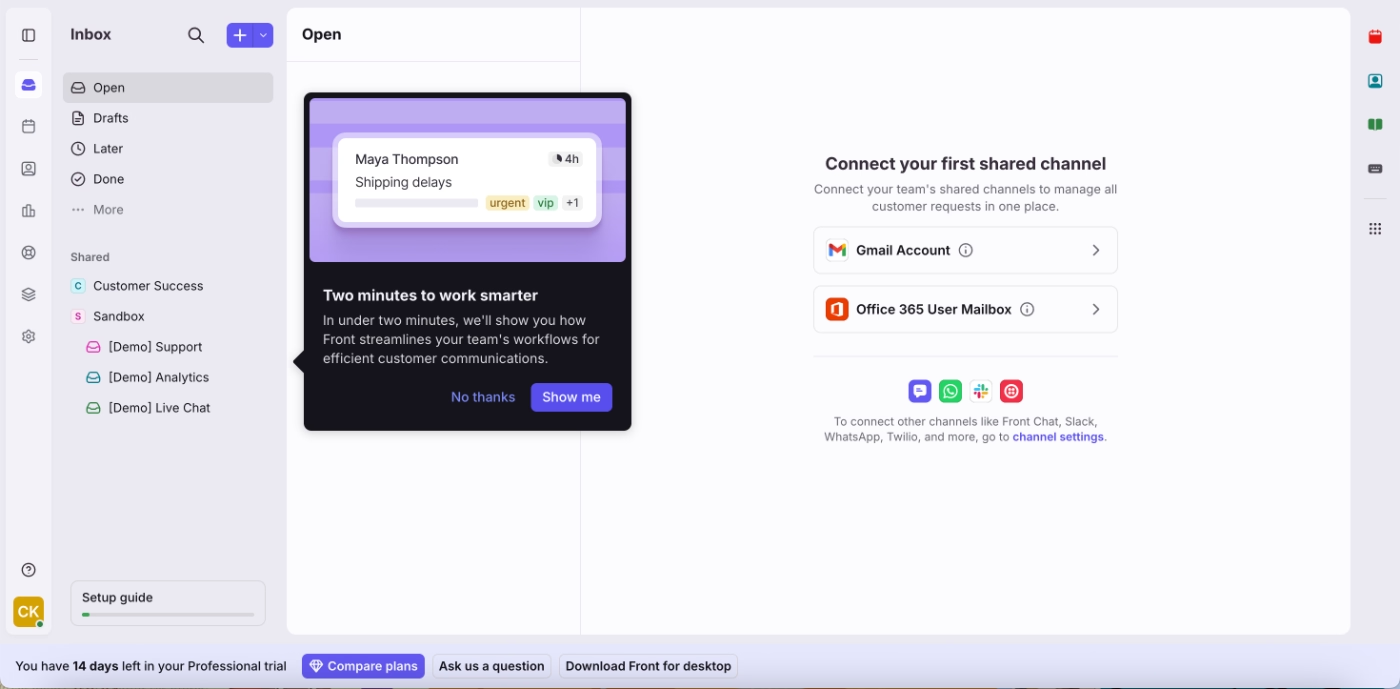
Unlike most sandbox implementations, the sample data and onboarding tutorials don’t disappear after the initial tour. Users can come back to them as many times as they want.
The tutorials are short, around 4-5 steps. And they have a conversational tone.
Here’s an example tooltip from one of the tours:
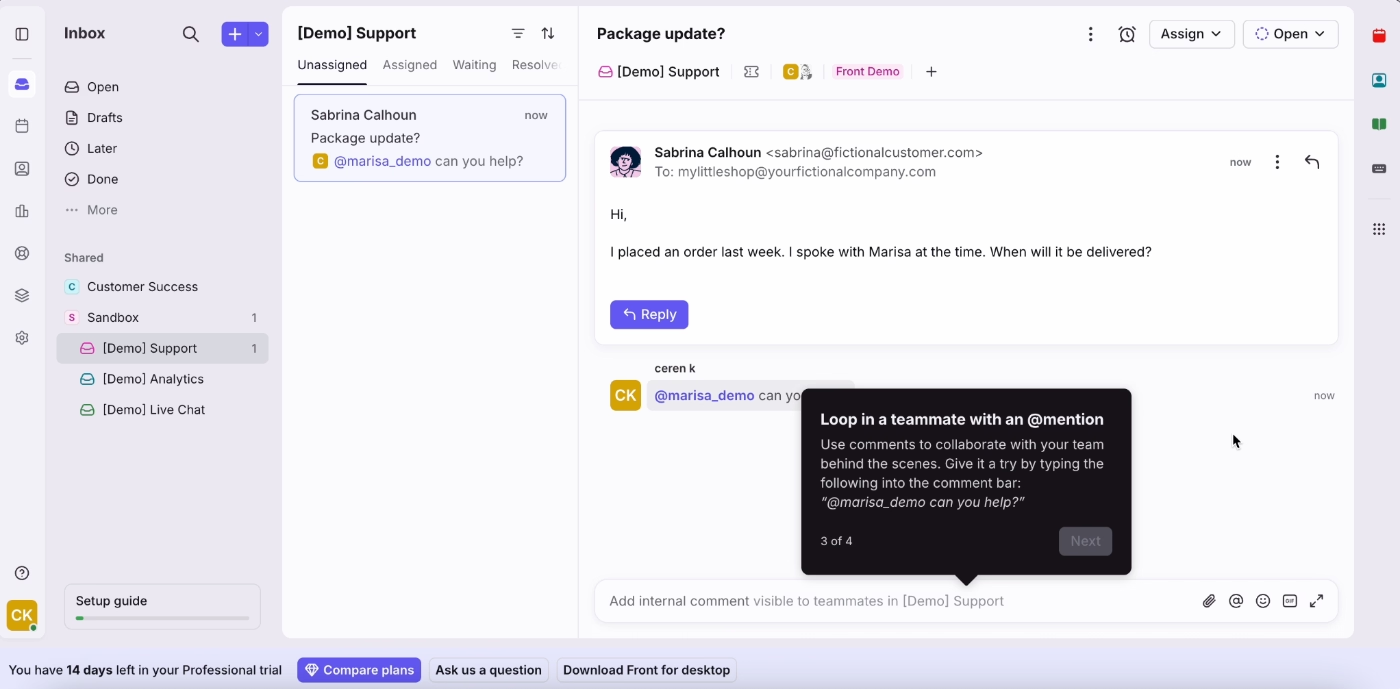
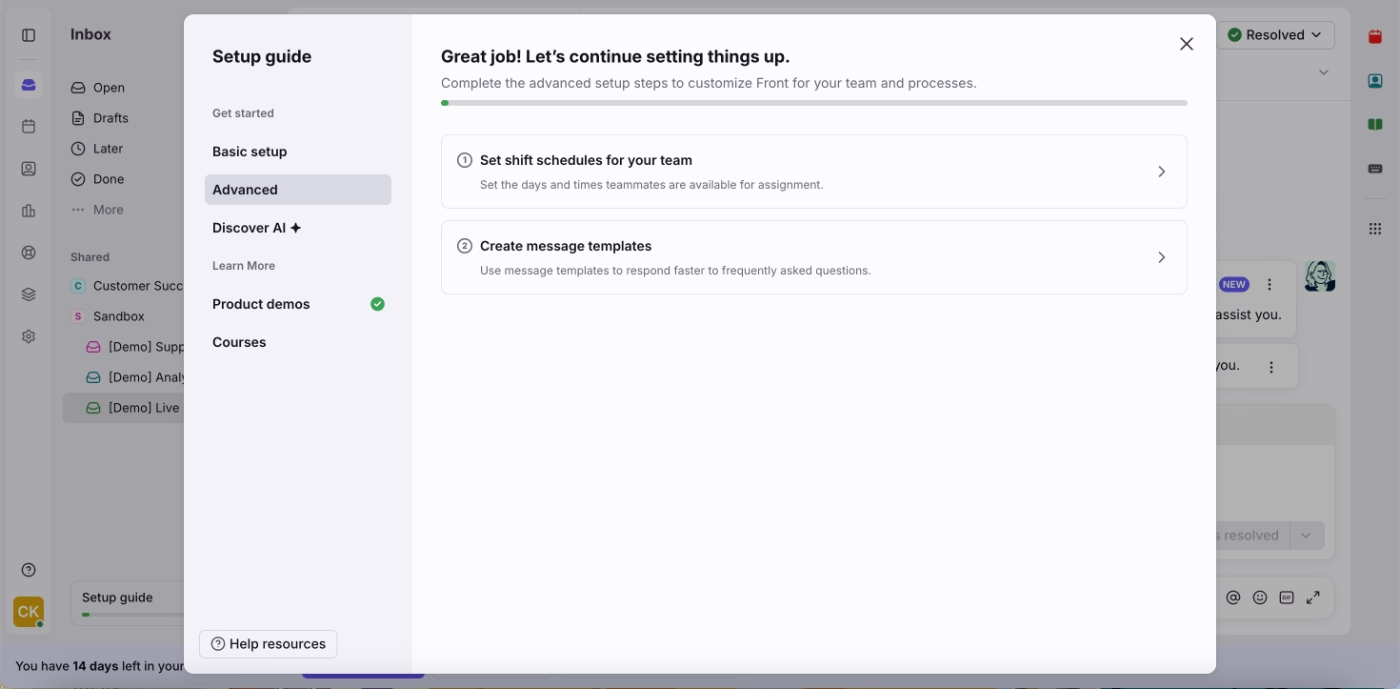
The onboarding checklist covers a lot of ground, but it's organized into tabs (basics, advanced, and so on) so users never see everything at once. Each tab is focused and manageable on its own.
Here’s the basic setup tab, for example, with 5 tasks:
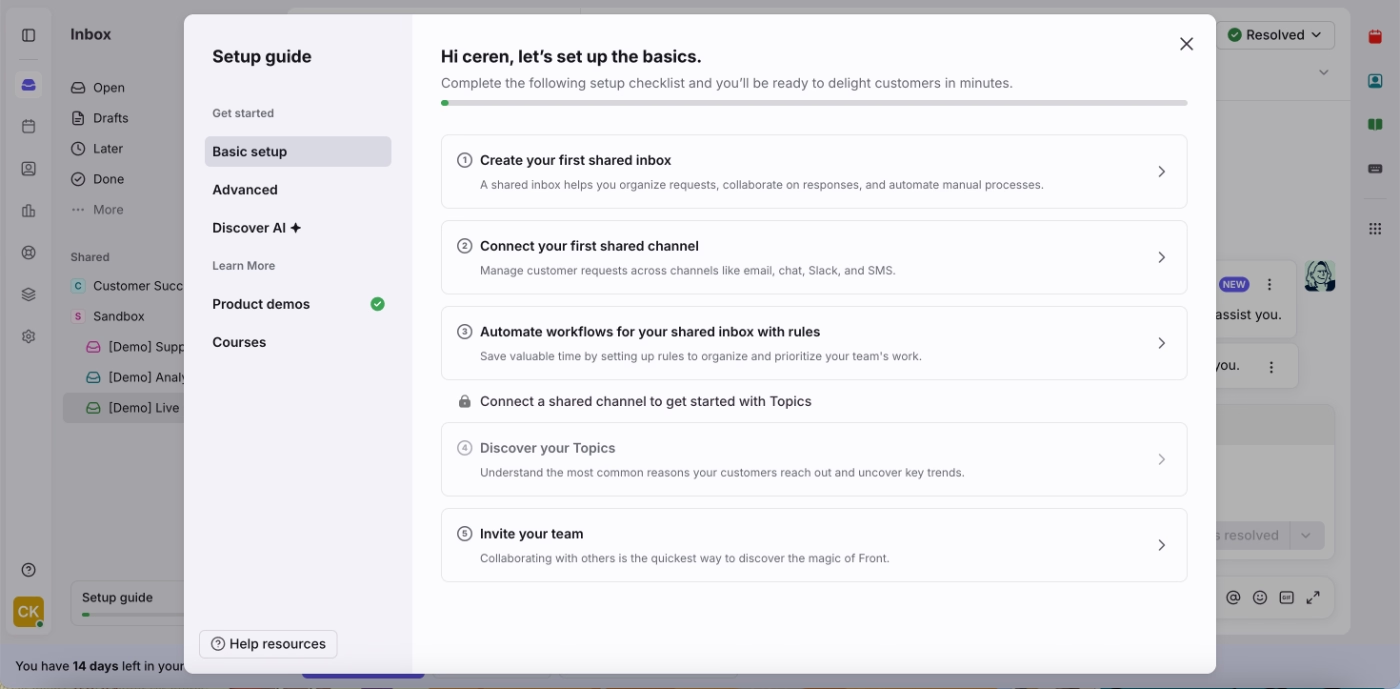
And here’s the Advanced tab, with only 2 tasks:
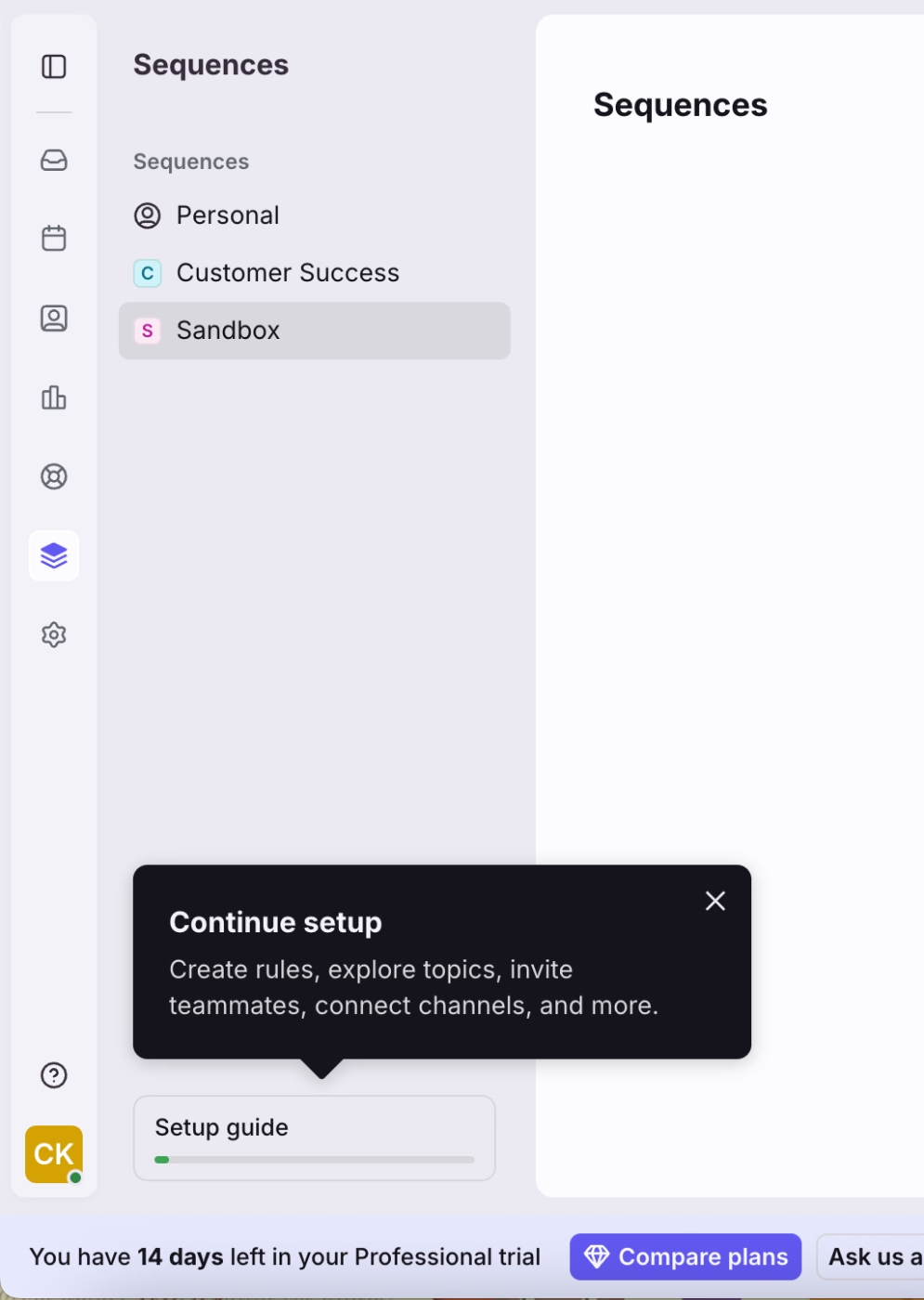
Finally, Front triggers a gentle reminder tooltip to draw users’ attention to the checklist widget in case they haven’t noticed it, or engaged with a few tasks and left the rest untouched for some time.
✅ What is good about Front’s B2B onboarding experience:
- Short, conversational tours make the guidance feel approachable.
- Sample data is accessible until the user deletes it.
- Tabbed checklist structure keeps onboarding content from feeling overwhelming.
To Wrap Up…
Okay, so B2B SaaS onboarding has a lot of moving parts, but we covered pretty much all of them and went over enough real examples to get some inspiration from.
Now the ball is in your court.
Go experiment, see what sticks, and find what your users actually respond to.
Frequently Asked Questions
What's the difference between B2B and B2C SaaS onboarding?
B2B SaaS onboarding is more complex in almost every dimension. It typically involves onboarding multiple users with different roles and technical levels, has higher stakes (business budgets, team workflows, and contracts on the line), often requires custom configuration or integration work, and needs to serve a diverse, global customer base. B2C onboarding is optimized for a single person getting to value in minutes. B2B onboarding is optimized for an entire organization getting to value, which takes more planning, more personalization, and more ongoing support.
What is the most common B2B SaaS onboarding model?
The trend is clearly toward hybrid, a combination of automated in-product guidance for the repeatable parts of setup, paired with human touchpoints at the moments that genuinely need them. Pure high-touch is still common at the enterprise end. Pure self-serve is common at PLG-focused SMB tools. But most mid-market B2B SaaS companies have landed somewhere in between.
What's the difference between onboarding and implementation in SaaS?
Implementation is the technical part, like integrations, data imports, configurations, and admin setup. Onboarding is broader; it includes implementation but also covers user education, feature adoption, and making sure the customer actually reaches their desired outcome. A completed implementation doesn't automatically mean successful onboarding if users still don't know how to use the product effectively.
How do I measure whether my B2B onboarding is working?
There are some clear signals to look for, like product activation rate, time to first value, core feature adoption within 30 days, onboarding completion rate, and trial-to-paid conversion rate. If those numbers look healthy, your onboarding is probably doing its job. If they don't, session replays are a great place to dig deeper. Watching real users move through your product tends to surface friction points. You may also want to keep an eye on multi-seat activation. In many B2B tools, that's where the real value kicks in, and it's a signal that your onboarding is working not just for the individual user but for the account as a whole.

.png&w=3840&q=75)