.svg)
.svg)
.svg)
.svg)
.svg)

.svg)
.svg)


.svg)

Unexpected from a product experience tool, you might have had a bad encounter with Pendo.
If not, perhaps you’re here to learn more about it and its alternatives.
In any case, this article covers all the points you need to know about before making a decision ⬇️
TL;DR
- Pendo is a mobile app-friendly product analytics tool with a great focus on analytics and insights; it offers guides to onboard users, session replays to track user behavior, and analytics to track material usage.
- However, Pendo’s analytics capabilities run short for two specific goals: providing qualitative data and delivering insights on user journey.
- UserGuiding: Emerging as the number one Pendo alternative, UserGuiding focuses on product adoption to help end-users understand how to accomplish their goals using your product. Besides adoption, it includes multiple onboarding elements, an AI assistant, and better yet, offers a scalable pricing system.
- Appcues: Another Pendo competitor, Appcues, focuses on user engagement; it does a great job, too, as it’s the only platform that offers multi-channel messaging through in-app, email, and push notifications. Another multi-channel ability is surveys, but it’s where Appcues falls short of compared to Pendo.
- Userpilot: Userpilot is similar to Pendo in terms of engagement features, such as session recordings, in-app announcements, and onboarding materials. However, the features this alternative offers are more robust and inclusive. However, Pendo has the upper hand in analytics, for sure.
- Userflow: Compared to Pendo, this alternative offers a more user-friendly interface and it shows especially in the creation process of user onboarding materials. The drag-and-drop builder makes Userflow a great alternative to Pendo if you’re looking for simplicity. Unfortunately, the same cannot be said for its analytics when compared to Pendo.
- Product Fruits: This Pendo competitor has an edge when it comes to self-service since it supports a native knowledge base and allows you to send in-app announcements, unlike Pendo. However, you will notice the lack of reports and advanced analytics with this one if you’re used to Pendo.
- WalkMe: In contrast to Pendo, WalkMe is an alternative that’s ideal for employee training and productivity due to its main use case being employee onboarding. Thus, you should choose WalkMe if these are the pain points you wish to solve for your business.
- Intercom: This Pendo alternative offers top-notch customer support thanks to its features, including an AI agent and knowledge base. While the former feature is ready to use in Pendo (but doesn’t have chatbot abilities), the latter is only available through an integration; thus, you can make your choice if your use case is the same as Intercom’s.
- Intro.js: Intro.js is similar to tools like Appcues when it comes to delivering in-app product tours. However, it’s far more developer-driven, offering full control through code. That said, it lacks built-in analytics, segmentation, and engagement features, so it's best suited for simple use cases or teams building custom solutions from scratch.
- Shepherd.js: Compared to Pendo, this tool is a more budget-friendly alternative with more customization options. The floating UI makes Shepherd.js a great alternative if you’re looking for building simple product tours.
- Chameleon: Chameleon offers a more affordable and flexible alternative to Pendo when it comes to custom in-app experiences. Custom targeting and flow builders are especially easy to adapt without needing technical knowledge. However, Pendo’s standalone features including analytics are way more effective.
- Whatfix: Compared to Pendo, Whatfix excels in employee training and internal tool adoption, especially across enterprise environments and desktop applications. However, it doesn’t offer the same depth in product analytics or native in-app feedback capabilities that Pendo is known for.
What is Pendo?
Pendo is a product analytics tool with four use cases:
- Product adoption
- User feedback
- Customer experience
- Product analytics

In order to cater to these needs, Pendo has a comprehensive amount of features, including:
- Product Insights: Pendo’s analytics allows you to obtain application and user data, enabling you to understand what users do inside your product.
- Product Roadmap: The roadmap permits you to prioritize your product initiatives and communicate your vision with internal and external parties.
- In-app Guides: Guides accelerate the time-to-value process for your users by helping them understand what they can achieve using your services.
- Session Replay: Showing how users spend time on your platform, session replays dig deeper into user behavior.
- In-app Surveys: In-app surveys facilitate the feedback collection process by using surveys that don’t interrupt the user experience.
Moreover, Pendo is compatible with mobile devices, so, you can reach product analytics and track events for both web and mobile applications.
What are the weaknesses of Pendo?
Pendo can help you with a lot, but it also raises some concerns regarding specific topics, such as:
- Analytics-based Functions: If you’re an early startup or you already have a third-party analytics service, then it’s highly likely that you don’t need Pendo in your tech stack.
- Not-so-working Analytics: For a tool this focused on analytics, there are many bad reviews on the way Pendo works with analytics; thus, you might need to think twice before committing to it. Check out what users said about Pendo in 2024 on G2:

- Feature Creep: While Pendo’s main focus is analytics, it offers several more services to enhance your users’ digital experience, creating feature bloat where side features outpower the core ones.
- Unscalable Pricing: Pendo doesn’t have a transparent pricing system that allows you to scale according to your business growth.
- Hard to Use: Due to a user-unfriendly interface, Pendo doesn’t facilitate the navigation process for users to access the feature sets easily.
11 Best Alternatives to Pendo (Free & Paid)
Here are our nominees:
#1 Pendo vs. UserGuiding
- G2 Score: 4.7⭐/5 (573 reviews)
UserGuiding is a no-code product adoption platform that focuses on aiding your adoption efforts.
Contrary to Pendo, it has multiple use cases that help boost adoption, from user onboarding to self-service help.
For example, UserGuiding is home to multiple UI elements, such as product tours, onboarding checklists, tooltips, hotspots, and in-app announcement modals, to engage users from the get-go, while Pendo doesn’t include as many elements.
Another example is to aid your self-service support channels: knowledge base and AI assistant.
While Pendo lacks the former feature (and UserGuiding doesn’t), the latter allows you to analyze feedback and create guides only; UserGuiding, on the other hand, enables you to provide instant support to users through its chatbot capabilities in different languages.
Last but not least, UserGuiding is a user-friendly platform that requires no code and works with a Chrome extension, while Pendo requires a technical team to get started and continue.

See how UserGuiding compares to Pendo for yourself 👈
Let’s see how Pendo and UserGuiding compare in terms of product features and capabilities side-by-side:
| Pendo | UserGuiding | |
|---|---|---|
|
In-App Guidance |
Create interactive guides, tooltips, and onboarding modules. |
Create product tours, hotspots, tooltips, and onboarding checklists. |
|
Knowledge Base |
No native knowledge base capabilities. However, there are integration options for the in-app resource center. |
Combine your educational materials into a standalone knowledge base and connect it to your in-app resource center for easy access within your product. |
|
User Feedback |
Send NPS surveys via both in-app and email channels. Feedback collection and user research capabilities require an upgrade to Pendo Listen. |
Gather user feedback and insights through in-app surveys, including NPS surveys, CSAT surveys, onboarding surveys, feature request surveys, support tickets, and more. |
|
In-App Announcements |
No pop-up, slideout, or banner capabilities. However, there are announcement modules within the resource center. |
Communicate your updates and feature releases through in-app announcement modals, such as slideouts, banners, and pop-ups. |
|
AI Agent |
Utilize internal AI capabilities for feedback analysis (Pendo Listen), and guide creation. No AI agent/support chatbot capabilities for end-users. |
Provide instant support in your users’ language and automate onboarding with real-time guidance offered by AI. |
|
Segmentation |
Segment your users based on product usage, guide interactions, or user/ account data and attributions. |
Segment your users based on user actions/ attributions to personalize their product experience. |
|
Product Analytics |
Monitor user interactions and create detailed reports for funnels, paths, retention, and workflows. |
Observe user flow and engagement metrics in the analytics dashboard to spot friction areas. |
|
Event Tracking/Goal Tracking |
Track user events, create detailed dashboards, and record user sessions. |
Set up and track goals for UserGuiding materials and user attributes. No native event-tracking features. |
|
Product Updates/Roadmap |
Use product roadmaps to plan, prioritize, and communicate tasks and feature releases. |
Announce and categorize your releases in a standalone Product Updates page. |
But that’s not it; seeing how these solutions differ in some other crucial areas besides features might also help you choose the one to adopt:
| Pendo | UserGuiding | |
|---|---|---|
|
Integrations |
Connect your product, knowledge base, feedback, support, and data tools. Available integrations include: Salesforce, HubSpot, Intercom, Gainsight, Optimizely, Zendesk, Qualtrics, and more. |
Connect your CRM and analytics tools to sync data and boost user onboarding. Available integrations include: Amplitude, Webhooks, Salesforce, Intercom, Mixpanel, Segment, Slack, Google Analytics, Woopra, and HubSpot. |
|
Pricing |
No transparent pricing. |
Starting from $174/mo (billed yearly) for 2000 MAU. |
|
Technical Requirements |
Steep learning curve and heavy reliance on technical teams for setup and maintenance. |
Little to no learning curve. |
|
Compliance & Security |
SoC2 Type 2, GDPR, CCPA, TX-RAMP, and HIPAA compliant. |
SoC2 Type2, GDPR, ISO 27001, LGPD compliant. Check all the other security & compliance documentation here. |
|
Device Supported |
Web applications, mobile applications, and iFrames. |
Web applications. No native mobile app support. |
|
Support |
Live support with limited work hours and a self-serve knowledge base. |
Access helps easily through 24/7 live support or a self-serve knowledge base. |
These differences also play a part in user reviews, too.
Based on G2’s quarterly report, you can see clearly that UserGuiding is preferred to Pendo in the following topics and receives more positive comments:


UserGuiding Pricing
UserGuiding has three pricing plans available, along with a free plan:
- Support Essentials: Forever Free!
- Starter: $174/monthly; billed annually.
- Growth: $349/monthly; billed annually.
- Enterprise: Custom pricing.
UserGuiding offers an adjustable pricing system based on the Monthly Active Users (MAUs) you have, and the minimum number of active users is 2,000.
The biggest difference between the first and second plans is the unlimited usage of some essential features, such as guides, hotspots, checklists, and resource centers; the second differentiator is the number of seats growing from 1 to 5.
The last plan is the most inclusive and offers several unlimited items, including seats, customization themes, and the number of domains.
The free plan covers all your essential needs for in-appsupport, including a knowledge base, resource center and product updates. In additional, it includes 50 free AI resolutions.
#2 Pendo vs. Appcues
- G2 Score: 4.6⭐/5 (331 reviews)
Appcues is a tool offering product adoption and user onboarding services.
These services are divided into five categories: user onboarding, feature adoption, user feedback, self-serve support, and trial conversion.
Appcues includes the following features:
- Flows and checklists
- NPS surveys
- Segmentation
- Event tracking
- Product analytics
- Banners and pop-ups

Appcues Wins at…
- Multi-channel User Engagement: Appcues has several user interface elements to increase engagement, including banners, pop-ups, and push notifications, whereas Pendo offers only announcement modules for resource centers.
- Pricing: Pendo doesn’t reveal any pricing information on its website; however, it’s known that Pendo’s plans are even more expensive than Appcues’ plans.
Pendo Wins at…
- User Feedback: Pendo’s NPS surveys have an edge over Appcues’ due to the ability to send them through two different channels: in-app and email.
- Analytics: While Appcues has an analytics section for flows and checklists, Pendo provides a more detailed look at not only performance metrics but also product usage metrics.
Appcues Pricing
Appcues has three pricing plans: Start, Grow, and Enterprise.
These plans alter based on the Monthly Tracked Users (MTU); for 1,000 MTUs, which is the minimum amount of users, here is how the pricing plans look:
- Start: $300/month; paid annually.
- Grow: $750/month; paid annually.
- Enterprise: Custom pricing.
The Start plan limiting some features’ usage and excluding some features from the get-go, such as the number of messages being 5K and no checklists and resource centers, might require you to purchase the next plan, which starts from $1000 a month.

#3 Pendo vs. Userpilot
- G2 Score: 4.6⭐/5 (689 reviews)
Userpilot is a product growth platform.
It covers three use cases: user onboarding, feature adoption, and user feedback.
Here are the features Userpilot has:
- Flows, hotspots, tooltips, and checklists
- In-app surveys
- Modals, slideouts, and banners
- Segmentation
- Session replay

Userpilot Wins at…
- Session Recordings: Session recordings are a must if you wish to capture user actions on your website, and Userpilot provides you with this ability better.
- In-App Announcements: Userpilot has modals, banners, and slideouts for feature announcements; however, Pendo does not have such capabilities, only announcement modals to use within the resource center.
- Pricing: As Userpilot follows a transparent pricing policy and Pendo does not, the former is the clear winner, with prices starting from $299.
Pendo Wins at…
- Product Roadmaps: While all Userpilot offers is a small news section within the resource center for announcements, Pendo includes product roadmaps to maintain communication with end users.
- AI Agent: If you’re looking for a tool with AI support to back up some operations, such as feedback analysis and guide creation, Pendo can help you with that – Userpilot, on the other hand, cannot.
Userpilot Pricing
Userpilot has three plans available: Starter, Growth, and Enterprise.
Here is how the plans break down:
- Starter: $299/month; paid annually.
- Growth: $799/month; paid annually.
- Enterprise: Custom quote.
The latter plan involves a custom number of Monthly Active Users (MAUs) and no seat limitations, with unlimited usage of features like segmentation and localization.
On the other hand, the former plan offers services for up to 2,000 MAUs and 3 seats while not including many features that the middle and last plans do, such as resource centers, surveys, funnels, and session replays – making it necessary to upgrade if you wish to benefit from the platform to the fullest.

#4 Pendo vs. Userflow
- G2 Score: 4.8⭐/5 (104 reviews)
Userflow is a user onboarding tool.
It aims to create engaged customers from the new users who land on your platform for the first time.
To do so, it has the following features:
- Product tours and guides
- Question flows
- Modals and banners
- AI agent
- Segmentation
- Event Tracking

Userflow Wins at…
- Onboarding Flow Builder: Using Userflow’s drag-and-drop flow builder makes it easy to create onboarding materials, while Pendo doesn’t offer the same experience to users due to its complexity.
- In-App Announcements: While Pendo limits you to announce through the resource center only, Userflow offers in-app announcement modals and banners.
- Design: Unlike Pendo, Userflow has a user-friendly design with less crowded elements that are easy on the eye.
- Pricing: While Pendo’s pricing remains unknown, a large percentage of users assume it’s higher than Userflow’s pricing plans, starting from $240.
Pendo Wins at…
- Analytics: Userflow’s basic material interaction metrics tracking system cannot compete with Pendo’s detailed reports for each user onboarding element it provides – if that’s an area you find valuable.
- Product Roadmaps: Pendo has your back when you need product roadmaps to maintain communication between each release; unfortunately, the same cannot be said for Userflow.
Userflow Pricing
Userflow has three pricing plans, Startup, Pro, and Enterprise respectively.
Here is how the pricing plans break down:
- Startup: $240/month; paid annually.
- Pro: $680/month; paid annually.
- Enterprise: Custom pricing.
Userflow benefits from an expendable Monthly Active Users system in which your pricing grows as your users do; thus, in the first plan, you start with 3,000 MAUs as a default, and you can increase the number of users you have from there.
The middle plan can accommodate up to 10,000 users and provides features not included in the first plan, such as localization, no-code event tracking, and unlimited surveys.

#5 Pendo vs. Product Fruits
- G2 Score: 4.7⭐/5 (123 reviews)
Product Fruits is a platform for user engagement and onboarding.
It covers 3 use cases: user onboarding, user feedback, and in-app communication.
Let me list some of the features Product Fruits has for these cases:
- Product tours, walkthroughs, tooltips, and checklists
- Knowledge base
- Surveys
- Pop-ups, banners, and newsfeeds
- AI agent
- Segmentation

Product Fruits Wins at…
- Knowledge Base: Product Fruitsh can support a knowledge base; however, Pendo lacks this feature by native means—it only allows integrations.
- In-App Announcements: Pendo only includes announcement modals within resource centers, while Product Fruits is home to several more elements: pop-ups, newsfeeds, and banners.
- Pricing: Although its pricing is little known, Pendo is deduced to be at the high end of the spectrum, unlike Product Fruits, which starts from $96 per month.
Pendo Wins at…
- Analytics: As Product Fruits only allows simple interaction metrics to be tracked, Pendo emerges as the clear winner of this category thanks to its ability to monitor user interactions and create reports for each trackable material.
- Event Tracking: If you believe in the power of tracking user events and recording user sessions, then moving forward with Pendo is a good choice since Product Fruits won’t give you that.
Product Fruits Pricing
Product Fruits has three pricing plans to choose from:
- Starter: $96/month; paid annually.
- Pro: $149/month; paid annually.
- Enterprise: Custom pricing.
Product Fruits doesn’t increase your pricing based on the number of seats, tours, or tooltips (these two are unlimited even in the first plan); rather, your pricing changes based on the Monthly Active Users (MAUs) you have.
The minimum number to start for the first two plans above is 1,500, and the difference between them is the ability to use NPS & surveys, custom events, and AI flow creation, which belong to the middle plan.

#6 Pendo vs. WalkMe
- G2 Score: 4.5⭐/5 (477 reviews)
WalkMe is an employee experience platform.
Different from the names in this list, this tool focuses on employees, not users; thus, its main use case is employee onboarding.
WalkMe has the following features:
- Product tours and hotspots
- NPS and surveys
- AI agent
- Segmentation
- Product analytics
- Event tracking

WalkMe Wins at…
- Employee-Facing Onboarding: If you’re looking for a tool for your employees rather than customers, WalkMe should be your choice since it’s built for it. Pendo, on the other hand, isn’t as suitable as this alternative to meet your employee-facing needs.
Pendo Wins at…
- Analytics: WalkMe is a great contender in analytics since it’s one of its strengths; however, Pendo provides more control over user analytics and reports.
- Technical Requirements: WalkMe is a product that requires an expert with technical knowledge to get started due to its customizable nature; even though Pendo isn’t as easy to use as the other alternatives, either – it still manages to win this section compared to WalkMe.
WalkMe Pricing
WalkMe doesn’t reveal its pricing structure; thus, you need to get a custom quote that fits your needs.

#7 Pendo vs. Intercom
- G2 Score: 4.5⭐/5 (3,338 reviews)
Intercom is a customer service platform, unlike the other alternatives on this list.
It covers three use cases: user feedback, customer support, and product experience.
It has the following features in its toolkit:
- Product tours, tooltips, and checklists
- Knowledge base
- Surveys
- Banners
- AI agent
- Segmentation
- Goal tracking

Intercom Wins at…
- Customer Support: A tool created to help out the support teams with features like banners for announcements and AI agent for customer service can help you a lot more than Pendo does.
- Knowledge Base: Unlike Pendo, Intercom enables you to create a knowledge base for your users to provide self-service support 24/7.
- AI Agent: Compared to Intercom’s AI agent, Pendo’s AI agent has limited capabilities on only feedback analysis and guide creation, while Intercom’s AI agent can back up your support services thanks to its chatbot abilities.
Pendo Wins at…
- Analytics: As Intercom doesn’t provide any metrics related to product and analytics is one of Pendo’s strong suits, the latter is the champion in this category.
- Product Roadmap: While Intercom lacks a product roadmap feature, Pendo allows you to plan your next releases and communicate them through its platform.
Intercom Pricing
Intercom has three pricing plans and one add-on plan:
- Essential: $29/month per seat; paid annually.
- Advanced: $85/month per seat; paid annually.
- Expert: $132/month per seat; paid annually.
- Proactive Support Plus: Starting from $99/month; add-on to the first three plans.
The bridge between Intercom’s plans is big in terms of capabilities; while the first plan includes only simple customer support features (such as shared inbox, ticketing system, and Fin AI agent), the second plan offers more inclusive features that a customer support tool needs: private help center, multilingual help center, and unlimited articles.
The third plan offers even better features to support your teams and customers, including real-time dashboards, advanced workflow automation, and multiple help centers.
What’s missing from each of these plans are all onboarding elements, which come in only as an add-on. Features like product tours, surveys, checklists, and push notifications can only be purchased with a plan from above, and the pricing is rather vague (except for the fact that it starts from $99) as it will be determined based on your needs.

#8 Pendo vs. Intro.js (Free option)
- GitHub Score: 4.6/5⭐ (23.1K reviews or “stargazers”)
Intro.js is an open-source library for building product tours and hints.
Its capabilities are primarily focused on guided tours, making it best suited for basic onboarding flows rather than a comprehensive product adoption platform.
Intro.js includes the following features:
- Step-by-step product tours
- Customizable tooltips
- Multi-language (manual) support
- Lightweight and developer-friendly integration
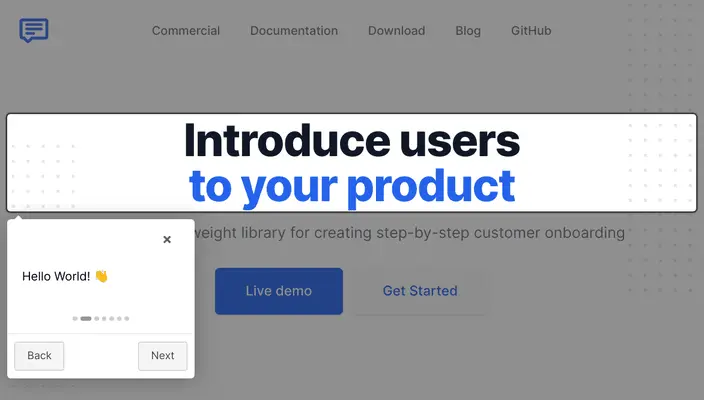
Intro.js is ideal for developers who want full control over onboarding flows without relying on third-party services or subscriptions, but it lacks the no-code tools and analytics found in modern product adoption platforms.
Pendo Wins at…
- Product Analytics: Pendo offers built-in analytics to track user behavior, feature usage, and retention, which Intro.js does not provide.
- Surveys and Feedback: Pendo supports NPS surveys, in-app polls, and user feedback tools, making it strong for continuous user research.
- Segmentation and Targeting: With robust segmentation, Pendo lets you deliver personalized experiences to specific user groups based on behavior or attributes.
Intro.js Wins at…
- Lightweight Implementation: Intro.js is a minimal, open-source library that's easy to integrate without vendor lock-in or heavy setup.
- Full Customization via Code: Developers can fully control tour behavior, styling, and logic, which is ideal for teams that want to build bespoke onboarding experiences.
- Cost-Effectiveness: Since it’s open-source and free for personal or non-commercial use, it’s a great option for budget-conscious teams or side projects.
Intro.js Pricing
Intro.js has a simple pricing structure with two main options: Free and Commercial Licensing.
Unlike Pendo, Intro.js’ pricing is based on usage type rather than Monthly Active Users (MAUs). Here's how the pricing breaks down:
- Free: Available for personal or non-commercial use.
- Commercial License: Starts at $9.99/lifetime for one project, with higher tiers for extended commercial usage and premium support.
Here’s what a user on Reddit has to say about Intro.js👇

While the free version is great for hobby projects or internal tools, commercial use requires a paid license, which is still cheaper than Pendo’s plans.
However, unlike platforms with built-in features, Intro.js does not include advanced onboarding functionality like checklists, analytics, or user targeting, which may require integrating additional tools or building those features manually.
#9 Pendo vs. Shepherd.js (Free option)
- GitHub Score: 13.2K⭐
Shepherd.js is a code-based platform that helps you create simple product tours. Shepherd.js includes the following features:
- Product tours
- Customizable guides
- Floating UI
- Tooltips
- Modals
- Navigation

Shepherd.js is a JavaScript library so you’ll need a developer to create guides and tours. However, it also gives you the flexibility to customize these onboarding materials as much as you want.
Pendo Wins at…
- All-in-One Platform: Pendo combines product tours, in-app messaging, feedback collection, and advanced analytics in a single platform, making it a one-stop shop for product teams. In contrast, Shepherd.js focuses solely on guided tours, requiring integration with other tools for a full onboarding experience.
- Data-Driven Decisions: With Pendo, teams get rich analytics and user behavior tracking that power smarter feature adoption and product development. Shepherd.js lacks native analytics, leaving data collection up to developers or third-party integrations.
Shepherd Wins at…
- Developer Control: Shepherd.js is open-source and built for customization. Developers have full control over the look, feel, and behavior of every step in a tour—something Pendo’s visual builder doesn’t allow to the same extent.
- Budget-Friendliness: As a free, open-source project, Shepherd.js is a cost-effective option for teams comfortable with coding. Pendo, on the other hand, targets mid-to-enterprise markets with pricing to match, which makes it often out of reach for early-stage startups.
Shepherd Pricing
Shepherd.js is free and open-source for personal use. There are no pricing tiers or monthly user limits. Since it’s a JavaScript library maintained by the open-source community, there are no fees for usage regardless of your Monthly Active Users (MAUs) or company size.
For commercial use, there are different plans:
- Business Plan: $50/lifetime.
- Enterprise Plan: $300/lifetime.
- Shepherd Consulting: Custom pricing.
Here’s what Shepherd.js customers say about the product:

#10 Pendo vs. Chameleon
- G2 Score: 4.4/5 ⭐
Chameleon is advertised as being “built to delight users, without you losing control”. It is essentially a product adoption platform that helps you create interactive product tours and onboarding materials like surveys.
It includes other features like:
- Modals, banners, and embedded cards
- Tooltips
- Checklists
- Resource centers
- CMD+K Search (in-app search bar)

You can also use Chameleon to link your knowledge base to the resource center to provide a self-serve support experience for users. AI recommendations for product tours and embeddables. These recommendations are informed by your content and reduce the time to write effective copy for upsell opportunities and new feature announcements.
Pendo Wins at…
- Product analytics: One of Pendo’s strongest features is its built-in product analytics. It automatically collects usage data without needing to manually tag events (thanks to auto-capture), which means teams can quickly see which features are most used, where users drop off, and how usage varies across segments.
This deep behavioral insight helps inform roadmap decisions and optimize user flows. While Chameleon provides basic engagement metrics (e.g., who viewed or completed a guide), it lacks the depth and breadth of product usage analysis that Pendo offers out of the box.
- Feedback collection: Pendo is great at collecting user feedback directly within the product experience. It offers NPS surveys, polls, and other feedback widgets that can be deployed in-app or sent via email. This multi-channel approach gives product teams a better pulse on user sentiment.
Chameleon does offer in-app surveys, but they’re more limited in format and don’t support email distribution, which can restrict your ability to gather feedback from all users.
- All-in-one platform: Pendo is designed as an all-in-one product experience platform that includes onboarding tools, product analytics, and user feedback in a single solution. For teams looking to minimize the number of tools in their stack and get everything under one roof, this unified platform can be appealing. It reduces the need for multiple subscriptions and helps centralize data.
Chameleon, while strong in engagement and onboarding, intentionally focuses on being a flexible layer that integrates with best-in-class tools for analytics and feedback. It is ideal for teams with an existing stack, but potentially less convenient for those seeking an all-inclusive solution.
Chameleon Wins at…
- Customization and design flexibility: Chameleon gives product teams more control over the look and feel of in-app experiences. Whether you're building modals, slide-outs, banners, or tooltips, every element can be styled to match your brand precisely. No developer help needed.
You can also create conditional logic and complex flows that adapt to user behavior, giving teams a way to guide users with a personalized touch. Pendo’s UI patterns are more limited in terms of design and interaction, making it harder to create fully on-brand or highly tailored experiences.
- User targeting: Chameleon allows teams to define highly specific user segments based on attributes, events, and behaviors. This level of targeting enables more relevant onboarding and engagement campaigns. For example, you can trigger different flows for new users, power users, or those who haven't tried a key feature yet.
Chameleon's built-in integrations with customer data platforms like Segment or CRMs like HubSpot make this even more powerful. Pendo also offers segmentation, but it's less intuitive and often tied closely to their analytics framework.
- Affordability: Chameleon is more transparent and flexible with its pricing. It offers a clear pricing structure on its website, with plans designed to scale with company size and usage needs, making it more accessible to startups and mid-size teams.
Pendo doesn’t disclose pricing publicly, and feedback from users consistently points to it being significantly more expensive, with a pricing model that scales quickly and often feels enterprise-focused. For teams seeking a high ROI without overspending, Chameleon offers better value.
Chameleon Pricing
Chameleon has four pricing plans available: HelpBar, Startup, Growth, and Enterprise.
These plans are priced based on team seats, features included, and monthly active users (MAUs). Here’s the breakdown of each plan:
- HelpBar: Free. Only includes CMD+K Search, a few design options, and help center integration. You cannot create onboarding flows or checklists in this plan.
- Startup: $279/mo. Includes features like product tours, tooltips, and microsurveys.
- Growth: Custom pricing. Includes everything in the Startup plan, plus A/B testing and goal tracking.
- Enterprise: Custom pricing. Includes everything in the Growth plan, plus unlimited seats for your team and localization.
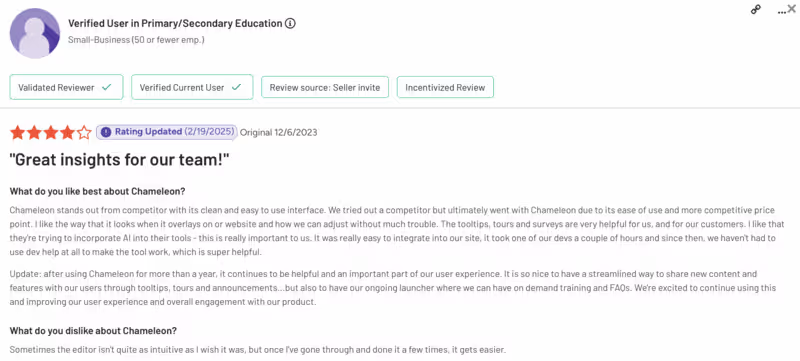
Here’s what Chameleon’s customers say about Chameleon:
#11 Pendo vs. Whatfix
- G2 Score: 4.6/5 ⭐
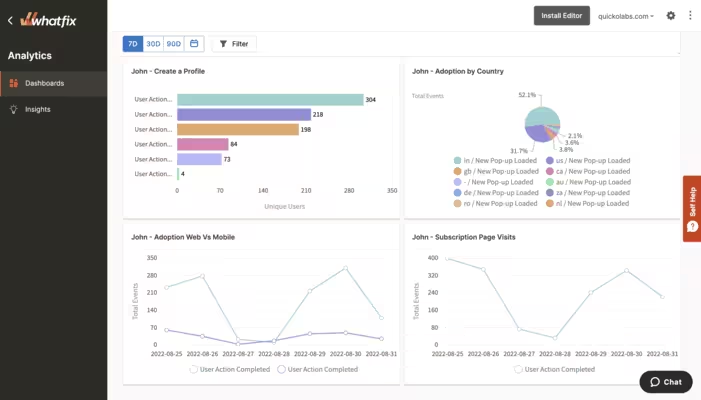
Whatfix is a digital adoption platform designed to improve user onboarding, employee training, and software adoption. Its solutions are mainly focused on internal use cases, including employee onboarding, self-guided training, and process compliance.
Whatfix includes the following features:
- Interactive walkthroughs and tooltips
- Task lists and smart tips
- Self-help widgets
- SCORM-compliant content export
- Role-based access control
- Content auto-maintenance
- Multi-platform support (web, desktop, OS)
Pendo Wins at…
- Pricing: Whatfix’s pricing is custom and depends on platform, product selection, and number of users, making it less predictable. Pendo also uses quote-based pricing, but tends to lean more toward product and marketing use cases.
- AI capabilities: Pendo includes AI-powered features such as automated feedback analysis and smart guide suggestions. Whatfix, while robust, currently lacks these AI-driven enhancements.
- Product roadmaps: Pendo includes public-facing roadmaps and idea voting features to keep users in the loop and collect product feedback. Whatfix doesn’t have built-in roadmap functionality, as it focuses more on training and process adoption.
Whatfix Wins at…
- Employee onboarding: While Pendo is more geared toward product teams and customer-facing experiences, Whatfix shines in internal training and employee onboarding, especially for enterprise use cases and internal tools like Salesforce, SAP, or proprietary platforms.
- Mirror: Whatfix offers Mirror, a tool for creating interactive sandbox environments without code. It's designed for sales, marketing, and training teams to showcase workflows without requiring a live product environment. Pendo doesn't offer it natively.
- Cross-app workflows: Whatfix supports cross-application workflows, guiding users through processes that span multiple tools (e.g., onboarding across Salesforce + Workday). Pendo’s functionality is mostly limited to within a single app experience.
Whatfix Pricing
Whatfix doesn’t offer transparent, public pricing, so you won’t find fixed rates on their website. However, their pricing structure follows a fairly predictable model based on four key factors:
- Which products you need
Whatfix offers three main products:- DAP (Digital Adoption Platform) – their core offering for in-app guidance and onboarding
- Product Analytics – for analyzing user behavior and engagement
- Mirror – for creating interactive product demos
- The platform you’ll use it on
For DAP, pricing varies depending on whether you’re using it for:- Web & Desktop
- Mobile
- Operating Systems (like Windows or Mac)
- Web & Desktop comes with three plan tiers: Standard, Premium, and Enterprise. Mobile and OS-based usage currently only have a Standard plan.
- The level of analytics you want
Product Analytics is sold separately with its own Standard, Premium, and Enterprise tiers. DAP on Web & Desktop includes Standard Analytics by default, but upgrades require buying the analytics tool. - Your user count
Costs are calculated based on:- MAUs (Monthly Active Users) for customer-facing use cases
- Employee seat licenses for internal adoption and training
There are also optional add-ons that can impact your final pricing:
- On-premise authoring
- White labeling
- 24/7 support (vs. standard 24/5)
- A dedicated Digital Adoption Assistant or Program Manager
In short, Whatfix pricing is flexible but complex. It’s ideal for enterprises needing custom configurations across multiple platforms and products but less ideal if you want upfront, self-serve pricing. You’ll need to go through a sales conversation to get a tailored quote.
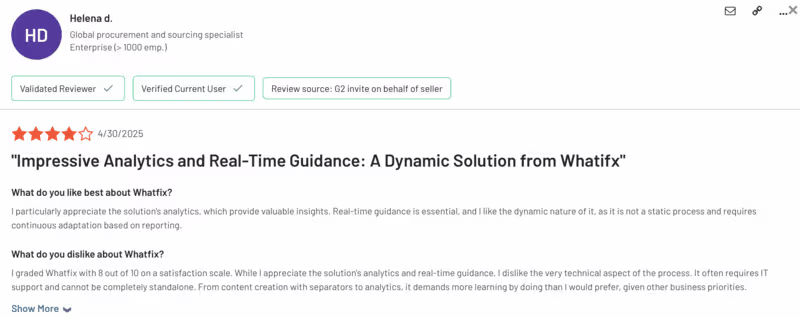
Here’s what Whatfix customers say about Whatfix:
AI Onboarding Tools
In this section, we’ll highlight some of the AI-powered onboarding tools that you can also explore as alternatives to Pendo ⬇️
- Frigade.ai: An AI-powered product assistant for building in-app onboarding experiences. It offers deep customization and integrates directly with your product’s logic and data to take action on users’ behalf.
- Hopscotch: A no-code solution for creating product tours, modals, and tooltips that helps you convert trial users into paying customers.
- Guidde: An AI-powered tool for creating video walkthroughs and tutorials by capturing your screen. Unlike in-app tools, Guidde focuses on external documentation and training content in a video-first format.
- Onboardly: An AI onboarding assistant and customer success platform that helps users navigate your product through a conversational, chat-based interface. It differs by using interactive dialogue instead of tours or videos to guide users.
In Conclusion…
Here is a table that summarizes the article:
1,000+ Teams Scaling Successfully
with UserGuiding’s Best Value Platform
start your free trial today with confidence.