UserGuiding gives us the flexibility to deliver an onboarding experience that fits each doctor’s needs and supports every region in the right language from day one.”
Yazan Al-Saif
Product Manager
FOUNDED
2011
COUNTRY
Jordan
SIZE
201-500
MARKET
Medical Equipment Manufacturing
COMPANY
Eon Dental is a full-service clear aligner company with a worldwide distribution network and a reputation for exceptional technology, products, and services. They offer two tailored solutions: Eon Aligner, a comprehensive branded solution sold directly to doctors across the MENA region, providing end-to-end support from treatment planning to manufacturing, and Eon One, an enterprise solution offering fully customizable, private-label aligners for clients worldwide.
RESULTS
Increased guide completion rate up to 85%
FEATURES USED
Localization & Segmentation
WITH USERGUIDING SINCE
2023
Join 1,000+ teams creating better experiences
BOOK A DEMO

Eon Dental

How Eon Dental personalized multilingual onboarding for doctors worldwide and achieved 85% guide completion rate

Renk Mert
Content Marketing Specialist
/
November 28, 2025
min read
Summary
As Eon Dental expanded worldwide, onboarding doctors with different languages, roles, and experience levels became increasingly difficult to manage.
Managing these different onboarding paths manually took too much time and made it challenging to maintain consistent onboarding across five languages.
Therefore, Eon Dental needed a solution that would help them deliver a personalized, multilingual onboarding experience without adding to the development workload.
By implementing UserGuiding, Eon Dental built personalized, multilingual onboarding experiences that improved guide completion rates by 7% quarter over quarter and cut localization time from three hours to just thirty minutes, ensuring a smoother onboarding experience that their doctors truly loved.

Eon Dental was welcoming doctors from every corner of the world, each with their own way of working and their own language.

As they expanded to new markets, maintaining a consistent experience across languages and user types became harder to manage.

With UserGuiding, Eon Dental built a personalized, multilingual onboarding experience for doctors across five continents, allowing orthodontists and general practitioners (GPs) to learn at their own pace in their own language. 

The result? A smoother experience for thousands of doctors and guide completion rates reaching up to 85%.

Let’s see how they did it 👇

It is hard and time-consuming to manage a globally diverse user group…

Eon Dental, a scale-up specializing in digital dental solutions and clear aligner manufacturing, works with a diverse user base of doctors and Dental Support Organizations (DSOs) worldwide.

This meant that Eon Dental’s onboarding couldn’t follow a single path.
Each user group came with its own needs and its own pace:

  • Five languages spanning continents.
  • Different levels of familiarity with experienced orthodontists versus first-time GPs.
  • Multiple user roles, from doctors to administrative staff.

Before implementing UserGuiding, Eon Dental’s onboarding process relied heavily on developer-built hotspots and manual customer success sessions. Any small change required developer input which slowed down iteration and created bottlenecks.

We would need [the developers] for any kind of change, any kind of edit. But at some point, we cannot maintain checking all of these with our developers. We have more features, and the priority is to build features for our users.”

On top of this, their previous survey system triggered feedback prompts based on time, not user activity which interrupted doctors mid-task.

Eon Dental needed a no-code, scalable solution to:
✅ Localize onboarding for multiple languages and markets
✅ Segment users by type and workflow
✅ Reduce developer dependency
✅ Improve engagement and feedback quality

A solution that breaks the language barriers…

Eon Dental evaluated multiple onboarding tools before discovering UserGuiding through G2 comparisons.

What stood out about UserGuiding was its ease of use and the recognition it had earned for supporting startups and scale-ups like theirs. UserGuiding offered Eon Dental a way to manage onboarding independently while continuing to expand globally.

If you’re getting so many awards for supporting startups, scale-ups, and established businesses, those are the people we want to go with.”

Once implemented, UserGuiding immediately became the cornerstone of Eon Dental’s onboarding transformation, reducing friction and giving full control to the product and customer success teams.

Time to change!

Eon Dental’s onboarding approach focuses on three main ideas: segmentation, localization, and personalization.

Localized onboarding from the first login

When doctors sign in for the first time, they see a welcome guide that asks for their preferred language. 
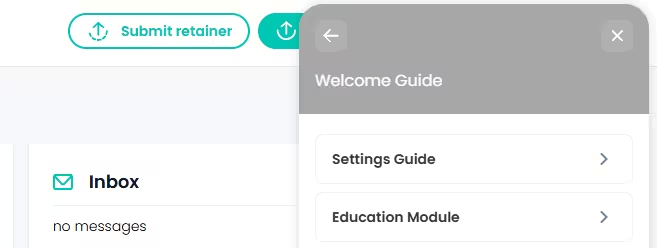
EonDental’s onboarding guide in English, created with UserGuiding
Eon Dental’s onboarding guide in English, created with UserGuiding.

Behind the scenes, Eon Dental uses UserGuiding’s session-based triggers to create a new session if the selected language isn’t English. This way, every doctor starts their onboarding journey in their own language from the very first click.
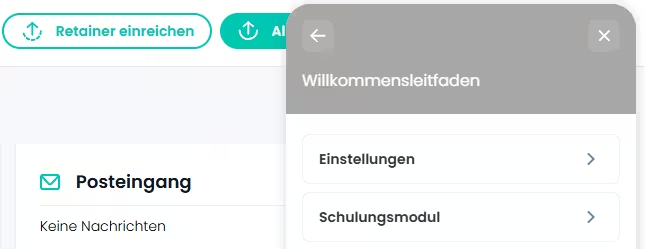
EonDental’s onboarding guide in German, created with UserGuiding
Eon Dental’s onboarding guide in German, created with UserGuiding.

The platform supports English, French, German, Spanish, and Italian.

Our German doctors especially appreciated being able to use the platform in their own language. With their limited time, removing the need for translation made the experience smoother and far more efficient.”

Eon Dental didn’t stop at localizing their welcome guide and they took extra steps to ensure smooth step-by-step guides for their various users. 

Using UserGuiding’s flexible triggers, doctors see a simple choice: continue in English or switch to another language.
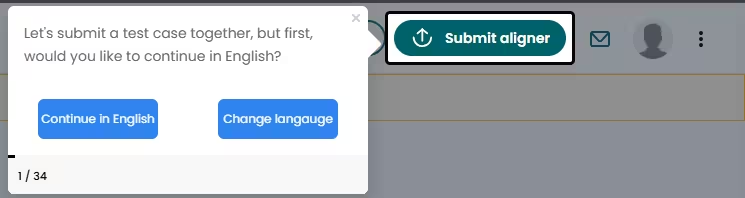
EonDental’s localization tooltip.
Eon Dental’s tooltip asking the user their preferred language, allowing a personalized onboarding guide.

One click takes them straight to the next step, no delays or confusion. This step keeps the onboarding experience smooth, fully localized, and consistent across every system they use.

Segmentation for different doctor types

Orthodontists and GPs use the platform in different ways, so their onboarding experiences also need to be different.

  • Orthodontists prefer quick introductions. They just want to know where to go and what to do next.
  • GPs are often new to clear aligner treatments, so they want to explore and understand more details.
EonDental’s orthodontist vs GP segmentation that’s based on the doctors’ companies.
Eon Dental’s orthodontist vs GP segmentation that’s based on the doctors’ companies.

With UserGuiding, Eon Dental can tailor the onboarding flow for each group without building separate product versions.

Their onboarding now includes:

👉 A main home screen guide that every user completes.

👉 Optional extra guides for GPs who want a deeper understanding.

👉 Highlighted steps for important actions, like submitting a case, while keeping optional steps simple and unobtrusive.

UserGuiding lets us give doctors the freedom to choose. The main screen guide is required, but everything else is optional for those who already know their way around. This allows orthodontists to skip information they may already be familiar with based on their industry experience.”

Eon Dental’s onboarding process with UserGuiding:

To make onboarding as clear as possible, Eon Dental built interactive step-by-step guides with UserGuiding for adding patient details and submitting their first case.
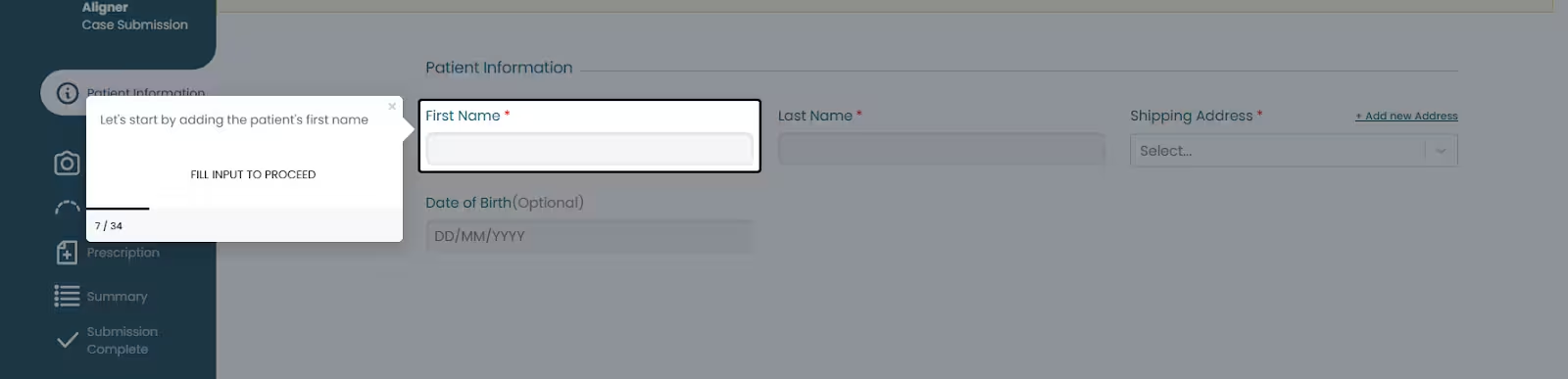
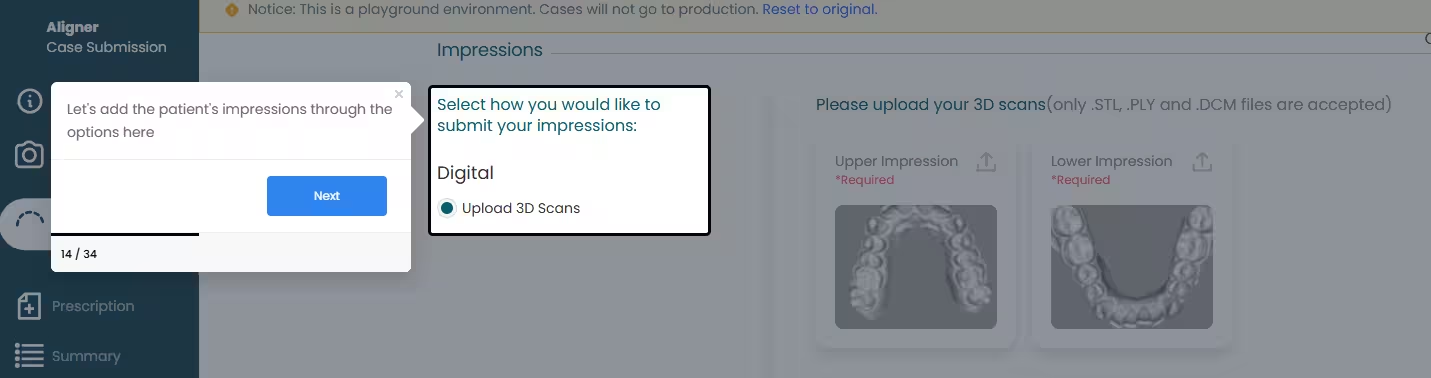
Eon Dental's onboarding guide for adding a patient.
Eon Dental's onboarding guide for adding a patient's information.

Through UserGuiding’s interactive walkthroughs, doctors learn how to upload patient X-rays, fill out detailed dental information, and review the case setup in real time. Each step highlights the exact field or button to click, turning what used to be a complex process into a smooth, self-explanatory experience.
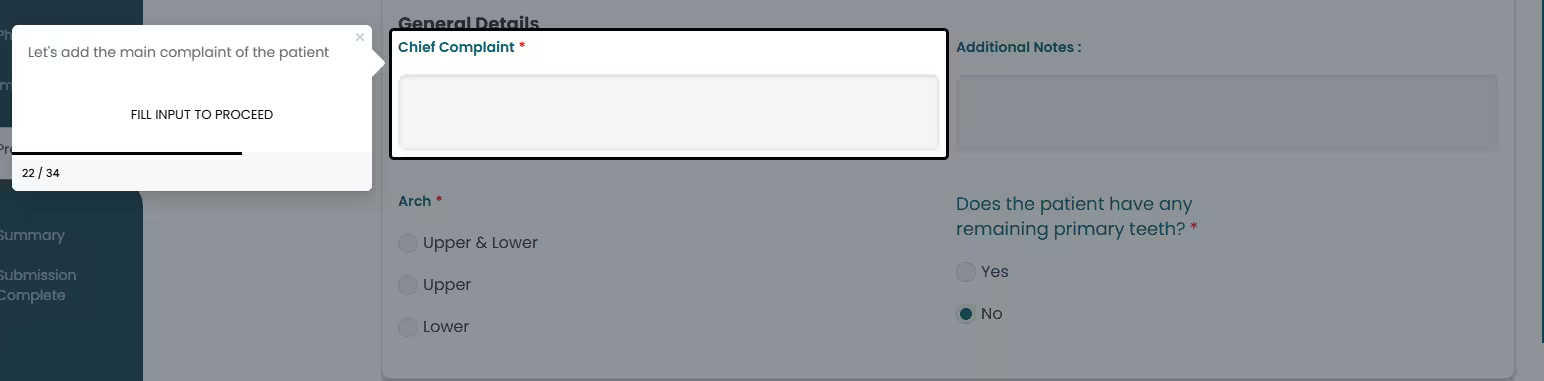
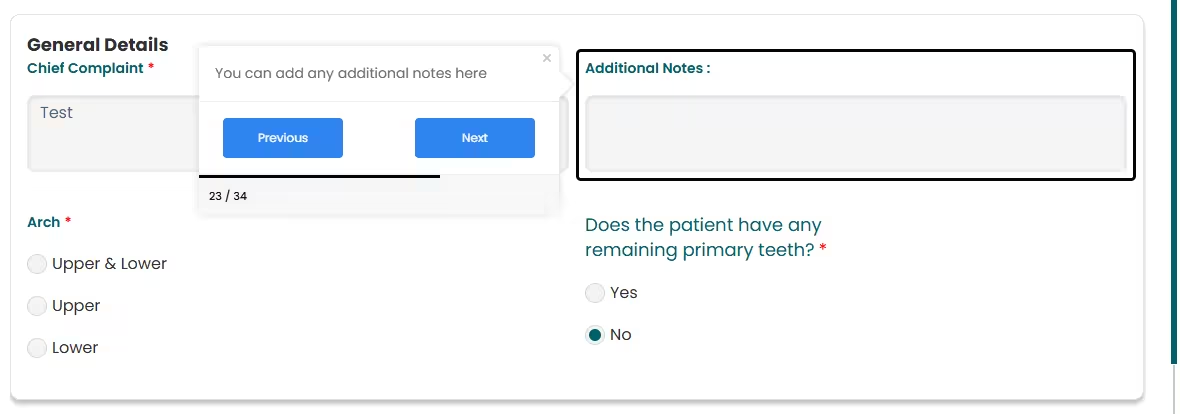
Eon Dental's onboarding guide for adding a patient's information.
Eon Dental's onboarding guide for adding a patient, highlighted steps.
Eon Dental's onboarding guide for adding patient information, tooltip usage.

These guides not only simplify the process for first-time users but also help experienced orthodontists complete cases faster without needing extra support. 

Onboard as if you’re the person on the other side of the screen.”

With this hands-on, visual onboarding flow, Eon Dental gives doctors the confidence to explore new features on their own, saving valuable time for both the practitioners and the customer success team.

Smarter feedback and faster localization

Eon Dental also reimagined how they collect user feedback. They replaced their old time-based survey system with page-based triggers, ensuring that surveys appear only after doctors complete key actions such as finishing onboarding.
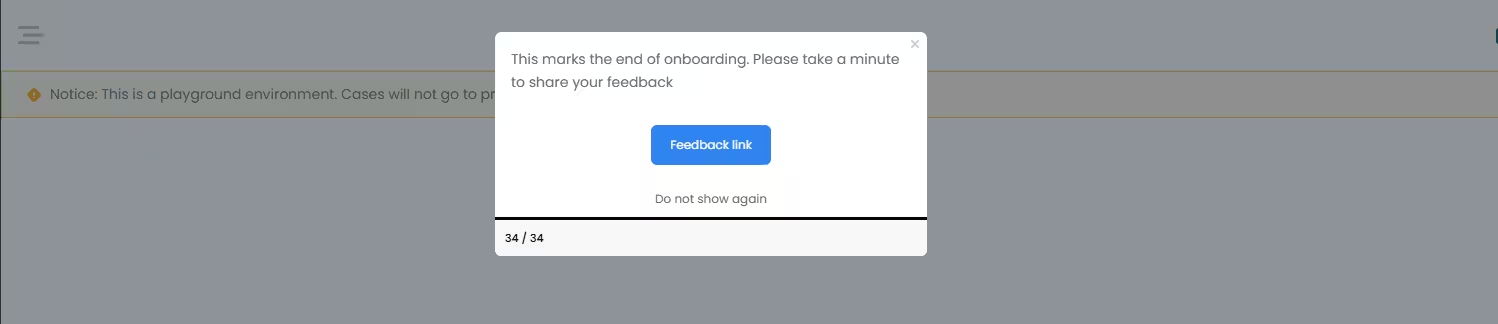
Eon Dental's feedback pop-up.
Eon Dental's feedback pop-up that comes up at the end of the onboarding guide.

This small change made feedback more accurate and less intrusive, helping the team gather genuine insights without disrupting doctors’ workflows.

In short…

By personalizing onboarding with UserGuiding, Eon Dental transformed a complex, multilingual experience into a clear and engaging one. Doctors now receive only the guidance they need, in their own language, and can complete their first case confidently without extra support.

With smarter onboarding, Eon Dental improved guide completion rates by 7% quarter over quarter and created a more connected experience for its growing global user base.

If you’re having similar issues with Eon Dental, UserGuiding can help you create a smoother, smarter experience for your diverse users 👈

85%
Guide completion rate
UserGuiding lets us give doctors the freedom to choose. The main screen guide is required, but everything else is optional for those who already know their way around. This allows orthodontists to skip information they may already be familiar with based on their industry experience.”

1,000+ Teams Scaling Successfully
with UserGuiding’s Best Value Platform

Join them — Take the first step toward growth;
start your free trial today with confidence.