


.svg)
.svg)
.svg)
.svg)



.svg)


.svg)
.svg)


When it comes to digital adoption platforms, two names stand tall: WalkMe and Pendo.
But are they really the best fit for your business? Maybe yes, maybe not.
Both WalkMe and Pendo are built for enterprise-level companies. With their extensive features and, let's be honest, not-so-stellar customer service, they’re the go-to for big businesses with big budgets.
So, if you're a smaller or mid-market company, you might want to consider a more cost-effective, user-friendly for your business.
(And preferably a no-code tool for your sanity)
But if you're ready to roll with the heavyweights –well, the real question is: Pendo vs WalkMe? Let’s find out.
TL;DR
- Pendo is a comprehensive software experience platform that excels in product-led growth, in-app guidance, and analytics.
- It’s mostly suitable for teams focused on product engagement, user behavior analytics, and those looking for deep insights into user flows.
- Its strong suits and features are detailed analytics, in-app messaging, feature tracking, customizable dashboards, and email survey and feedback capabilities.
- However, it’s not that powerful at employee productivity features, complex workflow automation, or any standalone feature like knowledge bases.
- WalkMe is a digital adoption platform built to streamline complex workflows, boost employee productivity, and offer in-app guidance across enterprise systems.
- It’s mostly suitable for large enterprises needing in-depth employee productivity tools, process automation, and detailed guidance for complex workflows.
- Its strong suits and features are workflow automation, ActionBot, employee productivity modules, and process management.
- However, it lacks flexibility, ease of use, and is much more difficult to manage without dedicated support or technical expertise.
- If neither of the two really convinces you to pay 6-7 figures for software, whether due to its complexity or lack of features, you might want to check out a better alternative: UserGuiding!
- UserGuiding is a no-code, all-in-one product adoption platform focused on simplicity and fast implementation, which makes it ideal for product teams that want to onboard users, announce updates, collect feedback, and increase user satisfaction without relying on developers.
- Start your free trial and see for yourself.
What is Pendo?
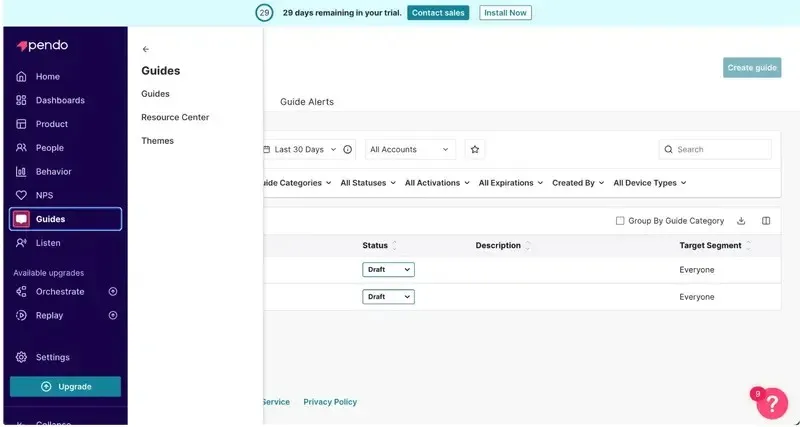
Pendo is a Software Experience Management (SXM) platform that offers several features and capabilities mainly for offering in-app guidance to your users and monitoring their behavior within your product.
The platform offers strong segmentation capabilities that help you to personalize each of your user persona’s product experience and prevent potention confusion or friction that can be an adoption barrier.
So, you can use Pendo for product adoption purposes, as well.
However, it lacks certain popular features that are crucial to a product adoption software, but we’ll talk about that later on.
Here’s a list of Pendo’s popular features and capabilities:
- Product tours and interactive guides
- User behavior analytics
- Surveys and user feedback analytics (Pendo Listen)
- User journey automation (Orchestrate)
Who should use Pendo?
Pendo mostly speaks to the needs of end users and customers.
So, product teams, and UX designers, along with CS specialists can use Pendo to optimize the user journey/ path. Pendo can also feel like a gem if you’re looking for detailed user engagement analytics but don’t want to pay for a separate tool or add another software to learn how to use and check regularly (we absolutely get why you might dread that).
Plus, it supports mobile apps and offers several mobile-first features. So if that’s an important use case for you, you can write another pro on Pendo’s column.
Only 1 tool to create your interactive flows (for web and mobile), monitor them, and conduct user research to optimize your product experience?
Totally respect that.
However, we need to note that Pendo is not a no-code tool, no matter how much it claims to be one 👀So, you need to have some level of technical knowledge to use the platform effectively.
Another potential barrier between you and Pendo is its pricing.
Pendo doesn’t have a transparent pricing. So you don’t have a chance to know how much you’ll probably end up paying before talking to the sales and getting a custom pricing and quote. But birds say (and by birds we mean Vendr studies) that the average cost of Pendo is $47,330/year.
Let’s take you here if you’re confused about Pendo’s pricing and want to hear more.
📌 So, who should use Pendo? In short…
- Product, UX, and CS teams with technical knowledge.
- Teams that want detailed analytics and mobile support alongside their SXM or product adoption tools.
- Businesses that are okay with opaque, multi-year contracts averaging almost $50K per year.
Pros of Pendo
✅ Detailed segmentation based on product usage patterns, interactive guide interactions, or user account data and attributions.
✅ Pendo Listen and AI-powered feedback sentiment analysis capabilities.
✅ Comprehensive product engagement analytics, customizable dashboards, and detailed reports for funnels, paths, retention, and workflows.
✅ Pendo Free (freemium plan) for startups and smaller businesses with fewer feature needs or MAU quotas. Or for those who just want to check the product out for themselves and use the freemium as a free trial before committing to an expensive plan.
Cons of Pendo
❌ The complex feature set can overwhelm new users or non-technical teams.
❌ Some usage data and analytics may be misleading because of the platform’s heavy focus on quantitative customer data and lack of qualitative customer data. Though the platform is heavily praised for its analytics capabilities, “inaccurate data” is listed among the top cons of Pendo on its G2 page.
❌ Limited flexibility when customizing certain elements.
❌ Despite its range, the platform can feel disjointed and cause a fragmented and patchy UX on your side.
❌ High pricing, long contracts, and enterprise-focused packaging may not suit smaller or fast-moving teams.
What is WalkMe?
WalkMe is a Digital Adoption Platform (DAP) that offers solutions for different needs, such as onboarding, employee productivity, AI transformation, and change management.
Many of the fancy use cases WalkMe lists on its page (including the ones we’ve just counted here) are mostly about in-app guidance, actually.
However, WalkMe focuses on employee guidance and onboarding, so that’s why the change management, AI transformation, and productivity come into play.
When you create experiences for your employees/ team members, you’ll require certain additional features and capabilities that are not offered by user onboarding platforms like Pendo.
But this doesn’t mean you cannot use WalkMe for your customers. You absolutely can. In fact, WalkMe offers 2 separate plans for employee use and customer use.
Here are some of the key features of WalkMe included in both plans:
- Product tours and walkthroughs
- Surveys
- AI agent (ActionBot)
- Resource center (WalkMe Menu)
- Analytics and custom reports
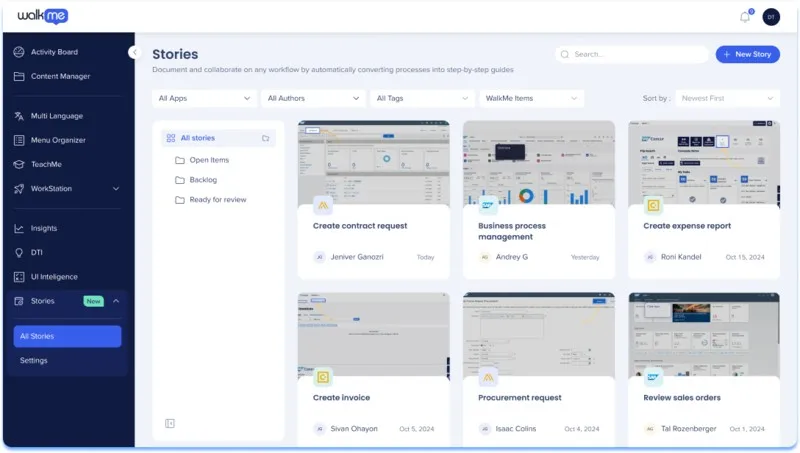
WalkMe was also recently acquired by SAP and this acquisition points to WalkMe’s shift further into the enterprise space.
Who should use WalkMe?
WalkMe is primarily geared toward large enterprises with internal training, process and change management needs. So, WalkMe can be a good option if you’re looking for a tool to onboard new employees to complex systems and software, standardize workflows, or ensure process compliance across departments.
And if you can pay more than $78,000 on average for one software…
But if you’re asking who, in the company, should (or more likely can) use WalkMe, we can say that HR, Learning & Development (L&D), and internal enablement teams are the main users.
IT departments are another core audience, especially during system rollouts or transitions. And mostly because of the heavy technicality and code reliance of the platform. Creating and maintaining WalkMe content often requires working with CSS and jQuery.
We’ve mentioned that WalkMe offers a separate plan for customer-focused use cases. So product teams and CS teams can find features that are relevant to them, as well. However, when we look at the plans, feature set, and depth of customization, it's clear that WalkMe is primarily designed for internal, employee-facing use cases.
📌 So, who should use WalkMe? In short…
- HR, L&D, internal enablement, and IT teams.
- Large enterprises with big budgets that are focused on internal training and workflow management.
- Organizations with technical resources and familiarity with DAPs, and that are able to assign dedicated owners to manage and maintain the platform.
Pros of WalkMe
✅ Workflow automation features help streamline complex internal processes.
✅ ActionBot allows employees to complete tasks through conversational prompts, suggests next-best actions, identify trends, and improves task execution speed.
✅ WalkMeX provides advanced AI-powered capabilities and features for automation, material creation, and analytics.
✅ High level of customization (which comes with CSS and jQuery) for creating detailed, step-based guidance on enterprise tools.
✅ Offers a comprehensive toolkit tailored to HR, compliance, and internal training needs.
Cons of WalkMe
❌ Requires technical expertise or dedicated teams to implement and maintain effectively. Even then, it has a steep learning curve and a long time-to-value, especially for teams without prior DAP experience.
❌ Maintaining existing materials can be time-consuming, and due to code dependencies, even small updates may require rebuilding them from scratch.
❌ Support can be difficult to access or slow to respond, especially during setup or troubleshooting.
❌ Enterprise-level pricing with limited transparency makes it inaccessible for many smaller teams.
❌ Lacks core features for customer onboarding, communication, or product adoption compared to platforms like Pendo or UserGuiding.
Pendo versus WalkMe (categorized)
You might have already started to shape your opinion about Pendo and WalkMe and which one is more suitable for your business, your budget, your team, and use cases.
However, before jumping to conclusions, let’s compare both tools and their features for more or less similar use cases side by side 👇🏻
User Onboarding & In-app Training
Pendo and WalkMe has a lot of overlapping features and capabilities for this specific use case. Both tools offer interactive guidence, walkthroughs, and a kind of onboarding checklist feature.
Here’s what Pendo’s interactive guides feature look like:
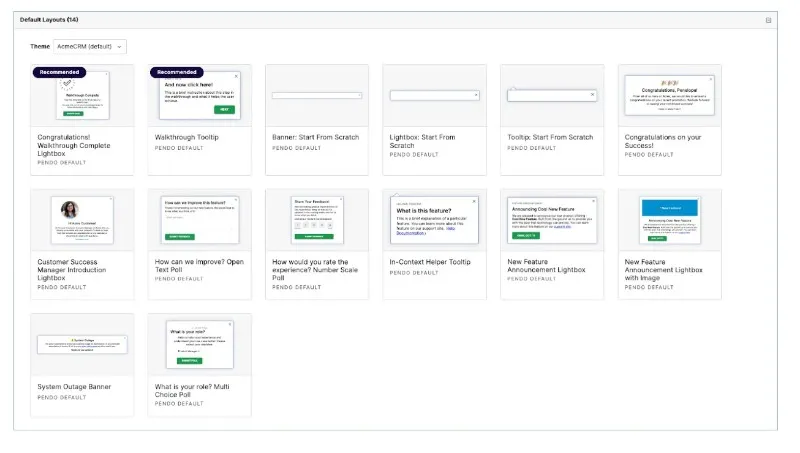
Pendo allows you to create overlay guides (displayed above the page content) as well as embedded guides (contained within an existing element). There’s also iFrame support for guides.
Other important capabilities of Pendo guides include:
- Customizing guides with code
- Editing the global CSS
- Tagging elements within guides
- Creating guides by using AI
- Running A/B tests and polls with guides
Pendo calls onboarding checklists onboarding modules and they look like this:

These onboarding modules can be either static guide lists or interactive checklists with progress tracking and a built-in search bar.
On Pendo UI, you can find them in the resource center page.
Now, back to WalkMe.
Here’s what WalkMe’s guides look like:
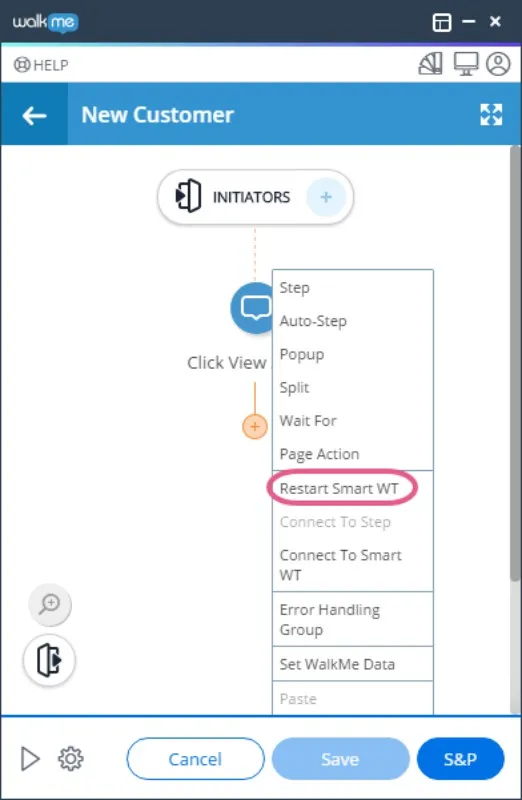
WalkMe has a feature called smart walkthru, which allows you to add auto steps. Auto steps perform actions for the user —like clicking a button or opening a menu— so you don’t have to rely on constant prompts to guide them through each interaction.
WalkMe allows for advanced customization for walkthroughs and guides through CSS and HTML, as well. You can customize elements, layout, colors, fonts, etc.
Another feature you can use to create (sort of) guides is WalkMe stories.
Stories are guides created by recording your screen as you complete a task using the browser extension. The recording is then converted into a step-by-step guide with editable tooltips and instructions. This feature is especially useful for internal processes like employee training and workflow standardization.
WalkMe calls its checklists onboarding tasks and here’s what it looks like:
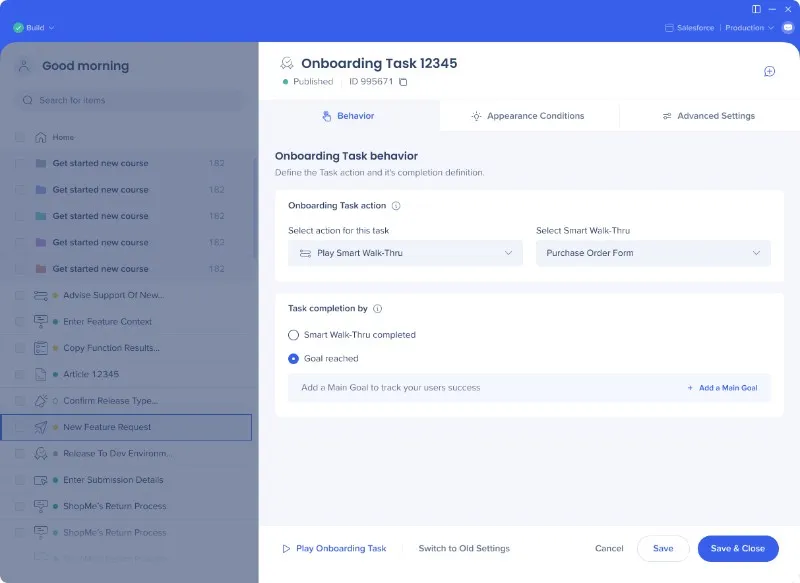
Onboarding tasks are also interactive and come with a progress bar and a lot of customization and logic options.
There’s one more checklist-like feature WalkMe offers: Workstation.
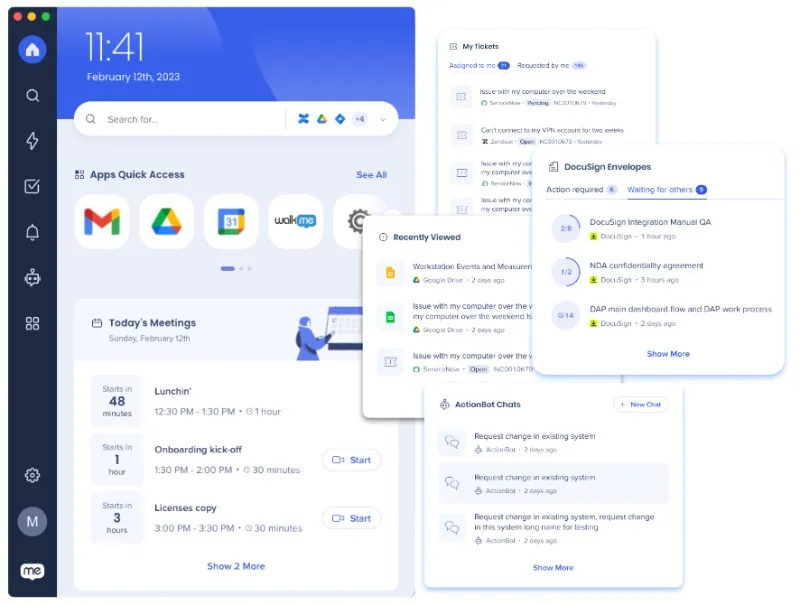
Workstation is a centralized hub that helps employees access tools, tasks, and guidance from one place. It acts as a launcher for commonly used apps and links, integrating with internal systems and SaaS tools.
It also displays a to-do list and incomplete tasks, making it functionally similar to a checklist.
User Communication & Messaging
This is a use case where we start to see some real differences between Pendo and WalkMe. For onboarding and training, they had similar features and capabilities, through WalkMe had more features available for internal training and employee onboarding.
So maybe you’ve given the score to WalkMe if it’s not a tie.
But for in-app messaging and communication, things change a little bit.
Pendo offers an announcement module for sharing product updates and other key messages directly within your app. Here’s what it looks like:

This module lives within the resource center and can be used for release notes, promotions, system events, and other important notes you don’t want to communicate through tooltips or banners, basically.
For more eye-catching announcements, or feature updates that don’t need to be permanently visible, you can use tooltips, banners, or lightboxes instead.
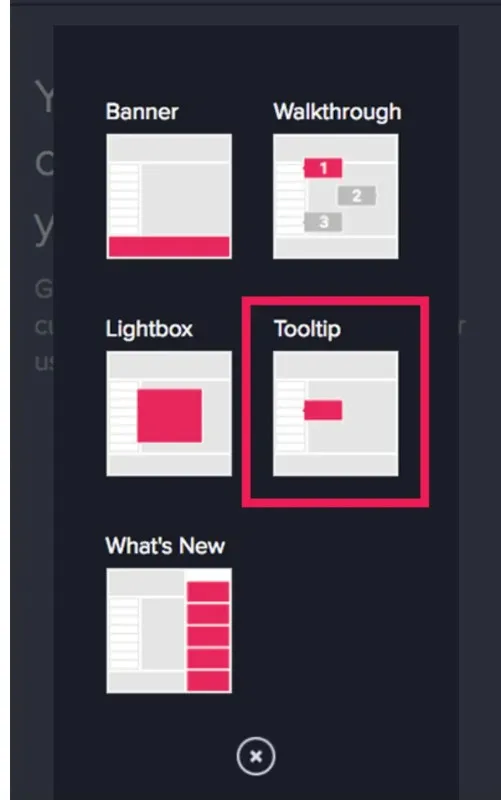
Tooltips that are triggered when a user hovers over or clicks on an icon (a.k.a. hotspots) are called badges in Pendo’s terminology. And you can find them in the tooltip builder, as well.
Another user communication method Pendo offers (via an add-on, of course…) is sending personalized emails to recommend actions, offer personalized guidance, or just remind an uncompleted task within the platform through orchestrate.
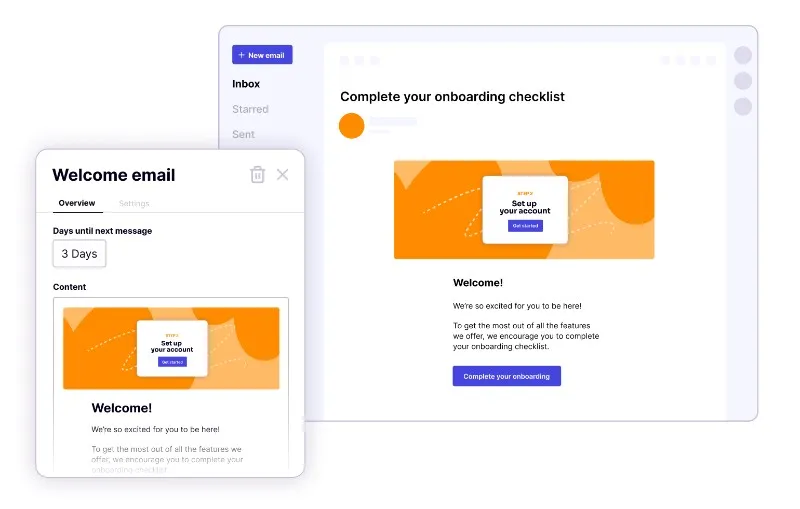
Orchestrate lets you design user journeys and automate in-app guidance, onboarding emails, and other user communications.
WalkMe, on the other hand, offers limited in-app messaging capabilities and no support for off-product communication.
There’s ShoutOuts feature, which is like an announcement modal, but unfortunately, it’s not as useful as Pendo’s counterparts. Here’s what it looks like:
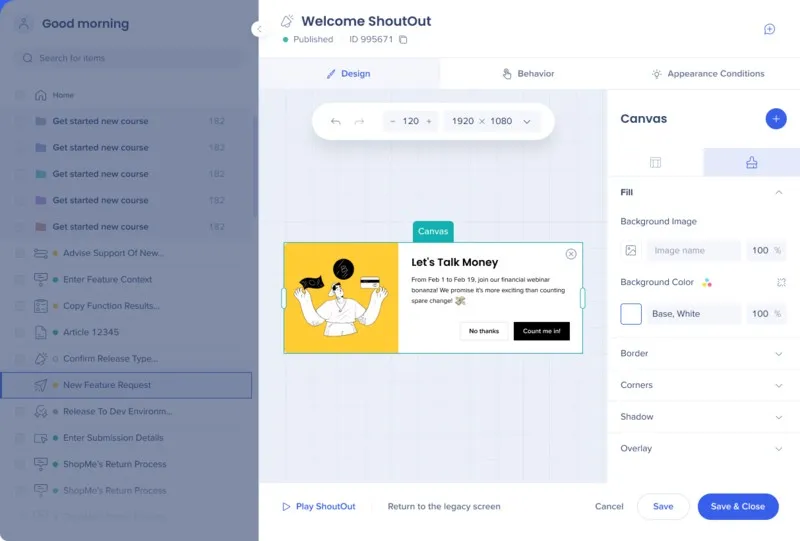
ShoutOuts are announcement modals you create from scratch on a blank canvas. You can customize their sizing, image, background color, buttons, corners, overlay options, positioning, trigger behavior, etc.
So you can create a modal similar to those built with Pendo or other onboarding tools, but it takes significantly more effort, time, and creative power. WalkMe includes a design gallery with basic templates, but most feel outdated and lack variety in both use case coverage and visual design.
There’s customization, and then there’s construction work.
WalkMe leans much closer to the latter.
WalkMe offers tooltips (SmartTips) that can be used for both guidance and error highlighting, as well. You can choose between two icon types, guidance and validation, and trigger messages based on user actions or specific conditions.

Customer Feedback
Both WalkMe and Pendo offer survey capabilities to some extent.
Pendo offers polls and NPS surveys. Polls are included in all plans and allow you to ask different types of questions, including multiple-choice, open-ended, number scale, and yes/no questions.
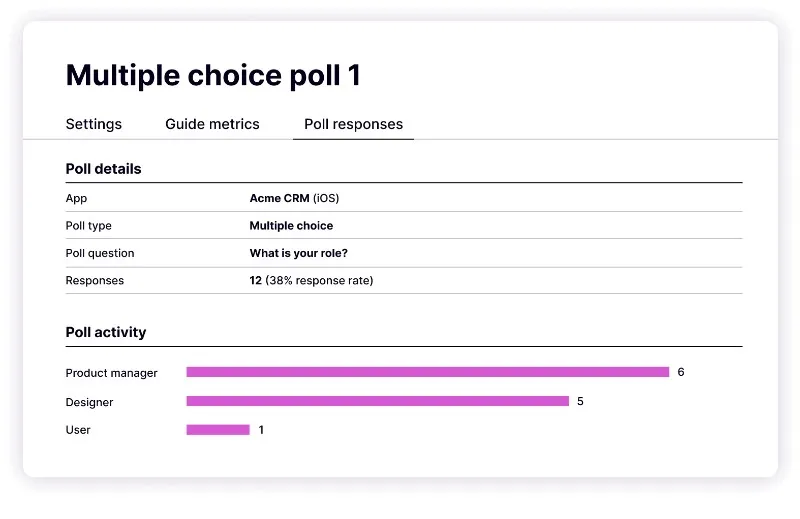
NPS surveys are part of Pendo Listen, so not included in the first 2 paid tier (Base and Core plans) but can be bought separately. In the more expensive tiers (Pulse and Ultimate plans) they’re included. In the free tier, also, they’re included but only with Pendo branding.

WalkMe allows you to create NPS surveys and custom surveys, as well. Here’s what the NPS survey builder looks like:
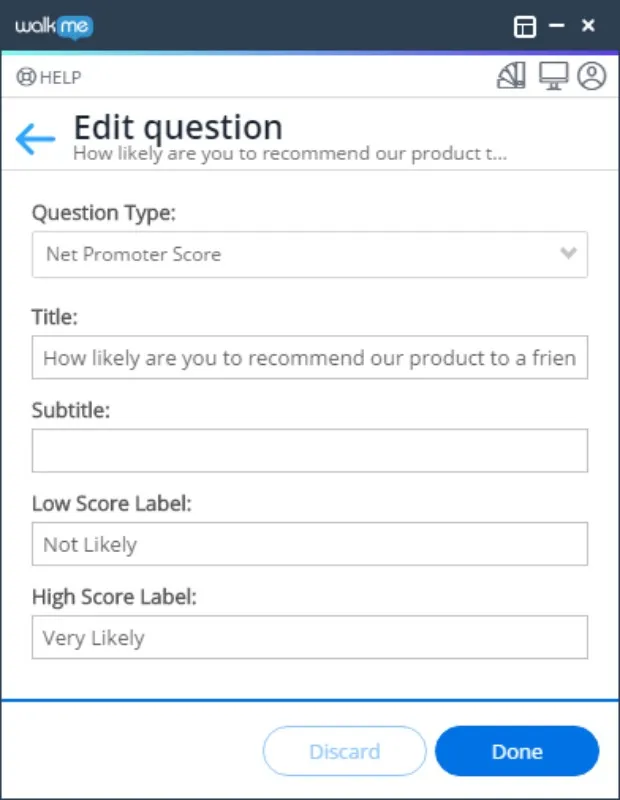
And here’s what the custom survey builder looks like:

As you can see, the feature builders are pretty similar. With custom surveys in WalkMe, you can ask multiple choice, single choice, open text, rating scale, Likert scale, and dropdown questions.
Product Analytics
This is another use case where both WalkMe and Pendo are strong and well-known.
Pendo offers highly customizable dashboards composed of various widgets that provide visualizations of your data, such as charts, tables, and high-level metrics. These dashboards enable you to centralize key information, track product or feature launches, and monitor user engagement metrics.
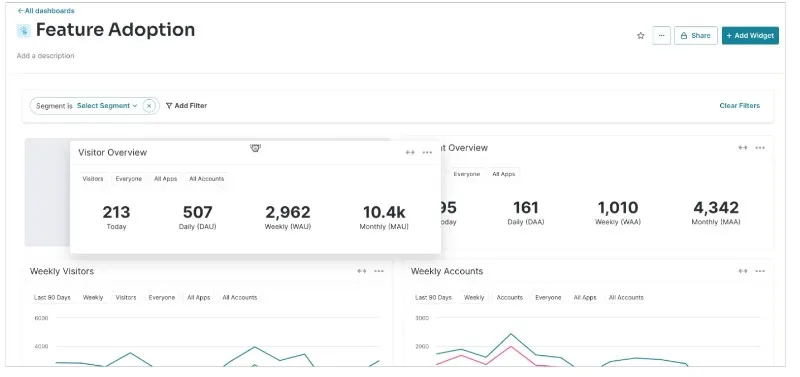
Pendo provides automatic tracking for standard user interactions, such as page views and feature clicks, without requiring any additional setup.
For more specific or complex interactions that aren't captured automatically, like form submissions, API calls, or custom user actions, Pendo supports the use of Track Events. These are custom events that you can configure by adding code snippets to your application, either on the client side or server side.
Track Events can also include additional properties to provide more context around the interaction, such as the type of plan selected or the error encountered during an action.
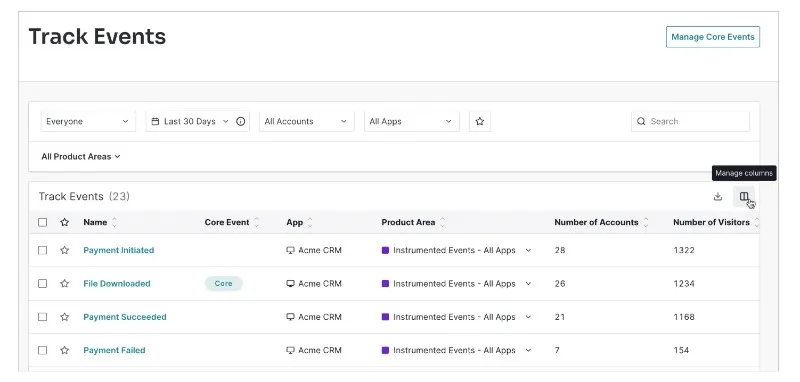
Other performance-related features Pendo offers are:
- Session recording
- Heatmaps
- Custom reports
- Goal tracking
WalkMe has detailed and powerful analytics, as well.
WalkMe Insights serves as the central hub for tracking user engagement and behavior across applications where WalkMe is implemented.
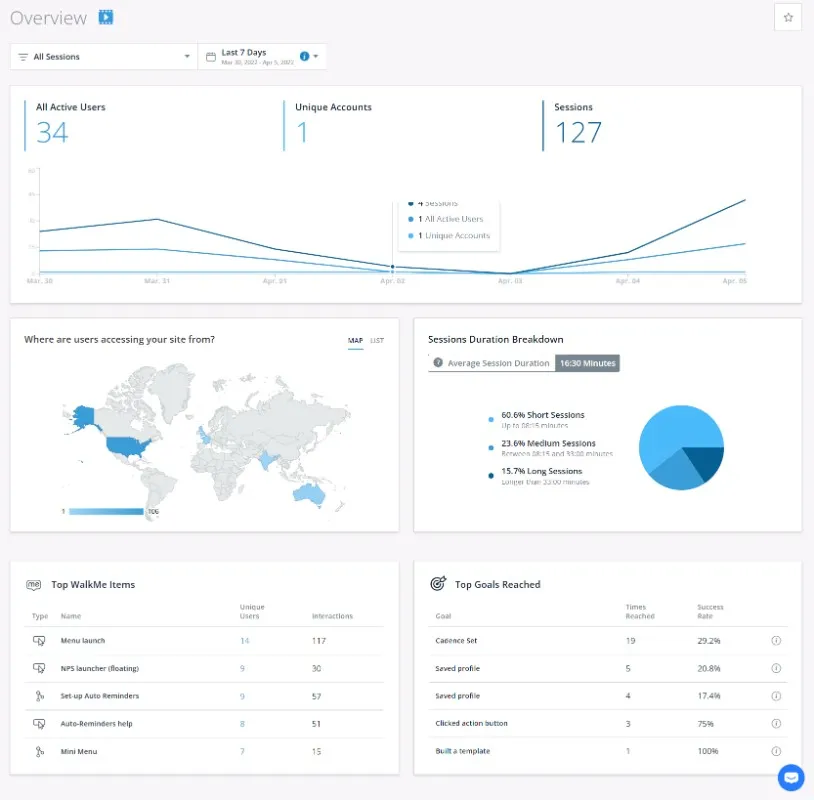
An important feature WalkMe offers is AI-powered predictive analytics. It allows you to leverage historical user data and forecast user behavior, such as the likelihood of task completion or potential drop-offs.
Other key analytics capabilities WalkMe offers include:
- Event tracking
- Session recording and playback
- Funnel and path analysis
- Workflow and form analytics
- License optimization and SaaS product usage analytics
Now that we’ve talked about Pendo and WalkMe’s product features, capabilities, and use cases, it’s time to consider these features’ usability aspects and costs 🔧💰
Usability, Setup, and Maintenance
We’re entering murky waters here because neither Pendo nor WalkMe is easy to set up, learn, use, or maintain. Both demand a high level of technical expertise, a dedicated person or team to manage them, and frequent support from customer success teams due to the complexity of their features.
While it’s common for enterprise tools to require onboarding help or a success manager, the dependency is particularly high with these platforms, especially WalkMe.
Some users even report being unable to build or launch anything without direct assistance from WalkMe’s team.

Pricing
Both Pendo and WalkMe have opaque pricing, with no public details on their plans. However, they are both widely recognized as high-cost tools.
As we’ve stated above, Pendo averages $47,330 per year, while WalkMe averages $78,817 per year.
So it’s a lose-lose situation, with a lot of money.
Both Pendo and WalkMe are frequently criticized for their high prices, lack of mid-tier plans with fewer features, and significant price increases at renewal. Many customers feel pressured to sign multi-year contracts just to avoid these escalating costs.
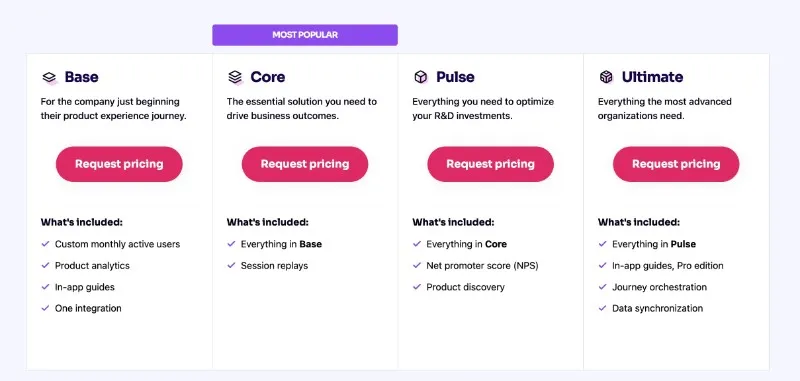
Pendo has 4 paid tiers along with a freemium tier.
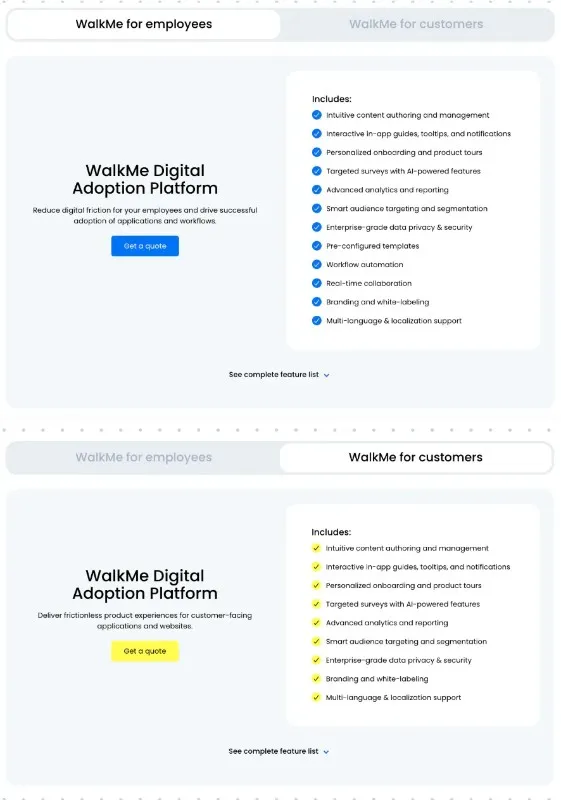
And WalkMe has 2 tiers: WalkMe for Employees and WalkMe for Customers.
Which one is better: Pendo or WalkMe?
If WalkMe’s employee productivity and workflow management features don’t quite impress you, Pendo might be a better fit, especially if you need:
- More in-app engagement and communication tool
- Off-product communication and survey capabilities
- User journey mapping and automation
- Support for iFrames and flexible content formats (overlay and embedded)
- More customizable dashboards
A broader range of pricing plans, which might save you some budget
It’s also worth noting: Pendo is generally easier to learn and manage than WalkMe, and often comes at a slightly lower cost.
Still, it’s very possible that neither tool fully addresses your needs.
Maybe you want something simpler, with fewer maintenance headaches. Maybe you don’t need comprehensive analytics or mobile support and would rather use a more focused tool. Or maybe, despite their breadth, both platforms are missing key features you’re looking for, especially standalone capabilities.
Or perhaps you’re just looking for a more cost-effective solution with flexible, transparent pricing.If that’s the case, here’s another option to consider…
A Better Alternative to Pendo and WalkMe: UserGuiding
UserGuiding is a no-code, all-in-one product adoption platform that helps you offer in-app guidance, automate customer support, and improve feature adoption. Here’s what it offers in terms of features and functionalities:
- Product tours
- Onboarding checklists
- Hotspots and tooltips
- Announcement modals (banners, slideouts, pop-ups, etc.)
- NPS and custom in-app surveys
- AI assistant
- Resource center (in-app)
- Knowledge base (standalone)
- Product updates (standalone)
- Segmentation
- Analytics

UserGuiding has an intuitive, easy-to-navigate UI –and the learning curve? Practically nonexistent. You can start using the platform almost immediately, unlike Pendo and WalkMe, which require lengthy setup and onboarding.
So let’s break it down and compare all three platforms side by side 👇🏻
Features
As you can see, UserGuiding has a lot of common features with Pendo and WalkMe, especially for use cases like onboarding, in-app training, in-app communication, user feedback, and automated support.
UserGuiding, Pendo, and WalkMe all offer guides, interactive walkthroughs, tooltips, some kind of a resource center, a certain number of announcement modals or similar capabilities, and in-app surveys.
However, UserGuiding also offers a standalone Knowledge Base, a standalone Product Updates module, and an AI agent. While the Product Updates feature might resemble Pendo’s Roadmap, they’re not quite the same. And although the AI agent may seem similar to WalkMe’s ActionBot, again, they serve different purposes.
When it comes to a built-in knowledge base, neither Pendo nor WalkMe offers anything comparable.
Here’s what a Product Updates page created with UserGuiding looks like:
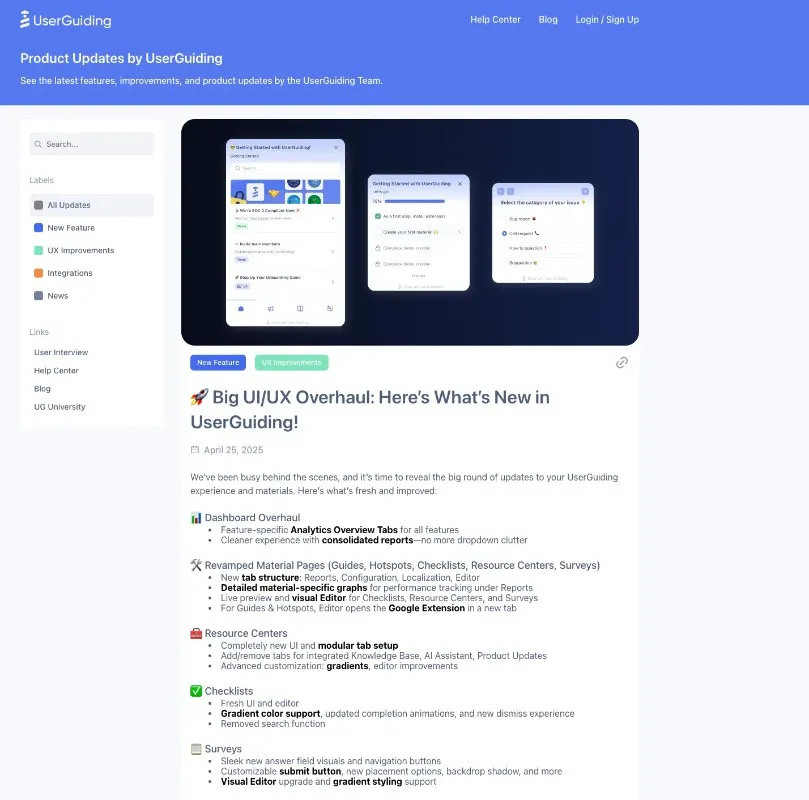
A roadmap is typically used for planning upcoming feature releases, prioritizing backlog items, and, if public, communicating future plans with users while collecting user feedback or feature requests.
A product updates page, on the other hand, is for release notes and sharing what’s already been launched. It helps you announce new features and improvements, and allows users to react or leave feedback with text or emojis.
A product updates page helps you keep your release history organized and easily accessible, both for internal teams and for customers who might want to reference specific feature changes later on.
Here’s what a Knowledge Base created with UserGuiding looks like:
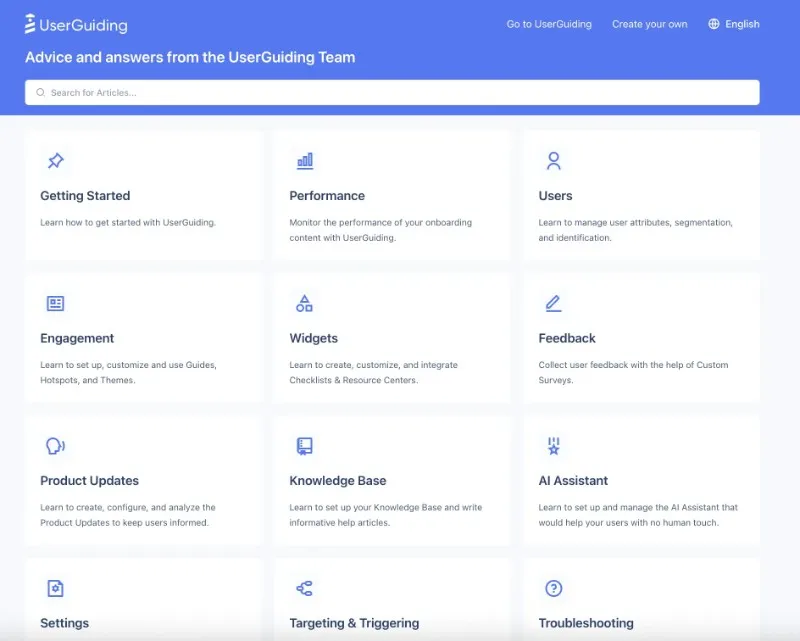
As you can see here, you can categorize your help materials and how-to articles and provide an organized help center with a search bar. You can further categorize your materials within these categories, as well. Like this:
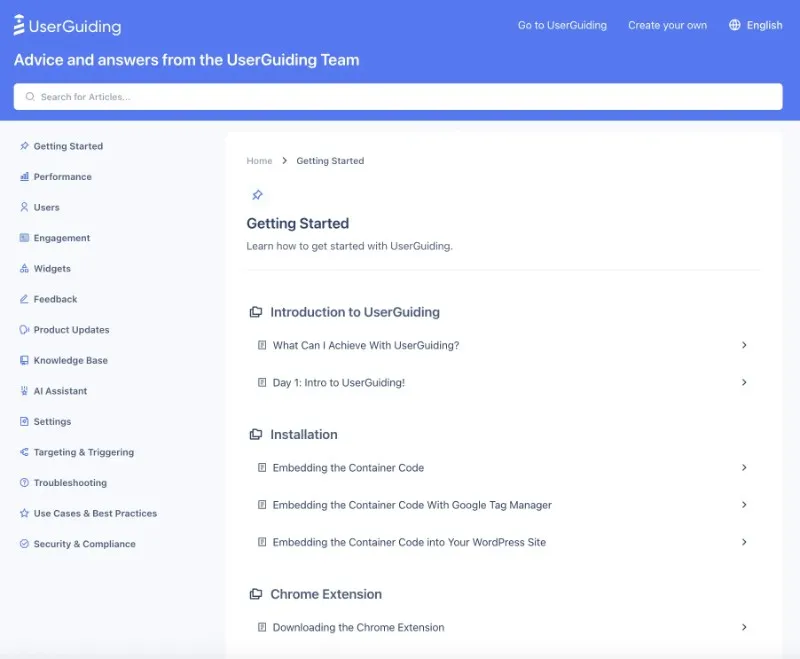
You can also link your knowledge base to your in-app resource center, making your FAQs and help articles easily accessible right inside your product. Plus, you can use the same knowledge base to power your AI agent and ensure all guidance and information comes from one centralized hub.
Speaking of AI agents…
Here’s UserGuiding’s AI agent:

UserGuiding’s AI agent is an in-app support assistant that answers user questions in real time while they interact with your product. It can offer help as a step-by-step written guide or redirect users to an interactive guide, if one exists for their specific need and they simply missed it in your resource center.
The AI agent turns your support materials into a conversational experience and saves users the time and effort of searching through your resource center or knowledge base.
Instead, they can just interact with it as if they were chatting with a human support rep.
The key difference between WalkMe’s ActionBot and UserGuiding’s AI agent is their purpose:
- ActionBot is built more for task automation, trend detection, and workflow recommendations –primarily geared toward internal use cases like employee productivity and workflow management.
- UserGuiding’s AI agent, in contrast, focuses on customer-facing guidance and support.
UserGuiding’s surveys and announcement modals are also significantly more customizable. They come with a large gallery of templates –a major advantage, especially considering the limited and outdated template options we’ve criticized in both Pendo and WalkMe.
So here are the in-app survey templates UserGuiding offers:
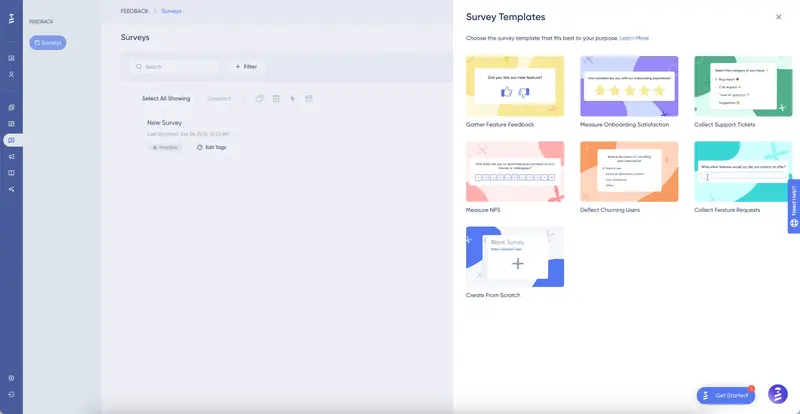
In addition to more use case-focused survey templates, UserGuiding also offers a wider range of question types compared to both Pendo and WalkMe. You can create number ratings, score ratings, emoji ratings, thumbs up/down, NPS, multiple choice, and open-ended questions.
The same variety –if not more– applies to announcement modals as well.
UserGuiding supports modals with columns, buttons, slideouts, banners, and pop-ups. It also provides ready-to-use templates for common use cases like campaign announcements, feature launches, ebooks, and policy updates.
Unlike Pendo and WalkMe, which offer limited and often outdated design options, UserGuiding stands out with its rich and versatile template/ design library.
Ease of Use & Setup
UserGuiding is a no-code tool –but unlike Pendo, it’s truly no-code.
It has little to no learning curve, and you can complete the setup and start creating materials within minutes, something that’s impossible with Pendo or WalkMe.
You don’t need constant hand-holding from customer success teams, and you won’t be glued to your technical teams just to run A/B tests or update your materials.
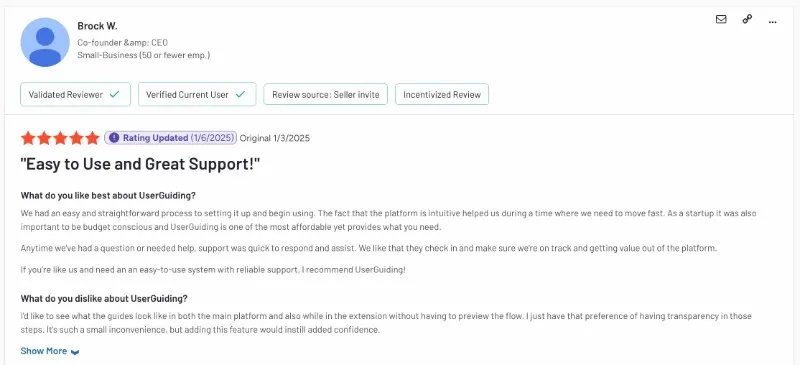
And it’s not just us claiming that, here’s what UserGuiding customers say:

Customer Support & Service
Pendo and WalkMe are enterprise-level platforms with a large customer base.
That in itself can be a good reference, they’re trusted by many big companies. But it also comes with a downside: they’re not always agile or responsive to individual customer needs. Reaching out to support can be difficult unless you have priority access or a dedicated CS agent.
WalkMe does have a community platform that can sometimes help, but it’s not a true substitute for real-time support. As for self-serve options, both platforms offer help centers and knowledge bases, but WalkMe’s is frequently criticized for being outdated and poorly organized.
UserGuiding, on the other hand, offers 24/7 live support.
Prefer to find answers on your own? There's an organized and regularly updated knowledge base, an AI agent, a resource center, and the UG University.
No matter how you prefer your support –live or self-serve– UserGuiding makes sure it’s there when you need it.
Pricing
Unlike Pendo and WalkMe’s opaque pricing, UserGuiding is fully transparent. Pricing is based on MAU (monthly active users).
UserGuiding offers 3 plans: Starter, Growth, and Enterprise.
- The Starter plan starts at $249/month for up to 2,000 MAU when billed annually, or $349/month when billed monthly.
- The Growth plan starts at $499/month for up to 2,000 MAU when billed annually, or $699/month when billed monthly.
So yes.
UserGuiding not only offers transparent, MAU-based pricing but also provides monthly billing options.
While monthly billing is less cost-effective than annual billing, it's still available if flexibility matters more to you.
What do you get for these prices?
Unlike Pendo, UserGuiding doesn’t reserve its key features for the most expensive plans. Most features are available even in the Starter plan, only with certain usage caps, which are either expanded or removed entirely in the higher tiers.
Also, AI features (Lighthouse included) are available across all plans.
In short, Pendo vs WalkMe vs UserGuiding…
➡️ Pendo excels at advanced analytics and offers a solid range of in-app guidance and communication tools. It also supports off-product engagement through surveys and emails.
However, it has a steep learning curve, limited customization options in some modules, and comes with a high price tag and complex setup.
➡️ WalkMe is strong in employee productivity and workflow automation. Its ActionBot, Workstation, and customization depth cater well to large internal teams.
But it’s highly technical, difficult to maintain, lacks modern in-app communication capabilities, and is often too complex for product adoption needs.
➡️ UserGuiding, in contrast, focuses on simplicity, speed, and ease of use. It offers powerful onboarding, announcements, and survey capabilities without the enterprise-level complexity.
Its no-code setup, rich template gallery, and 24/7 support make it ideal for teams that need to move fast without relying on developers or CS agents. Plus, its transparent, flexible pricing gives it an edge over both competitors.
Frequently Asked Questions
What is the difference between Pendo and WalkMe?
Pendo focuses primarily on product usage analytics, user onboarding, and in-app communication for customer-facing SaaS products. WalkMe, on the other hand, is designed more for internal employee productivity, workflow automation, and digital adoption across enterprise software applications. While both offer user guidance and tracking, Pendo is better suited for product teams, whereas WalkMe caters more to operations and HR teams.
What is the purpose of WalkMe?
WalkMe is designed to simplify the use of digital tools and internal software by automating workflows, guiding users through complex processes, and boosting employee productivity. It helps large enterprises manage digital adoption internally, reduce training time, and streamline operations across multiple applications. Its core use case is internal tool adoption and process standardization for employees, not necessarily external customer onboarding.
Who are the competitors of WalkMe?
WalkMe’s main competitors include UserGuiding, Userflow, Pendo, and Appcues, each with distinct strengths. UserGuiding stands out with its real no-code setup, ease of use. Userflow is similar in simplicity and focuses on building lightweight, highly responsive in-app flows quickly. Pendo, while also a WalkMe rival, is more analytics-heavy and suited for product teams looking to combine onboarding with detailed usage insights. Appcues, on the other hand, targets teams that want onboarding flows with strong visual customization and templates, though it can get expensive as usage grows.
Why did SAP buy WalkMe?
SAP acquired WalkMe to strengthen its digital transformation and business automation capabilities, particularly for enterprise clients. WalkMe’s focus on employee guidance, workflow orchestration, and productivity tools complements SAP’s suite of enterprise solutions. The acquisition signals SAP’s intent to streamline user experiences across its platforms and enhance the usability of its complex software products.
Is Pendo or WalkMe better for enterprise-level digital adoption platforms?
For enterprise-level digital adoption, both are strong contenders, but with different focuses. WalkMe is more powerful for internal use –employee workflows, task automation, and cross-application processes. Pendo, while enterprise-ready, is stronger for customer-facing onboarding, advanced analytics, and in-app user engagement. So, the better fit depends on whether you're targeting internal or external adoption.

.png)










